

If you’re tired of tangled cords and cluttered desk surfaces, a desk power grommet offers a practical solution. You can install one directly into your desk to provide convenient access to outlets and USB charging without the mess. These grommets fit standard 2–3-inch holes and deliver 125V outlets plus USB-C fast charging. But choosing the right model requires understanding which features match your specific device needs and setup—so let’s examine what separates the top options.
| Recessed Power Grommet with USB-C Fast Charging |

| Best for Basic Needs | USB-C Power Delivery: 20W PD | AC Outlets: 2 outlets | USB Ports (Total): 3 USB ports (1 USB-C, 2 USB-A) | VIEW LATEST PRICE | Read Our Analysis |
| 2 Inch Desk Power Grommet Outlet with USB-C Charging |

| Most Compact Option | USB-C Power Delivery: 20W PD | AC Outlets: Not specified | USB Ports (Total): 2 USB ports (1 USB-C, 1 USB-A) | VIEW LATEST PRICE | Read Our Analysis |
| Desk Power Grommet USB-C 30W with 2 Outlets |
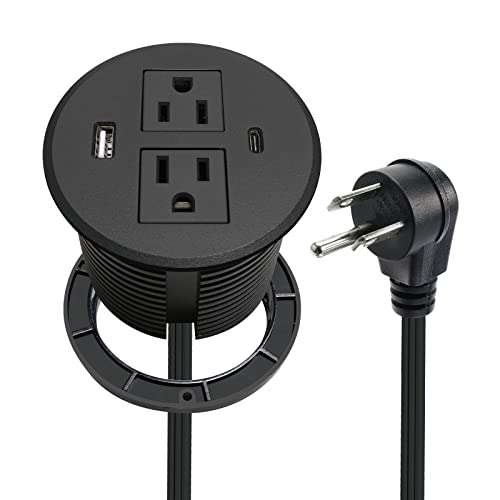
| Best Mid-Range Choice | USB-C Power Delivery: 20W PD | AC Outlets: 2 outlets | USB Ports (Total): 2 USB ports (1 USB-C, 1 USB-A) | VIEW LATEST PRICE | Read Our Analysis |
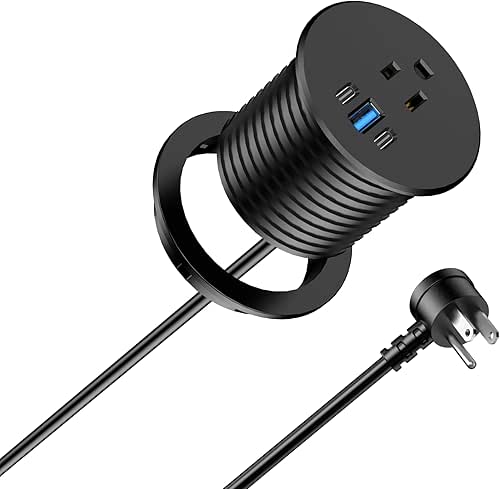
| Desktop Power Grommet with USB-C Charging Station |

| Most Powerful Pick | USB-C Power Delivery: 100W PD | AC Outlets: 5 outlets (recessed) | USB Ports (Total): 3 USB ports (2 USB-C, 1 USB-A) | VIEW LATEST PRICE | Read Our Analysis |
| Jgstkcity Desktop Power Grommet with USB-C Charging |

| Best All-Around Value | USB-C Power Delivery: 65W PD | AC Outlets: 2 outlets | USB Ports (Total): 4 USB ports (2 USB-C, 2 USB-A) | VIEW LATEST PRICE | Read Our Analysis |
| Power Grommet Desk Outlet with USB-C Charging |
| Best Budget Option | USB-C Power Delivery: 20W PD | AC Outlets: 1 outlet | USB Ports (Total): 3 USB ports (1 USB-C, 2 USB-A) | VIEW LATEST PRICE | Read Our Analysis |
| Jgstkcity 2-in-1 Desktop Power Grommet with USB-C |

| Best for Minimalists | USB-C Power Delivery: 20W PD | AC Outlets: 2 outlets | USB Ports (Total): 3 USB ports (1 USB-C, 2 USB-A) | VIEW LATEST PRICE | Read Our Analysis |
More Details on Our Top Picks
Recessed Power Grommet with USB-C Fast Charging
Want to consolidate charging cables and power outlets without cluttering your desk surface? This recessed power grommet fits into a 3-1/8 inch hole in your desk, keeping everything flush and organized. It includes 2 AC outlets rated for 125V at 12A, plus 3 USB ports: one USB-C delivering 20W fast charging and two USB-A ports providing 5V/2A total output. The USB-C port supports multiple power delivery profiles up to 12V/1.66A. Installation requires drilling or using an existing cable hole, then inserting the grommet through. A 6ft extension cord comes included. ETL certification confirms safety for home, office, and school environments, making it ideal for charging multiple devices simultaneously while maintaining a clean workspace.
- USB-C Power Delivery:20W PD
- AC Outlets:2 outlets
- USB Ports (Total):3 USB ports (1 USB-C, 2 USB-A)
- Grommet Hole Size:3-1/8 inch
- Extension Cord Length:6 ft
- Electrical Rating:125V, 12A
- Additional Feature:Flush-mount space-saving design
- Additional Feature:20W USB-C fast charging
- Additional Feature:Eliminates bulky adapter clutter
2 Inch Desk Power Grommet Outlet with USB-C Charging
If you’re outfitting a conference room, office table, or shared workspace where multiple devices need charging simultaneously, this 2-inch desk power grommet delivers two essential capabilities in one compact unit: a standard 125V/12A power outlet and a 20W USB-C fast charging port. Installation requires drilling a 2-inch hole in your desk or using an existing cable opening, then inserting the outlet and securing it with the included locking ring. The 6-foot cord provides flexible placement options. You’ll charge smartphones and tablets efficiently using QC3.0 USB-A output or PD 20W USB-C output. This ETL-listed grommet reduces cable clutter while maintaining workspace functionality across desks, countertops, and workspaces.
- USB-C Power Delivery:20W PD
- AC Outlets:Not specified
- USB Ports (Total):2 USB ports (1 USB-C, 1 USB-A)
- Grommet Hole Size:2 inch
- Extension Cord Length:6 ft
- Electrical Rating:125V, 12A
- Additional Feature:Compact 2-inch hole size
- Additional Feature:QC3.0 USB-A fast charging
- Additional Feature:Locking ring secure installation
Desk Power Grommet USB-C 30W with 2 Outlets
The Triantstek BY213-YD022 delivers a space-saving power solution for anyone drowning in desktop cable chaos. This 3.15-inch grommet mounts flush into your countertop, shelf, or cabinet, eliminating visible cords. You get two standard outlets plus two USB ports—one USB-C delivering 20W and one USB-A providing 10W. The 6.56-foot cable reaches most desk setups easily. Mount it into wood or metal surfaces using the embedded grommet design. The fire-resistant plastic shell protects against overheating. Installation takes minutes with basic tools. You’ll reduce clutter immediately while maintaining full power access for laptops, phones, and desk accessories.
- USB-C Power Delivery:20W PD
- AC Outlets:2 outlets
- USB Ports (Total):2 USB ports (1 USB-C, 1 USB-A)
- Grommet Hole Size:3.15 inch
- Extension Cord Length:6.56 ft
- Electrical Rating:125VAC, 12A, 1500W
- Additional Feature:Fire-resistant plastic shell
- Additional Feature:2-year manufacturer warranty
- Additional Feature:6.56 ft extended cable
Desktop Power Grommet with USB-C Charging Station
Looking to eliminate cable clutter while keeping multiple devices charged simultaneously? This double-sided grommet fits your 4-inch desktop hole and delivers 100W USB-C power delivery alongside five total outlets. The recessed design houses three ports on top and two on the bottom, including 18W QC 3.0 USB-A and dual USB-C outputs up to 100W. Install the 6ft extension cord through your existing hole, and you’ll gain surge protection rated at 1200J. The fire-resistant aluminum shell includes an individual safety switch. This setup works well for L-shaped workstations, side tables, and tight spaces where multiple devices need charging without creating desk clutter.
- USB-C Power Delivery:100W PD
- AC Outlets:5 outlets (recessed)
- USB Ports (Total):3 USB ports (2 USB-C, 1 USB-A)
- Grommet Hole Size:4 inch
- Extension Cord Length:6 ft
- Electrical Rating:125V, 15A, 1500W
- Additional Feature:Double-side recessed charging design
- Additional Feature:100W maximum USB-C power
- Additional Feature:1200J surge protection
Jgstkcity Desktop Power Grommet with USB-C Charging
Need a way to charge multiple devices without cluttering your desk surface? The Jgstkcity grommet installs into a 3-inch desk hole, providing flush integration with your work area. You’ll access 2 power outlets and 4 USB ports—including 2 USB-C ports supporting 65W fast charging. This setup charges your phone, laptop, smartwatch, and earbuds simultaneously. The 6-foot extension cord connects to your wall outlet, while surge protection rated at 1200J safeguards your devices. The fireproof housing and circuit protection ensure reliable operation. You can position this grommet on L-shaped desks, side tables, or headboards to transform your workspace into an organized charging station while maintaining a clean, minimalist appearance.
- USB-C Power Delivery:65W PD
- AC Outlets:2 outlets
- USB Ports (Total):4 USB ports (2 USB-C, 2 USB-A)
- Grommet Hole Size:3 inch
- Extension Cord Length:6 ft
- Electrical Rating:125V, 12A, 1500W
- Additional Feature:4 USB ports total
- Additional Feature:65W USB-C fast charging
- Additional Feature:1200J surge protection integrated
Power Grommet Desk Outlet with USB-C Charging
If you’re juggling multiple devices and tangled cables across your desk, Jgstkcity’s Power Grommet Desk Outlet with USB-C Charging offers a clean, integrated solution that mounts directly into your desktop. Installation takes minutes: insert the 2.5-inch grommet through your desk’s standard hole. You’ll get one AC outlet and three USB ports—one USB-C with 20W fast charging and two additional USB-C/USB-A ports for simultaneous device charging. The 6-foot extension cord reaches nearby power sources easily. The recessed flush-mount design keeps your workspace organized while eliminating adapter clutter. With a 4.7/5 rating from 62 reviews and a one-year warranty, this outlet handles everyday charging demands reliably.
- USB-C Power Delivery:20W PD
- AC Outlets:1 outlet
- USB Ports (Total):3 USB ports (1 USB-C, 2 USB-A)
- Grommet Hole Size:2.5 inch
- Extension Cord Length:6 ft
- Electrical Rating:125V (rating only)
- Additional Feature:2.5-inch compact grommet size
- Additional Feature:Dual USB-C + USB-A
- Additional Feature:1-year manufacturer warranty
Jgstkcity 2-in-1 Desktop Power Grommet with USB-C
The Jgstkcity 2-in-1 Desktop Power Grommet with USB-C works best for professionals and students who need to charge multiple devices simultaneously without cluttering their desk surface. This white grommet features 2 AC outlets and 3 USB charging ports—including one USB-C port with 20W Power Delivery output. Installation requires a 3-1/8 inch standard hole; drill one or use an existing cable opening, then insert the grommet through your desk. The unit connects via a 6-foot extension cord and handles 125V at 12A maximum. USB-C delivers 5V/3A, 9V/2.22A, or 12V/1.66A output, while USB-A ports provide 5V/2A combined. This setup eliminates cable clutter and adapter sprawl effectively.
- USB-C Power Delivery:20W PD
- AC Outlets:2 outlets
- USB Ports (Total):3 USB ports (1 USB-C, 2 USB-A)
- Grommet Hole Size:3-1/8 inch
- Extension Cord Length:6 ft
- Electrical Rating:125V, 12A
- Additional Feature:Creative recessed desk design
- Additional Feature:20W USB-C PD output
- Additional Feature:White color finish option
Factors to Consider When Choosing a Desk Power Grommet
When selecting a desk power grommet, you’ll want to evaluate five key factors: the grommet hole size to ensure it fits your desk, the power output capacity measured in watts or amps to handle your devices, the USB port configuration to determine how many and what types of ports you need, the installation ease based on whether you prefer adhesive or screw-mounted options, and the safety certifications like UL or FCC that confirm the unit meets electrical standards. Start by measuring your desk opening, then list the devices you’ll plug in simultaneously to calculate total wattage requirements, and finally check the product specifications for port types and installation methods. Cross-reference these findings against products that display recognized safety certifications to narrow your choices to models that match your workspace needs and safety standards.
Grommet Hole Size
How do you know which grommet size fits your desk? First, measure your desk’s drilled hole diameter. Standard sizes range from 2 inches to 4 inches. A 2-inch hole accommodates compact grommets with simple 2-outlet configurations. Larger holes—3 to 3-1/8 inches—fit multi-port or double-sided units with additional connectors. Check your grommet’s product specifications for exact hole requirements. Using an incorrect size prevents full insertion and creates gaps where dust and cords protrude, compromising safety and appearance. If your desk lacks a pre-drilled hole, you’ll need to drill one matching your grommet’s specifications. Verify compatibility before purchasing to ensure flush mounting and stable seating on your desk surface.
Power Output Capacity
To guarantee a proper grommet fit, you’ll need to evaluate its power output capacity to match your devices’ actual needs. Check the unit’s total wattage rating—typically 1500W or 12A at 125V—which represents the maximum load it can handle safely. Next, identify your devices’ power requirements. Laptops often need 60–100W, while phones typically require 20–30W through USB-C PD. Add these together to assure they won’t exceed your grommet’s capacity when used simultaneously. If your grommet combines AC outlets with USB ports, verify that the total USB output plus any AC device draw won’t trip the circuit. This calculation prevents overload situations and ensures reliable, sustained power delivery across all your connected equipment.
USB Port Configuration
What USB ports you’ll actually need depends on your specific devices and charging habits. Start by listing what you charge daily—smartphones, tablets, laptops, or headphones. Next, determine if any devices support USB-C Power Delivery (PD) fast charging, which handles higher wattages like 20W or more. Consider models offering 1 USB-C port with 2 USB-A ports for simultaneous multi-device charging. Check the maximum shared power across all ports combined; typical configurations range from 10W to 38W total. Verify USB-A ports deliver at least 5V/2A for standard charging, or higher when combined with other ports. Finally, confirm compatibility between your PD-capable devices and the grommet’s USB-C specifications to ensure optimal charging speeds and efficiency.
Installation Ease
After you’ve confirmed your USB port needs, the next step involves choosing a grommet that you can actually install without frustration or special tools. Most models fit standard desk hole sizes of 2, 3, or 4 inches, so measure your existing holes first. Tool-free options use locking rings or mounting brackets—you simply insert the grommet through the hole and secure it from underneath. Check whether your model requires you to drill a hole before installation or if it works with existing cable openings. Many units come with 6-foot extension cords to reach outlets more easily. Review the manufacturer’s compatibility notes to confirm the grommet matches your desk material and thickness. This ensures a flush, secure fit that reduces clutter without requiring special equipment.
Safety Certifications
How do you know if a desk power grommet is safe to use with your electronics? Check for ETL certification on the product label or manufacturer documentation, confirming independent safety testing and compliance with consumer electronics standards. Verify the electrical rating matches your needs, such as 125V/12A for standard US outlets. Examine the enclosure materials for fire-retardant components like PC shells or fireproof housing, which prevent electrical hazards. Review surge protection ratings, typically 1200J or higher, to safeguard connected devices from power spikes. Cross-reference the manufacturer’s current certification status to ensure ongoing compliance. These steps protect your workspace and equipment from electrical risks while maintaining reliable power distribution.
Cable Length Requirements
Because desk layouts vary widely, you’ll need to measure the distance from your power outlet to where you’ll mount the grommet before selecting a unit. Most models come with a standard 6-foot cord, which works well for typical desk setups. If your outlet sits closer—within 4 to 6 feet—a shorter cord prevents excess wire bunching. For deeper desks or setups where the outlet is farther away, verify the cord length reaches without stretching or creating tension along the edge. Consider your desk thickness and grommet hole diameter when calculating reach. Compact units often feature shorter cords, while larger pads may include extended options. Always test accessibility from your seating position before purchasing to ensure the cord reaches comfortably without strain.
Surface Compatibility
What size hole does your desk currently have? Standard desk cutouts come in 2-inch, 2.5-inch, 3-inch, or 3-1/8-inch diameters. Match your grommet’s hole size to your desk’s opening for a flush, secure fit.
Next, measure your desk thickness. Recessed-mount grommets require specific depth clearance under the surface to sit properly without protruding. Check whether your desk accommodates edge or through-hole installations.
Then, decide your installation method. If you have a pre-cut hole, use a locking ring for secure mounting. If you’re drilling a new hole, select a grommet with a drill-through design and verify your desk material supports the installation.
Finally, confirm compatibility with your desk type—whether it’s a standard desk, countertop, end table, or other surface. These details ensure proper fit and functionality.
Surge Protection Features
When you’re connecting multiple devices through a desk power grommet, surge protection becomes a critical safety factor that directly impacts your equipment’s longevity. Look for a joule rating—typically 1200J or higher—which indicates how much energy the grommet absorbs before failing. Verify that surge protection is built into the power strip itself, not just advertised as a feature. Check the enclosure materials; PC and aluminum combinations provide better thermal management during surge events. Confirm the grommet has fire-retardant properties to reduce risk during electrical incidents. Finally, confirm safety certifications like ETL are present, proving the surge protection has undergone independent testing. These specifications ensure your connected devices receive genuine protection against power fluctuations and voltage spikes.
Final Thoughts
You’ll want to select a desk power grommet that matches your device count and charging needs. Measure your desk hole first—most grommets fit 2 to 3-1/8 inch openings. Choose USB-C models with 20W or higher power delivery if you charge laptops. Verify ETL certification for safety. Install using your existing hole or drill one carefully. Mount the grommet with its locking ring, thread the cord through your desk, and plug in.

Meet Ry, “TechGuru,” a 36-year-old technology enthusiast with a deep passion for tech innovations. With extensive experience, he specializes in gaming hardware and software, and has expertise in gadgets, custom PCs, and audio.
Besides writing about tech and reviewing new products, he enjoys traveling, hiking, and photography. Committed to keeping up with the latest industry trends, he aims to guide readers in making informed tech decisions.