

You’re looking to upgrade your network speed, and a 2.5G Ethernet card can help you get there. These cards boost your internet performance beyond standard Gigabit speeds, offering you faster data transfers and more reliable connections. However, picking the right card requires you to contemplate several factors—form factor, compatibility, and driver support among them. Let’s explore which options work best for your setup.
| TP-Link 2.5GB PCIe Network Card (TX201) |

| Best Overall | Network Speed: 2.5 Gbps (backwards compatible with 1 Gbps, 100 Mbps) | PCIe Slot Compatibility: Standard PCIe slots | Included Brackets: Standard and low-profile brackets | VIEW LATEST PRICE | Read Our Analysis |
| YuanLey 2.5G PCIe Network Card Ethernet Adapter |

| Best Value | Network Speed: 2.5 Gbps (backwards compatible with 1 Gbps, 100 Mbps) | PCIe Slot Compatibility: PCIe x1, x4, x8, x16 slots | Included Brackets: Standard and low-profile brackets | VIEW LATEST PRICE | Read Our Analysis |
| Vogzone 2.5Gb PCI-E Network Card (Realtek8125B) |

| Most Versatile | Network Speed: 2.5 Gbps (backwards compatible with 1 Gbps, 100 Mbps) | PCIe Slot Compatibility: PCIe x1, x4, x8, x16 slots | Included Brackets: Low-profile bracket only | VIEW LATEST PRICE | Read Our Analysis |
| TRENDnet 2.5GBase-T PCIe Network Adapter (TEG-25GECTX) |

| Professional Grade | Network Speed: 2.5 Gbps (backwards compatible with 1 Gbps, 100 Mbps) | PCIe Slot Compatibility: PCIe 2.0 or later slots | Included Brackets: Standard and low-profile brackets | VIEW LATEST PRICE | Read Our Analysis |
| 2.5GBase-T PCIe Gigabit Ethernet Network Adapter |
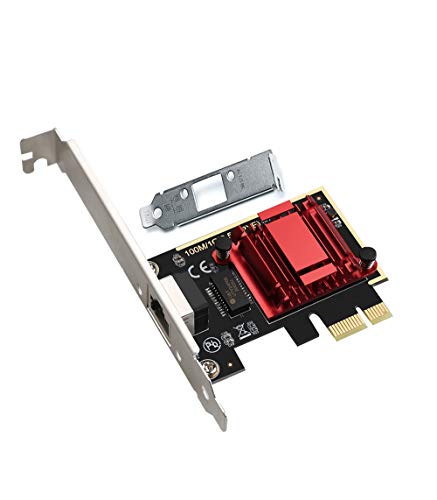
| Best For Servers | Network Speed: 2.5 Gbps (backwards compatible with 1 Gbps, 100 Mbps) | PCIe Slot Compatibility: PCIe x1, x4, x8, x16 slots | Included Brackets: Low-profile bracket only | VIEW LATEST PRICE | Read Our Analysis |
| NICGIGA 2.5G PCIe Network Adapter Ethernet Card |
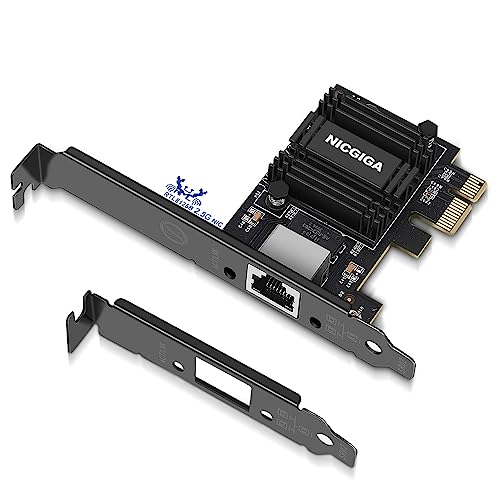
| Best For Gaming | Network Speed: 2.5 Gbps (backwards compatible with 1 Gbps, 100 Mbps) | PCIe Slot Compatibility: PCIe x1, x4, x8, x16 slots | Included Brackets: Standard and low-profile brackets | VIEW LATEST PRICE | Read Our Analysis |
| SODOLA 2.5Gb PCIe Network Card Adapter (RTL8125B) |

| Budget-Friendly Pick | Network Speed: 2.5 Gbps (backwards compatible with 1 Gbps, 100 Mbps) | PCIe Slot Compatibility: PCIe x1, x4, x8, x16 slots | Included Brackets: Low-profile bracket (not specified if standard included) | VIEW LATEST PRICE | Read Our Analysis |
| StarTech 2.5Gbps PCIe Network Card (Intel I225-V) |

| Premium Performance | Network Speed: 2.5 Gbps (backwards compatible with 1 Gbps, 100 Mbps, 10 Mbps) | PCIe Slot Compatibility: PCIe 2.0 x1 | Included Brackets: Low-profile bracket only | VIEW LATEST PRICE | Read Our Analysis |
More Details on Our Top Picks
TP-Link 2.5GB PCIe Network Card (TX201)
If you’re a PC gamer or content creator who needs faster network speeds without replacing your entire system, the TP-Link TX201 is an excellent choice. This PCIe network card delivers 2.5 Gbps speeds—2.5 times faster than standard Gigabit adapters. Installation requires inserting the card into an available PCIe slot and installing drivers for Windows 11/10/8.1/8/7 or supported Linux distributions. The card includes both standard and low-profile brackets to fit your case type. QoS technology prioritizes gaming traffic to reduce network congestion, while Wake-on-LAN lets you power on your computer remotely. You’ll receive a two-year warranty and free 24/7 technical support.
- Network Speed:2.5 Gbps (backwards compatible with 1 Gbps, 100 Mbps)
- PCIe Slot Compatibility:Standard PCIe slots
- Included Brackets:Standard and low-profile brackets
- Wake-on-LAN Support:Yes
- Windows Compatibility:Windows 11/10/8.1/8/7 and Windows Server 2022/2019/2016
- Technical Support:Free 24/7 technical support with 2-year warranty
- Additional Feature:QoS technology for gaming
- Additional Feature:2-year industry-leading warranty
- Additional Feature:Low-profile and full-height brackets
YuanLey 2.5G PCIe Network Card Ethernet Adapter
The YuanLey 2.5G PCIe Network Card delivers versatility across multiple system types, making it an excellent choice for users who need flexible installation options without sacrificing performance. This adapter features the Realtek RTL8125B chip, which provides 2.5Gbps speeds—2.5 times faster than standard Gigabit Ethernet. You’ll benefit from ultra-low latency ideal for gaming, 4K streaming, and large file transfers. The dual brackets accommodate both standard and low-profile cases, while compatibility with PCIe x1, x4, x8, and x16 slots ensures it fits your setup. An integrated heat sink prevents thermal issues during extended use. The card supports Windows, Linux, and Mac OS, with plug-and-play functionality on Windows 10. You’ll receive lifetime technical support with a 24-hour response guarantee for any setup or troubleshooting needs.
- Network Speed:2.5 Gbps (backwards compatible with 1 Gbps, 100 Mbps)
- PCIe Slot Compatibility:PCIe x1, x4, x8, x16 slots
- Included Brackets:Standard and low-profile brackets
- Wake-on-LAN Support:Yes
- Windows Compatibility:Windows 11/10/8.1/8/7
- Technical Support:Lifetime technical support with 24-hour response promise
- Additional Feature:Realtek RTL8125B chip
- Additional Feature:Plug-and-play on Windows 10
- Additional Feature:Lifetime technical support included
Vogzone 2.5Gb PCI-E Network Card (Realtek8125B)
Looking for a 2.5G Ethernet card that’ll work with your existing PCIe slot without requiring upgrades? The Vogzone 2.5Gb PCI-E Network Card delivers this compatibility through its PCIe 2.0 x1 interface, which functions in x1, x4, x8, or x16 slots. The Realtek RTL8125BG controller supports 100Mb, 1Gb, and 2.5Gb speeds on a single RJ45 port. You’ll get jumbo frames, PXE boot, DPDK, Wake on LAN, and VLAN support. Installation includes a low-profile bracket for compact cases. Supported systems include Windows, Linux, macOS, and ESXi 6.7/8.0, though ESXi 7.0 isn’t compatible.
- Network Speed:2.5 Gbps (backwards compatible with 1 Gbps, 100 Mbps)
- PCIe Slot Compatibility:PCIe x1, x4, x8, x16 slots
- Included Brackets:Low-profile bracket only
- Wake-on-LAN Support:Yes
- Windows Compatibility:Windows (all versions)
- Technical Support:Technical support (scope not specified)
- Additional Feature:Jumbo frames support
- Additional Feature:ESXi 6.7 and 8.0 compatible
- Additional Feature:DPDK support
TRENDnet 2.5GBase-T PCIe Network Adapter (TEG-25GECTX)
Need a 2.5G Ethernet card that works with government procurement standards? The TRENDnet TEG-25GECTX fits that requirement with NDAA and TAA compliance. Install this adapter into any PCIe 2.0 or later slot to gain 2.5Gbps, 1Gbps, and 100Mbps connectivity over standard Cat5e cables up to 328 feet. You’ll receive both standard and low-profile brackets for flexible mounting. The card supports jumbo frames up to 9KB and IEEE 802.1Q VLAN tagging for network optimization. LED indicators show port status, link speed, and activity at a glance. Windows operating systems and Windows Server are compatible. TRENDnet backs this adapter with three years of manufacturer protection and English-speaking technical support during business hours.
- Network Speed:2.5 Gbps (backwards compatible with 1 Gbps, 100 Mbps)
- PCIe Slot Compatibility:PCIe 2.0 or later slots
- Included Brackets:Standard and low-profile brackets
- Wake-on-LAN Support:Not specified
- Windows Compatibility:Windows and Windows Server
- Technical Support:English-speaking support during business hours with 3-year warranty
- Additional Feature:NDAA + TAA compliant
- Additional Feature:3-year manufacturer protection
- Additional Feature:Jumbo frames up to 9KB
2.5GBase-T PCIe Gigabit Ethernet Network Adapter
If you’re running older systems alongside modern networks, the 2.5GBase-T PCIe Gigabit Ethernet Network Adapter with RTL8125B controller offers broad compatibility that spans decades of operating systems. You’ll find support for Windows ME through Windows 10, Linux, Mac OS, and DOS environments. The card fits X1, X4, X8, and X16 PCIe slots, making installation straightforward across various motherboard types. You get speeds of 2500, 1000, or 100 Mbps depending on your network capabilities. The included low-profile bracket adapts to different case designs. Notable features include PXE boot support and Wake on LAN functionality, enabling remote system startup and network booting for deployment scenarios.
- Network Speed:2.5 Gbps (backwards compatible with 1 Gbps, 100 Mbps)
- PCIe Slot Compatibility:PCIe x1, x4, x8, x16 slots
- Included Brackets:Low-profile bracket only
- Wake-on-LAN Support:Yes
- Windows Compatibility:Windows ME/98SE/2000/XP/Vista/7/8/10 and Server editions
- Technical Support:Freely compatible across systems (support not specified)
- Additional Feature:PXE boot support
- Additional Feature:Multi-OS compatibility breadth
- Additional Feature:Freely compatible across systems
NICGIGA 2.5G PCIe Network Adapter Ethernet Card
The NICGIGA 2.5G PCIe Network Adapter stands out as an excellent choice for users who need faster data transfer speeds without replacing their entire system. This card uses the Realtek RTL8125B chip to deliver 2.5Gbps speeds while remaining backward compatible with 1Gbps and 100Mbps connections. Install it into any available PCIe slot on your motherboard, then download drivers from Realtek’s website for your operating system—Windows 10 users skip this step. The included heat sink keeps temperatures stable during intensive downloads or gaming sessions. You’ll receive lifetime technical support and a one-year manufacturer warranty with your purchase.
- Network Speed:2.5 Gbps (backwards compatible with 1 Gbps, 100 Mbps)
- PCIe Slot Compatibility:PCIe x1, x4, x8, x16 slots
- Included Brackets:Standard and low-profile brackets
- Wake-on-LAN Support:Yes
- Windows Compatibility:Windows 11/10/8.1/8/7
- Technical Support:Lifetime technical support with 1-year manufacturer warranty
- Additional Feature:Heat sink included
- Additional Feature:No driver needed Windows 10
- Additional Feature:1-year manufacturer warranty
SODOLA 2.5Gb PCIe Network Card Adapter (RTL8125B)
For users seeking broad OS compatibility across both Windows and Linux environments, the SODOLA 2.5Gb PCIe Network Card Adapter stands out because it supports drivers for Windows Vista through Windows 11, Windows Server editions, and multiple Linux distributions. This Realtek RTL8125B adapter plugs into any PCIe x1, x4, x8, or x16 slot on your motherboard. You’ll get a single RJ-45 port delivering 2.5 gigabit speeds with jumbo frames support for improved performance. The card includes Wake-on-LAN and PXE boot capabilities for remote management. SODOLA includes a one-year replacement warranty covering manufacturing defects, ensuring reliable operation across your network setup without iSCSI or PoE functionality.
- Network Speed:2.5 Gbps (backwards compatible with 1 Gbps, 100 Mbps)
- PCIe Slot Compatibility:PCIe x1, x4, x8, x16 slots
- Included Brackets:Low-profile bracket (not specified if standard included)
- Wake-on-LAN Support:Yes
- Windows Compatibility:Windows Vista/7/8/10/11 and Server editions
- Technical Support:Product replacement without repair within 1 year
- Additional Feature:Jumbo frames support
- Additional Feature:PXE boot enabled
- Additional Feature:1-year product replacement guarantee
StarTech 2.5Gbps PCIe Network Card (Intel I225-V)
StarTech’s 1-Port 2.5Gbps PCIe Network Card stands out as an excellent choice if you’re upgrading an existing system without replacing network infrastructure. The Intel I225-V chip supports 2.5GBASE-T speeds while remaining backward compatible with Cat5e and Cat6 cables you already have. You’ll benefit from integrated management features like Intel vPro for remote troubleshooting and PXE boot for centralized OS deployment. The built-in heat sink keeps temperatures stable, while LED indicators show your connection status. The card includes a low-profile bracket, making it compatible with compact systems. You can enable 9K jumbo frames to reduce packet overhead, and Wake-on-LAN functionality lets you boot systems remotely.
- Network Speed:2.5 Gbps (backwards compatible with 1 Gbps, 100 Mbps, 10 Mbps)
- PCIe Slot Compatibility:PCIe 2.0 x1
- Included Brackets:Low-profile bracket only
- Wake-on-LAN Support:Yes
- Windows Compatibility:Windows and Windows Server
- Technical Support:Support not specified
- Additional Feature:Intel I225-V chip
- Additional Feature:Intel vPro management capability
- Additional Feature:9K jumbo frame support
Factors to Consider When Choosing 2.5g Ethernet Cards
When you’re selecting a 2.5G Ethernet card, you’ll need to evaluate the chipset and controller quality to ensure reliable performance, check your operating system compatibility to confirm the card works with your setup, and review the physical form factor options to verify it fits your motherboard slots. You should also examine the warranty length and technical support availability so you’re covered if problems arise, and assess the card’s heat dissipation design and overall durability to guarantee it’ll handle sustained high-speed data transfers without failing.
Chipset And Controller Quality
The chipset you choose directly shapes your 2.5G Ethernet card’s real-world performance, latency, and how well it works with your existing network setup. Look for established options like Realtek RTL8125B or Intel I225-V, both proven to deliver stable 2.5 Gbps throughput. Your chipset determines whether you get advanced features like VLAN tagging, jumbo frames, and PXE/WOL support, so verify driver compatibility with your operating system before purchasing. Check that your chosen card supports auto-negotiation across 2.5G, 1G, 100M, and 10M speeds to ensure flexibility with older Cat5e or Cat6 cabling. A quality chipset backed by reliable driver support prevents bottlenecks and ensures your card performs consistently under heavy data transfer loads.
Operating System Compatibility
Once you’ve confirmed your chipset meets performance standards, you’ll need to verify that your 2.5G Ethernet card works with your operating system. Windows systems typically install drivers automatically or require minimal downloads. Linux and macOS often demand manual driver installation or specific kernel support. Check whether your card supports your exact OS version—some older models list Windows XP or Vista compatibility but don’t function properly on modern systems. For server environments, confirm ESXi compatibility with your virtualization platform’s version. Advanced features like Wake-on-LAN and PXE boot may require community-driven or open-source drivers on non-Windows platforms. Review the manufacturer’s compatibility list before purchasing to ensure your operating system appears explicitly supported.
Physical Form Factor Options
Your choice of physical form factor determines whether a 2.5G Ethernet card’ll fit your system and function properly. Most cards include both standard full-height and low-profile brackets, so you can select based on your case type. For desktop towers, use the standard bracket. For small form factor builds, install the low-profile bracket instead. Check your motherboard’s available PCIe slots—cards work with x1, x4, x8, or x16 connections, though they’re generally compatible with PCIe 2.0 or higher. Verify that your specific card supports your slot configuration before purchasing. Consider heat dissipation needs when planning physical space within your chassis. Match the bracket type to your case dimensions to ensure proper installation and airflow throughout your system.
Warranty And Technical Support
After you’ve confirmed physical compatibility with your system, warranty coverage and support options become your next evaluation point. Most 2.5G Ethernet cards offer warranties ranging from one to three years, with some vendors including lifetime technical support. Review what each warranty covers—replacement, repair, or both—since policies vary by manufacturer. Check whether support includes setup assistance, troubleshooting, and driver updates across your operating system. Many vendors provide 24/7 round-the-clock support channels with guaranteed response times. Compare these benefits against card pricing to ensure you’re getting adequate protection for your investment. Prioritize cards offering both extended warranty periods and accessible technical support, as these reduce future costs and minimize downtime if issues arise.
Heat Dissipation And Durability
Since sustained network activity generates thermal energy, you’ll want to evaluate how well a 2.5G Ethernet card manages heat to maintain stable performance and longevity. Many cards feature built-in heat sinks that passively dissipate warmth without fans, keeping operations quiet while preventing throttling during high-throughput tasks like gaming or file transfers. Check product specifications for heat dissipation ratings and low-profile bracket designs that fit compact systems without restricting airflow. Passive cooling effectively protects controllers like the RTL8125B and Intel I225-V from thermal stress during continuous network loads. By prioritizing cards with proven heat management, you’ll minimize the risk of overheating and extend your card’s functional lifespan significantly.
PCIe Slot Compatibility Range
When selecting a 2.5G Ethernet card, you’ll need to verify that your motherboard’s available PCIe slots match the card’s compatibility specifications. Most 2.5G Ethernet cards support x1, x4, x8, and x16 slot configurations across PCIe 2.0 and newer generations. Check your motherboard manual to identify which slots you have available. If your system uses an older motherboard with PCIe 2.0, confirm the card explicitly supports that generation. Cards rated for x1 lanes work in any PCIe slot, offering maximum flexibility. For optimal performance, match the card’s lane requirement to your available slot to ensure full 2.5G throughput. Additionally, verify bracket type—low-profile or full-height—fits your case before purchasing.
Advanced Networking Features Available
Beyond basic connectivity, you’ll want to evaluate the advanced networking features that a 2.5G Ethernet card offers, as these capabilities directly affect performance, management, and flexibility in your network setup. Check whether your card supports VLAN tagging to segment traffic and improve network organization. Verify jumbo frame support, which reduces CPU overhead during large file transfers by allowing packets up to 9KB. Look for Wake on LAN functionality to enable remote power management across your devices. Consider auto-negotiation capability, letting your card adapt automatically between 2.5G, 1G, and 100Mbps speeds based on your network conditions and existing cabling. Finally, confirm PXE boot support if you plan network-based operating system deployment and remote installation without relying on local storage.
Final Thoughts
You’ll choose the right 2.5G Ethernet card by evaluating your system’s PCIe slot type, available case space, and cooling requirements. Compare driver support for your operating system—Windows, Linux, or macOS. Check whether you need low-profile brackets for compact builds. Review heat management specs if you’re running sustained high-speed transfers. Match these factors to your specific setup, then purchase accordingly.

Meet Ry, “TechGuru,” a 36-year-old technology enthusiast with a deep passion for tech innovations. With extensive experience, he specializes in gaming hardware and software, and has expertise in gadgets, custom PCs, and audio.
Besides writing about tech and reviewing new products, he enjoys traveling, hiking, and photography. Committed to keeping up with the latest industry trends, he aims to guide readers in making informed tech decisions.