

When you need a USB-C extension cable that performs reliably, you’ll want to match your specific requirements—data speed, power delivery wattage, and video capabilities—with the right model. You’re choosing from options that range from basic 10Gbps cables to advanced 40Gbps Thunderbolt-compatible designs, each with distinct build quality and pricing. But selecting the wrong cable can bottleneck your devices or fail mid-transfer. Here’s what separates cables that actually work from those that disappoint.
| USB-C Extension Cable 20Gbps 240W 3.3Ft |

| Best All-Around Performance | Data Transfer Speed: 20 Gbps | Power Delivery: 240W | Video Support: 4K@60Hz | VIEW LATEST PRICE | Read Our Analysis |
| USB-C Extension Cable 20Gbps Ultra-High Speed |

| Most Durable Build | Data Transfer Speed: 20 Gbps | Power Delivery: 240W | Video Support: 4K@60Hz | VIEW LATEST PRICE | Read Our Analysis |
| USB-C Extension Cable 6ft 2 Pack 10Gbps |
| Best Value Pack | Data Transfer Speed: 10 Gbps | Power Delivery: 100W | Video Support: 4K@60Hz | VIEW LATEST PRICE | Read Our Analysis |
| Cable Matters 40Gbps USB 4 Extension Cable (3.3ft) |

| Fastest Speed Option | Data Transfer Speed: 40 Gbps | Power Delivery: 240W | Video Support: 4K or 8K | VIEW LATEST PRICE | Read Our Analysis |
| UGREEN USB-C Extension Cable 10Gbps 100W Fast Charging |
| Best for MacBook Users | Data Transfer Speed: 10 Gbps | Power Delivery: 100W | Video Support: 4K@60Hz | VIEW LATEST PRICE | Read Our Analysis |
More Details on Our Top Picks
USB-C Extension Cable 20Gbps 240W 3.3Ft
Why would you need a USB-C extension cable that handles both high-speed data transfer and fast charging? This 3.3-foot cable delivers 20Gbps data speeds and supports up to 240W charging, making it versatile for multiple devices. You’ll find it compatible with iPhones, MacBooks, iPads, and gaming devices like PSVR2. The dual-layer nylon braid and aluminum connectors ensure durability. However, verify your device’s port capabilities first—20Gbps requires USB-C to USB-C connections. Note that this cable won’t work with Thunderbolt 3 docks, so check your docking station before purchasing.
- Data Transfer Speed:20 Gbps
- Power Delivery:240W
- Video Support:4K@60Hz
- Cable Length Options:3.3 ft
- Build Material:Nylon braided with aluminum connectors
- Thunderbolt Compatibility:Not compatible with Thunderbolt 3
- Additional Feature:Dual-layer nylon braided construction
- Additional Feature:Aluminum alloy connectors
- Additional Feature:Backward compatible charging (140W/100W/65W/30W)
USB-C Extension Cable 20Gbps Ultra-High Speed
If you’re connecting high-powered devices like MacBooks, gaming consoles, or external monitors and you need a cable that won’t bottleneck your setup, the Green Jiss USB-C Extension Cable delivers the performance you’re after. This cable supports 20 Gbps data speeds, 240W power delivery, and 4K@60Hz video output across multiple lengths from 1.5 to 10 feet. The nylon braided jacket resists tangling while aluminum connectors with 24K gold-plated plugs prevent corrosion and signal interference. You’ll get compatibility with iPad Pro, Surface Go, Pixel devices, and Galaxy phones. The cable passed 400,000 bending tests and comes with a 24-month warranty plus lifetime technical support for reliable everyday use.
- Data Transfer Speed:20 Gbps
- Power Delivery:240W
- Video Support:4K@60Hz
- Cable Length Options:1.5 ft, 3.3 ft, 5 ft, 6.6 ft, 10 ft
- Build Material:Nylon braided with 24K gold-plated aluminum connectors
- Thunderbolt Compatibility:Not compatible with Thunderbolt 3/4/5
- Additional Feature:24K gold-plated plugs
- Additional Feature:Multiple length options (1.5ft-10ft)
- Additional Feature:24-month warranty included
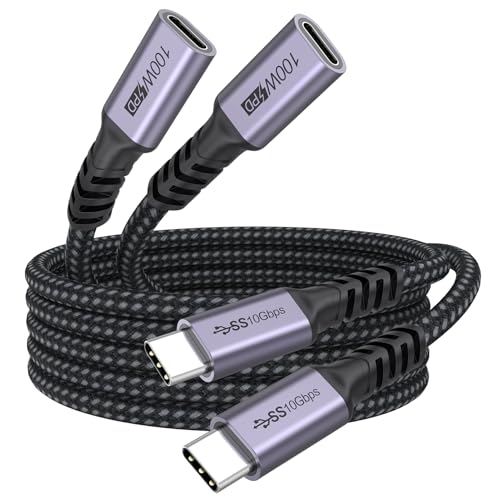
USB-C Extension Cable 6ft 2 Pack 10Gbps
You’ll want this extension cable if you need to transfer large files quickly, charge devices at full power, or connect displays without replacing your existing USB-C cables. This 6ft 2-pack model delivers 10Gbps data speeds, transferring 10GB files in 10–20 seconds. It supports 100W charging and 4K@60Hz video output. The aluminum alloy shell with nylon braiding resists corrosion and wear. Compatible with laptops, phones, tablets, and monitors, it works with most USB-C devices except Thunderbolt 3 docking stations. If power transfer fails, reverse the cable direction. The 24-month warranty backs your purchase with quality customer support.
- Data Transfer Speed:10 Gbps
- Power Delivery:100W
- Video Support:4K@60Hz
- Cable Length Options:6 ft
- Build Material:Nylon braided with aluminum alloy shell
- Thunderbolt Compatibility:Not compatible with Thunderbolt 3
- Additional Feature:Two-pack bundle value
- Additional Feature:Reversible cable direction capability
- Additional Feature:24-month warranty included
Cable Matters 40Gbps USB 4 Extension Cable (3.3ft)
For professionals and content creators who need to extend USB-C connections without losing speed or video quality, the Cable Matters 40Gbps USB 4 Extension Cable delivers the performance you’re looking for. This 3.3-foot male-to-female extender maintains full USB4 40Gbps bandwidth, allowing you to connect 4K or 8K monitors while preserving data speeds. The cable supports 240W Power Delivery, so connected devices receive full charging capability through the extension. Its reversible USB-C design eliminates connection errors. Use this extender to lengthen cable runs to monitors or peripherals in high-performance setups without sacrificing speed, video quality, or power delivery reliability.
- Data Transfer Speed:40 Gbps
- Power Delivery:240W
- Video Support:4K or 8K
- Cable Length Options:3.3 ft
- Build Material:Durable design with frequent use capability
- Thunderbolt Compatibility:USB4 compatible
- Additional Feature:40Gbps USB4 speed capability
- Additional Feature:Supports 8K monitor connections
- Additional Feature:Fully reversible USB-C design
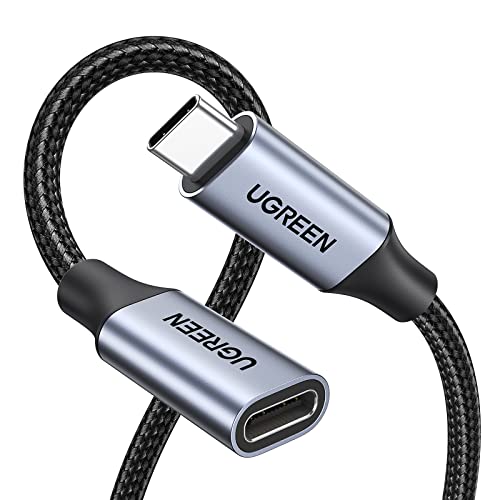
UGREEN USB-C Extension Cable 10Gbps 100W Fast Charging
The UGREEN USB-C Extension Cable delivers 100W fast charging and 10Gbps data transfer in a single 3.3 ft cord, making it the best choice when you need to extend your device’s reach without sacrificing performance. You’ll get reliable charging for MacBooks, iPhones, and iPads with speeds up to 5A at 20V, enabling full charges in roughly 30 minutes for compatible devices. The cable supports 4K video output at 60Hz when your devices have USB-C or Thunderbolt 3 capability. Its flat nylon design resists tangling and weighs only 40 grams for portability. Use this cable to protect your device’s port from wear caused by frequent connections, and verify compatibility with your specific equipment, as it won’t work with active Thunderbolt 3 docking stations.
- Data Transfer Speed:10 Gbps
- Power Delivery:100W
- Video Support:4K@60Hz
- Cable Length Options:3.3 ft
- Build Material:Nylon outer with flat cable design
- Thunderbolt Compatibility:Not compatible with Thunderbolt 3
- Additional Feature:Flat cable design
- Additional Feature:Protects USB-C port longevity
- Additional Feature:2-year manufacturer warranty
Factors to Consider When Choosing USB-C Extension Cables
When selecting a USB-C extension cable, you’ll need to evaluate five key factors: data transfer speed (check if you need 5Gbps, 10Gbps, or higher), power delivery wattage (confirm your device requires 60W, 100W, or more), video output compatibility (verify it supports your monitor’s resolution), build quality and durability (inspect the connector design and cable shielding), and device port compatibility (ensure it matches your specific devices). Start by identifying your primary use—whether you’re charging, transferring files, or connecting displays—then match the cable’s specifications to those requirements. Finally, cross-reference the cable’s rated specifications against your device manual to confirm full compatibility before purchasing.
Data Transfer Speed Requirements
How fast do you actually need your USB-C extension cable to transfer data? Start by identifying your devices’ port speeds. Check whether your source and destination support USB 3.2 Gen2 (10 Gbps), USB 3.2 Gen2x2 (20 Gbps), or USB 4 (20+ Gbps). Match your cable’s rated speed to the slowest device in your setup—this prevents bottlenecks. For basic file transfers, 10 Gbps cables suffice. For 4K@60Hz video or demanding workflows, choose 20 Gbps cables with DP Alt Mode support. Remember that real-world speeds run lower than ratings due to device limitations and cable quality. If you’re using Thunderbolt ports, verify cable compatibility first, as Thunderbolt devices may not guarantee full USB-C performance.
Power Delivery Capabilities
Match your USB-C extension cable’s power delivery (PD) rating to your device’s actual power needs, not its maximum theoretical capacity. Check your laptop or monitor’s power requirements first—you’ll find this in the specifications manual or on the device itself. Next, verify the cable’s voltage and current specifications, such as 48V/5A for 240W designs. Don’t assume high wattage ratings guarantee fast charging; your device will only draw what it needs. Ensure your power adapter supports the cable’s PD rating. A 240W cable paired with a 65W adapter won’t deliver more than 65W. Finally, match all three components—adapter, cable, and device—for safe, reliable operation without triggering safety protections.
Video Output Compatibility
Does your USB-C extension cable actually support video, or will it only pass power and data? You’ll need to verify that both your monitor and source device support the same video standard, such as USB-C with DisplayPort Alt Mode. Check your extension cable’s specifications to confirm it preserves the necessary bandwidth for your desired resolution—4K@60Hz or 2K@120Hz. Some cables explicitly don’t support video when connected to Thunderbolt ports due to protocol differences. Test the cable’s orientation, as reversing direction can affect video performance. Remember that power delivery capability doesn’t guarantee video functionality. Confirm all three components—your source, extension, and display—work together before relying on the setup for video output.
Build Quality And Durability
Because you’ll likely use your USB-C extension cable hundreds of times over its lifetime, you need to evaluate its construction materials and design features before making a purchase. Look for nylon braided jackets and aluminum alloy connectors, which resist wear and extend durability. Check for strain relief and reinforced connector tails that reduce stress at connection points and lower failure risk. Verify the cable includes full shielding and corrosion-resistant metals to maintain signal integrity and prevent interference. Examine the contacts—gold-plated or high-quality options resist oxidation and ensure reliable connections. Review manufacturer specifications for bend-test metrics, such as 400,000+ bend cycles, to understand real-world durability expectations. These construction details directly determine how long your cable will function reliably.
Device And Port Compatibility
What’s the point of buying an extension cable if it won’t work with your devices? Start by identifying your device’s USB-C port generation. Check whether you have USB-C 3.2 Gen2 (20 Gbps) or Gen1 (5 Gbps) to match your cable’s speed capability. Next, verify power delivery specifications. Confirm the cable supports your device’s wattage requirement, whether that’s 60W, 100W, or 240W. If you plan video output, check that the cable handles your desired resolution, such as 4K@60Hz. Finally, confirm Thunderbolt compatibility. Many USB-C extension cables explicitly don’t support Thunderbolt 3, 4, or 5 ports, so verify this before purchasing. Mismatched specifications will result in reduced speeds, failed charging, or complete incompatibility.
Final Thoughts
You’ll find the right USB-C extension cable by matching your needs to the specs. First, determine your required speed (5, 10, 20 Gbps, or USB4). Next, check your power delivery needs up to 240W. Then, verify video support if you’re connecting displays. Finally, inspect the build quality—aluminum connectors, nylon braiding, and shielding ensure durability. Cross-reference these details against each cable’s specifications before purchasing.

Meet Ry, “TechGuru,” a 36-year-old technology enthusiast with a deep passion for tech innovations. With extensive experience, he specializes in gaming hardware and software, and has expertise in gadgets, custom PCs, and audio.
Besides writing about tech and reviewing new products, he enjoys traveling, hiking, and photography. Committed to keeping up with the latest industry trends, he aims to guide readers in making informed tech decisions.