

When your Netgear Nighthawk router doesn’t reach every corner of your home, you need a compatible extender. You’ll find options ranging from WiFi 7 models like the BE5000 (EXS25) to budget-friendly AC1200 units. Each model handles different coverage areas and device counts. Before you invest in one, though, you should understand what specs actually matter for your specific situation—and which extenders deliver real results versus empty promises.
| NETGEAR WiFi 7 Range Extender BE5000 (EXS25) |
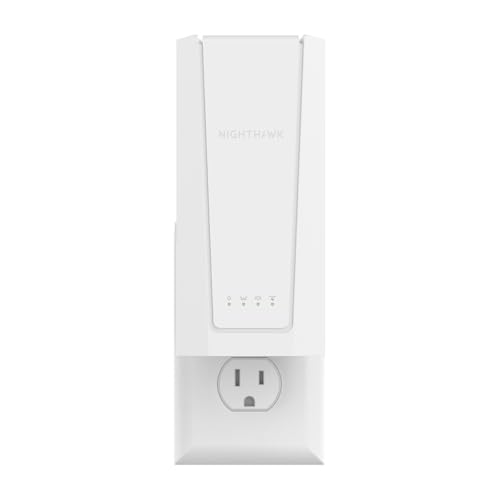
| Best Overall | WiFi Standard/Speed: WiFi 7 (BE5000) up to 5 Gbps | Coverage Area: Up to 1,500 sq. ft. | Device Capacity: Up to 45 devices | VIEW LATEST PRICE | Read Our Analysis |
| NETGEAR WiFi Mesh Range Extender AC1900 (EX6400) |

| Best Coverage | WiFi Standard/Speed: WiFi 5 (AC1900) up to 1.9 Gbps | Coverage Area: Up to 2,100 sq. ft. | Device Capacity: Up to 35 devices | VIEW LATEST PRICE | Read Our Analysis |
| NETGEAR WiFi 7 Range Extender (EXS27) |
| Best Performance | WiFi Standard/Speed: WiFi 7 (BE5000) up to 5 Gbps | Coverage Area: Up to 1,500 sq. ft. | Device Capacity: Up to 45 devices | VIEW LATEST PRICE | Read Our Analysis |
| NETGEAR WiFi Range Extender AC1200 (EX6120) |

| Budget-Friendly Pick | WiFi Standard/Speed: WiFi 5 (AC1200) up to 1.2 Gbps | Coverage Area: Up to 1,500 sq. ft. | Device Capacity: Up to 32 devices | VIEW LATEST PRICE | Read Our Analysis |
| NETGEAR WiFi 6 Mesh Range Extender (EAX15) |

| Best WiFi 6 | WiFi Standard/Speed: WiFi 6 (AX1800) up to 1.8 Gbps | Coverage Area: Up to 1,500 sq. ft. | Device Capacity: Up to 20+ devices | VIEW LATEST PRICE | Read Our Analysis |
| NETGEAR WiFi 7 Range Extender (EXS18) BE3600 |
| Best Mid-Range | WiFi Standard/Speed: WiFi 7 (BE3600) up to 3.6 Gbps | Coverage Area: Up to 1,200 sq. ft. | Device Capacity: Up to 40 devices | VIEW LATEST PRICE | Read Our Analysis |
| NETGEAR WiFi 6 Range Extender (EAX17) AX3000 |

| Best Speed-to-Price | WiFi Standard/Speed: WiFi 6 (AX3000) up to 3.0 Gbps | Coverage Area: Up to 1,500 sq. ft. | Device Capacity: Up to 20 devices | VIEW LATEST PRICE | Read Our Analysis |
| NETGEAR WiFi 6 Range Extender (EAX12) |

| Best Mesh Network | WiFi Standard/Speed: WiFi 6 (AX1600) up to 1.6 Gbps | Coverage Area: Up to 1,200 sq. ft. | Device Capacity: Not specified | VIEW LATEST PRICE | Read Our Analysis |
| WiFi Extender Signal Booster Dual Band 1200Mbps |

| Most Affordable | WiFi Standard/Speed: WiFi 5 (AC1200) up to 1.2 Gbps | Coverage Area: Up to 12,880 sq. ft. | Device Capacity: Up to 105 devices | VIEW LATEST PRICE | Read Our Analysis |
| NETGEAR WiFi Mesh Range Extender AC1200 (EX5000) |

| Best Compact Design | WiFi Standard/Speed: WiFi 5 (AC1200) up to 1.2 Gbps | Coverage Area: Up to 1,000 sq. ft. | Device Capacity: Up to 15 devices | VIEW LATEST PRICE | Read Our Analysis |
More Details on Our Top Picks
NETGEAR WiFi 7 Range Extender BE5000 (EXS25)
If you’re looking to expand coverage across a larger home or office space while maintaining support for numerous connected devices, the NETGEAR WiFi 7 Range Extender BE5000 (EXS25) stands out as an excellent choice. This dual-band wireless signal booster extends WiFi coverage up to 1,500 square feet and connects up to 45 devices simultaneously, including laptops, smartphones, cameras, and IoT equipment. The extender delivers WiFi 7 speeds reaching 5 Gbps, offering up to 2.7x better performance than previous WiFi generations. You’ll benefit from seamless roaming using your existing SSID, keeping devices connected as you move throughout your space. The unit works with any wireless router or cable modem router and includes a 2.5 Gigabit Ethernet port for wired devices requiring multi-gig speeds.
- WiFi Standard/Speed:WiFi 7 (BE5000) up to 5 Gbps
- Coverage Area:Up to 1,500 sq. ft.
- Device Capacity:Up to 45 devices
- Ethernet Port:2.5 Gigabit Ethernet port
- Dual-Band Support:2.4 GHz and 5 GHz
- Setup Method:Nighthawk App
- Additional Feature:2.5 Gigabit Ethernet port
- Additional Feature:Up to 2.7x better performance
- Additional Feature:Seamless roaming with existing SSID
NETGEAR WiFi Mesh Range Extender AC1900 (EX6400)
You’ll want the EX6400 if you’re looking to expand your Netgear Nighthawk network across a larger home without setting up multiple WiFi names or managing separate connections. This AC1900 extender covers up to 2,100 square feet and supports 35 devices simultaneously. Press the setup button once, then connect to your existing network—no new passwords required. The dual-band technology delivers 1,900 Mbps speeds suitable for streaming and gaming. Use the Gigabit Ethernet port to connect devices like gaming consoles directly. Smart Roaming lets you move between rooms without dropping your connection. One-year manufacturer warranty covers defects and malfunctions during normal use.
- WiFi Standard/Speed:WiFi 5 (AC1900) up to 1.9 Gbps
- Coverage Area:Up to 2,100 sq. ft.
- Device Capacity:Up to 35 devices
- Ethernet Port:Gigabit Ethernet port
- Dual-Band Support:2.4 GHz and 5 GHz
- Setup Method:Single button setup
- Additional Feature:FastLane technology for streaming
- Additional Feature:MU-MIMO and Smart Connect
- Additional Feature:One WiFi Name mesh feature
NETGEAR WiFi 7 Range Extender (EXS27)
The NETGEAR WiFi 7 Range Extender (EXS27) delivers the latest wireless technology for users who want maximum speed and coverage without upgrading their entire network setup. This BE5000 dual-band extender reaches up to 1,500 square feet and supports 45 devices simultaneously. It offers WiFi 7 speeds reaching 5 Gbps and includes a 2.5 Gigabit Ethernet port for wired connections. The extender works with any existing router or cable modem router, making installation straightforward. Use the Nighthawk App for easy setup, then enable Smart Roaming to switch between networks seamlessly using the same SSID. WPA3 security protects your connection throughout your extended network.
- WiFi Standard/Speed:WiFi 7 (BE5000) up to 5 Gbps
- Coverage Area:Up to 1,500 sq. ft.
- Device Capacity:Up to 45 devices
- Ethernet Port:2.5 Gigabit Ethernet port
- Dual-Band Support:2.4 GHz and 5 GHz
- Setup Method:Nighthawk App
- Additional Feature:WPA3 Security encryption
- Additional Feature:Nighthawk App easy setup
- Additional Feature:Smart Roaming capability
NETGEAR WiFi Range Extender AC1200 (EX6120)
Looking to expand your WiFi coverage without upgrading your entire network? The NETGEAR AC1200 (EX6120) extends your signal up to 1500 square feet and connects up to 32 devices. Set it up in five minutes using the WPS Push N’ Connect button. Plug the extender into a wall outlet midway between your router and dead zones. It works with any WiFi router and supports both 2.4 GHz and 5 GHz bands via FastLane technology. The device includes one Ethernet port for wired connections. You’ll get AC1200 speeds (up to 1200 Mbps) suitable for streaming and casual gaming, with WPA/WPA2 security protection included.
- WiFi Standard/Speed:WiFi 5 (AC1200) up to 1.2 Gbps
- Coverage Area:Up to 1,500 sq. ft.
- Device Capacity:Up to 32 devices
- Ethernet Port:10/100M Ethernet port
- Dual-Band Support:2.4 GHz and 5 GHz
- Setup Method:Push N’ Connect WPS (5-minute setup)
- Additional Feature:Push N’ Connect WPS button
- Additional Feature:Five-minute setup process
- Additional Feature:Wall-plug design for convenience
NETGEAR WiFi 6 Mesh Range Extender (EAX15)
If you’ve got a Netgear Nighthawk router and need to blanket your home in reliable WiFi 6 coverage without replacing your entire system, the EAX15 works as a universal mesh extender that expands your network up to 1,500 square feet. This AX1800 repeater delivers up to 1.8 Gbps across dual bands and connects 20+ devices simultaneously. Setup happens quickly through the Nighthawk App on your smartphone. The wall-plug design fits discreetly into any outlet, and its internal antennas require no external installation. The EAX15 supports WiFi 6, 5, and 4 standards, ensuring compatibility with your existing devices. One unified network name enables seamless roaming throughout your extended coverage area.
- WiFi Standard/Speed:WiFi 6 (AX1800) up to 1.8 Gbps
- Coverage Area:Up to 1,500 sq. ft.
- Device Capacity:Up to 20+ devices
- Ethernet Port:1 Gigabit Ethernet port
- Dual-Band Support:2.4 GHz and 5 GHz
- Setup Method:Nighthawk App
- Additional Feature:Four simultaneous streams
- Additional Feature:Wall-plug extender design
- Additional Feature:Back-compatible with WiFi 5/4
NETGEAR WiFi 7 Range Extender (EXS18) BE3600
Want cutting-edge WiFi 7 speeds without replacing your entire router setup? The EXS18 BE3600 delivers up to 3.6 Gbps and covers 1,200 square feet, supporting 40 devices simultaneously. You’ll seamlessly roam between networks using your existing SSID, preventing disconnections as you move throughout your home. The 2.5 Gig Ethernet port lets you connect wired devices like gaming consoles for faster speeds. Setup takes minutes through the Nighthawk App, and WPA3 security protects your network. Compatible with any WiFi 7 router or existing setup, this extender bridges the gap between coverage gaps and performance needs efficiently.
- WiFi Standard/Speed:WiFi 7 (BE3600) up to 3.6 Gbps
- Coverage Area:Up to 1,200 sq. ft.
- Device Capacity:Up to 40 devices
- Ethernet Port:2.5 Gigabit Ethernet port
- Dual-Band Support:2.4 GHz and 5 GHz
- Setup Method:Nighthawk App
- Additional Feature:2.5 Gig Ethernet port
- Additional Feature:WPA3 security
- Additional Feature:Nighthawk App setup
NETGEAR WiFi 6 Range Extender (EAX17) AX3000
The NETGEAR WiFi 6 Range Extender (EAX17) works best for you if you’re running a WiFi 6 router and need to expand coverage across 1,500 square feet without replacing your current network setup. You’ll plug the EAX17 into any wall outlet, then use the Nighthawk App to complete setup in minutes. It delivers up to 3.0 Gbps speeds and connects up to 20 devices simultaneously. The unit features a Gigabit Ethernet port for wired connections that maximize performance. WPA3 security keeps your network protected while creating one unified WiFi name across your extended coverage area. The EAX17 works with any router, though you’ll see optimal performance pairing it with WiFi 6 devices.
- WiFi Standard/Speed:WiFi 6 (AX3000) up to 3.0 Gbps
- Coverage Area:Up to 1,500 sq. ft.
- Device Capacity:Up to 20 devices
- Ethernet Port:1 Gigabit Ethernet port
- Dual-Band Support:2.4 GHz and 5 GHz
- Setup Method:Nighthawk App
- Additional Feature:WPA3 security
- Additional Feature:Nighthawk App setup
- Additional Feature:One WiFi Name mesh
NETGEAR WiFi 6 Range Extender (EAX12)
Looking to expand your Nighthawk network’s reach without replacing your existing router? The NETGEAR WiFi 6 Range Extender (EAX12) covers up to 1,200 square feet using AX1600 dual-band speeds. Plug it into any wall outlet within range of your current router. Use the Nighthawk App to connect it quickly to your existing network. The EAX12 creates a mesh network with automatic device handoff, so you’ll maintain connection while moving between areas. It includes one Gigabit Ethernet port for wired devices like gaming consoles or streaming boxes. This extender works with any router and costs less than upgrading your entire system.
- WiFi Standard/Speed:WiFi 6 (AX1600) up to 1.6 Gbps
- Coverage Area:Up to 1,200 sq. ft.
- Device Capacity:Not specified
- Ethernet Port:1 Gigabit Ethernet port
- Dual-Band Support:2.4 GHz and 5 GHz
- Setup Method:Nighthawk App
- Additional Feature:Smart Roaming mesh network
- Additional Feature:Automatic device handoff capability
- Additional Feature:Four-stream WiFi 6
WiFi Extender Signal Booster Dual Band 1200Mbps
If you’re struggling with dead zones throughout your home or need reliable WiFi coverage for multiple devices simultaneously, a dual-band 1200Mbps extender offers the speed and capacity you’re looking for. This model delivers 300Mbps on 2.4GHz and 867Mbps on 5GHz, covering up to 12,880 square feet. You’ll support up to 105 devices without network congestion. Set up quickly using the one-tap WPS feature, then select your preferred operation mode: AP Mode, Repeater Mode, or wired connection through two Ethernet ports. The extender penetrates walls and obstacles for stable signal throughout your home, making it ideal for streaming, remote work, and online activities.
- WiFi Standard/Speed:WiFi 5 (AC1200) up to 1.2 Gbps
- Coverage Area:Up to 12,880 sq. ft.
- Device Capacity:Up to 105 devices
- Ethernet Port:2 Ethernet ports
- Dual-Band Support:2.4 GHz and 5 GHz
- Setup Method:1-Tap WPS Setup
- Additional Feature:AP Mode and Repeater Mode
- Additional Feature:1-Tap WPS setup
- Additional Feature:Two Ethernet ports included
NETGEAR WiFi Mesh Range Extender AC1200 (EX5000)
Need dependable coverage across 1,000 square feet without upgrading your entire network? The NETGEAR WiFi Mesh Range Extender AC1200 (EX5000) connects to any wireless router using its WPS button for quick setup. This dual-band extender delivers up to 1200 Mbps and supports 15 devices simultaneously. Use the NETGEAR WiFi Analyzer app to identify the optimal placement location in your space. The compact wall plug design fits discreetly into standard outlets. It supports WEP and WPA/WPA2 security protocols, protecting your network. Install it between your router and dead zones to boost your Nighthawk’s signal effectively without replacing your primary equipment.
- WiFi Standard/Speed:WiFi 5 (AC1200) up to 1.2 Gbps
- Coverage Area:Up to 1,000 sq. ft.
- Device Capacity:Up to 15 devices
- Ethernet Port:Not specified
- Dual-Band Support:Dual-band (frequencies not specified)
- Setup Method:WPS button / WiFi Analyzer app
- Additional Feature:WiFi Analyzer app placement
- Additional Feature:WPS button quick connection
- Additional Feature:Wall plug compact design
Factors to Consider When Choosing a WiFi Extender for Netgear Nighthawk
When you’re selecting a WiFi extender for your Netgear Nighthawk, you’ll need to evaluate five critical factors: WiFi standard compatibility (ensuring your extender matches your router’s 802.11ac or 802.11ax capability), coverage area requirements (measuring your home’s square footage to determine the extender’s range needs), device connection capacity (counting how many devices you’ll connect simultaneously), ethernet port specifications (deciding if you need wired connections for stationary devices), and setup ease and speed (checking whether the extender offers one-button pairing or app-based configuration). Each factor directly impacts whether the extender will strengthen your signal effectively and integrate smoothly with your existing Nighthawk system. You’ll evaluate these points against your specific home layout, device count, and technical comfort level to make an informed choice.
WiFi Standard Compatibility
Why does your extender’s WiFi standard matter when pairing it with your Nighthawk router? Your extender must support the same or newer WiFi standard as your Nighthawk to maximize speeds and roaming efficiency. If your Nighthawk uses WiFi 6 or 6E, choose an extender with matching or WiFi 7 capability. Using an older standard—like WiFi 5 (802.11ac)—forces your network to operate at that lower speed, bottlenecking performance. Check that both devices support compatible features: beamforming, MU-MIMO, and Smart Roaming. Verify the extender’s firmware includes the same security standard as your router, typically WPA3. WiFi 7 extenders with multi-gig ports (2.5 Gigabit) release your Nighthawk’s full potential. Match standards first; everything else follows.
Coverage Area Requirements
Once you’ve matched your extender’s WiFi standard to your Nighthawk router, you’ll need to evaluate whether it’ll actually cover the spaces where you need it. Start by measuring your total square footage—most extenders advertise coverage between 1,200 and 2,100 sq ft. Match this number to your home’s actual size, accounting for walls and obstacles that reduce signal strength. Next, consider how many devices you’ll connect simultaneously; extenders typically support 20–45+ devices, and exceeding this limit degrades performance. Finally, check whether the extender offers seamless roaming with a single SSID, which maintains your connection as you move between rooms. Look for multi-gig wired ports like 2.5 Gigabit Ethernet to support high-speed devices. WiFi 6 and WiFi 7 models handle challenging layouts better than older standards.
Device Connection Capacity
How many devices will you actually connect to your extender at the same time? This question determines which model you need. Netgear extenders range from supporting 15 devices to 45 devices simultaneously. Count your laptops, smartphones, tablets, smart home devices, security cameras, and gaming consoles. If you’re streaming video or gaming on multiple devices at once, choose an extender supporting 40–45 devices. Mesh and WiFi 7 extenders handle more concurrent connections due to wider bandwidth and multi-user technology. However, peak capacity differs from real-world performance under load. Test your chosen extender with your actual device mix. If congestion occurs during simultaneous streaming, add a multi-gig Ethernet port connection to reduce wireless contention and improve overall speed.
Ethernet Port Specifications
When you’re selecting a WiFi extender for your Netgear Nighthawk, the Ethernet port specifications matter because they determine whether you can connect wired devices at full speed. Look for extenders with at least one dedicated Gigabit Ethernet port (1 Gbps) to support wired connections for computers, gaming consoles, or streaming devices. Better models offer 2.5G multi-gig Ethernet ports, which substantially boost performance for bandwidth-heavy tasks like 4K streaming or online gaming. Verify that the Ethernet port uses standard RJ45 cables and matches your extender’s WiFi speed tier for balanced overall performance. A single Gigabit port works adequately for most users, but if you need multiple wired connections simultaneously, confirm the extender supports that capability.
Setup Ease And Speed
Beyond verifying that your extender’s ports support your wired devices, you’ll want to evaluate how quickly you can get the unit operational. Most modern extenders offer push-button WPS setup, eliminating manual password entry. The Nighthawk App provides guided installation, walking you through placement, detection, and optimization for maximum coverage. Plug-in wall-plug designs skip cables and complex configuration entirely. You’ll benefit from automatic network handoff to your existing SSID, which reduces disconnections when moving between rooms. These extenders work with any router or gateway, though pairing with WiFi 6 or 7 routers maximizes setup speed and performance. Prioritize models combining quick-start processes with app-guided installation for fastest deployment.
Security Protocol Support
Why should you prioritize security protocol support when selecting a WiFi extender for your Netgear Nighthawk? Your extender’s security protocol directly protects your network from unauthorized access. Many NETGEAR extenders now offer WPA3 security, which provides stronger protection than the older WPA2 standard. If your Nighthawk router uses WPA3, choose an extender with matching WPA3 support for seamless roaming and consistent protection. Some extenders support WPA/WPA2 mixed security, allowing compatibility with older routers while maintaining encryption standards. Check your main router’s current security settings first. Then verify the extender matches or supports that protocol. This alignment ensures your connected devices receive uniform protection across your entire network coverage area without security gaps or compatibility issues.
Wired Performance Options
While security protocols protect your network from threats, wired performance options determine how fast your connected devices can actually transfer data. You’ll want to check whether your extender includes a wired Ethernet port—ideally 2.5 Gigabit rather than standard Gigabit. A multi-gig port delivers higher sustained throughput for bandwidth-heavy devices like gaming consoles and PCs. Keep in mind that single RJ45 ports limit you to one wired device per extender, so plan accordingly if you need multiple wired connections. Pair your wired connection with WiFi 6 or 7 capabilities to maximize overall network performance. Stable, low-latency wired connections remain superior for HD and 4K streaming, regardless of wireless signal fluctuations.
Final Thoughts
You’ve reviewed ten reliable Netgear Nighthawk extenders ranging from WiFi 6 to WiFi 7 models. Select based on your coverage needs (1,200–2,100 sq ft), device count (20–45+), and budget. Install your chosen extender midway between your router and dead zones. Use the Nighthawk App for seamless setup and single SSID roaming. Verify your model supports your router’s specifications before purchasing.

Meet Ry, “TechGuru,” a 36-year-old technology enthusiast with a deep passion for tech innovations. With extensive experience, he specializes in gaming hardware and software, and has expertise in gadgets, custom PCs, and audio.
Besides writing about tech and reviewing new products, he enjoys traveling, hiking, and photography. Committed to keeping up with the latest industry trends, he aims to guide readers in making informed tech decisions.