

You’re looking for a reliable phone that your elderly loved one can actually use without confusion. One-button phones strip away unnecessary features and give you large keys, instant SOS access, and loud alerts—all designed for quick, dependable communication. You’ll find options that work on walls, desks, or as wireless systems. But which model fits your specific situation?
| Large Button Phone for Seniors & Hearing Impaired |

| Best for Hearing Impaired | Connection Type: Corded landline | Button Size & Design: 1.06″ x 1.18″ large buttons | Quick Dialing/Memory: 3 memory buttons (M1, M2, SOS) | VIEW LATEST PRICE | Read Our Analysis |
| Big Button Phone for Wall or Desk with Speaker and Memory |

| Best Wall-Mount Option | Connection Type: Corded landline | Button Size & Design: Extra-large buttons with extra-large numbers | Quick Dialing/Memory: 10 memory options for contacts | VIEW LATEST PRICE | Read Our Analysis |
| AT&T CD4930 Corded Phone with Answering System |
| Best with Answering System | Connection Type: Corded landline | Button Size & Design: Standard buttons with backlit display | Quick Dialing/Memory: Caller ID with call history | VIEW LATEST PRICE | Read Our Analysis |
| CallToU Wireless Caregiver Pager Nurse Alert System |

| Best Caregiver Alert System | Connection Type: Wireless caregiver pager (500+ ft range) | Button Size & Design: Single call button (pendant or bracket) | Quick Dialing/Memory: Single-button alert to caregiver | VIEW LATEST PRICE | Read Our Analysis |
| AT&T TRIMLINE 213 Corded Phone Senior Friendly |

| Best Vintage Design | Connection Type: Corded landline | Button Size & Design: Extra big buttons with lighted keypad | Quick Dialing/Memory: Speed dial with 10 keys | VIEW LATEST PRICE | Read Our Analysis |
| VTech SN5307 Amplified Photo Dial Accessory Handset |

| Best Accessory Handset | Connection Type: Corded electric with handset battery | Button Size & Design: Big buttons with large display | Quick Dialing/Memory: Photo dial with 4 frequently dialed numbers | VIEW LATEST PRICE | Read Our Analysis |
| Uvital Big Button Phone for Seniors with One-Touch Dialing |

| Best Budget-Friendly Pick | Connection Type: Corded landline | Button Size & Design: 9 large one-touch dialing buttons | Quick Dialing/Memory: 9 one-touch buttons + 10 groups of two-button memory | VIEW LATEST PRICE | Read Our Analysis |
More Details on Our Top Picks
Large Button Phone for Seniors & Hearing Impaired
If you’re looking for a straightforward landline phone that doesn’t require batteries or technical know-how, the Sacumea Large Button Phone delivers what you need. The 1.06 x 1.18 inch buttons reduce dialing errors considerably. You can program three memory buttons (M1, M2, SOS) for quick one-button calls to family or friends—setup takes about 20 seconds. The 110+ dB ringer and 80+ dB handset volume suit hearing-impaired users, with adjustable settings for your preference. A flashing light signals incoming calls visually. The corded design means no batteries needed, so you’ll maintain contact during power outages. The 9-foot handset cord provides mobility around your home.
- Connection Type:Corded landline
- Button Size & Design:1.06″ x 1.18″ large buttons
- Quick Dialing/Memory:3 memory buttons (M1, M2, SOS)
- Audio Features:110 dB+ ringer, 80 dB+ handset volume
- Visual Call Indicators:Flashing indicator light for incoming calls
- Power Requirements:No batteries/external power needed (landline-powered)
- Additional Feature:9-foot handset cord mobility
- Additional Feature:Memory buttons for SOS calls
- Additional Feature:Works during power outages
Big Button Phone for Wall or Desk with Speaker and Memory
Do you struggle to see standard phone buttons or find it hard to press small keys? A big button phone for wall or desk placement solves these problems. This corded landline model requires no separate power supply and stores numbers during outages. You’ll find ten memory slots for family and emergency contacts, enabling quick two-touch dialing. The extra-large numbered buttons prevent pressing errors. A hands-free speaker with adjustable volume lets you hear conversations clearly. The loud ring tone features a switchable Hi-LO setting, and an LED indicator alerts you to incoming calls. This design keeps important contacts accessible while reducing missed calls and dialing mistakes.
- Connection Type:Corded landline
- Button Size & Design:Extra-large buttons with extra-large numbers
- Quick Dialing/Memory:10 memory options for contacts
- Audio Features:Loud ring with Hi-LO switchable setting, hands-free speaker
- Visual Call Indicators:LED indicator for incoming calls
- Power Requirements:No power supply needed (landline-powered)
- Additional Feature:Wall or desk mountable
- Additional Feature:10 contact memory options
- Additional Feature:Switchable Hi-Lo ring tone
AT&T CD4930 Corded Phone with Answering System
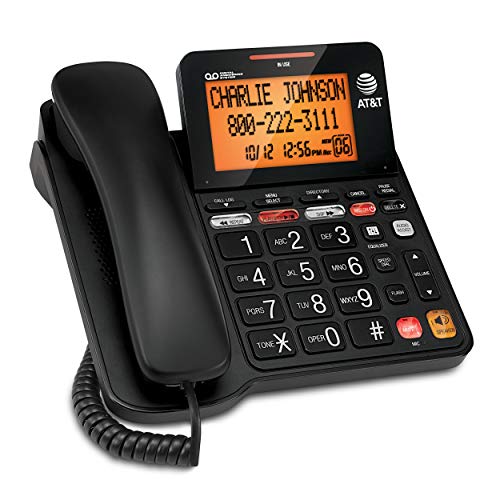
The AT&T CD4930 offers elderly users a straightforward corded phone that combines essential calling features with built-in message management, making it ideal if you’re looking for a single device that handles both communication and message storage without requiring multiple gadgets. You’ll access caller ID and call history from both the handset and base unit. The tilted LCD display on the base adjusts for comfortable viewing angles. You can record up to 25 minutes of incoming messages, outgoing announcements, and personal memos. The speakerphone function enables hands-free conversation. You’ll play back, skip, repeat, or selectively delete messages directly from either the handset or base, streamlining your daily communication needs.
- Connection Type:Corded landline
- Button Size & Design:Standard buttons with backlit display
- Quick Dialing/Memory:Caller ID with call history
- Audio Features:Speakerphone with hands-free talking
- Visual Call Indicators:Backlit LCD display with caller ID and call waiting
- Power Requirements:AC power required
- Additional Feature:Records 25 minutes messages
- Additional Feature:Tilted base LCD display
- Additional Feature:Caller ID with call history
CallToU Wireless Caregiver Pager Nurse Alert System
Looking for a way to keep elderly relatives safe while they move freely around your home? The CallToU Wireless Caregiver Pager offers dependable communication between you and your loved one. The system includes one receiver unit and one call button. Plug the receiver into any electrical outlet; it reaches up to 500+ feet in open areas. Your relative wears the call button as a pendant or secures it with a bracket. When they need assistance, they press the button once. You receive an immediate alert through one of 55 available ring tones. Adjust the volume across five levels, ranging from 0 to 110 decibels, depending on your hearing needs. The waterproof design works in bathrooms and outdoors. Customer service remains available 24 hours for support.
- Connection Type:Wireless caregiver pager (500+ ft range)
- Button Size & Design:Single call button (pendant or bracket)
- Quick Dialing/Memory:Single-button alert to caregiver
- Audio Features:55 ring tones, 5-level adjustable volume (0-110 dB)
- Visual Call Indicators:No visual indicator
- Power Requirements:Electrical outlet required for receiver
- Additional Feature:500+ feet open range
- Additional Feature:Waterproof and dustproof design
- Additional Feature:55 selectable ring tones
AT&T TRIMLINE 213 Corded Phone Senior Friendly
If you’re searching for a reliable landline phone that requires zero external power and offers oversized buttons for easier dialing, the AT&T TRIMLINE 213 delivers both simplicity and dependability. This corded phone operates entirely through your landline connection, eliminating battery concerns. The lighted keypad lets you see numbers in dim lighting, while the visual ringer alerts you to incoming calls through light signals rather than sound alone. You’ll find ten speed-dial keys for quick one-touch calling. Mount it on your wall for convenient access, adjust the receiver and ringer volume to your preference, or activate mute when needed. The robust construction and straightforward interface make this 1968-designed model suitable for home or office use.
- Connection Type:Corded landline
- Button Size & Design:Extra big buttons with lighted keypad
- Quick Dialing/Memory:Speed dial with 10 keys
- Audio Features:Receiver and ringer volume control, mute option
- Visual Call Indicators:Visual ringer signals
- Power Requirements:No AC power needed (line-power mode)
- Additional Feature:Visual ringer light indicator
- Additional Feature:Lighted keypad for darkness
- Additional Feature:Speed dial 10 keys
VTech SN5307 Amplified Photo Dial Accessory Handset
VTech’s SN5307 works best for seniors who need a secondary handset with simplified calling features and visual alerts for incoming calls. This accessory handset requires either an SN5127 or SN5147 base unit to function. You’ll benefit from four photo dial entries that let you attach pictures to frequently called numbers for quick recognition. The handset includes a visual ringing indicator that flashes at the top when calls arrive, especially helpful if you’re hearing impaired. A full-duplex speakerphone allows simultaneous talking and listening. The single lithium-ion battery provides four days of talk and standby time combined. Big buttons and a large display ensure easy operation.
- Connection Type:Corded electric with handset battery
- Button Size & Design:Big buttons with large display
- Quick Dialing/Memory:Photo dial with 4 frequently dialed numbers
- Audio Features:Full-duplex handset speakerphone with caller ID announce
- Visual Call Indicators:Visual ringing indicator (handset light flashes)
- Power Requirements:1 Lithium Ion battery + corded electric
- Additional Feature:Photo dial quick identification
- Additional Feature:Caller ID voice announce
- Additional Feature:Full-duplex speakerphone function
Uvital Big Button Phone for Seniors with One-Touch Dialing
The Uvital Big Button Phone works best for seniors who need a straightforward phone without extra features like call display or internet access. You’ll store frequently dialed numbers in nine large one-touch buttons with replaceable pictures for easy identification. The device includes ten two-button memory groups for quick contact access. You’ll adjust ringer volume across OFF, LOW, and HIGH settings up to 120 dB, and handset volume in three levels. The built-in loudspeaker enables hands-free calling at 98 dB. Since it’s corded and requires no batteries, you’ll plug it directly into your phone line using the RJ11 connector. The phone carries a one-year warranty and qualifies for Amazon’s 30-day return guarantee.
- Connection Type:Corded landline
- Button Size & Design:9 large one-touch dialing buttons
- Quick Dialing/Memory:9 one-touch buttons + 10 groups of two-button memory
- Audio Features:Up to 120 dB ringer, adjustable 3-level handset + 98 dB speaker volume
- Visual Call Indicators:LED incoming call indicator (flashing light)
- Power Requirements:No batteries or external power needed (landline-powered)
- Additional Feature:Replaceable button picture labels
- Additional Feature:Up to 120 dB ringer
- Additional Feature:No display/internet required
Factors to Consider When Choosing a One Button Phone for Elderly
When you’re selecting a one button phone for an elderly person, you’ll want to evaluate several key features that directly impact usability and safety. Check the button size and accessibility first, then assess the audio volume and clarity to ensure your loved one can hear calls comfortably, verify the memory storage capacity for storing important contacts, confirm the phone includes visual alert indicators for incoming calls, and finally confirm the device offers reliable power management and consistent performance. Each of these factors works together to create a phone that’s both simple to operate and dependable in emergencies.
Button Size and Accessibility
How important is button size when you’re selecting a one-button phone for an elderly user? Button size directly affects usability and safety. Look for phones with buttons measuring 1.06 to 1.18 inches—large enough to prevent accidental presses. Avoid models with small, densely packed keypads that increase dialing errors.
Consider phones offering 9 or more speed-dial buttons for frequently called contacts. This reduces the number of presses needed per call. Memory buttons like M1, M2, and SOS enable single-press calling to essential contacts.
Choose models with replaceable or picture-backed buttons if the user has visual impairments. This customization improves recognition and reduces confusion. Test the phone’s tactile feedback to ensure buttons provide clear resistance and audible confirmation when pressed.
Audio Volume and Clarity
After ensuring your elderly user can easily press buttons, you’ll need to address whether they can hear incoming calls and conversations clearly. Look for handset volume adjustment that reaches 80 dB or higher to support clear conversations. An amplified ringer of 110 dB or above ensures callers get noticed even in noisy environments, preventing missed calls. If the phone includes a speakerphone, verify it delivers high output for hands-free conversations without distortion. Consider models offering visual indicators like flashing lights to supplement audio alerts for users with reduced hearing. Some phones combine both high handset volume and loud ringer, providing multiple accessibility channels. Test volume levels with your user before purchasing to confirm the settings meet their specific hearing needs.
Memory Storage Capacity
What’s the most reliable way to prevent your elderly user from struggling with manual dialing? Memory storage capacity offers a direct solution. Look for one-button phones with at least two quick-dial slots, labeled M1 and M2, for storing frequently called numbers. Some models provide ten or more memory options, allowing you to program multiple contacts without repetition. Dedicated SOS or emergency buttons store urgent contacts separately for immediate access. Programming stored numbers eliminates dialing errors by removing manual entry requirements. Before purchasing, verify that the model retains stored numbers during power outages, particularly for landline-dependent devices. Check whether the phone requires a specific setup process to activate memory functions. Test the quick-dial feature after programming to confirm numbers save correctly.
Visual Alert Indicators
Beyond storing numbers reliably, you’ll want your elderly user to actually notice when calls arrive. Visual alert indicators solve this problem by providing non-audio notification methods. LED indicators flash when calls come in, offering a clear visual cue that doesn’t rely on hearing. Some models combine LED indicators with loud ring tones to serve users with varying abilities. You should look for phones featuring flashing lights as a standard feature. Check whether the LED indicator is bright enough to be visible in different lighting conditions. Pairing visual alerts with high-volume audio options ensures calls won’t be missed. This combination reduces missed calls markedly by delivering notifications through multiple sensory channels, making it ideal for elderly users with hearing difficulties.
Power and Reliability
Most one-button phones for elderly users fall into two categories based on how they draw power: corded landline models and wireless devices. Corded landline phones draw power directly from the telephone line itself, eliminating the need for an external power source. This design ensures your phone remains operational during power outages, a critical safety feature for elderly users who depend on reliable communication. Wireless caregiver pagers, by contrast, require outlet-powered receivers with ranges up to 500+ feet in open areas. However, their reliability can be affected by interference and environmental factors. When selecting a phone, prioritize corded models if consistent power availability matters most. Choose wireless options only if you’ve confirmed stable electrical supply and acceptable signal strength in your home.
Durability and Warranty
You’ll want to examine the physical construction of any one-button phone you’re considering, since a reliable power source alone won’t help if the device itself breaks down under regular use. Look for sturdy enclosure materials like durable plastic and reinforced buttons designed to withstand repeated pressing and accidental drops. Check whether the phone has splash- or dust-resistant ratings, which protect against kitchen spills and bathroom moisture. Verify the cord or mounting system is secure and well-anchored to prevent tangling and falls. Finally, review warranty coverage carefully. Compare 30-day return policies and manufacturer warranties across models. A comprehensive warranty protects you against durability failures and gives you recourse if the phone malfunctions within the coverage period.
Ease of Setup
How simple is the initial setup process? You’ll want a phone that memorizes numbers in about 20 seconds with clear on-device prompts guiding each step. Look for models with large memory buttons and straightforward instructions requiring minimal steps to store favorite numbers or emergency contacts. Choose devices offering one-touch speed dial features like M1, M2, and SOS buttons for rapid dialing without complexity. Select phones with visible indicators and audible prompts during setup—flashing lights or confirmation sounds help you confirm each action. Avoid phones requiring external software or complicated programming sequences. Prefer corded landline models with manual setup options printed directly on the device. The goal is selecting a phone where you can complete the entire setup independently without consulting manuals repeatedly or needing technical assistance.
Final Thoughts
You’ll find the right one-button phone by matching your needs to available features. Start by evaluating hearing and vision abilities, then prioritize models with large buttons, loud ringers (110+ dB), and SOS functions. Consider whether you need corded reliability or wireless flexibility. Test memory setup speed—most phones dial within 20 seconds. Finally, confirm the phone fits your home environment: wall-mounted, desk-based, or portable options exist for different situations.

Meet Ry, “TechGuru,” a 36-year-old technology enthusiast with a deep passion for tech innovations. With extensive experience, he specializes in gaming hardware and software, and has expertise in gadgets, custom PCs, and audio.
Besides writing about tech and reviewing new products, he enjoys traveling, hiking, and photography. Committed to keeping up with the latest industry trends, he aims to guide readers in making informed tech decisions.