

If you’re looking to connect wireless audio devices or peripherals to your PC, you’ll need a reliable Bluetooth transmitter that won’t drain your patience with connection drops or compatibility issues. You’ve got several solid options available, each with different features like range, speed, and price points. The right choice depends on what you’re connecting and how far away your devices sit from your computer. Here’s how to find the best fit for your setup.
| TP-Link USB Bluetooth 5.4 Adapter Dongle (UB500) |

| Most Compact Design | Bluetooth Version: Bluetooth 5.4 | Device Type: USB adapter/dongle | Windows Compatibility: Windows 11/10/8.1/7 | VIEW LATEST PRICE | Read Our Analysis |
| Long Range USB Bluetooth 5.3 Adapter for Desktop PC |

| Best Range Coverage | Bluetooth Version: Bluetooth 5.3 | Device Type: USB adapter/dongle | Windows Compatibility: Windows 11/10/8.1 | VIEW LATEST PRICE | Read Our Analysis |
| 1Mii B06TX+ Bluetooth 5.3 Transmitter for TV/PC |
| Best For TV Setup | Bluetooth Version: Bluetooth 5.3 | Device Type: Transmitter (non-USB, multi-input) | Windows Compatibility: Windows (via PC connection) | VIEW LATEST PRICE | Read Our Analysis |
| Wansurs Bluetooth 5.1 USB Adapter for PC (2-Pack) |

| Best Value 2-Pack | Bluetooth Version: Bluetooth 5.1 | Device Type: USB adapter/dongle (2-pack) | Windows Compatibility: Windows 11/10 | VIEW LATEST PRICE | Read Our Analysis |
| Bluetooth Adapter USB Dongle for PC & Laptops |

| Best Overall | Bluetooth Version: Bluetooth 5.4 | Device Type: USB adapter/dongle | Windows Compatibility: Windows 11/10/8.1 | VIEW LATEST PRICE | Read Our Analysis |
| TP-Link USB Bluetooth 4.0 Adapter (UB400) |
| Budget-Friendly Pick | Bluetooth Version: Bluetooth 4.0 | Device Type: USB adapter/dongle | Windows Compatibility: Windows 11/10/8.1/8/7/XP | VIEW LATEST PRICE | Read Our Analysis |
| Avantree DG45 USB Bluetooth Adapter for PC |

| Most Device Compatible | Bluetooth Version: Bluetooth (version not specified) | Device Type: USB adapter/dongle | Windows Compatibility: Windows 11/10/8.1/8 | VIEW LATEST PRICE | Read Our Analysis |
| Creative BT-W5 Smart Bluetooth Audio Transmitter |

| Premium Audio Quality | Bluetooth Version: Bluetooth 5.3 | Device Type: USB-C transmitter dongle | Windows Compatibility: Compatible with PC/Windows devices | VIEW LATEST PRICE | Read Our Analysis |
More Details on Our Top Picks
TP-Link USB Bluetooth 5.4 Adapter Dongle (UB500)
If you’re using a Windows PC and need a straightforward way to connect wireless devices without built-in Bluetooth, the TP-Link UB500 is your best choice. This nano-sized dongle uses Bluetooth 5.4 technology, offering faster data transfer and broader coverage than older versions. Simply plug it into any USB port on your desktop or laptop. Before setup, disable your PC’s internal Bluetooth in Device Manager to prevent driver conflicts. The UB500 works with keyboards, mice, headsets, and phones. Download the latest drivers from TP-Link’s website if you’re running Windows 7; Windows 8 and newer typically install automatically. You’ll have reliable wireless connectivity within seconds.
- Bluetooth Version:Bluetooth 5.4
- Device Type:USB adapter/dongle
- Windows Compatibility:Windows 11/10/8.1/7
- Simultaneous Device Connections:Not specified
- Data Transfer Rate:Up to 2 Mbps
- Warranty:2-year manufacturer
- Additional Feature:Nano design ultra-small
- Additional Feature:Backward compatible Bluetooth 2.0-5.3
- Additional Feature:Up to 4x broader coverage
Long Range USB Bluetooth 5.3 Adapter for Desktop PC
Are you working from a distance away from your desktop and need reliable wireless connectivity across a large office or home space? This Bluetooth 5.3 adapter delivers Class 1 radio technology with an extended antenna, transmitting up to 328 feet in open areas. Simply insert it into your USB port—no driver installation required. You’ll connect five devices simultaneously, including keyboards, mice, headsets, and speakers. The EDR technology supports 3 Mbps data rates, minimizing 2.4 GHz interference for fast, low-delay connections. It’s compatible with Windows 11, 10, and 8.1, though not with Mac OS or Linux systems.
- Bluetooth Version:Bluetooth 5.3
- Device Type:USB adapter/dongle
- Windows Compatibility:Windows 11/10/8.1
- Simultaneous Device Connections:Up to 5 devices
- Data Transfer Rate:Up to 3 Mbps
- Warranty:Not specified
- Additional Feature:Open-area 328 ft range
- Additional Feature:No driver installation required
- Additional Feature:Supports 5 simultaneous devices
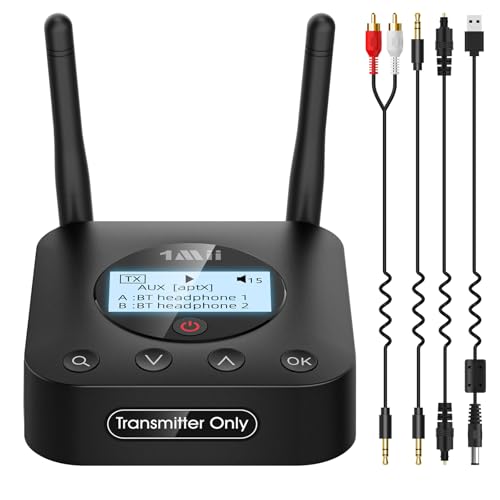
1Mii B06TX+ Bluetooth 5.3 Transmitter for TV/PC
Looking to stream audio from your TV or PC to two wireless headphones at the same time? The 1Mii B06TX+ Bluetooth 5.3 Transmitter handles exactly that. Connect it via AUX, RCA, Optical, or Coaxial inputs to your source device. The screen display guides you through pairing your two headphones or speakers. This transmitter supports aptX Low Latency technology, which synchronizes audio with video on compatible devices. Because it’s transmitter-only, you’ll need headphones that support aptX profiles. The compact black unit requires a 5V power source and delivers long-range connectivity. Setup takes minutes: plug in the power, select your audio input type, and pair your wireless devices through the intuitive interface.
- Bluetooth Version:Bluetooth 5.3
- Device Type:Transmitter (non-USB, multi-input)
- Windows Compatibility:Windows (via PC connection)
- Simultaneous Device Connections:2 devices (dual-link)
- Data Transfer Rate:Not specified
- Warranty:1-year
- Additional Feature:Dual-link connects 2 devices
- Additional Feature:Multiple audio input options
- Additional Feature:aptX Low Latency technology
Wansurs Bluetooth 5.1 USB Adapter for PC (2-Pack)
The Wansurs Bluetooth 5.1 USB Adapter works best for users who want a straightforward, hassle-free way to connect multiple wireless devices to their Windows PC without dealing with driver installation or complex setup procedures. You’ll plug the adapter into any USB 2.0 port, and it’ll immediately recognize your speakers, keyboards, mice, and headphones. The dual-pack gives you flexibility—place one adapter on your desktop and another on your laptop. With Bluetooth 5.1 technology and a 32-foot range, you’ll experience stable connections for music streaming and file transfers. The lightweight design won’t obstruct your workspace. Windows 10 and 11 users gain reliable wireless connectivity that simply works without technical complications.
- Bluetooth Version:Bluetooth 5.1
- Device Type:USB adapter/dongle (2-pack)
- Windows Compatibility:Windows 11/10
- Simultaneous Device Connections:Not specified
- Data Transfer Rate:Up to 3 Mbps
- Warranty:2-year manufacturer
- Additional Feature:Two-pack included
- Additional Feature:Driver-free plug-and-play
- Additional Feature:32 ft open-area range
Bluetooth Adapter USB Dongle for PC & Laptops
If you’ve got a desktop PC or laptop running Windows and need to connect multiple wireless devices without fussing with built-in Bluetooth that’s either missing or unreliable, the QGOO Bluetooth 5.4 USB Dongle offers straightforward plug-and-play functionality that gets you up and running in minutes. Simply insert the adapter into an available USB port, disable any existing Bluetooth function, and pair your devices. The dongle supports up to five simultaneous connections for mice, keyboards, headphones, and phones. Its compact design won’t obstruct adjacent ports. With backward compatibility spanning Bluetooth versions 5.3 down to 1.1, enhanced anti-interference technology, and a 2-year warranty, you’re getting reliable wireless connectivity with minimal setup hassle.
- Bluetooth Version:Bluetooth 5.4
- Device Type:USB adapter/dongle
- Windows Compatibility:Windows 11/10/8.1
- Simultaneous Device Connections:Up to 5 devices
- Data Transfer Rate:Up to 4 Mbps
- Warranty:2-year manufacturer
- Additional Feature:Ultra-compact mini dongle
- Additional Feature:Connect up to 5 devices
- Additional Feature:Up to 4 Mbps transfer
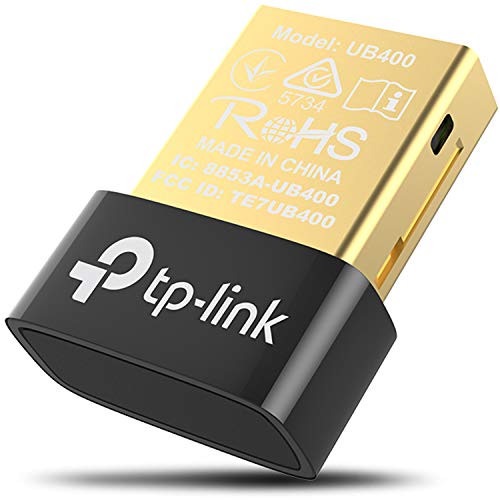
TP-Link USB Bluetooth 4.0 Adapter (UB400)
Want a budget-friendly Bluetooth solution that works right out of the box for Windows systems? The TP-Link UB400 delivers. This nano-sized USB adapter supports Windows 11, 10, 8.1, 8, 7, and XP without requiring drivers on newer systems. For Windows 7 and XP, download drivers from TP-Link’s website. The adapter connects to wireless keyboards, headsets, speakers, printers, and controllers within a 65-foot range. Bluetooth 4.0 technology ensures backward compatibility with older devices while consuming minimal power. Installation takes seconds—simply insert the dongle into an available USB port. You’ll receive a 24-month warranty and access to free technical support. The UB400 isn’t compatible with Mac, Linux, or televisions.
- Bluetooth Version:Bluetooth 4.0
- Device Type:USB adapter/dongle
- Windows Compatibility:Windows 11/10/8.1/8/7/XP
- Simultaneous Device Connections:Not specified
- Data Transfer Rate:Up to 480 Mbps (USB)
- Warranty:24-month
- Additional Feature:65 ft operating range
- Additional Feature:A2DP audio streaming support
- Additional Feature:Free 24/7 technical support
Avantree DG45 USB Bluetooth Adapter for PC
Looking to add Bluetooth capability to your Windows PC without replacing your entire system? The Avantree DG45 works with Windows 11, 10, 8.1, and 8 to connect up to seven Bluetooth devices simultaneously. You can pair headphones, speakers, keyboards, mice, printers, and smartwatches for stable, low-energy performance. Stream stereo music to Bluetooth headphones or speakers, and use compatible headphone microphones for voice calls on Skype, Zoom, and Teams. Note that this adapter doesn’t work with non-Bluetooth audio devices, 2.4G peripherals, Wi-Fi devices, or macOS systems. Simply plug the adapter into your PC’s USB port, then pair your Bluetooth devices through your system settings.
- Bluetooth Version:Bluetooth (version not specified)
- Device Type:USB adapter/dongle
- Windows Compatibility:Windows 11/10/8.1/8
- Simultaneous Device Connections:Up to 7 devices
- Data Transfer Rate:Not specified
- Warranty:Not specified
- Additional Feature:Connect 7 simultaneous devices
- Additional Feature:Voice call support Skype/Zoom
- Additional Feature:Multi-device stable connection
Creative BT-W5 Smart Bluetooth Audio Transmitter
The Creative BT-W5 stands out for users who need seamless switching between multiple devices without interrupting their workflow. This transmitter supports 24-bit/96 kHz audio with aptX Adaptive codec, which automatically adjusts bitrate based on your environment. You’ll connect it via USB-C to your PC—no drivers required. Press the multifunction button to switch between up to four paired devices, or use the Creative app for manual selection. A built-in microphone enables hands-free calls when you activate HFP mode by double-pressing the button. The plug-and-play setup makes installation instant.
- Bluetooth Version:Bluetooth 5.3
- Device Type:USB-C transmitter dongle
- Windows Compatibility:Compatible with PC/Windows devices
- Simultaneous Device Connections:Remembers up to 4 devices
- Data Transfer Rate:24-bit / 96 kHz audio
- Warranty:One year limited
- Additional Feature:24-bit/96 kHz audio streaming
- Additional Feature:Remembers up to 4 devices
- Additional Feature:Built-in hands-free microphone
Factors to Consider When Choosing a Bluetooth Transmitter for PC
When you’re selecting a Bluetooth transmitter for your PC, you’ll need to evaluate five key factors that directly affect performance: Bluetooth version compatibility (which determines speed and range), operating system support (ensuring it works with Windows, Mac, or Linux), device connection capacity (how many devices you can pair simultaneously), range and coverage area (the distance your transmitter operates effectively), and data transfer speed (which impacts audio quality and responsiveness). Start by checking your PC’s specifications and the devices you plan to connect, then cross-reference these requirements against each transmitter’s technical specs to find the best match. This systematic approach prevents compatibility issues and ensures you purchase a transmitter that actually meets your needs.
Bluetooth Version Compatibility
Since Bluetooth versions directly affect data transfer speed, connection range, and device compatibility, you’ll want to understand how they impact your transmitter choice. Newer versions like 5.4 and 5.3 deliver faster data rates and better interference resistance than older versions like 4.0 or 2.1. Check your devices’ Bluetooth versions first. If you’re connecting mixed-generation devices, remember that backward compatibility works, but the oldest version in your connection limits available features. Look for dual-mode BR/EDR plus BLE adapters if you need both classic Bluetooth and low-energy connections. Consider that the version you choose also affects latency and multipoint performance—how many devices you can connect simultaneously. Match your transmitter’s version to your devices’ capabilities for optimal performance.
Operating System Support
Have you verified that your chosen Bluetooth transmitter actually supports your specific operating system? Start by checking the product specifications for explicit OS compatibility—Windows 11, Windows 10, Windows 8.1, or other versions. Some transmitters work exclusively with Windows, while others support macOS and Linux as well. Next, determine whether your device requires drivers or operates plug-and-play. Visit the manufacturer’s website and download any necessary drivers matching your exact OS version. Confirm the minimum Windows version requirement to ensure proper driver installation and feature access. Finally, check if the manufacturer provides firmware updates for your OS to maintain compatibility with newer Bluetooth standards. This verification process prevents compatibility problems before purchase and guarantees seamless functionality with your PC.
Device Connection Capacity
How many devices do you need to connect simultaneously to your PC? Device connection capacity determines whether a transmitter suits your setup. Most adapters support between 5 and 7 devices at once, though actual limits depend on hardware, driver support, and interference in the 2.4 GHz band. Before purchasing, identify which devices you’ll connect: keyboards, mice, headphones, speakers, or printers. If you’re streaming audio to multiple speakers or headphones simultaneously, verify the model explicitly supports dual-link or multi-device capability. Check the product specifications for the maximum concurrent device count. This ensures your transmitter handles your exact needs without connectivity issues or dropped connections during use.
Range and Coverage Area
Where you’ll place your Bluetooth transmitter and how far your devices need to be from your PC directly affects which model you should buy. Standard devices reach about 32 feet in open space, while Class 1 models extend up to 328 feet with external antennas. However, walls, furniture, and other 2.4 GHz devices reduce real-world range considerably. Evaluate your setup by measuring the distance between your PC and where you’ll use your Bluetooth devices. If you need coverage across multiple rooms, choose a Class 1 transmitter with an external antenna. For single-room use, standard models work well. Also consider that extended range may increase latency or reduce data speed in some cases, so balance coverage needs with performance requirements.
Data Transfer Speed
You’ll want to pay attention to data transfer speed because it directly affects how quickly your files move between devices and how smoothly your audio streams over Bluetooth. Most USB Bluetooth adapters offer 3–4 Mbps for standard connections, but newer Bluetooth 5.x models deliver faster rates. Look for adapters with EDR (enhanced data rate) support, which boosts peak speeds beyond basic capabilities. Check the specifications for the profiles your devices use—audio applications have different speed requirements than file transfers. Keep in mind that real-world speeds drop below theoretical maximums due to distance, obstacles, and interference. When selecting an adapter, match its data rate to your primary use case and ensure device compatibility for stable, consistent performance.
Form Factor and Portability
The physical design of your Bluetooth transmitter determines how well it fits into your workspace and whether it’ll travel with you without hassle. Nano-sized dongles minimize desk clutter and remain plugged in during travel without blocking adjacent ports. These compact adapters typically feature USB-A connections that work with most computers through plug-and-play setup, requiring no external power or driver installation on compatible Windows systems.
Consider the trade-offs: smaller form factors prioritize portability but may reduce antenna range compared to larger models. Check whether the transmitter uses a standard USB-A interface to ensure compatibility with your devices. Black or gold finishes blend seamlessly with laptop and desktop equipment. Evaluate your typical use—stationary setup or frequent travel—to determine if a nano dongle or standard-sized adapter better serves your needs.
Warranty and Technical Support
How well does a manufacturer stand behind its product? Check the warranty duration first—look for at least a 2-year coverage period that protects against defects and dead-on-arrival units. Verify what’s included: does it cover accessories, USB port failures, and driver compatibility issues? Next, confirm technical support availability. Determine whether the manufacturer offers 24/7 assistance or business-hours-only support, then assess response times for your needs. Review the warranty conditions carefully. You’ll need to understand whether unopened packaging or proof of purchase is required. Finally, locate the RMA return process documentation. This should clearly outline the steps you must follow, required timelines, and whether you receive repairs or replacements. Strong warranty and support policies protect your investment and resolve issues quickly.
Final Thoughts
You’ve reviewed eight reliable Bluetooth transmitters suited for different PC needs. Select based on your specific requirements: choose the TP-Link UB500 for balanced performance, the Long Range adapter for extended distance, or the 1Mii B06TX+ for TV and PC use. Consider your device compatibility, desired range, and whether you need multi-device pairing. Install your chosen adapter, follow setup instructions, and test connectivity before regular use.

Meet Ry, “TechGuru,” a 36-year-old technology enthusiast with a deep passion for tech innovations. With extensive experience, he specializes in gaming hardware and software, and has expertise in gadgets, custom PCs, and audio.
Besides writing about tech and reviewing new products, he enjoys traveling, hiking, and photography. Committed to keeping up with the latest industry trends, he aims to guide readers in making informed tech decisions.