
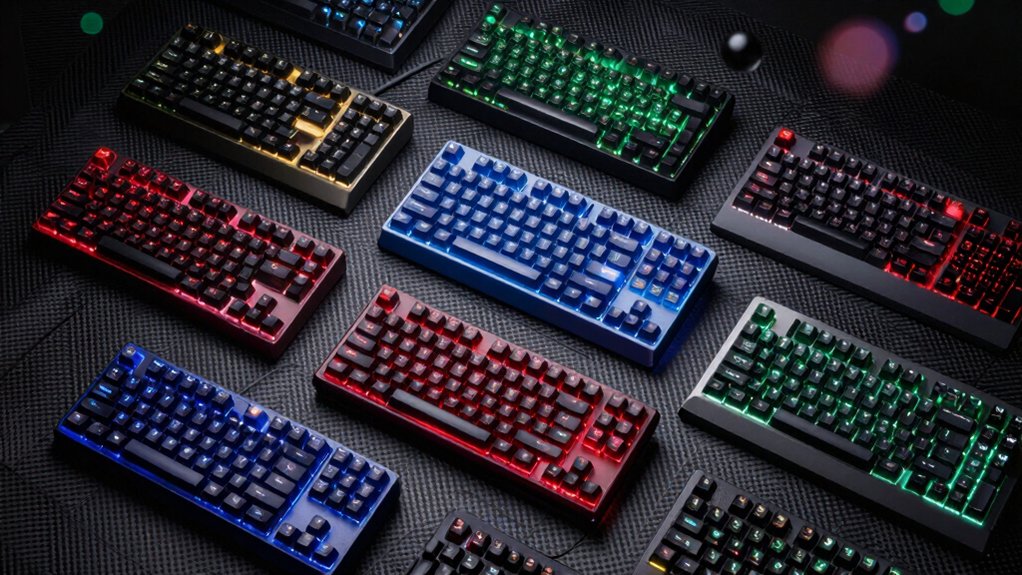

If you’re serious about competitive gaming, you need a keyboard that responds to your commands instantly. Macro keys let you execute complex sequences with a single press, giving you the speed advantage that separates winners from everyone else. Seven standout keyboards—from budget-friendly options to premium setups—offer programmable keys, customizable profiles, and features that match different gaming styles. The right choice depends on what you’re actually playing and how you want to set things up. Here’s what you need to know.
| Redragon K580 VATA RGB Mechanical Gaming Keyboard |

| Best For Customization | Macro Keys: 5 macro keys (G1–G5) | Connection Type: Wired | Keyboard Type: Mechanical (hot-swappable) | VIEW LATEST PRICE | Read Our Analysis |
| Corsair K55 RGB PRO Gaming Keyboard with Macro Keys |

| Best For Casual Gamers | Macro Keys: 6 dedicated macro keys | Connection Type: Wired | Keyboard Type: Membrane | VIEW LATEST PRICE | Read Our Analysis |
| K1 Pro Macro Keyboard with Screen & RGB Backlit |

| Best Overall | Macro Keys: Full-key programmable (87 keys) | Connection Type: Wired USB-C | Keyboard Type: Mechanical (hot-swappable) | VIEW LATEST PRICE | Read Our Analysis |
| Razer Tartarus V2 Gaming Keypad with RGB Lighting |

| Best One-Handed Option | Macro Keys: 32 programmable keys | Connection Type: Wired | Keyboard Type: Mecha-membrane | VIEW LATEST PRICE | Read Our Analysis |
| Redragon K517 Pro Wireless Gaming Keyboard RGB Backlit |

| Best Wireless Choice | Macro Keys: 4 dedicated macro keys | Connection Type: Tri-mode (wired, Bluetooth, 2.4GHz wireless) | Keyboard Type: Rubber dome with mechanical feel | VIEW LATEST PRICE | Read Our Analysis |
| VSDINSIDE Macro Keypad 18 Programmable Keys Gaming Controller |

| Best Stream Controller | Macro Keys: 18 programmable LCD keys | Connection Type: Wired USB-C | Keyboard Type: Macro keypad (LCD keys) | VIEW LATEST PRICE | Read Our Analysis |
| Vaydeer One-Handed Mechanical Keyboard with Programmable Keys |
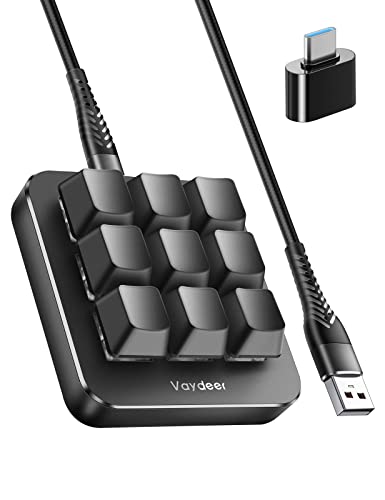
| Best For Productivity | Macro Keys: 9 NKRO keys with macros | Connection Type: Wired | Keyboard Type: Mechanical | VIEW LATEST PRICE | Read Our Analysis |
More Details on Our Top Picks
Redragon K580 VATA RGB Mechanical Gaming Keyboard
Want a gaming keyboard that lets you record macros instantly without installing extra software? The Redragon K580 VATA delivers onboard macro recording through five dedicated macro keys (G1–G5). You’ll record complex command sequences on the fly during gameplay without pausing to configure software. The hot-swappable socket accepts nearly all switch types, letting you customize your tactile experience. You’ll appreciate the 50-million-keystroke durability rating and robust build quality. The keyboard includes dedicated multimedia controls with a convenient volume and backlight wheel. You’re also getting 18 RGB lighting modes with per-key customization options. The double-shot injection-molded keycaps resist fading, and the waterproof, dust-resistant design handles intense gaming sessions. This keyboard combines practical macro functionality with solid mechanical construction and lighting flexibility.
- Macro Keys:5 macro keys (G1–G5)
- Connection Type:Wired
- Keyboard Type:Mechanical (hot-swappable)
- RGB Lighting:18 RGB backlight models with per-key customization
- Software Required:No software required (onboard recording)
- Durability:50 million keystrokes
- Additional Feature:Hot-swappable socket compatibility
- Additional Feature:Double-shot injection molded keycaps
- Additional Feature:Onboard macro recording capability
Corsair K55 RGB PRO Gaming Keyboard with Macro Keys
If you’re looking for a gaming keyboard that combines durability with extensive customization options, the Corsair K55 RGB PRO delivers both through its six dedicated macro keys and IP42 dust and spill-resistant design. Program these macro keys using CORSAIR iCUE software to execute functions, shortcuts, or keypresses instantly. You’ll also integrate streaming commands via Elgato Stream Deck software for seamless content creation. The membrane design provides reliable performance across PC, Mac, and Xbox platforms. Customize dynamic RGB backlighting across five zones with six onboard effects, or create personalized patterns through iCUE. Use dedicated volume and media keys for quick playback control without pausing gameplay. The detachable palm rest with textured rubber reduces hand fatigue during extended sessions, while the wired connection ensures stable, uninterrupted performance.
- Macro Keys:6 dedicated macro keys
- Connection Type:Wired
- Keyboard Type:Membrane
- RGB Lighting:6 onboard effects across 5 zones
- Software Required:CORSAIR iCUE software
- Durability:IP42 dust and spill resistance
- Additional Feature:Detachable palm rest included
- Additional Feature:IP42 dust and spill-resistant
- Additional Feature:Elgato Stream Deck integration
K1 Pro Macro Keyboard with Screen & RGB Backlit
The K1 Pro excels for gamers and content creators who need instant access to complex command sequences without breaking focus during gameplay. You’ll program macros directly on-board using the VSD Craf software, assigning shortcuts and multi-step operations to the 6 LCD keys across unlimited switchable pages. The built-in TFT color display shows customized images for each key, letting you recognize commands instantly. You can control volume, backlighting, and connection modes through the screen and 3 knobs. The 87-key layout features hot-swappable switches, gasket mount construction, and RGB backlighting with 16.8 million colors adjustable via software or shortcut keys.
- Macro Keys:Full-key programmable (87 keys)
- Connection Type:Wired USB-C
- Keyboard Type:Mechanical (hot-swappable)
- RGB Lighting:Multiple dynamic modes (16.8 million colors)
- Software Required:VSD Craf software (Windows/macOS compatible)
- Durability:Up to 50 million keystrokes (gasket mount)
- Additional Feature:Built-in smart LCD display
- Additional Feature:Gasket mount with dampening
- Additional Feature:Pre-lubed stabilizers and switches
Razer Tartarus V2 Gaming Keypad with RGB Lighting
Looking for a one-handed keyboard that streamlines your gaming setup? The Razer Tartarus V2 features 32 programmable keys and an 8-way directional thumbpad designed for console-style movement controls. Its mecha-membrane switches deliver tactile feedback while maintaining a soft, cushioned feel suitable for extended gaming sessions. You can customize complex commands through fully programmable macros and Razer Hypershift, which remaps all keys and combinations. The device integrates Razer Chroma RGB lighting with 16.8 million color options, syncing across popular games, other Razer hardware, Philips Hue, and 30+ partners. This ergonomic layout provides more natural controls, particularly benefiting players accustomed to console-oriented gameplay while optimizing your desk space.
- Macro Keys:32 programmable keys
- Connection Type:Wired
- Keyboard Type:Mecha-membrane
- RGB Lighting:Razer Chroma RGB (16.8 million colors)
- Software Required:Razer software
- Durability:High-performance mecha-membrane switches
- Additional Feature:8-way directional thumbpad
- Additional Feature:32 programmable keys
- Additional Feature:Razer Hypershift key remapping
Redragon K517 Pro Wireless Gaming Keyboard RGB Backlit
Want a compact keyboard that doesn’t sacrifice gaming performance or essential keys? The Redragon K517 Pro delivers a 94-key layout with four dedicated macro keys you can program without extra software. You’ll choose between USB-C wired, Bluetooth 3.0/5.0, or 2.4GHz wireless modes using a physical switch. The keyboard features high-elasticity rubber domes for responsive typing with lighter resistance than mechanical switches. Its 4000mAh battery supports extended wireless sessions. You can customize RGB illumination across eight preset modes and seven solid colors at five brightness levels. The dual-system switch lets you toggle between Windows and Mac without unplugging, streamlining your workflow across devices and gaming sessions.
- Macro Keys:4 dedicated macro keys
- Connection Type:Tri-mode (wired, Bluetooth, 2.4GHz wireless)
- Keyboard Type:Rubber dome with mechanical feel
- RGB Lighting:8 preset RGB modes with 7 solid colors
- Software Required:No extra software (editable on-board)
- Durability:High-elasticity rubber domes
- Additional Feature:Tri-mode connection capability
- Additional Feature:Dual-system Windows/Mac switching
- Additional Feature:4000mAh battery capacity
VSDINSIDE Macro Keypad 18 Programmable Keys Gaming Controller
If you’re a streamer, video editor, or competitive gamer who needs instant access to complex commands, the VSDINSIDE Macro Keypad delivers 18 programmable keys that’ll cut your workflow time substantially. The device combines 15 LCD keys and 3 buttons, letting you customize macros, game combos, and app launches. Each LCD key displays different images or animations in JPG, PNG, or GIF format. You’ll connect via USB-C to Windows 11+ or macOS 14+, and the software integrates directly with OBS, Streamlabs, Photoshop, and Discord. The Operation Follow feature enables sequential or simultaneous macro execution for complex tasks. An RGB light ring cycles automatically or accepts custom colors. The compact, ambidextrous design measures 4.6 x 4.1 x 0.8 inches and includes additional plugins for scheduling, weather, and timers.
- Macro Keys:18 programmable LCD keys
- Connection Type:Wired USB-C
- Keyboard Type:Macro keypad (LCD keys)
- RGB Lighting:RGB light ring with customizable colors
- Software Required:Proprietary software (Windows 11+, macOS 14+)
- Durability:Premium ABS/PMMA/polycarbonate construction
- Additional Feature:15 visual LCD keys included
- Additional Feature:Surrounding RGB light ring
- Additional Feature:Schedule reminders and utilities
Vaydeer One-Handed Mechanical Keyboard with Programmable Keys
The Vaydeer One-Handed Mechanical Keyboard delivers a compact, programmable solution for gamers and professionals who need rapid macro execution in a space-efficient design. You’ll assign functions to keys, drag them to virtual positions, then flash the keyboard to apply changes. The device supports 6 functional layers that auto-switch based on your active application. You can program macros for complex sequences, combos, and multimedia control. A real-time floating window displays your current layer. The keyboard handles 9 simultaneous key presses, enabling fast, accurate responses in competitive games like CSGO and OSU. You can export settings for backup or share configurations with others.
- Macro Keys:9 NKRO keys with macros
- Connection Type:Wired
- Keyboard Type:Mechanical
- RGB Lighting:RGB lighting (specific modes not detailed)
- Software Required:OTA firmware upgrades with floating window interface
- Durability:Mechanical switches with macro support
- Additional Feature:6 functional layers available
- Additional Feature:Real-time floating window display
- Additional Feature:OTA firmware upgrade support
Factors to Consider When Choosing Keyboards With Macro Keys
When you’re selecting a keyboard with macro keys, you’ll need to evaluate five core factors: the switch type and feel that matches your gameplay style, the programmability and software that lets you customize your macros efficiently, the build quality and durability that’ll withstand extended use, the connectivity options available for your setup, and the lighting and customization features that suit your preferences. Start by testing different switch types—mechanical switches offer tactile feedback while membrane switches provide quieter operation—then check whether the keyboard’s software allows you to program macros quickly and intuitively. Finally, compare the keyboard’s construction materials, connection methods (wired versus wireless), and RGB lighting capabilities against your budget and gaming needs.
Switch Type And Feel
How much resistance do you want when you press a key? Mechanical switches offer distinct tactile and audible feedback that membrane switches don’t provide. You’ll encounter actuation forces ranging from 45 to 60 grams, which directly affects your typing resistance and macro-triggering accuracy. Lighter switches demand less pressure, enabling faster inputs during rapid gameplay. Heavier switches require more force, reducing accidental keypresses. Actuation travel typically ranges from 1.8 to 2.4 millimeters—shorter distances let you register macros faster. If your keyboard features hot-swappable sockets, you can experiment with different switch types before committing. Durability matters too: look for switches rated for 50 million keystrokes or higher. Pre-lubed and dampened switches maintain consistent performance and reduce noise over extended use.
Programmability And Software
What customization options does your keyboard offer for creating and storing macros? You’ll encounter two primary approaches: onboard macro recording and software-based systems. Onboard recording lets you capture macros directly on your device without installing additional software, enabling immediate use but offering limited customization options. Software-based systems like iCUE or VSD Craft require installation but deliver advanced features including multi-key sequences, conditional triggers, and per-profile macros. Dedicated macro keys such as G1–G5 store macros on your keyboard itself, while standard keys depend on software assignment. Verify compatibility with your operating system and applications you’ll use regularly. Some keyboards integrate with OBS or Stream Deck, expanding macro functionality beyond gaming into content creation workflows.
Build Quality And Durability
Build quality and durability directly determine how long your macro keys’ll function reliably during intense gaming sessions. Look for keyboards rated for at least 50 million keystrokes, ensuring extended lifespan. Check if the keyboard features hot-swappable switches, allowing you to replace individual switches without replacing the entire board. Examine the keycaps for double-shot injected construction, which resists wear better than printed alternatives. Verify that macro keys have secure mounting without wobble, maintaining consistent input accuracy. Prioritize on-board macro recording capability to eliminate software dependency that could fail during gameplay. Test the stabilizers under macro keys to confirm they’re lubricated and stable. These concrete measures guarantee your macro keys remain functional and responsive throughout your gaming career.
Connectivity Options Available
Once you’ve confirmed your macro keyboard’s durability and build quality, you’ll need to evaluate how it connects to your devices, since connectivity directly affects your ability to use macros across different gaming platforms and setups. Consider three main connection types: wired USB-C or USB-A provides reliable power and data transfer without battery concerns; Bluetooth enables wireless play but requires monitoring battery life, typically 4000mAh or more; and 2.4GHz USB dongles offer wireless freedom with minimal latency. Some keyboards support tri-mode connectivity, letting you switch between all three methods seamlessly. Check your gaming platforms—PC, Mac, or Xbox—and verify the keyboard’s compatibility. Additionally, determine whether the keyboard supports onboard macro recording or requires companion software like iCUE for customization and profile management.
Lighting And Customization Features
How you’ll customize your keyboard’s lighting depends on the control options available and your need for visual feedback during gameplay. Look for keyboards offering per-key RGB or zone-based lighting so you can tailor colors to your preferences. Check whether the keyboard includes built-in modes like static colors, breath, wave, and cooldown effects with adjustable brightness through hardware controls or software. Verify if lighting syncs with game events or other hardware using systems like Chroma or iCUE for cohesive visual feedback. Determine whether customization requires on-board controls or manufacturer software. Finally, assess whether you can assign distinct colors to different macro groups for quick identification during intense gaming sessions.
Ergonomics And Design Layout
The physical structure of your macro keyboard directly affects your comfort and performance during extended gaming sessions. Examine the key layout first—compact or split designs reduce wrist strain by positioning keys closer together. Check whether the keyboard includes built-in wrist rests and textured palm areas, which stabilize your hands during rapid macro execution. Look for adjustable tilt and detachable stands that let you align the keyboard to your neutral wrist position. Evaluate keycap shape and spacing, as these factors impact finger movement efficiency and reduce errors during quick macro sequences. One-handed keypads should feature macro keys within thumb reach to minimize finger travel. Test these elements before purchasing to ensure the keyboard matches your hand size, grip style, and gaming demands.
Final Thoughts
You’ll choose the right macro keyboard by matching your needs to specific features. First, identify whether you need a full keyboard or compact keypad. Next, compare macro key counts and programming options—software-based or onboard. Then, check switch type and connectivity (wired or wireless). Finally, verify RGB customization and ergonomic design fit your gaming setup. Test your top choices before purchasing to ensure comfort and functionality meet your gameplay demands.

Meet Ry, “TechGuru,” a 36-year-old technology enthusiast with a deep passion for tech innovations. With extensive experience, he specializes in gaming hardware and software, and has expertise in gadgets, custom PCs, and audio.
Besides writing about tech and reviewing new products, he enjoys traveling, hiking, and photography. Committed to keeping up with the latest industry trends, he aims to guide readers in making informed tech decisions.