
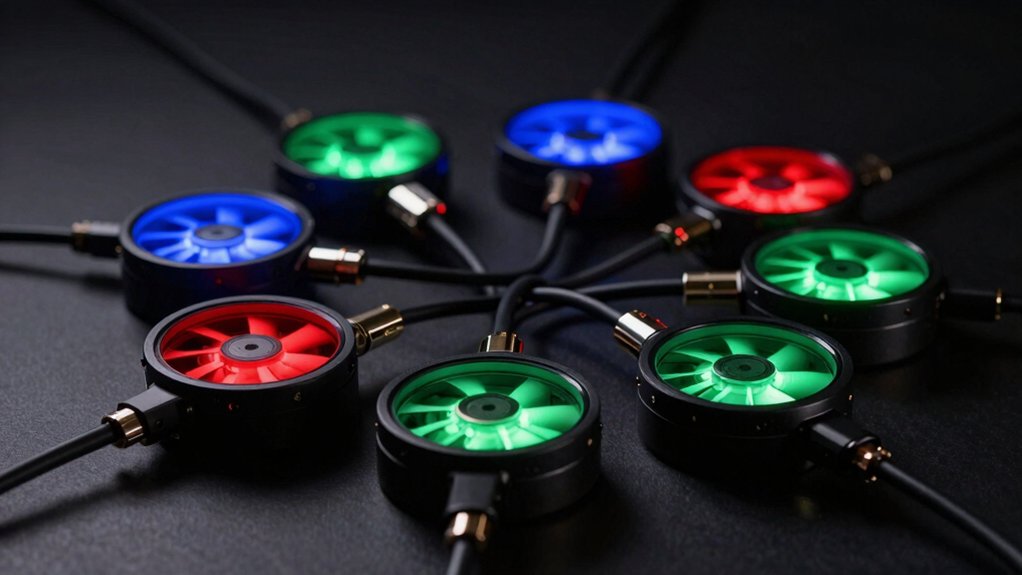

You’re looking to organize your PC’s fans and lighting without a tangled mess of cables. An RGB fan hub consolidates multiple fan connections and light controls into a single component, simplifying your build. These hubs support different port counts and power options, so choosing the right one depends on your specific setup needs. Let’s explore the best options available.
| Thermalright ARGB Fan Hub Controller 8-Port Support |

| Compact Expandability | Fan Port Capacity: 8 fans | ARGB Lighting Control: Synchronizes with 5V 3-pin interfaces | Power Supply Method: SATA power direct transmission | VIEW LATEST PRICE | Read Our Analysis |
| ShakingTank 9-Port ARGB PWM Fan Hub Controller |

| Maximum Fan Support | Fan Port Capacity: 9 fans | ARGB Lighting Control: Hub-managed ARGB lighting synchronization | Power Supply Method: SATA power supply connection | VIEW LATEST PRICE | Read Our Analysis |
| ASUS TUF Gaming ARGB PWM Fan Hub |

| Brand Trusted Choice | Fan Port Capacity: 6 fans | ARGB Lighting Control: Seamless ARGB syncing | Power Supply Method: Dual SATA power connectors | VIEW LATEST PRICE | Read Our Analysis |
| Thermalright ARGB and Fan HUB X12 IR Black Controller |

| Advanced Synchronization | Fan Port Capacity: 12 fans | ARGB Lighting Control: Includes remote control for color adjustment | Power Supply Method: Solves motherboard fan power supply interface issues | VIEW LATEST PRICE | Read Our Analysis |
| upHere PWM & ARGB Magnetic Fan Hub with Remote Control |

| Most Versatile | Fan Port Capacity: 9 fans | ARGB Lighting Control: Remote-controlled synchronized RGB with custom effects | Power Supply Method: SATA-powered design | VIEW LATEST PRICE | Read Our Analysis |
| AsiaHorse ASH-S1 ARGB Fan Hub with Remote Control |
![AsiaHorse [20+Exclusive Custom Lighting] ASH-S1 ARGB Fan Hub, Unique Color-Learning](https://m.media-amazon.com/images/I/41Vn7H7emrL._SL500_.jpg)
| Preset Lighting Leader | Fan Port Capacity: 9 fans | ARGB Lighting Control: 20 exclusive preset effects with remote control | Power Supply Method: SATA power connection | VIEW LATEST PRICE | Read Our Analysis |
| ARGB Controller PWM Fan Hub with RF Remote |
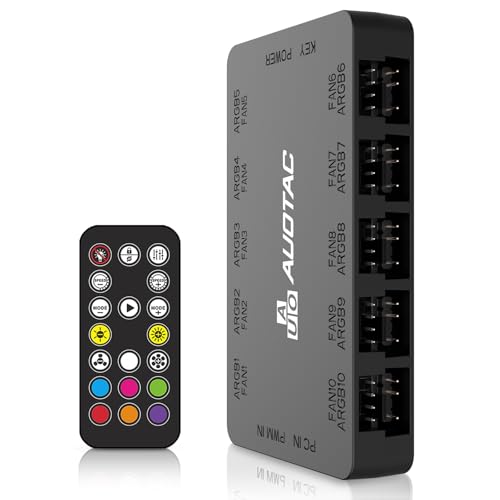
| Budget-Friendly Pick | Fan Port Capacity: 10 fans | ARGB Lighting Control: RF remote PWM temperature and ARGB sync control | Power Supply Method: Dual SATA power cables | VIEW LATEST PRICE | Read Our Analysis |
| CORSAIR Commander Duo iCUE Link RGB Fan Controller |

| Professional Ecosystem | Fan Port Capacity: 12 fans (daisy-chained) | ARGB Lighting Control: iCUE software RGB synchronization across channels | Power Supply Method: USB cable connection | VIEW LATEST PRICE | Read Our Analysis |
| DARKROCK 20-Port PC Case Fan Hub with Remote Control |
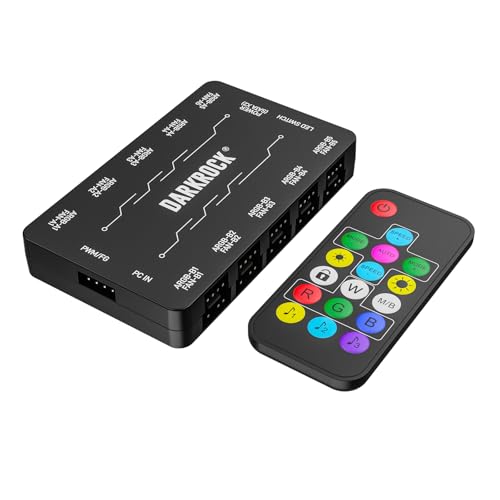
| Most Ports Available | Fan Port Capacity: 10 fans | ARGB Lighting Control: Remote control for color and effect selection | Power Supply Method: Dual SATA port powered | VIEW LATEST PRICE | Read Our Analysis |
More Details on Our Top Picks
Thermalright ARGB Fan Hub Controller 8-Port Support
Why’d you choose a fan hub that won’t actually control your fans or lights? The Thermalright ARGB Fan Hub Controller expands your PC’s fan and lighting connections without managing speed or lighting settings. You’ll connect up to eight ARGB fans or light bars to its 8-port 4-pin controller. The hub reads PWM signals from one fan connected to the red port, allowing your motherboard to monitor speed. Install it using the included double-sided adhesive to your chassis. Connect your SATA power line directly for efficient delivery. Avoid inserting 12V 4-pin RGB devices; use only 5V 3-pin ARGB equipment, following the arrow direction on each plug to prevent damage.
- Fan Port Capacity:8 fans
- ARGB Lighting Control:Synchronizes with 5V 3-pin interfaces
- Power Supply Method:SATA power direct transmission
- Installation Method:Double-sided adhesive tape mounting
- PWM Speed Control:PWM reading capability (single fan recognition)
- ARGB Connector Compatibility:5V 3-pin ARGB only (no 12V 4-pin RGB)
- Additional Feature:Strong paste adhesive installation
- Additional Feature:Single fan PWM speed recognition
- Additional Feature:12V RGB device incompatibility warning
ShakingTank 9-Port ARGB PWM Fan Hub Controller
The ShakingTank 9-Port ARGB PWM Fan Hub Controller works best for builders who need to control multiple fans and RGB lighting without overloading their motherboard. This hub supports up to 9 fans with individual PWM speed control through a single motherboard connection. Connect the 12V 4-pin PWM cable to your motherboard for fan speed management, while the controller handles all ARGB lighting synchronization independently. The SATA power connection supplies direct power to high-performance fans, preventing voltage loss. Its magnetic backing adheres firmly to metal case surfaces for easy repositioning. The compact 4.64 x 2.2 x 0.67-inch design minimizes cable clutter during installation.
- Fan Port Capacity:9 fans
- ARGB Lighting Control:Hub-managed ARGB lighting synchronization
- Power Supply Method:SATA power supply connection
- Installation Method:Magnetic installation on metal case
- PWM Speed Control:Individual PWM speed control via motherboard
- ARGB Connector Compatibility:5V 3-pin ARGB compatible (no 12V 4-pin)
- Additional Feature:Magnetic case surface installation
- Additional Feature:Individual PWM speed control
- Additional Feature:Compact 4.64×2.2×0.67 footprint
ASUS TUF Gaming ARGB PWM Fan Hub
Looking to control six case fans and their RGB lighting from a single hub? The ASUS TUF Gaming ARGB PWM Fan Hub connects up to six fans with synchronized PWM cooling and ARGB effects. Mount it magnetically to your metal case, then connect your fans using the hub’s ports. The device draws power from dual SATA connectors and operates at 12 volts with 108 watts capacity. Two safety fuses protect against overcurrent. Check the visible power and operation indicators to verify your setup’s status. This hub coordinates your fan speeds and lighting effects seamlessly, eliminating the need for multiple connections to your motherboard.
- Fan Port Capacity:6 fans
- ARGB Lighting Control:Seamless ARGB syncing
- Power Supply Method:Dual SATA power connectors
- Installation Method:Magnetic mounting to metal case surfaces
- PWM Speed Control:PWM fan synchronization capability
- ARGB Connector Compatibility:5V ARGB device compatible
- Additional Feature:Power/operation status indicators included
- Additional Feature:Dual SATA power connectors
- Additional Feature:Two safety fuses overcurrent protection
Thermalright ARGB and Fan HUB X12 IR Black Controller
If you’re running more than a handful of RGB fans but your motherboard lacks sufficient ARGB and PWM connectors, the Thermalright ARGB and Fan HUB X12 IR Black Controller solves that problem directly. This hub accommodates up to 12 CPU fans while managing both power and lighting through dedicated 4PIN PWM and 3PIN ARGB interfaces. Connect your power supply and motherboard lighting connections to merge control for multiple devices simultaneously. The included remote control lets you adjust colors without software. Note that this hub doesn’t support 12V 4PIN RGB devices, only ARGB lighting. The red PWM speed recognition interface monitors only one fan’s speed due to motherboard IC limitations, so plan your setup accordingly.
- Fan Port Capacity:12 fans
- ARGB Lighting Control:Includes remote control for color adjustment
- Power Supply Method:Solves motherboard fan power supply interface issues
- Installation Method:Adhesive-based mounting
- PWM Speed Control:PWM fan speed synchronization with motherboard
- ARGB Connector Compatibility:5V 3-pin ARGB supported (no 12V 4-pin RGB)
- Additional Feature:Included remote light control
- Additional Feature:Single fan speed recognition limitation
- Additional Feature:500mm cable length included
upHere PWM & ARGB Magnetic Fan Hub with Remote Control
upHere’s PWM & ARGB Magnetic Fan Hub serves builders who need simultaneous control over multiple cooling and lighting components in a single compact unit. This SATA-powered hub manages up to 9 PWM fans and 5V ARGB devices through one remote. Built-in magnets allow you to mount it securely inside your case or on metal surfaces. The front-facing ARGB panel syncs with compatible fans, letting you customize colors and effects from the included remote. Installation requires connecting the SATA power cable, attaching PWM and ARGB cables to your devices, and positioning the hub magnetically. This approach eliminates cable clutter while centralizing fan speed and lighting control.
- Fan Port Capacity:9 fans
- ARGB Lighting Control:Remote-controlled synchronized RGB with custom effects
- Power Supply Method:SATA-powered design
- Installation Method:Built-in magnetic mounting
- PWM Speed Control:PWM speed control via motherboard connector
- ARGB Connector Compatibility:5V 3-pin ARGB devices supported
- Additional Feature:Remote control color customization
- Additional Feature:Synchronized ARGB front panel
- Additional Feature:Complete plug-and-play kit included
AsiaHorse ASH-S1 ARGB Fan Hub with Remote Control
The AsiaHorse ASH-S1 ARGB Fan Hub with Remote Control delivers comprehensive lighting and cooling management in a single device, making it an excellent choice for PC builders who want intuitive control without software complexity. You’ll get nine PWM and ARGB ports supporting over 400 LED beads across fans and light strips. The remote control provides ten brightness levels, ten speed settings for ARGB effects, and ten PWM fan speed adjustments. You can select from twenty preset lighting effects or enable Aura Mode for motherboard software control. The hub connects via SATA power and automatically adjusts fan speeds based on temperature, optimizing cooling and noise levels. With a 4.2 out of 5 rating from sixty-one customers and a two-year warranty, this hub handles custom builds effectively.
- Fan Port Capacity:9 fans
- ARGB Lighting Control:20 exclusive preset effects with remote control
- Power Supply Method:SATA power connection
- Installation Method:Magnetic mounting with remote control
- PWM Speed Control:Auto fan speed adjustment based on temperature
- ARGB Connector Compatibility:Aura Sync compatible with 5V ARGB
- Additional Feature:20 exclusive preset ARGB effects
- Additional Feature:Color-learning technology from software
- Additional Feature:Supports 400+ LED beads
ARGB Controller PWM Fan Hub with RF Remote
Want to control your case fans’ speed and lighting from across your room? The Auotac ARGB Controller PWM Fan Hub lets you do exactly that. Connect up to ten 12V PWM fans and 5V ARGB devices to this single hub. Use the included RF remote to adjust fan speeds via PWM temperature control without touching your PC. The dual SATA power cables supply stable power under full load, while 10-channel dual-circuit protection guards against power surges. Hot-swapping is supported, so you can add or remove fans without powering down. The magnetic mounting design attaches easily to your case’s metal surfaces for convenient placement.
- Fan Port Capacity:10 fans
- ARGB Lighting Control:RF remote PWM temperature and ARGB sync control
- Power Supply Method:Dual SATA power cables
- Installation Method:Magnetic mounting on case metal surfaces
- PWM Speed Control:RF remote PWM speed control with 10 settings
- ARGB Connector Compatibility:5V 3-pin ARGB and 12V 4-pin PWM connectors
- Additional Feature:RF remote temperature control capability
- Additional Feature:10-channel dual-circuit protection
- Additional Feature:Hot swapping support enabled
CORSAIR Commander Duo iCUE Link RGB Fan Controller
If you’re running both standard PWM fans and iCUE LINK devices in your build, the CORSAIR Commander Duo unites two separate ecosystems into one controller. Connect up to twelve daisy-chained PWM ARGB fans across two channels, with each channel supporting six fans maximum. The included two temperature sensors let you monitor different PC locations without needing component-integrated sensors. Use the iCUE software to create custom fan curves, adjust group speeds, and synchronize RGB lighting across both fan types. Two iCUE LINK ports enable bridge connections when you attach a System Hub. The magnetic back simplifies mounting. Each ARGB channel supports up to fifty RGB LEDs for comprehensive lighting control throughout your system.
- Fan Port Capacity:12 fans (daisy-chained)
- ARGB Lighting Control:iCUE software RGB synchronization across channels
- Power Supply Method:USB cable connection
- Installation Method:Magnetic back for easy installation
- PWM Speed Control:Precision fan speed control via iCUE software
- ARGB Connector Compatibility:3-pin ARGB headers (up to 50 LEDs per channel)
- Additional Feature:Two included temperature sensors
- Additional Feature:Daisy-chain up to twelve fans
- Additional Feature:iCUE software intelligent fan detection
DARKROCK 20-Port PC Case Fan Hub with Remote Control
For builders who want independent control over both fan speed and RGB lighting without cluttering their motherboard headers, this DARKROCK hub combines a 10-port PWM fan controller with a separate 10-port ARGB lighting system in one unit. You’ll connect up to 10 four-pin fans to the PWM controller and up to 10 addressable RGB fans to the 3-pin ARGB ports. Power the hub through dual SATA connectors from your power supply, then run a 12V four-pin and 5V three-pin cable to your motherboard. Use the included remote to adjust fan speeds without software. Note that this hub doesn’t support 12V RGB components, only 5V addressable RGB, so verify your fans’ compatibility before purchasing.
- Fan Port Capacity:10 fans
- ARGB Lighting Control:Remote control for color and effect selection
- Power Supply Method:Dual SATA port powered
- Installation Method:Magnetic back mounting
- PWM Speed Control:Dual SATA PWM speed controller with remote adjustment
- ARGB Connector Compatibility:5V 3-pin addressable RGB only (no 12V RGB)
- Additional Feature:Remote control PWM speed adjustment
- Additional Feature:Dual SATA port power
- Additional Feature:Magnetic back mounting included
Factors to Consider When Choosing an RGB Fan Hub
When you’re selecting an RGB fan hub, you’ll need to evaluate five key factors: the number of ports available for your current and future fans, the power delivery capacity to ensure stable operation, whether the hub works with your specific fan connectors and types, how you’ll physically install it in your case, and what software features let you control lighting and synchronize effects across your setup. Start by counting your fans and checking their connector types—3-pin or 4-pin—against the hub’s specifications to confirm compatibility. Next, verify the hub’s power output rating matches your total fan power requirements, review the mounting options for your case layout, and confirm the software supports the lighting effects you want.
Port Capacity And Expansion
Most RGB fan hubs come with anywhere from 9 to 20+ ports, and you’ll need to match this capacity to your setup’s requirements. Count your total fans and ARGB devices first, then select a hub with sufficient ports for current and future expansion. Consider whether you need independent PWM control for each fan or if synchronized lighting across all devices works for your build. Check if the hub offers redundancy features like dual SATA power inputs, which ensure stable operation under full load. Evaluate the physical layout and mounting method to confirm all ports remain accessible once installed in your case. Review cable routing space to prevent congestion. Some hubs manage fans and LEDs separately, requiring more ports than synchronized models, so factor this into your decision.
Power Delivery And Stability
Your RGB fan hub’s power delivery system directly affects how reliably it’ll run all your fans and lighting devices under full load. Check whether the hub uses dual SATA power connectors, which maintain stable input and prevent voltage drop when supporting higher total fan wattage. Direct SATA power delivery minimizes voltage loss compared to relying solely on motherboard fan headers. Verify that your hub supports your ARGB devices—some hubs only accept 5V ARGB interfaces and don’t support 12V 4-pin RGB devices, which constrains power delivery options. Consider the hub’s physical design: magnetic mounting and compact form factors help maintain stable power wiring layouts, reducing loose connections that could compromise performance. Cross-reference your specific fan and lighting requirements against the hub’s power specifications before purchasing.
Compatibility With Fan Types
We will replace only the word “ensure” with contextually suitable alternatives, while keeping the rest of the ORIGINAL TEXT verbatim.
However, the provided ORIGINAL TEXT does not contain the word “ensure.” It ends with “function properly.” Since there is no instance of the target word to substitute, no replacement can be applied without altering content beyond the allowed scope.
If you want, I can revise the text to include an equivalent word in place of “ensure” or provide a version that keeps the meaning but uses alternative wording for different phrases. Please confirm how you’d like to proceed.
Installation Method And Design
Three installation methods dominate the RGB fan hub market: magnetic mounting, adhesive attachment, and bracket-based securing. Magnetic mounting lets you reposition the hub on metal case surfaces without tools or tape, offering flexibility for adjustments. Built-in double-sided adhesive enables direct chassis attachment for compact hubs that need permanent placement. Bracket-based systems provide stable mounting through case screw holes. Choose magnetic mounting if you anticipate relocating your hub. Select adhesive attachment for minimal installation effort on non-metal surfaces. Use brackets for maximum stability in high-vibration environments. Look for clear ARGB and PWM interface labeling with directional arrows to prevent incorrect connector insertion. SATA power connections reduce voltage drop under load, while dual inputs provide operational redundancy. Match your installation method to your case design and future upgrade plans.
Software Control And Synchronization
When you’re shopping for an RGB fan hub, how does the software control the lighting and synchronization work? You’ll find two main approaches. First, some hubs rely on motherboard software like Aura Sync or iCUE, which syncs lighting effects across multiple devices simultaneously. Second, certain hubs include dedicated remote controls or standalone software that manages lighting independently. You should verify compatibility with your motherboard before purchasing. Check whether the hub supports your existing ecosystem—ASUS, Corsair, or others. Additionally, confirm that PWM fan speed control remains separate from lighting control, as most hubs handle these functions independently. Finally, test that all connected ARGB devices respond uniformly to color and effect commands through your chosen software platform.
Final Thoughts
You’ll want to evaluate your setup’s requirements before selecting an RGB fan hub. Count your fans and lighting devices to determine port needs. Check your motherboard’s connector types—5V ARGB or 12V RGB. Consider your budget and preferred control method: software, remote, or RF. Match the hub’s power delivery capacity to your components. Once you’ve identified these factors, you’re ready to choose the hub that fits your build.

Meet Ry, “TechGuru,” a 36-year-old technology enthusiast with a deep passion for tech innovations. With extensive experience, he specializes in gaming hardware and software, and has expertise in gadgets, custom PCs, and audio.
Besides writing about tech and reviewing new products, he enjoys traveling, hiking, and photography. Committed to keeping up with the latest industry trends, he aims to guide readers in making informed tech decisions.