
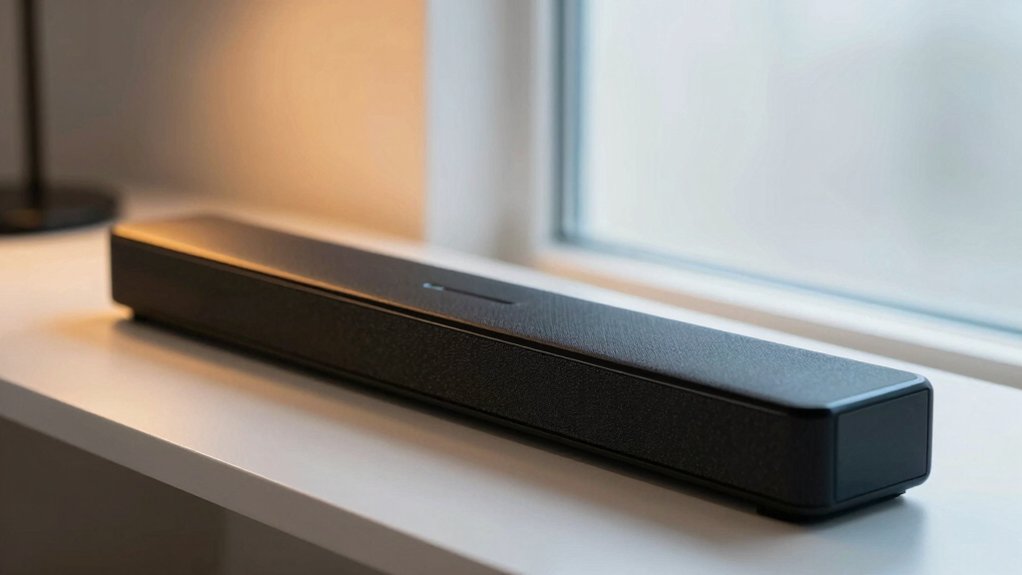

If you’re struggling to hear dialogue on your TV, you need a soundbar that actually prioritizes speech clarity. You’ll want to focus on models with dedicated dialogue enhancement modes—like ZVOX AccuVoice or Bose TV Speaker—that boost the 1–4 kHz frequency range where voices live. These soundbars offer multi-level dialogue controls and compact designs that fit most setups. But which model matches your specific needs?
| Roku Streambar SE 2-in-1 Soundbar with 4K Streaming |

| Best All-in-One | Dialogue Enhancement Technology: Enhanced speech clarity for dialogue | Connectivity Options: Bluetooth, HDMI, Optical, Wi-Fi | Maximum Output Power: Not specified | VIEW LATEST PRICE | Read Our Analysis |
| Saiyin 60W Bluetooth Soundbar with Virtual Surround Sound |

| Best Budget Soundbar | Dialogue Enhancement Technology: Dual silk dome tweeters for crisp dialogue | Connectivity Options: TV-ARC/Optical/AUX, Bluetooth 5.3 | Maximum Output Power: 60W power | VIEW LATEST PRICE | Read Our Analysis |
| Sony S100F 2.0ch Soundbar with Bluetooth (HTS100F) |

| Best Compact Design | Dialogue Enhancement Technology: Voice enhancement for clear dialogue | Connectivity Options: HDMI ARC, Bluetooth, USB, Optical | Maximum Output Power: 120 Watts maximum | VIEW LATEST PRICE | Read Our Analysis |
| ZVOX AccuVoice AV100 Compact TV Soundbar Speaker |
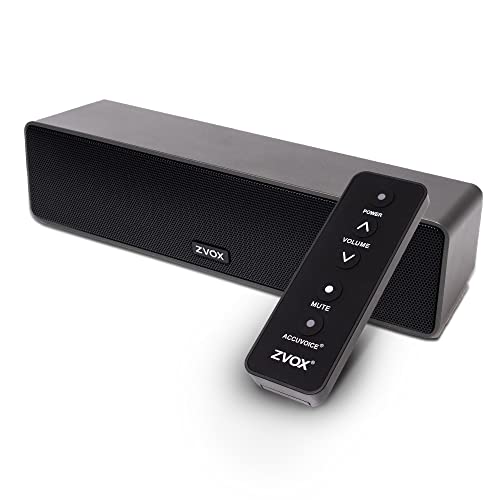
| Best for Hearing Aid Users | Dialogue Enhancement Technology: AccuVoice six levels of dialogue boost | Connectivity Options: Toslink optical or analog (3.5mm/RCA) | Maximum Output Power: 25 Watts maximum | VIEW LATEST PRICE | Read Our Analysis |
| ZVOX AccuVoice AV835 Dialogue Clarifying Soundbar |
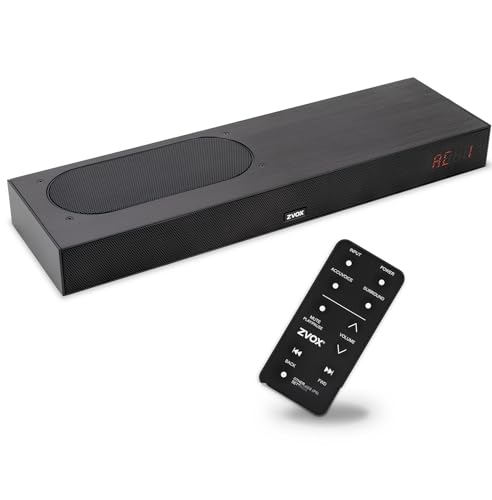
| Best Mid-Range Option | Dialogue Enhancement Technology: Patented voice-separating technology with 20 AccuVoice settings | Connectivity Options: HDMI-compatible, optical Toslink, mini-to-RCA, mini-to-mini | Maximum Output Power: Not specified | VIEW LATEST PRICE | Read Our Analysis |
| ZVOX AccuVoice AV855 Dialogue Clarifying Soundbar |

| Best Premium Pick | Dialogue Enhancement Technology: Patented voice-separating technology with 20 AccuVoice settings | Connectivity Options: ARC-HDMI, analog, optical | Maximum Output Power: 53W maximum output | VIEW LATEST PRICE | Read Our Analysis |
| ZVOX Dialogue Clarifying Sound Bar with Voice Boost |

| Best Voice Enhancement | Dialogue Enhancement Technology: AccuVoice with 12 levels of voice boost | Connectivity Options: Toslink optical or analog (3.5mm/RCA) | Maximum Output Power: 24-watt Class D digital amplifier | VIEW LATEST PRICE | Read Our Analysis |
| Bose TV Speaker Soundbar with Bluetooth and HDMI-ARC |

| Best Premium Brand | Dialogue Enhancement Technology: Enhanced dialogue to elevate vocals; dialogue mode | Connectivity Options: HDMI-ARC, Optical, Bluetooth, AUX | Maximum Output Power: Not specified (compact design) | VIEW LATEST PRICE | Read Our Analysis |
| Dell Pro Premium Conferencing Soundbar SB725 |

| Professional Conference Grade | Dialogue Enhancement Technology: AI-based noise cancellation for voice distinction | Connectivity Options: USB, compatible with UC platforms | Maximum Output Power: Not specified | VIEW LATEST PRICE | Read Our Analysis |
| Sound Bar for Smart TV with Bluetooth & ARC |
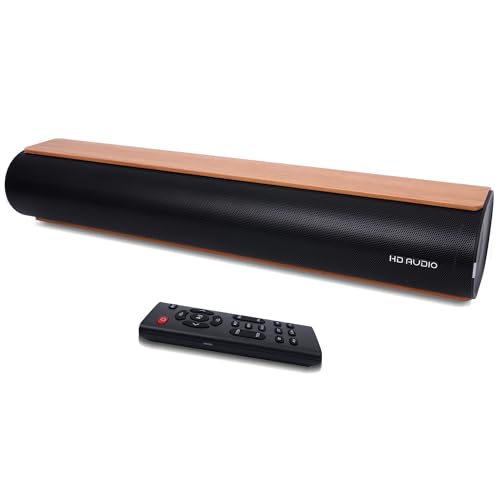
| Best Customizable Sound | Dialogue Enhancement Technology: Preset dialogue mode for speech clarity | Connectivity Options: Bluetooth 5.0, HD-ARC, Optical, USB, Coaxial, AUX | Maximum Output Power: 50W peak power | VIEW LATEST PRICE | Read Our Analysis |
More Details on Our Top Picks
Roku Streambar SE 2-in-1 Soundbar with 4K Streaming
Are you tired of constantly adjusting your TV volume to hear dialogue clearly? The Roku Streambar SE solves this problem with enhanced speech clarity and automatic volume control that favors voices. Set it up by plugging the device into your TV, connecting to the internet, and using the included HDMI or optical cable. The streambar includes two premium speakers and a dedicated bass port for balanced audio. You’ll control everything with one remote that powers your TV, adjusts volume, and manages streaming apps like Netflix, Hulu, and Prime Video. The device supports 4K HDR streaming and works with Bluetooth headphones. If you need more bass, you can expand the system with a Roku Wireless Bass subwoofer.
- Dialogue Enhancement Technology:Enhanced speech clarity for dialogue
- Connectivity Options:Bluetooth, HDMI, Optical, Wi-Fi
- Maximum Output Power:Not specified
- Physical Dimensions:9.6L x 3.5W x 2.4H inches
- Surround Sound Technology:Standard stereo with bass port
- Warranty:1-year manufacturer warranty
- Additional Feature:Built-in 4K streaming capability
- Additional Feature:One remote controls TV/streaming
- Additional Feature:Expandable with wireless subwoofer
Saiyin 60W Bluetooth Soundbar with Virtual Surround Sound
Looking for a soundbar that prioritizes dialogue clarity without taking up much space? The Saiyin 60W soundbar delivers crisp speech through dual silk dome tweeters while maintaining balanced audio across its 17-inch compact frame. Connect it via TV-ARC or optical cable to enable remote control through your existing TV remote. The soundbar’s six-layer voice coil woofers produce distortion-free lows that support dialogue without overwhelming it. Wall-mount using the included kit to reduce clutter and achieve theater-like sound in small to medium rooms. Compatible with Fire TV, Apple TV, and Google Chromecast remotes, this option works with displays ranging from 24 to 75 inches, making it adaptable to various setups.
- Dialogue Enhancement Technology:Dual silk dome tweeters for crisp dialogue
- Connectivity Options:TV-ARC/Optical/AUX, Bluetooth 5.3
- Maximum Output Power:60W power
- Physical Dimensions:17-inch compact form
- Surround Sound Technology:Virtual surround sound
- Warranty:Not specified
- Additional Feature:60W power output
- Additional Feature:Wall-mountable compact design
- Additional Feature:TV remote control compatibility
Sony S100F 2.0ch Soundbar with Bluetooth (HTS100F)
The Sony S100F delivers clear dialogue and speech through its voice enhancement feature, making it an ideal choice if you’re watching TV shows, movies with dialogue-heavy scenes, or hosting conference calls where you need to hear every word. You’ll connect it to your TV using HDMI ARC for seamless audio transmission. The compact 2.0-channel soundbar fits small living spaces without taking up much room. You can mount it on your wall using the included template, or place it on a surface near your TV. The 120-watt output produces room-filling sound with its bass reflex speaker. You’ll control playback through the remote commander and switch between Bluetooth, USB, and optical connections based on your device.
- Dialogue Enhancement Technology:Voice enhancement for clear dialogue
- Connectivity Options:HDMI ARC, Bluetooth, USB, Optical
- Maximum Output Power:120 Watts maximum
- Physical Dimensions:Compact, slim design (2-inch speaker size)
- Surround Sound Technology:S-Force Pro Front Surround
- Warranty:1-year limited warranty
- Additional Feature:120 Watts maximum output
- Additional Feature:S-Force Pro Front Surround
- Additional Feature:USB playback support
ZVOX AccuVoice AV100 Compact TV Soundbar Speaker
If you’re watching TV in a small bedroom, apartment, or dorm room and struggle to hear dialogue clearly, the ZVOX AccuVoice AV100 delivers targeted audio enhancement in a compact 10-inch frame. This soundbar features six levels of dialogue boost—hearing aid technology that sharpens speech without distorting other sounds. You’ll connect it using either Toslink optical or analog cables (both included), then adjust dialogue clarity to your preference. The dual speakers and passive radiator produce rich audio from just 25 watts, while PhaseCue Surround creates 3D sound in tight spaces. Setup takes minutes: plug in the power cable, connect your TV’s audio output, and use the large remote to control volume and dialogue levels. At 16 ounces, it won’t clutter your space.
- Dialogue Enhancement Technology:AccuVoice six levels of dialogue boost
- Connectivity Options:Toslink optical or analog (3.5mm/RCA)
- Maximum Output Power:25 Watts maximum
- Physical Dimensions:10W x 2.75D x 2.5H inches
- Surround Sound Technology:PhaseCue Surround with 3D sound
- Warranty:1-year manufacturer warranty
- Additional Feature:Six dialogue boost levels
- Additional Feature:World’s smallest home theater
- Additional Feature:Passive radiator design included
ZVOX AccuVoice AV835 Dialogue Clarifying Soundbar
Want sharper dialogue without constantly adjusting the volume? The ZVOX AccuVoice AV835 delivers clear speech through patented technology that separates voices from background noise. You’ll find twenty customizable AccuVoice settings to fine-tune clarity for your specific needs. The soundbar measures 17.6 inches wide and 1.9 inches high, fitting below most 32-inch TVs. Dual built-in woofers provide rich bass alongside PhaseCue virtual surround sound for immersive audio. You can connect via HDMI, optical, or USB ports. Output Leveling reduces sudden commercial volume spikes for balanced listening throughout your viewing experience.
- Dialogue Enhancement Technology:Patented voice-separating technology with 20 AccuVoice settings
- Connectivity Options:HDMI-compatible, optical Toslink, mini-to-RCA, mini-to-mini
- Maximum Output Power:Not specified
- Physical Dimensions:17.6W x 1.9H inches
- Surround Sound Technology:PhaseCue virtual surround technology
- Warranty:1-year limited parts and labor warranty
- Additional Feature:Twenty voice clarity settings
- Additional Feature:USB direct audio playback
- Additional Feature:Dual built-in woofers
ZVOX AccuVoice AV855 Dialogue Clarifying Soundbar
You’ll find the AV855 designed specifically for viewers who struggle to hear dialogue clearly on TV shows and movies. This soundbar uses patented voice-separating technology that enhances voices while reducing background noise, making speech easier to understand during complex scenes. You can adjust clarity using twenty AccuVoice settings to match your hearing preferences. The dual built-in subwoofers deliver balanced audio for both dialogue and music. Installation takes minutes—connect via HDMI, optical, or analog cables to your TV. The low-profile design fits beneath most 50-inch or larger televisions. You’ll also access a USB port for playing audio files directly from flash drives.
- Dialogue Enhancement Technology:Patented voice-separating technology with 20 AccuVoice settings
- Connectivity Options:ARC-HDMI, analog, optical
- Maximum Output Power:53W maximum output
- Physical Dimensions:33.7W x 1.85H inches
- Surround Sound Technology:PhaseCue virtual surround technology
- Warranty:1-year limited parts and labor warranty
- Additional Feature:Twenty voice clarity settings
- Additional Feature:USB direct audio playback
- Additional Feature:Dual built-in subwoofers
ZVOX Dialogue Clarifying Sound Bar with Voice Boost
The ZVOX Dialogue Clarifying Sound Bar with Voice Boost works best for viewers who struggle to hear dialogue clearly on their TV. First, check your TV’s audio outputs—you’ll need either Toslink optical or analog ports. If your Samsung or LG smart TV has only HDMI ARC/eARC, purchase an HDMI ARC Audio Extractor separately. Connect the soundbar using included cables, then adjust AccuVoice to your preferred level across 12 settings. Enable Supervoice mode to reduce background noise and isolate speech. The 24-watt amplifier and three full-range speakers deliver crisp dialogue with Dolby Digital decoding for theater-quality sound.
- Dialogue Enhancement Technology:AccuVoice with 12 levels of voice boost
- Connectivity Options:Toslink optical or analog (3.5mm/RCA)
- Maximum Output Power:24-watt Class D digital amplifier
- Physical Dimensions:Not specified
- Surround Sound Technology:Dolby Digital decoding for surround-like experience
- Warranty:Not specified
- Additional Feature:Twelve voice boost levels
- Additional Feature:Supervoice background noise reduction
- Additional Feature:Three full-range speaker drivers
Bose TV Speaker Soundbar with Bluetooth and HDMI-ARC
If you’re struggling to hear dialogue clearly while watching TV, the Bose TV Speaker delivers enhanced speech through its built-in dialogue mode and center tweeter—designed specifically to elevate vocals and pronunciation. Connect it via the included optical cable or HDMI-ARC to your TV. Activate dialogue mode through the remote to boost speech clarity immediately. The soundbar’s dual angled drivers produce wide, natural sound while the center tweeter isolates vocals. You can pair Bluetooth devices to stream music or podcasts. Wall-mount it or place it on your TV stand. Expand audio performance later by adding a Bose Bass Module 500 or 700 with a separate cable.
- Dialogue Enhancement Technology:Enhanced dialogue to elevate vocals; dialogue mode
- Connectivity Options:HDMI-ARC, Optical, Bluetooth, AUX
- Maximum Output Power:Not specified (compact design)
- Physical Dimensions:23.38W x 2.21H x 4.02D inches
- Surround Sound Technology:Dual angled full-range drivers for spacious sound
- Warranty:1-year warranty
- Additional Feature:Expandable with Bose Bass Modules
- Additional Feature:Dialogue mode with bass boost
- Additional Feature:Center tweeter design
Dell Pro Premium Conferencing Soundbar SB725
Built specifically for remote work and video calls, Dell’s SB725 delivers clarity where it matters most—capturing your voice and filtering out distractions. The soundbar uses AI-based noise cancellation to distinguish human speech from background noise, while echo cancellation removes acoustic feedback. Its high-performance drivers produce balanced audio across a 14 kHz frequency response range. You’ll mount it magnetically to compatible Dell P/U Series monitors via USB connection. The device works with Microsoft Teams and Zoom, making integration straightforward. With a 3-year limited hardware warranty and 30-day return guarantee, you get reliable performance for professional meetings.
- Dialogue Enhancement Technology:AI-based noise cancellation for voice distinction
- Connectivity Options:USB, compatible with UC platforms
- Maximum Output Power:Not specified
- Physical Dimensions:11.7W x 1.57H x 1.36D inches
- Surround Sound Technology:Balanced sound with high-performance drivers
- Warranty:3-year limited hardware with advanced exchange
- Additional Feature:AI-based noise cancellation
- Additional Feature:Microsoft Teams/Zoom certified
- Additional Feature:Magnetic mount attachment
Sound Bar for Smart TV with Bluetooth & ARC
Want crystal-clear dialogue without constantly adjusting your TV volume? This soundbar delivers speech clarity through its dual 25W speakers and adjustable treble settings. Select the Dialogue preset mode to optimize voices automatically, or manually increase treble via remote control for sharper articulation. You’ll connect using HD-ARC, optical, USB, coaxial, or AUX cables—choose based on your TV’s available ports. Bluetooth 5.0 enables wireless pairing with phones or tablets. The rounded wood grain design fits any entertainment space, whether you place it on your cabinet or mount it on the wall. VVIP support responds within 24 hours, and you’re covered by a 1-year replacement warranty for manufacturing defects.
- Dialogue Enhancement Technology:Preset dialogue mode for speech clarity
- Connectivity Options:Bluetooth 5.0, HD-ARC, Optical, USB, Coaxial, AUX
- Maximum Output Power:50W peak power
- Physical Dimensions:Not specified
- Surround Sound Technology:Dual 25W speakers with bass reflex tubes
- Warranty:1-year free replacement warranty
- Additional Feature:Adjustable treble and bass
- Additional Feature:Preset audio modes included
- Additional Feature:Wood grain finish exterior
Factors to Consider When Choosing a Soundbar for Clear Speech
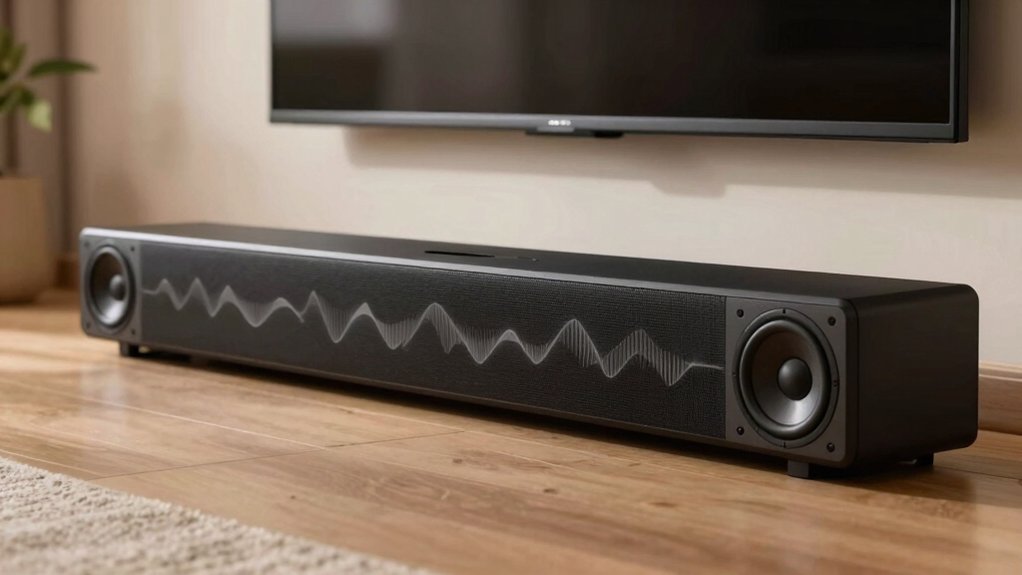
When you’re selecting a soundbar for clear speech, you’ll want to evaluate five key factors: dialogue enhancement technology that sharpens vocal frequencies, audio frequency response range (typically 20Hz–20kHz) that captures the full spectrum of human speech, and speaker driver quality that determines how crisply voices reproduce. Next, examine the soundbar’s noise reduction capabilities, which filter out background interference so dialogue stands out, and check whether it offers voice clarity customization options that let you adjust treble and midrange settings to your preference. By comparing these specifications across models, you can identify which soundbar best prioritizes speech intelligibility for your viewing needs.
Dialogue Enhancement Technology
How do you know if a soundbar’s dialogue enhancement features will actually work for your needs? Test the voice-boost settings first. Most systems like AccuVoice offer 12–20 calibrated levels that selectively amplify voices without boosting background noise equally. Start at mid-range settings and adjust upward if speech remains unclear. Check whether the soundbar includes a dedicated speech-enhancement mode or SafeListening feature—these minimize competing audio and clarify consonants and vowels. Verify that Dolby Digital decoding pairs with dialogue optimization to balance voice levels against surround effects. Finally, confirm HDMI ARC or eARC connectivity so you can control dialogue settings across all sources using your TV remote, ensuring consistent clarity whether you’re watching broadcasts, streaming services, or cable.
Audio Frequency Response Range
Because human speech clusters in the 300 Hz to 3.4 kHz range, you’ll want to prioritize soundbars with strong midrange and upper-midrange response—specifically around 1 kHz to 4 kHz—to ensure dialogue remains intelligible and natural-sounding. Check product specifications for explicit mentions of prominent response in this band. Look for models listing frequency ranges extending to at least 14 kHz, which enhances high-pitched consonants and overall clarity. Consider bass reflex or dual-woofer designs, which extend low-end performance without muddying midrange frequencies. These designs preserve vocal clarity while adding depth. When reviewing frequency response data, skip vague claims and demand specific technical details. This approach eliminates guesswork and ensures you’re selecting a soundbar genuinely optimized for clear speech reproduction.
Speaker Driver Quality
The frequency response range you’ve identified sets the foundation, but the actual components delivering those frequencies—the drivers themselves—determine how faithfully your soundbar reproduces speech. Look for soundbars with larger mid-range drivers, which maintain consistent output and reduce the need for excessive EQ adjustments that can distort dialogue. Consider models with dual or multiple mid-bass drivers; they enhance vocal presence without overemphasizing low frequencies that muddy speech intelligibility. Prioritize soundbars featuring dedicated tweeters paired with optimized phase alignment. This combination improves high-frequency vocal detail and eliminates muddiness in dialogue. Finally, check the speaker’s high-SPL response specifications. You need minimal distortion at dialogue frequencies—roughly 500 Hz to 4 kHz—to preserve natural voice articulation.
Noise Reduction Capabilities
What separates a soundbar that merely plays dialogue from one that makes every word crystal clear? Noise reduction capabilities. Look for soundbars with dedicated technologies like Supervoice or advanced noise cancellation that specifically suppress ambient sounds competing with speech. These systems reduce background noise without muting dialogue itself. Check whether your soundbar offers multiple noise-reduction levels you can adjust based on your room’s acoustics. A quieter living room might need minimal noise reduction, while a kitchen with appliances demands stronger settings. Test the soundbar in your actual space before purchasing. Play familiar dialogue at normal volume and listen whether speech remains intelligible when household sounds occur around you. This direct comparison ensures the noise reduction matches your real-world environment.
Voice Clarity Customization Options
While noise reduction keeps background sounds from drowning out speech, you’ll also want to customize how voices themselves are presented through your soundbar’s voice clarity settings. Many soundbars offer adjustable dialogue boost features with multiple levels—some provide up to 20 or 53 settings to match your preference. Access these controls through your remote, display panel, or companion app to fine-tune voice prominence in real time. Pair voice clarity adjustments with noise suppression for optimal results in busy audio environments. Test different boost levels while watching dialogue-heavy content to find your ideal setting. Consider models with dedicated Dialogue or Clear Voice modes that automatically emphasize speech. This approach lets you customize for different languages or accents without manual adjustment each time.
Connectivity and Compatibility Standards
Since your soundbar’s connection method directly affects how it receives and processes audio signals, you’ll want to verify which connectivity options your TV and soundbar both support before purchasing. Check whether your TV offers HDMI ARC/eARC ports, which allow two-way communication for remote control of volume and power. If your TV lacks these ports, look for soundbars with optical (Toslink) inputs as a reliable alternative. Confirm that your soundbar supports Bluetooth 5.0 or 5.3 with compatible codecs for wireless devices. Verify that audio output settings on your TV match your connection type—enabling DTS or Dolby formats when using digital connections. Finally, ensure the soundbar’s remote works with your TV’s remote or supports universal remote compatibility for seamless control.
Room Size and Placement Flexibility
How much space you’ve got in your room directly impacts which soundbar will deliver the clearest speech for your setup. In smaller rooms, choose compact units with focused dialogue enhancement to avoid overwhelming the space. Medium to large rooms need wider, multi-driver bars that maintain clear speech across all seating positions. Consider your TV placement next. Wall-mountable or slim designs let you position the soundbar closer to your listening area, improving vocal clarity. If you rearrange furniture frequently or plan to add a subwoofer later, select a model with stable dialogue performance across different configurations. Look for soundbars with consistent volume leveling or voice-enhancement features. These preserve intelligibility when ambient noise fluctuates or commercials play at varying volumes, especially important in larger living spaces where sound travels differently.
Bass and Treble Adjustability
When you’re shopping for a soundbar, don’t overlook the importance of bass and treble controls—they’re essential tools for sharpening dialogue clarity in your space. Boost treble to enhance high frequencies where speech details live, then moderate bass to prevent low tones from muddying voices. Many soundbars include preset modes like Dialogue or Voice that automatically adjust these frequencies for you. If you want more control, look for models offering 20+ adjustable voice levels or AccuVoice settings. These precise controls let you customize how aggressively dialogue is enhanced. Balanced bass and clear treble work together to emphasize the midrange where most speech resides, making voices stand out without overwhelming background sounds or music.
Final Thoughts
You’ll get crystal-clear dialogue by selecting a soundbar with dedicated speech enhancement modes. Prioritize models offering multiple dialogue boost levels, HDMI ARC compatibility, and midrange frequency emphasis. The ZVOX AccuVoice series and Bose TV Speaker deliver reliable performance. Match your soundbar to your TV’s connectivity options and room size. Test the dialogue setting before purchasing to confirm it meets your hearing needs.

Meet Ry, “TechGuru,” a 36-year-old technology enthusiast with a deep passion for tech innovations. With extensive experience, he specializes in gaming hardware and software, and has expertise in gadgets, custom PCs, and audio.
Besides writing about tech and reviewing new products, he enjoys traveling, hiking, and photography. Committed to keeping up with the latest industry trends, he aims to guide readers in making informed tech decisions.