

You’re tired of missing your favorite shows because you weren’t home to watch them. A recordable TV box solves this problem by letting you capture programs automatically and watch them whenever you want. You’ll find several reliable options available, each with different features and capabilities. The choice depends on your specific needs—whether you want basic recording, 4K quality, or advanced streaming features. Here’s what you need to know to pick the right one.
| iView 3300STB ATSC Converter Box with Recording |

| Best for Media | Recording Capability: Saves TV programs to storage | Video Output Resolution: Not specified | USB Media Playback: Videos, music, photos from USB; supports up to 4TB | VIEW LATEST PRICE | Read Our Analysis |
| ZJBOX Digital TV Converter Box ATSC Tuner 1080P |

| Best Budget Option | Recording Capability: Watch and record free-to-air TV via USB storage | Video Output Resolution: Full HD 1080p | USB Media Playback: Photos, MP3 music, movie files from USB storage | VIEW LATEST PRICE | Read Our Analysis |
| Digital Converter Box TV Tuner 1080P HDMI Output |

| Best All-Around | Recording Capability: DVR recording with schedule function to external drive | Video Output Resolution: 1080P HDMI output | USB Media Playback: MP4, MOV, AVI, MKV, MP3, JPG and other formats | VIEW LATEST PRICE | Read Our Analysis |
| Ematic Digital TV Converter Box with Recording & Controls |
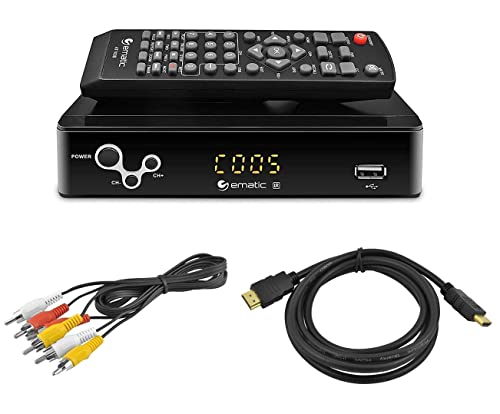
| Best Basic Recording | Recording Capability: Real-time and appointed recording capabilities | Video Output Resolution: 1080P output | USB Media Playback: MP3, AAC, AVI, MPG, DAT, VOB, MKV, MJPEG, JPEG, BMP, PNG | VIEW LATEST PRICE | Read Our Analysis |
| Colabox L2 PLUS 4K Smart TV Box Android 14 |
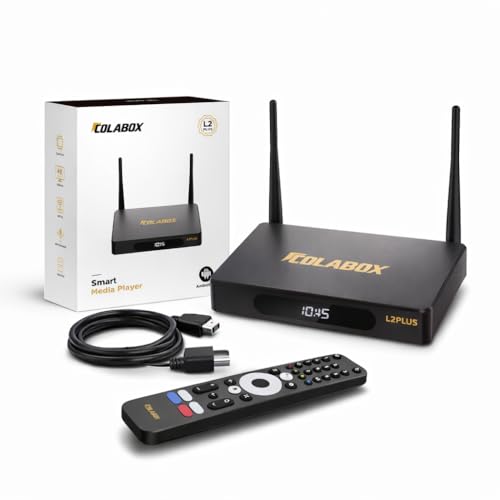
| Premium Streaming Alternative | Recording Capability: No recording capability | Video Output Resolution: 4K Ultra HD | USB Media Playback: No USB media playback specified | VIEW LATEST PRICE | Read Our Analysis |
More Details on Our Top Picks
iView 3300STB ATSC Converter Box with Recording
If you’re watching TV on an older analog television and don’t want to buy a new set, the iView 3300STB ATSC Converter Box is designed for you. This 2021 model converts digital air channels to analog TVs, letting you watch on your existing television or computer monitor. You’ll access unscrambled cable channels through ClearQAM support. Record your favorite programs using the built-in digital clock function, then play them back whenever you want. Connect a USB device or portable hard drive up to 4TB to store videos, music, and photos. The box includes HDMI and USB ports for flexible connectivity and supports four TV channels simultaneously.
- Recording Capability:Saves TV programs to storage
- Video Output Resolution:Not specified
- USB Media Playback:Videos, music, photos from USB; supports up to 4TB
- Remote Control:Not specified
- Parental Controls:Not specified
- Warranty:One Year
- Additional Feature:Built-in digital clock function
- Additional Feature:Supports up to 4TB storage
- Additional Feature:ClearQAM unscrambled cable access
ZJBOX Digital TV Converter Box ATSC Tuner 1080P
The ZJBOX Digital TV Converter Box ATSC Tuner 1080P works best for you if you’re looking to record free over-the-air broadcasts without paying for cable or satellite service. You’ll need an external antenna to receive signals and a USB hard drive or flash drive to store recordings. Connect the box to your TV using the included HDMI or composite cable, then attach your antenna. Use the remote to auto-tune channels and set up your favorite channel list. The device outputs full 1080p video and supports USB playback for photos, music, and movies. Format your storage device to FAT32 for compatibility with drives up to 4TB.
- Recording Capability:Watch and record free-to-air TV via USB storage
- Video Output Resolution:Full HD 1080p
- USB Media Playback:Photos, MP3 music, movie files from USB storage
- Remote Control:Standard remote control included
- Parental Controls:Parental Control Function
- Warranty:1 year warranty
- Additional Feature:Full HD 1080p output
- Additional Feature:Parental control function included
- Additional Feature:Timing start up & shutdown
Digital Converter Box TV Tuner 1080P HDMI Output
Want to record live TV without paying for cable subscriptions while keeping your setup simple? The ZJBOX Digital Converter Box captures ATSC broadcast signals through your antenna and outputs 1080P video via HDMI to your TV or projector. You’ll connect an external hard drive (up to 4TB) to schedule and store recordings automatically. The included two-in-one remote controls both your converter and television using four programmable buttons, eliminating clutter. You can also play back media files like MP4, MOV, AVI, and MKV from your external drive. Features include an electronic program guide, channel favorites, closed captions, and parental controls. Setup takes minutes with the provided HDMI and RCA cables plus power adapter. The manufacturer offers one-year warranty coverage and 24-hour email support.
- Recording Capability:DVR recording with schedule function to external drive
- Video Output Resolution:1080P HDMI output
- USB Media Playback:MP4, MOV, AVI, MKV, MP3, JPG and other formats
- Remote Control:Two-in-One remote with learning function
- Parental Controls:Parental controls included
- Warranty:One-year warranty
- Additional Feature:Two-in-one learning remote control
- Additional Feature:Electronic program guide (EPG)
- Additional Feature:Schedule recordings automatically
Ematic Digital TV Converter Box with Recording & Controls
For viewers with older analog televisions who need recording capability without upgrading their entire setup, Ematic’s Digital TV Converter Box with Recording & Controls offers a practical solution. You’ll connect the unit via HDMI or RCA cables to your TV, then use the included remote to navigate channels and set recording schedules. The device supports both real-time and appointed recording, letting you capture programs instantly or schedule them for later. You can also access your USB drive to play music files, view photos, and watch videos in various formats including AVI and MKV. Display options let you adjust the picture to fit your screen perfectly using pillar box, pan and scan, letterbox, or full settings.
- Recording Capability:Real-time and appointed recording capabilities
- Video Output Resolution:1080P output
- USB Media Playback:MP3, AAC, AVI, MPG, DAT, VOB, MKV, MJPEG, JPEG, BMP, PNG
- Remote Control:Infrared remote control included
- Parental Controls:Parental controls included
- Warranty:Not specified
- Additional Feature:Surround sound 5.1 support
- Additional Feature:H.265/HEVC encoding capability
- Additional Feature:EAS emergency alert system
Colabox L2 PLUS 4K Smart TV Box Android 14
If you’re tired of missing shows because your current setup can’t keep up with live sports or streaming demands, the Colabox L2 PLUS delivers the speed and stability you need. This Android 14 box streams 4K content at 60fps with minimal buffering thanks to Wi-Fi 6 and Gigabit Ethernet connectivity. Setup takes minutes: connect the HDMI cable, plug in power, and use the wireless voice remote to navigate. The optical port links directly to your soundbar for lossless audio. Start your first OTA upgrade through Settings → Upgrade → OTA Upgrade to access recording features and apps. The quad-core processor handles multiple streams smoothly, ensuring you capture live events without interruption.
- Recording Capability:No recording capability
- Video Output Resolution:4K Ultra HD
- USB Media Playback:No USB media playback specified
- Remote Control:Wireless 5.0 voice remote with LED display
- Parental Controls:Not specified
- Warranty:1-year manufacturer warranty
- Additional Feature:Wi-Fi 6 technology
- Additional Feature:1000M gigabit ethernet LAN
- Additional Feature:Optical SPDIF audio port
Factors to Consider When Choosing a Recordable TV Box
When you’re selecting a recordable TV box, you’ll need to evaluate five key factors that directly affect your viewing experience: recording capacity and storage space for your programs, video output quality standards that match your display, tuner compatibility and reception strength for your area, media playback functionality to support various file formats, and device control options through the interface. Start by determining how many shows you want to store simultaneously, then confirm that your TV supports the box’s video output (4K, 1080p, etc.), check that the tuner works with your local broadcast signals, verify which media types the box can play, and test whether you can navigate the controls easily. These five elements work together to determine whether a recordable TV box will reliably capture your favorite shows and play them back smoothly.
Recording Capacity And Storage
Since recordable TV boxes don’t include built-in storage, you’ll need to connect an external drive to store your DVR recordings. You can use USB hard drives up to 4TB or flash drives up to 32GB, depending on your model. Format your storage device using FAT32 to ensure compatibility with your box. Connect the external drive via USB before scheduling recordings. Larger drives let you store more programs and keep them longer. A 4TB hard drive holds significantly more content than a 32GB flash drive. Check your device’s specifications to confirm maximum storage capacity. Plan your storage size based on how many shows you record weekly and how long you want to keep them.
Video Output Quality Standards
What output quality does your TV box deliver, and how will that affect your viewing experience? HDMI outputs on standard set-top boxes support up to 1080p resolution, delivering full HD video quality for your recordings. Most tuners now include 1080p capability, enabling sharp playback on compatible televisions and displays. If you own an older TV, consider boxes offering composite RCA and component outputs alongside HDMI. These legacy connections affect upscaling and color fidelity differently than modern HDMI connections. Check your TV’s input ports first, then match them to the box’s available outputs. This ensures optimal picture quality for your specific display. Higher resolution support means clearer images, reduced pixelation, and better detail in recorded content. Prioritize HDMI-equipped models for newer televisions.
Tuner Compatibility And Reception
Your TV box’s tuner type determines which channels you’ll actually receive and record, so you’ll need to understand the differences before making your purchase. ATSC tuners pick up over-the-air broadcasts, while some boxes also include ClearQAM for unscrambled cable channels. Check your box’s specifications to see which tuner types it supports. Next, evaluate your antenna setup. External antenna quality and placement directly influence reception reliability. Position your antenna in a high location away from obstructions for optimal signal strength. Finally, consider the box’s channel-scanning capabilities. Some devices require offline operation or firmware updates to optimize tuner performance during initial setup. Running these scans ensures your box finds all available channels in your area before you start recording.
Media Playback Functionality Support
How well does a recordable TV box handle media files beyond live broadcasts? You’ll want to verify USB playback support for photos, music, and video files in formats like MP4, MOV, AVI, MKV, MP3, and JPG. Check whether the box records to external storage such as USB drives or hard drives, noting maximum supported sizes up to 4TB and file system requirements like FAT32. Confirm DVR-style recording capabilities including scheduling, instant recording, and programmed recording with storage management options. Guarantee the device plays back recorded TV programs from connected USB storage and offers a media center mode for local playback. Finally, verify that recording features integrate seamlessly with media playback, allowing you to switch between live TV recording and USB media playback without complications.
Device Control And Interface
When evaluating a recordable TV box, you’ll want to prioritize device control and interface features that’ll streamline your viewing experience. Look for a remote with learning functions and programmable buttons, which lets you control multiple devices without juggling separate remotes. Verify the box supports universal compatibility across HDMI, RCA/AV, and USB connections for seamless device integration. Check whether the system includes responsive on-device controls or a two-in-one remote to reduce clutter. Confirm the setup process is straightforward by reviewing documented pairing instructions and remote configuration steps. A well-designed control interface eliminates frustration during initial setup and daily operation, making your TV box accessible and efficient for all household members.
Final Thoughts
You’ve now reviewed five recordable TV boxes with distinct features. Select based on your specific needs: choose iView or Ematic for straightforward recording, ZJBOX for 1080p output, the Digital Converter Box for dual remote capability, or Colabox for 4K streaming and apps. Evaluate your current TV compatibility, desired recording capacity, and budget. Cross-reference the factors section to match features with your viewing habits before purchasing.

Meet Ry, “TechGuru,” a 36-year-old technology enthusiast with a deep passion for tech innovations. With extensive experience, he specializes in gaming hardware and software, and has expertise in gadgets, custom PCs, and audio.
Besides writing about tech and reviewing new products, he enjoys traveling, hiking, and photography. Committed to keeping up with the latest industry trends, he aims to guide readers in making informed tech decisions.