

When your electronics generate heat during heavy use, you need a reliable cabinet fan to maintain safe operating temperatures. You’ll find several effective options, each with distinct airflow ratings, noise levels, and power requirements. The right choice depends on your space constraints, noise tolerance, and cooling demands. Understanding how these five top-performing fans compare will help you select the best solution for your setup.
| AC Infinity AIRPLATE S5 Quiet Cooling Fan System |
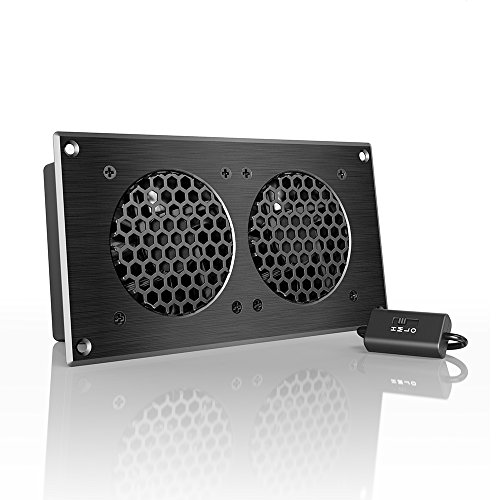
| Most Compact Design | Airflow (CFM): 52 CFM | Noise Level: 18 dBA | Power/Voltage: 1.9 watts at 240 volts | VIEW LATEST PRICE | Read Our Analysis |
| AC Infinity MULTIFAN S7 Dual USB Fan Cooling |

| Highest Airflow Output | Airflow (CFM): 104 CFM | Noise Level: 19 dBA | Power/Voltage: 5 watts at 12 volts | VIEW LATEST PRICE | Read Our Analysis |
| AC Infinity AXIAL 1225 Quiet Muffin Fan 120mm |
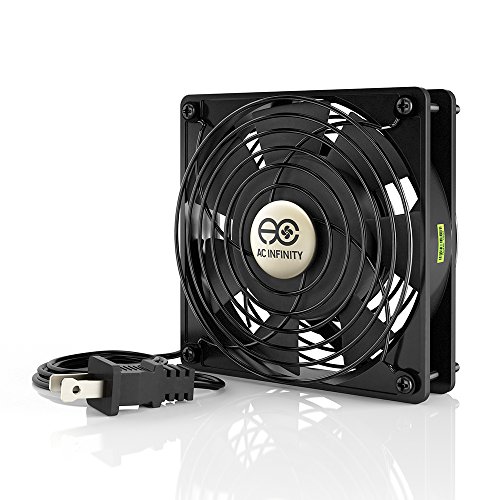
| Most Affordable Option | Airflow (CFM): 51 CFM | Noise Level: 30 dBA | Power/Voltage: 8 watts at 100-120V AC | VIEW LATEST PRICE | Read Our Analysis |
| Computer Fan 120mm Variable Speed with Controller |

| Best Speed Control | Airflow (CFM): 95.8 CFM | Noise Level: Less than 41 dB | Power/Voltage: 3.3 watts at 12V (via AC outlet) | VIEW LATEST PRICE | Read Our Analysis |
| AC Infinity AIRCOM S7 Quiet Cooling Fan System |

| Best Overall Performance | Airflow (CFM): 140 CFM | Noise Level: 19 dBA | Power/Voltage: 5.2 watts at 12 volts | VIEW LATEST PRICE | Read Our Analysis |
More Details on Our Top Picks
AC Infinity AIRPLATE S5 Quiet Cooling Fan System
Are you looking for a compact cooling solution that won’t clutter your AV cabinet or gaming setup? The AC Infinity AIRPLATE S5 delivers 52 CFM of airflow while operating at just 18 dBa, keeping noise minimal. You can power it via wall outlet or USB port for flexible installation options. The unit features dual ball bearings and runs at maximum 2000 RPM. Its CNC-machined aluminum frame measures 8.5 x 4.4 x 1.3 inches and weighs only 1 pound, fitting easily into tight spaces. You can boost performance by 25% using the optional Turbo Adapter. The fan includes a one-year warranty and qualifies for Amazon’s 30-day return guarantee.
- Airflow (CFM):52 CFM
- Noise Level:18 dBA
- Power/Voltage:1.9 watts at 240 volts
- Bearing Type:Dual ball bearings
- Dimensions:8.5 x 4.4 x 1.3 inches
- Speed Control:Fixed speed with optional turbo adapter
- Additional Feature:Turbo Adapter increases performance
- Additional Feature:Dual power options (outlet/USB)
- Additional Feature:CNC machined aluminum frame
AC Infinity MULTIFAN S7 Dual USB Fan Cooling
When you’re setting up cooling for gaming consoles, receivers, DVRs, or PC towers in tight spaces, the AC Infinity MULTIFAN S7 offers a practical dual-fan solution that operates at just 19 dBA—quiet enough not to interfere with your entertainment experience. Each 120mm fan delivers 104 CFM total airflow while drawing only 5 watts at 12 volts. The dual-ball bearings provide 67,000 hours of lifespan, ensuring long-term reliability. You can mount the unit flat or upright depending on your cabinet layout. The included multi-speed controller lets you adjust fan speed to balance noise and cooling performance. Power connects directly via USB ports behind your equipment, eliminating the need for additional outlets or complicated wiring.
- Airflow (CFM):104 CFM
- Noise Level:19 dBA
- Power/Voltage:5 watts at 12 volts
- Bearing Type:Dual-ball bearings (67,000 hours lifespan)
- Dimensions:4.7 x 4.7 x 1 inch (per fan)
- Speed Control:Multi-speed controller
- Additional Feature:Dual 120mm USB fans
- Additional Feature:Flexible mounting (flat/upright)
- Additional Feature:67,000 hour bearing lifespan
AC Infinity AXIAL 1225 Quiet Muffin Fan 120mm
The AC Infinity AXIAL 1225 suits you if you’re cooling gaming consoles, audio receivers, or building a DIY ventilation system that won’t generate excessive noise. This 120mm fan delivers 51 CFM airflow at just 30 dBA, making it quiet enough for noise-sensitive environments. It runs at 1800 RPM using only 8 watts, backed by dual-ball bearings rated for 67,000 hours. The aluminum construction mounts in any direction, and you’ll receive two fan guards plus a complete screw set. Installation takes minutes—connect the 2-pin power cord to your device, secure the fan with provided hardware, and position it for optimal airflow. UL certification ensures safety and reliability for long-term operation.
- Airflow (CFM):51 CFM
- Noise Level:30 dBA
- Power/Voltage:8 watts at 100-120V AC
- Bearing Type:Dual-ball bearings (67,000-hour lifespan)
- Dimensions:4.7 x 4.7 x 1 inch
- Speed Control:Fixed speed (1800 RPM)
- Additional Feature:Includes fan guards included
- Additional Feature:Omnidirectional mounting capability
- Additional Feature:Heavy-duty aluminum construction
Computer Fan 120mm Variable Speed with Controller
If you’re looking to cool a PC, server cabinet, DVR, or router without breaking your budget on energy costs, this 120mm axial fan with variable speed control offers you exactly what you need. The dual-ball bearing design provides 50,000 hours of reliable operation. You’ll adjust fan speed between 700 and 2800 RPM using the Easy Cloud controller, which accepts 3V–12V input. The fan produces airflow of 95.8 CFM while maintaining noise under 41 dB. Power consumption stays minimal at 3.3W. Installation works with 120V, 110V, or 220V outlets via the included AC plug. This replacement fan fits standard 120mm mounting brackets and keeps equipment operating at safe temperatures.
- Airflow (CFM):95.8 CFM
- Noise Level:Less than 41 dB
- Power/Voltage:3.3 watts at 12V (via AC outlet)
- Bearing Type:Dual-ball bearings (50,000 hours lifespan)
- Dimensions:4.72 x 4.72 x 0.98 inches
- Speed Control:Variable speed controller (700-2800 RPM)
- Additional Feature:220V compatibility via controller
- Additional Feature:Adjustable 700-2800 RPM range
- Additional Feature:50,000 hour bearing lifespan
AC Infinity AIRCOM S7 Quiet Cooling Fan System
Looking for a cooling solution that won’t clutter your entertainment setup? The AC Infinity AIRCOM S7 delivers quiet, efficient cooling for receivers, amps, and AV components. You’ll mount it horizontally or vertically in tight spaces using its low-profile steel design. The front controller lets you select two temperature trigger modes or continuous operation, with four fan speeds per mode. You’ll experience 140 CFM airflow at just 19 dBA noise level. The dual-ball bearing blowers run at up to 6,700 RPM while consuming only 5.2 watts. Installation’s straightforward: connect the 12-volt power adapter and position the unit for top exhaust airflow. The system supports ten pounds stacked on top, making it practical for crowded cabinets.
- Airflow (CFM):140 CFM
- Noise Level:19 dBA
- Power/Voltage:5.2 watts at 12 volts
- Bearing Type:Dual-ball bearings (67,000 hours)
- Dimensions:11.6 x 6.3 x 1.5 inches
- Speed Control:Programmable thermostat with four fan speeds
- Additional Feature:Smart thermostat trigger programming
- Additional Feature:Supports 10 lbs stacking
- Additional Feature:Integrated top-exhaust design
Factors to Consider When Choosing a Cabinet Fan for Electronics
When you’re selecting a cabinet fan for electronics, you’ll need to evaluate five key factors that directly impact performance and longevity: airflow measured in CFM (cubic feet per minute) must match your cooling needs, noise levels should stay within acceptable ranges for your environment, power consumption should align with your efficiency goals, the fan’s mounting system must fit your cabinet dimensions, and bearing quality determines how long the fan will operate reliably. Start by calculating your required CFM based on the heat output of your equipment, then cross-reference this against decibel ratings and wattage specifications to find options that balance cooling power with low noise and energy efficiency. Finally, verify that the fan’s mounting brackets and size are compatible with your cabinet space, and confirm the bearing type—typically ball or sleeve bearings—to ensure the lifespan meets your replacement timeline expectations.
Airflow And CFM Requirements
How much air does your cabinet fan actually need to move? You’ll measure this in CFM (cubic feet per minute), which directly correlates to your cabinet’s heat load and size. First, identify your equipment’s total heat output in watts, then convert this to BTU per hour by multiplying by 3.41. Next, determine your cabinet’s volume in cubic feet. Divide the BTU output by the volume to find your required CFM. Most electronics cabinets need 50–200 CFM depending on equipment density. Higher CFM improves cooling but increases noise and power consumption. When using multiple fans, add their CFM ratings together and account for air path resistance through filters or blocked vents. Match your total airflow precisely to your heat load for optimal performance without unnecessary noise or energy waste.
Noise Level Considerations
Noise level’s measured in dBA, and you’ll want to understand what the numbers mean before you buy. Quieter units range from 18–19 dBA, making them suitable for living rooms and AV cabinets where silence matters. Higher-noise options near 30–41 dBA become noticeable in quiet environments. RPM directly affects noise output: higher speeds generate louder operation. Dual-ball bearing fans deliver stable, quieter performance with longer lifespans compared to sleeve bearings. To manage noise effectively, select fans with speed control or multi-speed controllers. These allow you to adjust cooling power while keeping sound acceptable. Match your noise tolerance to your cabinet location. For sensitive spaces, prioritize units below 20 dBA. For utility areas, higher noise levels are tolerable if cooling performance justifies it.
Power Consumption And Efficiency
What’s the real impact of a cabinet fan’s power draw on your energy bills and cooling setup? Standard 120 mm fans consume between 1.9 and 8 watts, directly affecting your cabinet’s overall efficiency. You’ll find that higher airflow doesn’t automatically demand more power—some models deliver 104–140 CFM at just 5–8 watts, proving efficient cooling is achievable. USB-powered options maintain low wattage while offering convenient integration with existing electronics. To optimize performance, use multi-speed controllers or PWM control to reduce RPM and power when maximum cooling isn’t necessary. However, turbo adapters boost performance by roughly 25% while increasing power consumption, creating an efficiency trade-off you must evaluate based on your specific cooling demands and budget constraints.
Mounting And Space Compatibility
Before you purchase a cabinet fan, you’ll need to measure your available space carefully to confirm the unit will fit without blocking components or air vents. Check your cabinet’s interior depth, height, and width against the fan’s dimensions. Verify whether the fan mounts horizontally or vertically, and confirm it can operate in your preferred orientation. Examine the mounting hardware included—screws, brackets, and guards—and determine if you need spacers or vibration dampening material. Confirm the fan’s exhaust direction aligns with your cabinet layout, whether rear or top-mounted. For example, a 120mm fan typically measures 4.7 x 4.7 x 1 inches, so ensure your space accommodates these proportions without restricting airflow pathways or pressing against internal components.
Bearing Durability And Lifespan
Since your cabinet fan will run continuously or for extended periods, the bearing type directly impacts how long the unit will last before requiring replacement. Dual-ball bearing fans typically deliver 67,000 hours of lifespan, substantially outlasting sleeve-bearing alternatives. This durability matters because continuous operation stresses components, and higher mean time between failures (MTBF) means fewer maintenance interruptions.
When selecting a fan, verify the bearing specification in product documentation. Muffin-style 120mm fans with dual-ball bearings perform especially well in temperature-variable environments. Maximize lifespan by ensuring proper mounting—this reduces vibration and bearing wear. Additionally, confirm low-resistance airflow paths around your equipment, as restricted airflow forces fans to work harder and deteriorates bearings faster. Checking these factors upfront prevents costly replacements.
Final Thoughts
You’ve reviewed five cabinet fans with varying airflow and noise levels. Choose the AIRCOM S7 for maximum cooling at low noise, or pick the AIRPLATE S5 for compact spaces. If you need dual fans, go with the MULTIFAN S7. Match your selection to your cabinet size, heat output, and noise tolerance. Install your chosen fan according to its mounting specifications, then adjust temperature settings if available.

Meet Ry, “TechGuru,” a 36-year-old technology enthusiast with a deep passion for tech innovations. With extensive experience, he specializes in gaming hardware and software, and has expertise in gadgets, custom PCs, and audio.
Besides writing about tech and reviewing new products, he enjoys traveling, hiking, and photography. Committed to keeping up with the latest industry trends, he aims to guide readers in making informed tech decisions.