

You need an ID card scanner that captures data quickly and accurately without slowing your team down. The right scanner handles both sides of cards at once, extracts information automatically, and integrates with your existing software. Several options exist—from compact desktop models to mobile scanners—each designed for different workflows and spaces. Your choice depends on speed requirements, security needs, and where you’ll use it.
| Swish S1 Medical Insurance ID Card Scanner |

| Windows-Only Workhorse | Scanning Method: Single-side (manual dual-side capability) | Platform Compatibility: Windows only | Power Source: USB-powered | VIEW LATEST PRICE | Read Our Analysis |
| PS667 ID Card Scanner with Software & Data Extraction |

| Most Feature-Rich | Scanning Method: Single-side with 2D barcode extraction | Platform Compatibility: Windows and Mac | Power Source: USB-powered | VIEW LATEST PRICE | Read Our Analysis |
| Ambir ImageScan Pro 687-AS Duplex Card Scanner for Windows PC and MAC |

| Fastest Duplex Scanning | Scanning Method: Duplex (both sides in one pass) | Platform Compatibility: Windows and Mac | Power Source: USB-powered | VIEW LATEST PRICE | Read Our Analysis |
| Ambir Technology PS667 Simplex A6 Card Scanner |
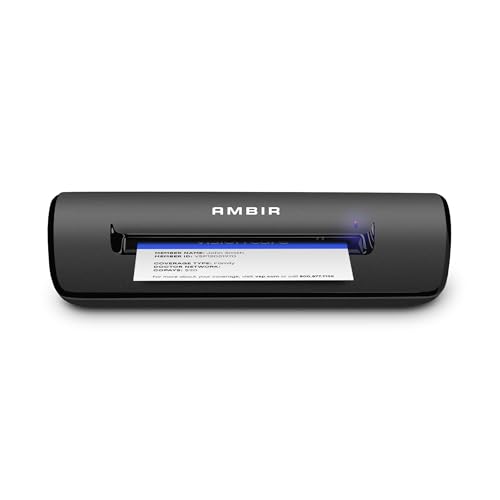
| Best Data Extraction | Scanning Method: Single-side | Platform Compatibility: Windows and Mac | Power Source: USB-powered | VIEW LATEST PRICE | Read Our Analysis |
| Brother DS-640 Compact Mobile Document Scanner (Model: DS640) |

| Most Portable | Scanning Method: Single-sheet (portable document scanner) | Platform Compatibility: Windows, Mac, Linux | Power Source: USB 3.0 cable-powered | VIEW LATEST PRICE | Read Our Analysis |
| Ambir nScan 690gt-AS High-Speed Card Scanner |

| High-Speed Compact | Scanning Method: Duplex (both sides in one pass) | Platform Compatibility: Windows and Mac | Power Source: USB-powered | VIEW LATEST PRICE | Read Our Analysis |
| DocketPORT 667 Simplex Card Scanner (DP667) |
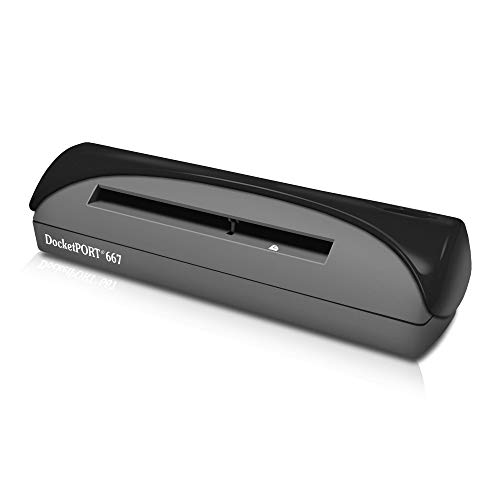
| Budget-Friendly Basic | Scanning Method: Single-side | Platform Compatibility: Multi-platform (TWAIN compatible) | Power Source: USB-powered | VIEW LATEST PRICE | Read Our Analysis |
More Details on Our Top Picks
Swish S1 Medical Insurance ID Card Scanner
Looking for a straightforward card scanner that works with your existing Windows practice management system? The Swish S1 uses a camera-based drop-and-scan design to capture insurance cards, photo IDs, and medical documents one side at a time. You place cards into a wide slot—no narrow feeds that damage fragile materials. The device connects via USB for power and data, requiring no external outlet. Scan-ID LITE software lets you save images as PDF, JPEG, TIF, or BMP files directly to your computer or network folders. Since it’s TWAIN compliant, it integrates with hundreds of healthcare applications. Note that this version doesn’t automatically read driver licenses; you’ll enter that information manually.
- Scanning Method:Single-side (manual dual-side capability)
- Platform Compatibility:Windows only
- Power Source:USB-powered
- Output Formats:PDF, JPEG, TIF, BMP
- Included Software:ScanToFile and Scan-ID LITE apps
- Portability/Footprint:Compact desktop (5.2 x 4.5 inches)
- Additional Feature:Dual-side scanning technology
- Additional Feature:No moving parts/damage prevention
- Additional Feature:Drop-and-scan design
PS667 ID Card Scanner with Software & Data Extraction
The PS667 ID Card Scanner with Software & Data Extraction works best for businesses that need local data control without cloud dependencies. You’ll plug the USB-powered scanner into your Windows or Mac computer and immediately extract data from 2D barcodes on valid US and state IDs. The software automatically flags expired IDs and minors, helping you prevent age-restricted sales. You can manage customer records locally, set up ban lists to block previously flagged individuals, and export your database for marketing campaigns. With password protection, anti-passback detection, and a 2-year warranty, you’re purchasing one complete system with no subscription fees or ongoing costs.
- Scanning Method:Single-side with 2D barcode extraction
- Platform Compatibility:Windows and Mac
- Power Source:USB-powered
- Output Formats:Local data storage
- Included Software:Data extraction and customer management software
- Portability/Footprint:Standard desktop scanner
- Additional Feature:Automatic 2D barcode extraction
- Additional Feature:Built-in age verification
- Additional Feature:Anti-passback duplicate detection
Ambir ImageScan Pro 687-AS Duplex Card Scanner for Windows PC and MAC
Need to process identification documents quickly without switching between front and back scans? The Ambir ImageScan Pro 687-AS captures both sides in one pass, cutting your scanning time in half. This duplex card scanner handles patient IDs, insurance cards, driver’s licenses, and vaccine cards in just three seconds each. Connect it via USB to your Windows PC or Mac, then use the included AmbirScan software to save documents as PDF, TIF, or JPG files directly to your computer or cloud services like Google Drive and Dropbox. The scanner supports raised characters and works with any TWAIN-compatible application, plus it integrates with Zapier to automate workflows in QuickBooks, DocuSign, and Slack.
- Scanning Method:Duplex (both sides in one pass)
- Platform Compatibility:Windows and Mac
- Power Source:USB-powered
- Output Formats:PDF, TIF, JPG
- Included Software:AmbirScan capture software
- Portability/Footprint:Standard desktop (8″ W x 1.7″ D x 1.69″ H)
- Additional Feature:Duplex scanning in one pass
- Additional Feature:Zapier workflow automation integration
- Additional Feature:Citrix Ready certification
Ambir Technology PS667 Simplex A6 Card Scanner
If you’re processing identification and insurance cards at registration desks or mobile stations, the Ambir Technology PS667 Simplex A6 Card Scanner delivers professional-grade scanning in a compact, durable package. This USB-powered device scans cards in three seconds, making it ideal for high-volume workflows. Weighing under one pound with an eight-inch length, it fits easily on crowded desks. The scanner captures clear images at 200 DPI resolution using LED lighting and CIS sensor technology. Save scanned files as PDF, TIF, or JPG directly to your PC or cloud services like Google Drive and Dropbox. The included AmbirScan software streamlines capture operations, while Zapier integration automates workflows in QuickBooks, DocuSign, and Slack, eliminating manual data entry.
- Scanning Method:Single-side
- Platform Compatibility:Windows and Mac
- Power Source:USB-powered
- Output Formats:PDF, TIF, JPG
- Included Software:AmbirScan capture software
- Portability/Footprint:Ultra-compact (~8″ long, under 1 pound)
- Additional Feature:3-second scan speed
- Additional Feature:Raised character support
- Additional Feature:Zapier webhook integration
Brother DS-640 Compact Mobile Document Scanner (Model: DS640)
Looking for a scanner you can carry in your bag or pocket? The Brother DS-640 weighs just 1.5 pounds and measures under 12 inches long, making it ideal for mobile scanning. Connect it via USB 3.0 to your laptop—no power outlet needed. You’ll scan business cards and plastic ID cards at up to 16 pages per minute in color or black and white. The scanner captures 300 dpi resolution with automatic color detection and background removal. You can convert scanned documents to editable Word files using included OCR software. Choose your scan destination: file, email, or cloud services. The device works with Windows, Mac, and Linux systems.
- Scanning Method:Single-sheet (portable document scanner)
- Platform Compatibility:Windows, Mac, Linux
- Power Source:USB 3.0 cable-powered
- Output Formats:PDF, Word (OCR-enabled)
- Included Software:OCR and document management suite
- Portability/Footprint:Highly portable (11.9″ W, 1.5 pounds)
- Additional Feature:16 pages per minute speed
- Additional Feature:Automatic color detection/adjustment
- Additional Feature:OCR and text enhancement
Ambir nScan 690gt-AS High-Speed Card Scanner
The Ambir nScan 690gt-AS High-Speed Card Scanner delivers duplex scanning capability, making it an excellent choice if you’re processing identification documents quickly without manually feeding each side separately. This compact scanner accepts driving licenses, ID cards, and insurance cards through its front-loading slot. You’ll save scans as PDF, TIFF, or JPG files using the included AmbirScan software. The device connects via USB and operates at 600 dpi resolution. For workflow automation, you can integrate Zapier to trigger actions in QuickBooks, DocuSign, or Slack. The scanner weighs just 1.33 pounds and fits easily on any desk.
- Scanning Method:Duplex (both sides in one pass)
- Platform Compatibility:Windows and Mac
- Power Source:USB-powered
- Output Formats:PDF, TIFF, JPG
- Included Software:AmbirScan capture software
- Portability/Footprint:Compact vertical footprint (6.6″ W x 3.3″ D x 5″ H)
- Additional Feature:Front-facing auto feed slot
- Additional Feature:600 dpi resolution
- Additional Feature:Zapier workflow automation
DocketPORT 667 Simplex Card Scanner (DP667)
Need a scanner that fits on your desk without consuming precious workspace? The DocketPORT 667 offers an ultra-compact footprint about the size of a stapler, making it ideal for tight office environments. You’ll appreciate its USB-powered design—simply connect it to your computer without needing an electrical outlet or AC adapter. The scanner converts documents directly to PDF format using included DocketScan software, streamlining your workflow immediately. Its TWAIN driver ensures compatibility with thousands of software applications and hardware systems you’re already using. The lightweight, portable construction makes it a practical travel companion for mobile professionals. This combination of compact design, direct-to-PDF functionality, and broad software integration delivers efficient ID card scanning without requiring significant desk space or complex setup procedures.
- Scanning Method:Single-side
- Platform Compatibility:Multi-platform (TWAIN compatible)
- Power Source:USB-powered
- Output Formats:PDF
- Included Software:DocketScan image acquisition software
- Portability/Footprint:Ultra-compact (stapler-sized)
- Additional Feature:Direct to PDF scanning
- Additional Feature:Stapler-sized footprint
- Additional Feature:TWAIN driver compatibility
Factors to Consider When Choosing ID Card Scanners for Computers
When you’re selecting an ID card scanner for your computer, you’ll need to evaluate several key factors: scanning speed and performance (how quickly it processes cards), system compatibility (whether it works with your existing setup), and duplex versus simplex capability (whether it scans both sides simultaneously or one side at a time). You should also assess the scanner’s data extraction and security features to ensure it captures information accurately and protects sensitive data from unauthorized access. Finally, consider the scanner’s portability and physical footprint, which determines whether you can move it between workstations or need dedicated desk space.
Scanning Speed and Performance
How quickly can your ID card scanner process documents without sacrificing quality? Duplex scanners capture both card sides in one pass, cutting your scanning time in half compared to simplex models. Look for devices that process cards in approximately three seconds each, enabling you to handle high-volume workflows efficiently. Scan resolution ranges from 200 to 600 dpi—choose higher resolutions for better readability and OCR accuracy when you’re processing text-heavy documents. Auto-feeding features eliminate manual handling, speeding up throughput significantly. USB-powered, compact designs let you deploy scanners quickly in any workspace, whether mobile or desk-based. Match your scanner’s speed and resolution to your specific volume needs and quality requirements for optimal performance.
Compatibility With Your System
Speed and resolution matter little if your scanner won’t work with your computer setup. Start by checking your operating system—Windows 10/11 or macOS 11+—against the scanner’s requirements. Next, confirm TWAIN or WIA compatibility to ensure the device integrates with your existing software. Verify whether the scanner uses USB power only or requires an external power supply, as this affects your setup options. Then check for available drivers and software support specific to your platform. If you use Citrix or specialized applications, confirm the scanner supports those environments. Finally, review bundled software to ensure it connects with your cloud storage and current workflows. These compatibility checks prevent purchasing a device that won’t function in your environment.
Duplex Versus Simplex Capability
Does your workflow require scanning both sides of ID cards regularly? You’ll want to understand the difference between duplex and simplex capability. Duplex scanners capture both sides in a single pass, completing the job in half the time compared to running two separate simplex scans. Simplex scanners require you to flip each card and scan again, which increases your total processing time. If your cards contain raised characters or sensitive data on both sides, duplex scanning delivers greater accuracy and completeness. Many duplex devices include software that automatically aligns and merges front-and-back images into one unified document. For high-volume ID card scanning operations, duplex capability significantly streamlines your workflow and reduces manual handling errors.
Data Extraction and Security
Once you’ve selected a scanner with the duplex capability that matches your volume needs, you’ll need to evaluate how the device handles the information it captures. Look for scanners that automatically extract data from 2D barcodes on IDs, pulling fields like name, address, and date of birth. This feature reduces manual entry and speeds verification. Verify the scanner stores data locally by default rather than in the cloud, giving you greater privacy control. Check for anti-tamper features including age verification flags, expired ID detection, and duplicate scan checks to reduce fraud. Confirm the device offers password protection and user management to restrict data access. Finally, review whether it integrates with your existing apps through Zapier or similar platforms to automate downstream workflows.
Portability and Physical Footprint
How much desk space can you actually spare for an ID card scanner? Compact models measure under 6 inches in width and weigh under 2 pounds, making them ideal for tight workspaces. Some units feature stapler-sized footprints designed specifically for travel and small desks. Check the height and depth—typically 1.5 to 5 inches—to ensure clearance under shelves or within storage carts. USB-powered designs eliminate external adapters, freeing up outlet space and improving mobility. Consider whether you need duplex scanning or single-pass front-loading options, as these affect how much surface area the scanner occupies during operation. Measure your available space before purchasing to confirm the device fits your workflow without disrupting your setup.
Final Thoughts
You’ll want to select an ID card scanner based on your specific needs. If you’re handling medical IDs, choose the Swish S1. For high-volume work, pick a duplex model like the Ambir ImageScan Pro 687-AS or nScan 690gt-AS. Need portability? Go with the Brother DS-640. For tight desk space, consider simplex options like the PS667 or DocketPORT 667. Verify that your chosen scanner integrates with your existing software and supports local data storage for security compliance.

Meet Ry, “TechGuru,” a 36-year-old technology enthusiast with a deep passion for tech innovations. With extensive experience, he specializes in gaming hardware and software, and has expertise in gadgets, custom PCs, and audio.
Besides writing about tech and reviewing new products, he enjoys traveling, hiking, and photography. Committed to keeping up with the latest industry trends, he aims to guide readers in making informed tech decisions.