
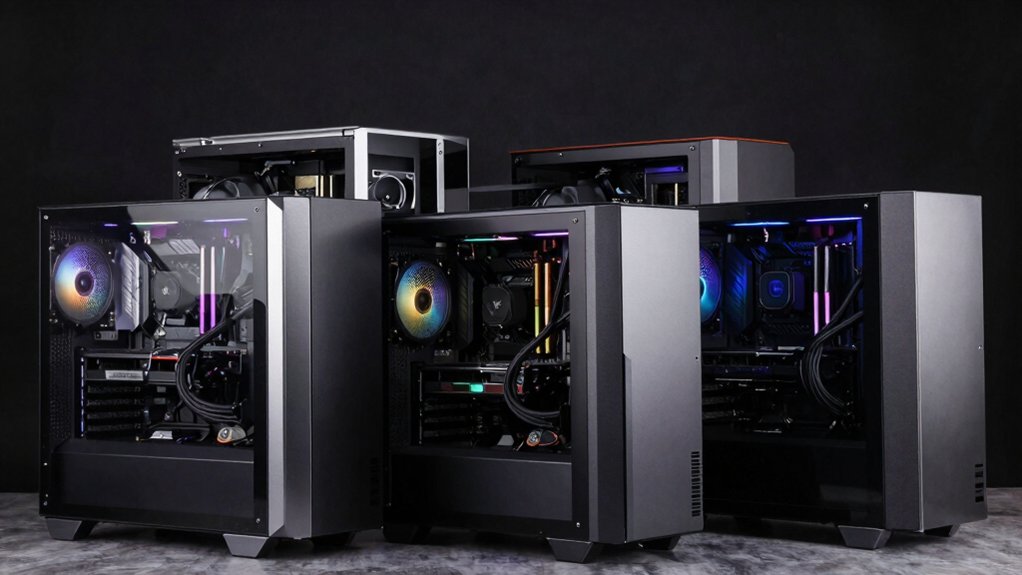

If you’re running multiple systems simultaneously, you need a case that handles the heat, power distribution, and component separation effectively. Standard cases won’t cut it—you require dual-chamber designs, robust cooling support, and strategic port placement. The right choice depends on your specific setup: water cooling needs, GPU dimensions, storage expansion, or specialized builds like Raspberry Pi systems. Understanding what each case offers helps you avoid costly mistakes. Let’s examine the options that actually deliver.
| Thermaltake Core W200 Dual System Water Cooling Tower Case |
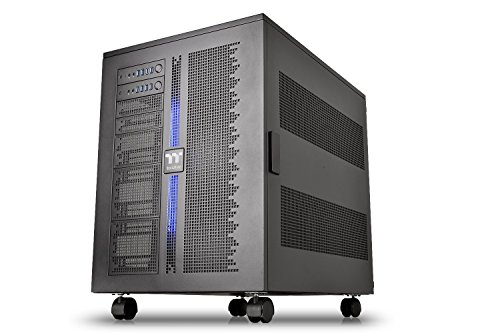
| Extreme Dual-System Beast | Case Type: XL-ATX Super Tower | Motherboard Support: Mini ITX to XL-ATX | Cooling Method: Air and liquid (up to two 600mm radiators) | VIEW LATEST PRICE | Read Our Analysis |
| CORSAIR AIR 5400 RS-R ARGB Mid-Tower PC Case |

| Best Overall Performance | Case Type: Mid-Tower | Motherboard Support: ATX | Cooling Method: Air (360mm radiator support) | VIEW LATEST PRICE | Read Our Analysis |
| MUSETEX ATX Mid Tower PC Case with ARGB Fans (K2) |

| Best Value Pick | Case Type: Mid-Tower | Motherboard Support: ATX, Micro ATX, Mini ITX | Cooling Method: Air (360mm radiator support) | VIEW LATEST PRICE | Read Our Analysis |
| Pironman 5-MAX Raspberry Pi 5 Case with NVMe SSD |
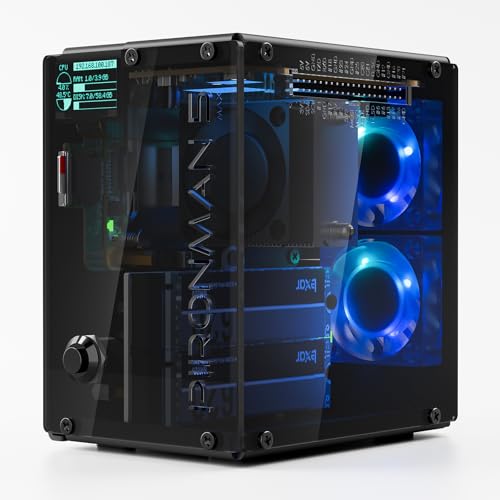
| Specialized Raspberry Pi | Case Type: Raspberry Pi 5 Enclosure | Motherboard Support: Raspberry Pi 5 | Cooling Method: Air (tower cooler with PWM fan) | VIEW LATEST PRICE | Read Our Analysis |
| NZXT H9 Flow ATX Mid-Tower PC Case |

| Best Airflow Design | Case Type: Mid-Tower | Motherboard Support: ATX, E-ATX | Cooling Method: Air (up to 420mm radiator support) | VIEW LATEST PRICE | Read Our Analysis |
| Hyte Y70 Touch Dual Chamber ATX Mid Tower Case |

| Premium Feature Leader | Case Type: Mid-Tower | Motherboard Support: ATX | Cooling Method: Air and liquid (up to 360mm radiators) | VIEW LATEST PRICE | Read Our Analysis |
| CORSAIR Frame 4500X RS Mid-Tower PC Case |

| Most Customizable Option | Case Type: Mid-Tower | Motherboard Support: Mini-ITX, Micro-ATX, ATX, E-ATX | Cooling Method: Air and liquid (up to 360mm radiators) | VIEW LATEST PRICE | Read Our Analysis |
More Details on Our Top Picks
Thermaltake Core W200 Dual System Water Cooling Tower Case
If you’re running two complete PC systems simultaneously, the Thermaltake Core W200 delivers the space and cooling capacity you’ll need to support them without compromise. This XL-ATX tower accommodates two separate motherboards, power supplies, and graphics cards within its 29.5″ deep frame. Install up to two 600mm radiators for extreme liquid cooling performance. The case supports Mini ITX through XL-ATX motherboards, offering ten expansion slots total across both systems. Each system accesses its own 4x USB 3.0 and HD Audio ports on the front panel. Removable modular components allow straightforward upgrades and maintenance. The acrylic window provides visibility while reinforcing structural integrity.
- Case Type:XL-ATX Super Tower
- Motherboard Support:Mini ITX to XL-ATX
- Cooling Method:Air and liquid (up to two 600mm radiators)
- Internal Bays:4 bays
- Front I/O Connectivity:Dual 4x USB 3.0 with HD Audio ports
- Enclosure Material:Acrylic
- Additional Feature:Dual-system motherboard support
- Additional Feature:Supports two 600mm radiators
- Additional Feature:Stackable Core P200 pedestal
CORSAIR AIR 5400 RS-R ARGB Mid-Tower PC Case
The CORSAIR AIR 5400 RS-R ARGB excels for builders who need to manage heat from two separate systems without sacrificing cooling performance. Its triple-chamber design isolates the CPU, GPU/motherboard, and PSU/storage into separate zones, preventing heat cross-contamination. Install your first system’s radiator in the front CPU chamber, then configure your second system in the central GPU chamber. The bottom airflow duct accelerates cooling through a narrow channel, reducing noise while maintaining thermal efficiency. Three pre-installed RS120-R ARGB fans support both configurations. The case supports standard ATX motherboards and accommodates four internal bays for storage drives, providing practical flexibility for dual-system setups.
- Case Type:Mid-Tower
- Motherboard Support:ATX
- Cooling Method:Air (360mm radiator support)
- Internal Bays:4 bays
- Front I/O Connectivity:2x USB 3.0
- Enclosure Material:Acrylic, Plastic, Tempered Glass
- Additional Feature:Triple-chamber thermal design
- Additional Feature:Reverse-rotor ARGB fans included
- Additional Feature:Panoramic wraparound glass panel
MUSETEX ATX Mid Tower PC Case with ARGB Fans (K2)
Looking to build a dual-system setup without compromising on cooling or visibility? The MUSETEX K2 delivers practical features you’ll need. Install your ATX, Micro ATX, or Mini ITX motherboards in the spacious interior supporting GPUs up to 420mm and CPU coolers reaching 178mm. You’ll get six pre-installed ARGB fans with adjustable speeds and anti-vortex blade design for efficient airflow. The dual tempered glass panels give you 270-degree visibility of your hardware. Connect peripherals through the front Type-C port and dual USB 3.0 connections. Magnetic dust filters on top and bottom keep components clean while maintaining quiet operation throughout your build.
- Case Type:Mid-Tower
- Motherboard Support:ATX, Micro ATX, Mini ITX
- Cooling Method:Air (360mm radiator support)
- Internal Bays:4 bays
- Front I/O Connectivity:2x USB 3.0, Type-C, Reset, Audio
- Enclosure Material:Glass, Metal, Plastics
- Additional Feature:Six pre-installed ARGB fans
- Additional Feature:270-degree dual tempered glass
- Additional Feature:Type-C front panel connectivity
Pironman 5-MAX Raspberry Pi 5 Case with NVMe SSD
Want to build a Raspberry Pi 5 system that handles high-speed storage, AI acceleration, and home automation all at once? The Pironman 5-MAX case equips you with dual NVMe M.2 SSD slots and a PCIe Gen2 switch, supporting RAID 0/1 configurations for NAS or edge computing. Install your storage drives, mount the Raspberry Pi 5 at the base, and use the advanced cooling system with PWM fan and dual RGB fans to maintain optimal temperatures. The 0.96″ OLED display shows real-time CPU usage, memory, temperature, and disk status. Configure your setup through SunFounder’s online tutorials, then deploy your system for home automation or AI workloads.
- Case Type:Raspberry Pi 5 Enclosure
- Motherboard Support:Raspberry Pi 5
- Cooling Method:Air (tower cooler with PWM fan)
- Internal Bays:2 bays
- Front I/O Connectivity:Full-size HDMI ports, GPIO extender
- Enclosure Material:Tempered Glass
- Additional Feature:Dual NVMe M.2 SSD slots
- Additional Feature:0.96-inch OLED display included
- Additional Feature:RAID 0/1 support capability
NZXT H9 Flow ATX Mid-Tower PC Case
If you’re building a dual-system setup and need a case that keeps your components organized while maintaining clean airflow, NZXT’s H9 Flow delivers a dual-chamber design that separates your main hardware from the power supply and storage drives. The case supports ATX and E-ATX motherboards, accommodates up to nine 140mm fans and one 120mm rear fan, and handles radiators up to 420mm. Three pre-installed F140Q front fans and one rear F120Q fan provide baseline cooling. You’ll access 10 internal bays for storage expansion, extra-wide cable channels, and Velcro straps for organized routing. The tempered glass panels wrap panoramically for full visibility of your builds. Suitable for high-end GPUs with ample clearance, the H9 Flow weighs 12.5 kg and includes a two-year manufacturer warranty.
- Case Type:Mid-Tower
- Motherboard Support:ATX, E-ATX
- Cooling Method:Air (up to 420mm radiator support)
- Internal Bays:10 bays
- Front I/O Connectivity:Not specified
- Enclosure Material:Alloy Steel, Tempered Glass
- Additional Feature:Dual-chamber design layout
- Additional Feature:Supports 420mm radiators
- Additional Feature:Back-connect ready design
Hyte Y70 Touch Dual Chamber ATX Mid Tower Case
The Hyte Y70 Touch stands out for builders who want integrated system monitoring without sacrificing performance—it’s the case to choose when you’re running multiple high-end components and need real-time visibility into your build’s performance and aesthetics. You’ll install your motherboard and GPU vertically using the included PCIe 4.0 x16 riser, positioning them prominently behind the 14.9″ touchscreen. Route your cables through dedicated channels and secure them with included Velcro straps. Configure your cooling setup by mounting radiators on the side (up to 360mm, 125mm thick) or top (up to 360mm, 68mm thick), then populate the cold floor with fans. Customize the touchscreen display using HYTE Nexus software to monitor your system in real time.
- Case Type:Mid-Tower
- Motherboard Support:ATX
- Cooling Method:Air and liquid (up to 360mm radiators)
- Internal Bays:4 bays
- Front I/O Connectivity:2x USB 2.0, 2x USB ports
- Enclosure Material:Metal, Tempered Glass
- Additional Feature:Integrated 14.9-inch LCD touchscreen
- Additional Feature:4-slot vertical GPU mounting
- Additional Feature:Dual chamber interior layout
CORSAIR Frame 4500X RS Mid-Tower PC Case
Building a dual-system setup requires a case that won’t limit your hardware options—and that’s where CORSAIR’s Frame 4500X RS delivers. The modular FRAME system lets you customize the motherboard tray, side-mounted fans, and PSU shroud independently. You’ll support ATX, Micro-ATX, Mini-ITX, and E-ATX boards simultaneously. The InfiniRail Fan Mounting System positions 120mm or 140mm fans anywhere on steel rails, accommodating up to 10 120mm fans. You can install dual radiators up to 360mm and mount GPUs vertically. Storage includes two 2.5″ SSDs, one 3.5″ HDD, and eight expansion slots.
- Case Type:Mid-Tower
- Motherboard Support:Mini-ITX, Micro-ATX, ATX, E-ATX
- Cooling Method:Air and liquid (up to 360mm radiators)
- Internal Bays:Storage for 2x 2.5″ SSDs, 1x 3.5″ HDD
- Front I/O Connectivity:2x USB 3.2 Gen1, 1x USB 3.2 Gen2 Type-C, Audio
- Enclosure Material:Steel, Tempered Glass, Plastic
- Additional Feature:FRAME modular case system
- Additional Feature:InfiniRail fan mounting system
- Additional Feature:Supports dual 360mm radiators
Factors to Consider When Choosing a Dual System PC Case
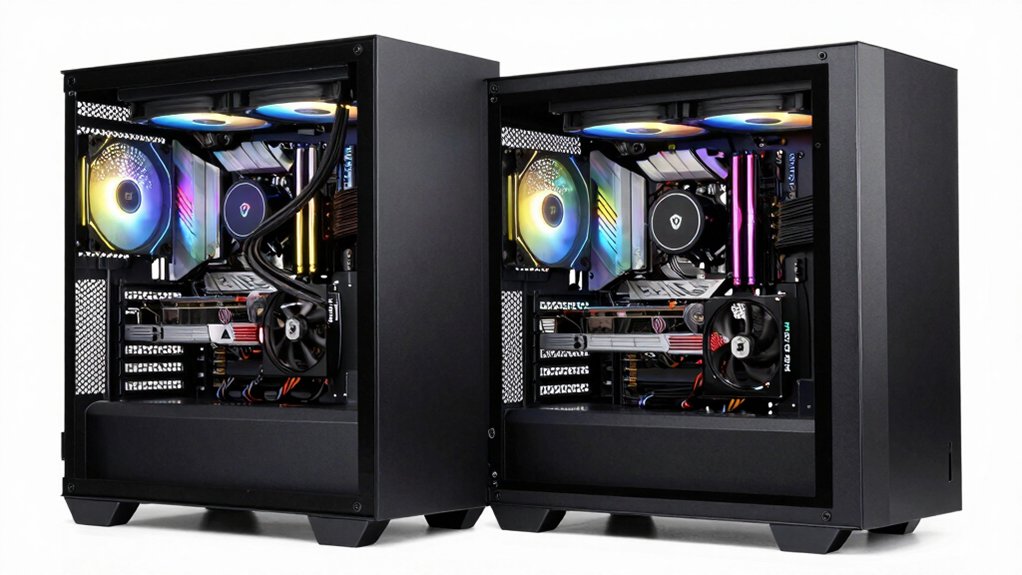
When you’re selecting a dual system PC case, you’ll need to verify that your motherboards fit the available slots, check whether your power supplies deliver enough wattage for both systems combined, and assess the cooling setup to prevent thermal throttling in confined spaces. Next, examine the internal drive bays and expansion slots to ensure you can install all your storage devices, and measure your case’s dimensions against your desk or cabinet space to confirm it’ll fit your physical location. Finally, cross-reference these five factors against your specific hardware components and installation requirements to avoid compatibility issues before purchase.
Motherboard Compatibility and Support
Since you’re planning to house two independent systems in one case, you’ll need to verify that your chosen case supports the motherboard form factors you want to use—whether that’s Mini ITX, Micro ATX, ATX, or larger configurations. Check the case’s specifications for motherboard mounting points and clearance dimensions. You should also count the available PCIe slots in each motherboard section to confirm you can install your expansion cards without interference. Additionally, inspect the case’s internal layout to ensure both motherboards fit without obstructing each other’s components or cooling solutions. Finally, verify that the case provides separate I/O panel openings aligned with each motherboard’s rear connectors, allowing straightforward cable management and access for maintenance on both systems.
Power Supply Requirements and Capacity
How’ll you power two complete systems running simultaneously in one chassis? You need two separate PSUs sized for each system’s peak load. Calculate total wattage by adding your GPU, CPU, memory, and storage power draws for each board, then add 20–30% headroom. For example, if one system needs 650W and the other needs 750W, buy PSUs rated accordingly rather than oversizing one unit. Check your case specifications to confirm it supports dual PSU mounting and lists maximum capacity per unit. Independent PSU compartments prevent heat transfer between systems and simplify cable routing. Verify your planned GPU count and drive quantity match available PCIe slots and power connectors on each PSU. Mismatched wattage causes instability or component failure.
Cooling System Capabilities
What’s your cooling strategy for managing heat from two full systems in one chassis? You’ll need to evaluate whether your case supports independent cooling loops or shared resources. Check the maximum radiator capacity—some cases accommodate two 600mm radiators or multiple 360–420mm units per system for extreme cooling. Next, examine airflow optimization features like perforated panels and dedicated ducts that direct hot air efficiently. Isolated chambers separate CPU, GPU, and PSU heat sources, preventing thermal interference between components. Finally, assess fan placement options across front, rear, top, and side positions. Pre-installed ARGB fans offer flexibility for your cooling configuration. Select a case matching your specific thermal requirements and component density to maintain optimal temperatures under sustained load.
Internal Storage Expansion Options
When you’re building a dual-system PC, you’ll need to contemplate how much storage each system requires and what types of drives you’ll install. Look for cases offering multiple internal bays—some models provide four bays that accommodate both 3.5″ HDDs and 2.5″ SSDs. This flexibility lets you mix storage types within one enclosure. Check whether the case includes dedicated storage chambers or modular drive sleds that keep each system’s drives separate and organized. For faster performance, verify M.2 slots or PCIe switch configurations support NVMe expansion. If you need maximum speed and redundancy, select cases featuring hot-swappable NVMe bays or RAID support. These options ensure you can configure storage independently for each system while maintaining the performance levels your workflows demand.
Physical Size and Space Constraints
Before you select a dual-system case, you’ll need to assess the physical dimensions of your workspace and confirm the case will actually fit there. Dual-system cases typically require XL-ATX or extended form factors, with depths around 29–30 inches and widths around 27 inches for stacked, back-to-back configurations. Measure your desk or rack space carefully, accounting for clearance on all sides. Consider whether your setup needs modular or dismantlable designs that allow stacking and custom arrangement. Check if separate I/O panels for each system require additional access space. Verify that internal space accommodates two radiators or cooling loops plus multiple drive bays without obstruction. These constraints directly determine whether a case fits your environment and functions properly.
Cable Management and Accessibility
Once you’ve confirmed your case fits your physical space, you’ll need to assess how well it handles cable management and accessibility for two independent systems. Look for cases with separate I/O panels and dedicated cable routing channels for each motherboard. Check whether the case includes built-in features like Velcro straps, tie-down points, or cable channels to keep wiring organized. Removable front panels and modular components should allow you to access both systems without disturbing the other. Verify that drive bays, PCIe slots, and power supply areas remain independently accessible. Cases with dual chambers or back-to-back layouts naturally separate each system’s cables, reducing confusion during installation and future upgrades. Prioritize accessibility over aesthetic considerations when evaluating cable management capabilities.
GPU Clearance and Slot Availability
How much vertical and horizontal space does your case actually provide for graphics cards in each chamber? Start by measuring the maximum GPU length your case accommodates per system—typically 250mm to 320mm for dual-setup cases. Next, verify the total PCIe slot count across both motherboards and confirm independent allocation, ensuring you can populate each system without conflicts. Check whether your case supports full-length dual GPUs simultaneously with adequate clearance between them. Examine mounting options that prevent card sag, particularly in the lower chamber. Finally, review airflow paths to confirm both GPUs receive independent cooling without heat transfer between systems. These specifications directly determine whether your hardware will physically fit and operate reliably in your dual-system configuration.
Thermal Design and Airflow Efficiency
When you’re running two complete systems in one case, thermal management becomes notably more complex than in a single-PC build because you’re fundamentally doubling your heat sources in a confined space. Look for cases with separate chambers or back-to-back layouts that isolate each system’s motherboard, CPU, and GPU areas. This partitioning reduces thermal interaction between systems. Check radiator support capacity—cases accommodating 600mm radiators or multiple radiators across chambers provide superior heat removal. Examine airflow paths: perforated panels and dedicated intake/exhaust routes minimize hot spots. Verify fan configurations, including reverse-rotor designs that optimize static pressure. These structural choices directly determine whether your dual-system setup maintains safe operating temperatures under load or risks thermal throttling.
Final Thoughts
You’ll select your dual-system case by matching your hardware requirements to each model’s cooling capacity, chamber layout, and expansion options. First, determine your GPU size and radiator needs. Next, compare chamber isolation for thermal separation. Then, verify your storage and port access requirements. Finally, confirm the case fits your motherboard size and cooling solution. These steps ensure you choose the case that handles your specific dual-system setup.

Meet Ry, “TechGuru,” a 36-year-old technology enthusiast with a deep passion for tech innovations. With extensive experience, he specializes in gaming hardware and software, and has expertise in gadgets, custom PCs, and audio.
Besides writing about tech and reviewing new products, he enjoys traveling, hiking, and photography. Committed to keeping up with the latest industry trends, he aims to guide readers in making informed tech decisions.