
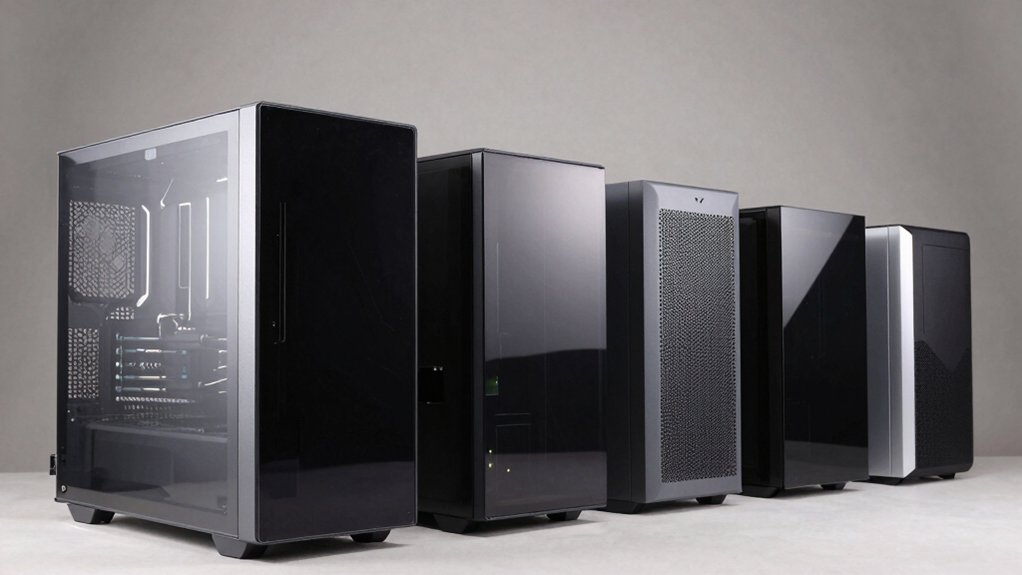

When you’re building a PC, you’ll need a case that handles heat efficiently without generating excessive fan noise. Silent airflow cases accomplish this through strategic intake and exhaust placement, sound-dampening materials, and optimized component spacing. You’ll find options ranging from compact micro-ATX builds to full-size ATX towers, each with distinct advantages. Understanding which features matter most for your setup will determine whether you get the quiet, cool performance you’re after—so let’s examine what separates the top contenders.
| CORSAIR 4000D RS ARGB Mid-Tower PC Case |

| Best Overall | Case Type: Mid-Tower | Pre-Installed Fans: 3x 120mm ARGB fans | Motherboard Support: ATX, mATX, ITX | VIEW LATEST PRICE | Read Our Analysis |
| Lian Li V100 ATX Mid-Tower PC Case (V100RX) |

| Most Versatile | Case Type: Mid-Tower | Pre-Installed Fans: 4x 120mm ARGB fans | Motherboard Support: ATX, Micro-ATX | VIEW LATEST PRICE | Read Our Analysis |
| NZXT H6 Flow Compact Mid-Tower Case (CC-H61FB-01) |

| Best Compact Design | Case Type: Compact Mid-Tower | Pre-Installed Fans: 3x 120mm RGB fans | Motherboard Support: ATX, Micro-ATX, Mini-ITX | VIEW LATEST PRICE | Read Our Analysis |
| be quiet! Pure Base 501 Black PC Case |
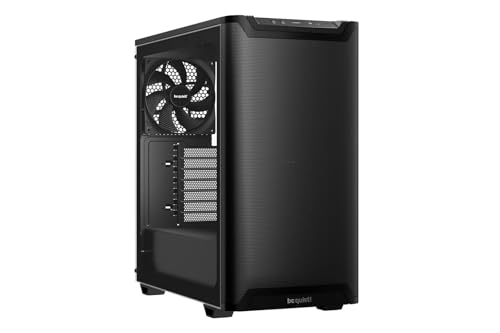
| Quietest Operation | Case Type: Mid-Tower | Pre-Installed Fans: 2x quiet PWM fans | Motherboard Support: ATX, Micro-ATX, Mini-ITX | VIEW LATEST PRICE | Read Our Analysis |
| Cooler Master MasterBox Q300L Micro-ATX PC Case |

| Best Budget Option | Case Type: Mini-Tower | Pre-Installed Fans: 1x 120mm fan | Motherboard Support: Micro-ATX, Mini-ITX | VIEW LATEST PRICE | Read Our Analysis |
| Lian Li LANCOOL 217 Mid-Tower ATX PC Case |
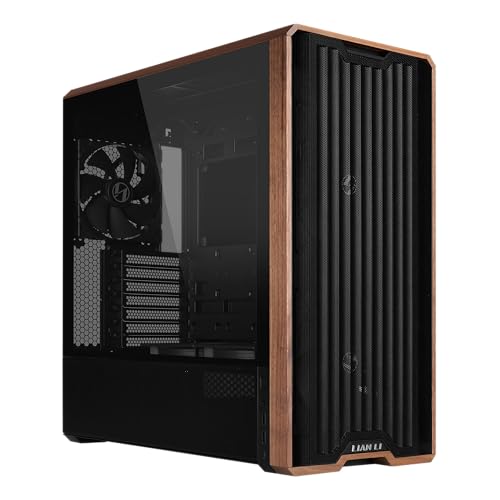
| Best Aesthetics | Case Type: Mid-Tower | Pre-Installed Fans: 5x fans (2x 170mm front, 2x 120mm reversed, 1x 140mm rear) | Motherboard Support: ATX | VIEW LATEST PRICE | Read Our Analysis |
| CORSAIR 7000D Airflow Full-Tower ATX PC Case |

| Best High-Performance | Case Type: Full-Tower | Pre-Installed Fans: 3x 140mm AirGuide fans | Motherboard Support: ATX | VIEW LATEST PRICE | Read Our Analysis |
| GAMDIAS White RGB Gaming ATX Mid Tower PC Case |

| Best RGB Lighting | Case Type: Mid-Tower | Pre-Installed Fans: 3x 120mm ARGB fans | Motherboard Support: ATX, Micro-ATX, Mini-ITX | VIEW LATEST PRICE | Read Our Analysis |
| MONTECH XR-B ATX Mid-Tower Gaming Case |

| Best Gaming Build | Case Type: Mid-Tower | Pre-Installed Fans: 3x ARGB fans (2x reverse-blade, 1x regular-blade) | Motherboard Support: ATX, Micro-ATX, Mini-ITX | VIEW LATEST PRICE | Read Our Analysis |
| MUSETEX ATX Gaming PC Case with ARGB Fans (NN8) |

| Most Fan-Ready | Case Type: Mid-Tower | Pre-Installed Fans: 6x 120mm ARGB fans | Motherboard Support: ATX, Micro-ATX, Mini-ITX | VIEW LATEST PRICE | Read Our Analysis |
| Zalman i3 NEO ATX Mid Tower PC Case with RGB Fans |
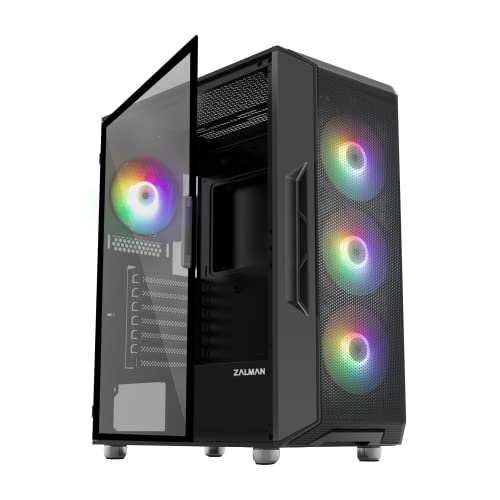
| Best Radiator Support | Case Type: Mid-Tower | Pre-Installed Fans: 4x RGB fans | Motherboard Support: ATX, Micro-ATX, Mini-ITX | VIEW LATEST PRICE | Read Our Analysis |
| H2 HYXN ATX PC Case with 8 ARGB Fans |

| Best Dual-Chamber | Case Type: Mid-Tower | Pre-Installed Fans: 8x ARGB fans (6x 140mm, 2x 120mm) | Motherboard Support: E-ATX, ATX, Micro-ATX, Mini-ITX | VIEW LATEST PRICE | Read Our Analysis |
More Details on Our Top Picks
CORSAIR 4000D RS ARGB Mid-Tower PC Case
Looking to build a PC that runs cool without constant fan noise? The CORSAIR 4000D RS ARGB delivers airflow efficiency through its 3D Y-Pattern front panel, which minimizes obstruction while maximizing air intake. Three pre-installed RS ARGB fans come daisy-chained for simple motherboard control. You’ll customize cooling layouts using the InfiniRail mounting system, which supports fans up to 200mm and dual 360mm radiators. The modular FRAME system lets you swap components like the motherboard tray and front I/O panel. Internal cable routing options keep your build organized, reducing airflow blockages. This mid-tower case accommodates ATX, mATX, and ITX motherboards, giving you flexibility in component selection while maintaining optimal thermal performance.
- Case Type:Mid-Tower
- Pre-Installed Fans:3x 120mm ARGB fans
- Motherboard Support:ATX, mATX, ITX
- Radiator Support:Dual 360mm radiators
- GPU Length Support:High-end GPUs supported (specific length not stated)
- Enclosure Material:Alloy steel, aluminum
- Additional Feature:FRAME Modular customization system
- Additional Feature:InfiniRail flexible mounting system
- Additional Feature:Dual 360mm radiator support
Lian Li V100 ATX Mid-Tower PC Case (V100RX)
Want a mid-tower case that balances cooling performance with a streamlined aesthetic? The Lian Li V100RX delivers both. Four pre-installed 120mm ARGB fans operate at 1800 RPM, producing airflow up to 61.47 CFM while maintaining quiet operation between 26.5–30.8 dBA. The case supports GPUs up to 420mm and CPU coolers up to 178mm, accommodating most standard components. Its tempered glass display platform lets you showcase figures or collectibles. Tool-less side panels provide quick access for maintenance. The case accepts ATX and Micro-ATX motherboards, offering expandability through four internal drive bays. ARGB lighting syncs with your motherboard software for unified control.
- Case Type:Mid-Tower
- Pre-Installed Fans:4x 120mm ARGB fans
- Motherboard Support:ATX, Micro-ATX
- Radiator Support:360mm radiators
- GPU Length Support:Up to 420mm
- Enclosure Material:Plastic, stainless steel, tempered glass
- Additional Feature:Tempered glass display platform
- Additional Feature:Slanted front PSU shroud
- Additional Feature:26-LED ARGB strip included
NZXT H6 Flow Compact Mid-Tower Case (CC-H61FB-01)
If you’re building a high-performance PC in a compact footprint without sacrificing cooling performance, the NZXT H6 Flow delivers effective thermal management through its dual-chamber design and optimized airflow layout. The case includes three pre-installed 120mm fans positioned for immediate cooling without additional setup. You’ll benefit from airflow-optimized perforations on top and side panels that filter dust while maintaining airflow efficiency. The compact dual-chamber layout separates components thermally and keeps your build organized visually. Supports ATX, micro-ATX, and mini-ITX motherboards with graphics cards up to 365mm. Intuitive cable management channels simplify assembly and hide routing behind panoramic glass panels.
- Case Type:Compact Mid-Tower
- Pre-Installed Fans:3x 120mm RGB fans
- Motherboard Support:ATX, Micro-ATX, Mini-ITX
- Radiator Support:360mm radiators
- GPU Length Support:Up to 365mm
- Enclosure Material:Metal, tempered glass
- Additional Feature:Dual-chamber thermal separation design
- Additional Feature:Panoramic wraparound glass panels
- Additional Feature:Airflow-optimized perforated panels
be quiet! Pure Base 501 Black PC Case
Pure Base 501 Black combines German engineering with practical cooling features. You get two preinstalled Pure Wings 3 fans that reduce turbulence and noise through optimized blade design. Mount up to three front fans or a 360mm radiator, and three top fans or a 240mm radiator for flexible cooling configurations. The mid-tower layout provides ample space for high-end GPUs and large coolers. You can rotate PCIe slots 90 degrees for vertical GPU mounting or use an optional riser cable to prevent sagging. Smart cable management keeps your build organized while maintaining airflow efficiency.
- Case Type:Mid-Tower
- Pre-Installed Fans:2x quiet PWM fans
- Motherboard Support:ATX, Micro-ATX, Mini-ITX
- Radiator Support:240mm or 360mm radiators
- GPU Length Support:High-end graphics cards supported (specific length not stated)
- Enclosure Material:Steel (specific composition not detailed)
- Additional Feature:German engineering and quality
- Additional Feature:90° PCIe vertical GPU mounting
- Additional Feature:Optional GPU sag prevention cable
Cooler Master MasterBox Q300L Micro-ATX PC Case
Building a compact PC that doesn’t sacrifice cooling performance requires a case designed with airflow as the foundation—and that’s where you’ll find the Cooler Master MasterBox Q300L useful. This micro-ATX mini-tower features perforated panels on all sides, enabling optimal heat dissipation throughout your build. You’ll accommodate a 240 mm liquid cooler, up to five fans total, and components including GPUs up to 360 mm long. The modular I/O panel adjusts across six positions on both sides, letting you customize cable routing. With a transparent side panel and magnetic dust filters, you’ll maintain visibility while managing thermal efficiency effectively in a compact footprint.
- Case Type:Mini-Tower
- Pre-Installed Fans:1x 120mm fan
- Motherboard Support:Micro-ATX, Mini-ITX
- Radiator Support:240mm liquid cooler
- GPU Length Support:Up to 360mm
- Enclosure Material:Alloy steel, plastic
- Additional Feature:Six adjustable I/O panel locations
- Additional Feature:Magnetic dust filter pattern design
- Additional Feature:Open cube frame layout
Lian Li LANCOOL 217 Mid-Tower ATX PC Case
Are you looking for a case that balances cooling performance with visual appeal? The Lian Li LANCOOL 217 offers both through its five pre-installed fans and wood accents in dark walnut or light beech finishes. You’ll benefit from two 170mm front fans, two 120mm reversed-blade fans, and one 140mm rear fan that work together for efficient airflow. The toolless fan mounting lets you customize placement to prioritize CPU or GPU cooling based on your needs. You can also configure the dual PSU mounting options to optimize cable management. The back-connect motherboard compatibility keeps cables hidden, maintaining a clean interior that supports consistent airflow and a professional appearance.
- Case Type:Mid-Tower
- Pre-Installed Fans:5x fans (2x 170mm front, 2x 120mm reversed, 1x 140mm rear)
- Motherboard Support:ATX
- Radiator Support:No radiator support specified
- GPU Length Support:No specific GPU length stated
- Enclosure Material:Metal with wood accents
- Additional Feature:Real wood accent finishes
- Additional Feature:Dual PSU mounting orientations
- Additional Feature:Reversed-blade fan configuration
CORSAIR 7000D Airflow Full-Tower ATX PC Case
If you’re building a high-performance system that demands extensive cooling capacity, the CORSAIR 7000D Airflow delivers the space and airflow you need. This full-tower case supports three 360mm radiators or two 420mm radiators simultaneously, accommodating up to twelve 120mm or seven 140mm fans. Three included 140mm AirGuide fans with PWM repeater feature anti-vortex vanes that concentrate airflow directly where you need it. The RapidRoute cable management system hides wires through a single channel, and the hinged side door provides quick access for installation and maintenance. With room for ten storage drives and a vertical GPU mount, you’ll configure diverse cooling layouts while keeping components organized and temperatures low.
- Case Type:Full-Tower
- Pre-Installed Fans:3x 140mm AirGuide fans
- Motherboard Support:ATX
- Radiator Support:Up to three 360mm or two 420mm radiators
- GPU Length Support:Vertical mount capable (specific length not stated)
- Enclosure Material:Steel, tempered glass
- Additional Feature:Three 360mm radiator capacity
- Additional Feature:RapidRoute hidden cable system
- Additional Feature:Customizable windowed PSU shroud
GAMDIAS White RGB Gaming ATX Mid Tower PC Case
The GAMDIAS White RGB Gaming ATX Mid Tower PC Case works well for builders who want a clean aesthetic without sacrificing cooling performance. The case includes three built-in 120mm ARGB fans that pull air through the front panel while displaying RGB lighting along the side. Its tempered glass panel lets you view your components and lighting effects. The PSU shroud at the bottom hides cables for a neat appearance. Connect the ARGB fans to your motherboard to synchronize lighting across your entire system. The front airflow design prioritizes both cooling efficiency and visual appeal, making it suitable for mid-range builds.
- Case Type:Mid-Tower
- Pre-Installed Fans:3x 120mm ARGB fans
- Motherboard Support:ATX, Micro-ATX, Mini-ITX
- Radiator Support:No radiator support specified
- GPU Length Support:No specific GPU length stated
- Enclosure Material:Metal, tempered glass
- Additional Feature:Snowy white minimalist design
- Additional Feature:Front panel RGB showcasing
- Additional Feature:ARGB motherboard synchronization support
MONTECH XR-B ATX Mid-Tower Gaming Case
Gamers who want a compact case without sacrificing cooling performance or GPU compatibility will find the MONTECH XR-B a solid match. The case ships with three pre-installed ARGB fans configured for optimal airflow: two reverse-blade fans on the side and one regular-blade fan at the rear. You can expand cooling capacity by adding up to nine total fans, with dedicated top radiator support for 360mm units. Dust filtration covers the top, bottom, and side panels to maintain airflow efficiency. The case accommodates ATX, Micro-ATX, and Mini-ITX motherboards, plus high-end GPUs up to the 40 series. At 17.1″ deep by 9″ wide by 17.7″ high, this mid-tower delivers strong thermal management in a compact footprint.
- Case Type:Mid-Tower
- Pre-Installed Fans:3x ARGB fans (2x reverse-blade, 1x regular-blade)
- Motherboard Support:ATX, Micro-ATX, Mini-ITX
- Radiator Support:360mm top radiator
- GPU Length Support:Up to 40-series GPUs
- Enclosure Material:Metal, tempered glass (dual panels)
- Additional Feature:Wood-grain design I/O interface
- Additional Feature:Dual tempered glass panels
- Additional Feature:Multi-panel dust filtration system
MUSETEX ATX Gaming PC Case with ARGB Fans (NN8)
Want a mid-tower case that arrives with six cooling fans already installed? The MUSETEX NN8 gives you pre-configured airflow through 120mm PWM ARGB fans. You’ll mount your power supply in the rear and arrange storage using up to five SSDs and one HDD. The tempered glass side panel opens magnetically, letting you access internal components quickly. You can install your graphics card vertically to display it prominently. Use the smart I/O panel to connect two USB 3.0 ports. Customize fan speeds through your motherboard’s RGB header to balance cooling performance with noise levels. The polygonal mesh front panel supports 280mm radiators without memory interference.
- Case Type:Mid-Tower
- Pre-Installed Fans:6x 120mm ARGB fans
- Motherboard Support:ATX, Micro-ATX, Mini-ITX
- Radiator Support:280mm radiator (top)
- GPU Length Support:Vertical mount option (specific length not stated)
- Enclosure Material:Metal, tempered glass
- Additional Feature:Polygonal diamond mesh front
- Additional Feature:Side-opening tempered glass door
- Additional Feature:76% cooling benefit improvement
Zalman i3 NEO ATX Mid Tower PC Case with RGB Fans
If you’re building a PC that requires robust cooling without sacrificing aesthetics, you’ll want to contemplate the Zalman i3 NEO’s pre-installed RGB fan setup and thoughtful airflow design. This ATX mid-tower supports multiple radiator configurations: 360mm front, 240mm top, and 120mm rear. The four fixed RGB fans create consistent airflow while the full tempered glass panels reduce noise. You’ll benefit from magnetic dust filters on top and detachable bottom filters for easy maintenance. The case accommodates ATX, mATX, and Mini-ITX motherboards across five internal bays and seven expansion slots. Front I/O includes dual USB 3.0 ports, USB 2.0, audio jacks, and power controls for convenient access during builds and troubleshooting.
- Case Type:Mid-Tower
- Pre-Installed Fans:4x RGB fans
- Motherboard Support:ATX, Micro-ATX, Mini-ITX
- Radiator Support:360mm front, 240mm top, 120mm rear radiators
- GPU Length Support:No specific GPU length stated
- Enclosure Material:Metal, tempered glass
- Additional Feature:Hinged full-edge glass panel
- Additional Feature:Metal feet rubberized cushions
- Additional Feature:Magnetic top dust filter
H2 HYXN ATX PC Case with 8 ARGB Fans
The HYXN H2 (2026) delivers excellent cooling performance through its dual-chamber design and eight included ARGB fans, making it an ideal choice for builders who prioritize both airflow and cable management without sacrificing aesthetics. You’ll find six 140mm reverse fans and two 120mm forward fans pre-installed, supporting both air and water cooling setups. The case accommodates radiators up to 420mm, allowing you to fit either two 420mm or three 360mm radiators simultaneously. Its oversized rear chamber houses cable management tools including Velcro straps and multiple mounting points for organized wiring. The tempered glass front panel displays your components while the case supports GPUs up to 455mm and PSUs up to 220mm, providing flexibility for various high-performance builds.
- Case Type:Mid-Tower
- Pre-Installed Fans:8x ARGB fans (6x 140mm, 2x 120mm)
- Motherboard Support:E-ATX, ATX, Micro-ATX, Mini-ITX
- Radiator Support:Up to 420mm or dual 360mm radiators
- GPU Length Support:Up to 455mm
- Enclosure Material:Metal, plastic, tempered glass
- Additional Feature:Dual 420mm radiator support
- Additional Feature:Oversized rear cable chamber
- Additional Feature:E-ATX motherboard compatibility included
Factors to Consider When Choosing a Silent Airflow Case
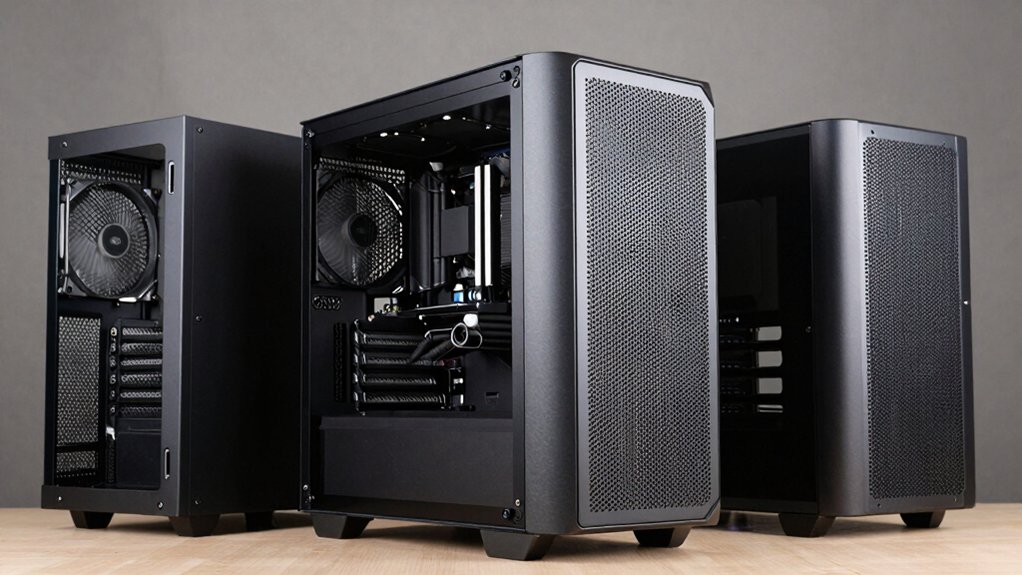
When selecting a silent airflow case, you’ll need to evaluate five key factors: noise reduction technology (such as sound-dampening foam and vibration isolation), airflow design optimization (including duct placement and intake/exhaust configuration), fan configuration options (determining how many fans you can install and where), thermal performance balance (ensuring cooling capacity matches your component heat output), and build quality materials (confirming the case uses durable construction that supports long-term performance). Start by identifying your noise tolerance level and maximum acceptable temperatures, then match those requirements against each case’s specifications and design features. Finally, compare the cases that meet your performance needs to confirm they offer the optimal combination of cooling efficiency and quiet operation for your specific build.
Noise Reduction Technology
How do you actually reduce noise in a PC case? You’ll find several proven methods working together. First, install low-RPM PWM-controlled fans with optimized blade designs that minimize turbulence. Second, add mass-loaded side panels and dense front panels to dampen sound resonance throughout the chassis. Third, incorporate strategic airflow paths using top, side, and rear exhaust options to reduce fan strain and dust buildup noise. Fourth, use dust filters to maintain cooling efficiency without forcing fans to work harder. Fifth, choose cases with hinged or magnetic panels that close securely without vibration gaps. Finally, arrange cables carefully to avoid blocking airflow and creating mechanical noise. These technologies work together to keep your system both cool and quiet.
Airflow Design Optimization
While noise reduction technologies form the foundation of a quiet PC case, you’ll also need to evaluate how air actually moves through the chassis. Check the front panel’s intake design—look for low-obstruction grills with 3D or perforated patterns that maximize airflow while minimizing turbulence. Examine internal layouts for dual-chamber designs or angled front panels that reduce heat buildup near your GPU. Verify the case supports larger radiators like dual 360mm or 420mm units, which let you run fans at slower, quieter speeds. Review cable management systems to ensure streamlined paths that won’t obstruct air movement. Finally, confirm the case includes pre-installed ARGB fans with daisy-chainable connectors, maintaining consistent airflow across multiple fans without creating additional clutter that restricts circulation.
Fan Configuration Options
What fan setup you’ll need depends on your cooling demands and case design. Most cases come pre-installed with multiple ARGB fans—typically 3 to 6 units—positioned at the front, top, or rear for balanced airflow. You can add more fans using adjustable mounting systems like InfiniRail or modular frames, supporting up to 12x 120mm or 7x 140mm fans in full-tower designs. Connect fans using daisy-chained 4-pin connectors to simplify power delivery and synchronize speed control. Match your radiator choice to your fan layout: dual 360mm radiators work well with larger configurations, while 420mm options suit high-capacity builds. This setup maintains both cooling performance and quiet operation simultaneously.
Thermal Performance Balance
Once you’ve selected your fan configuration, you’ll need to balance cooling capacity against noise output by choosing cases designed with high-efficiency airflow in mind. Prioritize cases supporting dual 360mm radiators, which distribute heat across larger surfaces without requiring high-speed fans that generate noise. Examine front panel designs—mesh or perforated panels maximize intake while minimizing turbulence that amplifies sound. Select cases featuring guided airflow systems and anti-vortex designs that maintain smooth air paths. Evaluate cable routing options; clean internal layouts prevent airflow obstruction and reduce the fan speed needed for adequate cooling. Compare acoustic specifications of included fans, focusing on low-noise models like Pure Wings 3 equivalents rated across standard RPM ranges. This approach ensures your system cools effectively while maintaining quiet operation under load.
Build Quality Materials
How much noise your case produces depends largely on the materials used in its construction and how well those materials dampen vibrations from your fans and components. You’ll want to prioritize thick steel chassis designs, which offer superior structural integrity compared to thin alternatives. Tempered glass panels enhance aesthetics but add weight—ensure they’re securely mounted to prevent long-term vibration issues. Look for integrated rubber grommets and dampened mounts that reduce case resonance. Rubberized feet minimize door and wall vibrations. Additionally, examine power supply shrouds and sealed seams around dust filters and gasketed openings. These features minimize air-leak noise and contribute to overall quieter operation. Combining quality materials with proper hardware selection creates an effective foundation for silent airflow performance.
Cable Management Systems
Why do loose cables create noise in your PC case? Unorganized cables obstruct airflow, forcing your cooling fans to work harder and produce more noise. To keep your system quiet, choose cases with robust cable management systems featuring wide routing channels and Velcro straps that organize cables away from your airflow path. Look for cases with cable cutouts behind the motherboard tray, which reduces turbulence and improves silent performance. Dual-chamber designs or internal side panels as cable covers further separate cables from cooling airflow. Select cases with tool-less panels and modular I/O panels to simplify tidying cables during your build. These features minimize loose cables that create turbulence, directly contributing to quieter operation while maintaining effective front-to-back airflow optimization.
Component Compatibility Range
Beyond organizing cables for optimal airflow, you’ll need to verify that your core components actually fit inside your chosen case. Check your motherboard’s form factor—ATX, mATX, ITX, or E-ATX—against the case’s supported specifications. Measure your graphics card’s length and compare it to the case’s GPU clearance limits, typically 360–420 mm. Verify your CPU cooler’s height against the case’s maximum clearance, usually 150–178 mm. Confirm radiator compatibility by checking mounting options (front, roof, or top) for your planned liquid cooling setup, whether 240 mm, 280 mm, or 360 mm. Finally, count the internal bays and expansion slots available. Ensure the case provides enough space for your storage drives and any additional PCIe devices you plan to install.
Final Thoughts
You’ll choose the right silent airflow case by evaluating your motherboard size, GPU length, and cooler height against case specifications. Compare front intake options, exhaust configurations, and sound-dampening materials across models. Check radiator mounting compatibility for your cooling setup. Review dust filter accessibility and cable management features. Match your budget to case features, then verify that your components fit before purchasing. This systematic approach ensures you get a quiet, cool build.

Meet Ry, “TechGuru,” a 36-year-old technology enthusiast with a deep passion for tech innovations. With extensive experience, he specializes in gaming hardware and software, and has expertise in gadgets, custom PCs, and audio.
Besides writing about tech and reviewing new products, he enjoys traveling, hiking, and photography. Committed to keeping up with the latest industry trends, he aims to guide readers in making informed tech decisions.