

You need a printer that works reliably with your Windows system without constant troubleshooting. Whether you’re printing documents, scanning paperwork, or handling photos, the right model saves you time and frustration. This guide covers eight printers that deliver solid performance across connectivity, print quality, and ease of use. Each option serves different needs and budgets, but they all share one thing: proven Windows compatibility. Here’s how to find the best fit for your office.
| HP Envy 6155e Wireless All-in-One Inkjet Printer |
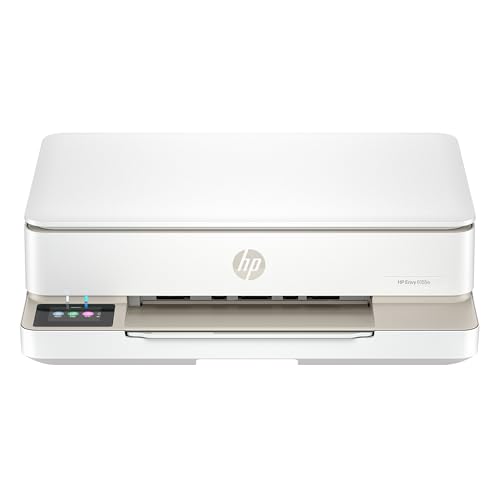
| Best for Home | Printer Type: Wireless color inkjet all-in-one | Print Speed: 10 ppm black / 7 ppm color | Connectivity: Dual-band Wi-Fi (802.11a/b/g/n/ac) + USB 2.0 | VIEW LATEST PRICE | Read Our Analysis |
| HP DeskJet 2855e Wireless All-in-One Inkjet Printer (588S5A) |

| Budget-Friendly Pick | Printer Type: Wireless color inkjet all-in-one | Print Speed: 7.5 ppm black / 5.5 ppm color | Connectivity: Wi-Fi + mobile app support | VIEW LATEST PRICE | Read Our Analysis |
| Canon PIXMA TR4720 All-in-One Wireless Printer |

| Best All-in-One | Printer Type: Wireless color inkjet all-in-one | Print Speed: 8.8 ppm black / 4.4 ppm color | Connectivity: Wireless + USB connectivity | VIEW LATEST PRICE | Read Our Analysis |
| HP Smart Tank 5101 Wireless All-in-One Printer |

| Most Cost-Effective | Printer Type: Wireless color inkjet refillable tank all-in-one | Print Speed: 10 ppm black / comparable color | Connectivity: Wireless + USB 2.0 | VIEW LATEST PRICE | Read Our Analysis |
| Brother DCP-L2640DW Wireless Monochrome Laser Printer |

| Best for High Volume | Printer Type: Wireless monochrome laser 3-in-1 | Print Speed: 36 ppm black (monochrome only) | Connectivity: Dual-band wireless (2.4GHz/5GHz) + Ethernet + USB 2.0 | VIEW LATEST PRICE | Read Our Analysis |
| Canon PIXMA TS6520 Wireless Inkjet Printer with Scanner |

| Best for Families | Printer Type: Wireless color inkjet all-in-one | Print Speed: 14 ppm black / 9 ppm color | Connectivity: Dual-band Wi-Fi (2.4GHz/5GHz) + mobile app | VIEW LATEST PRICE | Read Our Analysis |
| HP LaserJet M110w Wireless Black & White Printer |

| Professional Grade | Printer Type: Wireless monochrome laser printer | Print Speed: 21 ppm black (monochrome only) | Connectivity: Wireless + USB 2.0 | VIEW LATEST PRICE | Read Our Analysis |
| Epson Workforce Pro WF-3823 Wireless All-in-One Printer |
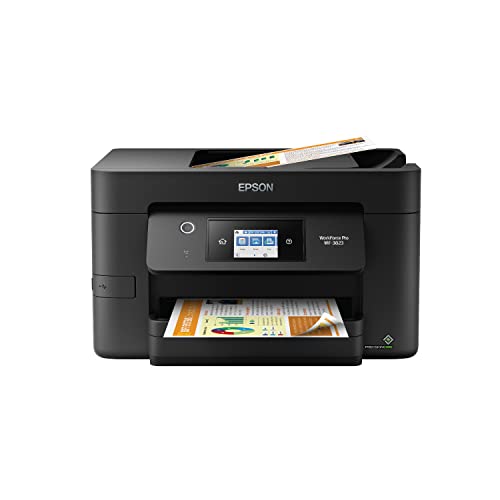
| Editor’s Choice | Printer Type: Wireless color inkjet all-in-one | Print Speed: 21 ppm black / 11 ppm color | Connectivity: Wireless + Ethernet + Wi-Fi Direct + Bluetooth Low Energy | VIEW LATEST PRICE | Read Our Analysis |
More Details on Our Top Picks
HP Envy 6155e Wireless All-in-One Inkjet Printer
Looking for a printer that’ll handle your home office printing, scanning, and copying without complicated setup? The HP Envy 6155e delivers all three functions in one compact machine. You’ll get print speeds up to 10 pages per minute for black-and-white documents and 7 ppm for color. The 2.4-inch touchscreen lets you navigate settings easily, while dual-band Wi-Fi connects your Windows PC directly. Use the HP app to print from your smartphone or tablet remotely. The 100-sheet input tray handles standard paper, envelopes, and labels. Borderless photo printing works for 4×6 cards and other sizes. One-year limited warranty covers hardware issues, with optional two-year extension available through HP+.
- Printer Type:Wireless color inkjet all-in-one
- Print Speed:10 ppm black / 7 ppm color
- Connectivity:Dual-band Wi-Fi (802.11a/b/g/n/ac) + USB 2.0
- Warranty:1 year limited (extendable to 2 years with HP+)
- Paper Input Capacity:100-sheet tray
- Mobile/App Support:HP app (print, scan, copy, fax from mobile devices)
- Additional Feature:Borderless photo printing capability
- Additional Feature:HP True-to-Screen technology (P3)
- Additional Feature:3-month Instant Ink trial included
HP DeskJet 2855e Wireless All-in-One Inkjet Printer (588S5A)
The HP DeskJet 2855e works best if you’re handling basic home printing tasks and want an all-in-one device that doesn’t require complex setup. You’ll get wireless printing, scanning, and copying capabilities through the HP App on your smartphone or Windows computer. Print speeds reach 7.5 ppm for black documents and 5.5 ppm for color. The 60-sheet input tray handles everyday documents like letters and financial statements. Three months of ink come included, reducing initial costs. Connect via 2.4 GHz Wi-Fi for reliable printing. This printer suits home users needing straightforward functionality without advanced office features or high-volume printing demands.
- Printer Type:Wireless color inkjet all-in-one
- Print Speed:7.5 ppm black / 5.5 ppm color
- Connectivity:Wi-Fi + mobile app support
- Warranty:Not specified
- Paper Input Capacity:60-sheet tray
- Mobile/App Support:HP app (print, scan, copy, fax from mobile)
- Additional Feature:3 months ink included
- Additional Feature:Auto Wi-Fi issue resolution
- Additional Feature:Ideal for home task printing
Canon PIXMA TR4720 All-in-One Wireless Printer
If you need a compact all-in-one printer that handles printing, copying, scanning, and faxing without taking up excessive desk space, the Canon PIXMA TR4720 delivers practical functionality for small offices and home workspaces. This inkjet printer produces black-and-white documents at 8.8 pages per minute and color prints at 4.4 pages per minute with maximum resolution of 4800 x 1200 dpi. The 100-sheet auto document feeder streamlines batch copying and scanning tasks. You’ll connect via wireless or USB, print borderless 8.5 x 11 documents, and enable duplex printing to reduce paper consumption. The hybrid ink system uses Canon CL-276 color and PG-275 black cartridges without requiring subscriptions. Power consumption stays minimal at 7 watts active and 0.3 watts off. Smartphone compatibility and Alexa integration allow you to manage low-ink alerts and reorder cartridges through voice commands.
- Printer Type:Wireless color inkjet all-in-one
- Print Speed:8.8 ppm black / 4.4 ppm color
- Connectivity:Wireless + USB connectivity
- Warranty:1 year limited
- Paper Input Capacity:100-sheet tray with auto document feeder
- Mobile/App Support:Mobile printing compatible + Alexa-enabled
- Additional Feature:Auto document feeder (100-sheet)
- Additional Feature:4800 x 1200 dpi resolution
- Additional Feature:Built-in fax functionality
HP Smart Tank 5101 Wireless All-in-One Printer
High-volume printing without constant cartridge replacements is exactly what you’ll get with HP’s Smart Tank 5101, making it ideal if you’re printing hundreds of pages monthly and want to cut consumable costs substantially. The refillable tank system includes two years of Original HP Ink upfront, eliminating frequent purchases. You’ll use the mess-free bottle-to-tank refill method without squeezing or spilling. The printer handles print, scan, and copy functions wirelessly across Windows, Android, and iOS devices. Its AI-powered optimization removes unwanted content and improves layout accuracy automatically. The 4800×1200 dpi color resolution produces sharp documents and photos, while the flatbed scanner captures images at 24-bit color depth.
- Printer Type:Wireless color inkjet refillable tank all-in-one
- Print Speed:10 ppm black / comparable color
- Connectivity:Wireless + USB 2.0
- Warranty:2 year limited
- Paper Input Capacity:Standard capacity tank system
- Mobile/App Support:Alexa, Android, iOS support + app control
- Additional Feature:2 years ink included
- Additional Feature:Mess-free bottle-to-tank refill
- Additional Feature:AI-assisted content removal formatting
Brother DCP-L2640DW Wireless Monochrome Laser Printer
For small to mid-sized offices that need reliable printing without breaking the budget, Brother’s DCP-L2640DW offers a practical 3-in-1 solution combining printer, scanner, and copier functions in one compact device. You’ll get print speeds up to 36 ppm with automatic duplex printing, reducing paper costs. The 50-page auto document feeder and 250-sheet tray handle daily workflows efficiently. Connect via dual-band wireless, Ethernet, or USB, then manage jobs remotely using the Brother Mobile Connect app. ENERGY STAR compliance and Toner Save Mode support sustainability goals. With 1-year limited warranty coverage and multiple support channels, you’ve got reliable backup when issues arise.
- Printer Type:Wireless monochrome laser 3-in-1
- Print Speed:36 ppm black (monochrome only)
- Connectivity:Dual-band wireless (2.4GHz/5GHz) + Ethernet + USB 2.0
- Warranty:1 year limited
- Paper Input Capacity:250-sheet tray with 50-page auto document feeder
- Mobile/App Support:Brother Mobile Connect app + Alexa compatible
- Additional Feature:50-page auto document feeder
- Additional Feature:36 ppm print speed
- Additional Feature:ENERGY STAR/EPEAT Silver rated
Canon PIXMA TS6520 Wireless Inkjet Printer with Scanner
The Canon PIXMA TS6520 works best when you’re a student or family member who needs occasional printing, copying, and scanning without managing a bulky machine. Set up wireless connectivity using dual-band Wi-Fi, then download the Canon PRINT App to print from your smartphone or tablet. Print color documents at 9 pages per minute and black-and-white at 14 pages per minute. Use auto duplex printing to save paper automatically. The flatbed scanner handles photos and documents up to 8.5″ x 11″. Compatible with Windows, Mac, and mobile devices, this compact printer fits small spaces while delivering sharp text and vivid colors through its hybrid ink system.
- Printer Type:Wireless color inkjet all-in-one
- Print Speed:14 ppm black / 9 ppm color
- Connectivity:Dual-band Wi-Fi (2.4GHz/5GHz) + mobile app
- Warranty:Limited warranty
- Paper Input Capacity:Standard capacity (specs not detailed)
- Mobile/App Support:Canon PRINT App + Apple AirPrint + Mopria Print Service
- Additional Feature:1.42″ OLED display panel
- Additional Feature:2-cartridge hybrid ink system
- Additional Feature:Compact design/space-saving footprint
HP LaserJet M110w Wireless Black & White Printer
Looking to equip a small team of 1–3 people with reliable, professional-quality printing? The HP LaserJet M110w delivers fast black and white output at 21 pages per minute. You’ll appreciate its compact design, which fits easily into tight office spaces. Set up wireless connectivity quickly, then print from Windows PCs, Macs, smartphones, and tablets using the HP Smart app. The printer includes a starter cartridge and requires genuine HP cartridges for operation. Energy Star certification keeps power consumption minimal. Use the flatbed scanner for copying documents at 600 x 600 dpi resolution. This laser printer handles cards, envelopes, labels, and plain paper up to 8.5 by 14 inches, making it versatile for various business documents.
- Printer Type:Wireless monochrome laser printer
- Print Speed:21 ppm black (monochrome only)
- Connectivity:Wireless + USB 2.0
- Warranty:1 year limited hardware
- Paper Input Capacity:Standard capacity (specs not detailed)
- Mobile/App Support:HP Smart app + AirPrint + Android + Alexa-compatible
- Additional Feature:World’s smallest laser printer
- Additional Feature:21 ppm print speed
- Additional Feature:Professional-quality black documents
Epson Workforce Pro WF-3823 Wireless All-in-One Printer
If you’re running a small office or workgroup that needs consistent, high-volume output without frequent cartridge changes, the Epson WorkForce Pro WF-3823 delivers the reliability you’re looking for. This wireless all-in-one prints 21 pages per minute in black and 11 in color, with auto 2-sided printing to reduce paper costs. The 35-page automatic document feeder and 250-sheet paper tray handle large jobs efficiently. Connect via built-in wireless, Ethernet, or Wi-Fi Direct, then use the Epson Smart Panel app to manage printing from any device. DURABrite Ultra pigment inks produce professional-quality documents consistently. The 2.7-inch touchscreen and ScanSmart interface keep operations straightforward for your team.
- Printer Type:Wireless color inkjet all-in-one
- Print Speed:21 ppm black / 11 ppm color
- Connectivity:Wireless + Ethernet + Wi-Fi Direct + Bluetooth Low Energy
- Warranty:1 year limited
- Paper Input Capacity:250-sheet tray with 35-page auto document feeder
- Mobile/App Support:Epson Smart Panel app + mobile device support
- Additional Feature:35-page auto document feeder
- Additional Feature:DURABrite Ultra instant-dry inks
- Additional Feature:250-sheet large-capacity input tray
Factors to Consider When Choosing an Office Printer for Windows
When you’re selecting an office printer for Windows, you’ll need to evaluate five key factors that directly affect your daily operations: print speed and volume determine whether the printer can handle your workload, connectivity and compatibility ensure it works smoothly with your Windows system, paper handling capacity tells you how much you can load before refilling, ink or toner costs impact your long-term budget, and wireless network support lets you print from multiple devices without cables. Start by assessing your monthly print volume to match it with a printer’s pages-per-minute (PPM) rating, then verify Windows driver availability and network features that align with your office setup. Finally, calculate the cost per page for consumables by dividing cartridge or toner costs by yield to compare total ownership expenses across models.
Print Speed and Volume
Pages per minute—or ppm—serves as the standard measurement for how quickly a printer handles both black-and-white and color documents on Windows systems, and you’ll want to prioritize this metric early in your selection process. For daily office use, target printers with sustained black-and-white speeds between 20–36 ppm to process document batches efficiently. Recognize that color printing typically operates at significantly lower speeds than black-and-white output, so evaluate color ppm separately if you produce graphics or presentations regularly. Leverage duplex printing capabilities to effectively double your page output over time without upgrading hardware. Calculate your actual daily capacity by combining print speed with paper capacity and warm-up time, as these factors together determine how quickly your Windows print queue clears.
Connectivity and Compatibility
What wireless standards does your office network actually support? Check if your printer supports dual-band Wi-Fi (2.4 GHz/5 GHz), Bluetooth, and USB 2.0 to match your setup. Verify Windows compatibility by confirming the printer works with manufacturer apps like HP Smart or Canon PRINT, which enable printing, scanning, and copying directly from your device. Review built-in Windows drivers and installation requirements—some printers need minimal setup while others require downloads. Confirm the printer supports WPA2/WPA3 security protocols and integrates with your domain environment if you’re on a corporate network. Check for cloud scanning and mobile app features that work without subscriptions, streamlining your Windows workflows and reducing ongoing costs.
Paper Handling Capacity
How often you’ll need to refill your printer’s paper tray depends directly on its input capacity and your office’s monthly print volume. Standard office printers offer input trays holding 50–250 sheets; larger capacities reduce interruptions during high-volume jobs. Evaluate your typical monthly printing needs first. If you print fewer than 5,000 pages monthly, a 100-sheet tray suffices. For higher volumes, choose printers with 250-sheet trays or multi-tray setups. Consider specialty trays for envelopes or heavy stock if you regularly print varied media types. Duplex printing capability further extends efficiency by printing both sides automatically, reducing paper consumption and reload frequency. Match tray capacity to your workflow demands to minimize downtime and maintain consistent productivity.
Ink or Toner Costs
When you’re evaluating office printers for Windows, consider whether you’ll save money with inkjet or laser technology by examining the cost per page, cartridge yield, and your monthly print volume. Laser printers typically deliver lower costs per page for high-volume black-and-white printing due to greater toner yields. Inkjet printers cost less initially but may prove expensive for dense document printing. To reduce ongoing expenses, look for models with high-capacity cartridges or separate color cartridges that decrease replacement frequency. Eco-tank systems offer the lowest long-term ink costs, though they require higher upfront investment and maintenance attention. Calculate your actual cost per page using yield specifications and standard page coverage percentages to compare models accurately before purchasing.
Wireless Network Support
Since wireless connectivity has become standard in most offices, you’ll want to verify that your printer supports the Wi-Fi standards and bands compatible with your Windows network infrastructure. Check that the printer supports 802.11ac or newer standards and operates on both 2.4 GHz and 5 GHz bands for flexibility. Dual-band Wi-Fi reduces connection drops and improves print speed. Look for automatic network recovery features that reconnect your printer after temporary outages without manual intervention. Confirm your printer includes Windows drivers and companion apps for managing print jobs and scans remotely. Additionally, prioritize network security features like WPA3 encryption and enterprise authentication support to protect your workstation when printing over shared networks. USB connectivity serves as a reliable backup for direct printing when wireless connections fail.
Resolution and Print Quality
With your wireless network secured and reliable, you’ll next want to examine the printer’s output quality—the sharpness, color accuracy, and detail it produces on the page. Resolution, measured in dpi (dots per inch), directly affects how crisp your text appears and how detailed your images look. Higher resolutions like 4800 x 1200 dpi deliver sharper results than lower settings. Check the printer’s color engine and ink technology—pigment inks typically produce more accurate, true-to-life colors than dye inks. Also verify the print speed in ppm (pages per minute) at your target resolution; faster speeds mean less waiting time without sacrificing quality. For document scanning and copying, confirm the scanner resolution matches your printing capabilities, ensuring consistent reproduction quality across all functions.
Scanning and Copying Functions
You’ll want to prioritize several key scanning and copying features that’ll streamline your document workflow. First, ensure the device has an automatic document feeder (ADF) to process multiple pages without manual reloading. Next, ensure duplex scanning capability, which digitizes both sides in a single pass. Check the scan resolution—aim for 4800 x 1200 dpi or higher to ensure sharp text and images. For copying functions, ensure color and black-and-white options, maximum copies per run (typically up to 99), and digital enhancements like auto content optimization. Finally, ensure connectivity options: scanning to email, cloud services, network folders, and mobile-app compatibility. These features directly impact efficiency, reducing time spent on repetitive document tasks and enabling flexible workflow integration across your office environment.
Warranty and Support Options
What warranty coverage does your printer actually include, and how accessible is support when you need it? Most office printers offer 1 to 2 years of hardware coverage, though you can extend protection through manufacturer plans like HP+. Before purchasing, verify what’s excluded—typically consumables and accidental damage aren’t covered. Register your printer online or through your retailer within the specified timeframe to activate additional protections or replacement services. Support channels vary by brand: use online help centers for quick answers, email or chat for documentation, and phone support for complex issues. Keep your proof of purchase accessible for warranty claims. Check the retailer’s 30-day return policy separately, as this provides additional post-purchase recourse beyond manufacturer warranty.
Final Thoughts
You’ve reviewed eight printers that work reliably with Windows. To choose the right one, match your needs to each printer’s features. If you need color printing, select an inkjet model like the HP Envy or Canon PIXMA. For high-volume black-and-white documents, choose a laser printer such as the Brother or HP LaserJet. Check your budget, required connectivity, and whether you need scanning or copying capabilities before deciding.

Meet Ry, “TechGuru,” a 36-year-old technology enthusiast with a deep passion for tech innovations. With extensive experience, he specializes in gaming hardware and software, and has expertise in gadgets, custom PCs, and audio.
Besides writing about tech and reviewing new products, he enjoys traveling, hiking, and photography. Committed to keeping up with the latest industry trends, he aims to guide readers in making informed tech decisions.