
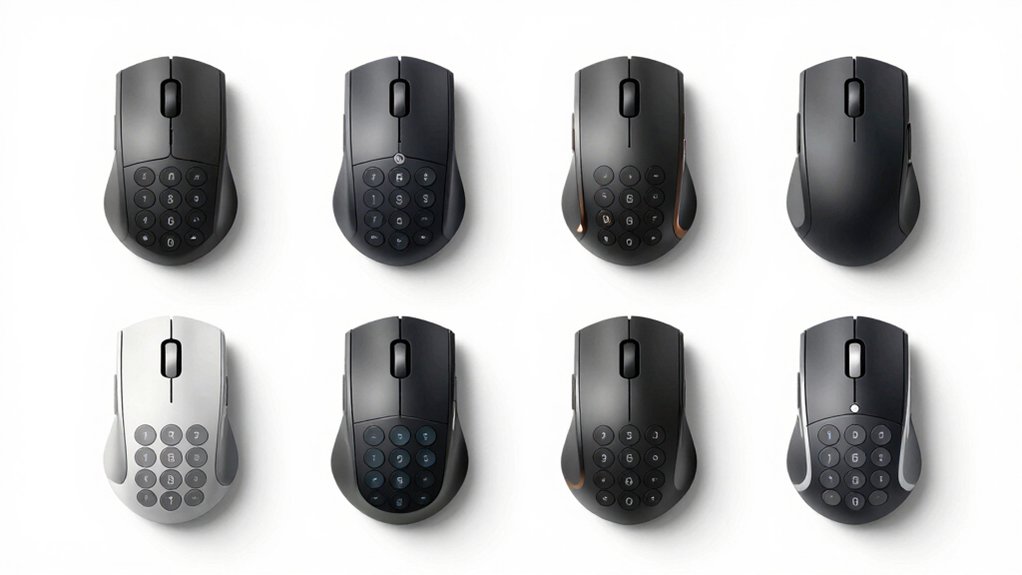

You’ll find that pairing a mouse with an integrated number pad eliminates the need for separate peripherals, saving desk space and streamlining your workflow. Models like the Redragon M908 Impact and Razer Naga V2 HyperSpeed offer 12–19 programmable side buttons with customizable DPI settings, macro support, and multiple memory profiles. Whether you’re managing spreadsheets, gaming, or running complex applications, you can assign specific functions to each button. But how do you determine which features actually matter for your specific tasks?
| Redragon M908 Impact RGB MMO Gaming Mouse |

| Gaming Performance Leader | Connectivity Type: USB wired | Programmable Buttons: 18 programmable buttons | Maximum DPI: 12,400 DPI | VIEW LATEST PRICE | Read Our Analysis |
| Razer Naga V2 HyperSpeed Wireless MMO Gaming Mouse |

| Wireless Premium Choice | Connectivity Type: Bluetooth and 2.4GHz wireless | Programmable Buttons: 19 programmable buttons | Maximum DPI: 30,000 DPI | VIEW LATEST PRICE | Read Our Analysis |
| Wireless Number Pad and Mouse Set 2.4GHz |

| Budget-Friendly Starter | Connectivity Type: 2.4GHz wireless | Programmable Buttons: 22-key numeric keypad | Maximum DPI: 1,600 DPI | VIEW LATEST PRICE | Read Our Analysis |
| Redragon M913 Impact Elite Wireless Gaming Mouse |
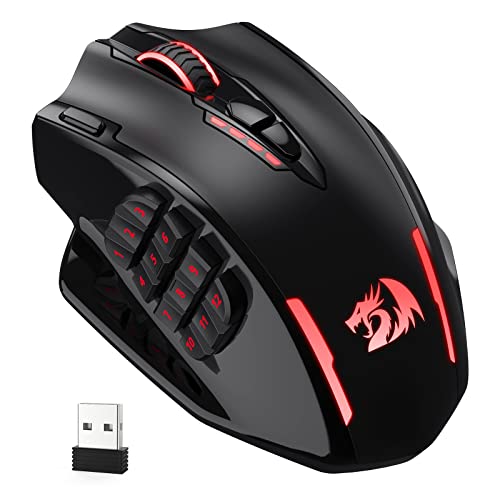
| Dual-Mode Versatility | Connectivity Type: 2.4GHz wireless and USB-C wired | Programmable Buttons: 16 programmable buttons | Maximum DPI: 16,000 DPI | VIEW LATEST PRICE | Read Our Analysis |
| Redragon Wireless Gaming Mouse 16000 DPI (M901P-KS) |

| Long Battery Life | Connectivity Type: Wireless rechargeable and wired | Programmable Buttons: 16 programmable buttons | Maximum DPI: 16,000 DPI | VIEW LATEST PRICE | Read Our Analysis |
| SOLAKAKA SM809 Pro Gaming Mouse with 9 Side Buttons |
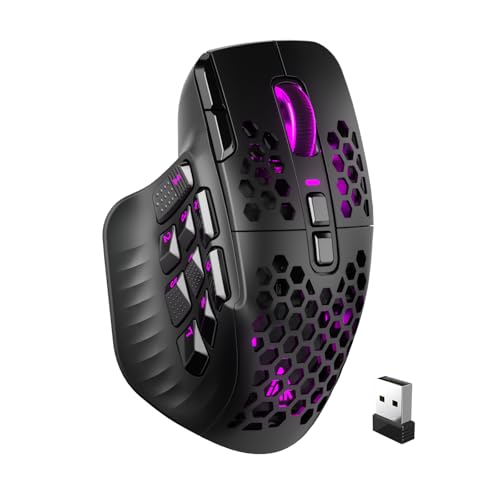
| Multi-Device Champion | Connectivity Type: 2.4GHz wireless, Bluetooth 5.0, and Type-C wired | Programmable Buttons: 16 programmable macros | Maximum DPI: 24,000 DPI | VIEW LATEST PRICE | Read Our Analysis |
| Redragon MMO Gaming Mouse 12400 DPI Programmable |

| Best Overall Value | Connectivity Type: USB wired | Programmable Buttons: 19 programmable buttons | Maximum DPI: 12,400 DPI | VIEW LATEST PRICE | Read Our Analysis |
| TRELC Wireless Numeric Keypad with Mouse (Black) |

| Compact Productivity Pick | Connectivity Type: 2.4GHz wireless | Programmable Buttons: 18-key numeric keypad | Maximum DPI: Not applicable (numeric keypad only) | VIEW LATEST PRICE | Read Our Analysis |
More Details on Our Top Picks
Redragon M908 Impact RGB MMO Gaming Mouse
If you’re looking for a mouse that combines extensive programmability with a dedicated number pad layout, the Redragon M908 Impact delivers 18 customizable buttons across its design—12 side buttons that function like a number pad, plus 6 default buttons—making it ideal for users who need quick access to macros, shortcuts, and frequently used commands. You’ll configure these buttons through the included software, which supports five memory profiles with independent light settings. The mouse features a Pixart PAW3327 optical sensor with adjustable DPI levels from 500 to 12,400, accessible via dedicated buttons or software. Its ergonomic design includes durable TEFLON feet pads and weighs 175 grams with an 8-piece weight tuning set for customization. The wired USB connection ensures stable connectivity without latency concerns.
- Connectivity Type:USB wired
- Programmable Buttons:18 programmable buttons
- Maximum DPI:12,400 DPI
- RGB Lighting:16.8 million colors, disableable
- Battery Life/Power:USB powered (no battery)
- Windows Compatibility:Windows 2000/ME/XP/2003/Vista/7/8/10
- Additional Feature:8-piece weight tuning system
- Additional Feature:18 programmable buttons total
- Additional Feature:Gold-plated USB connector
Razer Naga V2 HyperSpeed Wireless MMO Gaming Mouse
Want a mouse that handles complex commands without reaching for your keyboard? The Razer Naga V2 HyperSpeed gives you 19 programmable buttons to assign macros and commands for your workflow. You’ll get wireless connectivity through Bluetooth or 2.4 GHz HyperSpeed, with battery life up to 400 hours on Bluetooth or 250 hours wireless. The Focus Pro 30K optical sensor tracks accurately on any surface, while mechanical switches last up to 60 million clicks. Use the Razer Synapse App to customize button functions and optimize mouse settings. Position your wireless dongle at desk level within 30 centimeters for reliable performance.
- Connectivity Type:Bluetooth and 2.4GHz wireless
- Programmable Buttons:19 programmable buttons
- Maximum DPI:30,000 DPI
- RGB Lighting:RGB customizable
- Battery Life/Power:400 hours (Bluetooth), 250 hours (HyperSpeed wireless)
- Windows Compatibility:Windows OS
- Additional Feature:HyperScroll dual-mode technology
- Additional Feature:60 million click durability
- Additional Feature:Focus Pro 30K sensor
Wireless Number Pad and Mouse Set 2.4GHz
Professionals who handle numbers all day—accountants, data analysts, and remote workers—need a setup that keeps them moving without fumbling between devices. The Rytaki Wireless Number Pad and Mouse Set combines both tools into one 2.4GHz system using a single USB receiver. You get a 22-key keypad with standard functions like NumLock and Delete, plus a silent mouse with adjustable DPI settings at 800, 1200, or 1600. Setup requires no drivers—just plug in the receiver and start working. The keypad features a 15° tilt for comfort during extended use. Both devices run on one AA battery and automatically power down after ten minutes of inactivity, extending battery life markedly.
- Connectivity Type:2.4GHz wireless
- Programmable Buttons:22-key numeric keypad
- Maximum DPI:1,600 DPI
- RGB Lighting:Not applicable
- Battery Life/Power:1x AA battery (not included)
- Windows Compatibility:Windows 2000–11
- Additional Feature:22-key numeric keypad included
- Additional Feature:32.8 ft wireless range
- Additional Feature:Plug and play setup
Redragon M913 Impact Elite Wireless Gaming Mouse
Gamers seeking a mouse that combines MMO functionality with versatile connectivity will find the Redragon M913 Impact Elite delivers both through its 12 side buttons and dual wireless/wired modes. You’ll experience 1 ms click response time and precise tracking via the Pixart 3335 optical sensor. Customize all 16 buttons and 16.8 million color lighting effects through dedicated software. Adjust DPI across five preset levels from 1000 to 16000, or personalize settings by ±100 DPI increments. Battery performance reaches 45 hours with backlighting enabled or 80 hours in eco mode. The low-consumption chip ensures extended use without frequent charging, supporting your extended gaming sessions efficiently.
- Connectivity Type:2.4GHz wireless and USB-C wired
- Programmable Buttons:16 programmable buttons
- Maximum DPI:16,000 DPI
- RGB Lighting:16.8 million colors with eco mode
- Battery Life/Power:45 hours (backlit ON), 80 hours (backlit OFF)
- Windows Compatibility:Windows OS
- Additional Feature:Dual wireless/wired connectivity modes
- Additional Feature:80-hour battery life (eco mode)
- Additional Feature:1ms click response time
Redragon Wireless Gaming Mouse 16000 DPI (M901P-KS)
If you’re looking for a mouse that combines gaming performance with productivity features, the Redragon M901P-KS delivers 16 programmable buttons and 12 side buttons that you can remap for your specific workflow. Download the Redragon software to customize these buttons for your applications, whether you’re working in spreadsheets, design tools, or communication platforms. Adjust DPI settings from 100 to 16,000 to match your task requirements—lower DPI for precision work, higher DPI for quick navigation. The wireless design with 70-hour battery life keeps you productive without frequent charging interruptions. Use the five memory profiles to save different configurations for different applications, allowing instant switching between your gaming and productivity setups.
- Connectivity Type:Wireless rechargeable and wired
- Programmable Buttons:16 programmable buttons
- Maximum DPI:16,000 DPI
- RGB Lighting:16.8 million colors, 4 modes
- Battery Life/Power:70 hours (RGB off)
- Windows Compatibility:Windows XP–10
- Additional Feature:70-hour battery standby capacity
- Additional Feature:Rechargeable 1000mAh battery included
- Additional Feature:Wired charging capability
SOLAKAKA SM809 Pro Gaming Mouse with 9 Side Buttons
Looking for a mouse that handles both competitive gaming and productivity work? The SOLAKAKA SM809 delivers with nine side buttons and 16 programmable macros. You’ll customize each button for specific tasks using the web-based driver at solakakadriver.com—no software installation required. The PAW3311 sensor tracks up to 24000 DPI for precision control across gaming and professional applications. Switch between three connection modes: 2.4GHz wireless, Bluetooth 5.0, or Type-C wired, depending on your setup. Swap the four interchangeable magnetic side panels to adjust button configurations. RGB lighting adapts to your workspace. This MMO-focused design provides the productivity features you need without unnecessary complexity.
- Connectivity Type:2.4GHz wireless, Bluetooth 5.0, and Type-C wired
- Programmable Buttons:16 programmable macros
- Maximum DPI:24,000 DPI
- RGB Lighting:RGB lighting customizable
- Battery Life/Power:Rechargeable battery
- Windows Compatibility:Windows OS
- Additional Feature:Interchangeable magnetic side plates
- Additional Feature:Triple-mode connectivity options
- Additional Feature:PAW3311 high-precision sensor
Redragon MMO Gaming Mouse 12400 DPI Programmable
The Redragon M901K’s 19 programmable buttons—including 12 dedicated side buttons—make it ideal for players who need quick access to multiple in-game commands without reaching for a keyboard. You can remap each button using the macro editing software and save configurations across five memory profiles. The mouse supports up to 12,400 DPI with adjustable polling rates from 125Hz to 1000Hz, enabling precise cursor control for different tasks. Its ergonomic design includes removable 2.4-gram weights for customizing balance. The RGB lighting offers 16.8 million color options across four modes. You’ll receive a two-year warranty and thirty-day return guarantee with this USB-wired gaming mouse compatible with Windows, macOS, and Linux systems.
- Connectivity Type:USB wired
- Programmable Buttons:19 programmable buttons
- Maximum DPI:12,400 DPI
- RGB Lighting:16.8 million colors, 4 modes
- Battery Life/Power:USB wired (no battery)
- Windows Compatibility:Windows, macOS, Linux
- Additional Feature:8 removable 2.4g weights
- Additional Feature:2-year manufacturer warranty
- Additional Feature:Compatible with multiple OS
TRELC Wireless Numeric Keypad with Mouse (Black)
Need a combined numeric keypad and mouse setup that works right out of the box? The TRELC model NKM-B gives you both devices in one kit. You’ll get an 18-key numeric keypad, a wireless mouse, and a 2.4G USB receiver. Simply plug the receiver into your computer, and both devices connect immediately without installing drivers. The keypad features ergonomic tilting and spring-action keys for comfortable extended use. Four non-slip mats keep it stable on your desk. The mouse and keypad work together on Windows 2000 through Windows 10, making them suitable for spreadsheet work and accounting tasks. Battery auto-shutoff after ten minutes unused preserves power. The 33-foot wireless range gives you flexibility in positioning both devices.
- Connectivity Type:2.4GHz wireless
- Programmable Buttons:18-key numeric keypad
- Maximum DPI:Not applicable (numeric keypad only)
- RGB Lighting:Not applicable
- Battery Life/Power:1x AA battery (not included)
- Windows Compatibility:Windows 2000/XP/Vista/7/8/10
- Additional Feature:18-key numeric keypad bundled
- Additional Feature:33 ft working range
- Additional Feature:Auto power-off feature
Factors to Consider When Choosing a Mouse With Number Pad
When selecting a mouse with a number pad, you’ll need to evaluate several key specifications that directly affect your productivity and comfort. Start by deciding between a wireless connection for mobility or a wired connection for consistent performance, then assess the DPI levels and sensitivity settings to match your work speed, count the programmable buttons available for your specific tasks, check the battery life duration if you choose wireless, and examine the ergonomic design features to ensure the device fits your hand size and supports extended use without strain. Each of these factors works together to determine whether the device will actually improve your efficiency or create frustration during your workday.
Wireless Vs. Wired Connection
How should you decide between wireless and wired connectivity for your number-pad mouse? Start by ensuring your workspace setup. If you need mobility across multiple devices, choose wireless models with 2.4GHz USB dongles or Bluetooth. These offer multi-device pairing without cord limitations. However, verify your USB dongle placement and ensure line-of-sight positioning to avoid latency issues during precise work. If you prioritize constant, low-latency performance, select wired options instead. Wired connections eliminate battery management and interference concerns entirely. Alternatively, consider hybrid models that include both wireless and wired modes. This allows you to switch seamlessly when charging or when signal reliability decreases. Evaluate your typical usage patterns and workspace constraints before deciding which connection type best serves your productivity needs.
DPI Levels And Sensitivity
Once you’ve settled on your connectivity preference, adjusting DPI levels and sensitivity becomes your next critical control point for productivity. You’ll find most mice offer DPI ranges from 800 to 16,000, with fixed steps like 500/1000/2000/3000/6200 available on many models. Higher DPI settings increase cursor speed across the same physical distance, which accelerates navigation tasks. However, increased sensitivity can reduce precision for detailed work unless you enable pointer precision settings. Check whether your mouse supports on-device DPI adjustments through dedicated buttons or software configuration. Storing multiple DPI profiles lets you switch quickly between settings tailored to different tasks—data entry versus spreadsheet navigation, for example. Select a mouse offering both hardware buttons and software fine-tuning for maximum flexibility.
Programmable Button Count
What role will your mouse play in your daily workflow? When selecting a mouse with a number pad, examine the programmable button count carefully. Most MMO mice offer 12 to 19 side buttons for macros and hotkeys. You’ll find models with 16 total buttons including 12 side buttons, while others provide 19 programmable options. Consider whether you need multiple memory profiles—five profiles let you save different configurations for various applications. Evaluate working modes available; some mice switch between per-button macro mode and standard mode, letting you toggle between complex macros and basic controls quickly. Match the button count to your specific tasks. More buttons support intricate command sequences, but excess buttons may slow your workflow if unused. Test the layout before committing.
Battery Life Duration
Beyond counting your mouse’s programmable buttons, you’ll need to examine how long the device actually runs between charges or battery replacements. Wireless MMO mice with Bluetooth mode typically deliver 400 hours of battery life, while HyperSpeed Wireless reduces this to approximately 250 hours. Check the rechargeable battery capacity—models with 1000 mAh batteries support extended sessions without frequent recharging. Disable RGB lighting and activate backlight-off modes to significantly extend runtime. Enable auto-sleep features that power down the device during idle periods. When using your keypad and mouse together during long work sessions, prioritize models offering maximum battery life per charge. This approach minimizes recharging interruptions and maintains uninterrupted productivity throughout your workday.
Ergonomic Design Features
Your mouse’s physical shape and construction directly impact comfort during extended work sessions. When evaluating ergonomic design features, examine the mouse’s grip style first. An ambidextrous or curved shape promotes natural hand posture and reduces strain. Next, assess button placement. Twelve or more side buttons positioned for thumb accessibility let you execute MMO macros without excessive finger reach, minimizing strain during repetitive tasks. Consider weight customization options. Removable 2.4g weights allow you to balance the mouse according to your grip and playstyle, improving comfort over long periods. Evaluate surface materials too. Lightweight, skin-friendly materials combined with textured grips improve palm comfort and prevent slippage during fast movements. Finally, check for integrated keypad sections. A tilted or contoured keypad reduces wrist torsion and supports optimal hand positioning throughout your workday.
Compatibility And Operating Systems
How do you know if a mouse with number pad will actually work with your computer? First, check the device’s official OS compatibility list. Most models support Windows 2000 through 11, but Mac support varies substantially. Some mice function fully on Mac, while others have inactive keys or limited features on Apple systems. Next, determine your setup needs. USB and 2.4GHz wireless options typically work plug-and-play without drivers on any OS. However, if you want macros or custom button profiles, you’ll need Windows-specific software. Finally, verify Linux or Chromebook compatibility if you use those systems, as support isn’t universal. Review the product specifications carefully before purchasing to ensure all features you need will function on your operating system.
RGB Lighting Customization
What role should RGB lighting play in your mouse purchase decision? Consider whether you’ll use companion software to customize per-button lighting across your five memory profiles. You can assign dedicated light colors to each profile, helping you identify which settings you’re currently using. Many models offer 16.8 million color options and four lighting modes for aesthetic customization. Decide if you need synchronization between lighting effects and your macros or DPI profiles for visual feedback during gameplay. Evaluate whether disabling RGB lighting matters to you—turning it off extends battery life on wireless mice and reduces distractions. Check if the software requires online drivers or firmware updates for full lighting control before purchasing.
Warranty And Return Policy
Before purchasing a mouse with a number pad, you’ll want to review the warranty and return policy carefully since they protect your investment if something goes wrong. Most manufacturers offer a standard one-year warranty covering manufacturing defects, though some extend to two years. Check whether your seller provides a 30-day return window for dead-on-arrival or damaged items. Verify that you’ll need to keep your proof of purchase and original packaging for claims. Return eligibility typically excludes misuse or accidental damage, so read the specific conditions. Since terms vary by seller and region, confirm the exact coverage details before completing your purchase. Contact customer support if any policy language seems unclear.
Final Thoughts
You’ll find the right MMO mouse by comparing button counts, DPI ranges, and programmable features across models. Check wireless versus wired options based on your workspace. Test ergonomic grip and weight customization for comfort during long sessions. Verify software compatibility with your operating system. Review memory profile capacity and macro functionality. Select a mouse matching your specific workflow needs and budget constraints.

Meet Ry, “TechGuru,” a 36-year-old technology enthusiast with a deep passion for tech innovations. With extensive experience, he specializes in gaming hardware and software, and has expertise in gadgets, custom PCs, and audio.
Besides writing about tech and reviewing new products, he enjoys traveling, hiking, and photography. Committed to keeping up with the latest industry trends, he aims to guide readers in making informed tech decisions.