
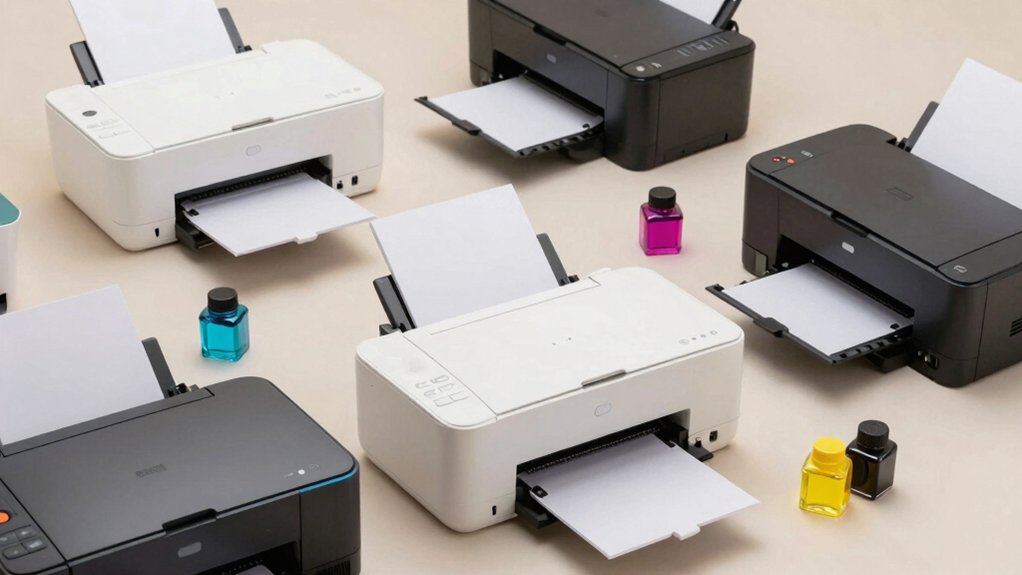

If you’re spending too much on printer ink, refillable ink tank printers offer a direct solution to reduce your costs considerably. These printers come with large ink reservoirs that you refill yourself rather than replacing cartridges, lowering your per-page printing expenses. You’ll find wireless models from Epson, HP, and Canon that handle printing, scanning, and copying. But choosing the right one depends on understanding what features match your specific needs—and the savings potential varies considerably.
| Epson EcoTank ET-2803 Wireless All-in-One Printer |

| Best For Beginners | Included Ink Supply: Initial ink only | Print Speed (Black): 10 ppm | All-in-One Functions: Print, scan, copy | VIEW LATEST PRICE | Read Our Analysis |
| Epson EcoTank ET-2400 Wireless All-in-One Printer |

| Best Value | Included Ink Supply: 2 years of ink included | Print Speed (Black): 10 ppm | All-in-One Functions: Print, scan, copy | VIEW LATEST PRICE | Read Our Analysis |
| HP Smart Tank 5000 Wireless All-in-One Printer (5D1B6A) |

| Most Versatile | Included Ink Supply: 2 years of ink included | Print Speed (Black): 10 ppm | All-in-One Functions: Print, scan, copy | VIEW LATEST PRICE | Read Our Analysis |
| HP Smart Tank Plus 570 All-in-One Printer (5HX14A) |

| Budget-Friendly Pick | Included Ink Supply: 2 years of ink included | Print Speed (Black): Not specified | All-in-One Functions: Print, scan, copy | VIEW LATEST PRICE | Read Our Analysis |
| Canon MegaTank G3270 Wireless All-in-One Printer |

| Best Overall | Included Ink Supply: 2 years of ink included | Print Speed (Black): Not specified | All-in-One Functions: Print, scan, copy | VIEW LATEST PRICE | Read Our Analysis |
| HP Smart Tank 7602 Wireless All-in-One Printer (28B98A) |
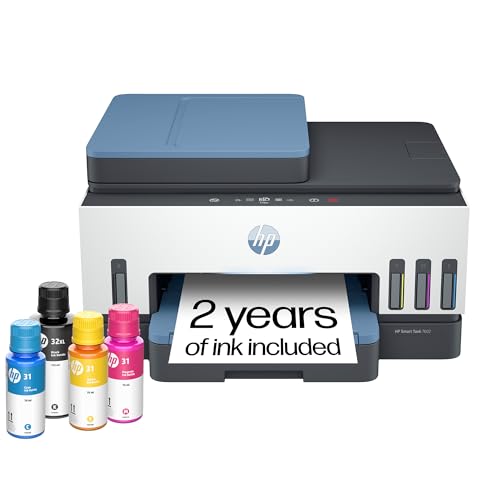
| Editor’s Choice | Included Ink Supply: 2 years of ink included | Print Speed (Black): Not specified | All-in-One Functions: Print, scan, copy | VIEW LATEST PRICE | Read Our Analysis |
| Canon PIXMA G6020 Supertank All-in-One Wireless Printer |

| Best For Home Office | Included Ink Supply: 2 years of ink included | Print Speed (Black): Not specified | All-in-One Functions: Print, scan, copy (optional fax) | VIEW LATEST PRICE | Read Our Analysis |
| Canon MegaTank MAXIFY GX2020 Wireless Color Printer |

| Professional Grade | Included Ink Supply: Ink bottles included (GI-25 set) | Print Speed (Black): Not specified | All-in-One Functions: Print, scan, copy (optional fax) | VIEW LATEST PRICE | Read Our Analysis |
| Epson EcoTank ET-2980 Wireless All-in-One Printer |
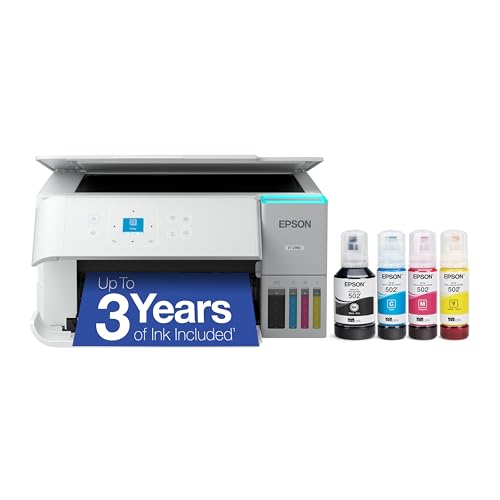
| Most Popular | Included Ink Supply: Up to 6,600 black / 5,500 color pages | Print Speed (Black): 15 ppm | All-in-One Functions: Print, scan, copy | VIEW LATEST PRICE | Read Our Analysis |
| Canon PIXMA TS4320 Wireless Color Inkjet Printer |

| Compact & Affordable | Included Ink Supply: Starter ink sets included | Print Speed (Black): Not specified | All-in-One Functions: Print, scan, copy | VIEW LATEST PRICE | Read Our Analysis |
More Details on Our Top Picks
Epson EcoTank ET-2803 Wireless All-in-One Printer
If you’re looking to cut printing costs without sacrificing functionality, the Epson EcoTank ET-2803 delivers what you need in a compact, wireless device. This cartridge-free printer features high-capacity refillable ink tanks that come pre-filled, eliminating recurring cartridge expenses. You’ll get color printing at 5 ppm and black-and-white at 10 ppm, plus built-in scanning and copying capabilities. The flatbed scanner handles documents up to 8.5 by 14 inches. Connect via USB or Wi-Fi for wireless printing from your phone or computer using AirPrint and Epson Connect. Use genuine Epson ink to maintain your one-year limited warranty and ensure optimal print quality. The compact design measures 22.8 inches deep, 14.8 inches wide, and 10 inches tall, fitting easily on most desks.
- Included Ink Supply:Initial ink only
- Print Speed (Black):10 ppm
- All-in-One Functions:Print, scan, copy
- Wireless Connectivity:Wi-Fi enabled
- Warranty:1-year limited
- Maximum Print Resolution:5760 x 1440 dpi
- Additional Feature:Flatbed scanner with LCD display
- Additional Feature:Supports media up to 8.5×14 inches
- Additional Feature:AirPrint and Android app control
Epson EcoTank ET-2400 Wireless All-in-One Printer
The Epson EcoTank ET-2400 works best for home and small office users who print regularly and want to minimize ongoing ink costs. This wireless all-in-one printer includes high-capacity refillable ink tanks and comes with two years’ worth of ink, eliminating frequent cartridge purchases. You’ll get print speeds of 10 ppm for black and 5 ppm for color documents. The flatbed scanner handles copying and scanning tasks, while the 100-sheet paper tray accommodates standard letter-size pages. Connect via USB or Wi-Fi to laptops, tablets, and smartphones using the Epson Smart Panel app. Use genuine Epson ink bottles to maintain warranty coverage and prime print quality throughout your device’s lifespan.
- Included Ink Supply:2 years of ink included
- Print Speed (Black):10 ppm
- All-in-One Functions:Print, scan, copy
- Wireless Connectivity:Wi-Fi enabled
- Warranty:1-year limited
- Maximum Print Resolution:5760 x 1440 dpi
- Additional Feature:Two years of included ink
- Additional Feature:100-sheet rear-feed input tray
- Additional Feature:ENERGY STAR certified
HP Smart Tank 5000 Wireless All-in-One Printer (5D1B6A)
Looking to cut printing costs without managing individual ink cartridges? The HP Smart Tank 5000 eliminates cartridge hassles with its refillable ink tank system. You’ll get two years of original HP ink included, supporting up to 6,000 pages per color. The printer handles scanning and copying alongside standard printing, with wireless connectivity for phones, tablets, and computers. Setup requires connecting the included ink bottles—no squeezing or spilling involved. AI features enhance layouts and remove unwanted content automatically. You’ll achieve sharp text and rich colors at 10 pages per minute for black documents and 5 for color. The 2-year limited warranty covers manufacturer defects, with Amazon’s 30-day return policy providing additional protection.
- Included Ink Supply:2 years of ink included
- Print Speed (Black):10 ppm
- All-in-One Functions:Print, scan, copy
- Wireless Connectivity:Wireless + Alexa compatible
- Warranty:2-year limited
- Maximum Print Resolution:4800 x 1200 dpi (optimized)
- Additional Feature:AI-enhanced print layouts
- Additional Feature:Up to 6,000 black pages included
- Additional Feature:Alexa compatible
HP Smart Tank Plus 570 All-in-One Printer (5HX14A)
You’ll want the HP Smart Tank Plus 570 if you’re printing high volumes on a tight budget, since it delivers thousands of pages without the recurring expense of traditional ink cartridges. The printer arrives with up to two years of ink included, yielding 8,000 color pages or 6,000 black pages out of the box. Its mess-free refill system lets you plug ink bottles directly into the tank without squeezing or spilling. The device prints, copies, and scans with borderless capability and supports mobile and wireless printing. You’ll experience sharper text and richer colors while maintaining reliable performance for over a year, outlasting most competitors.
- Included Ink Supply:2 years of ink included
- Print Speed (Black):Not specified
- All-in-One Functions:Print, scan, copy
- Wireless Connectivity:Wireless enabled
- Warranty:Not specified
- Maximum Print Resolution:Not specified
- Additional Feature:Up to 8,000 color pages included
- Additional Feature:Mess-free refill system
- Additional Feature:Borderless printing capability
Canon MegaTank G3270 Wireless All-in-One Printer
Canon’s MegaTank G3270 works best if you’re printing frequently at home and want to cut ink costs considerably. This wireless all-in-one printer handles printing, copying, and scanning tasks. You’ll receive up to two years of included ink, which prints approximately 6,000 black-and-white pages or 7,700 color pages per set. The 1.35-inch LCD display lets you navigate basic functions directly on the printer. You can save roughly $1,000 on ink expenses over time compared to standard cartridge models. The single-sided printing capability suits routine home use without requiring manual page flipping for duplex output.
- Included Ink Supply:2 years of ink included
- Print Speed (Black):Not specified
- All-in-One Functions:Print, scan, copy
- Wireless Connectivity:Wireless enabled
- Warranty:Not specified
- Maximum Print Resolution:Not specified
- Additional Feature:Up to 7,700 color pages included
- Additional Feature:1.35-inch LCD display
- Additional Feature:Single-sided printing
HP Smart Tank 7602 Wireless All-in-One Printer (28B98A)
The HP Smart Tank 7602 is built for home office users who need reliable, high-volume printing without frequent cartridge replacements. This all-in-one printer includes two years of original HP ink, allowing you to print up to 8,000 color pages or 6,000 black pages before refilling. The refillable tank system eliminates messy cartridge changes—ink bottles simply plug into the tank. You’ll handle scanning, copying, and borderless printing with AI-enhanced features that format web pages and emails correctly. The cartridge-free design keeps your printer useful longer than competing models, making it a practical choice for sustained, economical printing.
- Included Ink Supply:2 years of ink included
- Print Speed (Black):Not specified
- All-in-One Functions:Print, scan, copy
- Wireless Connectivity:Wireless + AI-enabled
- Warranty:Not specified
- Maximum Print Resolution:Not specified
- Additional Feature:AI removes unwanted content
- Additional Feature:Up to 8,000 color pages included
- Additional Feature:Home office optimized design
Canon PIXMA G6020 Supertank All-in-One Wireless Printer
If you’re printing 200 pages or more monthly and want to cut ink costs considerably, the Canon PIXMA G6020 Supertank delivers refillable ink tanks that yield up to 6,000 black and white pages or 7,700 color pages per set. You’ll receive up to two years of ink included, which covers sustained monthly printing at default settings. The all-in-one printer handles copying and scanning wirelessly, plus mobile printing and Alexa compatibility. You’ll save approximately $1,000 on ink compared to standard cartridge models. The device features auto two-sided printing, a two-line LCD display, and comes in black. This configuration prioritizes cost reduction for high-volume home or small office printing.
- Included Ink Supply:2 years of ink included
- Print Speed (Black):Not specified
- All-in-One Functions:Print, scan, copy (optional fax)
- Wireless Connectivity:Wireless + Alexa compatible
- Warranty:Not specified
- Maximum Print Resolution:Not specified
- Additional Feature:Auto 2-sided printing
- Additional Feature:Works with Alexa
- Additional Feature:2-line LCD display
Canon MegaTank MAXIFY GX2020 Wireless Color Printer
For home and office users who want to reduce ink costs without sacrificing print quality, Canon’s MegaTank MAXIFY GX2020 offers a refillable tank system that produces up to 3,000 pages per ink set in both black and white and color. You’ll benefit from its compact design, which fits easily on a desktop, alongside a 2.7-inch touchscreen for straightforward navigation. The printer handles multiple media types including photo paper and envelopes up to 8.5″ x 14″. Its 35-sheet automatic document feeder streamlines copying and scanning tasks. With dual-band WiFi connectivity, you can print wirelessly from computers and mobile devices, including Chromebooks. The 3-year limited warranty covers your investment, while the high page yield ensures sustained savings on replacement ink costs.
- Included Ink Supply:Ink bottles included (GI-25 set)
- Print Speed (Black):Not specified
- All-in-One Functions:Print, scan, copy (optional fax)
- Wireless Connectivity:Dual-band Wi-Fi (2.4/5 GHz)
- Warranty:3-year limited (60,000 pages)
- Maximum Print Resolution:Black 1200 x 2400 dpi / Color 600 x 1200 dpi
- Additional Feature:35-sheet auto document feeder
- Additional Feature:2.7-inch color touchscreen
- Additional Feature:Chromebook compatible
Epson EcoTank ET-2980 Wireless All-in-One Printer
Epson’s EcoTank ET-2980 stands out for budget-conscious users who print frequently and want to eliminate ongoing cartridge costs. This 7th-generation supertank printer arrives with enough ink to produce 6,600 black pages and 5,500 color pages. Each replacement ink bottle set replaces approximately 80 cartridges, dramatically reducing plastic waste and refill expenses. The printer includes a built-in scanner, auto duplex printing, and a 100-sheet paper tray for continuous workflow. Setup requires filling the uniquely keyed EcoFit tanks using the included bottles—a clean, straightforward process. Print speeds reach 15 black and 8 color pages per minute with no warmup delay.
- Included Ink Supply:Up to 6,600 black / 5,500 color pages
- Print Speed (Black):15 ppm
- All-in-One Functions:Print, scan, copy
- Wireless Connectivity:Wireless enabled
- Warranty:Not specified
- Maximum Print Resolution:Not specified
- Additional Feature:Auto duplex printing included
- Additional Feature:100-sheet paper tray
- Additional Feature:1.44-inch color display
Canon PIXMA TS4320 Wireless Color Inkjet Printer
The Canon PIXMA TS4320 works best when you’re a student or hybrid worker who needs basic printing, scanning, and copying without spending much money upfront. This compact printer uses a 2-cartridge hybrid ink system with PG-295 black and CL-286 color cartridges. You’ll get sharp text and vivid colors on documents and photos up to 8.5″ x 11″. Connect via dual-band Wi-Fi to print from your smartphone using the Canon PRINT App or Apple AirPrint. The flatbed scanner handles copying at 600 x 600 dpi resolution. Auto-duplex printing reduces paper usage automatically. Setup takes minutes on your computer or phone without needing a display screen.
- Included Ink Supply:Starter ink sets included
- Print Speed (Black):Not specified
- All-in-One Functions:Print, scan, copy
- Wireless Connectivity:Dual-band Wi-Fi (2.4/5 GHz)
- Warranty:1-year limited
- Maximum Print Resolution:Not specified
- Additional Feature:EPEAT Silver certified
- Additional Feature:Auto-duplex printing included
- Additional Feature:Compact space-saving design
Factors to Consider When Choosing a Printer With Refillable Ink
You’ll want to evaluate ink tank capacity first, since larger reservoirs mean fewer refills and lower per-page costs over time. Next, compare print speed performance across models you’re considering, then calculate total cost savings by multiplying the price per milliliter of ink by your expected monthly printing volume. Finally, examine the refill system design for ease of use, check warranty coverage terms to confirm they protect refillable tank components, and verify that each printer’s specific design matches your refilling comfort level.
Ink Tank Capacity
How much printing can you do before you’ll need to refill? Check your printer’s tank capacity, which directly determines your printing volume. A full ink set typically yields 6,000 to 8,000 pages, depending on whether you’re printing black or color documents. Review the ISO-standard page counts listed in your printer’s specifications, as these numbers account for standard print modes. Consider your monthly printing volume and calculate how many months one ink set will last. If you print 500 pages monthly, an 8,000-page capacity provides roughly 16 months between refills. Match tank size to your usage patterns: high-volume users benefit from larger tanks, while occasional printers may need less capacity. Compare replacement bottle costs against initial tank investment to determine your total cost savings over time.
Print Speed Performance
When evaluating refillable ink tank printers, you’ll want to understand how speed translates into actual productivity for your needs. Black and white documents typically print at 10 pages per minute, while color output averages 5 ppm. First-page-out timing matters too—expect around 7 seconds before your initial page emerges. Consider your printing patterns: refillable systems excel at steady, long-run jobs rather than frequent single-page sprints. If you use duplex printing, account for extended per-page duration since two-sided output takes longer than single-sided. Resolution settings also affect speed; higher quality (up to 5760 x 1440 dpi) reduces ppm. Match these specifications against your actual volume requirements to select the right printer for your workflow.
Total Cost Savings
Refillable ink tank printers deliver dramatically lower per-page costs than traditional cartridge-based systems, often producing thousands of pages from a single ink set. To calculate your savings, compare ink bottle prices against cartridge costs, then divide by each system’s ISO page yield. Many refillable models include two years of ink in the box, reducing upfront expenses before you buy replacements. High-page-yield options—reaching 6,000 black or 7,700 color pages per set—maximize long-term value for frequent printing. Factor in maintenance savings: refillable systems require fewer cartridge replacements, lowering disposal fees and labor time. Total cost advantages compound over months of regular use, making refillable printers ideal for high-volume printing environments where per-page expenses directly impact your budget.
Refill System Design
What separates a practical refill system from a frustrating one? Look for spill-resistant bottles and clearly labeled ports that match ink colors. This design prevents you from loading cyan into the magenta slot, which wastes ink and damages print quality.
Check whether your printer includes high-capacity tanks built into the unit or uses separate bottle systems you refill manually. Built-in tanks reduce mess during refills. Verify that bottle caps seal tightly to prevent evaporation between uses.
Confirm the printer accepts genuine inks only, as non-genuine products may void your warranty and compromise performance. Review the refill process: some systems require you to remove tanks, while others let you refill without disassembly. Choose whichever method matches your comfort level and available time.
Warranty Coverage Terms
How does warranty coverage protect your investment in a refillable-ink printer? Most manufacturers offer a standard one-year warranty, though some extend to two years or provide longer coverage specifically for ink tanks. Review your warranty terms carefully, as they typically exclude consumable items like ink itself while covering hardware and non-consumable parts. Check whether using non-genuine ink voids your coverage—many warranties require you to use supplied or recommended inks to maintain protection. Some models tie warranty benefits to AI features or advanced maintenance support through official channels. Beyond manufacturer warranties, leverage return policies like Amazon’s 30-day window for additional protection during your initial purchase period. Compare these coverage options alongside your refill costs to determine true long-term savings.
Connectivity Options Available
When you’re selecting a refillable-ink printer, you’ll want to examine the connection methods it offers, since they directly affect how you’ll send print jobs and access features. Evaluate which connectivity types suit your setup: USB provides direct computer connections, Wi-Fi enables wireless printing from devices on your network, and Ethernet offers stable connections for office environments. Some models include dual-band Wi-Fi (2.4 GHz/5 GHz) for faster, more reliable data transfer. Check if the printer supports mobile printing through apps, AirPrint, Mopria, or Alexa integration—these let you print directly from smartphones and tablets. Verify whether companion apps require internet access for full functionality. Compact or home-focused units may lack Ethernet or memory-card slots, so confirm which interfaces match your needs before purchasing.
Final Thoughts
You’ll save considerably by choosing a refillable ink printer. Compare tank capacity, page yields, and initial costs across Epson, HP, and Canon models. Check your monthly printing volume to match printer specifications. Verify wireless connectivity and multifunction features meet your needs. Review warranty coverage and ink replacement costs. Calculate total cost of ownership over two years. Select the model that aligns with your budget and usage requirements.

Meet Ry, “TechGuru,” a 36-year-old technology enthusiast with a deep passion for tech innovations. With extensive experience, he specializes in gaming hardware and software, and has expertise in gadgets, custom PCs, and audio.
Besides writing about tech and reviewing new products, he enjoys traveling, hiking, and photography. Committed to keeping up with the latest industry trends, he aims to guide readers in making informed tech decisions.