
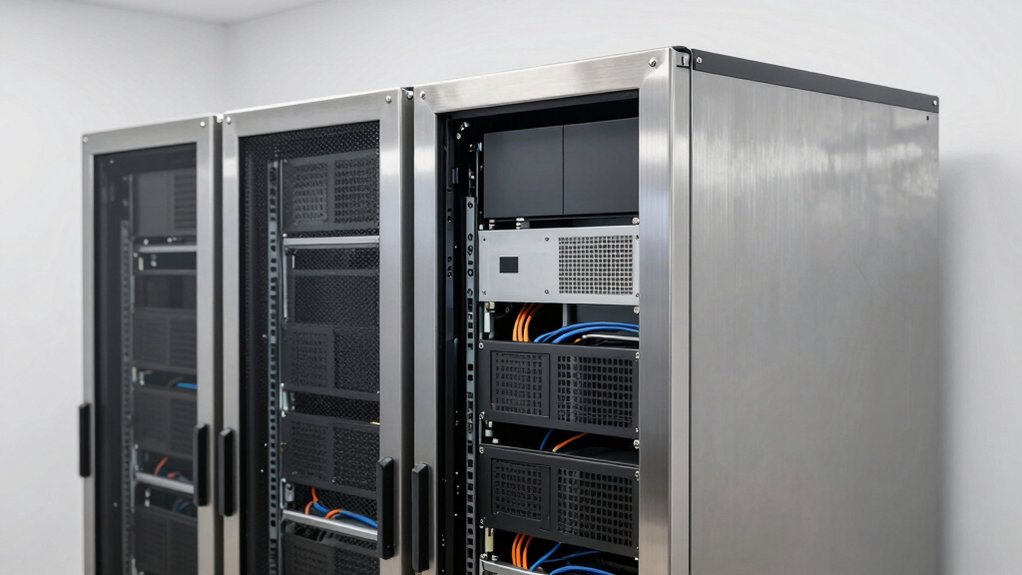

When you’re setting up IT infrastructure in limited spaces, you’ll need to evaluate wall-mount server rack cabinets carefully. You’re choosing between different sizes—from compact 6U models to larger 12U or 15U options—each offering distinct advantages for your equipment needs. The right cabinet protects your hardware while optimizing your available wall space. But selecting between solid doors, glass panels, open frames, and various mounting depths requires understanding specific features that impact both functionality and security.
| Tecmojo 6U Wall Mount Server Cabinet IT Network Rack |

| Best Overall | Rack Capacity (U-Size): 6U | Enclosure Depth: 17.72 inches (450mm) | Weight Capacity: 110 lbs (50kg) | VIEW LATEST PRICE | Read Our Analysis |
| NavePoint 12U Server Cabinet Wall Mount Rack Enclosure |

| Best Value | Rack Capacity (U-Size): 12U | Enclosure Depth: 23.6 inches (600mm) | Weight Capacity: 130 lbs | VIEW LATEST PRICE | Read Our Analysis |
| 15U Wall Mount Server Rack Cabinet 19″ Network Enclosure |

| Most Heavy-Duty | Rack Capacity (U-Size): 15U | Enclosure Depth: 24 inches (600mm) | Weight Capacity: 180 lbs | VIEW LATEST PRICE | Read Our Analysis |
| 18U Wall Mount Server Rack Cabinet with Glass Door |
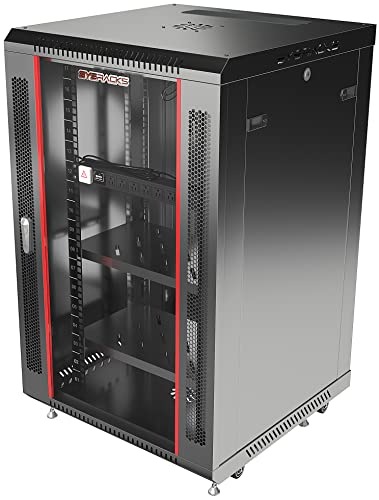
| Best Capacity | Rack Capacity (U-Size): 18U | Enclosure Depth: 24 inches (600mm) | Weight Capacity: 133 lbs (60kg) | VIEW LATEST PRICE | Read Our Analysis |
| 6U Server Cabinet Wall Mount Network Rack |

| Budget-Friendly Pick | Rack Capacity (U-Size): 6U | Enclosure Depth: 14.5 inches | Weight Capacity: 600 lbs | VIEW LATEST PRICE | Read Our Analysis |
| VIVO 12U Wall Mounted Server Rack Cabinet (MOUNT-SC12U) |
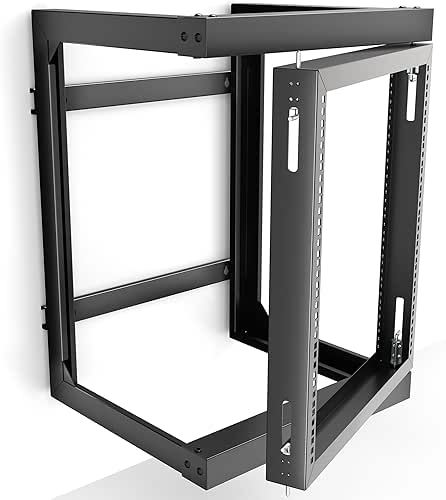
| Best For Small Spaces | Rack Capacity (U-Size): 12U | Enclosure Depth: 18.5 inches | Weight Capacity: 55 lbs | VIEW LATEST PRICE | Read Our Analysis |
| ECHOGEAR 15U Open Frame Rack for Servers & AV Gear |

| Best Open Frame | Rack Capacity (U-Size): 15U | Enclosure Depth: 20.4 inches | Weight Capacity: Not specified | VIEW LATEST PRICE | Read Our Analysis |
| ICC 15U Wall Mount Open Frame Server Rack |

| Best For Beginners | Rack Capacity (U-Size): 15U | Enclosure Depth: 18 inches | Weight Capacity: 125 lbs | VIEW LATEST PRICE | Read Our Analysis |
More Details on Our Top Picks
Tecmojo 6U Wall Mount Server Cabinet IT Network Rack
Why choose the Tecmojo 6U when you’re working with limited floor space? This wall-mount cabinet holds up to 110 pounds and fits standard 19″ IT equipment securely. The reversible glass door swings either direction, adapting to your room layout. You’ll mount it using fully adjustable rails with numbered positions for organized cable management. Top and bottom punch-out panels let you route cables efficiently. The lockable door and side panels protect your equipment from unauthorized access. Built from cold-rolled steel with a cooling fan included, this cabinet meets PCI, HIPAA, and EIA/ECA-310-E compliance standards. Its 450mm depth accommodates most network devices, while the compact 13.78″ height fits above doorways or in tight spaces.
- Rack Capacity (U-Size):6U
- Enclosure Depth:17.72 inches (450mm)
- Weight Capacity:110 lbs (50kg)
- Cooling/Ventilation:Single integrated cooling fan
- Security Features:Lockable glass door and side panels
- Material & Construction:Alloy steel and cold-rolled steel
- Additional Feature:Reversible swing door design
- Additional Feature:3-year manufacturer warranty
- Additional Feature:PCI & HIPAA compliant
NavePoint 12U Server Cabinet Wall Mount Rack Enclosure
If you’re managing IT equipment or audio-visual systems in a space-constrained environment, the NavePoint 12U Server Cabinet offers flexibility through its dual mounting options—you can install it as a free-standing unit or secure it directly to your wall, depending on your facility’s layout and needs. The cabinet accommodates 12U of 19-inch rack equipment within its 23.6-inch depth and supports up to 130 pounds of hardware. Its cold-rolled steel construction with black powder coating ensures durability. Two built-in top fans provide active ventilation through flow-through vents, maintaining equipment temperatures. The reinforced tempered glass front door locks securely while allowing visibility of your equipment. Removable side panels enable customization, and an L-shaped spring pin allows you to change door direction as needed. Assembly is straightforward with included hardware and flat-pack delivery.
- Rack Capacity (U-Size):12U
- Enclosure Depth:23.6 inches (600mm)
- Weight Capacity:130 lbs
- Cooling/Ventilation:Two built-in top fans with flow-through vents
- Security Features:Locking tempered glass front door with removable side panels
- Material & Construction:Cold-rolled steel with black powder coating
- Additional Feature:Free-standing or wall-mounted
- Additional Feature:Flat-pack assembly required
- Additional Feature:Dual top-mounted fans
15U Wall Mount Server Rack Cabinet 19″ Network Enclosure
For IT professionals managing office networks with limited floor space, the 15U Wall Mount Server Rack Cabinet delivers efficient equipment organization in a compact footprint. This 19-inch enclosure measures 24 inches deep with 20 inches of usable mounting space, accommodating switches, routers, patch panels, and NAS storage. The cabinet weighs 55 pounds empty and supports up to 180 pounds of equipment. You’ll benefit from the included vented steel shelves, cooling fan, and rack-mount PDU for organized power distribution. Its locking tempered glass door provides security while allowing visibility. Mount it directly to your wall or use the leveling feet for freestanding placement. Assembly is required, and the unit includes a two-year manufacturer warranty.
- Rack Capacity (U-Size):15U
- Enclosure Depth:24 inches (600mm)
- Weight Capacity:180 lbs
- Cooling/Ventilation:Top-mounted cooling fan with vented design
- Security Features:Locking tempered glass door with reinforced steel
- Material & Construction:Alloy steel with black powder coat
- Additional Feature:Included PDU and shelves
- Additional Feature:2-year manufacturer warranty
- Additional Feature:Leveling feet included
18U Wall Mount Server Rack Cabinet with Glass Door
The 18U wall-mount server rack cabinet with glass door delivers the space efficiency you’ll need when you’re installing network equipment, AV components, or security systems in a compact area. This 24-inch-deep enclosure holds up to 133 pounds when mounted securely to a solid wall. You’ll get two fixed shelves, a PDU, cable entry panels, and complete mounting hardware included. The perforated tempered glass door and removable side panels provide ventilation, while the integrated top fan ensures active cooling. Assembly is required, but the ready-to-assemble kit enables fast setup. The cabinet’s 19-inch standard rack compatibility accommodates routers, switches, and patch panels. Sysracks backs this unit with a 2-year manufacturer warranty.
- Rack Capacity (U-Size):18U
- Enclosure Depth:24 inches (600mm)
- Weight Capacity:133 lbs (60kg)
- Cooling/Ventilation:Integrated top fan with perforated door
- Security Features:Locking tempered glass door with removable side panels
- Material & Construction:Alloy steel with black powder coat
- Additional Feature:2 fixed shelves included
- Additional Feature:2-year manufacturer warranty
- Additional Feature:Ready-to-assemble kit
6U Server Cabinet Wall Mount Network Rack
Need a compact solution that doesn’t sacrifice capacity or durability? The Kinchoix 6U Server Cabinet delivers robust performance in a space-saving design. This wall-mounted enclosure measures 23 inches wide by 15 inches high by 14.5 inches deep, weighing 28 pounds with a 600-pound maximum capacity. The unit features SPCC cold-rolled steel construction with black powder coating for scratch and rust resistance. Removable side panels and a lockable top panel simplify cable management and equipment access. Ventilation holes on the front and top, combined with side mesh design, prevent overheating. The cabinet supports standard EIA-310-E compliance and accommodates 10-inch routers, switches, and AV equipment using adjustable mounting rails and square rack holes for quick installation.
- Rack Capacity (U-Size):6U
- Enclosure Depth:14.5 inches
- Weight Capacity:600 lbs
- Cooling/Ventilation:Top and front door ventilation with side mesh
- Security Features:Removable and lockable side panels
- Material & Construction:SPCC cold-rolled steel with black powder coat
- Additional Feature:1-year manufacturer warranty
- Additional Feature:Removable top panel design
- Additional Feature:EIA-310-E compliant
VIVO 12U Wall Mounted Server Rack Cabinet (MOUNT-SC12U)
Want a compact server solution that doesn’t consume floor space in cramped data closets or small server rooms? The VIVO 12U Wall Mounted Server Rack Cabinet (MOUNT-SC12U) delivers exactly that. This black alloy steel unit measures 18.5 inches deep, 21 inches wide, and 28.3 inches high, fitting snugly against any wall. You’ll mount it using included hardware and a provided template for wood studs or concrete anchors. The cabinet supports 19-inch IT equipment up to 55 pounds total, with four vertical rails accommodating servers, switches, and patch panels. Its 180-degree swing gate opens left or right, and you can remove it entirely for maintenance. Installation requires basic assembly, and VIVO backs it with a three-year warranty.
- Rack Capacity (U-Size):12U
- Enclosure Depth:18.5 inches
- Weight Capacity:55 lbs
- Cooling/Ventilation:Open frame design for natural airflow
- Security Features:180-degree swing gate (removable)
- Material & Construction:Alloy steel open-frame construction
- Additional Feature:180-degree swing gate
- Additional Feature:3-year warranty included
- Additional Feature:Includes mounting template
ECHOGEAR 15U Open Frame Rack for Servers & AV Gear
If you’re setting up servers and AV equipment in a space where wall real estate matters, ECHOGEAR’s 15U Open Frame Rack delivers efficient mounting without consuming floor space. This black alloy steel unit measures 20.4 inches deep, 20.42 inches wide, and 26.25 inches tall, holding 15U of equipment. You’ll get two vented shelves—one 1U and one 2U—that accommodate devices up to 19 inches deep while promoting airflow. Installation takes under 20 minutes using included hardware. The rack supports wall mounting or standing on leveling feet, giving you mounting flexibility. You receive securement straps and rack screws for secure equipment placement.
- Rack Capacity (U-Size):15U
- Enclosure Depth:20.4 inches
- Weight Capacity:Not specified
- Cooling/Ventilation:Open frame with vented shelves
- Security Features:Open frame (no door/locking mechanism)
- Material & Construction:Black alloy steel open frame
- Additional Feature:Includes vented shelves
- Additional Feature:Under 20-minute assembly
- Additional Feature:4 leveling feet included
ICC 15U Wall Mount Open Frame Server Rack
The ICC 15U Wall Mount Open Frame Server Rack works best for IT professionals and network administrators who operate in tight spaces and require immediate access to their equipment. This cold-rolled steel unit holds 15U of rack space within an 18-inch depth, supporting patch panels, switches, and PDUs up to 125 pounds. The reinforced 14-gauge arms and 11-gauge rails provide durability for long-term use. Wall mounting frees floor space while improving airflow and equipment accessibility. Pre-tapped rails accept #12-24 screws for straightforward installation. The rack arrives flat with assembly instructions included, making setup direct and efficient for network closets and IT rooms.
- Rack Capacity (U-Size):15U
- Enclosure Depth:18 inches
- Weight Capacity:125 lbs
- Cooling/Ventilation:Open frame design for airflow
- Security Features:Open frame (no door/locking mechanism)
- Material & Construction:Cold-rolled steel with 14-gauge reinforced arms
- Additional Feature:Pre-tapped rails included
- Additional Feature:14-gauge reinforced arms
- Additional Feature:Flat-ship design
Factors to Consider When Choosing Wall Mount Server Rack Cabinets
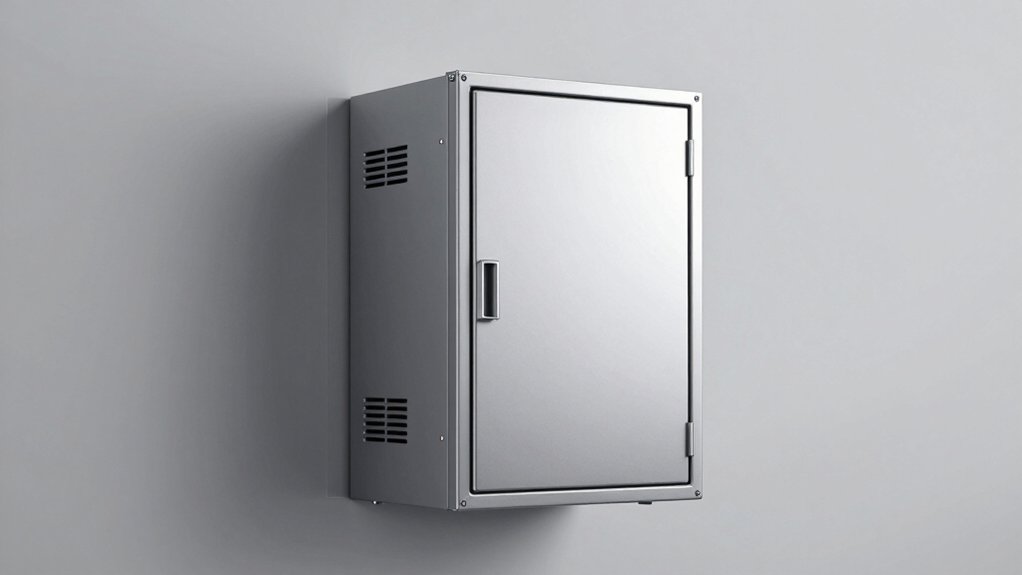
When you’re selecting a wall mount server rack cabinet, you need to evaluate five critical factors: space and depth requirements for your facility, weight capacity to support your equipment, cooling and ventilation systems to prevent overheating, security features including locks and access controls, and equipment compatibility standards to ensure your devices fit properly. Start by measuring your wall space and calculating the total weight of servers you’ll install, then verify that the cabinet’s cooling system matches your equipment’s heat output and that its mounting standards align with your hardware specifications. Finally, confirm the cabinet includes the security features your organization requires and that locking mechanisms are adequate for protecting sensitive equipment.
Space and Depth Requirements
How do you know what depth your wall-mount server rack cabinet needs? First, measure your equipment. Wall-mount racks range from 14 inches to 20 inches in usable depth. Check each device you’ll install—switches, patch panels, servers—and note their dimensions. Next, account for cable management. You’ll need extra space behind equipment for connections and airflow. Consider your room layout. Compact spaces work well with 14–15 inch shallow cabinets. Larger installations benefit from 20–24 inch depths. Finally, verify your wall can support the cabinet’s weight and depth. Deeper cabinets (23–24 inches) typically pair with broader widths for stability. Match your depth choice to your specific equipment needs, not maximum capacity.
Weight Capacity and Load
What weight will your equipment actually put on the wall-mount server rack cabinet? You need to calculate your total load by adding the weight of all equipment plus the empty rack itself. Wall-mount racks range from 55 lbs to 600 lbs capacity depending on the model. Higher capacity racks, typically rated 133–180 lbs, require secure attachment to solid walls to safely support that load. Lighter open-frame models prioritize airflow but have stricter weight limits. Before purchasing, verify that the maximum weight specification includes both your equipment and the empty enclosure, not just one. Additionally, account for dynamic factors like vibration and the physical stress of inserting or removing gear, which can effectively reduce safe capacity. Match your calculated total to the appropriate rack rating.
Cooling and Ventilation Systems
Thermal management is critical for wall-mount server rack cabinets, as equipment generates significant heat that can degrade performance or cause failures if left unchecked. You’ll want to evaluate whether your cabinet includes top-mounted fans that actively drive hot air out of the enclosure. Check if the front door is vented and if internal panels are perforated to allow steady airflow across your equipment. Consider models with removable shelves or side panels featuring mesh vents, which reduce hotspots by increasing cross-ventilation. Review the cabinet’s depth and usable mounting depth—deeper designs distribute air more effectively through stacked equipment. Open-frame or alloy-steel designs promote natural convection better than fully enclosed units. Select ventilation features matching your equipment’s heat output and your installation environment.
Security Features and Locking
When you’re selecting a wall-mount server rack cabinet, you’ll need to evaluate its security features to protect your valuable equipment from unauthorized access and tampering. Look for lockable front doors and side panels that restrict entry to internal components. Consider cabinets with reinforced tempered glass doors, which allow visibility while deterring tampering. Check whether the cabinet offers reversible door swings and removable side panels for flexible access control. Verify the cabinet uses metal construction—alloy or cold-rolled steel—to resist forced entry and provide physical protection. Confirm secure mounting brackets and cable access options that keep the cabinet fixed and tamper-evident. These features work together to establish a thorough security system protecting your server infrastructure from theft and damage.
Equipment Compatibility Standards
Before you install equipment in your wall-mount server rack cabinet, you’ll need to verify that your devices meet the cabinet’s mounting standards. Check that your servers, switches, and AV gear fit the standard 19-inch rack width. Measure the U-height of each device—whether it’s 1U, 2U, 6U, or larger—and confirm your cabinet has sufficient vertical space. Verify the usable mounting depth ranges from 14.2 to 20 inches to accommodate your equipment and cables. Review the cabinet’s load capacity, which typically ranges from 55 to 180 pounds, ensuring it safely supports your combined device weight. Confirm the mounting holes match your equipment’s bracket specifications. These compatibility checks prevent installation problems and equipment damage.
Material Quality and Durability
Since you’ll be mounting expensive IT and AV equipment on your wall, the cabinet’s material composition directly impacts how safely and durably it’ll support your gear over time. Choose alloy steel or cold-rolled steel enclosures—both provide rigid structure and long-term durability. Check the rail gauge; 11-gauge rails offer superior strength compared to 14-gauge options for heavier loads. Verify the weight capacity, typically ranging from 60 to 130+ pounds, ensuring it matches your equipment’s total mass. Examine door construction: reinforced front doors made of glass or tempered glass maintain structural integrity while allowing visibility. Assess ventilation design through perforated panels or top fans, which balance airflow protection without compromising the frame’s strength. These material specifications directly determine how your cabinet performs under daily operational stress.
Assembly and Installation Needs
Because assembly requirements vary considerably across models, you’ll need to evaluate the setup process before purchasing a wall mount server rack cabinet. Check whether your unit arrives fully assembled or requires you to attach mounting rails, brackets, and hardware. Review the included components—bolts, screws, anchors, and any tools needed—to confirm you have everything. Examine depth specifications, ranging from 14.2″ to 20″ usable space, since this determines equipment fit and installation complexity. Consider whether you need an open-frame or closed-door design; closed doors require more assembly steps but provide better security. Verify weight capacity, which ranges from 50 kg to over 60 kg, to ensure your equipment won’t exceed limits. If reversible doors or adjustable mounting directions apply, confirm you can orient them to match your space and access requirements before installation begins.
Warranty and Support Coverage
What warranty length should you prioritize when selecting a wall mount server rack cabinet? Review manufacturer offerings, which typically range from 2 to 3 years. Longer warranties protect your investment against defects and reduce replacement costs. Check whether coverage includes parts, labor, or both. Examine return policies separately—many retailers offer 30-day returns independent of manufacturer warranties. Identify available support resources before purchasing. Some manufacturers provide dedicated assistance promises, stating they’ll help resolve problems promptly. Verify parts availability through documentation or contact information provided in listings. Confirm whether warranty details appear directly in product descriptions or require links to access full information. Compare these factors across models to select cabinets offering comprehensive coverage matching your operational timeline and budget requirements.
Final Thoughts
You’ll choose the right cabinet by matching your equipment count to the U-size (6U to 12U works for most setups). Verify 19″ compatibility and 18–24 inch depth for your gear. Select solid steel construction with lockable doors or tempered glass. Mount it to sturdy wall studs. Confirm weight capacity exceeds your total hardware weight. Check warranty coverage. Install ventilation panels to prevent overheating. Test stability before loading equipment.

Meet Ry, “TechGuru,” a 36-year-old technology enthusiast with a deep passion for tech innovations. With extensive experience, he specializes in gaming hardware and software, and has expertise in gadgets, custom PCs, and audio.
Besides writing about tech and reviewing new products, he enjoys traveling, hiking, and photography. Committed to keeping up with the latest industry trends, he aims to guide readers in making informed tech decisions.