

If you’re experiencing slow internet speeds with your Xfinity service, upgrading your modem can make a real difference. You’ll find that choosing the right DOCSIS 3.1 modem guarantees compatibility and unlocks faster performance. We’ve compiled seven modems that work well with Xfinity plans, each offering different features and price points. But before you pick one, you’ll need to understand what specifications matter most for your specific needs.
| ARRIS SURFboard SB8200 DOCSIS 3.1 Cable Modem |

| Best Overall | DOCSIS Standard: DOCSIS 3.1 | Maximum Download Speed: Up to 2,000 Mbps | Gigabit Ethernet Ports: Two 1 Gig ports | VIEW LATEST PRICE | Read Our Analysis |
| NETGEAR Nighthawk Modem Router Combo WiFi 6 |

| All-in-One Solution | DOCSIS Standard: DOCSIS 3.1 | Maximum Download Speed: Up to 2,700 Mbps | Gigabit Ethernet Ports: Four 1 Gig ports | VIEW LATEST PRICE | Read Our Analysis |
| NETGEAR Nighthawk DOCSIS 3.1 Cable Modem (CM3000-1AZNAS) |

| Best For Speed | DOCSIS Standard: DOCSIS 3.1 | Maximum Download Speed: Up to 2,500 Mbps | Gigabit Ethernet Ports: One 2.5 Gig port + two 1 Gig ports | VIEW LATEST PRICE | Read Our Analysis |
| Hitron CODA56 Cable Internet Modem DOCSIS 3.1 |

| Best Performance Value | DOCSIS Standard: DOCSIS 3.1 | Maximum Download Speed: Up to 2,500 Mbps | Gigabit Ethernet Ports: One 2.5 Gig port | VIEW LATEST PRICE | Read Our Analysis |
| ARRIS SB8200 DOCSIS 3.1 Cable Modem (Renewed) |

| Budget-Friendly Pick | DOCSIS Standard: DOCSIS 3.1 | Maximum Download Speed: Up to 1,000 Mbps | Gigabit Ethernet Ports: Two 1 Gig ports | VIEW LATEST PRICE | Read Our Analysis |
| Hitron CODA DOCSIS 3.1 Cable Modem (1 Gbps) |
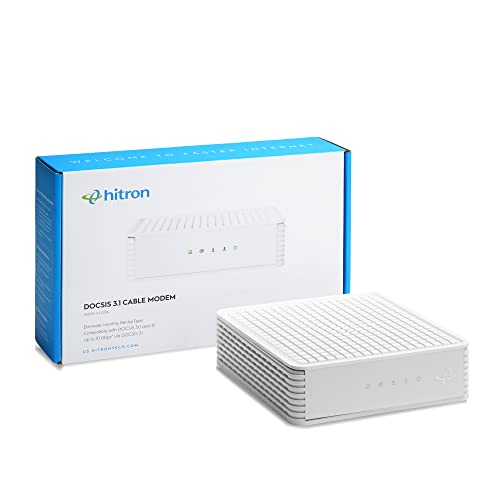
| Best For Beginners | DOCSIS Standard: DOCSIS 3.1 | Maximum Download Speed: Up to 1,000 Mbps | Gigabit Ethernet Ports: Two 1 Gig ports | VIEW LATEST PRICE | Read Our Analysis |
| Motorola B12 Advanced Compact Cable Modem MB8611 |

| Most Compact | DOCSIS Standard: DOCSIS 3.1 | Maximum Download Speed: Up to 2,500 Mbps | Gigabit Ethernet Ports: One 2.5 Gig port | VIEW LATEST PRICE | Read Our Analysis |
More Details on Our Top Picks
ARRIS SURFboard SB8200 DOCSIS 3.1 Cable Modem
Looking for a modem that handles the fastest Xfinity speeds? The ARRIS SURFboard SB8200 DOCSIS 3.1 supports plans up to 2 Gbps, delivering downstream and upstream speeds reaching 2000 Mbps. Setup requires three steps: connect the cable line, plug in power, and activate through your Xfinity account. Then attach your Wi-Fi router to one of the two Gigabit Ethernet ports. The modem’s compact design fits easily on shelves or desks. LED indicators show power, connection status, and data activity. Note that you’ll need a separate router for wireless coverage since this is a modem-only device. The SURFboard SB8200 comes with a two-year warranty and qualifies for major US cable providers including Xfinity, Cox, and Spectrum.
- DOCSIS Standard:DOCSIS 3.1
- Maximum Download Speed:Up to 2,000 Mbps
- Gigabit Ethernet Ports:Two 1 Gig ports
- WiFi Capability:Modem only (router required)
- Warranty Length:2-year limited warranty
- Physical Dimensions:5.13 L x 1.75 W x 5.25 H inches
- Additional Feature:Dual 1 Gigabit Ethernet ports
- Additional Feature:Compact, space-saving footprint
- Additional Feature:2-year limited warranty
NETGEAR Nighthawk Modem Router Combo WiFi 6
The NETGEAR Nighthawk combines your modem and router into one all-in-one solution, eliminating the need for separate devices. This combo unit supports Xfinity and other major cable providers with DOCSIS 3.1 technology. You’ll get WiFi 6 coverage up to 2,000 square feet and can connect up to 25 devices simultaneously. The device includes four Gigabit Ethernet ports for wired connections and one USB 3.0 port. Setup happens through the Nighthawk app, which lets you manage your network easily. You’ll save approximately $168 yearly in equipment rental fees. NETGEAR Armor provides built-in security protection against hackers and malware, plus a 30-day trial of additional safety features.
- DOCSIS Standard:DOCSIS 3.1
- Maximum Download Speed:Up to 2,700 Mbps
- Gigabit Ethernet Ports:Four 1 Gig ports
- WiFi Capability:Built-in WiFi 6 (AX2700)
- Warranty Length:Not specified
- Physical Dimensions:Not specified
- Additional Feature:Modem and router combo
- Additional Feature:NETGEAR Armor security suite
- Additional Feature:Saves up to $168/year
NETGEAR Nighthawk DOCSIS 3.1 Cable Modem (CM3000-1AZNAS)
Need maximum download and upload speeds without waiting for your modem to catch up? The NETGEAR Nighthawk CM3000-1AZNAS delivers downloads up to 2.5 Gbps and uploads up to 1 Gbps, supporting Xfinity’s fastest plans. This DOCSIS 3.1 modem features one 2.5 Gig Ethernet port and two Gigabit ports for flexible connectivity. You can pair it with any NETGEAR WiFi 6E or WiFi 7 router to optimize performance. Setup requires connecting your coaxial cable line, plugging in the power adapter, and connecting an Ethernet cable to your router. The modem’s future-proof design handles today’s and tomorrow’s high-speed internet demands.
- DOCSIS Standard:DOCSIS 3.1
- Maximum Download Speed:Up to 2,500 Mbps
- Gigabit Ethernet Ports:One 2.5 Gig port + two 1 Gig ports
- WiFi Capability:Modem only (router required)
- Warranty Length:1-year limited warranty
- Physical Dimensions:9.21 L x 8.74 W x 4.8 H inches
- Additional Feature:2.5 Gig Ethernet port
- Additional Feature:10x faster upload speeds
- Additional Feature:Future-proofed for higher speeds
Hitron CODA56 Cable Internet Modem DOCSIS 3.1
Want faster internet without paying monthly modem rental fees? The Hitron CODA56 delivers DOCSIS 3.1 performance with a 2.5 Gbps Ethernet port, supporting Xfinity plans up to 2.33 Gbps. Before purchasing, confirm your cable internet service and that your speed plan exceeds 1 Gbps. You’ll need a separate WiFi router with a 2.5 Gbps port since this modem only connects devices via Ethernet. Setup requires ISP activation and your existing router. The CODA56 optimizes low latency for gaming and 4K streaming, backed by warranty coverage and seven-day technical support.
- DOCSIS Standard:DOCSIS 3.1
- Maximum Download Speed:Up to 2,500 Mbps
- Gigabit Ethernet Ports:One 2.5 Gig port
- WiFi Capability:Modem only (router required)
- Warranty Length:30+ years support/warranty coverage
- Physical Dimensions:Not specified
- Additional Feature:2.5 Gbps Ethernet port
- Additional Feature:Low latency gaming optimized
- Additional Feature:30+ years Hitron expertise
ARRIS SB8200 DOCSIS 3.1 Cable Modem (Renewed)
Looking for a budget-friendly pick that delivers gigabit-speed performance on Xfinity? The ARRIS SB8200 offers DOCSIS 3.1 technology with 32 downstream and 8 upstream channels. You’ll get two 1-Gigabit Ethernet ports for wired connections. This renewed modem supports speeds up to 1 Gbps, making it suitable for most Xfinity plans. Note that it doesn’t include Wi-Fi or cable voice service support. Confirm compatibility with Xfinity before purchasing. The SB8200 works well if you need a straightforward, reliable modem without extra features.
- DOCSIS Standard:DOCSIS 3.1
- Maximum Download Speed:Up to 1,000 Mbps
- Gigabit Ethernet Ports:Two 1 Gig ports
- WiFi Capability:Modem only (router required)
- Warranty Length:Not specified
- Physical Dimensions:Not specified
- Additional Feature:Renewed/refurbished condition
- Additional Feature:Two 1-Gigabit Ethernet ports
- Additional Feature:32×8 channel bonding capable
Hitron CODA DOCSIS 3.1 Cable Modem (1 Gbps)
The Hitron CODA works with Xfinity’s coax cable infrastructure and won’t overwhelm you during setup—it’s straightforward for first-time modem buyers. After Xfinity activates it, you’ll connect the coax cable, power it on, and link it to your WiFi router via Ethernet. The modem delivers maximum speeds of 1,000 Mbps downstream and 350 Mbps upstream, matching most Xfinity plans. You’ll need a separate router for wireless coverage since the CODA handles data only. At roughly 4.2 stars, it offers solid reliability. Verify compatibility with Xfinity before purchasing, then expect potential savings on rental fees.
- DOCSIS Standard:DOCSIS 3.1
- Maximum Download Speed:Up to 1,000 Mbps
- Gigabit Ethernet Ports:Two 1 Gig ports
- WiFi Capability:Modem only (router required)
- Warranty Length:Per Hitron site/30-day return guarantee
- Physical Dimensions:6.73 x 6.73 x 2.03 inches
- Additional Feature:Two Ethernet ports
- Additional Feature:Simple 4-step setup process
- Additional Feature:30-day return guarantee
Motorola B12 Advanced Compact Cable Modem MB8611
Motorola’s most compact DOCSIS 3.1 modem delivers multi-gig speeds in a 3.5 x 3.5 x 5.5 inch footprint—ideal if you’re upgrading to Xfinity’s fastest plans but lack space for bulky equipment. The MB8611 supports downstream speeds up to 2500 Mbps and upstream up to 2.5 Gbps where available. Its 2.5 Gbps Ethernet port connects directly to compatible routers for high-speed performance. Active Queue Management reduces latency during gaming and conferencing. You’ll save approximately $168 annually by owning rather than renting. The modem includes a 2-year warranty and US technical support. Verify compatibility with your ISP before purchasing.
- DOCSIS Standard:DOCSIS 3.1
- Maximum Download Speed:Up to 2,500 Mbps
- Gigabit Ethernet Ports:One 2.5 Gig port
- WiFi Capability:Modem only (router required)
- Warranty Length:2-year manufacturer warranty
- Physical Dimensions:3.5 x 3.5 x 5.5 inches
- Additional Feature:Ultra-compact design (3.5×3.5×5.5)
- Additional Feature:Active Queue Management (AQM)
- Additional Feature:Reduces rental fees $168/year
Factors to Consider When Choosing a Modem for Xfinity
When you’re selecting a modem for Xfinity, you’ll need to evaluate your speed and performance requirements based on your plan, verify compatibility with Xfinity’s approved modem list, and decide between a modem-only unit or a combo modem-router device that fits your network setup. You should also examine the ethernet port configuration to ensure you have enough wired connections for your devices, and consider whether the modem supports the latest DOCSIS standards so your investment remains viable as your internet needs grow. These factors work together to determine which modem will deliver the speeds you’re paying for and perform reliably over time.
Speed and Performance Requirements
How fast does your modem need to be? Your modem’s speed must match your Xfinity plan and support future upgrades. For multi-gig plans up to 2 Gbps, you’ll need a DOCSIS 3.1 modem. Check your subscribed downstream and upstream speeds, then verify the modem supports those capabilities. A 2.5 Gbps Ethernet port or port aggregation maximizes speeds on faster plans. Upstream speeds typically range from 1–2.5 Gbps depending on your modem model and plan tier. Before purchasing, confirm your chosen modem is compatible with Xfinity’s service tiers and can be activated on your specific plan. Select a modem with capabilities exceeding your current needs to accommodate potential speed increases without requiring replacement.
Compatibility With Xfinity Plans
Before you buy a modem, you’ll need to verify it’s approved for your specific Xfinity plan and service tier. Check Xfinity’s official compatibility list or CableLabs certification to confirm the modem works with your plan. Match your modem’s capabilities to your speed tier: DOCSIS 3.0 modems work for basic plans, while DOCSIS 3.1 modems are required for faster speeds. If you’re subscribing to multi-gig plans at 2 Gbps, ensure your modem has multi-gig Ethernet ports rated at 2.5 Gbps or higher. Some Xfinity tiers require account activation to enable higher speeds, so contact Xfinity support if needed. Verify the modem model number against your plan requirements before purchasing to avoid compatibility issues and ensure you’ll achieve advertised speeds.
Modem Only vs. Combo Units
Should you choose a modem-only device or an all-in-one combo unit? Consider your specific needs. Modem-only setups let you pair any router with your modem, including high-performance Wi-Fi 6/6E models, giving you flexibility and customization options. You’ll own separate devices but gain upgrade ability for advanced features later.
Combo units simplify your setup by combining modem and router functions into one device, reducing clutter and installation complexity. However, you’ll sacrifice router customization and face limitations upgrading individual components.
For cost, modem-only ownership eliminates rental fees over time. Combo units often include built-in security features and integrated management apps, potentially offsetting costs.
Regardless of your choice, ensure your device supports DOCSIS 3.1 if your Xfinity plan exceeds 1 Gbps.
Ethernet Port Configuration
Once you’ve settled on whether you want a modem-only or combo unit, you’ll need to examine the Ethernet port setup, since the ports on your modem directly affect how fast your internet actually performs. DOCSIS 3.1 modems typically offer either a single 2.5 Gbps port or dual 1 Gbps ports for link aggregation. Match your modem’s port speed to your internet plan—higher tiers require multi-gig ports to avoid bottlenecking. Verify that your router or mesh system supports the same port speeds. If your plan delivers 1+ Gbps, a standard Gigabit port will limit performance. Check compatibility between modem and router before purchasing to ensure you’ll achieve your target speeds both wired and wirelessly.
Future-Proofing Your Investment
How can you guarantee your modem investment remains viable as Xfinity speeds evolve over the next few years? Choose a DOCSIS 3.1 modem with 32×8 channel capacity or higher to handle speeds beyond 1 Gbps. Verify downstream support reaches at least 2.5 Gbps and upstream reaches 1–2 Gbps. Select models featuring multiple Ethernet ports and link aggregation capability to maximize wired throughput as plan upgrades arrive. Confirm Xfinity certification and activation compatibility without requiring fiber or voice services. Pair your modem with a Wi-Fi 6 or 6E router to maintain network performance scaling. These specifications ensure your equipment supports anticipated speed increases over the coming years without replacement.
Warranty and Support Options
When you’re shopping for a modem, don’t overlook the warranty and support structure that comes with it—these details can make or break your experience if something goes wrong. Look for modems with documented warranty periods of 1–2 years and clear coverage terms. Verify what the manufacturer actually covers and how you’ll file a claim. Check whether the company offers US-based phone, chat, or email support for quick issue resolution. Review the return policy specifics: the time window allowed, condition requirements, and any restocking fees. Confirm the modem works with Xfinity and includes activation guidance. Finally, determine whether software and firmware updates are included in your warranty or cost extra.
Final Thoughts
You’ll want to select a modem that matches your Xfinity plan’s speed tier. If you’re upgrading to gigabit speeds, choose the NETGEAR CM3000 or Hitron CODA56 for their 2.5 Gbps ports. For mid-tier plans, the Hitron CODA 1 Gbps works well. Need WiFi included? Pick the NETGEAR Nighthawk combo. Verify compatibility with Xfinity before purchasing, then activate your modem through your account to enable faster speeds immediately.

Meet Ry, “TechGuru,” a 36-year-old technology enthusiast with a deep passion for tech innovations. With extensive experience, he specializes in gaming hardware and software, and has expertise in gadgets, custom PCs, and audio.
Besides writing about tech and reviewing new products, he enjoys traveling, hiking, and photography. Committed to keeping up with the latest industry trends, he aims to guide readers in making informed tech decisions.