

If you’re spending excessive time tapping your phone for gaming, streaming, or repetitive tasks, an auto clicker can streamline your routine dramatically. You’ll find multiple options with adjustable speeds, rechargeable batteries, and clip-on mounts that work across iOS and Android devices. Each model offers distinct advantages—from dual-pack bundles to high-frequency tapping capabilities—but selecting the right one depends on your specific needs and device type. Here’s what you need to know about each option to find your match.
| Auto Clicker for iPhone iPad and Smart Phones |

| Best for Gaming | Adjustable Click Speed Range: 99 clicks/second to 1 click/9 seconds (108 speeds) | Power Type: Battery powered | Device Compatibility: Android, iOS | VIEW LATEST PRICE | Read Our Analysis |
| Auto Clicker Tapper for iPhone and Android (2-Pack) |

| Most Portable | Adjustable Click Speed Range: 99 clicks/second to 1 click/9 seconds (107 speeds) | Power Type: 120mAh lithium battery (8 hours per charge) | Device Compatibility: iPhone, iPad, Android smartphones/tablets, touchscreen computers | VIEW LATEST PRICE | Read Our Analysis |
| Wireless Auto Clicker for Smartphone and Tablet Apps |
| Longest Battery Life | Adjustable Click Speed Range: Below 10 clicks/second recommended (frequency adjustment available) | Power Type: Built-in high-capacity battery (12 hours operation) | Device Compatibility: Smartphones and tablets | VIEW LATEST PRICE | Read Our Analysis |
| X2PRO Smartphone Auto Clicker with 150 Adjustable Speeds |

| Most Versatile | Adjustable Click Speed Range: 50 clicks/second to 1 click/960 minutes (150 speeds) | Power Type: 300mAh built-in battery (usable while charging) | Device Compatibility: Multiple phones and tablets simultaneously (up to 9 devices) | VIEW LATEST PRICE | Read Our Analysis |
| STRONGBERRY Auto Clicker with 6 Click Heads |

| Best Bundle Value | Adjustable Click Speed Range: Up to 50 clicks/second (adjustable) | Power Type: USB corded electric power | Device Compatibility: Android and iOS | VIEW LATEST PRICE | Read Our Analysis |
| OUTXE Wireless Auto Clicker for iPhone Bluetooth |
| Best for iPhone Users | Adjustable Click Speed Range: 6 clicks/second (high) or 1 click/6 seconds (low) | Power Type: Built-in battery (all-day lasting) | Device Compatibility: Bluetooth-enabled iPhone and Android devices | VIEW LATEST PRICE | Read Our Analysis |
More Details on Our Top Picks
Auto Clicker for iPhone iPad and Smart Phones
Gamers who need rapid, continuous tapping will find the Auto Clicker for Smart Phones indispensable. You’ll attach the click head or use the screen clip to simulate automatic finger taps on your iPhone, iPad, or Android device. The device features 108 adjustable speed settings, allowing you to customize clicks from 99 per second down to 1 click per 9 seconds. You connect the USB power supply and press start to enter click mode—a blue light flashes to confirm activation. The LED display shows your click count in real time. You can save your preferred speed settings for future sessions. The mute design produces zero noise while remaining non-damaging to your screen, making it ideal for gaming, live broadcasts, and reward tasks.
- Adjustable Click Speed Range:99 clicks/second to 1 click/9 seconds (108 speeds)
- Power Type:Battery powered
- Device Compatibility:Android, iOS
- Operation Noise Level:Zero noise (spatial mapping click technology)
- Portability:Compact with USB connection required
- Included Accessories:Click head or screen clip attachment
- Additional Feature:108-speed gear settings
- Additional Feature:LED click counter display
- Additional Feature:Spatial mapping click technology
Auto Clicker Tapper for iPhone and Android (2-Pack)
Want continuous clicking without wearing your finger out? This 2-pack auto clicker tapper works on iPhone, iPad, and Android devices using spatial mapping technology that clicks without touching your screen. You’ll get 107 adjustable speeds ranging from 1 click per 9 seconds to 99 clicks per second. Each device charges fully in hours and runs continuously for up to 8 hours. The cordless design needs no Bluetooth pairing or app installation. Use the one-touch power button and dedicated +/- controls to adjust speeds mid-task. The digital display shows your current speed setting clearly. These tappers handle live streaming, gaming, repetitive tasks, and limited-time purchases efficiently.
- Adjustable Click Speed Range:99 clicks/second to 1 click/9 seconds (107 speeds)
- Power Type:120mAh lithium battery (8 hours per charge)
- Device Compatibility:iPhone, iPad, Android smartphones/tablets, touchscreen computers
- Operation Noise Level:Silent operation (spatial mapping technology)
- Portability:Ultra-compact, portable, cordless, 180° rotation folding design
- Included Accessories:2-pack device (no additional accessories listed)
- Additional Feature:Fully cordless/battery-powered design
- Additional Feature:180° rotation folding design
- Additional Feature:Touchless clicking without contact
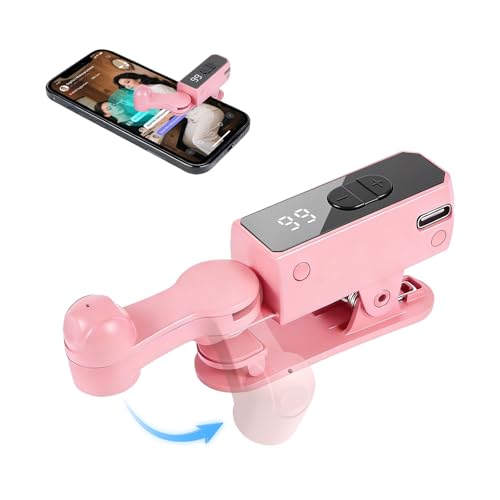
Wireless Auto Clicker for Smartphone and Tablet Apps
If you’re managing repetitive tapping tasks—live streams, ticketing systems, or engagement rewards—this wireless auto clicker delivers the longest battery life at 12 hours without recharging. The device features an LED display for adjusting click frequency and a clip-on grip that mounts securely without adhesive. Compatible with most smartphones and tablets, it simulates natural finger taps for continuous clicking. If your device doesn’t register high frequencies, reduce settings below 10 clicks per second. The ergonomic plastic and silicone design weighs little, making it portable for extended use. Aylthyo backs the clicker with a 90-day warranty, and it maintains a 4.4-star rating from over 100 users.
- Adjustable Click Speed Range:Below 10 clicks/second recommended (frequency adjustment available)
- Power Type:Built-in high-capacity battery (12 hours operation)
- Device Compatibility:Smartphones and tablets
- Operation Noise Level:Silent operation (spatial mapping technology)
- Portability:Lightweight, portable, clip-on design
- Included Accessories:LED digital display, clip-on grip
- Additional Feature:12-hour extended battery life
- Additional Feature:Clip-on non-adhesive mount
- Additional Feature:Pink ergonomic design option
X2PRO Smartphone Auto Clicker with 150 Adjustable Speeds
The X2PRO’s 150 adjustable speeds make it the most versatile auto clicker available for your phone or tablet. You’ll select from 50 clicks per second up to 1 click every 960 minutes, matching any task’s timing needs. The device operates silently using capacitive technology, so it won’t disturb others in libraries or bedrooms. You can attach up to 9 clicking tips simultaneously across different devices—the main unit includes one tip, with extras available separately. Install the tip using the clip for typical screen sizes, or apply the nano adhesive patch when the clip can’t reach your tablet’s center. The built-in 300mAh battery charges while you’re using it, eliminating downtime.
- Adjustable Click Speed Range:50 clicks/second to 1 click/960 minutes (150 speeds)
- Power Type:300mAh built-in battery (usable while charging)
- Device Compatibility:Multiple phones and tablets simultaneously (up to 9 devices)
- Operation Noise Level:Truly silent (capacitive non-contact mapping)
- Portability:Portable with detachable clicking tip
- Included Accessories:1 clicking tip included (additional tips sold separately)
- Additional Feature:Up to 9 simultaneous devices
- Additional Feature:Expandable clicking tips system
- Additional Feature:Capacitive non-contact mapping technology
STRONGBERRY Auto Clicker with 6 Click Heads
Gamers and live-stream enthusiasts who need undetectable automated tapping will find maximum value in this bundle package. The STRONGBERRY Auto Clicker delivers up to 50 clicks per second with adjustable speed settings for gaming, live broadcasts, and reward tasks. You’ll get six click heads, nano stickers, screen clips, and a charging cable included. Simply attach the clicker directly to your screen or use the screen clip method—both options work with Android and iOS devices. The USB-powered device remembers your last-used speed setting, eliminating repetitive setup. Its physical automation bypasses anti-cheat detection systems, ensuring uninterrupted gameplay without software interference.
- Adjustable Click Speed Range:Up to 50 clicks/second (adjustable)
- Power Type:USB corded electric power
- Device Compatibility:Android and iOS
- Operation Noise Level:Quiet, precise clicks
- Portability:30 grams weight (USB corded)
- Included Accessories:6 click heads, 24 nano stickers, 6 screen clips, charging cable, user guide
- Additional Feature:Includes 6 click heads
- Additional Feature:24 nano adhesive stickers
- Additional Feature:Anti-cheat bypass capability
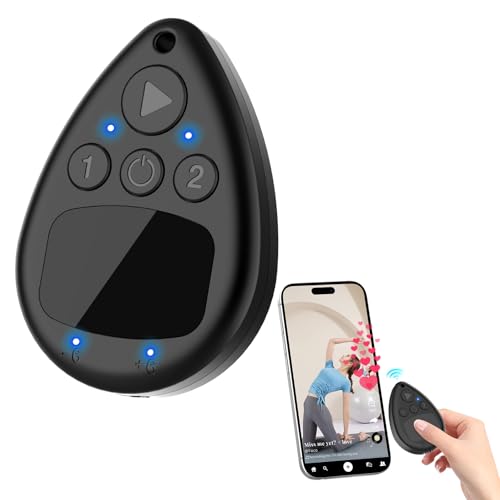
OUTXE Wireless Auto Clicker for iPhone Bluetooth
Want hands-free screen tapping without wires or noise? The OUTXE Wireless Auto Clicker delivers exactly that through Bluetooth connectivity. Enable AssistiveTouch in your iPhone Settings under Accessibility, then pair the device. You’ll access two speed modes: High Speed Mode clicks six times per second, while Low Speed Mode clicks once every six seconds. The built-in battery lasts all day, and you can control two phones simultaneously for increased efficiency. The compact design weighs just 3.2 ounces, making it portable for travel. Your package includes the clicker, charging cable, lanyard, and user manual, all in black.
- Adjustable Click Speed Range:6 clicks/second (high) or 1 click/6 seconds (low)
- Power Type:Built-in battery (all-day lasting)
- Device Compatibility:Bluetooth-enabled iPhone and Android devices
- Operation Noise Level:Silent operation (no screen contact)
- Portability:Compact wireless design, no cords or clips, includes lanyard
- Included Accessories:1 charging cable, 1 lanyard, 1 user manual
- Additional Feature:Dual phone simultaneous control
- Additional Feature:Two-mode speed switching
- Additional Feature:Smart touch panel positioning
Factors to Consider When Choosing an Auto Clicker for Phones and Tablets
When you’re selecting an auto clicker for your phone or tablet, you’ll need to evaluate five key factors: battery life and runtime to ensure the device operates long enough for your needs, adjustable speed settings so you can control clicking frequency, device compatibility range to confirm it works with your specific phone model, noise level and design to match your environment, and portability with solid build quality for durability. Start by checking the manufacturer’s battery specifications and runtime claims, then verify that your device appears on their compatibility list. Finally, review user feedback on build quality and noise output to determine which clicker best fits your daily use and budget.
Battery Life & Runtime
How long can an auto clicker run on a single charge? Most devices deliver 8–12 hours of continuous operation per charge, though runtime depends on battery capacity and usage intensity. You’ll find rechargeable lithium or lithium-polymer batteries standard across models. Check the mAh rating—higher capacities like 300 mAh or more support longer sessions without interruption. For extended use, select models offering pass-through charging, which lets you operate while plugged in, effectively removing runtime limits. Cordless designs typically prioritize built-in batteries optimized for on-the-go functionality. Evaluate your typical session length and recharge frequency tolerance before purchasing. If you need uninterrupted operation beyond single-charge limits, prioritize pass-through capability or higher capacity specifications to match your usage demands.
Adjustable Speed Settings
Finding the right speed setting depends on matching your auto clicker’s capabilities to your specific task requirements. Most models offer adjustable speeds ranging from 1 click every 9 seconds to 99 clicks per second, with many featuring multi-gear selections like 107 or 150 speed options. Check whether your device has a digital or LED display for real-time speed monitoring during use. Adjust speeds through dedicated controls or long-press actions on your device. Test your chosen speed with your phone’s compatibility first, since very high frequencies may not register properly on certain mobile models. Store your last-used speed setting in the device’s memory to avoid reconfiguring it repeatedly. Verify that your cordless or clip-on design allows easy speed adjustments without interrupting your task flow.
Device Compatibility Range
Before you purchase an auto clicker for your phone or tablet, you’ll need to verify that the device you’re considering actually works with your specific smartphone or tablet model. Check whether the clicker supports your operating system—Android, iOS, or both. Some models work only with iPhones, while others support iPads and Android tablets simultaneously. Review the manufacturer’s compatibility list for your exact device model, since performance varies across different versions. Determine if you need Bluetooth pairing or a direct USB connection. Consider whether you’ll use the clicker with multiple devices at once, which affects your wireless or corded design choice. Finally, test whether your device can register high-frequency tapping, as not all models support rapid clicking equally.
Noise Level & Design
When you’re selecting an auto clicker for your phone or tablet, you’ll want to contemplate both how quietly it operates and how its physical design affects your device’s screen. Many models feature silent operation through non-contact tapping or spatial mapping technology, eliminating mechanical noise entirely. These designs protect your screen by avoiding physical contact, preventing scratches and damage. Battery-powered options pair silent performance with cordless convenience, removing motor noise during extended use. Check your device’s speed settings, as higher speeds may produce slight sounds despite silent-tap simulations. Prioritize models advertising “mute design” or “capacitive non-contact mapping” for guaranteed quiet operation. Verify that soft-touch mechanisms won’t damage your screen, ensuring safe, damage-free performance across all usage levels.
Portability & Build Quality
Compact size and lightweight construction form the foundation of a truly portable auto clicker. Look for devices measuring around 5 x 3.39 x 1.14 inches and weighing approximately 2.4 ounces, which fit easily in pockets or bags. Choose cordless models with built-in rechargeable batteries to eliminate cable hassles and guarantee immediate usability. Select clip-on or clip-secure mounting options that attach directly to your screen without adhesive patches, allowing quick setup and removal. Consider foldable or collapsible designs that accommodate various screen sizes and devices. Verify the enclosure is durable and features non-scratch, capacitive tapping technology to protect your screen during portable use. These specifications ensure your auto clicker remains convenient and functional wherever you work.
Final Thoughts
You’ll find the right auto clicker by matching your needs to the available options. Consider your device type—iOS or Android—and your primary use, whether gaming or repetitive tasks. Check battery life, speed adjustability, and mounting compatibility. Start with a basic model if you’re new to auto clickers, then upgrade to advanced versions like the X2PRO if you need more features. Test your choice before committing to heavy use.

Meet Ry, “TechGuru,” a 36-year-old technology enthusiast with a deep passion for tech innovations. With extensive experience, he specializes in gaming hardware and software, and has expertise in gadgets, custom PCs, and audio.
Besides writing about tech and reviewing new products, he enjoys traveling, hiking, and photography. Committed to keeping up with the latest industry trends, he aims to guide readers in making informed tech decisions.