
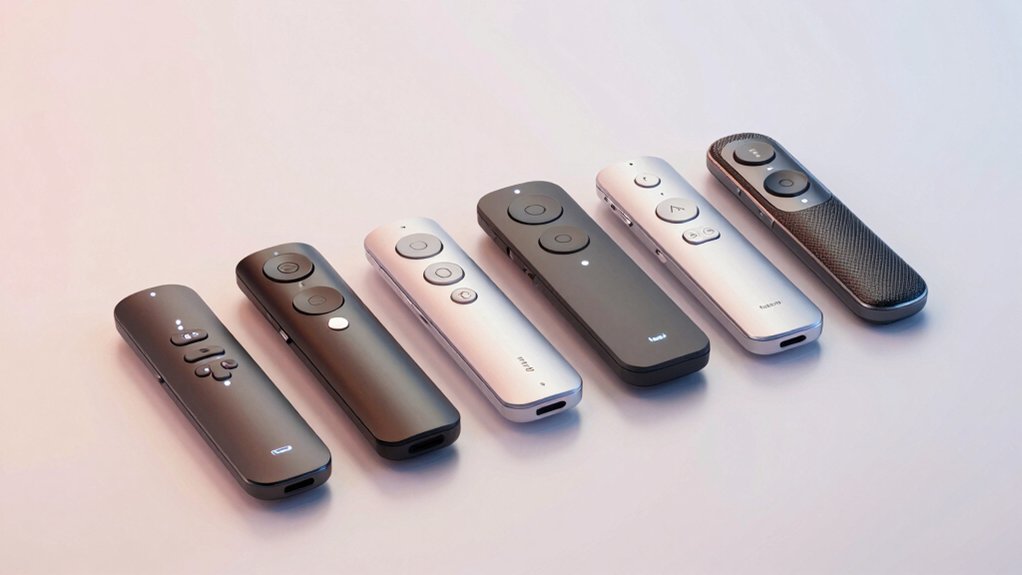

When you’re presenting to an audience, you need a reliable tool that keeps you mobile and in control. A PowerPoint remote clicker lets you advance slides, highlight key points with a laser, and manage your pace—all without being tethered to your laptop. You’ve got several solid options available, each with different features and price points. Here’s what you should know to pick the right one for your needs.
| Logitech Wireless Presenter R400 USB PowerPoint Clicker |

| Industry Standard | Wireless Range: Up to 50 feet | Laser Pointer: Bright red laser pointer included | Battery Type: 2 x AA batteries (included) | VIEW LATEST PRICE | Read Our Analysis |
| QUI Wireless Presentation Clicker Remote with Volume Control |

| Most Versatile | Wireless Range: Up to 328 feet | Laser Pointer: Bright red beam laser pointer | Battery Type: 1 x AAA battery (not included) | VIEW LATEST PRICE | Read Our Analysis |
| Wireless USB Presenter Remote for PowerPoint Presentations |

| Best Range | Wireless Range: 98 feet / 30 meters | Laser Pointer: Laser pointer with 328 feet range | Battery Type: 2 x AAA batteries (included) | VIEW LATEST PRICE | Read Our Analysis |
| Wireless Presentation Clicker with Laser Pointer Remote |
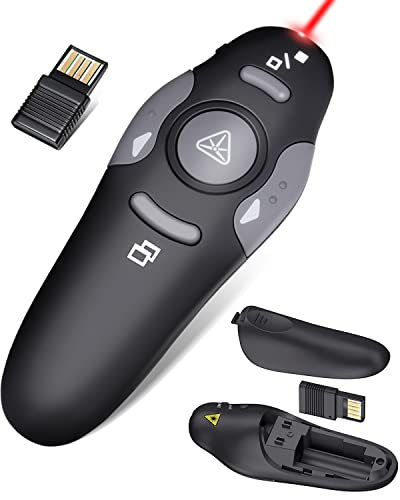
| Most Compact | Wireless Range: 98 feet / 30 meters | Laser Pointer: Laser pointer with 328 feet range | Battery Type: 1 x AAA battery (not included) | VIEW LATEST PRICE | Read Our Analysis |
| Hyperlink Wireless Presenter RF 2.4GHz PowerPoint Remote Control |
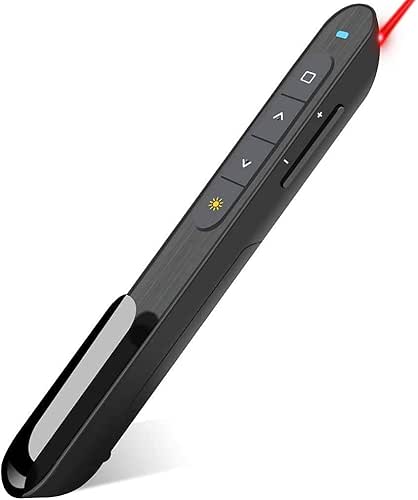
| Best Warranty | Wireless Range: Up to 30 meters / 100 feet | Laser Pointer: Bright red laser pointer included | Battery Type: 1 x AAA battery (not included) | VIEW LATEST PRICE | Read Our Analysis |
More Details on Our Top Picks
Logitech Wireless Presenter R400 USB PowerPoint Clicker
The Logitech R400 is, hands down, the industry standard for presenters who need reliable wireless control without complications. You’ll get a plug-and-play USB receiver that requires no software installation—just insert it into your computer and start presenting immediately. The device operates at 2.4 GHz with a 50-foot wireless range, allowing you to move freely around your presentation space. Its intuitive four-button keypad lets you navigate slides forward and backward, while the built-in red laser pointer highlights key points on your display. Two AA batteries power the presenter; a battery indicator shows remaining power. The receiver docks inside the unit for easy portability, and Logitech includes a carrying case for transport.
- Wireless Range:Up to 50 feet
- Laser Pointer:Bright red laser pointer included
- Battery Type:2 x AA batteries (included)
- Setup & Installation:Plug-and-play USB; no software required
- Warranty:Manufacturer’s warranty available upon request
- Weight:Approximately 0.1 kg
- Additional Feature:Receiver docks in presenter
- Additional Feature:Compatible with Windows XP/Vista
- Additional Feature:Battery indicator at glance
QUI Wireless Presentation Clicker Remote with Volume Control
Need a presenter remote that works across multiple operating systems and presentation platforms? The QUI Wireless Presentation Clicker offers broad compatibility with Mac OS, Windows, Linux, and Android devices. Simply plug the 2.4 GHz USB receiver into your computer—no software installation required. The remote features six touch buttons controlling slide advancement, hyperlink navigation, volume adjustments, full-screen mode, and a bright red laser pointer visible in large auditoriums. With a 328-foot maximum range, you’ll move freely during presentations. The ultracompact design weighs only 24 grams and includes a portable clip for pocket storage. One AAA battery powers the device. The one-year manufacturer warranty and 30-day return policy provide purchase protection.
- Wireless Range:Up to 328 feet
- Laser Pointer:Bright red beam laser pointer
- Battery Type:1 x AAA battery (not included)
- Setup & Installation:Plug-and-play USB; no software required
- Warranty:1-year manufacturer warranty
- Weight:24 grams
- Additional Feature:Volume control button included
- Additional Feature:Hyperlink navigation capability
- Additional Feature:Full/black screen toggle
Wireless USB Presenter Remote for PowerPoint Presentations
For presenters who need to move freely around a room while controlling slides, this VILNIU WP71-RC wireless remote delivers the control range you’re looking for—managing your presentation up to 98 feet away with a plug-and-play USB receiver that requires no software installation. The remote weighs just 70 grams and stores the dongle in its handle for portability. Its ergonomic design features large buttons that minimize accidental clicks. Two included AAA batteries power the device with an on/off switch to extend battery life. The remote works with Windows 2003 through 10, Mac OS, Linux, PowerPoint, Google Slides, Excel, and Word. A laser pointer extends to 328 feet, and the product carries a one-year warranty with a 4.7-star customer rating.
- Wireless Range:98 feet / 30 meters
- Laser Pointer:Laser pointer with 328 feet range
- Battery Type:2 x AAA batteries (included)
- Setup & Installation:Plug-and-play USB; no software required
- Warranty:1-year warranty
- Weight:70 grams
- Additional Feature:Dongle stores in handle
- Additional Feature:Large buttons prevent misclick
- Additional Feature:On/off switch saves power
Wireless Presentation Clicker with Laser Pointer Remote
Looking for a presenter remote that fits your pocket without sacrificing functionality? The CLIKBUTM WP08-R delivers reliable performance with its compact design and essential features. This wireless clicker works across Windows, macOS, and Linux systems, supporting PowerPoint, Google Slides, Keynote, and PDF presentations. Setup requires no drivers—simply insert an AAA battery, plug in the USB dongle, and press connect on the back. You’ll control slides from up to 98 feet away while the laser pointer reaches 100 meters. The 38-gram device stores its dongle inside the battery compartment, making it truly portable. Expect approximately two months of battery life per AAA cell, and you’re ready to present with confidence.
- Wireless Range:98 feet / 30 meters
- Laser Pointer:Laser pointer with 328 feet range
- Battery Type:1 x AAA battery (not included)
- Setup & Installation:Plug-and-play USB; no drivers needed
- Warranty:30-day Amazon return policy
- Weight:38 grams (battery included)
- Additional Feature:USB dongle in battery compartment
- Additional Feature:Two-month battery life estimate
- Additional Feature:Five total control buttons
Hyperlink Wireless Presenter RF 2.4GHz PowerPoint Remote Control
The Hyperlink Wireless Presenter RF 2.4GHz offers comprehensive (replacing with alternative contextually relevant word) presentation control with a robust 2-year global warranty that covers your investment across international locations. This RF 2.4GHz remote operates up to 30 meters away, giving you freedom to move throughout your presentation space. Simply plug the USB receiver into your laptop—no software installation required. Control slides forward and backward, adjust volume, switch windows, and activate full or black screen modes using soft rubber buttons. The built-in red laser pointer highlights key points on your slides. One AAA battery powers the device with an auto-sleep function for energy efficiency. The compact magnetic design stores conveniently in your bag or pocket.
- Wireless Range:Up to 30 meters / 100 feet
- Laser Pointer:Bright red laser pointer included
- Battery Type:1 x AAA battery (not included)
- Setup & Installation:Plug-and-play USB; no software required
- Warranty:2-year global warranty
- Weight:0.3 ounces
- Additional Feature:Auto-sleep energy saving function
- Additional Feature:Magnetic USB storage included
- Additional Feature:Switch Windows button feature
Factors to Consider When Choosing a PowerPoint Remote Clicker
When you’re selecting a PowerPoint remote clicker, you’ll need to evaluate wireless range and coverage to ensure it works throughout your presentation space, check the battery life and power specifications so you’re not interrupted during important talks, and verify compatibility across Windows, Mac, and other platforms you’ll use. You should also assess the laser pointer’s visibility in different lighting conditions and examine the ergonomic design features to confirm the clicker fits comfortably in your hand during extended use. These five factors will directly impact how smoothly your presentations run and how effectively you can engage your audience.
Wireless Range And Coverage
To ensure reliable control over your presentations, how far must you manage your slides from your audience? Wireless range determines whether you can move freely throughout your venue. Most presentation remotes operate between 30 meters (98 feet) and 100 feet, depending on the model and technology used.
For small meeting rooms, a 30-meter range suffices. For larger auditoriums, you’ll need 60–100 feet of reliable coverage. RF 2.4 GHz connections are standard, but obstacles like walls and interference reduce practical range. Battery power also affects performance.
Before purchasing, test the remote in your actual presentation space. Line-of-sight advertising claims often exceed real indoor performance. Measure your venue’s dimensions and account for potential interference sources. This ensures you’ll maintain reliable control from anywhere you need to present.
Battery Life And Power
Why does battery performance matter more than you might think? Your remote’s effectiveness depends directly on power availability. Most clickers use replaceable AAA or AA batteries, offering straightforward maintenance without rechargeable complications. You’ll get around two months of battery life per battery, though usage patterns and power-saving features affect this duration.
Check whether your model includes an on/off switch or auto-sleep mode—these features extend battery longevity significantly. Before first use, remove the protective film to ensure proper initialization. Monitor performance carefully: wireless range and responsiveness degrade noticeably as battery power drops, compromising your presentation quality. Replace batteries promptly when you notice reduced responsiveness to maintain consistent performance throughout your presentations.
Compatibility Across Platforms
Beyond keeping your batteries fresh, you’ll need to verify that your remote clicker actually works with your devices and software. Check the manufacturer’s specifications for Windows, macOS, and Linux support to match your operating system. Confirm whether the device requires drivers or uses plug-and-play USB connectivity. Test compatibility with your presentation software—PowerPoint, Keynote, Google Slides, or others—to ensure basic controls function properly. Verify that essential features like next/previous slide, laser pointer, and blackscreen options work within your chosen platform. Review wireless technology details, including frequency and range, to confirm the remote operates reliably in your presentation space. Document any software limitations upfront so you won’t encounter surprises during your actual presentation.
Laser Pointer Visibility
When you’re presenting in a large conference room or auditorium, you’ll need to assess whether your remote’s laser pointer will actually be visible to your audience. Red laser pointers perform well on most backgrounds, but bright or reflective surfaces reduce visibility. Check the range specification—a 328 ft (100 m) range indicates long-distance visibility under proper line-of-sight conditions. Battery power directly affects brightness and beam sharpness, so replace batteries regularly to maintain visibility. Consider your screen type: matte displays diffuse the laser beam differently than glossy surfaces. In dimly lit rooms, the pointer appears brighter; in well-lit spaces, visibility decreases. Test your remote in your actual presentation environment before your event to confirm the laser point stands out clearly against your slide content and projector output.
Ergonomic Design Features
Most presenters underestimate how much comfort affects their delivery, yet ergonomic design directly impacts your ability to control slides smoothly and confidently. Look for remotes with contoured shapes that fit naturally in your hand, reducing strain during extended presentations. Choose devices weighing 20–70 grams to prevent hand fatigue. Verify that buttons are large and distinctly spaced to minimize accidental clicks. Select models with tactile differences between controls so you locate functions without looking away from your audience. Prioritize compact designs that fit your pocket or attach via clip for quick access. Check that the integrated USB receiver stores inside the device, eliminating lost components. These features combine to create a remote you’ll control reliably while maintaining focus on your presentation.
Plug-And-Play Setup Requirements
How quickly do you need your remote ready to present?
Plug-and-play remotes require zero software installation. You simply insert the USB receiver into your computer’s USB port, and your operating system recognizes it automatically. This immediate functionality means you avoid driver downloads and setup delays.
Most remotes use a compact USB dongle that stores inside the device for transport. Before presenting, insert two AAA or one AAA battery, depending on your model. Check the battery indicator light to confirm it’s powered on.
Test your remote’s wireless range, which typically spans 30 to 50 meters. Move around your presentation space to verify signal strength. Compatibility covers Windows, Mac, and some Linux systems without additional software. This straightforward process gets you presenting within minutes.
Final Thoughts
You’ve now reviewed five reliable PowerPoint remote clickers—each offering plug-and-play USB setup, laser pointers, and ergonomic designs. Select based on your priorities: range needs (30 meters to 328 feet), battery type (AAA or AA), warranty length (1–2 years), and portability. All eliminate software installation requirements. Test your chosen clicker before presenting to ensure smooth slide control and confident delivery during your presentation.

Meet Ry, “TechGuru,” a 36-year-old technology enthusiast with a deep passion for tech innovations. With extensive experience, he specializes in gaming hardware and software, and has expertise in gadgets, custom PCs, and audio.
Besides writing about tech and reviewing new products, he enjoys traveling, hiking, and photography. Committed to keeping up with the latest industry trends, he aims to guide readers in making informed tech decisions.