

When you’re protecting your MacBook Neo, you’ll need to evaluate several protective case options that combine durability with functionality. You can choose from comprehensive bundles like the MOSISO 4-in-1 Kit, which includes a hard shell, keyboard cover, and screen protector, or opt for simpler solutions like Fintie’s crystal-clear snap-on case. Each option offers distinct advantages in terms of coverage, design, and price—but which one truly fits your needs?
| MOSISO MacBook 13″ Case with 4-in-1 Kit (A3404) |

| Complete Protection Bundle | Bundle Contents: Hard shell case, 2 keyboard covers, screen protector, storage bag | Material Composition: Polycarbonate shell | Design Thickness: Ultra-thin design | VIEW LATEST PRICE | Read Our Analysis |
| Fintie Hard Shell Case for MacBook Neo 13 Inch |
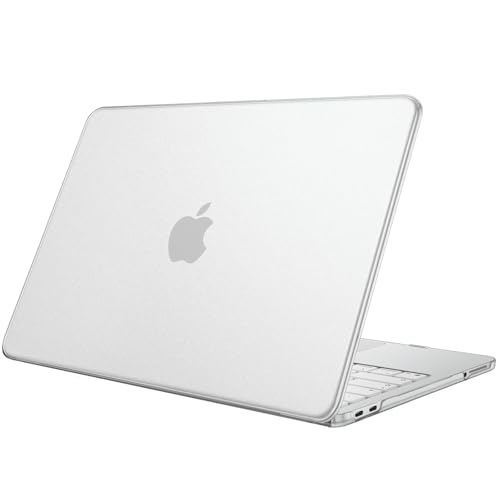
| Crystal Clear Design | Bundle Contents: Hard shell case only | Material Composition: Polycarbonate hard shell | Design Thickness: 0.65 inches | VIEW LATEST PRICE | Read Our Analysis |
| Batianda 4-in-1 MacBook 13 inch Case Bundle (A3404) |
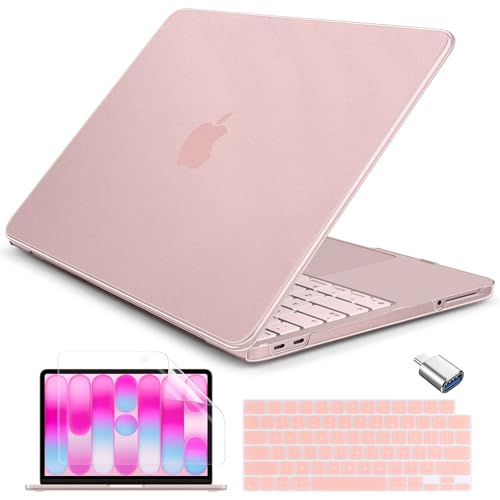
| Military-Grade Durability | Bundle Contents: Hard shell case, silicone keyboard skin, screen protector, USB-C adapter | Material Composition: Composite polycarbonate with nano-coating | Design Thickness: 1.2 mm matte hard shell | VIEW LATEST PRICE | Read Our Analysis |
| Tomtoc 360° Protective Laptop Sleeve for 13-inch MacBook |

| Best for Travel | Bundle Contents: Protective sleeve with front pocket | Material Composition: Recycled polyester fabric with soft lining | Design Thickness: 1.1 inches (sleeve form factor) | VIEW LATEST PRICE | Read Our Analysis |
| MOSILO Crack-Resistant MacBook Pro 13″ Case Emerald Green |

| Premium Build Quality | Bundle Contents: Hard shell case, keyboard cover, screen protector | Material Composition: Polycarbonate shell with TPU corners and interior | Design Thickness: Standard hard case with shock-absorbing corners | VIEW LATEST PRICE | Read Our Analysis |
| IMMOENUC 3-in-1 MacBook Pro 13 Inch Protective Case Set |

| Budget-Friendly Pick | Bundle Contents: Hard shell case, keyboard cover, touchpad protector | Material Composition: PC hard shell with TPU keyboard cover | Design Thickness: Ultra-slim, portable design | VIEW LATEST PRICE | Read Our Analysis |
More Details on Our Top Picks
MOSISO MacBook 13″ Case with 4-in-1 Kit (A3404)
Looking for complete protection without buying accessories separately? The MOSISO MacBook 13″ Case with 4-in-1 Kit offers a comprehensive solution for your MacBook Neo 13-inch (Model A3404). The kit includes a hard shell case, two keyboard covers, a screen protector, and a storage bag. The case uses engineering polycarbonate to resist cracks and scratches while maintaining crystal clarity. Installation requires no tools—simply push the top and bottom covers together firmly. The fingerprint-resistant surface stays clean during daily use. Remove the case easily whenever needed. This bundle ranks #3 in laptop hard shell cases and provides comprehensive device security in one purchase.
- Bundle Contents:Hard shell case, 2 keyboard covers, screen protector, storage bag
- Material Composition:Polycarbonate shell
- Design Thickness:Ultra-thin design
- Finish Type:Crystal-clear with fingerprint resistance
- Installation Method:Top and bottom covers with gentle push, no tools required
- Drop/Impact Protection Level:Crack-resistant protective hard shell
- Additional Feature:Crystal-clear, no yellowing shell
- Additional Feature:Fingerprint/smudge resistant surface
- Additional Feature:Complete storage bag included
Fintie Hard Shell Case for MacBook Neo 13 Inch
If you want a protective case that doesn’t obscure your MacBook’s design, Fintie’s hard shell enclosure delivers crystal clear polycarbonate protection for the MacBook Neo 13 Inch (Model A3404). The snap-on design allows quick installation without tools or complexity. Before purchasing, verify your laptop’s model number A3404 on the bottom to confirm compatibility. The ultra-thin, lightweight case maintains your MacBook’s original appearance while providing scratch resistance and anti-slip protection. Its vented bottom supports airflow and cooling during use. You’ll retain full access to all ports, microphones, and speakers without removing the case for charging or accessories. At 8 ounces with dimensions of 12.01 x 8.27 x 0.65 inches, this slim case adds minimal bulk. The manufacturer provides a 3-month warranty covering defects and issues.
- Bundle Contents:Hard shell case only
- Material Composition:Polycarbonate hard shell
- Design Thickness:0.65 inches
- Finish Type:Crystal clear, anti-scratch
- Installation Method:Snap-on design
- Drop/Impact Protection Level:Anti-scratch protection
- Additional Feature:Full port access design
- Additional Feature:Vented bottom for cooling
- Additional Feature:Anti-slip protective cover
Batianda 4-in-1 MacBook 13 inch Case Bundle (A3404)
The Batianda 4-in-1 Bundle delivers military-grade durability for your MacBook Neo 13″ (2026). This package includes a 1.2 mm polycarbonate hard shell, color-matched keyboard skin, HD screen protector, and USB-C adapter. The aerospace-grade composite construction boosts structural flexibility by 200%, providing drop and impact resistance. A nano-coating creates 99.9% smudge resistance while the matte texture prevents fingerprints and scratches. Four anti-slip silicone feet stabilize your laptop on surfaces. The zero-vent design maintains Apple’s aesthetic. Choose from Blush, Citrus, or Indigo to match your device. This complete ecosystem protects your investment comprehensively while extending connectivity options.
- Bundle Contents:Hard shell case, silicone keyboard skin, screen protector, USB-C adapter
- Material Composition:Composite polycarbonate with nano-coating
- Design Thickness:1.2 mm matte hard shell
- Finish Type:Matte texture with 99.9% smudge resistance
- Installation Method:Seamless snap-fit compatibility
- Drop/Impact Protection Level:Military-grade drop and impact resistance (200% boosted strength)
- Additional Feature:Aerospace-grade composite construction
- Additional Feature:Four anti-slip silicone feet
- Additional Feature:USB-C to USB-A adapter
Tomtoc 360° Protective Laptop Sleeve for 13-inch MacBook
Frequent travelers who need reliable laptop protection should consider Tomtoc’s 360° Protective Laptop Sleeve, which combines military-grade durability with practical organization features for on-the-go use. The sleeve features CornerArmor Technology and high-density soft padding that passed military-standard drop tests. You’ll find a front pocket for your charger, cables, and mouse, plus an additional strap for your AirTag or keys. The recycled polyester construction is water-resistant and scratch-resistant, meeting MacBook sleeve standards. The 12-month warranty and 12.6 x 9.06 x 1.1-inch dimensions accommodate your 13-inch MacBook Neo seamlessly.
- Bundle Contents:Protective sleeve with front pocket
- Material Composition:Recycled polyester fabric with soft lining
- Design Thickness:1.1 inches (sleeve form factor)
- Finish Type:Water-resistant recycled fabric
- Installation Method:Slide-in sleeve design
- Drop/Impact Protection Level:Military-standard drop-tested with CornerArmor Technology
- Additional Feature:CornerArmor technology edges
- Additional Feature:Front pocket storage design
- Additional Feature:Military-standard drop-test certified
MOSILO Crack-Resistant MacBook Pro 13″ Case Emerald Green
Looking for thorough protection without complexity? The MOSILO Crack-Resistant MacBook Pro 13″ Case delivers a complete 3-in-1 solution. You get a hard polycarbonate shell with shock-absorbing TPU corners, a waterproof keyboard cover, and a screen protector. Installation requires no tools—simply click the precision-molded case onto your MacBook. The reinforced design guards edges and disperses impact across four raised corner zones. A ventilated bottom with raised feet prevents overheating during use. This case fits M2/M1 models and variants A2338, A2251, A2289, A2159, A1989, A1708, and A1706. The hinge remains fully accessible, so your screen moves naturally. Choose Emerald Green for style combined with durable, scratch-resistant protection.
- Bundle Contents:Hard shell case, keyboard cover, screen protector
- Material Composition:Polycarbonate shell with TPU corners and interior
- Design Thickness:Standard hard case with shock-absorbing corners
- Finish Type:Polycarbonate with ventilated bottom
- Installation Method:Click-lock installation, tool-free, precision-molded
- Drop/Impact Protection Level:360-degree protection with shock-absorbing corners
- Additional Feature:Four raised TPU corners
- Additional Feature:Hinge access preserved naturally
- Additional Feature:Soft TPU interior lining
IMMOENUC 3-in-1 MacBook Pro 13 Inch Protective Case Set
Want comprehensive protection without breaking your budget? The IMMOENUC 3-in-1 set delivers three essential components for your 2026 MacBook Neo 13-inch (Model A3404). You get a hard PC shell case, soft TPU keyboard cover, and touchpad protector. The sturdy shell guards against scratches and minor bumps with its matte frosted finish that resists fingerprints and yellowing. Installation takes five seconds—simply snap it on. The keyboard cover is washable, and you can wipe the case clean with a damp cloth. Its ultra-slim design maintains heat dissipation while keeping bulk minimal. You’ll receive a 30-day manufacturer warranty covering your investment.
- Bundle Contents:Hard shell case, keyboard cover, touchpad protector
- Material Composition:PC hard shell with TPU keyboard cover
- Design Thickness:Ultra-slim, portable design
- Finish Type:Frosted clear, matte anti-fingerprint
- Installation Method:Tool-free snap-on installation (5 seconds)
- Drop/Impact Protection Level:Sturdy PC shell against scratches and minor bumps
- Additional Feature:Touchpad protector included
- Additional Feature:Washable keyboard cover included
- Additional Feature:Wipes clean with damp cloth
Factors to Consider When Choosing a MacBook Neo Protective Case
When you’re selecting a MacBook Neo protective case, you’ll need to evaluate five key factors: the material quality and durability to ensure long-term protection, precise model compatibility to guarantee proper fit, protection level and impact resistance for your usage environment, design and aesthetic appeal that matches your preferences, and installation ease so you can apply it without frustration. Start by checking the case material—hard polycarbonate shells offer rigid protection while soft silicone provides cushioning—then verify your exact MacBook model against the product specifications to avoid buying an incompatible case. Finally, consider how you’ll use your laptop; if you frequently travel, prioritize high impact resistance, but if you primarily work at a desk, you might emphasize slim design and easy installation instead.
Material Quality And Durability
Several key material features’ll protect your MacBook Neo and ensure your case lasts through daily use. Start by selecting polycarbonate hard shells, which provide impact resistance and rigid structure against daily wear and scratches. Next, choose cases with nano-coatings or smudge-resistant surfaces to minimize fingerprints and oil residues. Look for matte or frosted finishes that reduce glare and hide minor smudges while preserving your device’s color and design visibility. Consider 360-degree protection options with reinforced corners and edge bumpers to absorb shocks from drops effectively. Finally, verify the enclosure uses non-yellowing, crystal-clear materials to maintain long-term visibility of your laptop’s original finish. These material choices work together to maximize durability and protection.
Precise Model Compatibility Verification
How can you guarantee your protective case’ll fit your MacBook Neo without returning it? Check the exact model number on your laptop’s bottom to verify it matches A3404. Next, confirm the device name in product listings reads “MacBook Neo 13 inch” or similar phrasing. Look for explicit statements stating the case is designed for MacBook Neo 13 inch with A18 Pro Chip (A3404). Be cautious of broad compatibility claims like “13-inch MacBook Pro/Air”—these don’t guarantee proper fit for your specific model. Cross-check the vendor’s compatibility notes for model identifiers including A3404 and A18 Pro Chip references. This verification process eliminates ambiguity with other Neo or Apple models and reduces the risk of purchasing an incompatible case that requires returning.
Protection Level And Impact Resistance
After you’ve confirmed your case fits your MacBook Neo, you’ll need to evaluate how well it actually protects your device during drops and everyday impacts. Look for cases featuring reinforced TPU corners and hard polycarbonate shells that absorb shock effectively. Check whether the design offers 360-degree protection or edge bumpers that distribute impact force across the entire chassis. Review military-grade or drop-test certifications, which indicate the case has undergone real-world durability testing. Compare thickness and weight—thicker shells with raised edges typically provide superior protection than ultra-slim designs. Finally, verify additional features like non-yellowing finishes and anti-scratch coatings that maintain the case’s protective integrity over time.
Design And Aesthetic Appeal
What’ll you prioritize—preserving your MacBook Neo’s original finish or customizing its appearance?
If you want to keep your laptop’s design intact, choose clear, crystal-clear shells that won’t yellow or fade. They showcase your device’s natural colors without adding bulk.
For a cleaner aesthetic, select matte or textured finishes that resist fingerprints and smudges. These surfaces stay looking fresh longer with regular use.
Consider color-matched options like blush or emerald green if your MacBook Neo has a specific colorway. This creates a cohesive look across your device.
Keep your case slim by choosing ultra-thin profiles around 0.59–0.65 inches. They protect without adding weight.
For maximum uniformity, purchase kits with integrated keyboard skins and screen protectors. This approach ensures your entire setup matches seamlessly.
Installation Ease And Convenience
Beyond selecting a case that looks good, you’ll want one that installs without hassle and stays secure on your MacBook Neo. Snap-on designs let you attach and remove your case in seconds without tools or disassembly. Look for cases with click-lock mechanisms that grip your MacBook firmly while allowing the lid to open and close freely. Verify the case has precise cutouts for ports and camera access so you don’t struggle with alignment. Choose lightweight, ultra-thin shells that won’t restrict ventilation or interfere with cooling. Check that the case maintains hinge movement without obstruction. Cases bundled with keyboard covers and screen protectors eliminate separate purchases and simplify your setup process.
Bundle Contents And Accessories
Most protective case bundles for the MacBook Neo offer 4-in-1 packages that combine a hard shell case, keyboard covers, a screen protector, and a storage pouch or USB-C adapter into one purchase. You’ll want to verify that all components match your specific MacBook Neo 13″ A3404 model to ensure proper fit.
When selecting a bundle, check whether color-matched or matte textures coordinate with your laptop’s design. Keyboard covers protect against spills and dust accumulation, while screen protectors guard against scratches during transport.
Some bundles include additional accessories like anti-slip feet, edge protectors, or extra adapters that expand usability. Review the complete contents list before purchasing to confirm you’re getting items you’ll actually use. This approach prevents buying redundant accessories while maximizing your investment’s value.
Heat Dissipation And Ventilation
How does your MacBook Neo stay cool during intensive tasks? You’ll want to prioritize cases with vented bottoms or open-air designs that allow airflow around your device. Choose slim cases between 0.59–0.65 inches thick, as they obstruct heat dissipation less than bulkier options. Select matte or frosted polycarbonate shells with minimal internal obstructions to maintain natural heat pathways. Look for cases featuring strategic cutouts and avoid designs with anti-heat insulation, which traps warmth near your motherboard and fans. Verify that your case provides full port access without blocking cooling vents. These features work together to prevent heat buildup during extended use, keeping your MacBook Neo operating at optimal temperatures while remaining protected.
Warranty Coverage And Support
What protection does your case actually offer if something goes wrong? Review the warranty length first—most cases offer 3 to 12 months of coverage. Next, identify what’s covered: manufacturing defects, cracks, and discoloration typically qualify, while normal wear and accidental damage don’t.
Confirm the claim process by checking documentation requirements and proof of purchase procedures. Determine whether the manufacturer provides free replacements, repairs, or replacement parts.
Evaluate customer support accessibility by noting available channels: email, chat, or phone options. Response time matters—aim for support that answers within 24 to 48 hours.
Finally, check warranty transferability if you plan upgrading devices. Some manufacturers limit coverage across model variants, so verify your specific MacBook Neo model qualifies before purchasing.
Final Thoughts
You need to pick a MacBook Neo case based on your specific requirements. Evaluate the protection level you need—hard shell cases offer maximum durability, while sleeves provide portability. Check compatibility with model A3404. Consider whether you want bundled accessories like keyboard covers and screen protectors or prefer purchasing separately. Compare anti-fingerprint finishes and cutout precision. Match your choice to your budget and daily usage patterns for optimal laptop protection.

Meet Ry, “TechGuru,” a 36-year-old technology enthusiast with a deep passion for tech innovations. With extensive experience, he specializes in gaming hardware and software, and has expertise in gadgets, custom PCs, and audio.
Besides writing about tech and reviewing new products, he enjoys traveling, hiking, and photography. Committed to keeping up with the latest industry trends, he aims to guide readers in making informed tech decisions.