
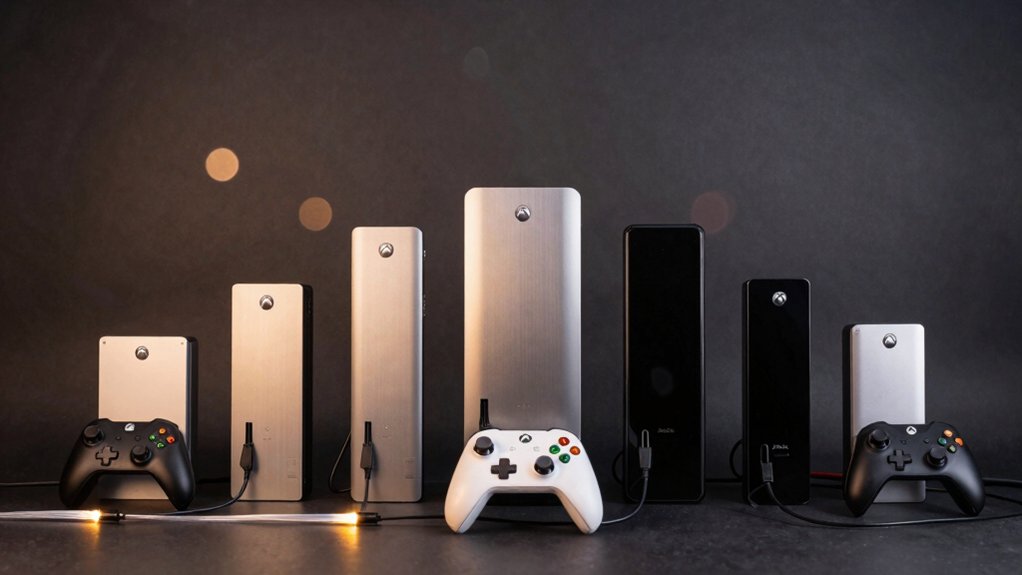

If you’re reviving your Original Xbox collection, you’ll need to connect it to a modern TV—and that’s where upscalers come in. You’ve got several solid options: direct HDMI cables like Pound HD Link, advanced scalers like PhotoFast 4K Gamer Pro, and budget-friendly converters using S-video or component inputs. Each choice affects picture quality, audio support, and setup complexity differently. The right pick depends on your TV’s inputs and your budget—but how do you know which one matches your setup?
| POUND HD Link Cable for Original Xbox |

| Simplest Setup | Primary Function: Analog component to HDMI converter | Output Resolution Support: 480i, 720p, 4K compatible | Setup Requirements: Plug and play; no power supply needed | VIEW LATEST PRICE | Read Our Analysis |
| PhotoFast 4K Gamer Pro Video Game Console HDMI Upscaler |

| Best Upscaling | Primary Function: 1080p to 4K upscaler | Output Resolution Support: 4K upscaled output | Setup Requirements: Plug and play; no drivers required | VIEW LATEST PRICE | Read Our Analysis |
| Kaico Original Xbox to HDMI Adapter with Optical Audio |

| Best Audio Support | Primary Function: Analog component to HDMI converter with optical audio | Output Resolution Support: 480i, 480p, 720p, 1080i | Setup Requirements: Plug and play; no drivers required | VIEW LATEST PRICE | Read Our Analysis |
| AV S-video to HDMI Converter Upscaler 1080P |

| Most Versatile Input | Primary Function: AV/S-Video to HDMI converter upscaler | Output Resolution Support: Up to 1080p | Setup Requirements: Plug and play; no drivers required | VIEW LATEST PRICE | Read Our Analysis |
| Component to HDMI Converter Upscaler for Gaming Consoles |

| Best Picture Optimization | Primary Function: Component/YPbPr to HDMI converter upscaler | Output Resolution Support: 480p, 576p, 720p, 1080p | Setup Requirements: Plug and play; includes power supply | VIEW LATEST PRICE | Read Our Analysis |
| Wiistar Original Xbox to HDMI Converter Cable |

| Most Portable | Primary Function: Original Xbox signal to HDMI converter | Output Resolution Support: 720p, 1080p | Setup Requirements: Plug and play; Micro USB power cable included | VIEW LATEST PRICE | Read Our Analysis |
| HD Link Cable for Original Xbox HDMI Converter |
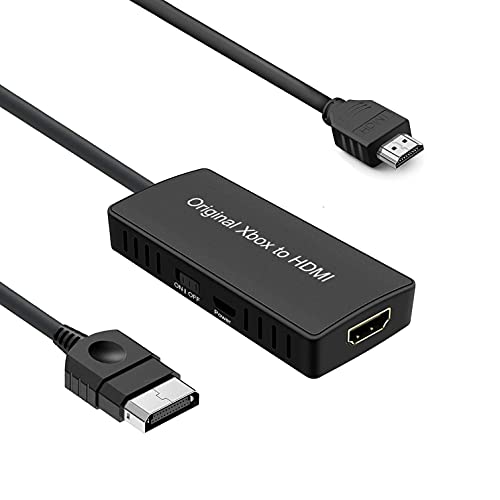
| Best Overall | Primary Function: YPbPr component to HDMI converter | Output Resolution Support: 480i, 720p, 1080p | Setup Requirements: Plug and play; USB power cable required | VIEW LATEST PRICE | Read Our Analysis |
More Details on Our Top Picks
POUND HD Link Cable for Original Xbox
The POUND HD Link Cable offers the simplest setup for retro gamers who want to connect their original Xbox to modern HDTVs without complicated adapters or power supplies. Simply plug the cable into your Xbox and connect it directly to your TV’s HDMI port. The cable converts your Xbox’s analogue component signal into digital HDMI format automatically. Games that run at 480i display in that resolution, while 720p titles show at 720p. You’ll notice sharper textures, clearer text, and more accurate colors compared to older connection methods. The plug-and-play design eliminates cable clutter and extra accessories, making it ideal for playing classics like Fable and Halo 2 with improved visual quality on modern screens.
- Primary Function:Analog component to HDMI converter
- Output Resolution Support:480i, 720p, 4K compatible
- Setup Requirements:Plug and play; no power supply needed
- Audio Support:Not specified
- Device Compatibility:Original Xbox only
- Image Enhancement Technology:HDMI conversion for improved color accuracy and clarity
- Additional Feature:No adapter or power supply required
- Additional Feature:4K TV compatibility supported
- Additional Feature:Plug and play seamless connection
PhotoFast 4K Gamer Pro Video Game Console HDMI Upscaler
Looking to upgrade your retro console’s output without replacing hardware? The PhotoFast 4K Gamer Pro upscales 1080p content to 4K using sharpening, color processing, and depth of field techniques. Connect your Original Xbox via HDMI 2.0a or higher cables—note that older HDMI 1.4 cables may cause black screens. The device delivers enhanced clarity and 3D depth without lag or frame rate drops. You’ll access three optimization levels to match your TV and game preferences for tailored visual quality. This upscaler works with multiple retro systems including Xbox 360, PS3, Wii U, and Nintendo Switch, making it versatile for your collection.
- Primary Function:1080p to 4K upscaler
- Output Resolution Support:4K upscaled output
- Setup Requirements:Plug and play; no drivers required
- Audio Support:Not specified
- Device Compatibility:Nintendo Switch, Wii U, PS4, PS3, Xbox One, Xbox 360
- Image Enhancement Technology:4K upscaling with sharpening, color processing, depth of field
- Additional Feature:Three levels of 4K optimization
- Additional Feature:No lag, no FPS drop
- Additional Feature:Compatible with multiple console types
Kaico Original Xbox to HDMI Adapter with Optical Audio
Kaico’s Original Xbox to HDMI Adapter delivers superior audio support through its Toslink optical port, making it ideal for retro gamers who want both crisp visuals and full surround sound. This plug-and-play converter handles all Original Xbox resolutions from 480i up to 1080i without quality loss. Connect your Xbox component cable to the adapter, then plug the HDMI output into your modern TV. The Toslink port transmits Dolby Digital 5.1 audio separately, giving you full surround capabilities. The adapter draws minimal power at 5 watts, requiring only a standard USB connection. This straightforward setup preserves vivid colors while eliminating the need for outdated analog connections.
- Primary Function:Analog component to HDMI converter with optical audio
- Output Resolution Support:480i, 480p, 720p, 1080i
- Setup Requirements:Plug and play; no drivers required
- Audio Support:Toslink optical audio with Dolby Digital 5.1
- Device Compatibility:Original Xbox only
- Image Enhancement Technology:Vivid color preservation via HDMI conversion
- Additional Feature:Toslink optical Dolby Digital 5.1
- Additional Feature:Supports all Xbox output resolutions
- Additional Feature:Durable with no transmission loss
AV S-video to HDMI Converter Upscaler 1080P
Want to connect your old gaming consoles to a modern TV without buying new equipment? The YITROX AV S-Video to HDMI Converter handles this conversion through a simple three-step process. First, connect your original Xbox’s AV or S-Video cable to the converter’s input ports. Second, plug an HDMI cable from the converter into your TV. Third, use the device button to switch between signal types as needed. The converter scales video up to 1080P resolution and includes a 3D compensation feature for motion and color optimization. Note that this device amplifies existing video quality rather than creating detail from low-resolution sources, so a 480P input won’t become 720P.
- Primary Function:AV/S-Video to HDMI converter upscaler
- Output Resolution Support:Up to 1080p
- Setup Requirements:Plug and play; no drivers required
- Audio Support:AUX audio port; synchronized audio
- Device Compatibility:Wii, Xbox, PS2, PS3, Blu-ray, DVD players
- Image Enhancement Technology:Partial 3D compensation; motion, color, noise reduction
- Additional Feature:Switch between three signal types
- Additional Feature:3D compensation with motion optimization
- Additional Feature:No drivers required, plug-and-play
Component to HDMI Converter Upscaler for Gaming Consoles
If you’re connecting older gaming consoles to modern displays, the YITROX YT-YH01 Component to HDMI Converter transforms picture quality through intelligent scaling and compensation technology. This converter accepts YPbPr component video and stereo audio inputs, then outputs HDMI to your TV or monitor. You’ll select from five resolution options—800×600, 1024×768, 1280×720, 1280×1024, or 1920×1080—depending on your display’s capabilities. The built-in scaler supports up to 1080P output while accommodating legacy devices like PlayStation 2, Xbox 360, and Wii. Seven zoom modes let you adjust image sizing, and three-dimensional compensation reduces jitter, enhances contrast, and optimizes motion and colors for clearer gameplay.
- Primary Function:Component/YPbPr to HDMI converter upscaler
- Output Resolution Support:480p, 576p, 720p, 1080p
- Setup Requirements:Plug and play; includes power supply
- Audio Support:R/L audio input; AUX audio port
- Device Compatibility:Wii, Xbox 360, PS3, Blu-ray, DVD players
- Image Enhancement Technology:3D compensation; motion, color optimization, noise reduction; 7 zoom modes
- Additional Feature:Seven picture quality zoom modes
- Additional Feature:Three-dimensional compensation technology included
- Additional Feature:Metal housing, durable construction
Wiistar Original Xbox to HDMI Converter Cable
The Wiistar Original Xbox to HDMI Converter Cable is most portable for retro gamers who want to connect their console to modern TVs without installing additional equipment. You’ll plug the cable directly into your Xbox’s AV port, then connect the HDMI end to your television. The included Micro USB power cable provides necessary power through any standard USB adapter. This setup supports both 1080p and 720p output, giving you clear image quality on contemporary displays. The 1-meter cable length accommodates most entertainment center layouts. Installation requires no drivers or complex configuration. You’re ready to play immediately upon connection.
- Primary Function:Original Xbox signal to HDMI converter
- Output Resolution Support:720p, 1080p
- Setup Requirements:Plug and play; Micro USB power cable included
- Audio Support:Not specified
- Device Compatibility:Original Xbox only
- Image Enhancement Technology:Clear visual effects via 10-bit 162MSPS sampling
- Additional Feature:One meter cable length included
- Additional Feature:Micro USB power cable included
- Additional Feature:Portable, lightweight, flexible design
HD Link Cable for Original Xbox HDMI Converter
Connecting your original Xbox to a modern TV doesn’t require expensive equipment or technical expertise. The HD Link Cable automatically detects your Xbox’s YPbPr component signal and converts it to 480i or 720p output through HDMI. Simply connect the component cables from your Xbox, plug in the USB power cable for the 5V adapter, and attach an HDMI cable to your television. The converter requires no driver installation or setup—it works immediately upon connection. This device outputs clear visuals suitable for TVs, projectors, and gaming monitors. The compact design fits easily behind entertainment systems. With its straightforward plug-and-play functionality, you’ll restore your original Xbox gaming experience to modern displays efficiently.
- Primary Function:YPbPr component to HDMI converter
- Output Resolution Support:480i, 720p, 1080p
- Setup Requirements:Plug and play; USB power cable required
- Audio Support:Not specified
- Device Compatibility:Original Xbox
- Image Enhancement Technology:Clear visual effects via automatic detection and conversion
- Additional Feature:Ten-bit 162MSPS sampling technology
- Additional Feature:USB powered connectivity option
- Additional Feature:Automatic signal detection and conversion
Factors to Consider When Choosing an Original Xbox Upscaler
When you’re selecting an Xbox upscaler, you’ll need to evaluate the resolution output capabilities it offers—whether it supports 1080p, 4K, or other formats—and confirm it’s compatible with your specific console model. Next, examine the video quality enhancement features available, such as line doubling or filtering options, along with the setup requirements and what cables or power supplies you’ll need for installation. Finally, check the connectivity options and power specifications to ensure the upscaler integrates smoothly with your current gaming setup without requiring additional equipment you don’t already have.
Resolution Output Capabilities
How do you know which output resolution your upscaler actually needs to support? Start by checking your display’s native resolution and supported inputs. Most modern TVs accept 1080p or 4K signals through HDMI, which is the standard output for upscalers. Next, identify your target quality level. If you want noticeable improvement without excessive processing, 720p provides a solid middle ground. For sharper visuals on larger screens, select 1080p output. Some upscalers offer fixed resolutions, while others let you choose from options like 800×600, 1024×768, or 1280×720. Verify that your chosen upscaler’s output matches both your display’s capabilities and your gaming preferences. This ensures you’re paying only for the resolution quality you’ll actually use.
Compatibility With Console Models
What output formats does your Original Xbox actually support? Your console generates 480i, 480p, 720p, and 1080i signals natively. When selecting an upscaler, verify it accepts all these formats to maintain full compatibility. Next, confirm the device works exclusively with Original Xbox hardware, not later models like Xbox 360 or Xbox One, since signal requirements differ significantly between generations.
Check that your upscaler accepts component (YPbPr) input cables, which your Original Xbox uses for video output. This connection type prevents compatibility issues with older cable standards. Additionally, examine power requirements carefully. Some upscalers need external power or USB connections for stable operation, so ensure you can meet these demands before purchasing. Verify HDMI output capability so you can connect directly to modern displays without additional adapters.
Video Quality Enhancement Features
Most upscalers convert your Original Xbox’s native 480i, 480p, or 720p signals into higher HDMI resolutions—typically 1080p or 4K—to improve sharpness on modern displays. Beyond basic scaling, many devices include additional features you should evaluate. Motion compensation reduces blur during fast-paced gameplay by processing frame transitions. Color processing adjusts saturation and contrast to match your TV’s capabilities and your preferences. 3D effect processing can enhance perceived depth without introducing lag or FPS drops. Optical processing quality varies by scaler chip; higher-tier devices deliver cleaner upscaling with fewer artifacts. User-adjustable optimization levels let you fine-tune output for different game genres—select game mode for competitive titles or TV mode for cinematic experiences. Compare these features against your display type and gaming priorities before purchasing.
Setup And Cable Requirements
Once you’ve identified which video quality features matter most for your gaming setup, you’ll need to confirm that your chosen upscaler actually connects to your original Xbox and displays. Check your upscaler’s input compatibility first—verify it accepts your Xbox’s output format, whether that’s composite, component (YPbPr), or S-video. Next, examine the HDMI output type: HDMI 1.4 handles 1080p, while HDMI 2.0a+ supports 4K resolution. Review power requirements carefully. Some upscalers operate plug-and-play with no external power, while others need micro USB or dedicated power supplies. Finally, assess your TV’s connectivity. Match your upscaler’s HDMI output version to your TV’s input capability to avoid compatibility issues and ensure your investment works properly from installation day.
Power Supply And Connectivity
How you’ll power your upscaler and connect it to your Xbox and TV directly impacts your setup’s functionality and convenience. First, determine whether your upscaler needs external power or draws from your console. Check the specifications for power requirements—most upscalers need 5V at 1A via USB. Next, verify the cable configuration: confirm whether you’re using HDMI, component, or AV connections. Some upscalers include HDMI cables; others require you to purchase them separately. Measure your TV distance to ensure cable length accommodates your setup without signal degradation. Finally, check if the device supports plug-and-play operation without requiring driver installation. This eliminates setup complications and ensures immediate functionality once connected properly.
Final Thoughts
You’ve reviewed seven upscalers for your Original Xbox. Select based on your needs: choose Pound HD Link or Kaico for straightforward 720p setup, PhotoFast 4K Gamer Pro for 4K scaling, or YITROX and YT-YH01 for flexible input options. Check your TV’s HDMI ports, confirm power requirements, and verify cable compatibility before purchasing. Test with a game like Halo 2 to ensure optimal picture quality.

Meet Ry, “TechGuru,” a 36-year-old technology enthusiast with a deep passion for tech innovations. With extensive experience, he specializes in gaming hardware and software, and has expertise in gadgets, custom PCs, and audio.
Besides writing about tech and reviewing new products, he enjoys traveling, hiking, and photography. Committed to keeping up with the latest industry trends, he aims to guide readers in making informed tech decisions.