

If you’re spending hours at your desk, you’ll want to examine how your current setup affects your posture and productivity. A laptop tray desk mount can eliminate neck strain, free up workspace, and improve your overall comfort. You’ve got several solid options available, each with different features and price points. The key is matching the right mount to your specific needs—whether that’s monitor compatibility, adjustment range, or installation method. Here’s what you need to know about five top performers.
| WALI Laptop Desk Mount with Monitor Arm (M00LP) |

| Most Versatile | Laptop Compatibility: Up to 17 inches | Weight Capacity: Up to 22 lbs | Monitor Support: Up to 32 inches | VIEW LATEST PRICE | Read Our Analysis |
| HUANUO Laptop Desk Mount Monitor Arm 17-32 |

| Best 2-in-1 Design | Laptop Compatibility: Up to 17 inches | Weight Capacity: Up to 22 lbs | Monitor Support: 15–32 inches (with VESA 75x75mm, 100x100mm) | VIEW LATEST PRICE | Read Our Analysis |
| MOUNT PRO Laptop Arm Mount for Desk with Monitor Stand |
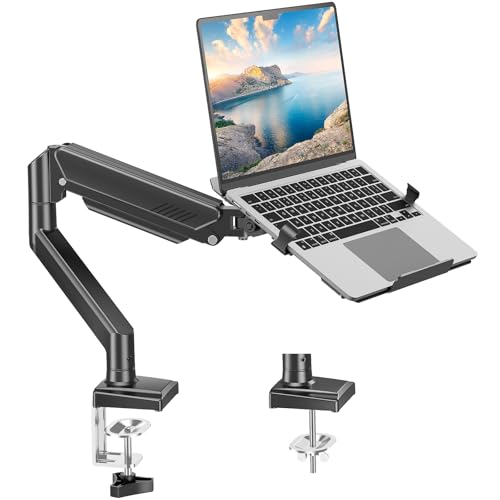
| Maximum Motion Range | Laptop Compatibility: Up to 17 inches | Weight Capacity: 4.4–22 lbs | Monitor Support: 13–32 inches (with VESA 75x75mm, 100x100mm) | VIEW LATEST PRICE | Read Our Analysis |
| UPGRAVITY Laptop Desk Mount Single Arm Stand |
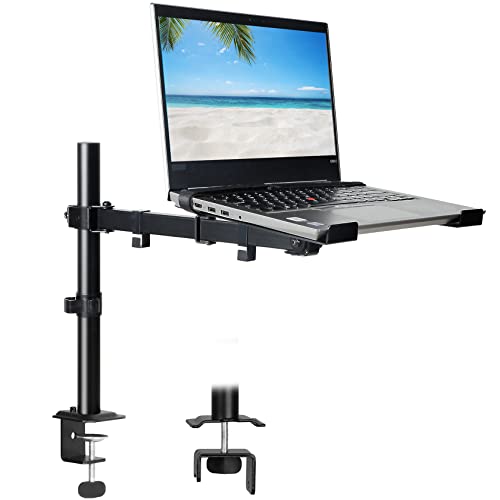
| Best Value | Laptop Compatibility: Up to 17 inches | Weight Capacity: Up to 17.6 lbs | Monitor Support: 14–32 inches (with VESA 75x75mm, 100x100mm) | VIEW LATEST PRICE | Read Our Analysis |
| Suptek Adjustable Laptop Desk Mount for 13-27 Inch |
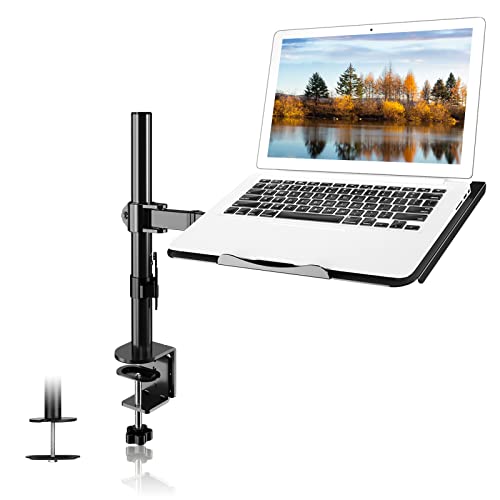
| Budget-Friendly Pick | Laptop Compatibility: Up to 15.6 inches | Weight Capacity: Up to 15.6 lbs | Monitor Support: 13–27 inches (with VESA 75x75mm, 100x100mm) | VIEW LATEST PRICE | Read Our Analysis |
More Details on Our Top Picks
WALI Laptop Desk Mount with Monitor Arm (M00LP)
Looking to reclaim your desk space while keeping your laptop at eye level? The WALI Laptop Desk Mount with Monitor Arm (M00LP) elevates your notebook up to 17 inches and weighs up to 22 lbs. You’ll choose between two mounting options: a C-clamp for desks 0.4–4 inches thick or a grommet mount for desks 0.4–2.2 inches thick. The ventilated 14 x 11-inch tray reduces neck and eye strain by positioning your laptop at ideal viewing height. You can tilt ±15 degrees, swivel ±90 degrees, and rotate 360 degrees. Cooling vents on the tray absorb airflow from your laptop fan. The package includes mounting hardware and a user manual, plus US-based customer support available seven days weekly.
- Laptop Compatibility:Up to 17 inches
- Weight Capacity:Up to 22 lbs
- Monitor Support:Up to 32 inches
- Mounting Options:C-clamp (0.4–4″ thick); Grommet (0.4–2.2″ thick)
- Adjustability Range:±15° tilt, ±90° swivel, 360° rotation, 16″ height adjustment
- Ventilation Features:Venting holes on laptop tray for cooling airflow
- Additional Feature:Detachable mount plates design
- Additional Feature:0.6″ protective bottom lip
- Additional Feature:Dual mounting configuration flexibility
HUANUO Laptop Desk Mount Monitor Arm 17-32
Want a single mount that handles both laptops and monitors? The HUANUO offers 2-in-1 functionality: use the ventilated tray for laptops up to 17 inches, or remove it to support monitors between 15–32 inches. It accommodates VESA 75x75mm and 100x100mm standards with a 22-pound weight capacity. Adjust the arm with ±45° tilt and swivel plus 360° rotation to reduce neck strain. The 15-inch pole provides adequate screen reach. Installation uses either a C-clamp for desks 0.39–3.07 inches thick or a grommet mount for 0.39–2.36 inches. Cable management clips keep wires organized while the ventilated tray design prevents overheating through 240 airflow holes.
- Laptop Compatibility:Up to 17 inches
- Weight Capacity:Up to 22 lbs
- Monitor Support:15–32 inches (with VESA 75x75mm, 100x100mm)
- Mounting Options:C-clamp (0.39–3.07″ thick); Grommet (0.39–2.36″ thick)
- Adjustability Range:±45° tilt, ±45° swivel, 360° rotation, 15″ pole height
- Ventilation Features:240 ventilation holes in tray for improved airflow
- Additional Feature:240-hole ventilated tray
- Additional Feature:Integrated cable management clips
- Additional Feature:2-in-1 removable tray system
MOUNT PRO Laptop Arm Mount for Desk with Monitor Stand
The MOUNT PRO’s maximum motion range—tilting -45° to +90°, swiveling 180°, and rotating 360°—makes it ideal for anyone who needs flexible screen positioning throughout the workday. You’ll appreciate the aluminum construction that supports laptops up to 17 inches and monitors from 13 to 32 inches, with a weight capacity between 4.4 and 22 pounds. Install it using either clamp or grommet mounting on desks measuring 0.39 to 2.76 inches thick. The adjustable height extends up to 17.3 inches, and the 19.9-inch maximum extension length lets you position your screen at optimal ergonomic angles. Internal cable management keeps your workspace organized. Note that this mount isn’t compatible with curved screens and works with VESA 75×75 mm and 100×100 mm standards.
- Laptop Compatibility:Up to 17 inches
- Weight Capacity:4.4–22 lbs
- Monitor Support:13–32 inches (with VESA 75x75mm, 100x100mm)
- Mounting Options:C-clamp (0.39–2.76″ thick); Grommet (0.39–2.76″ thick)
- Adjustability Range:-45° to +90° tilt, 180° swivel, 360° rotation, up to 17.3″ height
- Ventilation Features:No specific ventilation details provided
- Additional Feature:Internal cable pass-through
- Additional Feature:Extended reach up to 19.9″
- Additional Feature:Aluminum construction material
UPGRAVITY Laptop Desk Mount Single Arm Stand
If you’re spending hours hunched over a laptop on your desk, you’re risking neck and back strain—and UPGRAVITY’s single-arm mount delivers exceptional value by solving this problem affordably. This carbon steel stand supports laptops up to 17 inches or monitors between 14–32 inches using VESA 75x75mm or 100x100mm mounting. The ventilated tray measures 11.8 x 10.4 inches and detaches for cleaning. You’ll get full motion capability: 90° tilt, 180° swivel, and 360° rotation. Height adjusts along the center pole, while three-joint arms enable precise positioning. Installation uses either clamp or grommet mounting with included hardware. Cable management clips keep wires organized. A 3-year warranty covers defects.
- Laptop Compatibility:Up to 17 inches
- Weight Capacity:Up to 17.6 lbs
- Monitor Support:14–32 inches (with VESA 75x75mm, 100x100mm)
- Mounting Options:C-clamp or Grommet (0.39–2.76″ thick)
- Adjustability Range:90° tilt, 180° swivel, 360° rotation, height adjustable
- Ventilation Features:Ventilated tray design
- Additional Feature:Three-joint versatile positioning arms
- Additional Feature:3-year support warranty included
- Additional Feature:Detachable cable management clips
Suptek Adjustable Laptop Desk Mount for 13-27 Inch
Looking for a budget-friendly pick that handles both your monitor and laptop simultaneously? The Suptek mount combines a monitor arm with a detachable laptop tray, giving you flexible workspace options. You’ll adjust the arm using 180° swivel joints and 360° rotation to position your screen at eye level, reducing neck strain. The mount supports monitors up to 27 inches with VESA compatibility and laptops up to 15.6 inches. You can install it using either a C-clamp or grommet base depending on your desk type. The setup takes roughly ten minutes. You’re limited to 10kg weight capacity, so verify your equipment meets this requirement before mounting.
- Laptop Compatibility:Up to 15.6 inches
- Weight Capacity:Up to 15.6 lbs
- Monitor Support:13–27 inches (with VESA 75x75mm, 100x100mm)
- Mounting Options:C-clamp (10–80mm); Grommet (10–78mm diameter)
- Adjustability Range:±90° tilt, 180° swivel, 360° rotation, up to 400mm height adjustment
- Ventilation Features:Ventilated tray included (detachable)
- Additional Feature:400mm height adjustment range
- Additional Feature:Supports curved monitors included
- Additional Feature:10-minute installation time
Factors to Consider When Choosing a Laptop Tray Desk Mount
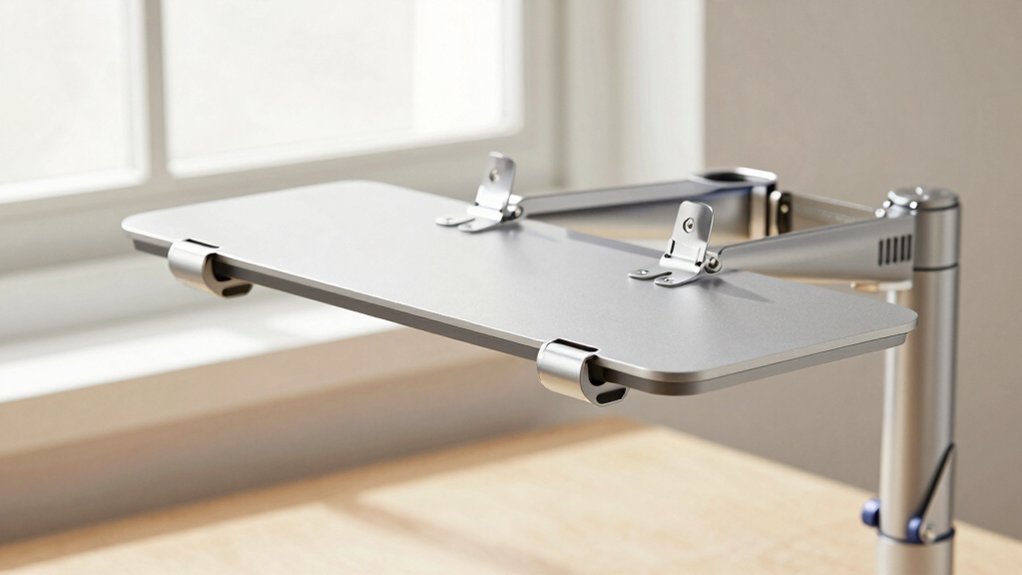
Before you purchase a laptop tray desk mount, you’ll need to verify that your laptop’s size and weight fall within the mount’s compatibility range, check whether the mounting option works with your desk type (clamp, grommet, or adhesive), and confirm the mount offers the ergonomic adjustability you need for proper screen height and viewing angle. You should also evaluate the tilt, swivel, and rotation range to ensure you can position your laptop for comfortable viewing from different angles, and examine whether the mount includes cooling and ventilation features that allow airflow underneath your device to prevent overheating during extended use. Taking time to assess these five factors will help you select a mount that fits your specific setup and usage needs.
Laptop Size And Weight Compatibility
How do you know if your laptop will actually fit and stay secure on a mounting tray? First, check your laptop’s diagonal screen size—most trays support 13 to 17 inches. Next, verify your laptop’s weight against the tray’s weight limit, typically up to 22 lbs. Measure your laptop’s dimensions and compare them to the tray’s size, usually around 14 x 11 inches, ensuring it fits without overhang. Then, confirm the entire arm system’s maximum weight capacity exceeds your laptop’s weight for safe operation. Finally, examine whether the tray design is removable or includes cooling features that match your laptop’s airflow needs. These steps prevent equipment damage and ensure stable, functional mounting.
Mounting Options For Your Desk
Once you’ve confirmed your laptop will fit securely on the tray, you’ll need to choose how to attach the entire arm system to your desk. Two primary mounting methods exist: C-clamp and grommet mounting.
C-clamp mounting uses clamping hardware to secure the arm directly to your desk edge. This method works for desks 0.4–4 inches thick, offering broad compatibility. Grommet mounting anchors through an existing hole in your desk, requiring thickness between 0.4–2.2 inches. This option conceals cables beneath your desk, creating a cleaner workspace appearance.
Verify your desk material and thickness meet the specified range before selecting either method. Some mounts offer interchangeable hardware, allowing you to switch between C-clamp and grommet options without purchasing additional components.
Ergonomic Height And Adjustability
Why does your laptop’s position matter so much? Proper alignment reduces neck strain and supports better posture during extended work sessions. When selecting a mount, prioritize adjustability range—look for models offering up to 17–18 inches of height adjustment to accommodate your specific stature and seating position. Multi-joint arms with 360° rotation and ±90° tilt capabilities let you position your screen at eye level precisely. Center-pole height adjustments provide customizable reach, preventing awkward stretches toward your keyboard or monitor. Consider detachable trays or 2-in-1 designs that convert between laptop-in-tray and monitor-only configurations. These flexible options allow you to modify your setup ergonomically without losing screen alignment efficiency. Test the adjustment range before purchasing to ensure it meets your posture requirements.
Tilt Swivel And Rotation Range
To position your laptop at the ideal viewing angle, you’ll need to understand what tilt, swivel, and rotation capabilities mean and how they affect your setup. Tilt adjusts the screen’s forward and backward angle, typically ranging from -45° to +90°. Swivel turns the tray side to side, offering +/-90° to 180° of horizontal movement. Rotation enables full 360° orientation shifts between portrait and landscape modes.
When selecting a mount, verify that tilt and swivel settings work independently for both laptop trays and monitors without sacrificing stability. Check product specifications for any restrictions—some models prohibit full vertical rotation of the laptop tray to prevent tipping. Programmable controls let you save preferred positions for quick adjustments throughout your workday.
Cooling And Ventilation Features
How much heat does your laptop generate during a full workday? Ventilated trays with built-in airflow features actively dissipate that heat by allowing air to circulate beneath your device. Look for trays with evenly spaced venting holes or perforations that enhance cooling effectiveness. Consider mounts designed to draw cooling air directly from your laptop’s fan through the tray structure. Position the tray away from desk surfaces to maximize airflow underneath. This strategic spacing prevents heat buildup that can damage internal components. A ventilated tray directly contributes to device longevity by maintaining lower operating temperatures during extended use. When evaluating options, prioritize ventilation patterns and tray proximity to ensure proper heat dissipation. Cooling features aren’t optional—they’re essential for protecting your investment and maintaining consistent performance.
Material Quality And Durability
Every laptop tray mount you’re considering should be built from sturdy materials like aluminum or carbon steel, which’ll give you the rigidity and lifespan you need compared to thinner steel or plastic alternatives. Check the weight capacity ratings—typically ranging from 15.6 to 22 lbs—to confirm the tray safely supports your laptop without flexing. Examine tray construction details like vented designs and lip height around 0.6 inches, both contributing to durability and secure placement. Look for integrated cable management and detachable parts using durable fasteners and mounting hardware that withstand repeated adjustments. Verify robust joints and bearings that enable smooth tilting, swiveling, and rotation without loosening over time, ensuring your mount remains stable through extended use.
Cable Management And Organization
A sturdy mount with excellent durability means nothing if cables create a tangled mess across your desk. When evaluating laptop tray mounts, examine the built-in cable management features carefully. Look for clips positioned along the arm and pole that secure wires neatly. Verify that the tray includes a dedicated keyboard and mouse area with organized cable routing. Check whether the mount offers internal pass-throughs or channels to hide cables inside the structure rather than across your work surface. If you plan to remove the tray occasionally, confirm that detachable models still provide secure cable routing options. Finally, inspect the clips and ties to ensure they accommodate multiple cables—power, data, and display—without restricting tray movement or creating bottlenecks that impede your workflow.
Installation Ease And Support
What mounting options does your desk accommodate? You’ll find two primary installation methods: C-clamps and grommets. C-clamps work on desks up to 3 inches thick, while grommets require a pre-drilled hole. Check your desk’s thickness and material before purchasing.
Verify that hardware comes included with your mount. Missing components delay setup unnecessarily. Look for labeled, step-by-step instructions that detail each installation phase clearly.
Contact customer support before buying to confirm they’re US-based or local. This matters if you encounter installation problems. Ask about response times and availability.
Confirm that tray and arm components detach or adjust for easier mounting. Adjustable heights simplify positioning during installation.
Review warranty length and coverage details. Multi-year warranties indicate manufacturer confidence in durability and provide extended post-purchase protection.
Final Thoughts
You’ve reviewed five reliable laptop tray desk mounts that’ll improve your workspace. Each model offers specific features—from compact designs to monitor compatibility—so select one based on your desk space, monitor size, and budget. Check mounting requirements: clamp or grommet options work with most desks. Install your chosen mount securely, adjust height and angle for comfort, then organize cables. You’ll gain ergonomic benefits and reclaim valuable desk space immediately.

Meet Ry, “TechGuru,” a 36-year-old technology enthusiast with a deep passion for tech innovations. With extensive experience, he specializes in gaming hardware and software, and has expertise in gadgets, custom PCs, and audio.
Besides writing about tech and reviewing new products, he enjoys traveling, hiking, and photography. Committed to keeping up with the latest industry trends, he aims to guide readers in making informed tech decisions.