

You’re looking to capture immersive virtual tours, but you need the right equipment to do it effectively. The camera you choose determines your video quality, ease of use, and final results. Seven standout options exist—from the Insta360 X4’s professional 8K capability to the j5create’s straightforward Zoom integration. Each serves different needs and budgets. Understanding what distinguishes these cameras helps you select the one that matches your specific requirements, so let’s examine each option.
| 360 Camera 3D Virtual Tour Real Estate Kit |

| Best For Beginners | Video Resolution: 360-degree panoramic images (resolution varies by phone) | Photo Resolution: 360-degree panoramic images (resolution varies by phone) | Stabilization: Digital stabilization via app processing | VIEW LATEST PRICE | Read Our Analysis |
| Insta360 X4 Virtual Tour Bundle 360º Camera |
| Professional Grade | Video Resolution: 8K 360° video | Photo Resolution: 72MP 360 photos | Stabilization: Image stabilization included | VIEW LATEST PRICE | Read Our Analysis |
| Ricoh Theta Z1 360° Camera with 51GB Memory |

| Best Overall | Video Resolution: 4K 360° video at 30 fps | Photo Resolution: 23MP still images (~7K stitching) | Stabilization: 3-axis rotation correction for video | VIEW LATEST PRICE | Read Our Analysis |
| j5create 360 Degree Meeting Webcam 1080P HD (JVCU360) |

| Budget-Friendly Pick | Video Resolution: 1080p @ 30 Hz | Photo Resolution: 2MP effective resolution | Stabilization: Not available | VIEW LATEST PRICE | Read Our Analysis |
| Insta360 X3 Waterproof 360 Action Camera |

| Best For Action | Video Resolution: 5.7K 360 video | Photo Resolution: 72MP 360 photos | Stabilization: FlowState stabilization with Horizon Lock | VIEW LATEST PRICE | Read Our Analysis |
| Matterport Pro3 3D Lidar Camera for Virtual Tours |

| Enterprise Solution | Video Resolution: High-precision lidar scanning (up to 100m range) | Photo Resolution: Photo-realistic 3D detail capture | Stabilization: Ultra-fast lidar sensor for precision | VIEW LATEST PRICE | Read Our Analysis |
| Samsung Gear 360 High Resolution VR Camera |
| Best Value | Video Resolution: 4K video recording | Photo Resolution: 30MP stills | Stabilization: No image stabilization | VIEW LATEST PRICE | Read Our Analysis |
More Details on Our Top Picks
360 Camera 3D Virtual Tour Real Estate Kit
If you’re transforming your smartphone into a 360-degree camera without requiring training, the Camera 3D Virtual Tour Real Estate Kit simplifies the entire process. The kit includes a tripod, digital camera rotator, and fisheye camera lens. You’ll shoot 360-degree panoramic images using your phone, then upload them to the iOS or Android app where they convert into 3D tours within 24–48 hours. The app handles tour creation with no training needed. Your finished tours feature a 3D dollhouse view showing property layout, a 2D floor plan with dimensions, and image touchup options for professional quality. Tours support HDR photos, teaser videos, and viewership analytics. You’ll pay $59 per tour after redeeming your free first tour voucher included in the box.
- Video Resolution:360-degree panoramic images (resolution varies by phone)
- Photo Resolution:360-degree panoramic images (resolution varies by phone)
- Stabilization:Digital stabilization via app processing
- HDR Capability:HDR photo compatibility
- Audio Capability:Not specified
- Battery/Power:Phone-dependent (smartphone-based)
- Additional Feature:3D Dollhouse property layout
- Additional Feature:2D floor plan dimensions
- Additional Feature:Free first tour creation
Insta360 X4 Virtual Tour Bundle 360º Camera
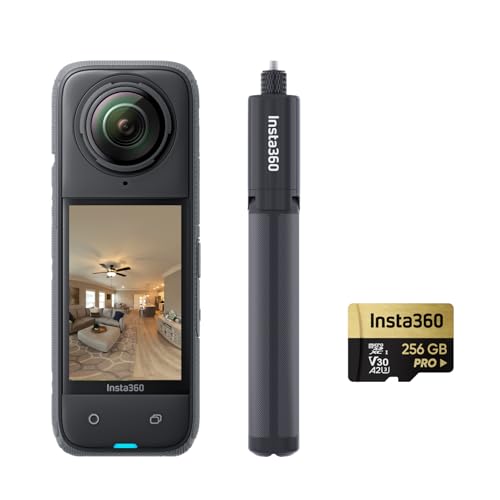
The Insta360 X4 delivers professional-grade 360-degree imaging for real estate agents and property marketers. You’ll capture 72MP photos and 8K video with its dual-lens system and Active HDR technology. The 2290mAh battery records up to 135 minutes at 5.7K resolution—67% longer than the previous X3 model. You get a replaceable battery, 2.5-inch display, and a 2-in-1 selfie stick with tripod included. Connect via HDMI or USB to computers, smartphones, and TVs. You can upload directly to Zillow, Floorfy, Realsee, and other virtual tour platforms. The bundle includes a 256GB microSD card for immediate use.
- Video Resolution:8K 360° video
- Photo Resolution:72MP 360 photos
- Stabilization:Image stabilization included
- HDR Capability:Active HDR
- Audio Capability:Not specified
- Battery/Power:2290mAh battery; up to 135 minutes at 5.7K
- Additional Feature:8K 360º video capture
- Additional Feature:135 minutes recording time
- Additional Feature:256GB microSD card included
Ricoh Theta Z1 360° Camera with 51GB Memory
Serious about capturing immersive virtual tours that rival professional productions? The Ricoh Theta Z1 delivers professional-grade results through its dual 1.0-inch back-illuminated CMOS sensors that capture 23MP still images and 4K 360° video at 30 fps. You’ll shoot with ISO sensitivity up to 6400, enabling clear footage in varied lighting conditions. The 51GB built-in memory stores approximately 900 RAW images or 110 minutes of 4K video. Stabilization via 3-axis rotation correction ensures smooth footage for virtual tours. Connect via USB 3.0 Type-C for rapid file transfers, then stitch images using the RICOH THETA Stitcher plug-in and process RAW files in Lightroom Classic CC. The magnesium alloy body withstands demanding production environments.
- Video Resolution:4K 360° video at 30 fps
- Photo Resolution:23MP still images (~7K stitching)
- Stabilization:3-axis rotation correction for video
- HDR Capability:Automatic dynamic range (DR) correction and HDR processing
- Audio Capability:4-channel built-in microphone for 360° spatial audio
- Battery/Power:Dependent on usage (internal 51GB memory)
- Additional Feature:23MP RAW image support
- Additional Feature:51GB internal memory
- Additional Feature:360° spatial audio recording
j5create 360 Degree Meeting Webcam 1080P HD (JVCU360)
Looking for a budget-friendly pick that captures full-room video conferences? The j5create JVCU360 delivers 1080p HD video with a 360-degree viewing angle, making it ideal for meeting spaces where you need to see everyone simultaneously. Simply plug the USB-C connector into your computer, and you’re ready to go—no drivers needed. The built-in omnidirectional microphone captures audio from all directions, ensuring clear sound during calls. You’ll access multiple video modes including full view, host, and dual host options, letting you customize what participants see. The camera works seamlessly with Zoom, Teams, Skype, and Google Meet. Its fixed focus and auto exposure adjust automatically to changing light conditions, while digital 2x zoom helps you frame shots precisely.
- Video Resolution:1080p @ 30 Hz
- Photo Resolution:2MP effective resolution
- Stabilization:Not available
- HDR Capability:Auto exposure/white balance
- Audio Capability:High fidelity omnidirectional microphone
- Battery/Power:USB-C powered (wired)
- Additional Feature:Omnidirectional microphone built-in
- Additional Feature:Multiple video view modes
- Additional Feature:Plug-and-play USB-C setup
Insta360 X3 Waterproof 360 Action Camera
Want to capture dynamic action sequences in full 360-degree detail? The Insta360 X3 delivers professional-grade capabilities with its dual 1/2″ 48MP sensors, producing 5.7K 360 Active HDR video and 72MP photos. You’ll access multiple recording options: shoot 4K single-lens mode at 30fps with a 170° field of view, or use 2.7K MaxView for ultra-wide single-lens coverage. FlowState stabilization keeps your footage smooth during movement, while Horizon Lock automatically levels your 360° footage. The invisible selfie stick feature eliminates the stick from your footage, creating drone-like perspectives. You can reframe and select angles after shooting using the Insta360 app’s AI-powered editing tools, giving you flexibility in post-production without reshooting.
- Video Resolution:5.7K 360 video
- Photo Resolution:72MP 360 photos
- Stabilization:FlowState stabilization with Horizon Lock
- HDR Capability:360 Active HDR video
- Audio Capability:Not specified
- Battery/Power:Battery specifications not provided
- Additional Feature:AI-powered post-capture reframing
- Additional Feature:4K single-lens mode
- Additional Feature:Horizon Lock 360° leveling
Matterport Pro3 3D Lidar Camera for Virtual Tours
The Matterport Pro3 is an enterprise solution designed for professionals who need to capture large indoor and outdoor spaces with photo-realistic precision. Its lidar sensor delivers accuracy within ±20mm at 10m distance, capturing 100K points per second. Each scan completes in under 20 seconds, covering standard ranges up to 20m or extended ranges to 100m. The removable battery enables continuous on-site scanning without power interruption, even in direct sunlight. You’ll pair the Pro3 with the Matterport Capture app on iOS or Android, then upload to your professional or business plan account to create virtual tours and 360-degree views with exceptional detail and fidelity.
- Video Resolution:High-precision lidar scanning (up to 100m range)
- Photo Resolution:Photo-realistic 3D detail capture
- Stabilization:Ultra-fast lidar sensor for precision
- HDR Capability:Performance in challenging lighting conditions
- Audio Capability:Not specified
- Battery/Power:Removable battery with charging kit included
- Additional Feature:100-meter extended scanning range
- Additional Feature:Under 20-second scan speed
- Additional Feature:±20mm precision accuracy
Samsung Gear 360 High Resolution VR Camera
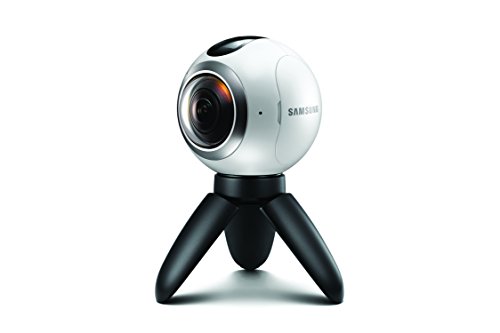
Samsung’s Gear 360 delivers outstanding value for creators who need straightforward 360-degree video without premium pricing. You’ll record 4K video and 30MP stills with its dual fisheye lenses, capturing full 360-degree footage or 180-degree wide-angle shots. The camera weighs just 8.8 ounces and resists dust and water, making it portable for various locations. You pair it with Samsung smartphones, then share directly to Facebook 360 or YouTube 360. The included tripod, carrying pouch, and battery get you started immediately. A one-year warranty covers your investment, and the Micro SD card slot supports expandable storage with V30 video speed class compatibility.
- Video Resolution:4K video recording
- Photo Resolution:30MP stills
- Stabilization:No image stabilization
- HDR Capability:Standard image capture (no specific HDR noted)
- Audio Capability:Not specified
- Battery/Power:1 Lithium Ion battery included
- Additional Feature:Dust and water-resistant
- Additional Feature:Optical 1x/digital 4x zoom
- Additional Feature:Gear VR ecosystem compatible
Factors to Consider When Choosing 360 Degree Cameras for Virtual Tours
When you’re selecting a 360 degree camera for virtual tours, you’ll need to evaluate five critical factors: resolution and image quality to ensure sharp, detailed footage; battery life and endurance so you can complete full tours without interruption; video stabilization features to eliminate shaky footage; sensor size specifications that determine light sensitivity and image clarity; and connectivity and compatibility options for seamless integration with your devices and platforms. Each factor directly affects your camera’s performance, so you should compare specifications across models before making your choice. Start by identifying which factors matter most for your specific touring needs, then use those priorities to narrow down your options.
Resolution And Image Quality
How much detail do you need in your virtual tours? Resolution directly determines clarity. You’ll find 360-degree cameras offering still image resolutions from 23 MP to 72 MP—higher megapixel counts capture finer details in panoramic photos. For video, choose between 4K and 8K resolution based on your platform and viewing needs. Consider sensor size and type; dual 1.0-inch sensors deliver better low-light performance and dynamic range than smaller CMOS sensors. Evaluate HDR capabilities, which balance bright and dark areas by reducing blown-out highlights and preserving scene detail. Check stabilization features for smooth video walkthroughs. Match your resolution choice to your specific use case: real estate tours benefit from 4K video, while high-resolution still photos work for real estate listings.
Battery Life And Endurance
You’ll want to prioritize battery capacity since it directly controls how long you can shoot before needing a recharge. Check the mAh rating on each camera—higher numbers mean extended recording sessions. Consider models with replaceable batteries, which let you swap in fresh units on-site without stopping work. Look for energy-efficient processing features and power-saving modes that optimize 360 capture efficiency. Monitor your battery level in real time during shoots to plan tours strategically and prevent mid-project power loss. Purchase bundles that include extended-capacity batteries and fast chargers to maximize uptime between sessions. Calculate your typical shooting duration, then select a camera whose battery life exceeds that requirement. This approach ensures you’ll complete projects without unexpected interruptions.
Video Stabilization Features
What’s the difference between shaky footage and smooth virtual tours? Stabilization features make that distinction. You’ll find two main options: in-camera gimbal-like stabilization and post-processing stabilization. In-camera stabilization uses 3-axis gyro technology to keep frames aligned during movement, maintaining a steady horizon in panoramic videos. Horizon lock features prevent tilt artifacts by keeping the virtual tour horizon level across pans and tilts. Consider that stabilization performance varies by resolution—8K and 5.7K modes demand more processing, potentially affecting effectiveness. AI-powered stabilization reframes or crops video while preserving smooth motion, ensuring consistent viewing. Test stabilization at your intended recording resolution before committing to a camera. This step ensures you’ll capture the smooth footage your virtual tours require.
Sensor Size Specifications
Once you’ve confirmed your camera delivers smooth footage at your target resolution, examine the sensor specifications that’ll determine your image quality and performance in various lighting conditions. Dual 1.0-inch back-illuminated CMOS sensors provide superior light sensitivity and dynamic range compared to smaller formats, reducing noise in dim environments. Check your camera’s megapixel rating—48MP to 72MP options capture greater detail in panoramic images, improving stitching quality during post-processing. Larger sensors require more power, so assess battery endurance for extended virtual tour shoots. Pair sensor size with focal length information to evaluate field of view and distortion control. Match sensor specifications to your specific lighting conditions and shooting duration requirements to ensure consistent results across all your projects.
Connectivity And Compatibility
How does your 360 camera connect to your editing software and hosting platforms? You’ll want to verify USB-C or Wi-Fi connectivity for fast file transfers to your computer. Check that your camera works with platforms like Zillow, OpenSpace, Kuula, and 3DVista to streamline publishing your tours. Confirm smartphone app integration so you can capture, preview, and share content directly from your phone. Ensure external storage options or sufficient internal memory to handle 72MP photos and 8K video without constant transfers. Finally, assess live streaming and social sharing capabilities for real-time virtual tour presentations. These connectivity features directly impact your workflow efficiency and publishing speed. Verify each compatibility requirement before purchasing to avoid workflow disruptions.
Memory Capacity Options
Your camera’s storage capacity directly affects how many shots you’ll capture before offloading files to your computer or external drive. Some 360 cameras include built-in memory—typically 51 GB or more—eliminating the need for additional cards. Others use removable microSD or SDHC cards, allowing you to expand storage by swapping cards during shoots. Check the memory speed class rating, such as C10, U3, or V30, since faster speeds ensure reliable writing for high-bitrate 4K and 8K video. Calculate your storage needs based on tour size and content type: larger multi-scene projects and dense HDR sequences demand substantially more capacity. Match your camera’s memory to your expected project scope to avoid interruptions during critical shooting sessions.
Price And Value Proposition
What’s the actual cost of owning a 360 camera system for virtual tours, and does it match what you’ll gain from it? Entry-level bundles start at moderate prices, while premium setups with advanced sensors and lidar reach higher costs. Calculate your total cost of ownership by factoring in battery life, storage capacity (256GB microSD cards), and recording times needed for field sessions. Some packages include free initial tours or promotional vouchers, reducing upfront expenses. Higher-resolution outputs like 8K video and 72MP photos justify increased hardware investments for detailed property showcases. Verify compatibility with major platforms—Zillow, Kuula, 3DVista—to maximize publishing value across ecosystems. Compare package offerings directly, weighing upfront expenses against long-term usability and platform integration benefits for your specific business needs.
Final Thoughts
You’ll select your 360 camera by matching your specific needs to each model’s strengths. Determine your primary use—real estate, virtual events, or content creation. Check resolution requirements, storage capacity, and stabilization features. Compare price against your budget. Test compatibility with your existing software or platform. Make your purchase decision based on which camera delivers the features you actually need for your project.

Meet Ry, “TechGuru,” a 36-year-old technology enthusiast with a deep passion for tech innovations. With extensive experience, he specializes in gaming hardware and software, and has expertise in gadgets, custom PCs, and audio.
Besides writing about tech and reviewing new products, he enjoys traveling, hiking, and photography. Committed to keeping up with the latest industry trends, he aims to guide readers in making informed tech decisions.