
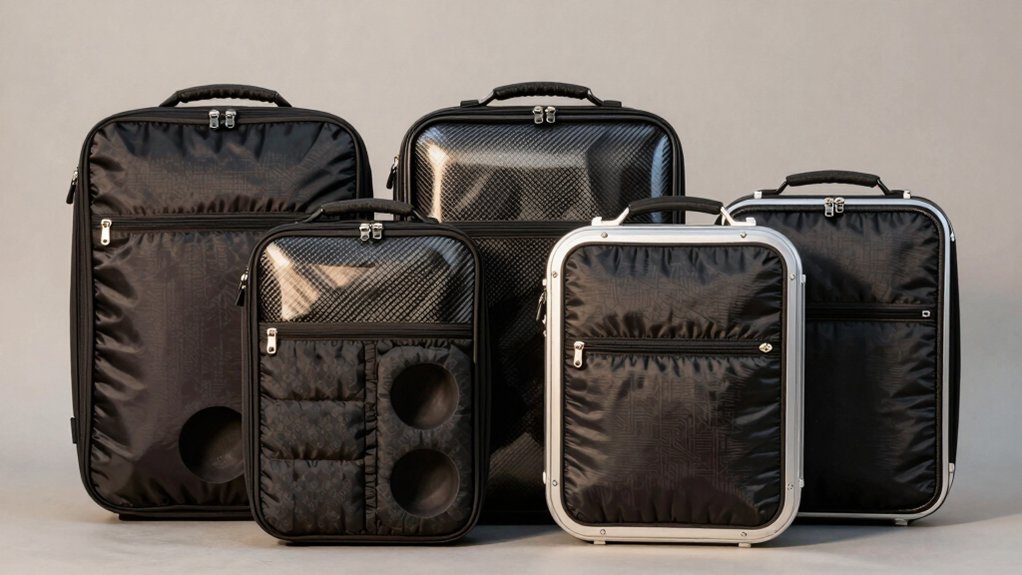

When you’re transporting your desktop PC tower to LAN events or across distances, you’ll need reliable protection that balances durability with portability. You’ve got several solid options available, from wheeled trolleys to reinforced backpacks, each designed to safeguard your equipment during travel. The right case depends on your specific tower dimensions, transport method, and how much gear you’re bringing along. Here’s what you should know to make the best choice for your setup.
| Trunab Computer Desktop Tower Carrying Case for ATX |

| Top Rated Choice | Compartments: Multiple pockets (exact number not specified) | Carrying Options: Shoulder strap and top handle | Interior Dimensions: 20.1 x 8.66 x 18.5 inches | VIEW LATEST PRICE | Read Our Analysis |
| Computer Desktop Tower Large Carrying Case |

| Most Versatile Storage | Compartments: 8 total compartments | Carrying Options: Shoulder strap and top handle | Interior Dimensions: 20.67 x 9.8 x 18.9 inches | VIEW LATEST PRICE | Read Our Analysis |
| CURMIO PC Carrying Case for Desktop Computer Tower |

| Lightweight Essential | Compartments: 4 compartments | Carrying Options: Shoulder strap and padded handle | Interior Dimensions: 19.7 x 9.3 x 18.5 inches | VIEW LATEST PRICE | Read Our Analysis |
| Computer Desktop Tower Large Carrying Case Backpack |

| Gaming-Ready Backpack | Compartments: 5 compartments | Carrying Options: Adjustable shoulder strap and padded handle | Interior Dimensions: 19.88 x 8.86 x 19.69 inches | VIEW LATEST PRICE | Read Our Analysis |
| CURMIO PC Carrying Case on Wheels with Trolley |

| Wheeled Travel Pro | Compartments: 5 compartments | Carrying Options: Shoulder strap and top handle (plus detachable trolley) | Interior Dimensions: 20.1 x 9.5 x 18.6 inches | VIEW LATEST PRICE | Read Our Analysis |
More Details on Our Top Picks
Trunab Computer Desktop Tower Carrying Case for ATX
The Trunab case is the top-rated choice for ATX tower transport. This bag holds your desktop computer tower, keyboard, cables, mouse, and earphones in one 30-liter capacity package. The interior measures 20.1 x 8.66 x 18.5 inches, fitting standard ATX and M-ATX chassis. Multiple pockets organize smaller items separately, while thickened pearl cotton padding protects your equipment from damage. Four non-slip feet pads stabilize the case and prevent friction. Use the adjustable padded shoulder strap for carrying, or grab the top handle. The chest strap keeps shoulders secure. Tear-resistant and water-resistant outer material with padded lining defends against dust, scratches, and moisture during travel.
- Compartments:Multiple pockets (exact number not specified)
- Carrying Options:Shoulder strap and top handle
- Interior Dimensions:20.1 x 8.66 x 18.5 inches
- Water/Dust Resistance:Water-resistant outer material with padding
- Bottom Protection:4 non-slip feet pads
- Chest Strap:Buckle chest strap included
- Additional Feature:Tear-resistant, water-resistant outer
- Additional Feature:Non-slip feet pads
- Additional Feature:Pearl cotton cushioning
Computer Desktop Tower Large Carrying Case
Need versatile storage that accommodates your entire desktop setup? The Wigojoy Computer Desktop Tower Large Carrying Case (Model MZT25) holds ATX and M-ATX chassis with dedicated compartments for accessories. The main section fits your tower case, while three front zippered pockets organize smaller items. Use the elastic straps on top-left for cables, the fleece pocket on the right for your mouse or power bank, and side mesh pockets for water bottles. The inner zippered mesh pocket stores your keyboard and mouse together. Carry it by hand or wear it as a backpack using padded shoulder straps with a chest buckle that reduces shoulder pressure. Dimensions are 20.67 by 9.8 by 18.9 inches.
- Compartments:8 total compartments
- Carrying Options:Shoulder strap and top handle
- Interior Dimensions:20.67 x 9.8 x 18.9 inches
- Water/Dust Resistance:Wear-resistant 600D Oxford cloth
- Bottom Protection:Not specified
- Chest Strap:Releasable plastic buckle included
- Additional Feature:High-density 5mm EPE lining
- Additional Feature:600D Oxford cloth exterior
- Additional Feature:Eight total compartments
CURMIO PC Carrying Case for Desktop Computer Tower
Want to transport your desktop tower without risking damage? The CURMIO PC Carrying Case offers a practical solution. This duffel-style bag measures 20.5 x 11 x 19.2 inches and accommodates your tower, keyboard, cables, and mouse. The thick nylon exterior resists water, scratches, and wear. Inside, foam padding and a removable cushioned pad protect your equipment from friction. Four compartments organize peripherals like hard drives and headphones. Use the adjustable shoulder strap or reinforced padded handle for carrying. The large opening lets you insert and remove items easily. Simply load your components, zip the closure, and you’re ready to transport. Amazon’s 30-day return policy covers eligible returns.
- Compartments:4 compartments
- Carrying Options:Shoulder strap and padded handle
- Interior Dimensions:19.7 x 9.3 x 18.5 inches
- Water/Dust Resistance:Water-resistant, scratch-resistant nylon
- Bottom Protection:4 bottom feet pads
- Chest Strap:Not mentioned
- Additional Feature:Removable foldaway cushioned pad
- Additional Feature:Large opening for access
- Additional Feature:Thick nylon material
Computer Desktop Tower Large Carrying Case Backpack
MRINCA’s gaming-ready backpack solves transport challenges for LAN enthusiasts, frequent office movers, and competitive gamers who need reliable desktop protection during travel. The case accommodates most ATX mid-tower desktops with internal dimensions of 19.88L × 8.86W × 19.69H inches. You’ll find five dedicated compartments organizing your keyboard, mouse, headset, and cables efficiently. Heavy-duty Oxford fabric with reinforced base and anti-slip feet protects against impacts and weather damage. Adjustable chest straps and a padded handle distribute weight evenly across your shoulders. The rear buckle fastener prevents tipping during transport, ensuring your system arrives safely at your destination.
- Compartments:5 compartments
- Carrying Options:Adjustable shoulder strap and padded handle
- Interior Dimensions:19.88 x 8.86 x 19.69 inches
- Water/Dust Resistance:Weatherproof Oxford fabric, dust-resistant
- Bottom Protection:Reinforced base and anti-slip feet
- Chest Strap:Adjustable chest straps included
- Additional Feature:Rear buckle anti-tip fastener
- Additional Feature:Full-height mesh panel organizer
- Additional Feature:Weatherproof oxford fabric
CURMIO PC Carrying Case on Wheels with Trolley
How do you transport a full desktop tower without risking damage during travel? The CURMIO PC Carrying Case addresses this challenge with a hard PC shell lined in thick nylon padding that protects against dust and scratches. The case measures 20.1 x 9.5 x 18.6 inches internally, accommodating most standard towers alongside keyboards and mice. A removable wooden bottom pad absorbs impact, while reinforced handles and detachable shoulder straps offer flexible carrying options. The integrated four-wheel trolley enables you to roll the case rather than lift it, reducing strain during transport. Five compartments—including two large zipper pockets and elastic pouches—organize cables, hard drives, and accessories separately. Organize your peripherals first, position your tower centrally, then secure everything before wheeling it to your destination.
- Compartments:5 compartments
- Carrying Options:Shoulder strap and top handle (plus detachable trolley)
- Interior Dimensions:20.1 x 9.5 x 18.6 inches
- Water/Dust Resistance:Nylon with thick padding protection
- Bottom Protection:Removable wooden pad
- Chest Strap:Not mentioned
- Additional Feature:Detachable folding trolley system
- Additional Feature:Removable wooden protective pad
- Additional Feature:Double-layer design construction
Factors to Consider When Choosing a Desktop PC Tower Travel Carrying Case
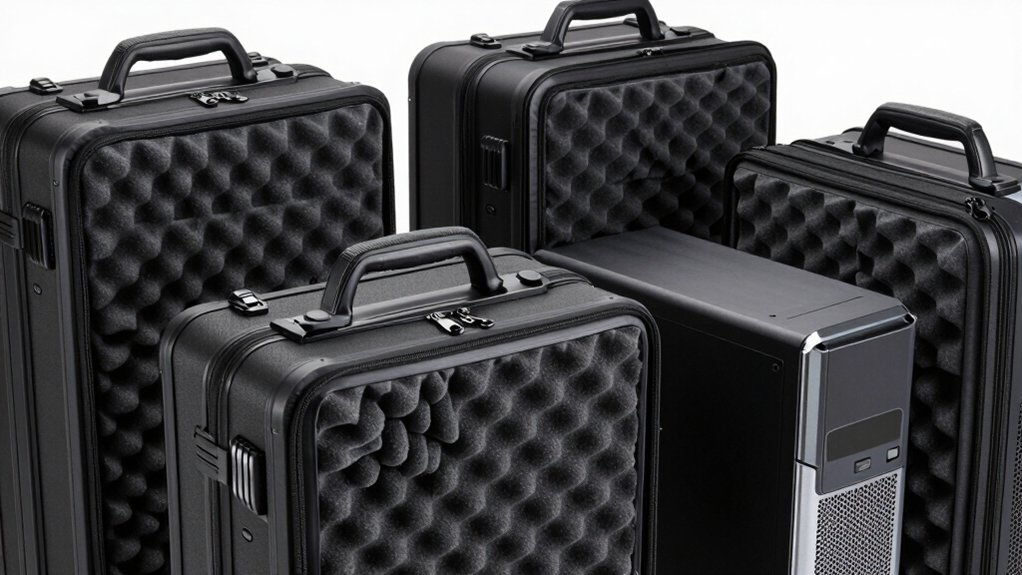
You’ll need to match your case’s interior dimensions to your tower’s height, width, and depth to guarantee it fits properly, then assess the material quality and durability by checking the walls’ thickness, frame reinforcement, and zipper construction. Next, examine the storage organization by counting pockets and compartments for cables, accessories, and documents, and test the carrying options—wheels, handles, and shoulder straps—to determine which methods work best for your travel needs. Finally, verify that the case’s comfort features, such as padded handles and ergonomic weight distribution, align with how far and how often you’ll be transporting your PC.
Compatibility With Your Tower
What matters most when selecting a travel case is matching it precisely to your tower’s dimensions and weight. First, measure your tower’s length, width, and height, then verify the case’s interior dimensions exceed these measurements by at least two inches for padding clearance. Next, confirm the case supports ATX or M-ATX motherboard sizes, since most desktop towers use these standards. Check the case’s weight capacity to ensure it handles your loaded tower safely during transport. Finally, measure your tower’s largest components—such as GPU length or radiator height—and verify the case’s interior accommodates these without compression. Mismatched dimensions risk damage during travel, so accuracy in measurements prevents costly repairs.
Interior Dimension Requirements
When choosing a travel case, matching interior dimensions to your tower’s footprint is the first critical step. Measure your desktop tower’s length, width, and height, then compare these measurements against the bag’s interior specs. Most cases accommodate towers with main compartments around 19–20 inches long, 8–9 inches wide, and 18–19 inches tall. Check the total interior capacity—typically 30 liters or more—to confirm adequate space beyond the tower itself. Verify that your chassis type, whether ATX or M-ATX, aligns with the case’s dimensional limits. Review padding and foam construction to ensure reinforcement where your tower sits snugly. Confirm additional pockets won’t consume space needed for the tower, allowing keyboard, mouse, and cables to fit alongside without compression or shifting.
Material Quality And Durability
How do you protect your tower during transit? Material quality directly determines whether your components survive the journey. Select cases with tear-resistant outer shells that withstand rough handling and sharp objects. Look for padded linings—foam or pearl cotton—that absorb impact and prevent internal shifting. Water-resistant or weatherproof shells guard against moisture and dust exposure during transport. Examine the case bottom for reinforced bases or anti-slip feet, which prevent sliding on vehicle floors and provide stability on varied surfaces. Evaluate handles and straps carefully; they should be padded and adjustable to distribute weight evenly without stretching or tearing under repeated carrying. Sturdy construction in these areas ensures your case maintains its protective function across multiple trips without degradation.
Storage Organization And Pockets
Organization separates a functional carrying case from a frustrating one, so you’ll want to prioritize how a case compartmentalizes your peripherals and accessories. Examine the pocket layout carefully—front pockets, side mesh pockets, and inner zippered sections should each serve a specific purpose. Count the compartments available and match them to your items: keyboard, mouse, cables, headphones, and hard drives each need designated spaces. Look for cases with interior dividers or adjustable padding that you can customize for different accessory sizes, including GPU radiators and mini tools. Check exterior features like elastic straps or cable pockets that keep frequently used items accessible without opening the main compartment. A large main compartment must accommodate your desktop tower while maintaining separate padded areas for fragile components to prevent movement during transport.
Comfort And Carrying Options
What carrying method’ll work best for your travel situation?
Consider your distance and comfort level first. For short trips, use the top handle to hand-carry your case. For longer distances, switch to adjustable padded shoulder straps that function as a backpack. Add chest straps or buckle systems to prevent strap slippage and reduce shoulder fatigue during movement.
If you’re transporting over extended distances, choose models with cross-body or removable shoulder straps. These distribute weight evenly across your body, minimizing strain. For maximum ease, select cases with trolley-ready designs or wheels. These eliminate lifting entirely, letting you roll your tower through airports and terminals instead.
Evaluate reinforced handles and padded straps on your chosen model. They directly impact comfort when carrying heavy desktop towers. Match your carrying method to your trip’s distance and your physical capability.
Protection And Padding Features
When you’re transporting a desktop tower, you’ll need to prioritize internal protection above all else. Look for cases with foam padding or thickened cushioning that absorbs impact during movement. Check the bottom for four protective feet pads that reduce friction and prevent direct contact with surfaces. Verify the case includes full-height internal padding lining to secure your keyboard, mouse, hard drives, and radiators without shifting. Select outer materials that resist tears and water damage, guarding against dust and moisture exposure. Confirm the case features reinforced bases and anti-slip surfaces to prevent tipping when you set it down. Finally, examine the closure system—quality zippers or buckles combined with adjustable straps keep your tower stable and minimize internal movement throughout transport.
Final Thoughts
You’ll protect your desktop tower effectively by selecting a case with hard-shell construction, interior space exceeding your tower’s dimensions by two inches, and multiple accessory pockets. Prioritize reinforced bases, anti-slip feet, and water-resistant materials. Choose wheels for frequent travel or backpack straps for lighter setups. Verify the main compartment measures 20–21 inches. These specifications ensure your equipment stays secure during transport while remaining portable for LAN events and relocations.

Meet Ry, “TechGuru,” a 36-year-old technology enthusiast with a deep passion for tech innovations. With extensive experience, he specializes in gaming hardware and software, and has expertise in gadgets, custom PCs, and audio.
Besides writing about tech and reviewing new products, he enjoys traveling, hiking, and photography. Committed to keeping up with the latest industry trends, he aims to guide readers in making informed tech decisions.