
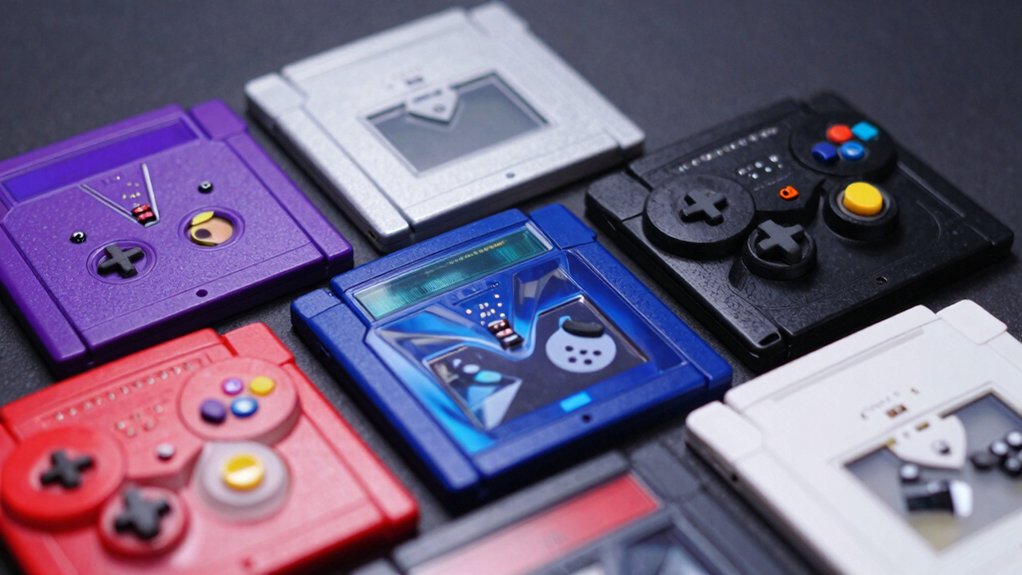

You need a reliable GameCube memory card to protect your saved games from loss or corruption. You’ll find several options available, each with different storage capacities and features designed for specific needs. Whether you’re looking for maximum storage, budget-friendly solutions, or advanced technology like USB-C firmware, the right card exists for your setup. Let’s explore which memory card suits your gaming requirements best.
| Wigearss 1024MB Memory Card for Gamecube and Wii |

| Maximum Storage Capacity | Storage Capacity: 1024MB (16,344 blocks) | Compatibility: Wii RVL-001 and GameCube | Memory Type: Flash Memory (SD) | VIEW LATEST PRICE | Read Our Analysis |
| 16MB GameCube Memory Card for Nintendo GameCube & Wii |

| Entry-Level Option | Storage Capacity: 16MB (251 blocks) | Compatibility: Wii RVL-001 and GameCube | Memory Type: CFast Memory | VIEW LATEST PRICE | Read Our Analysis |
| Gamilys 128MB Black Memory Card Compatible for Wii Gamecube |

| Best Value | Storage Capacity: 128MB | Compatibility: Wii and GameCube | Memory Type: Micro SD | VIEW LATEST PRICE | Read Our Analysis |
| MAYFLASH 512MB(8172 Blocks) Memory Card Blue for Gamecube and Wii |

| Mid-Range Choice | Storage Capacity: 512MB (8,172 blocks) | Compatibility: Wii RVL-001 and GameCube | Memory Type: Flash Memory (not specified) | VIEW LATEST PRICE | Read Our Analysis |
| BITFUNX GCMCE Memory Card Emulator for GameCube/Wii |
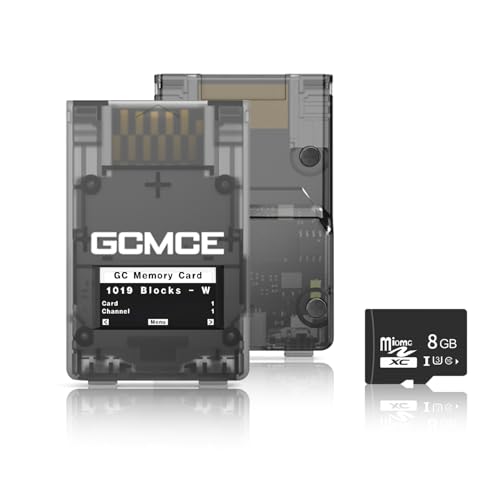
| Most Advanced | Storage Capacity: 1GB–500GB (via Micro SD card support) | Compatibility: GameCube/Wii (RVL-001) with homebrew software support | Memory Type: Micro SDHC | VIEW LATEST PRICE | Read Our Analysis |
| GameCube 251 Memory Card |

| Official Original | Storage Capacity: 251 blocks | Compatibility: GameCube with compatible games | Memory Type: Memory card (traditional) | VIEW LATEST PRICE | Read Our Analysis |
More Details on Our Top Picks
Wigearss 1024MB Memory Card for Gamecube and Wii
The Wigearss 1024MB card delivers maximum storage capacity with 16,344 blocks for GameCube and Wii RVL-001 consoles. This orange memory card features eight 128MB partitions, allowing you to organize saves across multiple sections. You’ll access different sections by pressing the button on the card to switch between parts. The card operates at speeds between 10–100 MB/s with Class 4 performance, ensuring efficient data transfers. Its compact dimensions of 1.3 inches by 1.7 inches fit standard console slots. The card maintains a 4.8-star rating from 369 customer reviews and ranks #6 in GameCube accessories, confirming reliable performance for your gaming library.
- Storage Capacity:1024MB (16,344 blocks)
- Compatibility:Wii RVL-001 and GameCube
- Memory Type:Flash Memory (SD)
- Physical Design:Orange, compact with button to switch between 8 parts
- Data Transfer Speed:10-100 MB/s (Class 4)
- Durability Features:Wearout proof
- Additional Feature:Eight 128MB storage partitions
- Additional Feature:Button-switchable partition access
- Additional Feature:Real 16344 block capacity
16MB GameCube Memory Card for Nintendo GameCube & Wii
Looking for an entry-level option that won’t drain your wallet? The Hyamass 16MB GameCube Memory Card delivers reliable storage at a budget-friendly price. You’ll get 251 blocks of capacity to store hundreds of game files from titles like Super Smash Bros. and Zelda. The card features a streamlined design that fits snugly in your console slot without wobbling, a common issue with generic alternatives. Its shock-resistant build protects your saves from accidental drops and power outages. With rapid data transfer speeds, you’ll experience minimal lag during saves. Simply plug it into your GameCube or Wii RVL-001 model—no installation required. This third-party accessory replaces bulky original cards while preserving full game compatibility.
- Storage Capacity:16MB (251 blocks)
- Compatibility:Wii RVL-001 and GameCube
- Memory Type:CFast Memory
- Physical Design:Black, streamlined profile, lightweight
- Data Transfer Speed:High-speed, rapid data transfer
- Durability Features:Crash-proof, shock-resistant, prevents wobble
- Additional Feature:Shock-resistant build protection
- Additional Feature:Streamlined profile eliminates wobble
- Additional Feature:Crash-proof rapid data transfer
Gamilys 128MB Black Memory Card Compatible for Wii Gamecube
Want reliable game saves without overspending? The Gamilys 128MB Black Memory Card delivers straightforward functionality for your Wii and GameCube. This third-party option stores game saves independently across different titles, giving you dedicated space for each game. The card features temperature and water-resistant construction, protecting your data from environmental damage. With 10-20 MB/s media speed and Class 2 classification, you’ll experience reliable performance during save operations. The lightweight design weighs only 20 grams, making it portable between gaming sessions. Installation requires inserting the MicroSD card into your console’s compatible slot. This option provides practical storage capacity at an accessible price point for casual and regular players.
- Storage Capacity:128MB
- Compatibility:Wii and GameCube
- Memory Type:Micro SD
- Physical Design:Black, temperature/water-proof, 20 grams
- Data Transfer Speed:10-20 MB/s (Class 2)
- Durability Features:Temperature proof, water proof
- Additional Feature:Temperature and water proof
- Additional Feature:Independent game save storage
- Additional Feature:Class 2 speed class
MAYFLASH 512MB(8172 Blocks) Memory Card Blue for Gamecube and Wii
MAYFLASH’s 512MB card offers a solid mid-range option for GameCube and Wii players seeking reliable save storage. This third-party card provides four separate storage areas, each holding 2043 blocks, allowing you to organize saves efficiently. You’ll switch between areas by pressing the button on the card itself. Compatibility works with GameCube consoles and Wii model RVL001 only. The card operates plug-and-play, requiring no setup. Its high-speed performance ensures quick data transfers. At 512MB capacity, you’ll store considerably more saves than smaller alternatives, making it practical for players with extensive game libraries.
- Storage Capacity:512MB (8,172 blocks)
- Compatibility:Wii RVL-001 and GameCube
- Memory Type:Flash Memory (not specified)
- Physical Design:Blue, plug-and-play with button to switch storage areas
- Data Transfer Speed:High speed and efficient
- Durability Features:High speed and efficient
- Additional Feature:Four distinct storage areas
- Additional Feature:2043 blocks per partition
- Additional Feature:Plug and play operation
BITFUNX GCMCE Memory Card Emulator for GameCube/Wii
The BITFUNX GCMCE is the most advanced memory card solution for GameCube and Wii owners who need unlimited save storage without purchasing multiple physical cards. This emulator uses Micro SD cards up to 500GB, letting you store over 8000 virtual memory cards on a single 8GB card. You create virtual cards in various sizes: 59, 123, 251, 507, or 1019 blocks. The device automatically detects your running game and assigns dedicated save files to prevent conflicts. Its 128×64 OLED display shows real-time status, while two front buttons enable easy navigation. USB-C firmware updates keep your device current. This solution works with Swiss homebrew software, FlippyBoot, and other compatible loaders.
- Storage Capacity:1GB–500GB (via Micro SD card support)
- Compatibility:GameCube/Wii (RVL-001) with homebrew software support
- Memory Type:Micro SDHC
- Physical Design:Tran-Black, OLED display, USB-C port, 20 grams
- Data Transfer Speed:69 MB/s (Class 10)
- Durability Features:Supports unlimited saves via expandable storage
- Additional Feature:128×64 OLED display status
- Additional Feature:Supports 1GB-500GB Micro SD
- Additional Feature:Unlimited virtual memory cards
GameCube 251 Memory Card
Nintendo’s official original GameCube 251 Memory Card stores up to 251 blocks of save data across compatible games. You’ll find the card’s capacity varies by game—some titles use fewer blocks while others demand more storage space. The memory card measures 5.04 by 4.8 by 0.94 inches and weighs just 13 grams, making it portable and easy to transport between consoles. Simply insert the card into your GameCube’s memory slot to save and load your progress. With a 4.4-star rating from 875 customer reviews, this original card provides reliable performance for preserving your game saves.
- Storage Capacity:251 blocks
- Compatibility:GameCube with compatible games
- Memory Type:Memory card (traditional)
- Physical Design:Original gray, 13 grams, 5.04 x 4.8 x 0.94 inches
- Data Transfer Speed:Not specified
- Durability Features:Durable standard construction
- Additional Feature:Official Nintendo manufacturer product
- Additional Feature:Saves up to 251 blocks
- Additional Feature:Compatible with all GameCube games
Factors to Consider When Choosing a Gamecube Memory Card
When you’re shopping for a GameCube memory card, you’ll need to evaluate several key factors: storage capacity (how many saves you need), compatibility with your specific console model, the card’s read/write speed for faster performance, its durability and build quality to protect your data long-term, and your budget relative to the value you’re getting. Start by determining how many game saves you typically maintain, then verify that your chosen card works with your console version, check performance specs if speed matters for your gameplay, inspect build quality reviews to avoid data loss, and finally compare prices across options to find the best deal. These considerations will help you select a memory card that reliably stores your saves without wasting money on unnecessary features.
Storage Capacity Needs
How much space do you actually need on a GameCube memory card? Start by counting your game library and researching each game’s save file size. Most games require 1–5 blocks per save, though larger titles demand more. A 16 MB card holds roughly 251 blocks—enough for 50–100 saves depending on game sizes. For moderate collections, a 64 MB card works well. If you own 20+ games or plan to expand your collection, choose 128 MB or larger. These cards provide 16,344+ blocks, accommodating hundreds of saves across multiple titles. Calculate your needs by multiplying your game count by average save size, then select a card exceeding that total. This approach prevents running out of space during future gaming sessions.
Compatibility With Console Model
What console model do you own? Your answer determines which memory card works for you. GameCube systems accept standard GameCube memory cards with 251 blocks of storage. Wii RVL-001 models use either GameCube cards or Wii-specific SD/SDHC cards. Some memory cards work exclusively with one console, while others support both GameCube and Wii. Check your console’s model number on the bottom or back panel. Then verify the card’s compatibility specifications match your system. Standard GameCube cards require the GameCube controller port, while Wii SD cards need the Wii’s SD card slot. Using an incompatible card won’t damage your console, but it won’t function. Purchase a card explicitly labeled for your console model to guarantee plug-and-play compatibility without adapters.
Speed And Performance
You’ll want to pay close attention to a memory card’s speed and performance specs, as they directly impact how quickly your saves load and write to the card. Check the data transfer rates listed in the product specifications, typically ranging from 10 to 100 MB/s. Higher speeds reduce lag during save operations and improve overall performance. Look for cards rated Class 2 or higher, which indicate faster read and write capabilities. Consider cards featuring multiple storage partitions or areas, as these organize saves efficiently and reduce fragmentation. If you frequently save games or play titles requiring rapid data access, prioritize higher-speed options. Standard-speed cards work adequately for casual gaming, but high-speed cards provide noticeably better performance during intensive gaming sessions.
Durability And Build Quality
Since GameCube memory cards experience regular insertion, removal, and occasional handling mishaps, durability and build quality should rank high in your selection criteria. Look for cards labeled shock-resistant or crash-proof to protect your saves during accidental drops or sudden power loss. Check product specifications for water and temperature resistance ratings, which safeguard data integrity against environmental damage. Examine the physical design to ensure the card fits snugly in your console’s slot, minimizing wobble that causes mechanical wear over time. Review the storage architecture—cards with multiple storage areas or virtual memory mapping distribute data across isolated blocks, preventing total loss from single-point failures. Consider models offering USB-C or microSD interfaces, enabling firmware updates and recovery options that extend long-term reliability and lifespan.
Budget And Value Proposition
How should you balance cost against long-term savings when selecting a GameCube memory card?
Start by comparing capacity options. A 512MB or 1024MB card costs more upfront but provides multiple save slots, eliminating the need to buy several smaller cards. Next, evaluate durability features. Cards labeled “wearout proof” with robust data protection prevent costly data loss and replacement expenses. Then examine read/write speeds. Faster cards (69 MB/s or higher) reduce save times and improve reliability, justifying higher prices through better performance.
Finally, assess warranty coverage. Third-party cards with extended warranties and post-purchase support offer greater long-term protection than cheaper alternatives without guarantees. Calculate total ownership cost by adding card price, potential replacements, and warranty expenses. This approach reveals which card delivers genuine value rather than simply lowest price.
Final Thoughts
You’ll want to select a memory card based on your storage needs and budget. For maximum capacity, choose the Wigearss 1024MB. If you’re saving money, pick the 16MB Hyamass. Need portability? Go with the Gamilys 128MB. Want modern features? Select the BITFUNX GCMCE with USB-C and OLED display. Match your choice to your game library size and usage habits.

Meet Ry, “TechGuru,” a 36-year-old technology enthusiast with a deep passion for tech innovations. With extensive experience, he specializes in gaming hardware and software, and has expertise in gadgets, custom PCs, and audio.
Besides writing about tech and reviewing new products, he enjoys traveling, hiking, and photography. Committed to keeping up with the latest industry trends, he aims to guide readers in making informed tech decisions.