
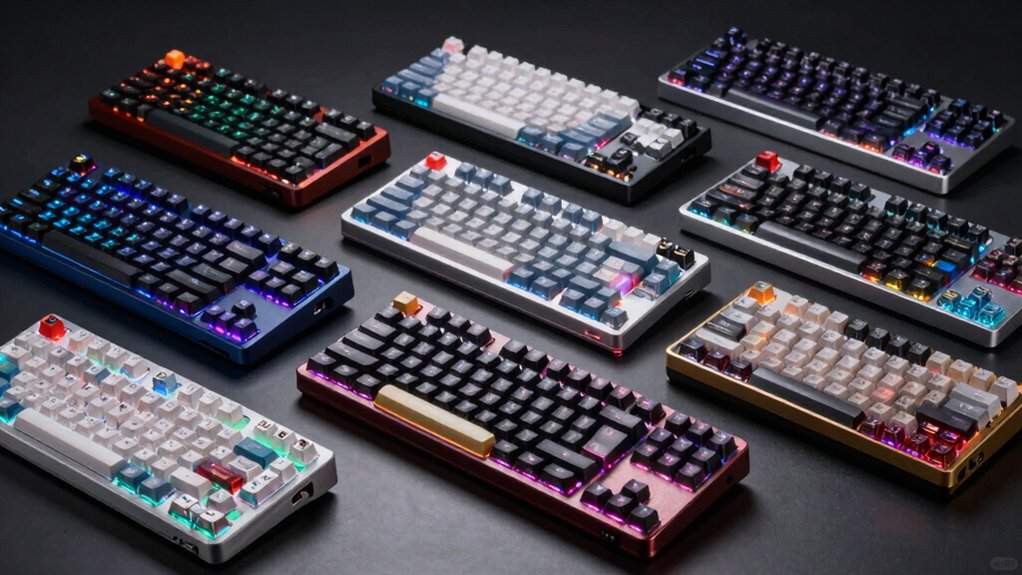

When you’re shopping for a metal mechanical keyboard, you need to evaluate several key factors before making your purchase. Start by checking the switch type—linear, brown, or clicky—based on whether you prioritize gaming speed or typing comfort. Next, confirm the layout size that fits your desk: 87-key compact, 75%, or full 104-key. Then verify connectivity options like USB-C, Bluetooth, or 2.4GHz wireless. Finally, examine build quality features such as aluminum construction and gasket mounting. Understanding these elements will help you narrow down your choices, but which keyboard actually delivers the best performance?
| Newmen GM325Pro Mechanical Gaming Keyboard with RGB LED |
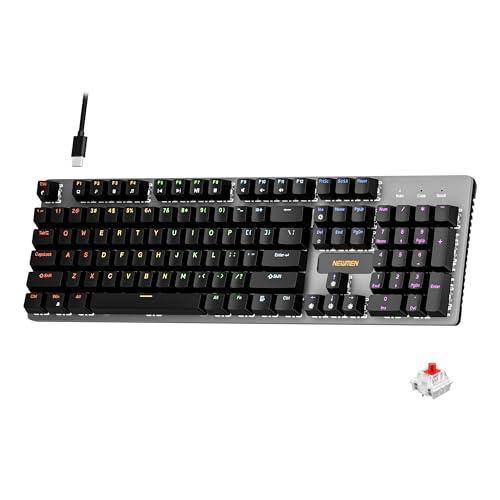
| Best Gaming Aesthetics | Switch Type: Linear red switches | Layout Size: Full-size (104 keys) | Lighting Type: RGB side-edge lighting (13 preset effects) | VIEW LATEST PRICE | Read Our Analysis |
| Cherry KC 200 MX Mechanical Keyboard with Silent RED Switches |

| Best Office Keyboard | Switch Type: MX2A silent red switches | Layout Size: Full-size (104-108 keys) | Lighting Type: White status LEDs (caps/scroll/num lock only) | VIEW LATEST PRICE | Read Our Analysis |
| Redragon K552 Mechanical Gaming Keyboard 87-Key Compact |

| Best Compact Gaming | Switch Type: Linear red switches | Layout Size: Tenkeyless (87 keys) | Lighting Type: Rainbow backlighting (6 preset modes) | VIEW LATEST PRICE | Read Our Analysis |
| AULA F75 Pro Wireless Mechanical Gaming Keyboard |

| Most Versatile Features | Switch Type: LeoboG reaper switches (linear) | Layout Size: 75% compact (81 keys) | Lighting Type: 16.8M RGB backlighting (16 preset + 10 music effects) | VIEW LATEST PRICE | Read Our Analysis |
| Womier SK80 75% Mechanical Gaming Keyboard RGB Black |

| Best Display Innovation | Switch Type: Pre-lubed linear switches | Layout Size: 75% compact (unspecified key count) | Lighting Type: RGB backlighting (19 effects, 9 colors) | VIEW LATEST PRICE | Read Our Analysis |
| Logitech G413 SE Mechanical Gaming Keyboard Backlit |

| Best Budget Option | Switch Type: Tactile mechanical switches | Layout Size: Full-size (tenkeyless variant available) | Lighting Type: White LED backlighting | VIEW LATEST PRICE | Read Our Analysis |
| Cherry KC 200 MX Mechanical Keyboard (Black/Bronze) |

| Best Tactile Typing | Switch Type: MX2A brown switches (tactile) | Layout Size: Full-size (104 keys) | Lighting Type: White status LEDs (caps/scroll/num lock only) | VIEW LATEST PRICE | Read Our Analysis |
| AULA F2088 Typewriter Mechanical Gaming Keyboard Blue Switches |
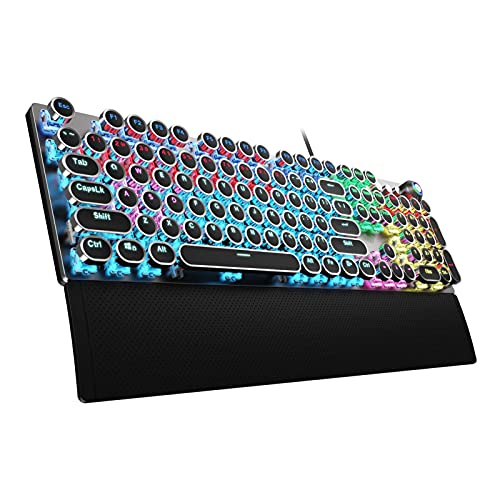
| Best Retro Style | Switch Type: Blue switches (tactile/clicky) | Layout Size: Full-size (104 keys) | Lighting Type: Rainbow LED backlighting (19 effects) | VIEW LATEST PRICE | Read Our Analysis |
| Redragon K556 RGB Mechanical Gaming Keyboard with Brown Switch |

| Best Hot-Swappable Build | Switch Type: Brown switches (tactile) | Layout Size: Full-size (104 keys) | Lighting Type: RGB backlighting (20+ presets) | VIEW LATEST PRICE | Read Our Analysis |
More Details on Our Top Picks
Newmen GM325Pro Mechanical Gaming Keyboard with RGB LED
Why settle for a standard keyboard when you’re looking for gaming aesthetics paired with reliable performance? The Newmen GM325Pro delivers a full-size 104-key layout with a metal top plate that withstands intense gaming sessions. You’ll experience smooth, linear red switches that register every keystroke instantly with full-key rollover technology. The keyboard features 13 RGB rainbow preset effects on side lighting that enhance visibility. Its 1.8-meter detachable USB cable allows easy portability for LAN parties or travel. You can access media controls and functions through FN+F1–F11 shortcuts. Optional customization software lets you remap keys, record macros, and personalize lighting settings for gaming or work environments.
- Switch Type:Linear red switches
- Layout Size:Full-size (104 keys)
- Lighting Type:RGB side-edge lighting (13 preset effects)
- Connectivity:Wired USB (1.8m detachable cable)
- Key Rollover & Anti-Ghosting:Full N-key rollover
- Hot-Swappable Capability:Not hot-swappable
- Additional Feature:13 preset rainbow effects
- Additional Feature:1.8-meter detachable USB cable
- Additional Feature:FN+F1–F11 media shortcuts
Cherry KC 200 MX Mechanical Keyboard with Silent RED Switches
If you’re looking for a keyboard that won’t disrupt your office environment, the Cherry KC 200 MX with Silent RED switches delivers quiet, smooth typing without sacrificing durability. The MX2A Silent RED switches provide linear key presses with zero audible click, ideal for shared workspaces. Its anodized aluminum plate and laser-etched keycaps withstand years of daily use. The wired USB connection ensures reliable compatibility with Windows 10 and later systems. Three status LEDs indicate CAPS LOCK, SCROLL LOCK, and NUM LOCK activation. With full N-key rollover and anti-ghosting technology, you’ll experience accurate input during rapid typing. The keyboard’s fold-out feet offer adjustable angles for ergonomic positioning. Each switch supports over 50 million actuations, guaranteeing long-term reliability. The ambidextrous layout accommodates both left and right-handed users effectively.
- Switch Type:MX2A silent red switches
- Layout Size:Full-size (104-108 keys)
- Lighting Type:White status LEDs (caps/scroll/num lock only)
- Connectivity:Wired USB-A
- Key Rollover & Anti-Ghosting:Full N-key rollover with anti-ghosting
- Hot-Swappable Capability:Not hot-swappable
- Additional Feature:>50 million actuations per key
- Additional Feature:Anodized metal plate construction
- Additional Feature:Laser-etched abrasion-resistant keycaps
Redragon K552 Mechanical Gaming Keyboard 87-Key Compact
The Redragon K552 delivers compact gaming performance in an 87-key tenkeyless layout that fits smaller desks and travel setups. Its metal top plate and anti-slip feet provide durability for portable use. The linear red switches offer rapid actuation with quiet operation, making them suitable for gaming marathons and extended typing. You’ll get full anti-ghosting with N-key rollover for reliable multi-key input. Rainbow LED backlighting includes six preset modes with adjustable brightness through keyboard shortcuts. For customization, download dedicated software to remap keys and create macro commands. The keyboard connects via braided USB cable and requires no drivers for basic plug-and-play functionality across Windows, macOS, and Linux systems.
- Switch Type:Linear red switches
- Layout Size:Tenkeyless (87 keys)
- Lighting Type:Rainbow backlighting (6 preset modes)
- Connectivity:Wired USB (braided cable)
- Key Rollover & Anti-Ghosting:Full N-key rollover (NKRO) with anti-ghosting
- Hot-Swappable Capability:Not hot-swappable
- Additional Feature:6 preset lighting modes
- Additional Feature:Adjustable brightness via shortcuts
- Additional Feature:Dedicated software driver customization
AULA F75 Pro Wireless Mechanical Gaming Keyboard
Looking for a keyboard that works across multiple devices without constant reconnection? The AULA F75 Pro connects via Bluetooth 5.0, 2.4GHz wireless, or USB-C to five devices simultaneously. Switch between them using shortcut keys or the side button. The 81-key layout preserves arrow keys while maintaining a compact form. Hot-swappable switches support both 3-pin and 5-pin types without soldering. LeoboG Reaper switches deliver smooth typing with creamy mechanical sound. Customize lighting through 16.8M RGB options and 16 preset effects. Use the multi-function knob to adjust brightness, volume, and effects. The 4000mAh battery provides long-lasting wireless operation. PBT keycaps resist fading and sweat. Program macros via the driver for gaming or productivity needs.
- Switch Type:LeoboG reaper switches (linear)
- Layout Size:75% compact (81 keys)
- Lighting Type:16.8M RGB backlighting (16 preset + 10 music effects)
- Connectivity:Tri-mode (Bluetooth 5.0, 2.4GHz wireless, USB-C wired)
- Key Rollover & Anti-Ghosting:N-key rollover
- Hot-Swappable Capability:Hot-swappable (3-pin or 5-pin)
- Additional Feature:Tri-mode connectivity (five devices)
- Additional Feature:Pre-lubricated stabilizers included
- Additional Feature:Multi-function knob control
Womier SK80 75% Mechanical Gaming Keyboard RGB Black
Want a keyboard that displays what you’re actually doing while you type? The Womier SK80 features a DIY multimedia screen in the upper right corner that shows custom GIFs, caps lock status, connection mode, RGB settings, and volume. The screen angles at 11° to match your natural viewing position. You’ll get hot-swappable switches compatible with 3Pin or 5Pin options, pre-lubed linear switches with south-facing light diffusers, and 19 RGB lighting effects across 9 colors. Customize everything through the driver software—adjust brightness, flow rate, macros, and GIF displays. The gasket-mounted design reduces typing noise while the EVA positioning plate provides a soft, responsive feel. Connect via detachable Type-C and use it on Mac or Windows systems.
- Switch Type:Pre-lubed linear switches
- Layout Size:75% compact (unspecified key count)
- Lighting Type:RGB backlighting (19 effects, 9 colors)
- Connectivity:Wired USB Type-C (detachable)
- Key Rollover & Anti-Ghosting:N-key rollover
- Hot-Swappable Capability:Hot-swappable (3-pin or 5-pin)
- Additional Feature:DIY multimedia display screen
- Additional Feature:Gasket mounted design
- Additional Feature:Music syncing rhythm mode
Logitech G413 SE Mechanical Gaming Keyboard Backlit
Gamers who want durability without overspending should consider Logitech’s G413 SE, an affordable mechanical keyboard that doesn’t compromise on build quality. The keyboard features a brushed aluminum top case paired with an aluminum-magnesium alloy backbone, delivering robust construction with minimal flex. PBT keycaps resist heat and wear, ensuring longevity during intense gaming sessions. You’ll benefit from tactile mechanical switches that provide precise input, while 6-key rollover anti-ghosting prevents missed commands. White LED backlighting illuminates keys for low-light gaming. FN key media controls let you adjust volume, manage playback, and toggle lighting quickly. Choose the full-size layout or switch to the TKL SE model based on your desk space.
- Switch Type:Tactile mechanical switches
- Layout Size:Full-size (tenkeyless variant available)
- Lighting Type:White LED backlighting
- Connectivity:Wired USB
- Key Rollover & Anti-Ghosting:6-key rollover anti-ghosting
- Hot-Swappable Capability:Not hot-swappable
- Additional Feature:Brushed aluminum top case
- Additional Feature:PBT heat-resistant keycaps
- Additional Feature:Windows lock FN key
Cherry KC 200 MX Mechanical Keyboard (Black/Bronze)
If you’re prioritizing tactile responsiveness in an office setting, the Cherry KC 200 MX delivers the typing precision you need. This wired mechanical keyboard features CHERRY MX2A Brown switches that provide tactile feedback without audible clicks, making it ideal for shared workspaces. The anodized aluminum plate and metal construction ensure durability through years of daily use. With full N-key rollover and anti-ghosting technology, you’ll experience simultaneous key recognition without missed inputs. The laser-etched keycaps resist abrasion, maintaining legibility over time. Additional multimedia keys for calculator and volume control streamline your workflow, while white status LEDs indicate lock key activation clearly.
- Switch Type:MX2A brown switches (tactile)
- Layout Size:Full-size (104 keys)
- Lighting Type:White status LEDs (caps/scroll/num lock only)
- Connectivity:Wired USB-A
- Key Rollover & Anti-Ghosting:Full N-key rollover with anti-ghosting
- Hot-Swappable Capability:Not hot-swappable
- Additional Feature:Over 100 million actuations
- Additional Feature:2 sturdy fold-out feet
- Additional Feature:Molded comfortable keycaps
AULA F2088 Typewriter Mechanical Gaming Keyboard Blue Switches
The AULA F2088 delivers a typewriter aesthetic that appeals to users seeking retro-inspired keyboards with modern gaming performance. This wired keyboard features blue switches that provide crisp, tactile feedback for responsive typing. The aluminum alloy top panel resists scratches while the matte finish maintains a professional appearance. You’ll customize lighting from 19 effects, adjusting brightness and speed through three profiles using the dedicated media control knob. The ergonomic wrist rest supports your hands at an elevated angle, reducing fatigue during extended use. Anti-ghosting technology ensures each keystroke registers independently, making this keyboard suitable for gaming and productivity tasks across Windows, Mac, and Linux systems.
- Switch Type:Blue switches (tactile/clicky)
- Layout Size:Full-size (104 keys)
- Lighting Type:Rainbow LED backlighting (19 effects)
- Connectivity:Wired USB
- Key Rollover & Anti-Ghosting:104-key anti-ghosting
- Hot-Swappable Capability:Not hot-swappable
- Additional Feature:Retro typewriter round keycaps
- Additional Feature:Removable ergonomic wrist rest
- Additional Feature:19 lighting effects customizable
Redragon K556 RGB Mechanical Gaming Keyboard with Brown Switch
Looking to customize your keyboard without permanence? The Redragon K556 offers hot-swap sockets that accept 99.8% of mechanical switches, letting you swap Brown switches for alternatives whenever you want. Its aluminum frame provides stability and durability for daily use. You’ll access 20 RGB backlighting presets through onboard controls or design custom effects using the included software. The keyboard includes a switch puller and spare switches to get started immediately. It connects via USB to Windows, Mac, and Linux systems. At 1000 grams with noise-absorbing foams, this wired keyboard delivers reliable performance for typing and gaming without the commitment of a soldered build.
- Switch Type:Brown switches (tactile)
- Layout Size:Full-size (104 keys)
- Lighting Type:RGB backlighting (20+ presets)
- Connectivity:Wired USB
- Key Rollover & Anti-Ghosting:Hot-swap compatible (true hot-swappable)
- Hot-Swappable Capability:Hot-swappable (3-pin/5-pin, 99.8%+ compatibility)
- Additional Feature:20 RGB backlighting presets
- Additional Feature:Noise-absorbing foams included
- Additional Feature:Hot-swappable 99.8%+ compatibility
Factors to Consider When Choosing Metal Mechanical Keyboards
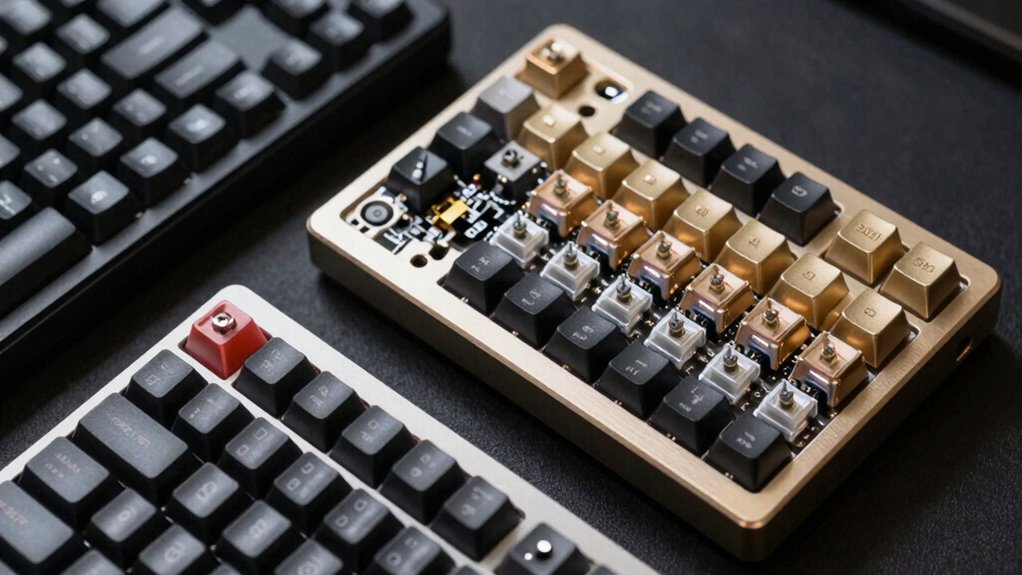
When you’re selecting a metal mechanical keyboard, you’ll want to evaluate five key areas: the build quality and durability of the frame and components, the switch type and performance characteristics that match your typing needs, the design and layout options available for your desk setup, the lighting and customization features you can control, and the connectivity and compatibility standards that work with your devices. Start by checking the metal construction type (aluminum, steel, or brass) and switch mechanism (linear, tactile, or clicky), then confirm the keyboard layout fits your space and that RGB or other lighting options meet your preferences. Finally, verify that the keyboard’s connection method—whether USB, wireless, or both—and software compatibility align with your computer or gaming system before making your purchase.
Build Quality And Durability
How do you know if a metal mechanical keyboard will last through years of daily use? Check the top plate material first—aluminum or brushed aluminum chassis provides superior rigidity compared to plastic designs. Next, examine the mounting system; gasket or multi-layer mounting reduces vibration and maintains typing consistency over time. Inspect the key components carefully. Look for metal or reinforced plates, strengthened sockets, and wear-resistant keycaps that withstand prolonged use. Verify full-key rollover and anti-ghosting capabilities to ensure reliable performance during rapid multi-key input without losing precision. These features preserve functionality across extended periods. Finally, test flex resistance by applying downward pressure on the keyboard surface. Minimal flex indicates a sturdy construction that won’t degrade under heavy gaming or typing loads.
Switch Type And Performance
The switch type you select directly determines your keyboard’s responsiveness, sound level, and typing feel. You’ll encounter three primary options: linear switches like red or silent red, which deliver smooth actuation for rapid gaming responses; brown switches, which provide tactile feedback without loud clicks; and clicky switches, which produce audible confirmation. Consider your environment—silent switches suit shared spaces, while standard switches work in private areas. For gaming, linear switches enable quick key presses without delay. For typing, brown switches balance feedback with reasonable noise levels. Additionally, verify the keyboard features full NKRO to ensure multiple simultaneous key presses register accurately. Hot-swappable designs let you change switches later, allowing customization of actuation force and feel without soldering.
Design And Layout Options
Because your desk space and workflow differ from others’, you’ll need to choose a layout that matches your specific needs. Full-size 104-key keyboards provide complete alphanumeric keys and function rows but require substantial desk space. Tenkeyless designs eliminate the numpad, saving space while retaining arrow keys and function rows. Compact 75% and 81% layouts offer essential keys in smaller footprints, ideal for portable setups. Evaluate your daily tasks: if you frequently use number pads for data entry, select full-size models. If you prioritize desk space and portability, choose tenkeyless or 75% options. Many metal mechanical keyboards in these layouts feature hot-swappable switches, allowing customization without soldering. Measure your available desk space before purchasing to ensure the keyboard fits your workspace efficiently.
Lighting And Customization Features
If you want to enhance both the visual appeal and functionality of your metal mechanical keyboard, you’ll need to evaluate the lighting options and customization capabilities available. First, check whether the keyboard offers RGB or multi-color lighting with preset effects for low-light visibility. Next, examine if it includes side lighting or edge illumination to highlight the keyboard’s silhouette. Then, determine if onboard controls and driver software let you customize color profiles, brightness, and lighting patterns independently. Consider whether per-key or per-zone lighting options allow you to assign unique colors to specific keys or areas. Finally, verify that the keyboard uses aluminum or metal plates paired with translucent keycaps to maximize light diffusion and color impact.
Connectivity And Compatibility Standards
How you’ll connect your metal mechanical keyboard to your devices matters just as much as its build quality, so you’ll want to evaluate your connectivity options before purchasing. USB wired connections offer universal compatibility across Windows, macOS, and Linux systems with plug-and-play functionality. USB-C and Bluetooth/2.4GHz tri-mode keyboards let you switch between multiple devices wirelessly. Consider your desk setup: standard USB-A cables work with most desktops, while USB-C suits laptops and docking stations better. Evaluate your keyboard’s layout—full-size, 75%, or 87-key designs—to confirm cable length meets your multi-device needs. Verify N-key rollover and anti-ghosting features ensure reliable performance during rapid inputs across all operating systems. Match your connectivity choice to your specific workflow requirements.
Typing Feel And Comfort
The rigidity of a metal keyboard’s construction directly shapes how each keystroke feels beneath your fingers. You’ll notice that a full-size metal chassis minimizes flex, delivering consistent feedback with every keypress. Next, examine your mechanical switch type—tactile switches provide noticeable bumps, while linear switches offer smooth, uninterrupted motion. Consider keycap material too; PBT caps with laser-etched legends maintain stable height and resist wear over time. Additionally, check whether the keyboard uses gasket mounting, which reduces typing noise and softens key feel for smoother action. Finally, verify that the keyboard supports full NKRO (N-key rollover) to preserve input accuracy without wobble. These factors work together to create the precise, comfortable typing experience you’re seeking.
Final Thoughts
You’ll find the right metal mechanical keyboard by matching your needs to available features. First, decide between compact (87-key) or full-size (104-key) layouts. Next, pick your switch type: linear for gaming, brown for balanced use, or clicky for tactile feedback. Then, check connectivity options—USB-C, Bluetooth, or 2.4GHz wireless. Finally, verify RGB lighting and build quality meet your desk setup requirements.

Meet Ry, “TechGuru,” a 36-year-old technology enthusiast with a deep passion for tech innovations. With extensive experience, he specializes in gaming hardware and software, and has expertise in gadgets, custom PCs, and audio.
Besides writing about tech and reviewing new products, he enjoys traveling, hiking, and photography. Committed to keeping up with the latest industry trends, he aims to guide readers in making informed tech decisions.