

When you’re working at your desk during warm months, you need a fan that cools efficiently without creating noise or taking up space. You’ll want to evaluate key features like motor type, speed settings, and airflow direction before making your choice. This guide walks you through eight solid USB desk fan options and explains what factors matter most when comparing them. Here’s what separates the best models from the rest.
| Gaiatop USB Desk Fan with 3 Speed Settings |

| Best Budget Pick | Speed Settings: 3 speeds | Rotation Capability: 0–30 degree adjustable tilt | Noise Level: Under 50 dB | VIEW LATEST PRICE | Read Our Analysis |
| TriPole Desk Fan USB Powered 360° Rotation Quiet |

| Quietest Operation | Speed Settings: 3 speeds | Rotation Capability: 360° full rotation | Noise Level: 25 decibels | VIEW LATEST PRICE | Read Our Analysis |
| VIHOSE 120mm USB Computer Fan 4-Pack (5V) |

| Best For Multiple Devices | Speed Settings: 3 intensity levels | Rotation Capability: Fixed (no rotation) | Noise Level: 23 dB | VIEW LATEST PRICE | Read Our Analysis |
| Gaiatop USB Desk Fan with 3 Speeds & Rotation |
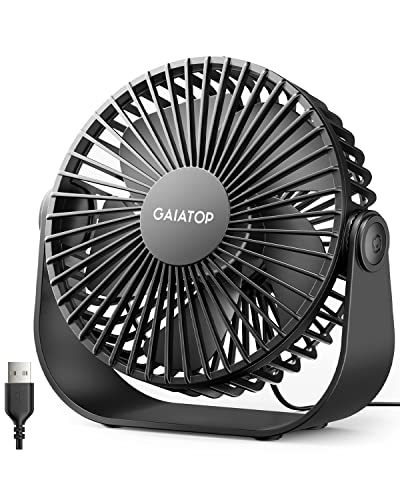
| Best Overall | Speed Settings: 3 speeds | Rotation Capability: 90° tilt/rotate | Noise Level: Ultra quiet (specific dB not stated) | VIEW LATEST PRICE | Read Our Analysis |
| TriPole Small USB Powered Desk Fan 3 Speeds |

| Most Compact | Speed Settings: 3 speeds | Rotation Capability: 360° rotation (up-down) | Noise Level: ~30 dB | VIEW LATEST PRICE | Read Our Analysis |
| USB Desk Fan with Digital Display & Turbo Airflow |

| Most Advanced Features | Speed Settings: 100 adjustable speeds | Rotation Capability: 120° oscillation | Noise Level: 28 decibels | VIEW LATEST PRICE | Read Our Analysis |
| Edvision USB Desk Fan 5 Inch Mini Portable |

| Best For Cleaning | Speed Settings: 3 speeds | Rotation Capability: 360° rotation and 360° up/down tilt | Noise Level: Silent brushless motor (specific dB not stated) | VIEW LATEST PRICE | Read Our Analysis |
| Zuvas Quiet USB Desk Fan with 360° Rotation |
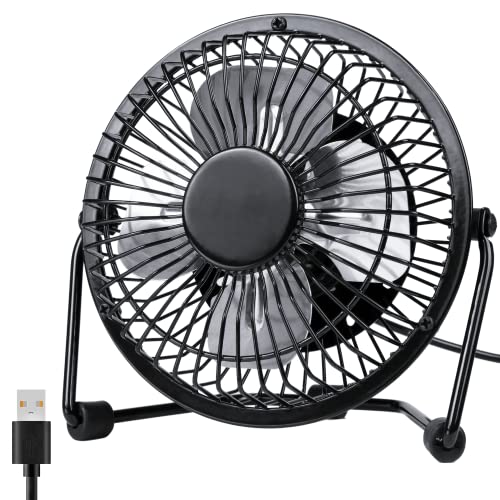
| Most Durable Build | Speed Settings: 2 speeds | Rotation Capability: 360° rotatable head | Noise Level: Less than 40 dB | VIEW LATEST PRICE | Read Our Analysis |
More Details on Our Top Picks
Gaiatop USB Desk Fan with 3 Speed Settings
If you’re looking for affordable cooling without sacrificing performance, the Gaiatop USB Desk Fan delivers solid functionality at a budget-friendly price point. This compact fan features three speed settings—low, medium, and high—allowing you to control airflow intensity based on your needs. The adjustable head rotates up to 30 degrees, directing cool air where you need it most. At under 8 ounces, it fits easily on desks, in cars, or in travel bags. The USB-powered design connects to computers, laptops, power banks, or car chargers for flexible placement. Operating quietly under 50 dB, it won’t distract you during work or sleep. With 27,902 customer reviews averaging 4.6 out of 5 stars, this fan proves reliable for summer cooling.
- Speed Settings:3 speeds
- Rotation Capability:0–30 degree adjustable tilt
- Noise Level:Under 50 dB
- Blade Count:5 blades
- Cable Length:USB cable included (length not specified)
- Weight:6.24 ounces
- Additional Feature:Adjustable wind angle (30°)
- Additional Feature:Energy-efficient operation
- Additional Feature:Compatible with multiple USB sources
TriPole Desk Fan USB Powered 360° Rotation Quiet
Need a fan that won’t disturb your work with distracting noise? The TriPole Desk Fan operates at just 25 decibels, making it ideal for offices and bedrooms. This compact 4.5-inch fan features 360° rotation and three adjustable speed settings. You’ll control it via push-button mechanism. Connect the 4.9-foot USB-A cord to any charger, computer, or power bank. The fan requires 5V power and draws 0.8A current; if the highest speed doesn’t activate, use a 5V/1A charger instead. Its brushless motor delivers 5 meters-per-second airflow. The stable base with silicone pads minimizes vibration. You can detach the cover for straightforward blade cleaning, preventing dust accumulation over time.
- Speed Settings:3 speeds
- Rotation Capability:360° full rotation
- Noise Level:25 decibels
- Blade Count:5-blade plastic rotor
- Cable Length:4.9ft USB-A power cord
- Weight:6.3 ounces
- Additional Feature:Detachable cover for cleaning
- Additional Feature:Four silicone vibration pads
- Additional Feature:Brushless motor technology
VIHOSE 120mm USB Computer Fan 4-Pack (5V)
The VIHOSE 120mm USB Computer Fan 4-Pack works across multiple devices without requiring special setup or modifications. You’ll connect each fan directly to a USB port on your TV box, router, modem, or mini PC. The 1-meter cable gives you flexibility in placement. You can adjust airflow using three intensity levels to match your cooling needs. Each fan operates at 1500 rpm with minimal 23 dB noise, so you won’t hear distracting sounds during work. The dual ball bearings ensure 50,000 hours of reliable service. Install the fans flat or upright in tight spaces where they’ll provide continuous protection for your electronics without taking up desk room.
- Speed Settings:3 intensity levels
- Rotation Capability:Fixed (no rotation)
- Noise Level:23 dB
- Blade Count:Not specified (4-pack cooling fans)
- Cable Length:1m / 40 inches per fan
- Weight:Not specified (4-pack)
- Additional Feature:Four-pack bundle included
- Additional Feature:Dual ball bearing durability
- Additional Feature:50,000-hour service life
Gaiatop USB Desk Fan with 3 Speeds & Rotation
Looking for a compact fan that won’t clutter your workspace? The Gaiatop USB Desk Fan delivers efficient cooling in a 5.5-inch frame. You’ll find three speed settings: soft wind at 1500 rpm, moderate airflow at 2000 rpm, and maximum cooling at 2500 rpm. The 90-degree rotation allows you to direct airflow where you need it most. Its ultra-quiet motor operates at just 5 watts, making it suitable for offices and bedrooms without creating distractions. The stable rubber-padded base prevents slipping and vibration. Setup requires nothing—simply plug the included 4.9-foot USB cable into your computer, power bank, or adapter and start cooling. The detachable cover enables quick cleaning when dust accumulates.
- Speed Settings:3 speeds
- Rotation Capability:90° tilt/rotate
- Noise Level:Ultra quiet (specific dB not stated)
- Blade Count:5 blades
- Cable Length:4.9 ft cable
- Weight:~6.5 ounces
- Additional Feature:90° tilt rotation capability
- Additional Feature:Four rubber anti-slip pads
- Additional Feature:Plug-and-play installation
TriPole Small USB Powered Desk Fan 3 Speeds
TriPole’s most compact USB desk fan delivers dependable cooling for anyone working in tight spaces. This 5.1-inch fan operates at three speeds up to 2400 RPM, producing quiet operation at approximately 30 dB. You’ll connect it via the included 4.9-foot USB cable to your computer, laptop, power bank, or wall charger. Push the button to cycle through speeds and rotate the fan head 360 degrees for directional airflow. The non-slip base keeps it stable on your desk during use. At just 6.3 ounces with plastic construction, you can easily move it between rooms or take it to your office.
- Speed Settings:3 speeds
- Rotation Capability:360° rotation (up-down)
- Noise Level:~30 dB
- Blade Count:5 blades
- Cable Length:4.9 ft cable
- Weight:6.3 ounces
- Additional Feature:360° up-down rotation
- Additional Feature:12-month quality guarantee
- Additional Feature:Non-slip base design
USB Desk Fan with Digital Display & Turbo Airflow
Want complete control over your cooling comfort? The Coolhill ZH27 offers 100 adjustable speed levels through its digital display. Press the touch control briefly to jump between preset speeds: 20, 40, 60, 80, or 100. Hold the button to increment through all levels. The 5500 mAh rechargeable battery runs 3–10 hours per charge and powers via USB-C from laptops, power banks, or car chargers. Operating at just 28 decibels, this fan runs whisper-quiet. Its 120° oscillation spreads airflow across your bedroom, office, or workspace. At five watts, it consumes minimal energy while delivering turbo airflow up to 6 meters per second.
- Speed Settings:100 adjustable speeds
- Rotation Capability:120° oscillation
- Noise Level:28 decibels
- Blade Count:Not specified
- Cable Length:USB-C powered (cord included)
- Weight:1.1 pounds (17.6 ounces)
- Additional Feature:100 adjustable speed levels
- Additional Feature:5500 mAh rechargeable battery
- Additional Feature:120° oscillation coverage
Edvision USB Desk Fan 5 Inch Mini Portable
Need a fan you can actually maintain without hassle? The Edvision 5-inch fan features detachable grilles and blades, letting you clean it easily with a cloth. This compact model offers three speed settings controlled by push buttons: Low, Medium, and High. The 360-degree rotation and tilt function direct airflow exactly where you need it. Powered by USB, it connects to your computer, powerbank, or car adapter via its 4.92-foot cable. The brushless motor runs quietly at up to 3200 RPM, and four silicone feet minimize vibration. Weighing only 0.34 pounds, you’ll carry it anywhere—bedroom, office, or travel. Setup requires no installation; simply plug in and adjust your preferred speed.
- Speed Settings:3 speeds
- Rotation Capability:360° rotation and 360° up/down tilt
- Noise Level:Silent brushless motor (specific dB not stated)
- Blade Count:5 blades
- Cable Length:4.92 ft cable
- Weight:0.34 lb (5.44 ounces)
- Additional Feature:Detachable grille and blades
- Additional Feature:Brushless motor technology
- Additional Feature:360° full rotation capability
Zuvas Quiet USB Desk Fan with 360° Rotation
The Zuvas Quiet USB Desk Fan delivers a most durable build through its metal construction, making it your best choice if you want a fan that’ll withstand daily use at your desk, in your bedroom, or while traveling. Its iron frame and aluminum blades create a refined appearance with a heavier feel than plastic alternatives. The 4-inch blade operates at two speed settings using push-button controls, allowing you to adjust wind output based on your needs. The 360° rotatable head broadens your airflow coverage across wider spaces. At under 40 decibels on the strongest mode, you’ll run it during sleep or work without distraction. Three silicone anti-slip rings stabilize the base on any surface. Connect it to any USB power source—adapter, hub, power bank, or laptop—using the included 3.6-foot cable. Weighing just 149 grams, it’s genuinely portable for office or travel use.
- Speed Settings:2 speeds
- Rotation Capability:360° rotatable head
- Noise Level:Less than 40 dB
- Blade Count:Aluminum blades (count not specified)
- Cable Length:3.6 ft USB cable
- Weight:149 g (5.26 ounces)
- Additional Feature:Aluminum blade construction
- Additional Feature:Iron exterior frame
- Additional Feature:Three silicone anti-slip rings
Factors to Consider When Choosing a USB Fan for Desk
When selecting a USB fan for your desk, you’ll need to evaluate several key factors that directly affect your comfort and satisfaction. Check the power source compatibility to guarantee the fan works with your available USB ports, assess the noise level performance so it won’t distract you during work, examine the speed settings available to give you control over airflow intensity, consider the portability and weight for easy repositioning, and verify the rotation and adjustability features that let you direct air where you need it most.
Power Source Compatibility
How compatible is your USB fan with the power sources you’ll actually use? Most USB desk fans require a 5V power source, which you can obtain from several options: PCs, laptops, power banks, wall adapters, or car chargers. Check your fan’s current requirements, listed in amps (0.8A, 1A, etc.), and ensure your chosen power source supplies sufficient current, especially for higher speed settings. Consider cable length—typically 4.9 or 5 feet—to determine if you can comfortably reach your power source from your desk. If you travel frequently, verify voltage compatibility and charger specifications for overseas usage. Some models offer battery-powered operation with USB charging, providing flexibility when stationary power isn’t convenient.
Noise Level Performance
Beyond ensuring your fan powers up reliably, you’ll want to contemplate how much sound it produces during operation. USB desk fans typically range from 23 dB to 40 dB depending on speed settings. Quieter models use lower RPM and brushless motors, maintaining noise around 23–30 dB at moderate speeds. Higher speeds push noise toward 30–40 dB. Select a fan with 3-speed settings to choose lower or medium options that reduce disturbance while preserving airflow. Check product specifications for maximum noise levels at high speed to understand peak performance expectations. Consider design features like silicone pads and stable bases, which minimize vibration and resonance. Metal-frame designs may transmit more vibration, affecting perceived noise levels during extended use.
Speed Settings Available
What speed options should you prioritize when selecting a USB desk fan? Most models offer either two or three speed settings, each controlling airflow intensity differently. A two-speed fan typically gives you basic low and high options, while a three-speed model provides more precise temperature control through an additional medium setting. Low speed, usually around 1500–2000 rpm, operates quietly at roughly 23–30 dB. High speed reaches approximately 2500 rpm but generates 40–50 dB of noise. More speed settings let you fine-tune comfort and energy consumption based on your immediate cooling needs. Consider your workspace and temperature preferences when deciding between speed options. Three-speed fans offer greater flexibility for varying conditions throughout your workday.
Portability And Weight
When you’re selecting a USB desk fan, portability and weight become critical factors if you’ll be moving it between locations or working in tight spaces. Look for models weighing 6 to 7 ounces, which offer easy transport without sacrificing performance. Check the dimensions—aim for units roughly 4 to 6 inches wide or tall to minimize desk clutter. Consider fans with foldable or detachable parts that reduce size during travel. Verify the base design includes silicone pads to ensure stability on different surfaces and prevent vibration. Keep in mind that USB-powered fans require connection to external power sources, limiting true cordless mobility. Evaluate your specific needs: frequent relocation demands lighter weights and compact dimensions, while stationary setups allow for slightly larger models with enhanced airflow.
Rotation And Adjustability
Once you’ve confirmed your fan fits your desk space and moves easily between locations, you’ll want to examine how it directs airflow.
Check if the fan rotates 360° horizontally to distribute cooling across your entire desk area. Look for adjustable vertical tilt options, typically ranging from 0–30° or 90°, to aim airflow directly at you. Some models combine both features, giving you multidirectional control for precise positioning.
Examine the base stability. Fans with sturdy bases and non-slip pads maintain your chosen angle without shifting during operation. Consider detachable or easy-clean grilles that you can remove for maintenance without resetting your directional adjustments. These features ensure your fan stays positioned exactly where you need it while remaining practical to maintain throughout summer use.
Blade Size Efficiency
Because larger blades push more air at the same speed, you’ll want to compare blade diameter across models you’re considering. A bigger blade moves more air efficiently, meaning you get stronger airflow without pushing your motor harder. However, five-blade designs can displace more air than three-blade options, though they may create more noise depending on the motor and housing. Check the blade material too—sturdy plastics with streamlined edges perform better aerodynamically. For desk fans, you’re balancing two approaches: larger blades at lower RPMs or smaller blades at higher RPMs. The larger-blade option typically uses less energy and runs quieter, making it preferable for desk work. Examine product specifications and customer reviews to determine which blade configuration delivers the airflow you need without excessive noise or power consumption.
Build Quality Materials
While blade efficiency determines how well your fan moves air, the materials used to construct the fan itself will determine whether it survives months of daily desk use. Choose fans with metal exteriors or high-quality plastic frames that resist flexing and warping. Check the base design—heavier, sturdy bases with non-slip rubber feet prevent vibrations and sliding on your desk surface. Examine the overall weight and build tolerances; well-constructed units from solid materials typically indicate better stability and durability. Look for brushless motors paired with reinforced bearings, which deliver 50,000+ hours of service life. Verify that blade covers and grilles detach easily for cleaning without requiring tools. These material choices directly extend your fan’s lifespan and performance reliability throughout extended summer use.
Warranty And Support
What coverage does a USB fan’s warranty actually provide? Before purchasing, check the manufacturer’s website for warranty details, including duration (typically 12 months) and covered defects. Verify whether coverage includes replacement parts, full unit replacement, or repair services. Review the claim process outlined on their support portal, email contact, or phone line. Note response time expectations. Confirm what proof of purchase you’ll need—usually your receipt or order confirmation. Many manufacturers require product registration to activate warranty coverage, so complete this step immediately after purchase. Document your purchase date and keep all packaging. Contact customer support directly if you’re unsure about specific coverage details before buying, ensuring you understand exactly what protection you’re receiving.
Final Thoughts
You’ve reviewed eight USB desk fan options with varying features. Select a model based on your specific needs: choose quiet brushless motors for offices, prioritize 360° rotation for flexible airflow direction, and pick detachable grilles for easy maintenance. Confirm USB or USB-C compatibility with your devices. Verify the fan includes a stable base with anti-slip feet. Compare speed settings and noise levels before purchasing to ensure you’re getting the cooling performance you need.

Meet Ry, “TechGuru,” a 36-year-old technology enthusiast with a deep passion for tech innovations. With extensive experience, he specializes in gaming hardware and software, and has expertise in gadgets, custom PCs, and audio.
Besides writing about tech and reviewing new products, he enjoys traveling, hiking, and photography. Committed to keeping up with the latest industry trends, he aims to guide readers in making informed tech decisions.