

When you need to connect one HDMI source to multiple displays, you’ll want a splitter that delivers consistent performance without signal loss or compatibility issues. You’ll face choices between 1-in-2, 1-in-4, and switchable models, each with different bandwidth requirements and power needs. Understanding what specs actually matter—and which products live up to their claims—makes the difference between a reliable setup and constant frustration. Here’s what you need to know to make the right choice.
| Avedio Links HDMI Splitter 1 in 2 Out 4K |

| Best Budget Pick | Configuration: 1 input, 2 outputs | Maximum 4K Resolution: 4K@30Hz | Power Requirements: 5V 1A external power adapter | VIEW LATEST PRICE | Read Our Analysis |
| MT-ViKI HDMI Splitter 1 in 4 Out 4K |

| Best For Multiple Displays | Configuration: 1 input, 4 outputs | Maximum 4K Resolution: 4K@30Hz | Power Requirements: 5V 2A AC power adapter | VIEW LATEST PRICE | Read Our Analysis |
| Marmoin HDMI Cable Splitter 1 in 2 Out |
| Most Compact | Configuration: 1 input, 2 outputs | Maximum 4K Resolution: 1080p only | Power Requirements: No external power | VIEW LATEST PRICE | Read Our Analysis |
| OREI UltraHD 4K HDMI 1×4 Splitter (UHDS-104) |

| Professional Grade | Configuration: 1 input, 4 outputs | Maximum 4K Resolution: 4K@60Hz | Power Requirements: External power adapter (dual voltage) | VIEW LATEST PRICE | Read Our Analysis |
| UGREEN HDMI Switch 5 in 1 with Remote Control |

| Best For Gaming | Configuration: 5 inputs, 1 output | Maximum 4K Resolution: 4K@60Hz | Power Requirements: USB powered (adapter not included) | VIEW LATEST PRICE | Read Our Analysis |
| GANA HDMI Switch 4K@60Hz Splitter (2 in 1) |

| Most Affordable | Configuration: 2 inputs, 1 output (bidirectional) | Maximum 4K Resolution: 4K@60Hz | Power Requirements: No external power | VIEW LATEST PRICE | Read Our Analysis |
| OREI UltraHD 4K HDMI Splitter 1×2 Port |

| Best Overall | Configuration: 1 input, 2 outputs | Maximum 4K Resolution: 4K@60Hz | Power Requirements: Dual voltage power supply | VIEW LATEST PRICE | Read Our Analysis |
| 1×4 HDMI Splitter 4K Audio Video Distributor |
| Best Value | Configuration: 1 input, 4 outputs | Maximum 4K Resolution: 4K@30Hz (4K@60Hz in YCbCr) | Power Requirements: 5V DC power supply | VIEW LATEST PRICE | Read Our Analysis |
| OREI 4K HDMI Splitter 1 in 2 Out (UHDS-102C) |

| Best Auto-Downscaling | Configuration: 1 input, 2 outputs | Maximum 4K Resolution: 4K@60Hz | Power Requirements: External power supply | VIEW LATEST PRICE | Read Our Analysis |
| OREI HDMI Splitter 1 in 2 Out (HD-102) |

| Budget-Friendly Workhorse | Configuration: 1 input, 2 outputs | Maximum 4K Resolution: 4K@30Hz | Power Requirements: USB powered (adapter not included) | VIEW LATEST PRICE | Read Our Analysis |
More Details on Our Top Picks
Avedio Links HDMI Splitter 1 in 2 Out 4K
Why’d you need a budget-friendly splitter that doesn’t compromise on core performance? The Avedio Links 1×2 HDMI Splitter delivers 4K@30Hz mirroring to two displays simultaneously. You’ll get one HDMI input and two outputs, perfect for duplicating signals to a monitor and TV at once. The splitter includes a 4-foot HDMI cable and USB power cable, requiring a 5V 1A adapter for stable operation. It supports 3D content and works backward-compatible with 1080p displays. Note that this splitter mirrors only—it won’t extend your desktop or combine two inputs into one output. Use HDMI 2.0 cables rated AWG 26 for optimal performance up to 16 feet at 4K resolution.
- Configuration:1 input, 2 outputs
- Maximum 4K Resolution:4K@30Hz
- Power Requirements:5V 1A external power adapter
- HDCP Support:HDCP 1.4
- Functionality Type:Splitter/duplicator (mirror only)
- Warranty:1 year manufacturer
- Additional Feature:Includes 4 ft HDMI cable
- Additional Feature:Backward compatible 1080p@50/60Hz
- Additional Feature:Deep color 12/16 bit support
MT-ViKI HDMI Splitter 1 in 4 Out 4K
Need to display one video source across multiple monitors simultaneously? The MT-ViKI HDMI Splitter 1 in 4 Out 4K handles this task efficiently. Connect your source device to the single HDMI input, then attach up to four displays to the outputs. The splitter mirrors your signal identically across all monitors—no extended desktop mode available. It supports 4K at 30Hz and 1080p at 60Hz with deep color and 3D video compatibility. The included 5V/2A power adapter ensures stable performance without signal drops. Its metal housing dissipates heat effectively, making it suitable for continuous conference room or classroom use. This model works with gaming consoles, streaming devices, projectors, and TVs.
- Configuration:1 input, 4 outputs
- Maximum 4K Resolution:4K@30Hz
- Power Requirements:5V 2A AC power adapter
- HDCP Support:HDCP 1.4
- Functionality Type:Splitter/distributor (mirror only)
- Warranty:Standard manufacturer warranty
- Additional Feature:Built-in amplifier long-distance
- Additional Feature:Metal housing heat dissipation
- Additional Feature:24/7 commercial environment rated
Marmoin HDMI Cable Splitter 1 in 2 Out
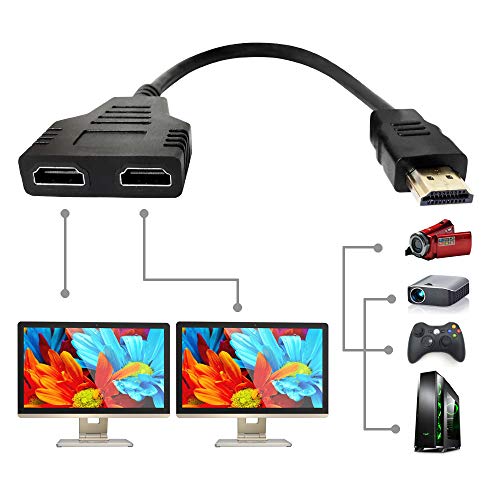
The Marmoin’s most compact design works best if you’re mirroring content to two same-sized TVs from a single source like a Blu-ray player or gaming console. This 1-in-2-out splitter duplicates your signal only—it doesn’t extend or distribute different images. You’ll connect one HDMI cable from your source device, then plug two TVs into the dual female outputs. If you need to switch which TV displays the content, unplug one HDMI cable rather than unplugging from the source. The splitter supports resolutions up to 1080p and works with standard HDMI-enabled televisions. Note that it doesn’t support HDCP protection and won’t function with cable boxes, streaming devices, or MacBooks.
- Configuration:1 input, 2 outputs
- Maximum 4K Resolution:1080p only
- Power Requirements:No external power
- HDCP Support:Not supported
- Functionality Type:Splitter/cable adapter (mirror only)
- Warranty:1 year limited
- Additional Feature:Integrated HDMI cable design
- Additional Feature:Supports 720p/1080i/1080p resolutions
- Additional Feature:11.8 inch compact length
OREI UltraHD 4K HDMI 1×4 Splitter (UHDS-104)
OREI’s professional-grade 1×4 HDMI splitter delivers 4K@60Hz mirroring across four displays simultaneously, making it ideal for presentations, retail environments, classrooms, and bars where you need synchronized video and audio without signal extension. The splitter supports HDMI 2.0 with 18Gbps bandwidth and HDCP 2.0 protection. Setup requires minimal effort—connect your source device to the single input, plug the power adapter, and attach up to four displays to the output ports. Use HDMI cables up to 30 feet for stable performance. The device handles multiple audio formats including Dolby TrueHD and DTS-HD Master Audio, ensuring quality sound across all connected screens. Its metal construction manages heat effectively, and OREI provides 12-month manufacturer warranty plus lifetime technical support.
- Configuration:1 input, 4 outputs
- Maximum 4K Resolution:4K@60Hz
- Power Requirements:External power adapter (dual voltage)
- HDCP Support:HDCP 2.0
- Functionality Type:Splitter/distributor (mirror only)
- Warranty:12 months manufacturer + lifetime technical support
- Additional Feature:EDID management included
- Additional Feature:Lifetime OREI technical support
- Additional Feature:International adapter/converter provided
UGREEN HDMI Switch 5 in 1 with Remote Control
Looking to connect five gaming devices to a single TV without constant cable swapping? The UGREEN HDMI Switch 5 in 1 lets you connect PS5, Xbox Series X, Nintendo Switch, and other devices simultaneously. You’ll select which device displays using the included remote (up to 33 feet away) or the manual button. The switch supports 4K@60Hz resolution with HDR and 3D compatibility across all ports. You must use USB power and keep cable lengths under 9 feet for peak performance. LED indicators show which port is active. Note that automatic switching isn’t supported, and you’ll need to purchase a power adapter separately.
- Configuration:5 inputs, 1 output
- Maximum 4K Resolution:4K@60Hz
- Power Requirements:USB powered (adapter not included)
- HDCP Support:HDCP 2.2/1.4
- Functionality Type:Switch (5 inputs to 1 output)
- Warranty:Standard manufacturer warranty
- Additional Feature:Remote control 33 ft range
- Additional Feature:Supports 2560×1440@120Hz resolution
- Additional Feature:Manual button port selection
GANA HDMI Switch 4K@60Hz Splitter (2 in 1)
Need a budget-friendly switcher that handles multiple devices without breaking your setup? The GANA HDMI Switch offers bidirectional switching with three HDMI ports configured as either two inputs and one output or one input and two outputs. Its aluminum enclosure includes LED indicators showing which port is active. You’ll connect your devices—laptops, gaming consoles, or Blu-ray players—and switch between them using the manual button. The switcher supports 4K@60Hz video with stable audio transmission and requires no external power. Keep total cable length under three meters for optimal 4K performance. Note that only one display works at a time with this configuration.
- Configuration:2 inputs, 1 output (bidirectional)
- Maximum 4K Resolution:4K@60Hz
- Power Requirements:No external power
- HDCP Support:HDCP 1.4/2.0 (bidirectional capable)
- Functionality Type:Bidirectional switch/splitter (2 in/1 out or 1 in/2 out)
- Warranty:Lifetime technical support
- Additional Feature:Aluminum enclosure construction
- Additional Feature:No external power required
- Additional Feature:Bidirectional 3-port operation
OREI UltraHD 4K HDMI Splitter 1×2 Port
The OREI UltraHD 4K splitter stands out for users who need to display one video source across two monitors simultaneously without sacrificing 4K resolution. This 1-in-2-out splitter duplicates your HDMI signal at 4K@60Hz with 18 Gbps data rate, making it ideal for gaming consoles, streaming devices, and projectors. It supports 3D content and multiple audio formats including Dolby-AC3 and DTS 7.1. The unit maintains HDCP protection while delivering consistent video quality. Simply connect your source device to the input port, then attach two displays to the output ports. Keep HDMI cables under 30 feet for reliable performance. A power supply and international adapter are included.
- Configuration:1 input, 2 outputs
- Maximum 4K Resolution:4K@60Hz
- Power Requirements:Dual voltage power supply
- HDCP Support:HDCP does not bypass
- Functionality Type:Splitter/duplicator (mirror only)
- Warranty:1 year full warranty with OREI support
- Additional Feature:Auto downscaling dual resolution
- Additional Feature:Dual voltage international adapter
- Additional Feature:18 Gbps data rate
1×4 HDMI Splitter 4K Audio Video Distributor
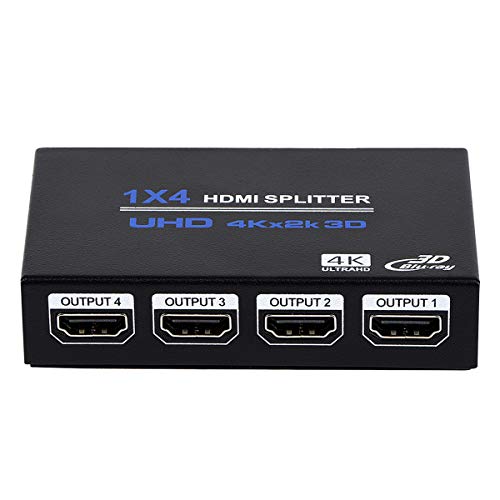
Want to display one video source on multiple screens without breaking your budget? The ENBUER 1×4 HDMI Splitter distributes a single HDMI signal to four identical outputs simultaneously. This splitter handles 4K video at 30Hz, 2K at 60Hz, and FHD at 120Hz. It supports advanced audio formats including DTS-HD and Dolby TrueHD. Setup requires only plugging in the device and connecting your source and displays—no drivers needed. Use 4K-rated HDMI cables rated for your resolution, extending input signals up to 33 feet and output signals to 50 feet. The included 5V power supply enables operation. Note that this splitter doesn’t support HDR, VRR, or CEC functionality, and operates at 4K 60Hz only in YCbCr format.
- Configuration:1 input, 4 outputs
- Maximum 4K Resolution:4K@30Hz (4K@60Hz in YCbCr)
- Power Requirements:5V DC power supply
- HDCP Support:HDCP 1.4
- Functionality Type:Splitter/distributor (mirror only)
- Warranty:1 year warranty
- Additional Feature:Plug and play setup
- Additional Feature:Input cable 33 ft capable
- Additional Feature:Output cable 50 ft capable
OREI 4K HDMI Splitter 1 in 2 Out (UHDS-102C)
If you’re running one media source to displays with different resolution needs, you’ll find the OREI UHDS-102C handles auto-downscaling effectively by outputting 4K to one screen while simultaneously sending 1080p to another without requiring manual adjustments. Connect your source device to the single HDMI input, then attach your two displays to the output ports. Use high-quality cables no longer than 30 feet for peak performance. The splitter supports HDCP 2.2 and 18 Gbps bandwidth, ensuring compatibility with streaming devices, gaming consoles, Blu-ray players, and cable boxes. You’ll receive a one-year warranty and full OREI support with your purchase.
- Configuration:1 input, 2 outputs
- Maximum 4K Resolution:4K@60Hz
- Power Requirements:External power supply
- HDCP Support:HDCP 2.2
- Functionality Type:Splitter/duplicator (mirror only)
- Warranty:1 year full warranty with OREI support
- Additional Feature:Auto downscaling mixed displays
- Additional Feature:HDCP 2.2 compliance
- Additional Feature:4:4:4 8-bit color support
OREI HDMI Splitter 1 in 2 Out (HD-102)
Looking to mirror your screen to two displays simultaneously? The OREI HD-102 duplicates your HDMI signal to two outputs using USB power. Connect your source device—computer, PS4, Fire Stick, or Blu-ray player—to the input port. Attach two HDMI cables to the output ports, linking them to your displays. The splitter supports resolutions up to 4K at 30Hz and 1080p at 60Hz. Its metal enclosure dissipates heat effectively. Keep cables under 30 feet for optimal picture quality. Note: this splitter mirrors content only; it doesn’t extend displays across multiple monitors. It supports HDCP 1.4 but doesn’t bypass copy protection. One-year warranty included.
- Configuration:1 input, 2 outputs
- Maximum 4K Resolution:4K@30Hz
- Power Requirements:USB powered (adapter not included)
- HDCP Support:HDCP 1.4 (does not bypass)
- Functionality Type:Splitter/duplicator (mirror only)
- Warranty:1 year warranty
- Additional Feature:Heavy-duty metal enclosure
- Additional Feature:USB powered operation
- Additional Feature:Operating temperature 0°C–40°C
Factors to Consider When Choosing an HDMI Y-Splitter
When you select an HDMI Y-splitter, you’ll need to evaluate your resolution requirements and bandwidth support first, then determine how many output ports your devices actually require. Next, check the power specifications to assure stable operation, verify that the splitter meets HDCP compatibility standards for your content, and measure your cable distances to confirm the splitter accommodates your setup’s physical layout. These five factors work together to guarantee you’ll get reliable performance without compatibility issues or signal degradation.
Resolution And Bandwidth Support
You’ll need to match your HDMI splitter’s supported resolution and refresh rate to your source device and displays. Check your source’s maximum output—for example, 4K at 60 Hz or 1080p at 60 Hz—then confirm the splitter supports that same specification.
Bandwidth capacity directly affects performance. A splitter with 18 Gbps or higher bandwidth handles 4K resolution without signal degradation. Lower bandwidth splitters may downscale your image or produce artifacts.
Consider color depth requirements. If you need 4:4:4 chroma and deep color (8/10/12-bit), verify the splitter supports these features at your target resolution. This ensures consistent color fidelity across all outputs.
Check HDCP compatibility versions—HDCP 1.4 versus 2.2—as they determine what content displays at specific resolutions. Matching these specifications prevents compatibility issues between your devices.
Number Of Output Ports Needed
Once you’ve confirmed your splitter handles the right resolution and bandwidth, the next step is determining how many output ports you actually need. Count every display you want to connect simultaneously. A 1×2 splitter works for two screens, while 1×3 or 1×4 splitters handle three or four displays. Choose the minimum number of ports that covers your setup to reduce latency and signal degradation. More output ports demand stronger power management, so verify your splitter includes an external power supply if you’re using four or more outputs. Remember that all connected displays mirror the same source signal—higher-port splitters won’t create independent desktops. Match your port count exactly to your display requirements for optimal performance.
Power Requirements And Stability
How much power does your splitter actually draw? Many HDMI splitters require external 5V power adapters rather than USB power alone for stable operation. Check your splitter’s specifications to match the power supply to its current draw—typically 1A or 2A—ensuring reliable multi-output performance. Powered splitters reduce flicker and signal drops, especially over longer cable runs. Underpowered or unpowered splitters often cause signal degradation and intermittent picture problems on one or more outputs. Review the maximum cable lengths your splitter supports at full resolution; 4K@60Hz, for example, may work reliably only up to shorter distances with proper power. Verify your adapter’s amperage before connecting to prevent performance issues and maintain consistent signal integrity across all outputs.
HDCP Compatibility Standards
What’s HDCP, and why does it matter for your splitter? HDCP is copy protection that prevents unauthorized viewing of protected content from Blu-rays and streaming services. Your splitter must support the same HDCP version as your source to avoid blank screens or handshake failures.
Check your content requirements first. If you’re using 4K/HDR sources, you need HDCP 2.2 support. Many budget splitters only support HDCP 1.4, which blocks newer content.
Verify all downstream devices comply with your splitter’s HDCP version. One non-compliant display can cause the entire setup to fail. Some splitters negotiate HDCP separately per output, while others use a shared handshake. Know which type you’re buying to ensure all your displays work together without interruption.
Cable Length Specifications
Distance matters more than you might think when you’re running HDMI cables from your splitter to your displays. For 4K signals, keep cable runs under 16 feet (4.9 meters) to maintain signal stability. For 1080p, you can typically extend runs up to 32.8 feet (10 meters), depending on your splitter model. Use high-quality HDMI cables rated AWG 26–28 to preserve signal integrity across longer distances. Balance your input and output cable lengths—if your input runs 50 feet, keep outputs at 50 feet as well to minimize degradation. For extended runs carrying 4K signals, consider USB-powered splitters with powered adapters to sustain reliable output. Always check your specific splitter’s manual for exact cable length limits, as specifications vary by manufacturer.
Heat Dissipation And Build Quality
Once you’ve confirmed your cable lengths will support your setup, you’ll need to evaluate the splitter’s physical construction, since the device itself generates heat during operation. Choose aluminum or metal enclosures over plastic housings—they dissipate heat more effectively and prevent external heat buildup. Heavier-duty casings provide better thermal mass, which stabilizes performance during continuous 4K@60Hz distribution. Inspect the internal design for heat sinks and airflow paths that minimize hotspots. Larger units with more surface area cool better than compact models, though they require more space. Avoid splitters with fans; they introduce noise and vibration. Passive cooling through chassis design alone is sufficient for most applications. Prioritize build quality and materials over form factor when heat dissipation matters most.
Audio Format Compatibility
How do you know if your splitter can handle the audio formats your sources actually produce? Check the device’s specifications for supported formats like DTS-HD, Dolby TrueHD, LPCM 7.1, DTS, Dolby-AC3, and DSD. Verify the splitter’s HDCP version—older HDCP 1.4 models may not work with newer sources requiring HDCP 2.2, which affects audio handshake capability. Review the deep color support rating (8/10/12 bit), as higher bit depths prevent audio compression and downsampling during transmission. Confirm the splitter provides audio passthrough through the same HDMI connection to your display’s speakers. If you need external audio output, an external audio extractor isn’t included, so you’ll need to purchase one separately. Match the splitter’s bandwidth (18–18+ Gbps) to your setup’s demands.
Final Thoughts
You’ll want to select a splitter that matches your setup’s needs. Check if you need 1-in-2 or 1-in-4 output. Verify it supports 4K at 60Hz with 18 Gbps bandwidth and HDCP 2.2. Confirm it includes a power adapter and has a heat-dissipating case. Read user reviews confirming stable performance on actual setups. Purchase a model with strong specifications and reliable real-world results to avoid signal dropouts or latency issues.

Meet Ry, “TechGuru,” a 36-year-old technology enthusiast with a deep passion for tech innovations. With extensive experience, he specializes in gaming hardware and software, and has expertise in gadgets, custom PCs, and audio.
Besides writing about tech and reviewing new products, he enjoys traveling, hiking, and photography. Committed to keeping up with the latest industry trends, he aims to guide readers in making informed tech decisions.