


When you’re selecting a curved monitor for RPG gaming, you’ll need to evaluate several key specifications: screen size (24 to 49 inches), resolution (1080p to 3440×1440), refresh rate (120 to 240 Hz), and curve intensity (1000R to 1500R). Each choice affects your immersion level, performance, and budget differently. Understanding these factors will help you narrow down which of the 15 contenders matches your setup.
| SANSUI 34-Inch Curved Gaming Monitor UWQHD 200Hz |

| Best Overall | Screen Size: 34 inches | Resolution: 3440 x 1440 (UWQHD) | Refresh Rate: 200 Hz | VIEW LATEST PRICE | Read Our Analysis |
| Samsung 32″ Odyssey G55C Curved Gaming Monitor |

| Best Value | Screen Size: 32 inches | Resolution: 2560 x 1440 (QHD) | Refresh Rate: 165 Hz | VIEW LATEST PRICE | Read Our Analysis |
| 34 Inch Curved Gaming Monitor 3440×1440 165Hz Ultrawide |

| Best 165Hz Performance | Screen Size: 34 inches | Resolution: 3440 x 1440 (WQHD) | Refresh Rate: 165 Hz | VIEW LATEST PRICE | Read Our Analysis |
| Amzfast 49 Inch Curved Ultrawide Gaming Monitor 120Hz |

| Ultimate Immersion | Screen Size: 49 inches | Resolution: 5120 x 1440 (Dual QHD) | Refresh Rate: 120 Hz | VIEW LATEST PRICE | Read Our Analysis |
| SANSUI 32 Inch Curved 240Hz Gaming Monitor |

| Best High Refresh | Screen Size: 32 inches | Resolution: 1920 x 1080 (FHD) | Refresh Rate: 240 Hz | VIEW LATEST PRICE | Read Our Analysis |
| SANSUI 32-Inch Curved Gaming Monitor WQHD 180Hz |
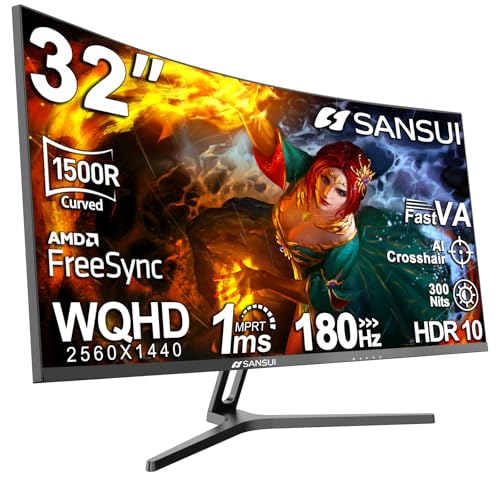
| Best Balanced Features | Screen Size: 32 inches | Resolution: 2560 x 1440 (WQHD) | Refresh Rate: 180 Hz | VIEW LATEST PRICE | Read Our Analysis |
| Gawfolk 34 Inch Ultrawide Curved Gaming Monitor |
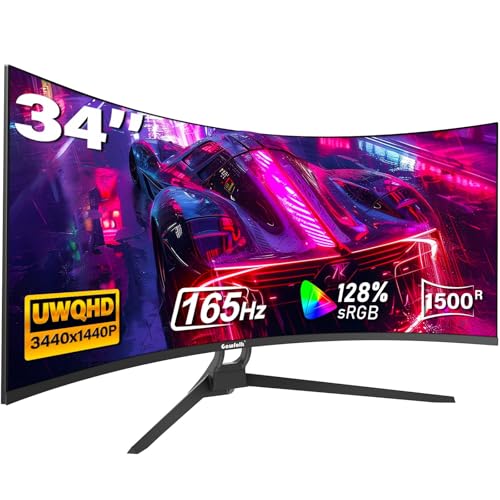
| Best Budget Ultrawide | Screen Size: 34 inches | Resolution: 3440 x 1440 (UWQHD) | Refresh Rate: 165 Hz | VIEW LATEST PRICE | Read Our Analysis |
| Samsung 27″ Essential S3 Curved Gaming Monitor (LS27D366GANXZA) |

| Best Entry-Level | Screen Size: 27 inches | Resolution: 1920 x 1080 (FHD) | Refresh Rate: 100 Hz | VIEW LATEST PRICE | Read Our Analysis |
| Samsung 34″ Odyssey G5 Ultra-Wide Gaming Monitor |

| Best Productivity Gaming | Screen Size: 34 inches | Resolution: 3440 x 1440 (WQHD) | Refresh Rate: 165 Hz | VIEW LATEST PRICE | Read Our Analysis |
| INNOCN 49″ Curved Gaming Monitor 144Hz Ultrawide |

| Most Extreme Setup | Screen Size: 49 inches | Resolution: 3840 x 1080 (Ultra Wide) | Refresh Rate: 144 Hz | VIEW LATEST PRICE | Read Our Analysis |
| Samsung 40″ Odyssey G7 Curved Gaming Monitor |

| Best 4K Ultrawide | Screen Size: 40 inches | Resolution: 3840 x 1600 (WUHD 4K) | Refresh Rate: 180 Hz | VIEW LATEST PRICE | Read Our Analysis |
| ASUS VG34VQL1B TUF 34″ Curved Gaming Monitor |

| Professional Esports Choice | Screen Size: 34 inches | Resolution: 3440 x 1440 (WQHD) | Refresh Rate: 165 Hz | VIEW LATEST PRICE | Read Our Analysis |
| ViewSonic VX3418C-2K 34 Inch Ultrawide Gaming Monitor |

| Best Curved Standard | Screen Size: 34 inches | Resolution: 3440 x 1440 (WQHD) | Refresh Rate: 180 Hz | VIEW LATEST PRICE | Read Our Analysis |
| LG UltraGear 32-inch Curved Gaming Monitor 180Hz |

| Best QHD Gaming | Screen Size: 32 inches | Resolution: 2560 x 1440 (QHD) | Refresh Rate: 180 Hz | VIEW LATEST PRICE | Read Our Analysis |
| Sceptre Curved 24-inch Gaming Monitor 1080p (C248W-1920RN) |

| Best Compact Curved | Screen Size: 24 inches | Resolution: 1920 x 1080 (FHD) | Refresh Rate: 75 Hz | VIEW LATEST PRICE | Read Our Analysis |
More Details on Our Top Picks
SANSUI 34-Inch Curved Gaming Monitor UWQHD 200Hz
Why settle for a standard display when you can get a curved ultrawide that dominates RPG gaming? The SANSUI 34-inch curved monitor delivers a 3440 x 1440 UWQHD resolution across a 1500R curved panel, immersing you in expansive game worlds. You’ll access 200Hz refresh rates via DisplayPort 1.4 or 200Hz through HDMI 2.1, ensuring smooth gameplay. The 1ms response time eliminates motion blur during fast combat sequences. AI features like Crosshair and Sniper Scope enhance precision targeting. The monitor tilts from -5° to +15°, letting you adjust for optimal viewing comfort during extended RPG sessions.
- Screen Size:34 inches
- Resolution:3440 x 1440 (UWQHD)
- Refresh Rate:200 Hz
- Curvature Radius:1500R
- Response Time:1 ms (OD)
- Adaptive Sync Technology:G-Sync/FreeSync compatible
- Additional Feature:AI Blue light reduction & Crosshair
- Additional Feature:DisplayPort 1.4 up to 200Hz
- Additional Feature:30-day money-back guarantee
Samsung 32″ Odyssey G55C Curved Gaming Monitor
Looking for a 32-inch curved monitor that delivers immersive RPG gaming without premium pricing? The Samsung Odyssey G55C combines QHD resolution (2560×1440) with a 1000R curve that expands your peripheral vision during gameplay. You’ll experience 165 Hz refresh rates and 1 ms response times that eliminate lag and blur. AMD FreeSync synchronization reduces screen tearing. The display features HDR10 for enhanced color depth, Eye Saver Mode to reduce blue light strain, and a glossy panel that maintains sharp detail. You get DisplayPort and HDMI connectivity options. This monitor balances performance and affordability for RPG enthusiasts seeking immersive curved gaming without excessive cost.
- Screen Size:32 inches
- Resolution:2560 x 1440 (QHD)
- Refresh Rate:165 Hz
- Curvature Radius:1000R
- Response Time:1 ms (MPRT)
- Adaptive Sync Technology:AMD FreeSync
- Additional Feature:HDR10 support
- Additional Feature:Eye Saver Mode blue light
- Additional Feature:1.7x pixel density vs FHD
34 Inch Curved Gaming Monitor 3440×1440 165Hz Ultrawide
The DJiEX Q34D45 delivers the 165Hz performance you’ll need for competitive RPG gaming across an ultrawide 3440×1440 display. This 34-inch VA panel curves at 1500R, wrapping your vision in immersive gameplay while maintaining a 1ms response time for sharp action sequences. The monitor supports FreeSync for tear-free visuals and offers 4000:1 contrast with HDR10 support, enhancing dark dungeons and bright spell effects. Connect via DisplayPort 1.4 or HDMI 2.0 for flexible setup options. Use the tilt adjustment to position the screen at your preferred viewing angle, and leverage PIP/PBP features to manage multiple game windows or chat applications simultaneously.
- Screen Size:34 inches
- Resolution:3440 x 1440 (WQHD)
- Refresh Rate:165 Hz
- Curvature Radius:1500R
- Response Time:1 ms (MPRT)
- Adaptive Sync Technology:FreeSync (AMD)
- Additional Feature:HDR10 support
- Additional Feature:Dual DisplayPort 1.4 inputs
- Additional Feature:4000:1 contrast ratio
Amzfast 49 Inch Curved Ultrawide Gaming Monitor 120Hz
Immerse yourself in RPG worlds with Amzfast’s 49-inch curved ultrawide, which spans 5120×1440 pixels across a 32:9 aspect ratio for ultimate immersion. The 1500R curve wraps around your field of vision, reducing eye strain during extended gaming sessions. Connect via DisplayPort 1.4 to unlock 120Hz refresh rates, eliminating screen tearing in fast-paced combat. Activate FreeSync or G-Sync compatibility to synchronize frame rates with your GPU. Use picture-by-picture mode to monitor multiple game windows simultaneously. The 1ms MPRT response time ensures sharp character movements and spell effects. Adjust brightness to 350 nits for clear visibility without glare. Select the FPS preset mode for optimized color and contrast during gameplay sessions.
- Screen Size:49 inches
- Resolution:5120 x 1440 (Dual QHD)
- Refresh Rate:120 Hz
- Curvature Radius:1500R
- Response Time:1 ms (MPRT)
- Adaptive Sync Technology:FreeSync/G-Sync compatible
- Additional Feature:Dual QHD split-screen capability
- Additional Feature:G-Sync and FreeSync compatible
- Additional Feature:120% sRGB color gamut
SANSUI 32 Inch Curved 240Hz Gaming Monitor
Want a curved monitor that delivers high refresh rates without compromising on screen size? The SANSUI 32-inch curved monitor offers you a 1500R curve with 240Hz refresh rate and 1ms MPRT response time. You’ll get 1080p resolution, HDR support, and FreeSync compatibility for smooth gameplay. The monitor includes one DisplayPort 1.4 and one HDMI port, both supporting 240Hz output. You can tilt the display between -5° and 15° and mount it using the VESA 100x100mm standard. The 125% sRGB color gamut provides accurate colors, while the 300 nits brightness handles various lighting conditions. The metal stand and included DP cable simplify your setup process immediately.
- Screen Size:32 inches
- Resolution:1920 x 1080 (FHD)
- Refresh Rate:240 Hz
- Curvature Radius:1500R
- Response Time:1 ms (MPRT)
- Adaptive Sync Technology:FreeSync
- Additional Feature:240Hz refresh rate capability
- Additional Feature:125% sRGB color gamut
- Additional Feature:Lifetime technical support included
SANSUI 32-Inch Curved Gaming Monitor WQHD 180Hz
SANSUI’s 32-inch curved monitor balances high refresh rates with sharp resolution for RPG players who need responsiveness without sacrificing visual detail. The 1500R curve pulls you into expansive fantasy worlds while the 180Hz refresh rate keeps gameplay smooth. You’ll get 2560 x 1440 resolution on a VA panel with 1ms response time, ensuring crisp visuals and quick reactions. Connect via DisplayPort 1.4 to disclose the full 180Hz potential. The 300-nit brightness and 125% sRGB color gamut deliver accurate colors for immersive exploration. Tilt the display between -5° and +15° to match your seating position. This monitor handles demanding RPGs effectively without excessive cost.
- Screen Size:32 inches
- Resolution:2560 x 1440 (WQHD)
- Refresh Rate:180 Hz
- Curvature Radius:1500R
- Response Time:1 ms (OD)
- Adaptive Sync Technology:FreeSync
- Additional Feature:Dual DisplayPort 1.4 inputs
- Additional Feature:DCI-P3 95% color accuracy
- Additional Feature:Lifetime technical support included
Gawfolk 34 Inch Ultrawide Curved Gaming Monitor
The Gawfolk 34-inch ultrawide curved monitor delivers expansive screen real estate at an accessible price point for RPG gamers who prioritize immersion without premium spending. You’ll get 3440×1440 native resolution with a 1500R curve that wraps your field of view. The 165Hz refresh rate via DisplayPort 1.4 ensures smooth gameplay, while 1ms MPRT response time eliminates motion blur during combat. FreeSync support synchronizes frame rates with compatible graphics cards. Connect using two HDMI ports or two DisplayPort ports. The tilt-adjustable stand lets you position the display for comfort, and wall-mount compatibility provides alternative setup options. The 128% sRGB color coverage and HDR technology enhance visual detail in dark dungeons and bright outdoor environments.
- Screen Size:34 inches
- Resolution:3440 x 1440 (UWQHD)
- Refresh Rate:165 Hz
- Curvature Radius:1500R
- Response Time:1 ms (MPRT)
- Adaptive Sync Technology:FreeSync
- Additional Feature:34% more screen space available
- Additional Feature:Picture-in-Picture/Picture-by-Picture modes
- Additional Feature:128% sRGB color coverage
Samsung 27″ Essential S3 Curved Gaming Monitor (LS27D366GANXZA)
Samsung’s 27″ Essential S3 curved monitor (LS27D366GANXZA) offers an entry-level curved gaming setup that doesn’t require a premium budget. The 1800R curve wraps your field of vision, and you’ll adjust the 100 Hz refresh rate in settings to reduce motion blur during gameplay. Connect your desktop or console using the HDMI or D-sub ports included with cables. The FHD 1920×1080 display delivers sharp visuals, while Game Mode enhances color and contrast for RPG details. Enable the flicker-free technology and blue light filter to reduce eye strain during extended sessions. This monitor suits budget-conscious gamers seeking immersive curved gameplay without ultrawide specifications.
- Screen Size:27 inches
- Resolution:1920 x 1080 (FHD)
- Refresh Rate:100 Hz
- Curvature Radius:1800R
- Response Time:Not specified
- Adaptive Sync Technology:G-Sync compatible
- Additional Feature:Game Mode color contrast adjustment
- Additional Feature:TÜV certified eye comfort technology
- Additional Feature:100Hz refresh rate adjustable
Samsung 34″ Odyssey G5 Ultra-Wide Gaming Monitor
Looking for a monitor that transforms your RPG experience? The Samsung 34″ Odyssey G5 delivers immersion through its ultra-wide 3440 x 1440 display and aggressive 1000R curve. You’ll benefit from 165 Hz refresh rates and 1 ms response times, which reduce motion blur during fast gameplay. The VA panel produces deep blacks and high contrast, essential for RPG atmospheres. AMD FreeSync Premium eliminates screen tearing. Its 21:9 aspect ratio expands your field of view, revealing more game world simultaneously. Connect via HDMI or DisplayPort. The curved design minimizes bezel distraction and reduces eye strain during extended sessions, making it ideal for story-driven RPGs.
- Screen Size:34 inches
- Resolution:3440 x 1440 (WQHD)
- Refresh Rate:165 Hz
- Curvature Radius:1000R
- Response Time:1 ms (MPRT)
- Adaptive Sync Technology:AMD FreeSync Premium
- Additional Feature:Anti-input-latency features
- Additional Feature:HDR10 true-to-life colors
- Additional Feature:Wall-mount compatibility included
INNOCN 49″ Curved Gaming Monitor 144Hz Ultrawide
Want to experience gaming’s most extreme setup? The INNOCN 49″ curved ultrawide delivers dual full HD experiences side-by-side through its 32:9 aspect ratio and 3840×1080 resolution. Set up picture-by-picture mode to display two game instances simultaneously, or use picture-in-picture for secondary content monitoring. Connect via DisplayPort 1.4 to achieve the full 144Hz refresh rate for smooth gameplay. The 1800R curvature reduces eye strain during extended sessions. Utilize the USB-C connection for 65W power delivery to compatible laptops. Adjust height, tilt, and swivel to your preferred ergonomic position. The VA panel provides 99% sRGB color accuracy and HDR400 support for rich visuals.
- Screen Size:49 inches
- Resolution:3840 x 1080 (Ultra Wide)
- Refresh Rate:144 Hz
- Curvature Radius:1800R
- Response Time:Not specified
- Adaptive Sync Technology:Adaptive-Sync (FreeSync)
- Additional Feature:USB Type-C 65W power delivery
- Additional Feature:Built-in speakers included
- Additional Feature:Height, tilt, swivel adjustable
Samsung 40″ Odyssey G7 Curved Gaming Monitor
The Samsung 40″ Odyssey G7 stands out as the 4K ultrawide option for RPG players who demand immersive visuals without compromise. Its 1000R curved display and 21:9 aspect ratio expand your field of view, pulling you deeper into fantasy worlds. The 180Hz refresh rate keeps action smooth, while the 1ms response time eliminates lag during combat sequences. VESA DisplayHDR 600 technology reveals hidden details in shadowed dungeons and brightens explosive spell effects. The ultrawide 4K resolution delivers sharp character models and environmental textures. This monitor combines performance specs and screen real estate to enhance both visual clarity and gameplay responsiveness for RPG experiences.
- Screen Size:40 inches
- Resolution:3840 x 1600 (WUHD 4K)
- Refresh Rate:180 Hz
- Curvature Radius:1000R
- Response Time:1 ms (GtG)
- Adaptive Sync Technology:Not specified
- Additional Feature:VESA DisplayHDR 600 standard
- Additional Feature:Ultrawide 4K resolution support
- Additional Feature:21:9 screen aspect ratio
ASUS VG34VQL1B TUF 34″ Curved Gaming Monitor
ASUS’s VG34VQL1B delivers professional esports-grade performance in a 34-inch ultrawide package. The 3440×1440 resolution and 165Hz refresh rate create smooth, detailed gameplay across expansive RPG environments. You’ll benefit from 1ms MPRT response time and FreeSync Premium technology, which eliminate screen tearing during fast action sequences. The 1500R curve immerses you in the game world while the DisplayHDR 400 certification ensures vibrant colors and deeper blacks. Connect via dual DisplayPort 1.4 inputs for maximum bandwidth. The ergonomic stand adjusts height, swivel, and tilt to match your setup requirements. Eye Care features reduce strain during extended gaming sessions.
- Screen Size:34 inches
- Resolution:3440 x 1440 (WQHD)
- Refresh Rate:165 Hz
- Curvature Radius:1500R
- Response Time:1 ms (MPRT)
- Adaptive Sync Technology:FreeSync Premium
- Additional Feature:ASUS Extreme Low Motion Blur
- Additional Feature:DisplayHDR 400 certification
- Additional Feature:3-month Adobe Creative Cloud
ViewSonic VX3418C-2K 34 Inch Ultrawide Gaming Monitor
Looking for an ultrawide curved display that delivers immersive RPG gameplay? The ViewSonic VX3418C-2K offers a 34-inch ultrawide screen with 3440×1440 resolution and a 1500R curve that pulls you into expansive game worlds. You’ll experience 180 Hz refresh rates via DisplayPort and 1 ms response times for smooth action sequences. The monitor includes FreeSync Premium for adaptive sync compatibility with AMD graphics cards. Connect via two DisplayPort 1.4 inputs or HDMI 2.0 ports. Use the built-in ViewMode presets tailored for RPGs, adjusting settings for optimal visibility in dark dungeons or bright landscapes. The ergonomic stand allows full adjustability, positioning the screen at your preferred height and angle for extended gaming sessions.
- Screen Size:34 inches
- Resolution:3440 x 1440 (WQHD)
- Refresh Rate:180 Hz
- Curvature Radius:1500R
- Response Time:1 ms (MPRT)
- Adaptive Sync Technology:FreeSync Premium
- Additional Feature:ViewMode presets for gaming
- Additional Feature:3-year limited warranty coverage
- Additional Feature:FreeSync Premium support included
LG UltraGear 32-inch Curved Gaming Monitor 180Hz
LG’s 32GS60QC-B UltraGear brings QHD resolution gaming to a 32-inch curved display. The 1000R curve pulls you into the action while the 180Hz refresh rate keeps motion smooth. You’ll get a 1ms response time for competitive gameplay and AMD FreeSync to eliminate screen tearing. The VA panel delivers strong contrast at 3000:1, and the matte finish reduces glare during extended sessions. Use the built-in Gaming GUI modes—Gamer, FPS, or RTS—to optimize your setup for different game types. Connect via DisplayPort or HDMI, and adjust the tilt to your preferred angle. Black Stabilizer helps you spot enemies in dark scenes, while Dynamic Action Sync reduces input lag for faster reactions.
- Screen Size:32 inches
- Resolution:2560 x 1440 (QHD)
- Refresh Rate:180 Hz
- Curvature Radius:1000R
- Response Time:1 ms (GtG)
- Adaptive Sync Technology:AMD FreeSync
- Additional Feature:Enhanced Gaming GUI modes
- Additional Feature:Black Stabilizer for visibility
- Additional Feature:99% sRGB color gamut
Sceptre Curved 24-inch Gaming Monitor 1080p (C248W-1920RN)
Want a compact curved display that won’t dominate your desk space? The Sceptre C248W-1920RN delivers a 24-inch curved screen with 1800R curvature and 1080p resolution. You’ll get a 75 Hz refresh rate, VA panel technology, and 3000:1 contrast ratio suitable for RPG gaming on a budget. Connect via HDMI or VGA to your PC, console, or laptop. The monitor includes FreeSync and Adaptive Sync for smoother gameplay. Its matte finish reduces glare during extended sessions. At approximately 7 pounds, you’ll mount it easily using the included stand or VESA wall bracket. This option works well if you prioritize affordability and compact desk real estate.
- Screen Size:24 inches
- Resolution:1920 x 1080 (FHD)
- Refresh Rate:75 Hz
- Curvature Radius:1800R
- Response Time:Not specified
- Adaptive Sync Technology:Adaptive Sync/FreeSync
- Additional Feature:30,000+ lamp life hours
- Additional Feature:Metal pattern brush finish
- Additional Feature:98% sRGB color gamut
Factors to Consider When Choosing a Curved Monitor for Immersive RPG Gaming

When selecting a curved monitor for RPG gaming, you’ll need to evaluate screen size (measured diagonally in inches), resolution (such as 1080p, 1440p, or 4K), and refresh rate (typically 60Hz to 144Hz or higher) to match your graphics card’s capabilities. You should also examine the curvature radius, expressed in millimeters, where smaller numbers create more dramatic curves that enhance immersion, and compare panel types—IPS panels offer better colors while VA panels provide deeper blacks. These five factors work together to determine whether you’ll experience sharp visuals, smooth gameplay, and the wraparound field of view that defines immersive RPG play.
Screen Size And Immersion
How does screen size shape your RPG experience? A larger screen directly expands your field-of-view immersion, particularly when you pair it with a 21:9 or 32:9 ultrawide aspect ratio. This wider format spans more of your peripheral vision, pulling you deeper into the game world. You’ll notice the difference immediately: expansive in-game maps, inventories, and landscapes display across significantly more horizontal real estate than standard 16:9 monitors. Larger ultrawide displays also enable efficient multitasking during RPG sessions. You can position in-game HUDs alongside guides or chat without switching windows or adding extra monitors. However, larger screens require more desk space and a wider viewing area, so measure your setup before purchasing. Choose a size that fits your physical space while maximizing immersion.
Resolution For Visual Clarity
While screen size determines how much of your RPG world you’ll see, resolution controls how sharp and detailed that world appears. You’ll want to choose between three main options based on your GPU’s capabilities. Start with 1440p (QHD) if you’re balancing clarity and performance—you’ll get sharper text and UI elements than 1080p while maintaining decent frame rates. Step up to 3440×1440 ultrawide if your system supports it; this delivers exceptional detail across expansive environments without panning constantly. For maximum clarity, consider 4K ultrawide, though you’ll need a powerful GPU to sustain high refresh rates during fast-paced scenes. Target at least 1440p paired with 165 Hz or higher refresh rates to maintain sharp visuals while reducing motion blur during action sequences.
Refresh Rate Performance Impact
Why does refresh rate matter so much for RPG gaming? Higher refresh rates reduce motion blur and ghosting during fast combat sequences. You’ll notice smoother weapon swings and enemy movements at 165–200 Hz compared to standard 60 Hz monitors. Response time also impacts performance—aim for 1 ms MPRT or lower to minimize blur during rapid camera panning. Adaptive Sync technologies like FreeSync or G-Sync eliminate screen tearing by synchronizing your monitor’s refresh rate with your GPU output. At lower rates between 60–100 Hz, you’ll experience noticeable stutter that breaks immersion. Choose 120 Hz minimum for RPG titles, though 144–165 Hz delivers noticeably better fluidity. If you’re using an ultrawide 21:9 monitor, ensure your GPU maintains consistent frame rates to fully utilize the higher refresh capability.
Curvature Radius Considerations
What curvature radius works best for your RPG setup? Consider your monitor size and viewing distance first. For 34-inch ultrawides at standard gaming distances, choose 1500R curvature to maintain consistent peripheral visibility and create immersion across expansive RPG maps. This deeper curve reduces eye movement strain when scanning wide environments.
If you’re using a smaller ultrawide, a tighter 1000R curve concentrates the arc effectively but may distort edges. Match your curvature to your screen dimensions—larger panels benefit more from gradual 1500R curves.
Next, evaluate your monitor’s color specifications. Verify whether it offers native 8-bit or 10-bit color depth and HDR support. These features complement curvature by enhancing visual immersion through superior color fidelity in RPG environments.
Panel Type And Colors
Now that you’ve matched your curvature radius to your setup, you’ll want to examine the panel technology and color capabilities that’ll determine how RPG environments actually look on your curved display. VA panels deliver superior contrast ratios, producing deeper blacks that enhance dark fantasy scenes. However, most curved monitors use 8-bit color depth with 125–128% sRGB coverage, which limits color breadth compared to 10-bit alternatives. This affects how richly detailed fantasy environments appear. HDR10 support helps expand dynamic range, though peak brightness around 250–350 nits may underwhelm in bright in-game scenes. Check for 178° viewing angles to maintain consistent colors as you explore story-driven worlds. Prioritize panel type first, then verify color specs match your RPG preferences.
Input Latency And Response
How much delay exists between your controller input and the character’s on-screen response? That gap—called input latency—directly impacts your combat effectiveness and navigation precision in RPGs. Look for monitors with 1 ms MPRT or GtG response times to minimize motion blur during fast character movements and spell casts. High refresh rates between 165–200 Hz further smooth camera pans and reaction windows, provided your GPU delivers consistent frames. Pair these specs with FreeSync or G-Sync adaptive sync technology to eliminate tearing and stuttering during animated sequences. VA panels excel here, offering fast response combined with high contrast that sharpens enemy silhouettes in dim environments. Faster response times reduce the interval between your action and on-screen result, amplifying immersion and giving you decisive input advantages during critical combat moments.
Adaptive Sync Technology Benefits
Why does your RPG experience stutter during intense combat sequences, even when your GPU delivers strong frame rates? Adaptive Sync technology solves this problem by matching your monitor’s refresh rate to your GPU’s frame output. This eliminates screen tearing and stuttering across varying frame rates, which is critical for expansive RPGs with dynamic worlds. To activate this feature, you’ll need to enable Adaptive Sync in your monitor’s on-screen display menu first. Then, open your GPU driver settings and activate the corresponding feature—FreeSync for AMD or compatible Adaptive-Sync for NVIDIA cards. This coordinated synchronization maintains smooth motion during immersive gameplay sequences. Proper setup ensures tear-free gaming regardless of performance fluctuations.
Connectivity And Compatibility Options
When selecting a curved monitor for RPG gaming, you’ll want to prioritize connectivity features that let you connect multiple devices simultaneously without constantly swapping cables. Look for at least two HDMI and two DisplayPort inputs to support your gaming PC, console, and peripherals. Verify the monitor has HDMI 2.0/2.1 and DisplayPort 1.4 capabilities, which sustain high refresh rates between 120–165 Hz at wide resolutions. Additionally, check for built-in USB hubs or USB-C with power delivery to simplify peripheral connections and charging during extended gaming sessions. These connectivity options eliminate cable swapping and streamline your setup, allowing you to focus entirely on your RPG experience without technical interruptions.
Final Thoughts
You’ll find your ideal curved monitor by matching your setup to specific needs. Prioritize refresh rate based on your GPU’s capability—aim for 144Hz minimum for smooth RPG gameplay. Check panel size against your desk space and viewing distance. Verify your graphics card supports the monitor’s resolution. Compare HDR ratings, response times, and curve intensity. Test return policies before purchasing to ensure the monitor meets your immersion expectations.

Meet Ry, “TechGuru,” a 36-year-old technology enthusiast with a deep passion for tech innovations. With extensive experience, he specializes in gaming hardware and software, and has expertise in gadgets, custom PCs, and audio.
Besides writing about tech and reviewing new products, he enjoys traveling, hiking, and photography. Committed to keeping up with the latest industry trends, he aims to guide readers in making informed tech decisions.