


When you need reliable external storage, choosing the right SATA hard drive enclosure makes a real difference. You’ll want a unit that combines sturdy construction with practical features like tool-free installation and secure anti-slip design. The market offers several solid options—from budget-friendly models to advanced dual-bay setups with USB-C connectivity. But which enclosure actually matches your specific needs? Let’s examine the top choices that deliver durability and performance.
| Sabrent USB 3.0 SATA Hard Drive Docking Station (EC-DFLT) |
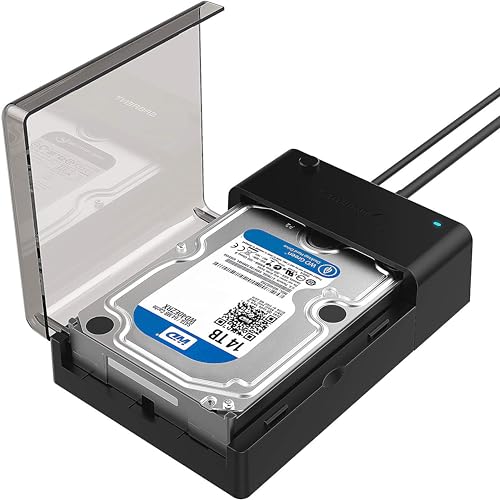
| Best Overall | Drive Size Compatibility: 2.5″ and 3.5″ | Connection Type: USB 3.0 Type-A | Maximum Capacity: Varies by drive | VIEW LATEST PRICE | Read Our Analysis |
| SABRENT 2.5″ SATA to USB 3.0 SSD/HDD Enclosure |
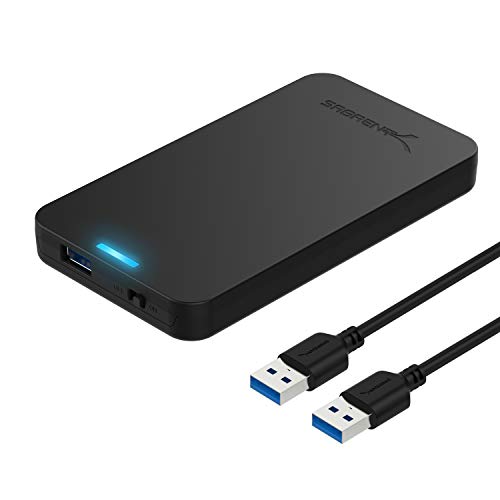
| Best For SSDs | Drive Size Compatibility: 2.5″ only | Connection Type: USB 3.0 Type-A | Maximum Capacity: Up to 16 TB | VIEW LATEST PRICE | Read Our Analysis |
| BENFEI 2.5 Inch SATA USB Hard Drive Enclosure |

| Most Portable | Drive Size Compatibility: 2.5″ only | Connection Type: USB Type-C and Type-A | Maximum Capacity: Up to 6 TB | VIEW LATEST PRICE | Read Our Analysis |
| CENMATE Aluminum 2 Bay Hard Drive Enclosure USB 3.0 |

| Best Dual-Bay | Drive Size Compatibility: 2.5″ and 3.5″ | Connection Type: USB 3.0 Type-A and Type-C | Maximum Capacity: Up to 20 TB per drive | VIEW LATEST PRICE | Read Our Analysis |
| UGREEN 2.5″ Hard Drive Enclosure USB 3.0 SATA Adapter |

| Best Budget Pick | Drive Size Compatibility: 2.5″ only | Connection Type: USB 3.0 Type-A | Maximum Capacity: Up to 6 TB | VIEW LATEST PRICE | Read Our Analysis |
| ACASIS USB-C Hard Drive Enclosure for 3.5/2.5 Inch SATA |

| Fastest Transfer Speed | Drive Size Compatibility: 2.5″ and 3.5″ | Connection Type: USB Type-C | Maximum Capacity: Up to 30 TB | VIEW LATEST PRICE | Read Our Analysis |
| External Hard Drive Enclosure USB 3.0 2.5 inch |

| Most Compact | Drive Size Compatibility: 2.5″ only | Connection Type: USB 3.0 Type-A with Type-C adapter | Maximum Capacity: Up to 2 TB | VIEW LATEST PRICE | Read Our Analysis |
| SABRENT USB 3.0 to SATA Hard Drive Docking Station |
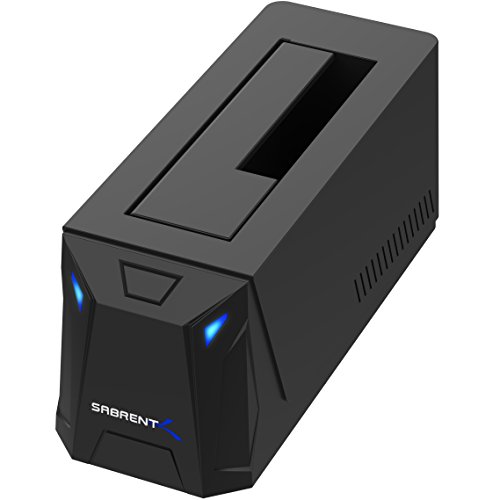
| Best Upright Design | Drive Size Compatibility: 2.5″ and 3.5″ | Connection Type: USB 3.0 Type-A | Maximum Capacity: 20+ TB | VIEW LATEST PRICE | Read Our Analysis |
| POSUGEAR 2.5″ External Hard Drive Enclosure USB 3.0 |

| Best Protection | Drive Size Compatibility: 2.5″ only | Connection Type: USB 3.0 Type-A | Maximum Capacity: Up to 4 TB | VIEW LATEST PRICE | Read Our Analysis |
| SABRENT USB-C Dual Bay Hard Drive Docking Station |

| Best For Cloning | Drive Size Compatibility: 2.5″ and 3.5″ | Connection Type: USB-C | Maximum Capacity: 20+ TB | VIEW LATEST PRICE | Read Our Analysis |
More Details on Our Top Picks
Sabrent USB 3.0 SATA Hard Drive Docking Station (EC-DFLT)
Do you need a single dock that handles both 2.5″ and 3.5″ SATA drives? The Sabrent EC-DFLT is a lay-flat docking station that accepts either size. Connect it directly to a USB 3.0 port on your computer using the included cable—avoid USB hubs and 2.0 ports to prevent disconnections. For 3.5″ drives, you must use the included 12V power adapter; 2.5″ drives work via USB power but benefit from the adapter for stability. The dock supports UASP protocol for faster transfers if your system is UASP-capable. It’s plug-and-play on Windows, macOS, and Linux with no driver installation needed. Note that S.M.A.R.T. diagnostics aren’t supported through the USB connection.
- Drive Size Compatibility:2.5″ and 3.5″
- Connection Type:USB 3.0 Type-A
- Maximum Capacity:Varies by drive
- Installation Type:Lay-flat dock
- External Power Required:12V adapter (required for 3.5″)
- UASP Support:Yes
- Additional Feature:Lay-flat dock design
- Additional Feature:LED activity indicator
- Additional Feature:Supports both 2.5″/3.5″ drives
SABRENT 2.5″ SATA to USB 3.0 SSD/HDD Enclosure
Looking for an enclosure that prioritizes solid-state drives? The SABRENT EC-UASP delivers tool-free installation for your 2.5″ SATA SSDs and HDDs. You’ll connect it via USB 3.0, achieving transfer speeds up to 5 Gbps, with backward compatibility for USB 2.0 devices. The enclosure supports drives up to 16 TB capacity and requires no drivers—simply plug your drive in and access your files immediately. Its compact plastic design weighs just 2 ounces, making it portable. You’ll receive the enclosure and USB cable in the package. The product covers Windows and Mac systems, backed by a one-year warranty and Amazon’s 30-day return guarantee.
- Drive Size Compatibility:2.5″ only
- Connection Type:USB 3.0 Type-A
- Maximum Capacity:Up to 16 TB
- Installation Type:Tool-free enclosure
- External Power Required:No
- UASP Support:Yes
- Additional Feature:Tool-free installation
- Additional Feature:Supports up to 16TB capacity
- Additional Feature:Optimized for SSD performance
BENFEI 2.5 Inch SATA USB Hard Drive Enclosure
The BENFEI 2.5 Inch enclosure’s dual USB Type-C and Type-A ports make it the most portable option for users who need drive access across multiple devices. You’ll experience data transfer speeds up to 5 Gbps using the UASP SATA III protocol, which delivers 70% faster performance than standard USB 3.0. Installation requires no tools: simply push out the cover, insert your 2.5-inch SSD or HDD, and close it. The enclosure supports drives up to 6TB and works with Windows, Linux, and MacOS 8.0 and above. Its backward compatibility with USB 2.0 ensures functionality across older systems. BENFEI backs this product with an 18-month warranty and responsive customer service.
- Drive Size Compatibility:2.5″ only
- Connection Type:USB Type-C and Type-A
- Maximum Capacity:Up to 6 TB
- Installation Type:Tool-free enclosure
- External Power Required:No
- UASP Support:Yes
- Additional Feature:USB Type-C/Type-A dual ports
- Additional Feature:18-month warranty included
- Additional Feature:70% faster than USB 3.0
CENMATE Aluminum 2 Bay Hard Drive Enclosure USB 3.0
Need reliable dual-bay storage that won’t clutter your workspace? The CENMATE Aluminum enclosure holds two 2.5″ or 3.5″ drives up to 20TB each. You’ll get USB 3.0 speeds up to 5Gbps—transferring a 1GB file takes 3–5 seconds. The aluminum design includes a cooling fan that runs quietly at 40–50 decibels. Install drives tool-free into the tray system without powering down. Daisy chain up to three units for 120TB total expansion. It’s compatible with Windows 7+, Mac 9.1+, and Linux. Technical support responds within 24 hours for any questions you have.
- Drive Size Compatibility:2.5″ and 3.5″
- Connection Type:USB 3.0 Type-A and Type-C
- Maximum Capacity:Up to 20 TB per drive
- Installation Type:Tool-free enclosure with hot-swap
- External Power Required:Yes (implied for 3.5″)
- UASP Support:Not specified
- Additional Feature:Dual bay with cooling fan
- Additional Feature:Daisy chain expansion capability
- Additional Feature:Aluminum-alloy heat dissipation design
UGREEN 2.5″ Hard Drive Enclosure USB 3.0 SATA Adapter
UGREEN’s 2.5″ enclosure delivers reliable external storage without breaking your budget. You’ll get 5Gbps transfer speeds and UASP support, which accelerates data transmission up to 70% faster than standard USB 3.0. The enclosure fits 2.5-inch SATA drives up to 6TB and works with Windows, Linux, and MacOS 8.0 and above. Installation requires no external power—simply insert your drive, secure it, and connect the included 12-inch cable to your PC, laptop, PS4, or Xbox. Built-in short-circuit and over-current protection safeguards your hardware, while EVA foam prevents damage during transport. You can use this enclosure for data transfers, expanding storage, booting legacy systems, and file recovery.
- Drive Size Compatibility:2.5″ only
- Connection Type:USB 3.0 Type-A
- Maximum Capacity:Up to 6 TB
- Installation Type:Tool-free enclosure
- External Power Required:No
- UASP Support:Yes
- Additional Feature:Detachable 12-inch cable included
- Additional Feature:Short-circuit/over-current protection
- Additional Feature:EVA foam shock protection
ACASIS USB-C Hard Drive Enclosure for 3.5/2.5 Inch SATA
Looking for the fastest transfer speed without sacrificing storage capacity? The ACASIS USB-C Hard Drive Enclosure delivers 6Gbps transfer speeds with UASP transmission, cutting 1TB transfer time from 51 minutes to 34 minutes. You’ll get aerospace-grade aluminum construction that dissipates heat effectively, extending your drive’s lifespan during intensive work. The hollow inner tray design keeps operating temperatures low. You can store up to 30TB, making it suitable for backing up large photo libraries or video projects. The enclosure fits both 3.5 and 2.5-inch SATA drives and includes a 12V/2A power adapter, USB-C cable, and smart sleep mode for energy efficiency.
- Drive Size Compatibility:2.5″ and 3.5″
- Connection Type:USB Type-C
- Maximum Capacity:Up to 30 TB
- Installation Type:Enclosure with independent switch
- External Power Required:Yes (12V/2A adapter included)
- UASP Support:Yes
- Additional Feature:Aerospace-grade aluminum casing
- Additional Feature:10-minute smart sleep mode
- Additional Feature:Independent switch for drive control
External Hard Drive Enclosure USB 3.0 2.5 inch
Ever need portable storage that won’t clutter your desk? This USB 3.0 enclosure houses your 2.5-inch SATA drive securely. Installation takes seconds: slide the enclosure open, insert your 7mm or 9.5mm drive, then slide it closed along the cover tracks. The USB 3.0 connection delivers 5 Gbps transfer speeds with UASP and TRIM protocols for faster file movement. You’ll get the enclosure, a micro B to USB 3.0 cable, and a USB 3.0 to Type-C adapter in the package. Use it for data transfer, portable storage expansion, or booting old drives on Windows, Linux, or Mac OS 8.0 and newer. This setup supports drives up to 2TB and works with PCs, laptops, PS4, and Xbox systems.
- Drive Size Compatibility:2.5″ only
- Connection Type:USB 3.0 Type-A with Type-C adapter
- Maximum Capacity:Up to 2 TB
- Installation Type:Sliding enclosure
- External Power Required:No
- UASP Support:Yes
- Additional Feature:Sliding cover installation design
- Additional Feature:USB Type-C adapter included
- Additional Feature:Supports up to 2TB capacity
SABRENT USB 3.0 to SATA Hard Drive Docking Station
Need a docking station that won’t tip over when you’re swapping drives? The Sabrent EC-UBLB offers an upright design that keeps your drives stable during use. This docking station accepts both 2.5″ and 3.5″ SATA drives, giving you flexibility with different storage sizes. You’ll connect via USB 3.0 for speeds up to 5Gbps, though it works with USB 2.0 and 1.1 ports on older computers. Setup requires no drivers—just plug in your drive and start transferring files immediately. The LED indicator shows you when your drive’s active or powered on. UASP support enhances performance compared to standard USB connections, making file transfers faster and more reliable for your workflow.
- Drive Size Compatibility:2.5″ and 3.5″
- Connection Type:USB 3.0 Type-A
- Maximum Capacity:20+ TB
- Installation Type:Upright dock with hot-swap
- External Power Required:Not specified
- UASP Support:Yes
- Additional Feature:Upright dock form factor
- Additional Feature:LED power/activity indicator
- Additional Feature:Universal 2.5″/3.5″ compatibility
POSUGEAR 2.5″ External Hard Drive Enclosure USB 3.0
The POSUGEAR enclosure offers top-tier protection for your 2.5-inch drives through its durable PC+ABS shell that withstands drops and impacts. Installation takes three simple steps: slide open the enclosure, insert your 7mm or 9.5mm drive, then slide closed. The EVA sponge ensures stable connection between drive and SATA interface. You’ll get USB 3.0 speeds up to 5Gbps with UASP acceleration, making transfers roughly nine times faster than USB 2.0. The enclosure supports drives up to 4TB and works with major brands like WD, Samsung, and Kingston. Built-in protections include automatic hibernation, overcurrent, overvoltage, and overheat safeguards. Hot-swappable design means no power supply needed. LED indicators display working status clearly.
- Drive Size Compatibility:2.5″ only
- Connection Type:USB 3.0 Type-A
- Maximum Capacity:Up to 4 TB
- Installation Type:Sliding tool-free enclosure
- External Power Required:No
- UASP Support:Yes
- Additional Feature:Sliding hard drive enclosure design
- Additional Feature:Automatic hibernation/overheat protection
- Additional Feature:Anti-drop/anti-shock PC+ABS shell
SABRENT USB-C Dual Bay Hard Drive Docking Station
SABRENT’s USB-C dual-bay dock excels for users who clone hard drives regularly. You can read and write to two drives simultaneously at USB 3.0 speeds up to 5 Gbps. The offline cloning feature transfers data at 60 MB/s without requiring a computer. Simply insert your 2.5″ or 3.5″ SATA drives into the tool-free bays, connect via USB-C, and access your drives immediately. The LED indicator shows activity status. This dock supports drives up to 20+ TB and works with Windows and Mac OS, making it practical for backup and drive migration tasks.
- Drive Size Compatibility:2.5″ and 3.5″
- Connection Type:USB-C
- Maximum Capacity:20+ TB
- Installation Type:Dual-bay dock with hot-swap
- External Power Required:Not specified
- UASP Support:Not specified
- Additional Feature:Offline cloning capability
- Additional Feature:Simultaneous dual-drive read/write
- Additional Feature:Supports drives up to 20TB
Factors to Consider When Choosing an Enclosure for SATA Hard Drives

When you’re selecting a SATA hard drive enclosure, you’ll need to evaluate five key factors that directly affect performance and usability: drive size compatibility (ensuring your 2.5-inch or 3.5-inch drives fit), interface speed requirements (matching USB 2.0, 3.0, or USB-C to your transfer needs), power supply considerations (whether you need external adapters or bus power), build quality materials (metal versus plastic durability), and hot-swap capability (the ability to remove drives without powering down). Each factor determines how well the enclosure will serve your specific storage and workflow demands. You should check the manufacturer’s specifications against your current drives and planned usage before making a purchase.
Drive Size Compatibility
How do you know which enclosure will truly fit your hard drive? Start by identifying your drive’s form factor—either 2.5″ or 3.5″—then check its thickness. Most 2.5″ drives measure 7mm or 9.5mm in height. Match these specifications exactly to your enclosure’s supported dimensions. Next, verify the enclosure’s capacity limit per drive. Many 2.5″ models support up to 6TB, while others max out at 4TB. If you’re using a 3.5″ drive, ensure the enclosure provides adequate tray space and airflow. Some enclosures accommodate mixed thicknesses, but confirm your exact drive height before purchasing. Finally, check whether your enclosure supports bus power or requires an external adapter based on your drive’s power requirements.
Interface Speed Requirements
What interface standard does your enclosure really support? Check whether it offers USB 3.0, which delivers up to 5 Gbps theoretical bandwidth, or USB-C with backward compatibility to USB-A hosts. USB 3.0 significantly outpaces USB 2.0, enabling faster transfers that match your drive’s performance. Consider UASP support, which reduces CPU load and improves throughput on compatible systems. Match the interface speed to your drive type: HDDs typically reach 100–160 MB/s, while SSDs exceed those speeds. For 3.5″ drives or high-capacity enclosures, verify your host connection and power delivery sustain high-speed transfers without throttling. Select an enclosure where the interface doesn’t bottleneck your drive’s actual capabilities.
Power Supply Considerations
You’ve matched your enclosure’s interface to your drive’s speed, but a fast connection won’t help if your drive can’t stay powered reliably. Consider your drive’s size: 3.5-inch drives need external 12V adapters, while 2.5-inch drives can run on USB bus power but perform better with dedicated power. Check the enclosure’s power specifications against your adapter’s voltage and current ratings—mismatches cause spin-up failures and disconnections. If you’re adding multiple drives, verify the power supply handles simultaneous operation without voltage drops. Choose enclosures with dedicated power supplies over bus-powered options for stability. This prevents data loss during hot-swapping and protects against the drive failures that occur when power is insufficient.
Build Quality Materials
Why does material choice matter more than you’d think when selecting an enclosure? The materials directly affect your drive’s lifespan and reliability. Aluminum and alloy enclosures dissipate heat better than plastic while providing superior sturdiness. They maintain stable operating temperatures, reducing thermal stress on your drive. Plastic enclosures lack this thermal management capability and flex under pressure, potentially misaligning connectors. Next, examine the internal construction. Sealed or tightly clamped trays with secure SATA connections minimize vibration during operation, preventing connection failures. Tool-free designs reduce assembly errors that expose drives to static discharge. Finally, check for protective features. EVA padding, splash-resistant coatings, and rugged housings absorb shock effectively. Prioritize aluminum construction with sealed trays and integrated padding for maximum protection and longevity.
Hot-Swap Capability
How important is it that you can swap drives without shutting down your enclosure? Hot-swapping saves you time during active workflows by letting you insert or remove drives instantly. First, verify your enclosure explicitly supports hot-swapping for SATA drives, as not all models do. Next, check that your enclosure matches your drive type—whether you’re using 2.5″ or 3.5″ drives, HDDs or SSDs. Look for tool-free trays, which eliminate screw handling and speed up replacements. Finally, confirm the enclosure has LED activity indicators so you can verify active connections and drive readiness before swapping. These indicators prevent you from removing drives that are actively being accessed. Proper hot-swap compatibility protects your drives from damage and keeps your workflow uninterrupted.
Thermal Management Features
While hot-swapping keeps your workflow moving, thermal management keeps your drives running reliably during extended use. Choose enclosures with metal or aluminum casings instead of plastic; metal dissipates heat more effectively and prevents thermal throttling during large file transfers. Consider models with built-in cooling fans—typically 2-inch fans actively reduce drive temperatures, though expect some operational noise at higher speeds. Look for hollow inner tray designs and aerospace-grade aluminum construction, which lower operating temperatures and extend drive lifespan. Verify the enclosure supports sustained workloads without performance degradation. Poor thermal design causes heat accumulation, leading to reduced speeds or drive failure over time. Prioritize thermal features matching your usage intensity to maintain consistent throughput and reliability.
Operating System Support
When you’re selecting a SATA enclosure, checking its operating system compatibility is one of your first practical steps. Verify that the enclosure supports your specific OS version—whether Windows, macOS, or Linux—to ensure plug-and-play functionality without requiring driver installations. Confirm the enclosure offers USB 3.0, 3.1, or 3.2 connectivity, with backward compatibility to USB 2.0 if you’ll connect it to older devices. Check whether your OS supports hot-swappable operation so you can swap drives without restarting. Confirm TRIM and UASP compatibility with your kernel version to optimize SSD performance. Finally, verify that SMART diagnostics are accessible through the USB bridge, as some enclosures don’t expose this data, limiting your ability to monitor drive health effectively.
Storage Capacity Limits
Once you’ve confirmed your enclosure works with your operating system, you’ll need to verify it can handle the drive sizes you plan to use. Each bay has a maximum capacity limit—typically ranging from 4TB to 30TB per drive. Check your enclosure’s specifications for this per-drive limit before purchasing. Don’t assume a multi-drive enclosure’s total capacity means each bay supports that amount; instead, verify the individual bay limits. Also confirm the enclosure supports your drive’s height, usually 7mm or 9.5mm, since mismatches can prevent full recognition. If you need more storage later, check whether your enclosure supports daisy-chaining or expansion options. These features let you add capacity without replacing existing drives, though per-drive limits still apply to each inserted drive.
Final Thoughts
You’ll want to pick an enclosure that matches your drive size and capacity needs. Prioritize aluminum bodies for durability, tool-free installation for convenience, and USB 3.0 or USB-C with UASP support for speed. Check that it’s compatible with your operating system. Verify anti-slip features prevent tipping. For 3.5″ drives, confirm external power availability. These selections assure reliable storage access without frustration or drive damage.

Meet Ry, “TechGuru,” a 36-year-old technology enthusiast with a deep passion for tech innovations. With extensive experience, he specializes in gaming hardware and software, and has expertise in gadgets, custom PCs, and audio.
Besides writing about tech and reviewing new products, he enjoys traveling, hiking, and photography. Committed to keeping up with the latest industry trends, he aims to guide readers in making informed tech decisions.