
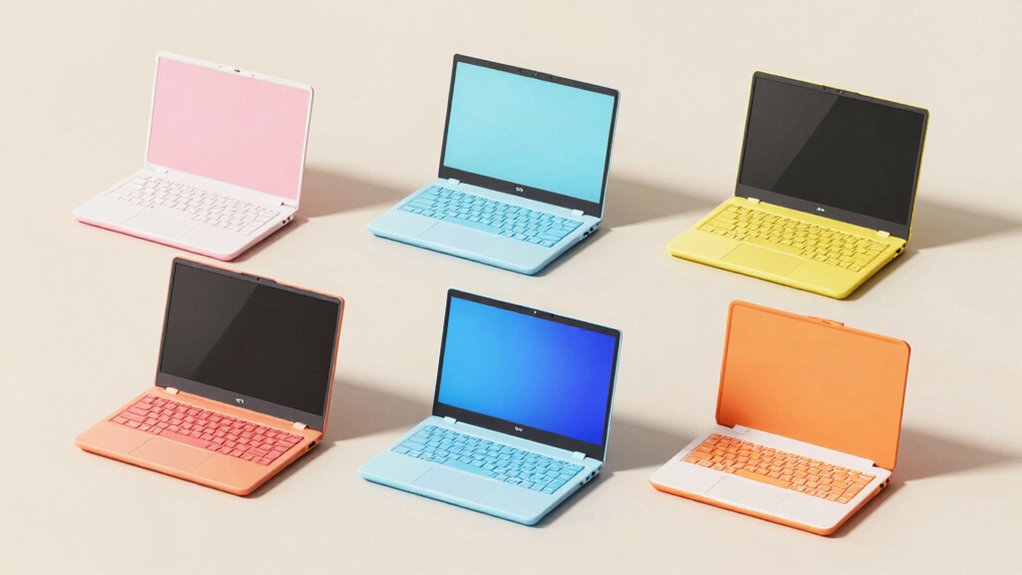

When you’re buying your child’s first laptop, you need to evaluate several critical factors before committing. Screen size, learning content volume, durability, and safety features determine whether the device actually supports your child’s development. VTech and LeapFrog models dominate this category for good reason. You’ll discover that age-appropriate designs with offline functionality and parental controls matter considerably—but which specific features align with your situation? We’ll break down the top 15 options.
| VTech Genio Bilingual JuniorBook Learning Laptop for Kids |

| Best Bilingual Learning | Target Age Range: 5+ years | Learning Activities/Modes: 80+ activities | Bilingual Support: Fully bilingual (English/Spanish) | VIEW LATEST PRICE | Read Our Analysis |
| Kids Educational Laptop with 48 Learning Modes (Ages 5+) |

| Most Learning Modes | Target Age Range: 5+ years | Learning Activities/Modes: 48 learning modes | Bilingual Support: English only | VIEW LATEST PRICE | Read Our Analysis |
| LeapFrog 2-in-1 LeapTop Touch Green |

| Best For Toddlers | Target Age Range: 2-5 years | Learning Activities/Modes: 5 learning modes | Bilingual Support: English only | VIEW LATEST PRICE | Read Our Analysis |
| LeapFrog My First STEAM Laptop |

| Best STEAM Introduction | Target Age Range: 3+ years | Learning Activities/Modes: STEAM-focused hands-on activities | Bilingual Support: English only | VIEW LATEST PRICE | Read Our Analysis |
| Kids Laptop with 80 Learning Modes for Ages 5 |

| Best Value Pack | Target Age Range: 5-10 years | Learning Activities/Modes: 80 learning modes | Bilingual Support: English only | VIEW LATEST PRICE | Read Our Analysis |
| VTech Play Smart Preschool Laptop Black |

| Best Preschool Pick | Target Age Range: 3-6 years | Learning Activities/Modes: 30 activities with leveled learning | Bilingual Support: Includes Spanish words | VIEW LATEST PRICE | Read Our Analysis |
| 7 Inch Portable Mini Laptop PC Android 12 |

| Real Android Laptop | Target Age Range: Kids (no specific age listed) | Learning Activities/Modes: Android 12 apps (YouTube, web browsing) | Bilingual Support: English only | VIEW LATEST PRICE | Read Our Analysis |
| Lexibook Barbie Educational Bilingual Laptop (JC598BBi2) |

| Most Bilingual Activities | Target Age Range: Not specified | Learning Activities/Modes: 124 activities | Bilingual Support: Bilingual (English/Spanish) | VIEW LATEST PRICE | Read Our Analysis |
| Learning Laptop Toy for Toddlers 1-3 Years |

| Best For Babies | Target Age Range: 1-3 years | Learning Activities/Modes: 120+ learning themes with 4 interactive modes | Bilingual Support: English only | VIEW LATEST PRICE | Read Our Analysis |
| VTech Toddler Tech Laptop |
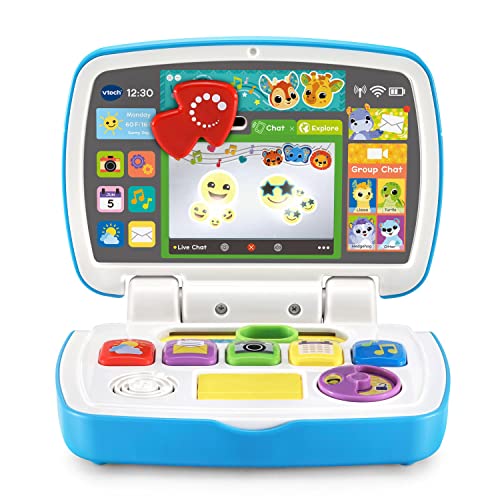
| Best Interactive Design | Target Age Range: 12-36 months | Learning Activities/Modes: 5 app buttons with interactive activities | Bilingual Support: English only | VIEW LATEST PRICE | Read Our Analysis |
| LEXiBOOK Disney Frozen 2 Educational Bilingual Laptop |

| Best Character Theme | Target Age Range: Not specified | Learning Activities/Modes: 124 activities | Bilingual Support: Bilingual (English/Spanish) | VIEW LATEST PRICE | Read Our Analysis |
| LeapFrog My Own Leaptop Pink |

| Best Portable Option | Target Age Range: 2-4 years | Learning Activities/Modes: 4 learning modes with 26 animal animations | Bilingual Support: English only | VIEW LATEST PRICE | Read Our Analysis |
| Tech Kidz STEM Educational Learning Laptop for Kids |
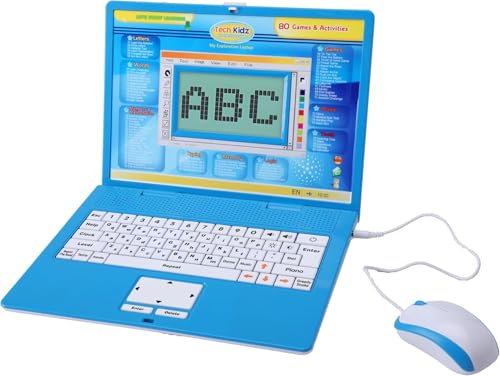
| Best Collaborative Learning | Target Age Range: 4+ years | Learning Activities/Modes: 80 learning games and activities | Bilingual Support: English only | VIEW LATEST PRICE | Read Our Analysis |
| Learning Toy Laptop for Toddlers (Pink) |
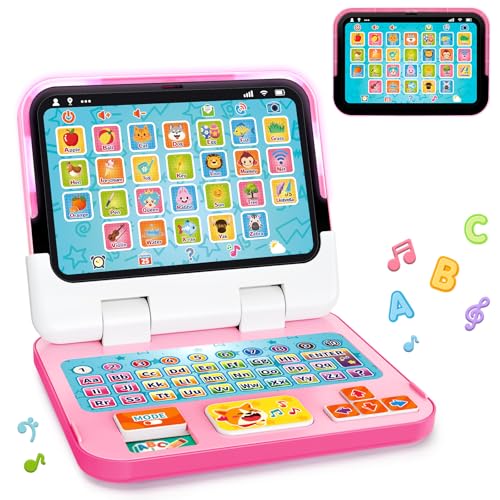
| Best Travel Toy | Target Age Range: 1-3 years | Learning Activities/Modes: 120+ learning themes with 4 interactive modes | Bilingual Support: English only | VIEW LATEST PRICE | Read Our Analysis |
| Mini Laptop Computer 10.1 inch Android 13 (Pink) |

| Best Full-Size Screen | Target Age Range: Kids/students (no specific age listed) | Learning Activities/Modes: Android 13 apps (web browsing, streaming, video conferencing) | Bilingual Support: English only | VIEW LATEST PRICE | Read Our Analysis |
More Details on Our Top Picks
VTech Genio Bilingual JuniorBook Learning Laptop for Kids
If you’re looking for an offline learning device that teaches basic computer skills while building bilingual proficiency, the VTech Genio Bilingual JuniorBook works best for children ages 5 and up. The laptop features a full-size QWERTY keyboard and cursor controller, mimicking adult computers to familiarize kids with standard equipment. You’ll access over 80 activities covering math, science, language arts, and music, with every activity playable in English or Spanish. The device includes practical apps like a weekly calendar, notebook, and music player. Since it requires no internet connection, all activities load offline immediately. You’ll need four AA batteries to operate it; the package includes demo batteries, though new batteries are recommended for regular use. This approach establishes foundational computer literacy while supporting dual-language development.
- Target Age Range:5+ years
- Learning Activities/Modes:80+ activities
- Bilingual Support:Fully bilingual (English/Spanish)
- Screen Type:No screen (keyboard-based)
- Power Source:4 AA batteries
- Design Style:Full-size QWERTY keyboard laptop replica
- Additional Feature:Over 80 offline activities
- Additional Feature:Full-size QWERTY keyboard
- Additional Feature:Cursor controller included
Kids Educational Laptop with 48 Learning Modes (Ages 5+)
Your child needs a learning tool that combines education with engagement, and this kids’ educational laptop delivers both through its 48 learning modes designed specifically for ages 5 and up. The 4.3-inch TFT color screen displays clear, lifelike visuals that support learning across alphabet, mathematics, colors, animals, and general knowledge. The realistic keyboard and mouse enable your child to answer questions and play logic games, memory challenges, and speed competitions. The ergonomic design mimics actual laptops, featuring a slim profile and convenient size for easy handling. After each learning activity, your child engages with games that reinforce skills through interactive practice, creating sustained educational value through extended gameplay.
- Target Age Range:5+ years
- Learning Activities/Modes:48 learning modes
- Bilingual Support:English only
- Screen Type:4.3 inch TFT color screen
- Power Source:Not specified (presumed battery)
- Design Style:Realistic laptop with mouse and keyboard
- Additional Feature:4.3 inch TFT color screen
- Additional Feature:48 learning modes
- Additional Feature:Realistic mouse included
LeapFrog 2-in-1 LeapTop Touch Green
The LeapFrog 2-in-1 LeapTop Touch works best for children ages 2–5 who’re beginning to explore letters, numbers, and basic technology skills through interactive play. This device features a flip screen that converts between keyboard and tablet modes, offering versatility for different learning activities. The keyboard includes letters A–Z and numbers 1–10, while five learning modes cover ABCs, numbers, games, music, and messages. You can customize content to help your child practice spelling their own name. Role-play features let kids pretend to email Scout, mimicking adult computer use. The toy requires three AA batteries, with replacements recommended for regular use after demo batteries deplete.
- Target Age Range:2-5 years
- Learning Activities/Modes:5 learning modes
- Bilingual Support:English only
- Screen Type:Flip/transforming screen
- Power Source:3 AA batteries
- Design Style:2-in-1 flip laptop-to-tablet design
- Additional Feature:Screen flips to tablet mode
- Additional Feature:Customizable name spelling
- Additional Feature:E-mail Scout role-play
LeapFrog My First STEAM Laptop
Parents seeking an engaging introduction to STEAM concepts for children ages 3 and up’ll find LeapFrog’s My First STEAM Laptop an effective starting point. The device guides learning through Dr. Frankensteam and STEAM-Bot, covering science, technology, engineering, art, and math. Children explore inventions, build robots, investigate fossils, and learn about sunlight’s importance. Hands-on activities include growing plants, matching shapes, designing animals, and counting with dinosaur bones. The laptop requires two AA batteries, which are included for demo purposes only; new batteries are recommended for regular use. These interactive features develop early problem-solving skills and creativity while combining education with play.
- Target Age Range:3+ years
- Learning Activities/Modes:STEAM-focused hands-on activities
- Bilingual Support:English only
- Screen Type:Basic interactive screen (size not specified)
- Power Source:2 AA batteries
- Design Style:Compact laptop-style design
- Additional Feature:STEAM-themed guided learning
- Additional Feature:Fossil investigation activities
- Additional Feature:Robot building included
Kids Laptop with 80 Learning Modes for Ages 5
Looking for an educational device that mirrors real computer skills while keeping kids engaged? The LESHITIAN Kids Laptop delivers 80 learning modes covering alphabet, words, mathematics, games, and music. The realistic design includes a standard keyboard and dual-button mouse, helping children develop typing skills and hand-eye coordination. You’ll receive the laptop, manual, and mouse with no assembly required. The device operates on lithium-ion batteries and weighs just 0.97 kg, making it portable for travel. Dimensions measure 15.15 by 8.07 by 2.08 inches. Amazon’s 30-day return guarantee protects your purchase, and customer reviews average 4.0 stars from 250 ratings. Choose this laptop for children ages 5–10 seeking structured learning outside the classroom.
- Target Age Range:5-10 years
- Learning Activities/Modes:80 learning modes
- Bilingual Support:English only
- Screen Type:No screen (keyboard-based)
- Power Source:Lithium-ion battery
- Design Style:Realistic ergonomic laptop design
- Additional Feature:80 learning modes
- Additional Feature:Lithium-ion battery powered
- Additional Feature:Knowledge testing challenges
VTech Play Smart Preschool Laptop Black
If you’re shopping for a preschooler aged 3–6 years who’s ready to explore early learning through interactive play, this sleek black toy laptop delivers 30 leveled activities that build foundational skills in literacy, phonics, and basic Spanish vocabulary. You’ll personalize the experience by entering your child’s name, age, and selecting an avatar, which customizes the learning path to their developmental stage. The laptop covers essential early skills: letter and number recognition, letter sounds, shape identification, and categorization tasks like sorting foods into fruits or vegetables. You’ll also find logic games, animal sounds with footprint identification, and a music game featuring instrument sounds for auditory discrimination. The device runs on two AA batteries (included for demonstration only), so you should purchase fresh batteries for regular use. This structured approach ensures your child progresses systematically through core preschool competencies without unnecessary complexity.
- Target Age Range:3-6 years
- Learning Activities/Modes:30 activities with leveled learning
- Bilingual Support:Includes Spanish words
- Screen Type:No screen (keyboard-based)
- Power Source:2 AA batteries
- Design Style:Sleek black laptop replica
- Additional Feature:30 leveled learning activities
- Additional Feature:Personalization with child avatar
- Additional Feature:Animal sounds/footprints included
7 Inch Portable Mini Laptop PC Android 12
This 7-inch portable mini laptop runs Android 12 and delivers the compact computing power you’ll need if you’re shopping for a child’s first educational device or a portable backup computer. The quad-core Allwinner A133P processor handles basic tasks, while 2GB RAM and 32GB storage support educational apps and media. The 1024×600 LCD display fits easily in backpacks, and the 1.6-pound weight makes it genuinely portable. You get WiFi connectivity, dual USB ports, HDMI output, and a built-in camera for video calls. The keyboard and touchpad function like standard laptops. Battery life reaches approximately 8 hours on the 3000mAh lithium-ion cell. Goldengulf includes an optical mouse, charger, and keychain light. The manufacturer provides a one-year warranty covering defects and malfunctions.
- Target Age Range:Kids (no specific age listed)
- Learning Activities/Modes:Android 12 apps (YouTube, web browsing)
- Bilingual Support:English only
- Screen Type:7 inch 1024×600 LCD display
- Power Source:Lithium-ion rechargeable
- Design Style:Portable 7-inch netbook
- Additional Feature:Android 12 operating system
- Additional Feature:Built-in camera/webcam
- Additional Feature:32GB storage capacity
Lexibook Barbie Educational Bilingual Laptop (JC598BBi2)
The Lexibook Barbie Educational Bilingual Laptop works well for children who want to develop math and logic skills while learning English and Spanish simultaneously. The device features 124 activities across math, clock, logic, and music categories, each offering multiple difficulty levels for progressive advancement. Its compact design measures 24 x 18 x 3.6 cm when closed, making it portable for travel and home use. The 5.1 x 9.7 cm screen displays interactive content that engages learners throughout lessons. After completing educational activities, children can play Snake, Memory, and Puzzle games, reinforcing skills through entertainment. The realistic laptop design with functional keyboard and mouse encourages proper posture and ergonomic habits during learning sessions.
- Target Age Range:Not specified
- Learning Activities/Modes:124 activities
- Bilingual Support:Bilingual (English/Spanish)
- Screen Type:5.1 x 9.7 cm interactive screen
- Power Source:Not specified
- Design Style:Slim elegant Barbie-themed laptop
- Additional Feature:124 activities bilingual
- Additional Feature:Snake, memory, puzzle games
- Additional Feature:Compact portable design
Learning Laptop Toy for Toddlers 1-3 Years
Looking for a toy that introduces your toddler to early learning concepts while supporting fine motor development? This 2-in-1 laptop switches between keyboard and tablet modes, giving you flexibility for desktop or portable play. You’ll access 120+ learning themes covering letters, numbers, colors, and words through four interactive modes: Learning, Spelling, Quiz, and Music. The device features lights, sounds, and music to engage your child’s senses. Built from durable ABS plastic with rounded edges and anti-drop protection, it suits ages 12 months and up. Function keys simulate real-life scenarios like phone calls and emails, helping your toddler develop social skills and everyday vocabulary. The secure power compartment requires a screwdriver to open, prioritizing safety.
- Target Age Range:1-3 years
- Learning Activities/Modes:120+ learning themes with 4 interactive modes
- Bilingual Support:English only
- Screen Type:2-in-1 detachable screen (tablet/keyboard modes)
- Power Source:Not specified
- Design Style:2-in-1 detachable keyboard/tablet design
- Additional Feature:120+ learning themes
- Additional Feature:Detachable base transforms
- Additional Feature:8 function keys included
VTech Toddler Tech Laptop
VTech’s Toddler Tech Laptop works best for children between 12 and 36 months who’re ready to explore interactive learning through play. The device features five app buttons covering weather, email, camera, calendar, and music. You’ll activate cause-and-effect songs and phrases through the spinning disc, slider, arrow buttons, and color controls. The mirror screen displays light-up emojis that respond to your child’s interactions. Insert three AA batteries to power the laptop, then guide your toddler to press buttons and discover animal chats. This approach builds fine motor skills, counting ability, and cause-and-effect understanding. The compact 7×10-inch size fits small hands easily.
- Target Age Range:12-36 months
- Learning Activities/Modes:5 app buttons with interactive activities
- Bilingual Support:English only
- Screen Type:Mirror screen with light-up emojis
- Power Source:3 AA batteries
- Design Style:Compact mirror-screen laptop with spinning controls
- Additional Feature:Mirror screen light-up emojis
- Additional Feature:Five app buttons
- Additional Feature:Spinning disc interaction
LEXiBOOK Disney Frozen 2 Educational Bilingual Laptop
If you’re looking for a laptop that teaches both English and Spanish while keeping kids engaged, this LEXiBOOK model offers 124 activities across multiple subjects. The device covers mathematics, general knowledge, and clock reading alongside typing skills and language development. You’ll find differentiated difficulty levels that progress with your child’s abilities. Musical exploration features let kids learn notes, compose melodies, and play songs as foundational music education. The ergonomic design includes a realistic keyboard and mouse sized appropriately for children’s hands. Its slim profile and blue/purple Frozen 2 theme with Elsa and Anna characters appeal to young learners while maintaining a functional, laptop-inspired appearance.
- Target Age Range:Not specified
- Learning Activities/Modes:124 activities
- Bilingual Support:Bilingual (English/Spanish)
- Screen Type:Screen size not specified
- Power Source:Not specified
- Design Style:Slim elegant Disney Frozen-themed laptop
- Additional Feature:124 bilingual activities
- Additional Feature:Music composition/melody learning
- Additional Feature:Disney character theme
LeapFrog My Own Leaptop Pink
The LeapFrog My Own Leaptop, Pink works best for children ages 2–4 years who’re ready for interactive pretend play that combines entertainment with early learning. The device features four learning modes: ABCs, Messages, Games, and Music. In ABC mode, your child hears letters, sounds, and words. Message mode lets them send pretend emails with Scout. Games mode includes animal trivia and letter activities. You can personalize the experience by spelling your child’s name and customizing emails. The laptop includes 26 animal animations, 16 songs, and a portable handle. It requires three AA batteries and measures 5.6 by 9.5 by 2 inches, weighing 1.1 pounds.
- Target Age Range:2-4 years
- Learning Activities/Modes:4 learning modes with 26 animal animations
- Bilingual Support:English only
- Screen Type:Screen with handle
- Power Source:3 AA batteries
- Design Style:Larger screen laptop replica with handle
- Additional Feature:26 animal animations
- Additional Feature:16 songs/melodies included
- Additional Feature:On-the-go carry handle
Tech Kidz STEM Educational Learning Laptop for Kids
For children ages 4 and up who’re ready to develop foundational computer skills while strengthening academic fundamentals, this dual-user exploration laptop delivers 80 learning games covering math, spelling, problem-solving, logic, vocabulary, typing, and memory. The large LCD screen accommodates two users simultaneously, making it suitable for collaborative learning between siblings or a child and parent. A real standard keyboard familiarizes kids with actual computer layouts, while the dual-button mouse builds fine motor skills and hand-eye coordination. The intuitive hardware design supports extended learning sessions without requiring adult technical knowledge. You’ll appreciate how the device balances entertainment with structured educational content, keeping children engaged while reinforcing classroom concepts and building confidence around technology use.
- Target Age Range:4+ years
- Learning Activities/Modes:80 learning games and activities
- Bilingual Support:English only
- Screen Type:Large LCD screen
- Power Source:Not specified
- Design Style:Real keyboard and dual-button mouse laptop
- Additional Feature:80 challenging learning games
- Additional Feature:Two-user collaborative setup
- Additional Feature:Large LCD screen
Learning Toy Laptop for Toddlers (Pink)
Looking for your toddler’s first introduction to interactive learning? The Learning Toy Laptop for Toddlers (Pink) offers a 2-in-1 design that switches between keyboard and tablet modes. You’ll access 120+ learning themes across four interactive modes: Learning Mode covers letters, numbers, and colors; Spelling Mode provides instant word feedback; Quiz Mode presents 70+ questions; and Music Mode develops early music skills. Eight function keys simulate real-life scenarios like phone calls and emails, building social vocabulary. The device supports fine motor development and memory through sensory-rich play. Built from durable ABS plastic with rounded edges, it’s designed for children aged 12–18 months to 3 years and fits small hands comfortably. The secure power compartment requires a screwdriver, ensuring child safety during independent use.
- Target Age Range:1-3 years
- Learning Activities/Modes:120+ learning themes with 4 interactive modes
- Bilingual Support:English only
- Screen Type:2-in-1 detachable screen (tablet/keyboard modes)
- Power Source:Not specified
- Design Style:2-in-1 detachable keyboard/tablet design
- Additional Feature:120+ learning themes
- Additional Feature:70+ quiz mode questions
- Additional Feature:Detachable base design
Mini Laptop Computer 10.1 inch Android 13 (Pink)
Need a compact device that handles schoolwork, streaming, and video calls without taking up much space? The Mini Laptop Computer 10.1 inch Android 13 offers a practical solution. You’ll get a lightweight device with a 10.1-inch IPS display, 2GB RAM, and 64GB storage for documents and files. The Allwinner A133 processor supports web browsing, video conferencing, and online classes effectively. Dual speakers and a front-facing camera enhance multimedia experiences. You receive a protective case, USB-C charger, and optical mouse included. This setup works well for students who need portability without sacrificing basic functionality.
- Target Age Range:Kids/students (no specific age listed)
- Learning Activities/Modes:Android 13 apps (web browsing, streaming, video conferencing)
- Bilingual Support:English only
- Screen Type:10.1 inch IPS display (800×1280 resolution)
- Power Source:USB-C rechargeable
- Design Style:10.1-inch full Android laptop/tablet hybrid
- Additional Feature:10.1 inch IPS display
- Additional Feature:Android 13 operating system
- Additional Feature:Protective case included
Factors to Consider When Choosing First Laptops for Kids
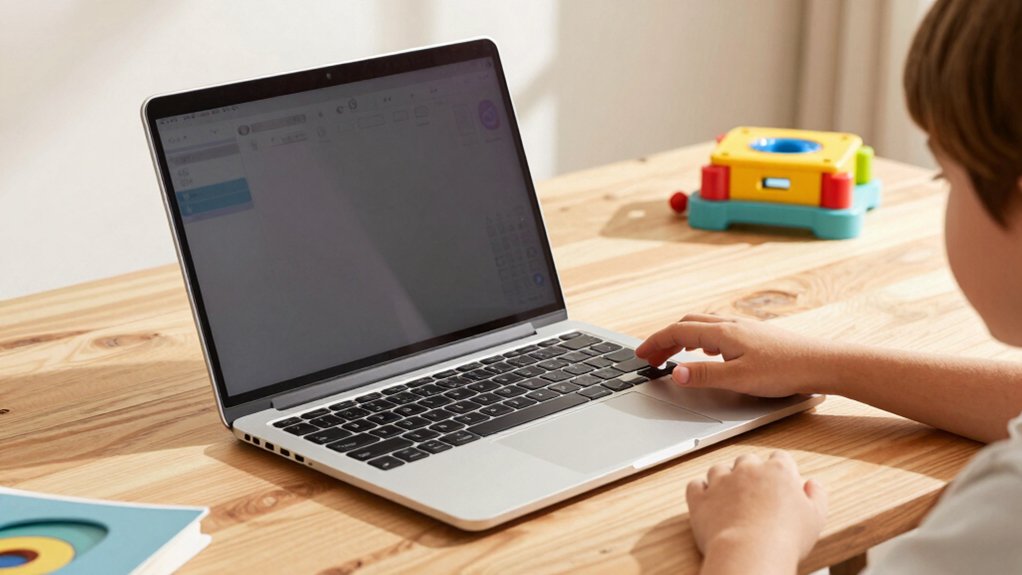
When you’re selecting your child’s first laptop, you’ll need to evaluate five critical factors: age appropriateness and development stage, educational content and learning modes that match their curriculum, battery life and power requirements for school and home use, screen size and display quality for comfortable viewing, and durability and safety features that withstand daily handling. Each factor directly impacts how effectively your child can learn and how long the device will remain functional, so you should assess them in order of your child’s immediate needs and your household’s practical constraints. Start by identifying your child’s age and academic level, then match the laptop’s specifications to their specific activities, whether that’s reading digital texts, completing assignments, or accessing educational software.
Age Appropriateness and Development
How do you know which laptop features actually match your child’s current abilities? Start by identifying your child’s age group and developmental stage. For toddlers aged 12–36 months, choose devices with chew-resistant materials, rounded edges, and simplified single-mode functions. For preschoolers aged 3–5 years, select laptops offering multi-mode activities that build letter recognition, basic counting, and pretend play. For early elementary ages 5–7+, opt for devices with spelling practice, memory games, logic puzzles, and introductory typing. Next, verify the device’s offline capability or internet requirement based on your child’s independence level and your preferred parental controls. Check the manufacturer’s age label to confirm alignment with typical developmental milestones in language, motor skills, and numeracy. This systematic approach ensures the laptop supports rather than frustrates your child’s learning.
Educational Content and Learning Modes
Once you’ve matched a laptop to your child’s developmental stage, the next step is evaluating the educational content and learning modes it provides. Look for devices offering 48–80 activities that cover core subjects: alphabet, math, science, and language arts. Prioritize laptops with bilingual or multilingual content, such as English and Spanish options, to support dual-language development. Check whether the device includes multiple learning modes—spelling, memory, logic, and music activities—that combine instruction with hands-on practice. Verify the laptop includes progression features and multiple difficulty levels so your child can advance as skills improve. Additionally, confirm that pretend-play scenarios reinforce literacy and numeracy concepts through realistic, engaging situations. These elements ensure viable, sustained learning that grows with your child.
Battery Life and Power Requirements
Before you purchase a kids’ laptop, you’ll want to understand what powers it and how long that power lasts. First, identify the battery type: most children’s devices use either replaceable AA/AAA batteries or built-in rechargeable packs. Check the manufacturer’s specifications for run-time on a full charge—aim for at least 8–10 hours for uninterrupted learning sessions. Verify whether batteries come included or require separate purchase. For rechargeable models, confirm the charging cable and outlet compatibility. Review the expected replacement interval for disposable batteries or the lifespan of rechargeable packs. Prioritize energy-efficient devices with low power consumption to extend usage between charges. Consult the quick-start guide for battery maintenance tips that maximize longevity and performance.
Screen Size and Display Quality
What screen size works best for your child’s learning needs? Consider portable models between 7–8 inches, which fit comfortably in small hands and reduce strain during extended use. If your child multitasks frequently or watches educational videos, opt for 10–10.1 inches instead, though you’ll sacrifice some portability.
Next, evaluate display quality by checking pixel density and color clarity. Higher pixel density supports better letter recognition for early readers. Examine the screen’s viewing angle to ensure visibility from different positions. Select matte or anti-glare screens to minimize glare in various lighting conditions, whether in classrooms or homes.
Finally, test the display in person when possible. This confirms readability and comfort for your child’s specific needs before purchasing.
Durability and Safety Features
How can you guarantee a laptop survives your child’s daily use and poses no safety risks? Select models with sturdy ABS plastic construction featuring rounded edges and anti-drop protection designed for toddlers through five-year-olds. Inspect the power compartment to verify screws secure the battery access, preventing your child from reaching batteries or small parts. Review parent-tested durability notes highlighting impact resistance and reinforced hinges. Check that demo batteries come pre-installed and instructions specify replacement procedures for regular use. Confirm the laptop has a compact, portable design with a secure grip that fits your child’s hands, reducing accidental drops during handling and transport. These specifications work together to create a device that withstands everyday wear while maintaining essential safety standards.
Portability and Design Ergonomics
Once you’ve confirmed your child’s laptop can withstand drops and handle rough treatment, you’ll want to ensure the device itself fits comfortably in your child’s hands and travels easily between home, school, and other locations. Look for laptops with screens between 7 and 15 inches and weights around 1 to 2 pounds. Check for ergonomic features like a responsive touchpad and real keyboard that reduce strain during extended use. Examine the design for built-in handles, slim profiles, or two-in-one modes that support portability. Verify the device fits your storage spaces and bag dimensions. Test the laptop on your child’s lap to confirm comfort. These specifications ensure your child can use the laptop practically across different environments without fatigue or damage risk.
Final Thoughts
You’ll find your ideal first laptop by matching your child’s age to the device’s features. Start by identifying your child’s learning needs—literacy, STEAM, or bilingual content. Next, compare screen sizes, activity counts, and battery life across your shortlist. Finally, verify parental controls and durability ratings before purchasing. VTech and LeapFrog models consistently meet these criteria, making them reliable choices for parents.

Meet Ry, “TechGuru,” a 36-year-old technology enthusiast with a deep passion for tech innovations. With extensive experience, he specializes in gaming hardware and software, and has expertise in gadgets, custom PCs, and audio.
Besides writing about tech and reviewing new products, he enjoys traveling, hiking, and photography. Committed to keeping up with the latest industry trends, he aims to guide readers in making informed tech decisions.