

When you’re building a storage system, you need hot-swap drive bays that match your specific setup. You’ll encounter several key options: single-drive mobile racks, multi-bay enclosures, and security-focused cages. Each type serves different purposes and fits different chassis configurations. Before choosing, you must understand drive compatibility, interface standards, and cooling requirements. The right selection depends on your current drives and future expansion plans—but which model actually fits your needs?
| StarTech.com 5.25in Hot Swap Mobile Rack (HSB100SATBK) |
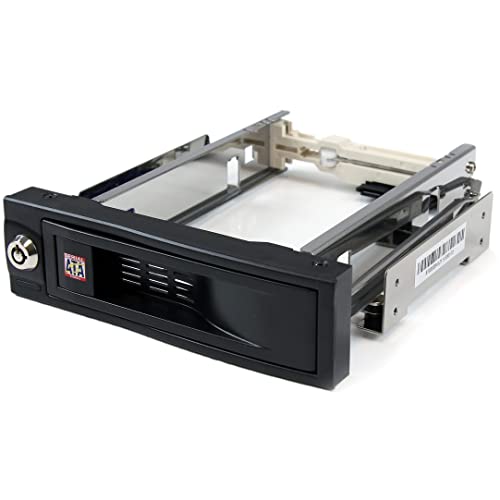
| Best Overall | Drive Capacity: 1 drive (3.5″) | Bay Size Required: 1x 5.25″ bay | Drive Interface Support: SATA | VIEW LATEST PRICE | Read Our Analysis |
| Rosewill Internal Hard Drive Enclosure Hot-Swap SATA (RSV-SATA-Cage-34) |

| Most Capacity | Drive Capacity: 4 drives (3.5″ or 2.5″) | Bay Size Required: 3x 5.25″ bays | Drive Interface Support: SATA I/II/III, SAS (6Gbps) | VIEW LATEST PRICE | Read Our Analysis |
| StarTech.com 3-Bay Hot Swap HDD Backplane (HSB3SATSASBA) |

| Best Enterprise Solution | Drive Capacity: 3 drives (3.5″) | Bay Size Required: 2x 5.25″ bays | Drive Interface Support: SATA I/II/III, SAS I/II | VIEW LATEST PRICE | Read Our Analysis |
| Kingwin Universal Hot Swap Mobile Rack for SSD/HDD |

| Best Budget Pick | Drive Capacity: 1 drive (3.5″ or 2.5″) | Bay Size Required: 1x 5.25″ bay | Drive Interface Support: SATA I/II/III | VIEW LATEST PRICE | Read Our Analysis |
| RackChoice Internal Hard Drive Enclosure with HDD Hotswap |

| Best For Servers | Drive Capacity: 5 drives (2.5″ or 3.5″) | Bay Size Required: 3x 5.25″ bays | Drive Interface Support: SATA I/II/III, SAS I/II | VIEW LATEST PRICE | Read Our Analysis |
| Syba 5.25″ Mobile Rack for 3.5″ and 2.5″ SATA HDD |
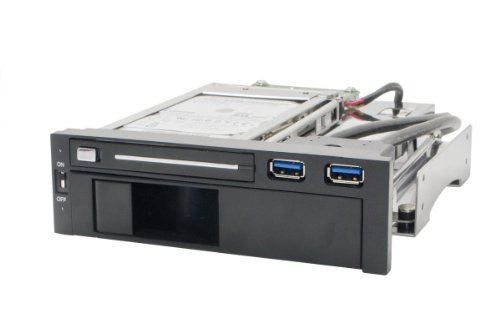
| Most Versatile | Drive Capacity: 1 drive (3.5″ or 2.5″) | Bay Size Required: 1x 5.25″ bay | Drive Interface Support: SATA III | VIEW LATEST PRICE | Read Our Analysis |
| ORICO Trayless Hot Swap Mobile Rack SATA Hard Drive Adapter |

| Best Design | Drive Capacity: 1 drive (3.5″) | Bay Size Required: 1x 5.25″ bay | Drive Interface Support: SATA III | VIEW LATEST PRICE | Read Our Analysis |
| Sata HDD & SSD Hot Swap Cage 6 Bay Dock |

| High-Capacity Option | Drive Capacity: 6 drives (2.5″) | Bay Size Required: 1x 5.25″ bay | Drive Interface Support: SATA | VIEW LATEST PRICE | Read Our Analysis |
| SATA HDD & SSD Hot Swap Cage 2 Bay |
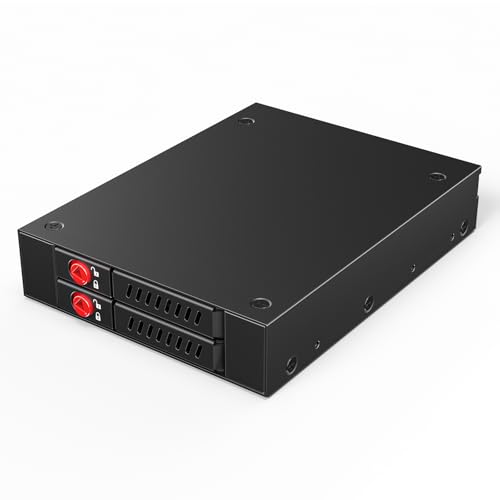
| Compact Dual-Bay | Drive Capacity: 2 drives (2.5″) | Bay Size Required: 1x 3.5″ bay | Drive Interface Support: SATA III | VIEW LATEST PRICE | Read Our Analysis |
| Silverstone FS304-12G 3.5″ Hot-Swap Cage |

| Professional Grade | Drive Capacity: 4 drives (3.5″) | Bay Size Required: 3x 5.25″ bays | Drive Interface Support: SATA 6Gb/s, SAS-12G | VIEW LATEST PRICE | Read Our Analysis |
More Details on Our Top Picks
StarTech.com 5.25in Hot Swap Mobile Rack (HSB100SATBK)
If you’re managing multiple 3.5″ SATA drives and need quick access without powering down your system, the StarTech.com HSB100SATBK delivers trayless hot-swap capability in a standard 5.25″ bay format. You’ll install the rack into your computer’s front-accessible bay, then insert drives directly without separate trays. The aluminum construction and rubber shock absorbers protect your drives during insertion and removal. With a 50,000+ insertion rating, you’re assured durability for frequent drive changes. The lockable bay prevents accidental ejection, while the internal SATA backplane handles all connections. This TAA-compliant design suits organizations with procurement requirements, offering reliable performance for systems requiring regular drive swaps.
- Drive Capacity:1 drive (3.5″)
- Bay Size Required:1x 5.25″ bay
- Drive Interface Support:SATA
- Trayless Design:Yes
- Cooling Solution:Rubber shock absorbers
- Security/Lock Features:Lockable drive bay
- Additional Feature:Solid aluminum construction
- Additional Feature:50,000+ insertion rating
- Additional Feature:Internal rubber shock absorbers
Rosewill Internal Hard Drive Enclosure Hot-Swap SATA (RSV-SATA-Cage-34)
Need to maximize storage in a standard desktop tower without replacing your entire system? The Rosewill RSV-SATA-Cage-34 converts three 5.25-inch CD/DVD drive bays into four hot-swap SATA drive slots. You can install four 3.5-inch HDDs or four 2.5-inch HDDs/SSDs simultaneously. The unit supports SATA I, II, and III drives, plus SAS drives at 6Gbps speeds. A rear 120mm exhaust fan maintains proper airflow and cooling during operation. The steel and ABS construction provides durability for long-term use. This enclosure works with Rosewill cases L4000U, L4500U, and R4000U. Hot-swap functionality lets you remove and install drives without powering down your system.
- Drive Capacity:4 drives (3.5″ or 2.5″)
- Bay Size Required:3x 5.25″ bays
- Drive Interface Support:SATA I/II/III, SAS (6Gbps)
- Trayless Design:Yes (tray-based)
- Cooling Solution:120mm rear exhaust fan
- Security/Lock Features:None mentioned
- Additional Feature:Converts 3x 5.25″ bays
- Additional Feature:120mm rear exhaust fan
- Additional Feature:Steel and ABS materials
StarTech.com 3-Bay Hot Swap HDD Backplane (HSB3SATSASBA)
For IT professionals managing enterprise systems that demand reliable storage expansion without downtime, the StarTech.com 3-Bay Hot Swap HDD Backplane converts two standard 5.25-inch drive bays into a trayless mobile rack capable of hosting up to three 3.5-inch SATA or SAS hard drives. You’ll appreciate the individual ejection levers that enable quick drive removal and installation. The ventilated aluminum enclosure with built-in fan maintains ideal temperatures during operation. Optional key-lock security prevents unauthorized access to your drives. This backplane supports SATA I/II/III and SAS I/II interfaces, ensuring broad compatibility across your infrastructure. StarTech backs the unit with a two-year warranty and provides free lifetime technical support.
- Drive Capacity:3 drives (3.5″)
- Bay Size Required:2x 5.25″ bays
- Drive Interface Support:SATA I/II/III, SAS I/II
- Trayless Design:Yes
- Cooling Solution:Built-in fan with speed control
- Security/Lock Features:Key-lock design (2 keys included)
- Additional Feature:Supports three 3.5″ drives
- Additional Feature:Built-in fan speed control
- Additional Feature:2-year warranty included
Kingwin Universal Hot Swap Mobile Rack for SSD/HDD
The Kingwin Universal Hot Swap Mobile Rack works best for professionals and IT administrators who manage multiple drives across servers, cloud storage systems, or desktop workstations. This device fits one 5.25″ bay and supports both 2.5″ and 3.5″ drives simultaneously. Its tray-less design simplifies installation: you insert drives directly without additional hardware. The patented SATA connector withstands 50,000 insertion cycles, ensuring durability during frequent swaps. It delivers up to 6 Gbps performance across SATA I/II/III standards. The open-air construction maintains optimal drive temperatures, extending lifespan. ABS construction provides reliable protection. Install this rack in any PC or server case for flexible media backup, security system storage, or cloud computing applications.
- Drive Capacity:1 drive (3.5″ or 2.5″)
- Bay Size Required:1x 5.25″ bay
- Drive Interface Support:SATA I/II/III
- Trayless Design:Yes
- Cooling Solution:Open-air ventilation design
- Security/Lock Features:None mentioned
- Additional Feature:Supports 2.5″ and 3.5″
- Additional Feature:50k SATA connector cycles
- Additional Feature:Compatible with server cases
RackChoice Internal Hard Drive Enclosure with HDD Hotswap
Scalability without downtime matters most when you’re running a personal computer or laptop that demands rapid storage expansion. The RackChoice Internal Hard Drive Enclosure supports five 2.5″ or 3.5″ SATA/SAS drives through three external 5.25″ bays. You’ll connect power via two MOLEX connectors—note that no power supply ships with the unit. The metal enclosure includes an 80mm cooling fan for heat management. You get five SATA cables included. It supports RAID configurations 0, 1, 5, 6, and 10 when paired with a RAID card. Request replacement trays directly from the seller. The unit carries a two-year manufacturer warranty.
- Drive Capacity:5 drives (2.5″ or 3.5″)
- Bay Size Required:3x 5.25″ bays
- Drive Interface Support:SATA I/II/III, SAS I/II
- Trayless Design:Yes (tray-based)
- Cooling Solution:80mm cooling fan
- Security/Lock Features:None mentioned
- Additional Feature:Supports five 2.5″/3.5″ drives
- Additional Feature:80mm cooling fan included
- Additional Feature:Includes 5 SATA cables
Syba 5.25″ Mobile Rack for 3.5″ and 2.5″ SATA HDD
Need a hot swap bay that works with both your larger desktop drives and smaller laptop hard drives? The Syba SY-MRA55006 fits into your computer’s 5.25″ bay and handles both drive sizes without tools. You simply insert your drive, and it locks into place using the patented mechanism. The built-in power switch controls both drives simultaneously. It includes two extra USB 3.0 ports for additional peripherals. With SATA III support, you’ll achieve transfer speeds up to 6 Gbps. The anti-shock design protects your drives during hot swaps, making this rack reliable for frequent drive exchanges.
- Drive Capacity:1 drive (3.5″ or 2.5″)
- Bay Size Required:1x 5.25″ bay
- Drive Interface Support:SATA III
- Trayless Design:Yes
- Cooling Solution:Anti-shock design
- Security/Lock Features:None mentioned
- Additional Feature:Extra 2-port USB 3.0
- Additional Feature:HDD power switch control
- Additional Feature:Patented tool-free mechanism
ORICO Trayless Hot Swap Mobile Rack SATA Hard Drive Adapter
If you’re working with multiple 3.5-inch SATA hard drives or SSDs and need quick, tool-free swaps without powering down your PC, this ORICO adapter fits directly into your computer’s 5.25-inch drive bay. The stainless steel construction dissipates heat effectively while supporting SATA III speeds up to 6 Gbps. You’ll mount your drive without tools, then connect via SATA interface. The front-mounted on/off button lets you switch between active and sleep modes. Windows XP through Windows 10 automatically detect the drive, enabling seamless hot-swapping. You can swap drives while your system runs without data corruption or slowdowns. This adapter supports any 3.5-inch SATA drive regardless of capacity.
- Drive Capacity:1 drive (3.5″)
- Bay Size Required:1x 5.25″ bay
- Drive Interface Support:SATA III
- Trayless Design:Yes
- Cooling Solution:Stainless steel heat dissipation
- Security/Lock Features:On/off power button
- Additional Feature:Stainless steel construction
- Additional Feature:Front on/off button
- Additional Feature:Windows XP to 10 compatible
Sata HDD & SSD Hot Swap Cage 6 Bay Dock
The READYXIO 6 Bay Hot Swap Cage is your best choice when you’re working with multiple 2.5″ drives and you’ll need quick access to them without shutting down your system. This metal enclosure fits into a standard 5.25″ bay and holds up to six SATA hard drives or SSDs simultaneously. You can swap drives in and out instantly without powering down your computer, which saves time during data transfers or maintenance. The cage supports drives between 5mm and 9.5mm thick, accommodating most 2.5″ models. Installation is straightforward—you’ll insert the unit into your 5.25″ enclosure and connect it via SAS interface. The built-in cooling fans maintain optimal drive temperatures during intensive operations. At 1.04 kilograms, it’s compact enough for desktop setups while offering substantial storage capacity.
- Drive Capacity:6 drives (2.5″)
- Bay Size Required:1x 5.25″ bay
- Drive Interface Support:SATA
- Trayless Design:Yes (tray-based)
- Cooling Solution:Cooling fans
- Security/Lock Features:None mentioned
- Additional Feature:Stores six HDDs/SSDs
- Additional Feature:Supports 2.5″ SATA drives
- Additional Feature:SAS universal compatibility
SATA HDD & SSD Hot Swap Cage 2 Bay
For users who need to expand storage capacity or maintain continuous system operation during drive replacements, this dual-bay hot-swap cage delivers practical flexibility within a standard 3.5″ drive bay slot. You’ll install two 2.5″ SATA drives (up to 15mm thick) using tool-free setup in minutes. The sturdy metal construction with optimized ventilation keeps both drives cool during operation, extending their lifespan. You can swap drives without powering down your system, enabling seamless backups or upgrades. It’s compatible with all 2.5″ SATA III HDDs and SSDs on Windows and Linux platforms. This cage maximizes storage density while maintaining reliable performance and secure drive housing.
- Drive Capacity:2 drives (2.5″)
- Bay Size Required:1x 3.5″ bay
- Drive Interface Support:SATA III
- Trayless Design:Yes (tray-based)
- Cooling Solution:Metal construction with ventilation
- Security/Lock Features:None mentioned
- Additional Feature:Dual-bay single slot design
- Additional Feature:Supports 15mm thickness drives
- Additional Feature:Windows and Linux compatible
Silverstone FS304-12G 3.5″ Hot-Swap Cage
Need a hot-swap solution that doesn’t require you to remove drive trays or use screws? The Silverstone FS304-12G delivers exactly that. This cage accommodates four 3.5″ SAS-12G and SATA 6Gb/s drives within three 5.25″ device bays. You’ll benefit from its trayless, screwless construction, which streamlines drive installation and removal. Each drive features an individual metal key lock for security. The all-aluminum body with hairline brushed finish provides durability and a professional appearance. You can adjust the drive status LED and fan control system to match your monitoring needs. This configuration makes the FS304-12G ideal for users requiring reliable, straightforward drive management without complicated setup procedures.
- Drive Capacity:4 drives (3.5″)
- Bay Size Required:3x 5.25″ bays
- Drive Interface Support:SATA 6Gb/s, SAS-12G
- Trayless Design:Yes
- Cooling Solution:Adjustable fan control system
- Security/Lock Features:Individual metal key lock per drive
- Additional Feature:Four 3.5″ drive support
- Additional Feature:Adjustable drive status LED
- Additional Feature:All aluminum construction
Factors to Consider When Choosing Hot Swap Drive Bays
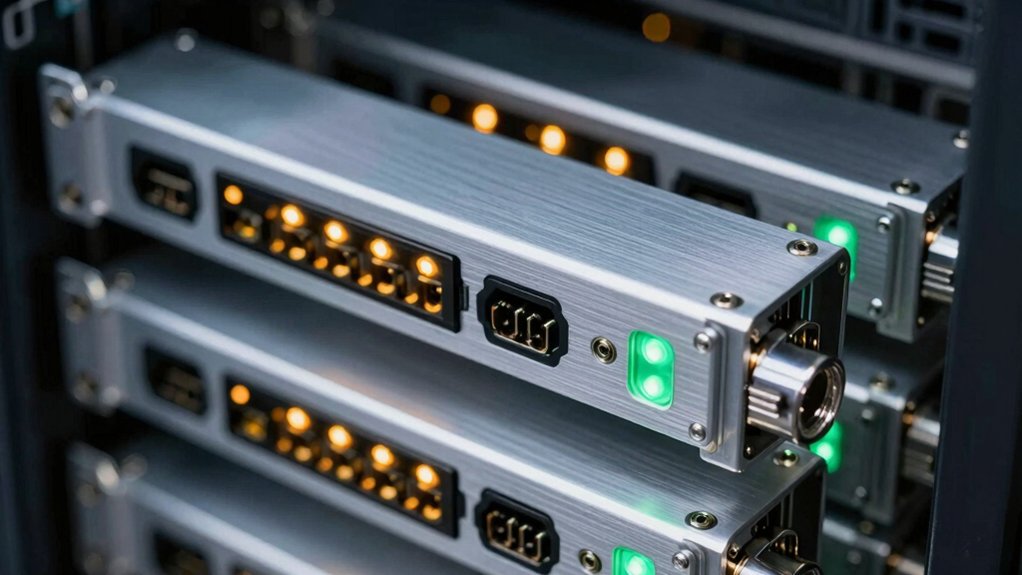
When selecting a hot swap drive bay, you’ll need to evaluate drive size compatibility (2.5″ or 3.5″), determine how many bays you require based on your storage needs, and confirm the interface type (SATA or SAS) matches your system’s speed standards. Thermal management features like airflow design and fan configurations directly impact drive longevity, so you should examine cooling capacity before purchasing. Review the bay’s physical dimensions, mounting options, and whether it supports your current and future drive specifications to ensure a practical fit for your setup.
Factors to Consider When Choosing Hot Swap Drive Bays
What matters most when you’re selecting a hot swap drive bay? First, check the tray capacity to determine how many drives you’ll swap simultaneously—options range from 2 to 4 drives per enclosure. Second, verify interface compatibility with your drives: confirm support for SATA I/II/III or SAS connections to ensure proper throughput up to 6 Gbps. Third, evaluate cooling systems and materials. Aluminum and steel construction with integrated fans maintain optimal thermal performance during frequent swaps, extending drive lifespan. Fourth, assess security needs. If you’re protecting sensitive data, choose bays with individual key locks preventing unauthorized drive removal. Finally, consider trayless designs if you need faster installation and removal without disassembling components. These factors directly impact your bay’s functionality and reliability.
Drive Size Compatibility
How do you ensure your drives’ll actually fit in your chosen hot swap bay? First, identify your drive form factor: either 3.5″ or 2.5″. Match this size to your bay specification exactly, since mismatched sizes won’t seat properly or lock into the backplane. Check your enclosure’s documentation for supported drive heights and connector alignment requirements. If your bay uses trayless design, verify that your drive’s dimensions and connector position align with the backplane slots. Some 5.25″ bays accommodate mixed sizes, but you’ll need to confirm compatibility based on drive thickness. Next, confirm your interface type—SAS or SATA 6Gb/s—matches your backplane design. Finally, count available bays and ensure they fit your chassis without obstruction. Document these specifications before purchasing drives.
Bay Configuration and Capacity
Once you’ve confirmed your drives’ll fit the physical slots, you’ll need to evaluate the bay configuration itself—the total number of hot-swap positions your enclosure provides and how that capacity matches your storage needs. Bay configurations range from 2-bay to 6-bay designs, with each position holding one drive. A 4-bay enclosure lets you hot-swap four drives simultaneously, while a 6-bay model doubles that flexibility. Consider your current storage requirements and future expansion plans. If you need three drives now but expect to add more within two years, choose an enclosure with extra bays. Some designs convert multiple 5.25″ computer bays into hot-swappable slots, maximizing your available space and giving you upgrade options without replacing the entire enclosure.
Interface and Speed Standards
Your enclosure’s interface determines how fast data moves between your drives and your computer, so you’ll want to match it with your existing hardware and future needs. SATA I/II/III enclosures support data transfer rates up to 1.5, 3, and 6 Gbps respectively. SAS drives commonly offer 3 Gbps, 6 Gbps, or faster interfaces depending on generation. Some enclosures explicitly support SAS 12Gbps or 6Gbps SATA, requiring compatible host controllers for full performance. Check your motherboard or expansion card’s capabilities before purchasing. Remember that performance gets limited by the slowest component in the chain: your drive, backplane, or host controller. Match all three elements to avoid bottlenecks and maximize your system’s speed potential.
Thermal Management Features
Why does heat matter in hot-swap drive bays? Because densely packed drives generate significant heat that can reduce performance and lifespan if not managed properly.
When selecting a hot-swap enclosure, prioritize aluminum or metal housings over plastic alternatives. Metal conducts heat away from drives more effectively, preventing thermal buildup. Next, verify the enclosure includes integrated fans—typically 80mm or 120mm models at the rear—to actively pull hot air away from your storage devices.
Choose trayless designs with vented layouts. These configurations allow uniform airflow around each drive instead of trapping heat in enclosed compartments. Additionally, check that individual ejection levers and security locks stay clear of cooling pathways during drive swaps.
Finally, inspect ventilation openings to ensure they’re unobstructed. Proper thermal management directly extends drive reliability and maintains consistent read-write speeds under continuous operation.
Build Quality and Materials
Material selection and construction durability form the foundation of a reliable hot-swap drive bay. You’ll find aluminum and steel enclosures most commonly used because they dissipate heat effectively while keeping weight manageable. When evaluating build quality, check for designs rated for 50,000+ insertion cycles, which indicates the bay withstands repeated use without degradation. Anti-shock features protect your drives during hot-swaps, preventing damage from vibration or impact. Examine the locking mechanisms—keyed or screwless options secure drives against unauthorized removal while maintaining tool-free access for authorized users. Ensure the enclosure design supports adequate ventilation around drive bays. Review construction seams and connections for solid assembly. These material and durability factors directly impact long-term performance and drive protection.
Security and Locking Mechanisms
How effectively can you protect your drives from unauthorized removal? You’ll find several locking options across hot-swap bay designs. Individual drive locks secure each drive within its bay, preventing accidental or intentional ejection. Some models feature lockable bay doors or front-panel latches that deter tampering at the access point. Keyed backplanes add an extra protection layer by requiring a key to reach the removable drives. Trayless configurations can incorporate lockable backplanes or shielded access points for comparable security. When evaluating options, confirm whether the locking mechanism protects only individual bays or the entire front-access panel. This distinction determines your overall security coverage. Check that any locking system you choose matches your specific security requirements and integrates smoothly with your existing setup.
Final Thoughts
You’ll want to match your hot-swap bay choice to your specific needs: verify drive size compatibility (3.5″ or 2.5″), confirm your motherboard supports the backplane interface (SATA or SAS), and check cooling capacity for your setup. Count your current drives and plan for future expansion. Prioritize aluminum chassis for durability, lockable bays for security, and trayless designs for easier installation. Test thermal performance under load before full deployment.

Meet Ry, “TechGuru,” a 36-year-old technology enthusiast with a deep passion for tech innovations. With extensive experience, he specializes in gaming hardware and software, and has expertise in gadgets, custom PCs, and audio.
Besides writing about tech and reviewing new products, he enjoys traveling, hiking, and photography. Committed to keeping up with the latest industry trends, he aims to guide readers in making informed tech decisions.