


When you need to replace your iPad 9th Gen digitizer, you’ll encounter several kit options that vary in quality, included components, and compatibility. You can choose between digitizer-only replacements, LCD-inclusive kits, or professional repair services. Each option demands careful attention to model numbers (A2602, A2603, A2604, A2605) and whether the kit includes a functional home button. Understanding these differences will determine whether your replacement performs flawlessly—but first, you need to know which factors matter most.
| iPad 9th Generation Screen Replacement Digitizer Kit |

| Complete DIY Kit | Installation Type: DIY kit with full tool set | Touch ID Support: Not supported; transfer original button required | Screen Component Included: Digitizer glass only (no LCD) | VIEW LATEST PRICE | Read Our Analysis |
| iPad 9 Screen Replacement Glass Digitizer Kit with Tools |

| Best Overall | Installation Type: DIY kit with tool set | Touch ID Support: Not supported; transfer original button required | Screen Component Included: Digitizer glass with adhesive (no LCD) | VIEW LATEST PRICE | Read Our Analysis |
| iPad 9 Screen Replacement Digitizer 2-Pack (10.2 Inch) |

| Budget Bulk Option | Installation Type: Professional technician recommended (no tools included) | Touch ID Support: Not supported; transfer original button required | Screen Component Included: Digitizer glass only (no LCD) | VIEW LATEST PRICE | Read Our Analysis |
| LW Mail-in Repair Service Original OEM Screen Replacement for iPad 7/8/9th |
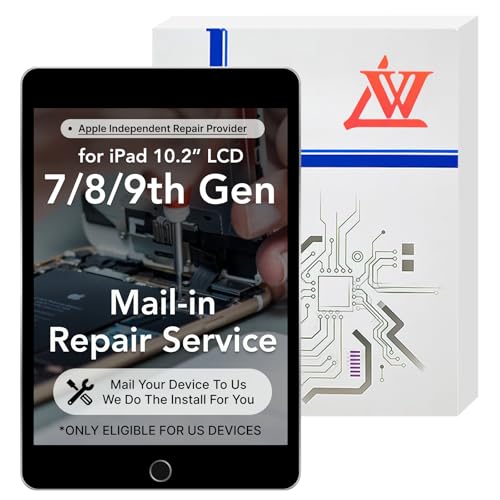
| Professional Service | Installation Type: Mail-in repair service (non-DIY) | Touch ID Support: Preserved with OEM screen | Screen Component Included: Complete OEM LCD with digitizer assembly | VIEW LATEST PRICE | Read Our Analysis |
| (Only LCD) 10.2″ LCD Screen Replacement for iPad 7th/8th/9th Gen |

| LCD-Only Replacement | Installation Type: DIY kit with professional tools | Touch ID Support: Not applicable (LCD only) | Screen Component Included: LCD only (no digitizer) | VIEW LATEST PRICE | Read Our Analysis |
| for iPad 9 (9th Generation) Screen Replacement for iPad 10.2 2021 Non LCD |

| Premium Installation Kit | Installation Type: Professional installation recommended (includes tools) | Touch ID Support: Not supported; transfer original button required | Screen Component Included: Digitizer glass with adhesive (no LCD) | VIEW LATEST PRICE | Read Our Analysis |
| iPad 9th Generation Screen Replacement Kit with Home Button |
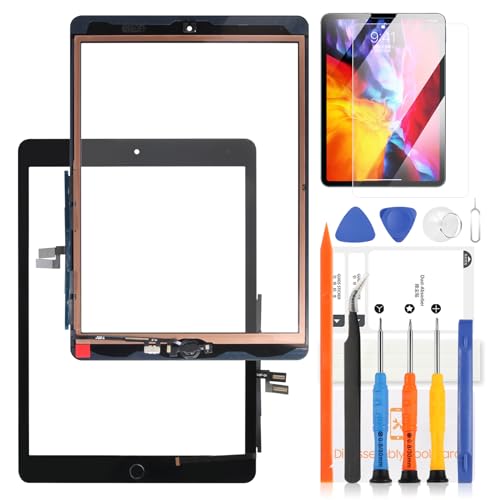
| Best For Beginners | Installation Type: DIY kit with basic tools | Touch ID Support: Not supported; transfer original button required | Screen Component Included: Digitizer glass only (no LCD) | VIEW LATEST PRICE | Read Our Analysis |
More Details on Our Top Picks
iPad 9th Generation Screen Replacement Digitizer Kit
Looking to replace your iPad’s cracked or unresponsive screen? This kit includes everything you need: a digitizer touch glass panel, home button, camera bracket, tools, and a microfiber cloth. First, confirm your model matches A2602, A2603, A2604, or A2605 by checking Settings or the back cover. Heat the screen edges with a heat gun, then carefully use the scraper and suction cup to remove the old digitizer. Disconnect cables and gold pins before installation. If you transfer your original home button to preserve fingerprint recognition, move the black bracket to prevent sticking. The new home button works but won’t support TouchID. Install the new digitizer, reconnect cables, and test all functions before reassembling.
- Installation Type:DIY kit with full tool set
- Touch ID Support:Not supported; transfer original button required
- Screen Component Included:Digitizer glass only (no LCD)
- Home Button Included:Yes, pre-installed
- Model Compatibility:iPad 9th Gen (A2602/A2603/A2604/A2605)
- Warranty/Guarantee:Manufacturer assistance for installation issues
- Additional Feature:Comprehensive 12-piece tool kit included
- Additional Feature:Pre-installed camera bracket included
- Additional Feature:Black bracket transfer guidance
iPad 9 Screen Replacement Glass Digitizer Kit with Tools
The TSIOFO iPad 9 Screen Replacement Glass Digitizer Kit tops the list for users who need a complete, ready-to-install solution without purchasing separate components. This all-in-one kit fits 2021 iPad 9th Generation models A2602, A2603, A2604, and A2605. You’ll receive a pre-installed glass digitizer with adhesive, camera bracket, and home button, plus DIY tools and instructions. The high-quality, anti-shatter glass resists scratches effectively. Before installation, test the screen and review instructions carefully. Note that the included home button lacks Touch ID; transfer your original button if you need this feature. The kit includes a 30-day money-back guarantee and warranty support for any issues.
- Installation Type:DIY kit with tool set
- Touch ID Support:Not supported; transfer original button required
- Screen Component Included:Digitizer glass with adhesive (no LCD)
- Home Button Included:Yes, pre-installed
- Model Compatibility:iPad 9th Gen (A2602/A2603/A2604/A2605)
- Warranty/Guarantee:30-day money-back guarantee
- Additional Feature:100% pre-shipment functionality tested
- Additional Feature:30-day money back guarantee
- Additional Feature:Anti-shatter, scratch-resistant glass
iPad 9 Screen Replacement Digitizer 2-Pack (10.2 Inch)
Need a budget bulk option for iPad 9th Gen screen repairs? This 2-pack digitizer from TPhaelay fits iPad 9th Gen models A2602, A2603, A2604, and A2605. Each glass screen replacement includes a home button but doesn’t contain the LCD layer. Before purchasing, verify your device’s model number on the back. Installation requires technical skill and isn’t recommended for beginners—consider using a repair shop instead. Note that the included home button doesn’t support Touch ID; you’ll need to transfer your original button to restore that feature. The package arrives with two complete digitizers, giving you a spare for future repairs or multiple devices.
- Installation Type:Professional technician recommended (no tools included)
- Touch ID Support:Not supported; transfer original button required
- Screen Component Included:Digitizer glass only (no LCD)
- Home Button Included:Yes (2-pack)
- Model Compatibility:iPad 9th Gen (A2602/A2603/A2604/A2605)
- Warranty/Guarantee:Product warranty (30-day return window)
- Additional Feature:Two digitizer screens included
- Additional Feature:No tools or instructions
- Additional Feature:Recommended for repair shops
LW Mail-in Repair Service Original OEM Screen Replacement for iPad 7/8/9th
Want your iPad screen replaced without tackling it yourself? LW’s mail-in repair service handles screen replacement for iPad 7th, 8th, and 9th generation models. You’ll receive an empty box with a prepaid shipping label. Mail your device with your order number, phone number, and address. LW completes repairs within 2-3 business days after receipt and returns your device with tracking information. The service includes an original OEM LCD screen and protector. Your data remains untouched throughout the process. LW charges less than local repair shops and offers 30-day coverage against non-artificial and non-water damage.
- Installation Type:Mail-in repair service (non-DIY)
- Touch ID Support:Preserved with OEM screen
- Screen Component Included:Complete OEM LCD with digitizer assembly
- Home Button Included:N/A (service includes original)
- Model Compatibility:iPad 7th/8th/9th Gen (multiple models)
- Warranty/Guarantee:30-day coverage for non-damage issues
- Additional Feature:Professional mail-in repair service
- Additional Feature:Original OEM LCD included
- Additional Feature:Screen protector included in package
(Only LCD) 10.2″ LCD Screen Replacement for iPad 7th/8th/9th Gen
If your iPad’s display shows dead pixels, lines, or color distortion, this LCD-only replacement targets that specific problem. The Alzesc model fits iPad 7th, 8th, and 9th Gen 10.2″ tablets across multiple model numbers including A2197, A2198, A2200, A2270, A2428, A2429, A2430, A2602, A2603, A2604, and A2605. Each unit arrives tested with 2160×1620 resolution and LED backlight technology. You’ll receive the LCD panel, installation guide, professional repair tools, and access to an installation video. Note this purchase contains only the display—the touch screen digitizer isn’t included. Confirm your iPad’s model number before ordering to ensure compatibility.
- Installation Type:DIY kit with professional tools
- Touch ID Support:Not applicable (LCD only)
- Screen Component Included:LCD only (no digitizer)
- Home Button Included:No
- Model Compatibility:iPad 7th/8th/9th Gen (multiple models)
- Warranty/Guarantee:Product warranty included
- Additional Feature:LCD-only component replacement
- Additional Feature:Professional installation tools included
- Additional Feature:Installation video provided
for iPad 9 (9th Generation) Screen Replacement for iPad 10.2 2021 Non LCD
This premium installation kit serves users whose iPad 9th generation screens’ve cracked, shattered, or stopped responding to touch. You’ll receive a touch screen digitizer with a pre-installed home button, tempered glass, and DIY tools. The product fits models A2602, A2603, A2604, and A2605 only. Installation requires professional technicians because improper handling risks cable tearing or motherboard damage. You can transfer your original home button if it’s functional to retain Touch ID capabilities. The kit includes everything needed for repair, eliminating extra tool purchases. Verify your iPad’s model in Settings before ordering to ensure compatibility.
- Installation Type:Professional installation recommended (includes tools)
- Touch ID Support:Not supported; transfer original button required
- Screen Component Included:Digitizer glass with adhesive (no LCD)
- Home Button Included:Yes, pre-installed
- Model Compatibility:iPad 9th Gen (A2602/A2603/A2604/A2605)
- Warranty/Guarantee:30-day money-back guarantee
- Additional Feature:Anti-shatter, scratch-resistant glass
- Additional Feature:30-day money-back guarantee
- Additional Feature:Professional technician installation recommended
iPad 9th Generation Screen Replacement Kit with Home Button
You’ll find this digitizer screen replacement kit straightforward to install if you’re tackling your first iPad repair. The package includes a digitizer touch screen, home button, suction cup, triangle opening tools, card pin, and plastic spudger. Before you start, verify your iPad model matches A2602/A2603/A2604/A2605 on the back. Inspect cables and gold pins for damage. During installation, keep cables bent under 90 degrees to prevent black display issues. Connect the home button with the gold side facing down. Note that this non-original button won’t support Touch ID, though other functions remain intact. Wear an ESD strap to prevent static damage and eye protection when handling glass.
- Installation Type:DIY kit with basic tools
- Touch ID Support:Not supported; transfer original button required
- Screen Component Included:Digitizer glass only (no LCD)
- Home Button Included:Yes, pre-installed
- Model Compatibility:iPad 9th Gen (A2602/A2603/A2604/A2605)
- Warranty/Guarantee:Basic product warranty (no return for installation damage)
- Additional Feature:Tempered glass screen protector
- Additional Feature:9H surface hardness rating
- Additional Feature:ESD protection precautions recommended
Factors to Consider When Choosing an iPad 9th Gen Replacement Digitizer Screen

When you’re selecting a replacement digitizer screen for your iPad 9th Gen, you’ll need to verify that the model matches your device exactly, ensure that Touch ID functionality remains intact after installation, and confirm that all necessary tools and accessories come included in the kit. Check your iPad’s model number against the replacement screen’s specifications, test the fingerprint sensor immediately after installation to avoid later complications, and review the kit contents before purchasing to prevent missing components that you’d need to source separately. These three factors—compatibility, sensor preservation, and complete tooling—directly impact whether your replacement will function properly and last as long as the original screen.
Best iPad 9th Gen Replacement Digitizer Screen
What you’re really deciding when selecting an iPad 9th Gen replacement digitizer screen comes down to three primary factors: whether you need just the digitizer or a complete LCD assembly, which pre-installed components matter most for your installation skill level, and whether preserving Touch ID functionality is essential.
First, determine if you need only the digitizer or a full LCD replacement. Digitizer-only kits cost less but require more technical skill. Complete kits with pre-installed components like adhesive, camera brackets, and tempered glass simplify installation significantly.
Second, assess your comfort level. Kits including tools and detailed instructions suit beginners. Advanced users can purchase digitizer-only options and source tools separately.
Third, if you need Touch ID, you must transfer your original home button. Non-original buttons won’t support Touch ID functionality, making this transfer non-negotiable for retention.
Factors to Consider When Choosing iPad 9th Gen Replacement Digitizer Screen
How do you know which digitizer screen will in fact work with your device and your skill level? First, confirm your iPad’s model number—A2602, A2603, A2604, or A2605—to ensure compatibility with the 10.2-inch digitizer. Next, decide whether you need a standalone digitizer or a complete kit with adhesive, tools, and brackets. Standalone options cost less but require you to source additional materials. Complete kits simplify installation if you’re inexperienced. Third, determine if you want to retain Touch ID functionality. This requires transferring your original home button, which carries installation risks and may need professional help. Non-original buttons won’t support fingerprint recognition. Finally, assess your technical skills. Handle cables and pins carefully during installation to avoid tearing or bending components.
Model Compatibility Verification
Before you select a replacement digitizer, you’ll need to verify that it matches your specific iPad model number. Check your device’s model by navigating to Settings → General → About → Model Name. Alternatively, examine the back cover for printed numbers: A2602, A2603, A2604, or A2605. Confirm that your replacement digitizer explicitly lists compatibility with iPad 9th Gen (2021) and these model numbers, not other generations or sizes. Review the product listing to determine whether the kit includes a pre-installed home button and whether it supports Touch ID functionality. Non-original home buttons won’t enable fingerprint recognition, so you may need to transfer your original button to maintain full compatibility and original functionality.
Touch ID Functionality Preservation
Since most replacement digitizers don’t include a home button capable of supporting fingerprint recognition, you’ll need to decide whether to transfer your original home button or accept the loss of Touch ID functionality. Transferring your original button preserves Touch ID but carries risks: the button may stick or the screen could sustain damage during removal. Alternatively, you can install the replacement kit‘s included home button, which maintains all button functions except fingerprint recognition. Before purchasing, verify that the replacement kit explicitly states Touch ID compatibility with its included button. Check your iPad 9th Gen model number (A2602, A2603, A2604, or A2605) against the kit’s specifications. This step ensures you’re selecting the right product for your needs.
Included Tools And Accessories
What tools you’ll actually receive matters considerably when selecting a replacement digitizer kit. Most kits include essential hand tools: screwdrivers, spudgers, a suction cup, and opening tools. You’ll also get a pre-installed home button, adhesive, camera bracket, and microfiber cloth. Some packages add tempered glass or protective film for front protection. Check whether your kit includes an installation guide or video—these resources simplify the replacement process significantly. Review listings carefully, as several specify that extra professional tools may be required for careful prying and cable handling. Before purchasing, verify what’s included so you won’t need to buy additional equipment. Confirm warranty details too, since many kits offer 100% function testing and 30-day money-back guarantees before committing.
Installation Complexity Assessment
How difficult you’ll find the replacement process depends largely on which components come pre-installed in your kit and which ones you’ll need to transfer from your original screen. Kits with pre-installed home buttons and camera brackets markedly reduce installation complexity. However, if you require Touch ID functionality, you’ll need to transfer your original home button, adding extra steps and risk. Before starting, inspect all cables and gold pins for damage, as bent pins or torn cables complicate installation considerably. Some digitizers require heat application for removal—use a heat gun or hair dryer with plastic tools to minimize screen damage. Given potential motherboard and power issues from improper reassembly, professional installation is often worth considering for this model.
Final Thoughts
You should verify your iPad’s model number (A2602, A2603, A2604, or A2605) before purchasing a replacement digitizer. Choose kits that specify whether they include only the digitizer or the LCD panel combined. If you need Touch ID functionality, confirm the kit includes an original home button. Review warranty coverage and installation requirements. Professional installation’s recommended for flawless results and proper calibration.

TechGuru
Meet Ry, "TechGuru," a 36-year-old technology enthusiast with a deep passion for tech innovations. With extensive experience, he specializes in gaming hardware and software, and has expertise in gadgets, custom PCs, and audio.
Besides writing about tech and reviewing new products, he enjoys traveling, hiking, and photography. Committed to keeping up with the latest industry trends, he aims to guide readers in making informed tech decisions.
Read author profile →

