


When your iPad Air 5th Gen screen breaks, you’ll need to choose between several replacement options—each with distinct advantages. You can select a complete DIY kit with tools and instructions, purchase LCD-only panels for budget savings, opt for digitizer replacements if only touch functionality’s damaged, or use mail-in repair services for professional handling. Understanding what you’re actually replacing and your skill level matters before you decide, which brings us to the specific options available.
| passionTR LCD Screen Replacement for iPad Air 4th/5th Gen |
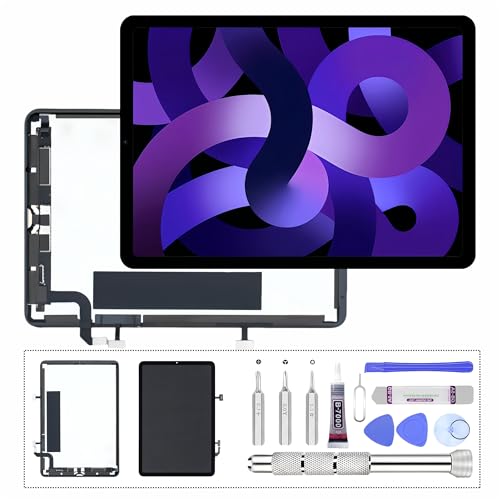
| Complete DIY Kit | Installation Type: DIY kit with professional installation recommended | Component Type: Full LCD touch screen assembly | Warranty Period: 1 month | VIEW LATEST PRICE | Read Our Analysis |
| Screen Replacement LCD & Glass for iPad Air 5 |

| Premium Replacement Option | Installation Type: DIY kit with professional installation recommended | Component Type: LCD + glass touch digitizer assembly | Warranty Period: 3 months | VIEW LATEST PRICE | Read Our Analysis |
| Mail-in Repair Service for iPad Air 5th OEM Screen Replacement |

| Professional Repair Service | Installation Type: Mail-in professional repair service | Component Type: OEM LCD screen replacement | Warranty Period: 30 days (non-artificial/water damage) | VIEW LATEST PRICE | Read Our Analysis |
| (Only LCD) 9.7″ LCD Screen Replacement for iPad 5th/6th/Air 1st | LCD-Only Budget Fix | Installation Type: DIY kit (LCD only) | Component Type: LCD panel only | Warranty Period: Product warranty available | VIEW LATEST PRICE | Read Our Analysis | |
| iPad Air 5 Touch Screen Digitizer Replacement Panel |
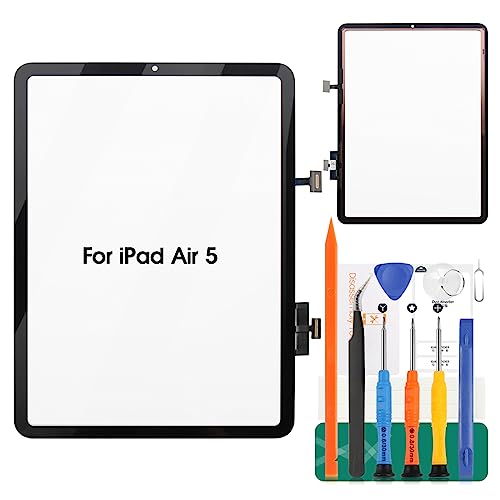
| Touch Screen Specialist | Installation Type: DIY kit with professional installation recommended | Component Type: Touch screen digitizer only | Warranty Period: Warranty info available | VIEW LATEST PRICE | Read Our Analysis |
| iPad 5th Gen Screen Replacement Digitizer with Home Button |

| Not Applicable* | Installation Type: DIY kit (digitizer only) | Component Type: Touch screen digitizer only | Warranty Period: Product warranty available | VIEW LATEST PRICE | Read Our Analysis |
| (Only LCD) 9.7″ LCD Screen Replacement for iPad 5th/6th/Air 1st |

| Not Applicable* | Installation Type: DIY kit (LCD only) | Component Type: LCD panel only | Warranty Period: Product warranty available | VIEW LATEST PRICE | Read Our Analysis |
More Details on Our Top Picks
passionTR LCD Screen Replacement for iPad Air 4th/5th Gen
The passionTR complete DIY kit works for both iPad Air 4th Gen (2020) and 5th Gen (2022) models. You’ll receive a full tool set including screwdrivers, pry bars, suction cups, and triangle opening tools. The high-definition LCD panel delivers vivid colors and smooth touch response with no dead pixels. Before installation, review professional installation videos to understand the process. Test the display and touch sensitivity before applying adhesive, since returns aren’t supported once glued. Handle the glass screen carefully during installation. Remove the battery before powering on after completion. The product includes a one-month warranty covering non-functional screens not damaged by user error.
- Installation Type:DIY kit with professional installation recommended
- Component Type:Full LCD touch screen assembly
- Warranty Period:1 month
- Included Tools/Accessories:Full tool kit (screwdrivers, pry bars, suction cups, triangle tools)
- Quality Testing:Rigorous factory testing with full-function verification
- Device Compatibility:iPad Air 4th/5th Gen (models A2072/A2316/A2324/A2325/A2588/A2589/A2591)
- Additional Feature:Comprehensive full tool kit included
- Additional Feature:No dead pixels guaranteed
- Additional Feature:Professional installation recommended
Screen Replacement LCD & Glass for iPad Air 5
Looking to restore your iPad Air 5’s display? This premium kit from HOYRTDE includes the LCD screen, glass touch digitizer, and installation tools for models A2589, A2591, and A2588. Before starting, verify your model number matches these specifications. Clean all connectors thoroughly to ensure proper functionality. During installation, handle the LCD corners carefully to prevent damage. After completing the replacement, restart your device and test the touch screen. If malfunctions occur, check the touch cable connection. The kit arrives with a three-month warranty and includes a protective film you should remove before use. Consider consulting professional technicians if you’re uncomfortable with the installation process.
- Installation Type:DIY kit with professional installation recommended
- Component Type:LCD + glass touch digitizer assembly
- Warranty Period:3 months
- Included Tools/Accessories:Professional installation tools included
- Quality Testing:LCD tested before shipping
- Device Compatibility:iPad Air 5th Gen (models A2589/A2591/A2588)
- Additional Feature:LCD tested before shipping
- Additional Feature:Backlight LED technology included
- Additional Feature:Three-month warranty coverage
Mail-in Repair Service for iPad Air 5th OEM Screen Replacement
Lenwell’s mail-in professional repair service works best for you if you’ve damaged your iPad Air 5th screen through DIY attempts or accidental drops. You’ll receive an empty box with a prepaid shipping label. Mail your device with your order number, phone number, and full address, then provide the tracking number for processing. Lenwell completes repairs within 2–3 business days after receipt and returns your device with tracking. They use 100% original OEM screens and preserve all your data without factory resets. The service includes 30-day coverage for non-artificial and non-water damage on repaired screens, ensuring genuine compatibility and device integrity.
- Installation Type:Mail-in professional repair service
- Component Type:OEM LCD screen replacement
- Warranty Period:30 days (non-artificial/water damage)
- Included Tools/Accessories:Prepaid shipping label and screen protector
- Quality Testing:Expert team with thorough device checks
- Device Compatibility:iPad Air 5th Gen (models A2588/A2589/A2591)
- Additional Feature:100% original OEM screen
- Additional Feature:Data preservation during repair
- Additional Feature:Two to three day turnaround
(Only LCD) 9.7″ LCD Screen Replacement for iPad 5th/6th/Air 1st
LCD-Only Budget Fix
View Latest PriceIf you’ve got dead pixels or display issues but your touch screen still responds correctly, this lcd-only budget fix works for iPad 5th Gen, iPad 6th Gen, and iPad Air 1st Gen models. You’ll receive one LCD screen replacement, an installation guide, professional repair tools, and an installation video. Before you start, verify your iPad’s model number matches A1893, A1954, A1822, A1823, A1474, or A1475. Follow the illustrated instructions step-by-step to remove your damaged LCD and install the new one. The replacement features high-resolution LED backlighting tested for clear display quality before shipping. Contact the manufacturer within 24 hours if problems arise after installation.
- Installation Type:DIY kit (LCD only)
- Component Type:LCD panel only
- Warranty Period:Product warranty available
- Included Tools/Accessories:Professional tools with installation guide and video
- Quality Testing:Tested before shipping for clear display
- Device Compatibility:iPad 5th/6th/Air 1st Gen (9.7-inch models A1893/A1954/A1822/A1823/A1474/A1475)
- Additional Feature:Fixes dead pixels only
- Additional Feature:High-resolution LED backlight
- Additional Feature:Installation video provided
iPad Air 5 Touch Screen Digitizer Replacement Panel
Your iPad Air 5’s touch screen specialist panel restores full responsiveness to your 2022 device. This digitizer replacement works with model A2589 and A2591 units. The package includes one touch screen digitizer, an opening tool kit, and adhesive strips. You’ll receive a brand-new component tested for scratches, dead pixels, and touch sensitivity before shipping. Installation requires precise flex cable connection to your motherboard, so professional installation is advised. The panel measures 10.91 by 8.58 inches and weighs 9.7 ounces. Contact the email support team if you need assistance during or after installation. Note that this product doesn’t include an LCD screen—it’s the digitizer sensor only.
- Installation Type:DIY kit with professional installation recommended
- Component Type:Touch screen digitizer only
- Warranty Period:Warranty info available
- Included Tools/Accessories:Opening tool kit and adhesive
- Quality Testing:Strict testing before shipping
- Device Compatibility:iPad Air 5th Gen (models A2589/A2591)
- Additional Feature:Touch screen digitizer only
- Additional Feature:Adhesive included in package
- Additional Feature:Professional installation advised
iPad 5th Gen Screen Replacement Digitizer with Home Button
This digitizer replacement isn’t applicable to iPad Air models—it’s designed specifically for iPad 5th Generation (2017) devices with model numbers A1822 or A1823. You’ll receive a touch screen digitizer, DIY tools kit, and a blank home button in white. The replacement addresses shattered glass only, not LCD damage. Installation requires YouTube guidance since no printed instructions come included. You can retain your original home button to preserve Touch ID functionality, or use the provided replacement button. Before starting, carefully handle all tools to avoid damage. The package ships tested and ready. Contact the seller for warranty details if issues arise after installation.
- Installation Type:DIY kit (digitizer only)
- Component Type:Touch screen digitizer only
- Warranty Period:Product warranty available
- Included Tools/Accessories:DIY tools kit
- Quality Testing:Strictly tested before shipment
- Device Compatibility:iPad 5th Gen 2017 (models A1822/A1823)
- Additional Feature:Includes home button replacement
- Additional Feature:Touch ID retention possible
- Additional Feature:YouTube video installation guidance
(Only LCD) 9.7″ LCD Screen Replacement for iPad 5th/6th/Air 1st
The CityDawn 9.7″ LCD screen replacement isn’t applicable to iPad Air 5th generation models—it’s designed for iPad 5th generation, iPad 6th generation, and iPad Air 1st generation devices. You’ll receive a tested display unit with full repair tools and an installation guide included in the package. Before purchasing, verify your device model matches the compatibility list to ensure proper fit. The product carries a 4.7-star rating from 17 customer reviews, indicating reliable performance. Installation requires following the provided guide step-by-step while using the included tools. Check warranty details through the manufacturer’s information link for coverage specifics. Compare prices across online retailers and local stores using the available price comparison options to secure the best deal.
- Installation Type:DIY kit (LCD only)
- Component Type:LCD panel only
- Warranty Period:Product warranty available
- Included Tools/Accessories:Full repair tools and installation guide
- Quality Testing:Tested display included
- Device Compatibility:iPad 5th/6th/Air 1st Gen (9.7-inch)
- Additional Feature:Tested display quality assured
- Additional Feature:Full repair tools included
- Additional Feature:Exact fit compatibility guaranteed
Factors to Consider When Choosing an iPad Air 5th Gen Replacement LCD Screen

When you’re selecting an iPad Air 5th Gen replacement LCD screen, you’ll need to verify compatibility with your specific device model, assess the display’s quality standards and performance ratings, evaluate how difficult the installation process will be for your skill level, and confirm what warranty protection the manufacturer offers. Check the product specifications against your iPad’s exact model number, compare brightness and color accuracy metrics between options, review installation guides to determine if you can complete the replacement yourself or need professional help, and examine warranty lengths to protect your investment. These four factors—compatibility, quality, installation complexity, and warranty coverage—will guide you toward the replacement screen that best fits your needs and circumstances.
Factors to Consider When Choosing iPad Air 5th Gen Replacement LCD Screen
How do you know you’re buying the right replacement screen for your iPad Air 5th Gen? First, verify your device model number—A2588, A2589, or A2591—since compatibility depends on exact matching. Next, decide between an LCD-only replacement or a full assembly with touch digitizer, depending on what’s damaged. Check the warranty length and coverage limits; most sellers offer 1–3 months with exclusions for user damage. Review whether the kit includes installation tools and instructional videos or manuals. Finally, confirm the seller tests screens for dead pixels, color accuracy, and touch responsiveness before shipping. These steps ensure you purchase a compatible, quality replacement that installs properly and functions reliably.
Compatibility With Device Models
Checking model compatibility stands as your first critical step before purchasing any replacement LCD screen. Your iPad Air 5th Gen matches one of three model numbers: A2588, A2589, or A2591. You’ll find this number on your device’s back or in Settings under General and About.
Verify the replacement screen’s specifications list these exact model numbers. Next, confirm the display size is 10.9 inches, which matches your device’s screen dimensions. Check whether you own a Wi-Fi or cellular model, then ensure the replacement supports your specific variant.
Additionally, examine the product details for LCD type and connector specifications. The screen must feature compatible mounting locations and connection interfaces matching your iPad Air 5th Gen’s internal components. Cross-referencing these details prevents installation failures and guarantees proper functionality.
LCD Quality And Performance
Prioritize full-color accuracy and zero dead pixels when you’re selecting your replacement LCD screen, as these factors directly determine your display’s visual quality and longevity. Look for panels that’ve passed rigorous factory testing to confirm full-function display and touch performance work correctly. You’ll want an LCD with a high-definition LED backlight that delivers consistent brightness and stable operation across all viewing angles. Verify the supplier tests every unit before shipment and provides clear testing guidance you can follow before final installation. This pre-adhesive testing step prevents costly mistakes after you’ve permanently attached the screen. Confirm the panel uses quality materials that resist degradation over time, ensuring your replacement investment lasts through extended daily use without color shifting or brightness loss.
Installation Difficulty Level
What’s the actual skill level you’ll need to successfully replace your iPad Air 5th Gen LCD screen? Installation difficulty varies considerably based on your experience and kit selection. Beginner-friendly kits include comprehensive tool sets and detailed guides, making them accessible for first-time repairs. However, most manufacturers recommend professional installation to prevent internal damage. You’ll need to test display and touch functionality before applying adhesive. LCD-only replacements are simpler than kits combining the LCD with digitizers, which add complexity. Handle glass components carefully and protect connectors and cables during removal and reassembly. Be aware that non-functional issues after installation typically aren’t covered by warranty, so accuracy during assembly matters notably.
Warranty Coverage Duration
How long you’re covered after purchasing an iPad Air 5th Gen replacement LCD screen matters considerably for your repair investment. Most sellers offer warranties ranging from 1 to 3 months, with longer coverage typically indicating better support. Before buying, verify the exact warranty duration stated by the seller to match your expectations. Review the coverage terms carefully, as many warranties exclude damage caused during installation—they only protect against manufacturer defects. Some sellers provide 30-day non-artificial damage protection as a service option, covering specific issues after repair. Test your screen before final installation, since damage during this process often voids warranty claims. Understanding these conditions ensures you select protection that aligns with your repair needs.
Professional Versus DIY Options
Should you replace your iPad Air 5th Gen screen yourself or send it to a professional? DIY kits include tools and replacement LCD/digitizer components, but you’ll handle fragile glass and connectors through multiple steps. Mistakes risk internal damage and void warranties. Professional installation reduces these risks since technicians test your display and touch function before applying adhesive. Mail-in repair services provide device-safe handling, tracking, and data protection with a defined repair window. You’ll receive your iPad back fully tested. Choose DIY if you’re confident with electronics repair and accept warranty consequences. Select professional service if you value warranty coverage, want to minimize damage risk, or lack repair experience. Consider your comfort level, time availability, and budget when deciding.
Included Tools And Accessories
When you’re selecting a replacement LCD screen kit for your iPad Air 5th Gen, the included tools and accessories determine whether you’ll complete the repair successfully or run into obstacles mid-project. A complete kit should contain screwdrivers with multiple bits, pry bars, suction cups, and triangle opening tools for screen removal. You’ll also need spare screws, adhesive, and a display touch screen to finish the job. Verify the package lists a metal scraper, screw handle, and card pin for precise component handling. Check that the kit includes protective packaging to prevent transport damage during shipping. Confirm compatibility with models A2588, A2589, and A2591. Installation guides or video access reduce damage risk significantly. Kits with tested, pre-functioning LCD panels save troubleshooting time.
OEM Versus Third-Party Screens
What’s the actual difference between OEM and third-party iPad Air 5th Gen replacement screens? OEM screens match your device’s original specifications exactly, including LCD properties and backlight characteristics. They’re designed to maintain warranty compatibility and avoid connector issues. Third-party screens cost less but may vary in color accuracy, touch responsiveness, and durability. When choosing, verify whether you’re purchasing an original OEM part or a high-quality aftermarket substitute. Check warranty terms and testing assurances for each option. OEM replacements require fewer calibration steps, while third-party kits often need additional adhesive or setup. Evaluate your priorities: if you want guaranteed performance and warranty protection, select OEM. If budget matters most and you’ll accept potential quality variations, third-party options work adequately.
Final Thoughts
When you’re ready to replace your iPad Air 5th Gen screen, you’ll choose between a complete DIY kit with tools and videos, a mail-in repair service for guaranteed OEM quality, or individual components like LCD-only or digitizer panels. Evaluate your comfort level with installation, your timeline, and your budget. Each option delivers reliable performance when you match it to your specific needs and technical ability.

TechGuru
Meet Ry, "TechGuru," a 36-year-old technology enthusiast with a deep passion for tech innovations. With extensive experience, he specializes in gaming hardware and software, and has expertise in gadgets, custom PCs, and audio.
Besides writing about tech and reviewing new products, he enjoys traveling, hiking, and photography. Committed to keeping up with the latest industry trends, he aims to guide readers in making informed tech decisions.
Read author profile →

