
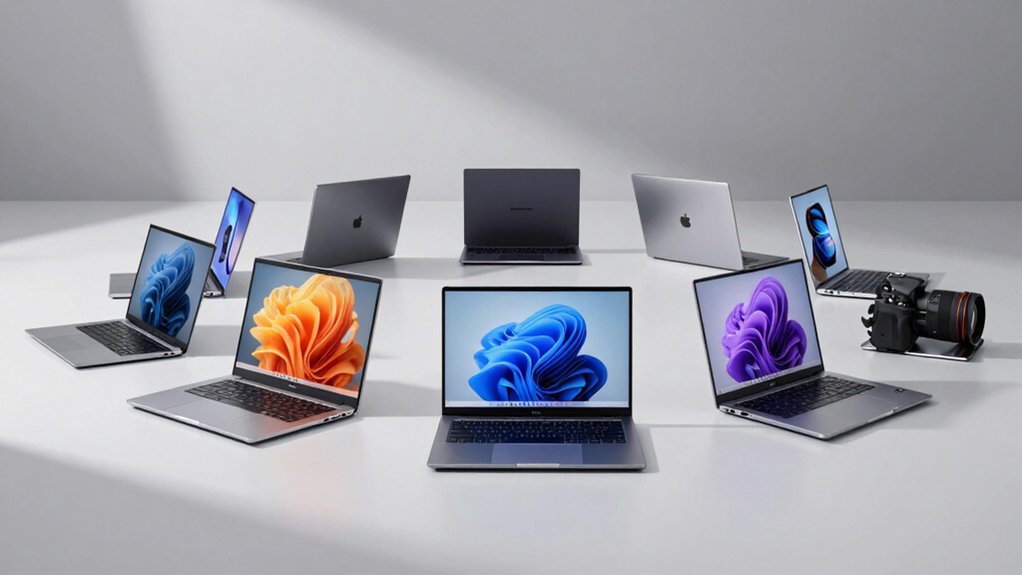

When you need a laptop ready for work immediately, you’ll want one that arrives with Microsoft Office already installed and licensed. Rather than spending extra time and money on software purchases, you can select from several business-focused models featuring 16GB RAM, solid storage, and Windows 11. Each option below addresses different needs and budgets. To find your ideal match, you’ll need to understand what separates these models and which features matter most for your situation.
| HP 15.6″ Business Laptop with Intel Processor & 16GB RAM |
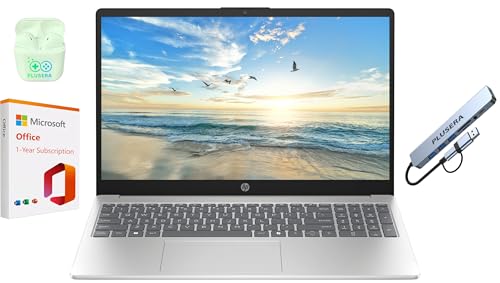
| Budget-Friendly Pick | Processor Type: Intel N200 (4-core) | RAM & Storage: 16GB DDR4 / 128GB SSD | Display Size & Resolution: 15.6″ HD (1366 x 768) | VIEW LATEST PRICE | Read Our Analysis |
| HP 15.6″ Business Laptop with Intel i3 & 16GB RAM |

| Professional Grade | Processor Type: 12th Gen Intel Core i3-1215U (6-core) | RAM & Storage: 16GB DDR4 / 1TB SSD | Display Size & Resolution: 15.6″ HD touch (1366 x 768) | VIEW LATEST PRICE | Read Our Analysis |
| HP 15.6″ Business Laptop with Intel Processor & 16GB RAM |

| Best Value | Processor Type: Intel N200 (4-core) | RAM & Storage: 16GB DDR4 / 128GB SSD | Display Size & Resolution: 15.6″ LED (1366 x 768) | VIEW LATEST PRICE | Read Our Analysis |
| HP Ultrabook Laptop with Intel Core & 1.2TB Storage |
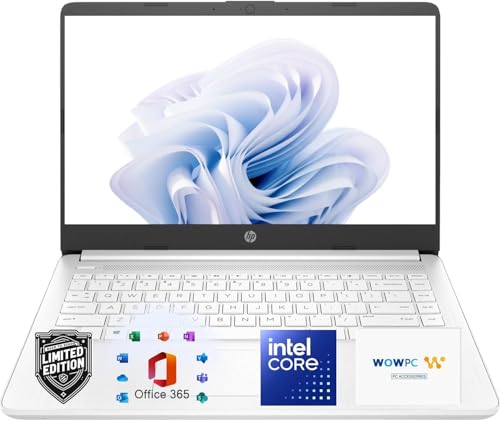
| Most Versatile | Processor Type: 13th Gen Intel Core (up to 4.6 GHz) | RAM & Storage: 8GB DDR4 / 1.2TB (192GB SSD + 1TB OneDrive) | Display Size & Resolution: 14″ HD (1366 x 768) | VIEW LATEST PRICE | Read Our Analysis |
| Lenovo 14″ Laptop with Intel Celeron & 8GB RAM |

| Best For Students | Processor Type: Intel Celeron N4500 (2-core) | RAM & Storage: 8GB DDR4 / 384GB (128GB eMMC + 256GB SSD) | Display Size & Resolution: 14″ HD (1366 x 768) | VIEW LATEST PRICE | Read Our Analysis |
| HP 14″ Business Laptop with Intel Processor & Windows 11 |

| Best For Travel | Processor Type: Quad-Core Intel Celeron (4-core) | RAM & Storage: DDR4 RAM / eMMC SSD (capacity unspecified) | Display Size & Resolution: 14″ LED (1366 x 768) | VIEW LATEST PRICE | Read Our Analysis |
| HP 15.6″ HD Touchscreen Laptop Intel Core i3 |

| Best Overall | Processor Type: Intel Core i3-1315U (6-core) | RAM & Storage: 16GB DDR4 / 256GB SSD | Display Size & Resolution: 15.6″ HD touch (1366 x 768) | VIEW LATEST PRICE | Read Our Analysis |
| HP Stream 14 Student Business Laptop with Windows 11 |
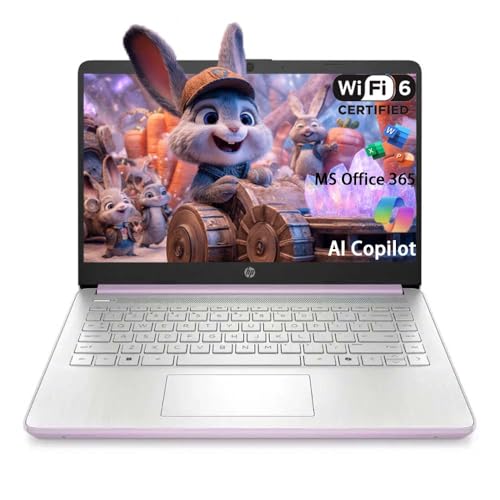
| Best For Beginners | Processor Type: Intel N150 Quad-Core | RAM & Storage: 4GB DDR4 / 128GB UFS | Display Size & Resolution: 14″ HD (1366 x 768) | VIEW LATEST PRICE | Read Our Analysis |
| HP 15.6″ Laptop Computer with Intel i3 & 16GB RAM |

| Editor’s Choice | Processor Type: Intel i3-N305 (8-core) | RAM & Storage: 16GB DDR4 / 628GB (128GB UFS + 500GB external) | Display Size & Resolution: 15.6″ HD anti-glare | VIEW LATEST PRICE | Read Our Analysis |
More Details on Our Top Picks
HP 15.6″ Business Laptop with Intel Processor & 16GB RAM
If you’re looking for a laptop that arrives ready to work without extra setup, the HP 15.6″ Business Laptop delivers Microsoft Office 365 pre-installed for one year, so you can start productivity tasks immediately. The Intel N200 processor with 16GB RAM handles multitasking efficiently, while the 128GB SSD ensures quick boot times. The 15.6″ HD display and full-size keyboard with numeric keypad support extended work sessions. You’ll receive PLUSERA earphones and an 8-in-1 hub for connectivity. The 42Wh battery provides extended life for on-the-go use. Camera privacy shutter protects your security during video calls.
- Processor Type:Intel N200 (4-core)
- RAM & Storage:16GB DDR4 / 128GB SSD
- Display Size & Resolution:15.6″ HD (1366 x 768)
- Operating System:Windows 11
- Microsoft Office Included:Office 365 (1-year subscription)
- Weight & Portability:4.6 lbs
- Additional Feature:Camera privacy shutter
- Additional Feature:Extended 42 Wh battery
- Additional Feature:Included PLUSERA Earphones & Hub
HP 15.6″ Business Laptop with Intel i3 & 16GB RAM
Business professionals and students who need a reliable work machine with Microsoft Office already installed and activated should consider this HP 15.6″ Business Laptop. It features a 12th Gen Intel Core i3-1215U processor with 6 cores and 16GB RAM, delivering solid performance for multitasking and everyday business tasks. The 1TB SSD provides ample storage for documents and files. Windows 11 Pro comes pre-loaded with Microsoft Office LTSC Professional Plus 2024, including Word, Excel, Outlook, PowerPoint, and Access with a lifetime license—no subscription needed. The 15.6″ HD touchscreen display and 5-hour battery life support mobile work. You get integrated graphics, Wi-Fi connectivity, and enterprise-grade security tools ready to use immediately.
- Processor Type:12th Gen Intel Core i3-1215U (6-core)
- RAM & Storage:16GB DDR4 / 1TB SSD
- Display Size & Resolution:15.6″ HD touch (1366 x 768)
- Operating System:Windows 11 Pro
- Microsoft Office Included:Office LTSC Professional Plus 2024 (lifetime)
- Weight & Portability:Not specified
- Additional Feature:Lifetime Microsoft Office 2024 LTSC
- Additional Feature:HP Fast Charge 0-50% capability
- Additional Feature:Touch display with BrightView technology
HP 15.6″ Business Laptop with Intel Processor & 16GB RAM
For professionals who need reliable productivity tools without setup hassles, the HP 15.6″ Business Laptop delivers Microsoft Office 365 pre-installed and ready to use immediately. You’ll access 16GB DDR4 RAM for smooth multitasking and the Intel N200 processor (4 cores, 3.7 GHz boost) for standard business tasks. The 128GB SSD enables fast boot times and file access. You get 1TB OneDrive storage plus Copilot AI through your subscription. Connect via USB-C, USB-A, or HDMI ports. The included 8-in-1 hub expands connectivity options. Windows 11 includes built-in security features protecting your data during work sessions.
- Processor Type:Intel N200 (4-core)
- RAM & Storage:16GB DDR4 / 128GB SSD
- Display Size & Resolution:15.6″ LED (1366 x 768)
- Operating System:Windows 11
- Microsoft Office Included:Office 365 (1-year subscription)
- Weight & Portability:4.6 lbs
- Additional Feature:1TB OneDrive cloud storage included
- Additional Feature:Moonlight Blue color option
- Additional Feature:Numeric keypad on keyboard
HP Ultrabook Laptop with Intel Core & 1.2TB Storage
Equipped with a 13th Gen Intel Core processor and 1.2TB of total storage, this HP Ultrabook delivers the processing power and space you’ll need for demanding work tasks, online classes, and content creation without requiring additional setup or software installation. You’ll get a full year of Microsoft 365, which includes Word, Excel, and PowerPoint. The 14-inch HD display supports extended viewing for productivity work and streaming. Wi-Fi 6 connectivity ensures reliable internet access, while the integrated Copilot AI assists with document creation and research tasks. Dual-array microphones and a 720p webcam enable clear video calls and presentations right away.
- Processor Type:13th Gen Intel Core (up to 4.6 GHz)
- RAM & Storage:8GB DDR4 / 1.2TB (192GB SSD + 1TB OneDrive)
- Display Size & Resolution:14″ HD (1366 x 768)
- Operating System:Windows 11 Home 64-bit
- Microsoft Office Included:Microsoft 365 (1-year subscription)
- Weight & Portability:3.24 lbs
- Additional Feature:Up to 11.5 hours battery
- Additional Feature:Dedicated Microsoft Copilot key
- Additional Feature:Wi-Fi 6 with Bluetooth 5.4
Lenovo 14″ Laptop with Intel Celeron & 8GB RAM
The Lenovo 14″ with Intel Celeron processor works well if you’re looking for a lightweight everyday laptop that comes ready to use Microsoft Office immediately. You’ll get Word, Excel, PowerPoint, Outlook, OneNote, and Access pre-installed and activated—no purchase or key needed. The 8GB RAM handles typical tasks smoothly, while the 128GB eMMC and 256GB SSD provide adequate storage. Its 14″ HD display offers comfortable viewing for documents and spreadsheets. The 10-hour battery keeps you productive throughout the day. Wi-Fi 6 connectivity ensures reliable online access. You can start working on Office projects right away without setup delays.
- Processor Type:Intel Celeron N4500 (2-core)
- RAM & Storage:8GB DDR4 / 384GB (128GB eMMC + 256GB SSD)
- Display Size & Resolution:14″ HD (1366 x 768)
- Operating System:Windows 11 Home
- Microsoft Office Included:Office 365 (lifetime license)
- Weight & Portability:Not specified
- Additional Feature:Lifetime Microsoft Office 365 included
- Additional Feature:Toree Wireless Bluetooth earbuds
- Additional Feature:Camera shutter privacy feature
HP 14″ Business Laptop with Intel Processor & Windows 11
Need a lightweight laptop that’s ready to work immediately out of the box? The HP 14″ Business Laptop delivers exactly that. You’ll find Windows 11 S pre-installed alongside a 1-year Microsoft Office 365 subscription, so you can start working right away without additional software purchases. The quad-core Intel Celeron processor handles everyday tasks efficiently, while the 14-inch HD display provides clear visuals for documents and spreadsheets. DDC4 RAM and eMMC storage support smooth multitasking across applications. The ultra-thin design makes it portable for business travel or commuting. With up to 11 hours 30 minutes of battery life, you’ll complete a full workday without charging. Connectivity options include USB-C, USB-A ports, HDMI, and SD card reading capabilities for transferring files easily.
- Processor Type:Quad-Core Intel Celeron (4-core)
- RAM & Storage:DDR4 RAM / eMMC SSD (capacity unspecified)
- Display Size & Resolution:14″ LED (1366 x 768)
- Operating System:Windows 11 S
- Microsoft Office Included:Office 365 (1-year)
- Weight & Portability:Not specified
- Additional Feature:Up to 11.5 hours battery life
- Additional Feature:Multi-touch HP Imagepad gesture
- Additional Feature:Snowflake White color design
HP 15.6″ HD Touchscreen Laptop Intel Core i3
Looking for a laptop that arrives ready to work without extra setup steps? The HP 15.6″ HD Touchscreen arrives with Microsoft Office 2024 Professional Plus pre-installed and activated for life. You’ll get Word, Excel, PowerPoint, Outlook, OneNote, Publisher, and Access immediately. The Intel Core i3-1315U processor handles everyday tasks efficiently, while 16GB RAM supports multitasking. The 256GB SSD provides quick boot times and file access. Windows 11 Pro includes built-in security features. Connect external monitors via HDMI, add peripherals through USB ports, and use Wi-Fi 6 for fast internet. Start working right away without purchasing or installing Office separately.
- Processor Type:Intel Core i3-1315U (6-core)
- RAM & Storage:16GB DDR4 / 256GB SSD
- Display Size & Resolution:15.6″ HD touch (1366 x 768)
- Operating System:Windows 11 Pro
- Microsoft Office Included:Office 2024 Professional Plus (lifetime)
- Weight & Portability:3.52 lbs
- Additional Feature:15.6″ capacitive touchscreen display
- Additional Feature:Dedicated Copilot button included
- Additional Feature:Full numeric keypad keyboard
HP Stream 14 Student Business Laptop with Windows 11
If you’re a student or professional who needs a lightweight, affordable laptop that’s ready to work immediately, the HP Stream 14 delivers pre-installed Office 365 with Word, Excel, and PowerPoint already activated. The Intel N150 processor handles everyday tasks efficiently, while the 4GB RAM supports multitasking for schoolwork and business projects. You’ll access 1TB OneDrive storage for documents, plus Copilot AI features that auto-format essays and create presentation outlines. The 14-inch HD display offers clear visibility, and Wi-Fi 6 connectivity ensures reliable internet access. At just 3.24 pounds, you’ll carry it easily between classes or meetings. Windows 11 Home S mode provides security suitable for students. Connect external monitors using HDMI or USB-C ports for expanded workspace.
- Processor Type:Intel N150 Quad-Core
- RAM & Storage:4GB DDR4 / 128GB UFS
- Display Size & Resolution:14″ HD (1366 x 768)
- Operating System:Windows 11 Home (S mode)
- Microsoft Office Included:Office 365 (pre-installed)
- Weight & Portability:3.24 lbs
- Additional Feature:1TB OneDrive cloud storage
- Additional Feature:Copilot AI essay formatting
- Additional Feature:DisplayPort 1.2 connectivity option
HP 15.6″ Laptop Computer with Intel i3 & 16GB RAM
The HP 15.6″ Laptop with Intel i3 and 16GB RAM excels for students, remote workers, and small business owners who need reliable performance without setup hassles. You’ll get Windows 11 Pro, an 8-core processor reaching 3.8 GHz, and 16GB RAM supporting heavy multitasking. The 628GB storage (128GB UFS plus 500GB external drive) handles documents, spreadsheets, and presentations. Lifetime Microsoft Office arrives pre-installed, so you skip download steps entirely. The 15.6″ HD display with anti-glare coating suits extended work sessions. You’ll connect peripherals through the included 6-in-1 USB-C hub featuring 4K HDMI and card readers. Wi-Fi 6 ensures fast internet for video calls and online classes.
- Processor Type:Intel i3-N305 (8-core)
- RAM & Storage:16GB DDR4 / 628GB (128GB UFS + 500GB external)
- Display Size & Resolution:15.6″ HD anti-glare
- Operating System:Windows 11 Pro
- Microsoft Office Included:Office 2024 (lifetime)
- Weight & Portability:Not specified
- Additional Feature:6-in-1 USB-C Docking Station
- Additional Feature:Lifetime Microsoft Office 2024
- Additional Feature:Anti-glare DC Dimming panel
Factors to Consider When Choosing a Laptop With Microsoft Office Installed

When you’re selecting a laptop with Microsoft Office pre-installed, you’ll want to evaluate five key factors: processor performance and speed to handle your daily tasks, storage capacity to store your files without running out of space, display quality and resolution so you can work comfortably for extended periods, battery life to ensure you can work away from an outlet when needed, and your budget alongside the overall value you’re getting for your money. Each of these elements directly affects how well the laptop will serve your needs, so you should assess them in order of importance to your specific situation. Start by determining which factors matter most to you—for example, if you travel frequently, battery life becomes more critical than if you work primarily at a desk.
Processor Performance And Speed
How does a laptop’s processor affect your Microsoft Office experience? Your processor’s core and thread count directly impacts multitasking capability. A 6-core/8-thread CPU handles simultaneous Office applications better than a 4-core/4-thread model. Check the turbo boost frequency—CPUs reaching 4.4–4.5 GHz accelerate document editing and spreadsheet calculations. For heavy multitasking, prioritize higher base and boost clocks across multiple cores over peak single-core speed alone. Choose 12th or 13th Gen processors for superior efficiency and integrated graphics performance. Pair your processor choice with abundant RAM, ideally 16 GB, to reduce swapping and improve responsiveness when working with large Office files. This combination ensures smooth performance for your Office workloads.
Storage Capacity Requirements
Storage capacity directly impacts how effectively you’ll use Microsoft Office on your new laptop. A 128 GB SSD fills quickly once you install the operating system, Office suite, and documents. Consider choosing a laptop with 256 GB or more to avoid frequent upgrades and maintain usable space. Assess your typical file sizes and project requirements before purchasing. If you work with large datasets or media files, you’ll need additional storage beyond Office’s footprint. Many laptops bundle substantial cloud storage like OneDrive, letting you offload files when local space runs low. This hybrid approach combines local and cloud storage for flexible file management. Evaluate whether you’ll rely on external drives for backup or additional storage, and factor this into your decision.
Display Quality And Resolution
Why does your laptop’s display matter for Microsoft Office work? Your screen directly affects how clearly you can read documents and spreadsheets. Look for 1366×768 HD resolution as a minimum—this ensures text stays readable without constant zooming. Check brightness levels around 220–250 nits, which reduces eye strain during extended viewing sessions. Consider screen size: 14″ laptops show less content at once, while 15.6″ displays let you view multiple documents side-by-side. Decide whether you need touchscreen capability; it’s optional for Office tasks but helpful for navigation. Finally, compare display types—LED screens offer standard viewing, while anti-glare options reduce reflections and improve color accuracy when editing files. Test these specifications before purchasing to match your workflow needs.
Battery Life Expectations
When you’re selecting a laptop with Microsoft Office pre-installed, battery endurance directly affects your productivity—especially if you work away from outlets regularly. Check the battery capacity in watt-hours (Wh); a 42 Wh battery paired with an efficient processor typically outlasts similar-capacity models with older CPUs. Expect real-world performance to fall short of manufacturer claims due to display brightness, Office syncing, and Copilot AI background tasks. Most laptops deliver 5–7.5 hours under mixed usage, though some reach 11 hours for video playback. Prioritize quick-charge features—models reaching 50% in 45 minutes minimize downtime between work sessions. Test battery life under your actual workload before purchasing, since Office applications and cloud synchronization significantly drain reserves faster than idle use.
Budget And Value Proposition
How do you know if you’re actually saving money when you buy a laptop with Microsoft Office included? Calculate the total cost by adding the laptop price plus what you’d pay separately for Office. Compare this to purchasing the laptop and Office licenses independently. Check whether you’re getting a one-year subscription or lifetime license, since lifetime versions offer better long-term value. Verify the Office suite includes all applications you need: Word, Excel, PowerPoint, and Outlook. Next, evaluate storage and RAM specifications to ensure they support your Office workflow without performance issues. Finally, examine any constraints like Windows S mode, which may limit your ability to install additional Office features or updates beyond what’s included.
Office Suite Version Type
Once you’ve calculated your total savings, you’ll need to identify which Office version type comes with your laptop, since this choice directly impacts your costs and access to features over time. You’ll encounter three main options: Microsoft 365 subscriptions (monthly or yearly payments with automatic updates), perpetual licenses like Office 2024 or LTSC (one-time purchase, no ongoing fees), or limited-period bundles (typically one year of Microsoft 365 included). Subscriptions provide cloud synchronization and AI features like Copilot. Perpetual licenses eliminate recurring costs but require manual updates. Check your device’s specifications carefully. Some Windows S Mode devices require switching out of S Mode to install certain Office versions, adding an extra step to your setup process.
Final Thoughts
You’ll find the right laptop by matching your needs to available options. Choose an HP or Lenovo model with 16GB RAM and preinstalled Office for seamless productivity. Verify the processor meets your tasks—Intel i3 handles basic work; higher tiers support demanding applications. Confirm the SSD storage’s 256GB minimum. Check that Windows 11 Pro or Home comes installed. Test the keyboard and display before purchasing. These steps ensure you’re productive immediately without additional setup or software costs.

Meet Ry, “TechGuru,” a 36-year-old technology enthusiast with a deep passion for tech innovations. With extensive experience, he specializes in gaming hardware and software, and has expertise in gadgets, custom PCs, and audio.
Besides writing about tech and reviewing new products, he enjoys traveling, hiking, and photography. Committed to keeping up with the latest industry trends, he aims to guide readers in making informed tech decisions.