


When you’re hunting for a mesh WiFi extender that actually strengthens your signal, you’ll need to evaluate specific features that matter. Start by checking whether models offer Ethernet backhaul, multi-band support, and compatibility with your current router. You should also consider range, device capacity, and warranty coverage. But before you choose, there’s a critical decision about WiFi standards—Wi-Fi 6 versus Wi-Fi 7—that’ll determine your setup’s long-term performance.
| TP-Link Deco S4 Mesh WiFi System (3-Pack) |
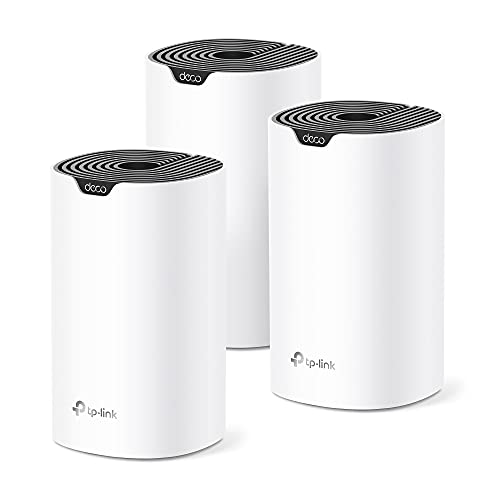
| Best Overall | Coverage Area: 5,500 sq ft (3-pack) | WiFi Standard & Speed: AC1900 (1,200 Mbps) | Device Capacity: Supports up to 100 devices | VIEW LATEST PRICE | Read Our Analysis |
| TP-Link Deco X55 AX3000 WiFi 6 Mesh System |

| WiFi 6 Upgrade | Coverage Area: 6,500 sq ft (3-pack) | WiFi Standard & Speed: WiFi 6 AX3000 (2,402 Mbps + 574 Mbps) | Device Capacity: Not specified | VIEW LATEST PRICE | Read Our Analysis |
| TP-Link AC1200 WiFi Extender with OneM Mesh (RE315) |

| Budget-Friendly Pick | Coverage Area: 1,500 sq ft | WiFi Standard & Speed: AC1200 (867 Mbps 5GHz / 300 Mbps 2.4GHz) | Device Capacity: Supports up to 32 devices | VIEW LATEST PRICE | Read Our Analysis |
| TP-Link Deco 7 BE25 WiFi 7 Mesh System |

| Most Advanced | Coverage Area: 6,600 sq ft (3-pack) | WiFi Standard & Speed: WiFi 7 BE5000 (4,324 Mbps 5GHz / 688 Mbps 2.4GHz) | Device Capacity: Supports over 150 devices | VIEW LATEST PRICE | Read Our Analysis |
| 1200Mbps Dual Band WiFi Extender Signal Booster |

| Best Value | Coverage Area: 12,880 sq ft | WiFi Standard & Speed: Dual-Band 1200 Mbps | Device Capacity: Supports up to 105 devices | VIEW LATEST PRICE | Read Our Analysis |
| NETGEAR WiFi Mesh Range Extender (EX5000) |

| Most Compact | Coverage Area: 1,000 sq ft | WiFi Standard & Speed: AC1200 (1,200 Mbps) | Device Capacity: Supports up to 15 devices | VIEW LATEST PRICE | Read Our Analysis |
| Google Wifi AC1200 Mesh Router System (1-Pack) |

| Best For Beginners | Coverage Area: 1,500 sq ft (1-pack); 4,500 sq ft (3-pack) | WiFi Standard & Speed: AC1200 | Device Capacity: Not specified | VIEW LATEST PRICE | Read Our Analysis |
| 2026 WiFi Extender 10000 Sq.ft Long Range Repeater |
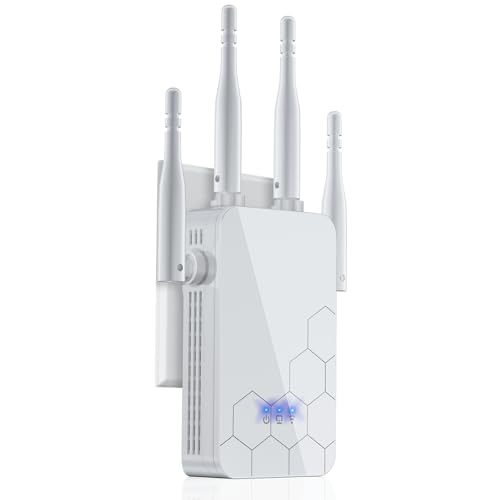
| Widest Coverage | Coverage Area: 10,000 sq ft | WiFi Standard & Speed: Dual-Band 1200 Mbps | Device Capacity: Supports 65+ devices | VIEW LATEST PRICE | Read Our Analysis |
| Amazon eero 6+ Mesh WiFi System (3-pack) |

| Best Mesh System | Coverage Area: 4,500 sq ft (3-pack) | WiFi Standard & Speed: WiFi 6 (up to 1 Gigabit) | Device Capacity: Connect 75+ devices | VIEW LATEST PRICE | Read Our Analysis |
| Amazon eero 7 Dual-Band Mesh Wi-Fi 7 Router (3-Pack) |

| WiFi 7 Leader | Coverage Area: 6,000 sq ft (3-pack) | WiFi Standard & Speed: WiFi 7 (1.8 Gbps; supports up to 2.5 Gbps) | Device Capacity: Supports 120+ devices | VIEW LATEST PRICE | Read Our Analysis |
More Details on Our Top Picks
TP-Link Deco S4 Mesh WiFi System (3-Pack)
The TP-Link Deco S4 Mesh WiFi System leads our roundup for households needing reliable coverage across 5,500 square feet without replacing their entire setup. This three-unit system replaces traditional routers and extenders with seamless roaming on a single network. Each unit includes two Gigabit Ethernet ports, supporting wired backhaul for stronger connections. The AC1900 speeds handle up to 100 devices simultaneously. Setup takes minutes through the Deco app on Android or iOS. You’ll get guest WiFi control via Alexa voice commands and parental controls to manage family members’ online time and block inappropriate sites. The system works with all major internet service providers.
- Coverage Area:5,500 sq ft (3-pack)
- WiFi Standard & Speed:AC1900 (1,200 Mbps)
- Device Capacity:Supports up to 100 devices
- Ethernet Ports:6 total Gigabit ports (2 per unit, 3-pack)
- Setup Method:Mobile app (Android/iOS)
- Security Features:WPS; parental controls; Linux-based system
- Additional Feature:Alexa voice command control
- Additional Feature:Parental controls per family member
- Additional Feature:Seamless roaming, single network name
TP-Link Deco X55 AX3000 WiFi 6 Mesh System
Looking to upgrade your entire home network with Wi-Fi 6 speeds? The TP-Link Deco X55 delivers AX3000 performance across 6,500 square feet using three mesh units. Each unit includes three Gigabit Ethernet ports, so you can connect wired devices directly. Set up the system through the Deco app, which guides you through installation and lets you manage your network remotely. Enable Ethernet Backhaul by connecting units with cables to boost speeds substantially. The included HomeShield security service provides QoS, parental controls, and basic network protection. You’ll receive 24/7 technical support and a two-year warranty with your purchase.
- Coverage Area:6,500 sq ft (3-pack)
- WiFi Standard & Speed:WiFi 6 AX3000 (2,402 Mbps + 574 Mbps)
- Device Capacity:Not specified
- Ethernet Ports:9 total Gigabit ports (3 per unit, 3-pack)
- Setup Method:Mobile app (Deco app)
- Security Features:TP-Link HomeShield; CISA Secure-by-Design pledge; parental controls; QoS
- Additional Feature:AI-Driven Mesh optimization
- Additional Feature:TP-Link HomeShield security service included
- Additional Feature:24/7 technical support
TP-Link AC1200 WiFi Extender with OneM Mesh (RE315)
Need reliable coverage without breaking your budget? The TP-Link RE315 extends your home network up to 1500 sq ft using dual-band technology: 867 Mbps on 5GHz and 300 Mbps on 2.4GHz. Set it up through the TP-Link Tether app on Android or iOS. Position the extender halfway between your router and dead zones using the built-in signal indicator. Connect up to 32 devices simultaneously. Use the fast Ethernet port for wired connections to stationary devices. Note that extenders enhance coverage more effectively than speed. The EasyMesh compatibility allows whole-home coverage integration.
- Coverage Area:1,500 sq ft
- WiFi Standard & Speed:AC1200 (867 Mbps 5GHz / 300 Mbps 2.4GHz)
- Device Capacity:Supports up to 32 devices
- Ethernet Ports:1 Fast Ethernet port
- Setup Method:Mobile app (TP-Link Tether) + one-touch connection
- Security Features:CISA Secure-by-Design pledge; WPA/WPA2 encryption
- Additional Feature:2023 Engadget Best Budget Pick
- Additional Feature:Adjustable external antennas
- Additional Feature:Intelligent signal placement indicator
TP-Link Deco 7 BE25 WiFi 7 Mesh System
TP-Link’s most advanced Deco 7 BE25 mesh system delivers WiFi 7 speeds up to 5 Gbps across 6,600 square feet. You’ll get dual-band performance with 4,324 Mbps on 5GHz and 688 Mbps on 2.4GHz. The 3-pack includes two 2.5 Gbps ports per unit for wired backhaul connections. You can connect over 150 devices without performance drops using AI-Roaming technology. Setup involves placing units strategically throughout your space and using the app to configure your network. HomeShield security protects your devices with network monitoring and parental controls. This system works with any ISP and remains backward compatible with older WiFi standards.
- Coverage Area:6,600 sq ft (3-pack)
- WiFi Standard & Speed:WiFi 7 BE5000 (4,324 Mbps 5GHz / 688 Mbps 2.4GHz)
- Device Capacity:Supports over 150 devices
- Ethernet Ports:6 total 2.5 Gbps ports (2 per unit, 3-pack)
- Setup Method:Mobile app (Deco app) + voice control
- Security Features:TP-Link HomeShield; CISA pledge; VPN support; parental controls; IoT protection
- Additional Feature:Multi-Link Operation (MLO) technology
- Additional Feature:Supports 150+ connected devices
- Additional Feature:VPN client/server support
1200Mbps Dual Band WiFi Extender Signal Booster
The 1200Mbps Dual Band WiFi Extender Signal Booster (Model WD-R1206U) delivers strong performance at a reasonable price point, making it an excellent choice if you’re covering a large home without overspending. You’ll get 360° coverage across 12,880 square feet with dual-band technology—the 2.4GHz band reaches farther distances while the 5GHz band provides faster speeds with less interference. Setup takes minutes: plug the unit into an outlet, connect it to your existing router, and you’re done. The extender supports up to 105 devices including smartphones, smart TVs, security cameras, and gaming consoles. Four high-gain antennas ensure reliable signal distribution throughout living rooms, garages, backyards, and multi-story spaces. WPA/WPA2 encryption protects your network from unauthorized access. This model works with most routers and wireless devices, offering straightforward, effective coverage expansion.
- Coverage Area:12,880 sq ft
- WiFi Standard & Speed:Dual-Band 1200 Mbps
- Device Capacity:Supports up to 105 devices
- Ethernet Ports:Not specified
- Setup Method:1-tap setup with plug-and-play
- Security Features:WPA/WPA2 encryption; 802.11a/b/g/n/ac compatibility
- Additional Feature:360° directional antenna coverage
- Additional Feature:Four high-gain antennas
- Additional Feature:1-Tap plug-and-play setup
NETGEAR WiFi Mesh Range Extender (EX5000)
NETGEAR’s most compact extender, the EX5000, works well for anyone needing reliable coverage without taking up outlet space. This AC1200 dual-band model covers up to 1,000 square feet and connects 15 devices simultaneously across 2.4 GHz and 5 GHz bands. Setup requires pressing the WPS button to pair with your router—no complex configuration needed. The unit includes an Ethernet port for wired connections and works with any standard WiFi router. At 5.44 ounces with dimensions of 2.55 by 2.85 by 2.85 inches, it fits flush against walls. NETGEAR WiFi Analyzer app helps you position it optimally. Security uses WEP and WPA/WPA2 protocols. The one-year warranty covers manufacturer defects.
- Coverage Area:1,000 sq ft
- WiFi Standard & Speed:AC1200 (1,200 Mbps)
- Device Capacity:Supports up to 15 devices
- Ethernet Ports:1 RJ45 Ethernet port
- Setup Method:WPS button + mobile app (NETGEAR WiFi Analyzer)
- Security Features:WEP and WPA/WPA2 protocols
- Additional Feature:WPS button easy pairing
- Additional Feature:Compact wall plug design
- Additional Feature:NETGEAR WiFi Analyzer app
Google Wifi AC1200 Mesh Router System (1-Pack)
Google Wifi AC1200 gets newcomers connected fast. You’ll set up this mesh system in a few steps using the Google Home app to create your network and go online. One pack covers 1,500 square feet; three packs cover 4,500 square feet. The system intelligently maintains fast WiFi speeds across rooms, reducing buffering. You can manage your network by prioritizing devices, viewing speeds, and setting up guest networks. Parental controls let you manage screen time, restrict adult content, and pause WiFi on selected devices. Additional points expand coverage and work with existing Nest Wifi systems, creating flexible whole-home connectivity.
- Coverage Area:1,500 sq ft (1-pack); 4,500 sq ft (3-pack)
- WiFi Standard & Speed:AC1200
- Device Capacity:Not specified
- Ethernet Ports:Not specified
- Setup Method:Google Home app
- Security Features:Parental controls; guest network management
- Additional Feature:Scalable with Nest Wifi system
- Additional Feature:Parental controls with content filtering
- Additional Feature:Google Home app management
2026 WiFi Extender 10000 Sq.ft Long Range Repeater
Cyseed’s 2026 WiFi Extender delivers the widest coverage available for whole-home connectivity. You’ll extend your network up to 10,000 square feet using four external antennas that provide 360° signal coverage. The device eliminates dead zones and supports 65+ devices simultaneously, making it compatible with 99% of existing routers. Setup takes one tap using the WPS button on your original router. You can select from five operational modes—Repeater, Client, AP, Bridge, or Router—depending on your needs. The 2.4 GHz processor handles streaming, gaming, and video calls without buffering. An Ethernet port provides faster wired connections when needed.
- Coverage Area:10,000 sq ft
- WiFi Standard & Speed:Dual-Band 1200 Mbps
- Device Capacity:Supports 65+ devices
- Ethernet Ports:1 Ethernet port
- Setup Method:1-tap WPS button + mobile app
- Security Features:WPA/WPA2 protocols; AP/Repeater/Bridge/Client modes
- Additional Feature:Four operational modes (AP/Repeater/Bridge/Client)
- Additional Feature:Real-time threat detection
- Additional Feature:4 external antennas included
Amazon eero 6+ Mesh WiFi System (3-pack)
The Amazon eero 6+ mesh system excels for households needing whole-home coverage without complexity. You’ll get gigabit-speed support across 4,500 square feet with the three-pack configuration. Setup takes minutes using the eero app, which also handles network management remotely. The system connects 75+ devices simultaneously, so your family can work, stream, and video chat without interruption. Built-in Thread and Zigbee support integrates smart home devices directly through Alexa. You’ll benefit from automatic security updates and backward compatibility with older eero models, ensuring your investment remains current and protected.
- Coverage Area:4,500 sq ft (3-pack)
- WiFi Standard & Speed:WiFi 6 (up to 1 Gigabit)
- Device Capacity:Connect 75+ devices
- Ethernet Ports:Not specified
- Setup Method:eero app
- Security Features:Optional eero Plus subscription (Advanced Security, Ad Blocking, Parental Controls); automatic updates
- Additional Feature:Built-in Smart Home Hub
- Additional Feature:Patented TrueMesh technology
- Additional Feature:Backward-compatible with previous eero
Amazon eero 7 Dual-Band Mesh Wi-Fi 7 Router (3-Pack)
Amazon’s eero 7 stands as the Wi-Fi 7 leader for users who need expansive coverage and multi-device support. The 3-pack system covers up to 6,000 square feet and connects over 120 devices simultaneously. Each router features dual 2.5 GbE ports and delivers wireless speeds up to 1.8 Gbps. You’ll get WPA3 encryption, automatic channel selection, and band steering to optimize connections. The included eero Plus subscription provides advanced security, ad blocking, and parental controls. Set up takes minutes through the mobile app on iOS or Android. Matter support and Alexa integration enable smart home control from your network hub.
- Coverage Area:6,000 sq ft (3-pack)
- WiFi Standard & Speed:WiFi 7 (1.8 Gbps; supports up to 2.5 Gbps)
- Device Capacity:Supports 120+ devices
- Ethernet Ports:2 auto-sensing 2.5 GbE ports per unit (6 total, 3-pack)
- Setup Method:eero app
- Security Features:WPA3 and WPA2 encryption; optional eero Plus (Advanced Security, Parental Controls, Malwarebytes, VPN); Matter support
- Additional Feature:Matter support for smart homes
- Additional Feature:TrueRoam and TrueChannel optimization
- Additional Feature:eero Plus subscription available
Factors to Consider When Choosing Mesh WiFi Extenders

You’ll need to evaluate your coverage area first—measure your home’s square footage and identify dead zones where you currently lack signal. Next, assess your speed requirements by checking what bandwidth your devices need, then compare each extender’s performance specifications against your internet plan’s speeds. Finally, you should verify device compatibility with your existing router, review setup complexity and security features like WPA3 encryption, and prioritize the factors that matter most to your situation before making a purchase.
Coverage Area Requirements
How much square footage do you need to cover? Start by measuring your home’s total area, then match it to your system’s specifications. Most 3-pack setups cover 4,500–6,600 square feet, while long-range extenders reach up to 10,000 square feet. If your home exceeds these ranges, plan for multiple nodes to eliminate dead zones. Multi-story layouts require careful placement to ensure consistent signal on each level. For outdoor spaces, select units advertising 360° indoor-outdoor capability. Review whether coverage claims are per-pack or aggregate, as some manufacturers combine totals across multiple units. For complex layouts, verify wired backhaul options through Ethernet connections to maintain maximum throughput between nodes and avoid performance loss.
Speed And Performance Needs
Once you’ve mapped out your coverage area, the next step is matching your mesh system’s speed capabilities to what your devices actually demand. Determine your required throughput by identifying how many devices you’ll connect simultaneously—100+ devices need robust systems. Check for AC1900 speeds or higher, and prioritize 5 GHz bands with 160 MHz channel support for streaming and gaming. Evaluate backhaul options, whether wired or wireless, since they sustain speeds across rooms and prevent slowdowns. Newer standards like Wi-Fi 6, 6E, or 7 with features such as MLO or AI-driven optimization minimize dead zones and improve sustained performance. Match these specifications directly to your household’s actual usage patterns and device density for optimal results.
Device Compatibility Matters
Because mesh extenders only perform at their best when they align with your existing router’s capabilities, you’ll need to verify several compatibility factors before making a purchase. First, check that your extender supports the same Wi-Fi standard as your router—whether that’s Wi-Fi 5, Wi-Fi 6, or Wi-Fi 7. Second, confirm the extender operates on both 2.4 GHz and 5 GHz bands to match your devices and reduce interference. Third, verify compatibility with your specific router model or ecosystem, since some extenders work universally while others perform better with identical brands. Fourth, determine whether the extender supports wired Ethernet backhaul if you plan cable connections. Finally, confirm it shares your router’s network management features like guest networks and parental controls for consistent policy application across your entire system.
Setup Ease And Installation
Setup ease and installation determine whether you’ll get your mesh extender running in minutes or spend hours troubleshooting connections. Look for devices with dedicated mobile apps that guide you through each step, from powering on the unit to connecting it to your existing network. One-tap connections or WPS-based pairing eliminate manual configuration and reduce errors. Check that your extender supports multiple modes—repeater, bridge, and access point—so you can adapt it to your home layout. Verify compatibility with your current router before purchasing. Visual indicators showing signal strength help you position the extender in the optimal location. Choose systems that expand without requiring separate hubs or complex provisioning processes.
Security Features Priority
What security protections does your mesh extender actually provide? You should prioritize WPA3 encryption and vendor-specific security services like HomeShield, which safeguard all connected devices across your network. Next, confirm the system supports automatic firmware updates and carries a Secure-by-Design pledge to minimize vulnerabilities over time. Check that your extender offers network-wide parental controls and device-level QoS to manage security risks from multiple connected devices. Look for built-in threat detection and IoT device identification capabilities to quickly flag and isolate compromised devices. Finally, verify compatibility with Wi-Fi 6 or Wi-Fi 7 standards and ensure the system supports VPN or remote access features for secure connectivity. These protections work together to create a comprehensive security foundation for your entire home network.
Budget And Value Assessment
How do you determine whether a mesh WiFi extender truly delivers value for your budget? Start by dividing the total system price by your coverage area in square feet to calculate cost per unit of coverage. Compare single units against multi-packs, as three-packs typically offer better value for homes with multiple rooms. Next, examine maximum device support limits and whether premium models justify their higher cost through improved throughput and stability. Review warranty length—longer coverage reduces replacement expenses. Check included accessories like power adapters and Ethernet cables, as purchasing these separately increases overall costs. Finally, evaluate backhaul options. Wired connections sustain speeds better than wireless as your network expands, potentially saving money on future upgrades.
Wired Backhaul Support Options
Why does wired backhaul matter when you’re selecting a mesh WiFi extender? Wired backhaul uses Ethernet connections between nodes to carry inter-node traffic, which reduces wireless interference and boosts overall throughput. When you check a system’s specifications, look for models with two or more Gigabit Ethernet ports per unit. This setup offloads communication from the wireless link, directly improving speeds for connected clients. Some mesh systems support optional Ethernet backhaul, letting you create a mixed setup with wireless links where cabling isn’t practical. To maximize performance, configure the backhaul correctly in the app to route inter-node traffic over Ethernet instead of the wireless mesh. Prioritize extenders offering this flexibility for optimal signal strength and reliability.
Warranty And Support Options
When you’re investing in a mesh WiFi extender system, you’ll want to understand the warranty and support structure before making your purchase. Most mesh extenders offer 1 to 2 years of hardware warranty coverage, though some manufacturers provide extended options. Check whether your warranty ties to the retailer’s policy or the manufacturer directly. Support typically includes 24/7 technical assistance through phone, email, or chat channels. Verify which updates—security patches and software improvements—come included versus those requiring separate subscriptions. Review the return policy at your retailer, as these windows affect your post-purchase support eligibility. Compare warranty lengths and support response times across models to ensure you receive adequate protection and assistance throughout your device’s lifespan.
Final Thoughts
You’ll choose the right mesh WiFi extender by matching it to your router’s specifications and your coverage needs. Prioritize Wi-Fi 6 or 7 models with Ethernet backhaul capability. Check that the extender supports your device ecosystem—whether that’s Alexa, Matter, or Thread. Verify the warranty length and return policy before purchasing. Test the setup through the manufacturer’s app to confirm seamless roaming across your home.

Meet Ry, “TechGuru,” a 36-year-old technology enthusiast with a deep passion for tech innovations. With extensive experience, he specializes in gaming hardware and software, and has expertise in gadgets, custom PCs, and audio.
Besides writing about tech and reviewing new products, he enjoys traveling, hiking, and photography. Committed to keeping up with the latest industry trends, he aims to guide readers in making informed tech decisions.