
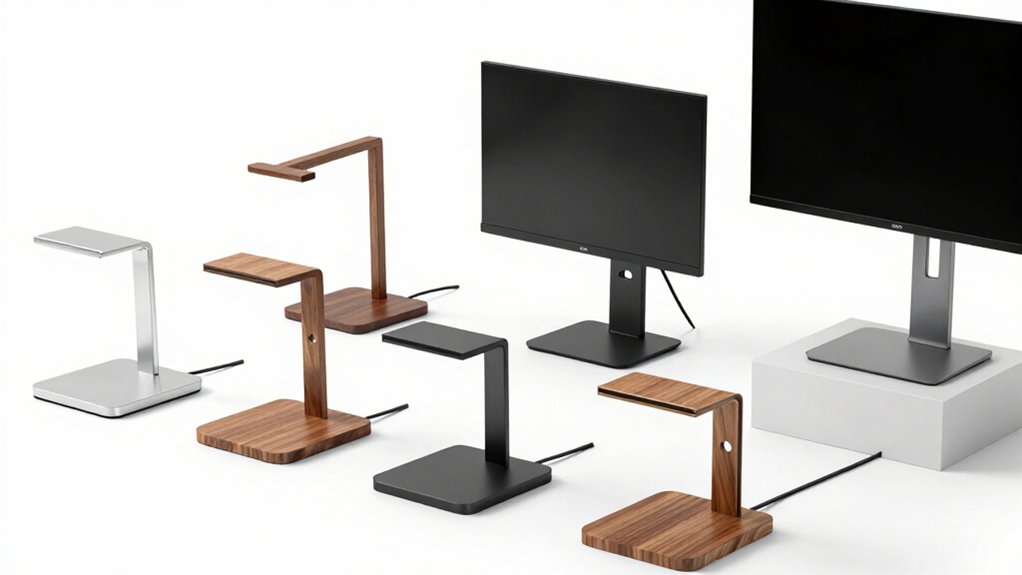

You can improve your desk workspace by choosing the right monitor holder. Your options range from single-arm mounts supporting 13–32 inches to dual-monitor systems for larger setups. Each holder offers adjustable height, tilt, and rotation features. You’ll need to decide between C-clamp or grommet bases depending on your desk type. Cable management and weight capacity matter too. Let’s examine which option works best for your specific needs.
| HUANUO FlowLift Single Monitor Mount Arm (13-32 Inch) |

| Best Overall | Maximum Screen Size Support: 32 inches | Weight Capacity: 19.8 lbs | Rotation Range: 360° | VIEW LATEST PRICE | Read Our Analysis |
| ErGear Dual Monitor Stand for 2 Screens 32 |
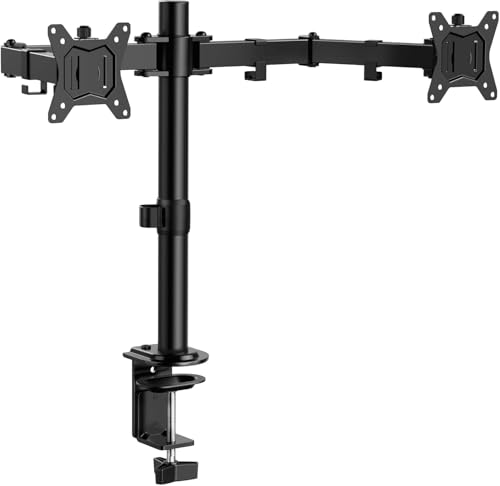
| Best for Dual Setups | Maximum Screen Size Support: 32 inches | Weight Capacity: 17.6 lbs per arm | Rotation Range: 360° | VIEW LATEST PRICE | Read Our Analysis |
| Suptek Monitor Mount Gas Spring Arm Desk Mount |

| Best for Large Screens | Maximum Screen Size Support: 35 inches | Weight Capacity: 24.25 lbs | Rotation Range: 360° | VIEW LATEST PRICE | Read Our Analysis |
| LISEN iPad Stand Tablet Holder for Desk |

| Best for Tablets | Maximum Screen Size Support: 16 inches (iPad/tablet) | Weight Capacity: 0.95 lbs (device weight, not capacity) | Rotation Range: Adjustable angle/foldable | VIEW LATEST PRICE | Read Our Analysis |
| WALI Single Monitor Mount Adjustable Gas Spring Arm (GSMP001N) |

| Premium Pick | Maximum Screen Size Support: 34 inches | Weight Capacity: 26.4 lbs (flat) / 19.8 lbs (curved) | Rotation Range: 360° | VIEW LATEST PRICE | Read Our Analysis |
| Amazon Basics Monitor Stand with Cable Management |

| Budget-Friendly Pick | Maximum Screen Size Support: 30 inches | Weight Capacity: 22 lbs | Rotation Range: 360° | VIEW LATEST PRICE | Read Our Analysis |
More Details on Our Top Picks
HUANUO FlowLift Single Monitor Mount Arm (13-32 Inch)
Looking to free up desk space while keeping your monitor at eye level? The HUANUO FlowLift accommodates 13-32 inch monitors weighing 4.4-19.8 lbs with VESA patterns of 75×75 mm or 100×100 mm. Installation takes about three minutes: affix the bracket to your table, attach your monitor to the VESA plate, then adjust tension based on your monitor’s weight. You’ll choose between C-clamp or grommet mounting. The arm tilts from -50° to +85°, swivels ±90°, and rotates 360°, lifting your screen up to 39.6 cm. One-hand operation lets you adjust height and angle easily. Its automotive-grade components withstand 20,000 motion tests, designed for over five years of use.
- Maximum Screen Size Support:32 inches
- Weight Capacity:19.8 lbs
- Rotation Range:360°
- Mounting Options:C-clamp or grommet base
- VESA Compatibility:75×75 mm and 100×100 mm
- Height Adjustability:Up to 39.6 cm from desktop
- Additional Feature:One-hand operation capability
- Additional Feature:80% sturdier construction
- Additional Feature:Quick 3-minute setup
ErGear Dual Monitor Stand for 2 Screens 32
The ErGear Dual Monitor Stand works best for professionals and gamers who need flexible screen positioning without sacrificing desk space. You’ll mount two monitors up to 32 inches each, with each arm supporting up to 17.6 lbs. The stand offers +/-90° swivel, +/-45° tilt, and 360° rotation for ergonomic viewing angles. Installation requires either a C-clamp or grommet mount, depending on your table thickness. Your monitors must have 75×75 mm or 100×100 mm VESA mounting holes. The integrated cable management clips keep your setup organized while freeing desk surface for keyboards and laptops.
- Maximum Screen Size Support:32 inches
- Weight Capacity:17.6 lbs per arm
- Rotation Range:360°
- Mounting Options:C-clamp or grommet base
- VESA Compatibility:75×75 mm and 100×100 mm
- Height Adjustability:Fully adjustable height
- Additional Feature:Supports dual 32″ monitors
- Additional Feature:Integrated cable management clips
- Additional Feature:Frees up desk space
Suptek Monitor Mount Gas Spring Arm Desk Mount
If you’re managing multiple screens or need flexibility to adjust your monitor throughout the day, Suptek’s gas spring arm delivers the stability and range you’re looking for. This mount accommodates screens up to 35 inches and handles weights up to 24.25 lbs. The arm extends 21.65 inches and adjusts vertically to 18.7 inches maximum, supporting both sitting and standing work positions. Installation uses either a C-clamp or optional grommet base on desks up to 3.85 inches thick. The gas spring mechanism rotates 360° at the joint, tilts ±80°, and swivels ±180°, enabling complete repositioning. Tested for 30,000 cycles, the arm provides durable performance. Suptek includes detailed instructions and a complete hardware kit for straightforward setup.
- Maximum Screen Size Support:35 inches
- Weight Capacity:24.25 lbs
- Rotation Range:360°
- Mounting Options:C-clamp or grommet base
- VESA Compatibility:75×75 mm and 100×100 mm
- Height Adjustability:Up to 18.7 inches max height
- Additional Feature:30,000 cycle durability tested
- Additional Feature:Extends up to 21.65″
- Additional Feature:Up to 35″ screen support
LISEN iPad Stand Tablet Holder for Desk
Need a portable stand that works with multiple tablet sizes without weighing down your bag? The LISEN iPad Stand uses gravity-based stability instead of clips or magnets, securing your device through back tilt. Its foldable design collapses to pocket size for travel. The stand supports iPad Pro up to 16 inches, iPad Air, iPad mini, Galaxy Tabs, and drawing tablets. Adjust the bridge screw truss rod to control tightness as joints loosen over time. For screen tapping, place the bottom bracket on your desk. The metal base with anti-slip silicone prevents sliding. Avoid devices with cases thicker than 0.7 inches.
- Maximum Screen Size Support:16 inches (iPad/tablet)
- Weight Capacity:0.95 lbs (device weight, not capacity)
- Rotation Range:Adjustable angle/foldable
- Mounting Options:Gravity-based (no clamps)
- VESA Compatibility:N/A (gravity-based system)
- Height Adjustability:Adjustable height and angle
- Additional Feature:Fully foldable/pocket-sized design
- Additional Feature:Gravity-based security system
- Additional Feature:Works with multiple devices
WALI Single Monitor Mount Adjustable Gas Spring Arm (GSMP001N)
WALI’s Single Monitor Mount (GSMP001N) works best for anyone who wants to optimize their desk ergonomics while accommodating screens ranging from 13 to 34 inches. The gas spring arm elevates your monitor up to 17.3 inches above your desk and extends 19.3 inches outward, reducing neck and back strain. You’ll get full rotational control: 360° rotation, ±180° swivel, and ±70° to −45° tilt adjustments. Installation takes minutes using either the clamp or grommet base. The mount supports up to 26.4 lbs for flat screens and 19.8 lbs for curved screens, with VESA compatibility at 75×75 mm and 100×100 mm. WALI backs this with a 10-year warranty and seven-day customer support.
- Maximum Screen Size Support:34 inches
- Weight Capacity:26.4 lbs (flat) / 19.8 lbs (curved)
- Rotation Range:360°
- Mounting Options:Clamp base or grommet base
- VESA Compatibility:75×75 mm and 100×100 mm
- Height Adjustability:Up to 17.3 inches elevation
- Additional Feature:10-year warranty included
- Additional Feature:26.4 lbs flat screen capacity
- Additional Feature:7-day US customer support
Amazon Basics Monitor Stand with Cable Management
The Amazon Basics Monitor Stand with Cable Management works well for anyone juggling multiple screens or dealing with tangled desk clutter. This tabletop mount accommodates 13- to 30-inch monitors weighing up to 22 pounds and fits desks 0.8 to 3.9 inches thick. You’ll adjust the height between 7.9 and 14.2 inches, then position your screen using 360-degree rotation and a tilt range from -15 to +85 degrees. The built-in cable-management system routes your cords neatly behind the arm. Setup takes minutes since all hardware and tools come included. VESA compatibility supports both 100x100mm and 75x75mm mounting patterns. Amazon backs the unit with a one-year limited warranty.
- Maximum Screen Size Support:30 inches
- Weight Capacity:22 lbs
- Rotation Range:360°
- Mounting Options:Tabletop clamp mount
- VESA Compatibility:75×75 mm and 100×100 mm
- Height Adjustability:7.9 to 14.2 inches range
- Additional Feature:Integrated cable management system
- Additional Feature:Detachable VESA plate included
- Additional Feature:Durable steel construction
Factors to Consider When Choosing a Monitor Holder for Desk
Before you purchase a monitor holder, you’ll need to evaluate your monitor’s size and weight, check whether the holder fits your desk type and available space, and confirm it offers the adjustability range you need for proper ergonomics. Next, assess the holder’s build quality and durability by reviewing materials and weight capacity, then determine which mounting option—clamp, grommet, adhesive, or stand-based—works best for your desk configuration. Finally, consider how much flexibility you’ll need for future adjustments, since your setup may change over time.
Monitor Size And Weight
How do you know if a monitor holder‘ll actually support your screen? Check two critical specs: size and weight capacity. Monitor arms typically support screens between 13 and 34 inches, though most max out at 32 inches. Verify your monitor’s dimensions fall within this range. Next, confirm the weight capacity matches your screen. Most arms support 17.6 to 26.4 lbs—your monitor must weigh less. You’ll find this information on your monitor’s label or manual. Finally, confirm VESA pattern compatibility: your monitor’s mounting holes must match the arm’s pattern, usually 75×75 mm or 100×100 mm. Cross-reference these three factors before purchasing. Mismatched specs result in unsafe installations and potential equipment damage.
Desk Compatibility And Setup
Once you’ve verified your monitor’s specs, you’ll need to guarantee your desk can physically support the monitor arm you’ve chosen. First, check your desk’s material—wood works best for secure mounting. Measure your desk thickness and underside clearance to confirm compatibility with either a C-clamp or grommet base. Verify the arm’s weight capacity matches your monitor’s weight to prevent sagging. Next, inspect beneath your tabletop for interfering beams or panels that’d block installation. Finally, confirm the arm’s height range and extension reach your desired viewing angle without colliding with your desk edge or keyboard. Review the installation process—whether quick-setup or hardware-intensive—to ensure you can properly mount it on your specific desk configuration.
Adjustability And Ergonomic Range
What adjustability features matter most for your monitor arm? You need tilt, swivel, rotation, and height adjustments to optimize your viewing comfort. Check the tilt range—most quality arms offer ±80° to +85°—to reduce neck strain. Verify swivel capability, typically ±90° to ±180°, for flexible angle changes without moving your desk. Confirm the gas spring lift mechanism provides substantial range, ideally 17–39 cm or more, enabling smooth one-handed height adjustments. Ensure VESA compatibility matches your monitor (75×75 mm or 100×100 mm) and verify weight capacity covers your monitor’s specs, usually 4–26+ lbs. Test tension adjustment—you should modify settings without tools. These adjustability options directly impact your ergonomic positioning and reduce fatigue during long work sessions.
Build Quality And Durability
Durability determines whether your monitor holder’ll function reliably for years or fail within months, so you’ll want to prioritize materials and construction standards from the start. Seek arms built with metal construction and automotive-grade components, which resist wear and maintain stability over time. Check the load capacity rating against your monitor’s weight and VESA pattern—75×75 mm or 100×100 mm are common standards. Review motion-testing data; arms tested through 20,000–30,000 cycles demonstrate long-term reliability. Examine the gas spring mechanism or joints, ensuring they’re rated for sustained use without degradation. Finally, verify your base option—C-clamp or grommet—fits your desk thickness and clearance requirements. These checks confirm your holder’ll support your monitor securely and function smoothly for years.
Mounting Options And Flexibility
How you’ll mount your monitor holder depends on your desk type and available space, so you’ll need to choose between a C-clamp or grommet base before purchasing. C-clamp mounts work on tables measuring 0.39 to 3.15 inches thick, gripping the desk edge securely. Grommet bases fit desks with 0.39 to 2.17-inch thickness and require a drilled hole in your surface. Beyond mounting style, verify that your holder offers full adjustability—tilt ranges from -50° to +85°, swivel up to ±180°, and 360° rotation optimize positioning for your specific needs. Gas-spring mechanisms provide 6.8 to 15.4 inches of height adjustment, allowing you to raise or lower your screen smoothly. Check weight capacity and screen size compatibility against your equipment specifications.
Cable Management And Space
A well-organized cable system keeps your desk clean and protects your equipment from damage. Look for monitor holders with built-in cable channels or clips that route cords along the arm to your desk or power strip. Verify the mount includes dedicated fasteners to secure multiple cables—power, HDMI, DisplayPort, and USB—preventing tangling and sagging. Check that the arm’s height and extension allow cables to run cleanly without pinching or stretching during monitor adjustments. Confirm the holder’s design aligns with your desk’s grommets or clamp base so cable pathways remain unobstructed. Review the weight capacity and cable support limits to ensure your setup handles all necessary connections simultaneously. These features create an efficient, professional workspace while protecting your cables from damage.
Final Thoughts
You’ve reviewed six monitor holder options with different mounting styles and capacities. Select your holder by matching your monitor size to the product’s compatibility range, then choose between C-clamp or grommet bases depending on your desk type. Verify VESA compatibility and weight limits for your setup. Install the mount securely, adjust for ergonomic positioning, and organize cables for a functional workspace.

Meet Ry, “TechGuru,” a 36-year-old technology enthusiast with a deep passion for tech innovations. With extensive experience, he specializes in gaming hardware and software, and has expertise in gadgets, custom PCs, and audio.
Besides writing about tech and reviewing new products, he enjoys traveling, hiking, and photography. Committed to keeping up with the latest industry trends, he aims to guide readers in making informed tech decisions.