

When your PC won’t start or performs erratically, you need diagnostic tools that pinpoint problems fast. PC diagnostic cards let you identify motherboard, RAM, and power supply failures without guesswork. You’ll find several types available—from basic 4-digit POST testers to advanced multi-interface analyzers—each designed for specific troubleshooting tasks. Understanding which card fits your repair workflow determines how quickly you’ll resolve issues.
| PC Motherboard & PSU Diagnostic Tester Kit |

| Best Starter Kit | Diagnostic Scope: Motherboard power, POST, display, boot issues | Interface Compatibility: Standard PCI only | Portable/Transportable Design: Portable carrying storage case included | VIEW LATEST PRICE | Read Our Analysis |
| 4 Digit PCI ISA Motherboard Diagnostic Analyzer Card |

| Best Budget Option | Diagnostic Scope: Motherboard power and POST status | Interface Compatibility: Standard PCI and ISA | Portable/Transportable Design: Desktop-bound; no portability mentioned | VIEW LATEST PRICE | Read Our Analysis |
| Laptop DDR4 DDR5 RAM Tester Diagnostic Kit |

| Best RAM Diagnostics | Diagnostic Scope: RAM-related issues (no-POST, freezes, BSOD) | Interface Compatibility: USB Type-C (RAM tester) | Portable/Transportable Design: Compact and lightweight for onsite troubleshooting | VIEW LATEST PRICE | Read Our Analysis |
| Debug Card Portable Computer Diagnostic Analyzer Tester |
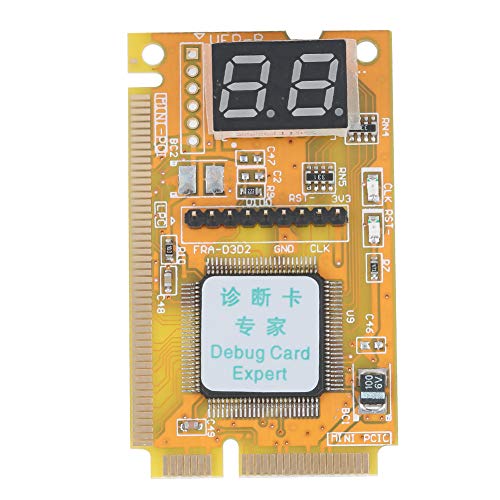
| Best Laptop Repairs | Diagnostic Scope: Laptop and motherboard repair diagnostics | Interface Compatibility: Mini PCI, Mini PCI-E, LPC bus | Portable/Transportable Design: Portable for laptop and onsite repair | VIEW LATEST PRICE | Read Our Analysis |
| Jadeshay TL631 Pro Motherboard Analyzer Diagnostic Card |
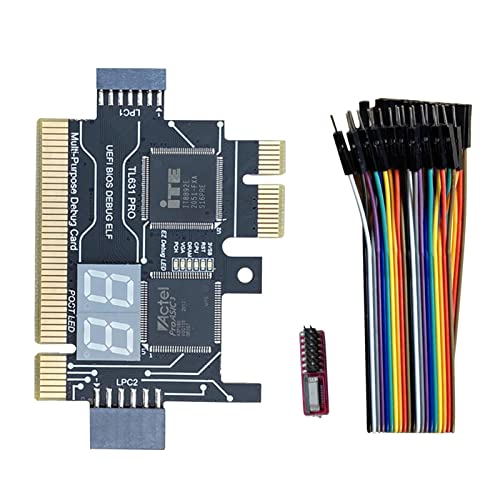
| Best Universal Coverage | Diagnostic Scope: Motherboard power, CPU, memory, graphics, hard disk, and support structures | Interface Compatibility: PCI, PCI-E, Mini PCI-E, LPC | Portable/Transportable Design: Portable for professionals and enthusiasts | VIEW LATEST PRICE | Read Our Analysis |
More Details on Our Top Picks
PC Motherboard & PSU Diagnostic Tester Kit
When you’re troubleshooting an older desktop or laptop that won’t power on, won’t display video, or won’t complete startup—and you don’t have time to swap in known-good components to identify the problem—this diagnostic kit gives you a faster way forward. The kit includes two test boards designed for PCI slots, an ATX PSU tester, a power switch cable, and a wrist strap for static protection. The larger board features a BIOS speaker that captures beep codes to help pinpoint motherboard issues. Insert the appropriate test board into your PCI slot, connect the PSU tester to your power supply, and align all pins carefully without forcing them. Check your documentation to confirm you’re using standard PCI, not PCIe, slots. This portable kit eliminates guesswork during repairs.
- Diagnostic Scope:Motherboard power, POST, display, boot issues
- Interface Compatibility:Standard PCI only
- Portable/Transportable Design:Portable carrying storage case included
- Display/Output Method:BIOS speaker (beep codes) and visual indicators
- Build Quality:Standard components in protective case
- Target User:Beginners, technicians, class learning environments
- Additional Feature:BIOS speaker captures beep codes
- Additional Feature:ATX PSU quick testing
- Additional Feature:Power switch cable included
4 Digit PCI ISA Motherboard Diagnostic Analyzer Card
The 4-Digit PCI and ISA PC Computer Motherboard Power Diagnostic Analyzer Post Tester Card works best for technicians who need quick motherboard diagnostics on desktop systems, since it plugs directly into standard PCI or ISA slots and displays error codes immediately after power-on. The card’s 4-digit LCD screen shows current error codes on the first two digits and previous codes on the last two digits. You’ll insert the card into your motherboard’s slot, power on the system, and read the displayed codes using the included error code table. This card also tests motherboard bus speed, making it valuable for identifying power issues and POST failures across compatible motherboards.
- Diagnostic Scope:Motherboard power and POST status
- Interface Compatibility:Standard PCI and ISA
- Portable/Transportable Design:Desktop-bound; no portability mentioned
- Display/Output Method:4-digit LCD display with error codes
- Build Quality:Standard PCI/ISA card construction
- Target User:Desktop PC technicians and professionals
- Additional Feature:4-digit LCD error display
- Additional Feature:Dual-code tracking capability
- Additional Feature:Motherboard bus speed test
Laptop DDR4 DDR5 RAM Tester Diagnostic Kit
If you’re troubleshooting no-POST issues, system freezes, or blue screen errors on laptops, you’ll want a dedicated RAM tester that works with both DDR4 and DDR5 modules without powering on the device. Connect the tester to power via the included USB Type-C cable, then insert your RAM module into the corresponding socket. LED indicators display diagnostic results immediately, helping you identify shorted circuits or failing memory. Wear an antistatic strap during operation to prevent damage. Note that all LEDs lighting up doesn’t guarantee functionality—verify results with additional checks. Use only the original Type-C cable to avoid power disconnection issues. This compact, durable tool saves technicians time by quickly determining whether RAM causes hardware problems before attempting extensive repairs.
- Diagnostic Scope:RAM-related issues (no-POST, freezes, BSOD)
- Interface Compatibility:USB Type-C (RAM tester)
- Portable/Transportable Design:Compact and lightweight for onsite troubleshooting
- Display/Output Method:LED indicators for diagnostic status
- Build Quality:Black multi-layer PCB with professional design
- Target User:Computer technicians and laptop owners
- Additional Feature:USB Type-C powered operation
- Additional Feature:LED diagnostic status indicators
- Additional Feature:DDR4/DDR5 compatibility support
Debug Card Portable Computer Diagnostic Analyzer Tester
Looking for a diagnostic card that’ll handle laptop and motherboard repairs without complicated setup? This debug card supports Mini PCI, Mini PCI-E, and LPC bus interfaces, giving you comprehensive motherboard diagnostic coverage. You’ll connect one interface during use while leaving the other two unused. The plug-and-play design requires minimal setup. The multi-segment display shows your diagnostic results clearly. Its four-layer PCB design maintains stable signals, and the tantalum capacitor ensures reliable power delivery during extended operations. Technicians rely on this card to clarify diagnostic findings and streamline repair work. The satisfaction guarantee and responsive customer support back your investment.
- Diagnostic Scope:Laptop and motherboard repair diagnostics
- Interface Compatibility:Mini PCI, Mini PCI-E, LPC bus
- Portable/Transportable Design:Portable for laptop and onsite repair
- Display/Output Method:Multi-segment displays for results
- Build Quality:Four-layer PCB with tantalum capacitors
- Target User:Laptop and motherboard repair technicians
- Additional Feature:Four-layer PCB design
- Additional Feature:Multi-segment display results
- Additional Feature:Tantalum capacitor stability support
Jadeshay TL631 Pro Motherboard Analyzer Diagnostic Card
Professionals and enthusiasts who need rapid, accurate motherboard diagnostics across multiple systems will find the Jadeshay TL631 Pro invaluable because it supports PCI, PCI-E, mini PCI-E, and LPC slots—giving you compatibility with most motherboards regardless of brand or configuration. The card’s intelligent power module recognition enables swift, accurate diagnostics. Multi-channel LED indicators display real-time status of power supply, motherboard, CPU, memory, graphics card, and hard disk. You’ll troubleshoot motherboard support structures efficiently. The straightforward diagnostic process makes it essential for professionals requiring quick problem identification across diverse laptop and desktop configurations.
- Diagnostic Scope:Motherboard power, CPU, memory, graphics, hard disk, and support structures
- Interface Compatibility:PCI, PCI-E, Mini PCI-E, LPC
- Portable/Transportable Design:Portable for professionals and enthusiasts
- Display/Output Method:Multi-channel LED indicators for real-time status
- Build Quality:Intelligent power module recognition technology
- Target User:Computer professionals and enthusiasts
- Additional Feature:Multi-channel LED indicators
- Additional Feature:Intelligent power module recognition
- Additional Feature:Hardware component status monitoring
Factors to Consider When Choosing PC Diagnostic Cards
When you’re selecting a PC diagnostic card, you’ll need to evaluate five key factors: interface compatibility with your motherboard, the range of diagnostic functions it offers, whether its display provides clear readability under different lighting conditions, how easily you can transport and store it, and whether its construction will withstand regular professional use. Start by confirming the card’s interface type matches your system—whether that’s ISA, PCI, or PCI Express—then assess what specific components it can test, such as RAM, CPU, or power supply. Finally, consider the display quality, physical design for portability, and material durability to ensure your investment serves you reliably across multiple repair jobs.
Interface Compatibility Requirements
How do you know if a diagnostic card will actually work with your motherboard? You’ll need to verify interface compatibility first. Check your motherboard’s manual to identify which slots you have available—PCI, PCI-E, ISA, Mini PCI, Mini PCI-E, or LPC. Next, confirm the diagnostic card supports those specific interfaces. Some cards work with both PCI and PCIe slots, while others are PCIe-only. Review the card’s documentation for any dual compatibility modes if you’re using mixed environments. Finally, verify you won’t need adapter cards or additional hardware to connect the device to your target bus types. Matching these requirements prevents installation failures and ensures your diagnostic tool functions properly during troubleshooting.
Diagnostic Capability Scope
What components and interfaces can a diagnostic card actually test on your system? You’ll want to verify whether your card supports the interfaces your motherboard uses: PCI, PCI-E, ISA, LPC, or Mini PCI/PCI-E variants. Different cards cover different ground. Some cards interpret POST codes and status indicators, letting you quickly identify power or startup failures through 4-digit error displays. Others provide real-time monitoring of CPU, memory, GPU, and HDD status through visual indicators. Additional testing capabilities include bus speed analysis and anti-static or power-switch verification. Consider your equipment type too. Desktop diagnostics typically rely on PCI or PCI-E slots, while laptop work may require Mini PCI-E or LPC support. Match the card’s capabilities to the systems you’ll troubleshoot most frequently.
Display Type And Readability
Your diagnostic card’s display directly impacts how quickly you’ll identify problems on the job site. You’ll encounter two main display types: 4-digit LCD screens and multi-segment LED indicators. LCD displays show error codes numerically, allowing you to cross-reference against your manual immediately. LED indicators light up to show real-time component status—power supply, CPU, memory, and GPU—giving you instant visual feedback. Consider lighting conditions where you’ll work. LCD screens require adequate brightness for readability in dim server rooms or equipment cabinets. LED indicators perform better in varied lighting since they emit their own light. You should prioritize contrast ratio and screen size. Larger displays and high-contrast designs reduce eye strain and speed up code interpretation during troubleshooting sessions.
Portability And Storage Design
Three key elements determine whether a diagnostic card kit’ll serve you well in the field: the carrying case, the test board’s physical design, and the organization of components inside.
Choose a kit with a compact, lightweight test board that balances functionality with portability. Foldable power testers and slim-form designs reduce bulk without sacrificing diagnostic capability. Your case should feature clearly labeled compartments that keep cables, boards, and manuals separated and accessible. This organization lets you locate PCI, ISA, or mini PCI interfaces quickly during repairs.
Built-in anti-static wrist straps eliminate the need for additional equipment. Select kits with plug-and-play designs that require minimal setup, enabling you to deploy rapidly across multiple job sites. Prioritize cases with sturdy handles and protective padding to safeguard components during transport.
Build Quality And Durability
How’d you know if a diagnostic card’ll hold up under the demands of daily field work? Check the PCB construction first—four-layer designs provide better signal integrity and durability during extended diagnostics. Next, examine the capacitors used; tantalum capacitors deliver stable power and reduce voltage fluctuations that can damage sensitive components. Evaluate the enclosure materials for ruggedness and weight. You need a unit that tolerates harsh shop and on-site environments without failing. Verify that the construction is compact and lightweight for transport between jobs. Finally, assess how well the enclosure protects internal components from physical damage and dust. These factors combined determine whether your diagnostic card survives months of heavy field use or fails prematurely.
Motherboard Support Coverage
When selecting a diagnostic card, you’ll need to verify which motherboard interfaces it supports—PCI, PCI-E, PCI-ISA, LPC, or mini PCI-E—because compatibility with your target boards determines whether the card’ll function at all during testing. Check whether the card covers both desktop and laptop motherboards if you work across different platforms. Additionally, confirm the tool supports legacy slots like ISA and LPC if you diagnose older systems regularly. Examine the card’s error code feedback and LED display to ensure they align with your motherboard’s POST codes. Finally, prioritize cards offering multi-slot compatibility in a single device, as this maximizes versatility across various systems without requiring multiple diagnostic tools.
Operating Ease And Setup
Once you’ve confirmed motherboard compatibility, the next step is evaluating how straightforward the diagnostic card is to use in practice. Look for plug-and-play designs that require minimal setup steps and feature clearly labeled connectors to reduce errors. Real-time status indicators—whether LEDs or displays—let you interpret results immediately without guessing. Check that the card needs only a single interface connection during operation, which simplifies installation and reduces cable clutter. Review the documentation carefully; quality manuals, quick-start sheets, and PDF guides streamline both initial setup and troubleshooting. Select a diagnostic card that supports your system’s exact bus interfaces without requiring adapters. This approach eliminates unnecessary complications and gets you diagnosing problems efficiently.
Final Thoughts
You’ll select a diagnostic card based on your primary repair focus. Choose 4-Digit PCI/ISA testers for legacy systems, Debug Cards for modern LPC/Mini PCI(-E) interfaces, or the Jadeshay TL631 Pro for cross-platform versatility. Pair your card with RAM and power-testing kits for comprehensive diagnostics. Invest in organized cases with labeled compartments and antistatic protection. This approach reduces troubleshooting time and improves field reliability across your repair operations.

Meet Ry, “TechGuru,” a 36-year-old technology enthusiast with a deep passion for tech innovations. With extensive experience, he specializes in gaming hardware and software, and has expertise in gadgets, custom PCs, and audio.
Besides writing about tech and reviewing new products, he enjoys traveling, hiking, and photography. Committed to keeping up with the latest industry trends, he aims to guide readers in making informed tech decisions.