


When you’re setting up a network, choosing the right PoE gigabit switch determines whether your devices get reliable power and data simultaneously. You’ll need to evaluate port counts, power budgets, and management features based on your specific setup. This guide walks you through ten switches that deliver performance across different scales—from compact 5-port models to robust 24-port options—so you can find the right fit for your needs.
| TP-Link TL-SG1005P 5 Port Gigabit PoE Switch |

| Compact Starter | Total PoE Power Budget: 65W | Number of PoE Ports: 4 PoE+ ports | Maximum Power Per Port: 30W | VIEW LATEST PRICE | Read Our Analysis |
| TP-Link LS108GP 8 Port PoE Gigabit Switch |

| Best For Surveillance | Total PoE Power Budget: 65W | Number of PoE Ports: 8 PoE+ ports | Maximum Power Per Port: 30W | VIEW LATEST PRICE | Read Our Analysis |
| NETGEAR 8 Port PoE Gigabit Smart Switch (GS308EP) |

| Easy Smart Managed | Total PoE Power Budget: 62W | Number of PoE Ports: 8 PoE+ ports | Maximum Power Per Port: 30W | VIEW LATEST PRICE | Read Our Analysis |
| UGREEN 10-Port PoE Network Switch with Gigabit Uplink |

| Most Versatile | Total PoE Power Budget: 60W | Number of PoE Ports: 8 PoE+ ports | Maximum Power Per Port: 30W | VIEW LATEST PRICE | Read Our Analysis |
| TP-Link TL-SG1428PE 24 Port Gigabit PoE+ Switch |

| Professional Grade | Total PoE Power Budget: 250W | Number of PoE Ports: 24 PoE+ ports | Maximum Power Per Port: 30W | VIEW LATEST PRICE | Read Our Analysis |
| 8 Port Gigabit PoE Switch with Uplink |
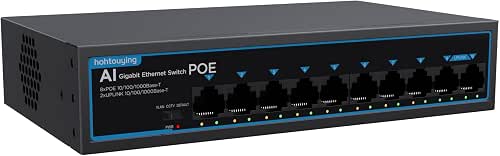
| Best Value | Total PoE Power Budget: 120W | Number of PoE Ports: 8 PoE ports | Maximum Power Per Port: 30W | VIEW LATEST PRICE | Read Our Analysis |
| NETGEAR 8-Port PoE+ Gigabit Ethernet Switch (GS308PP) |
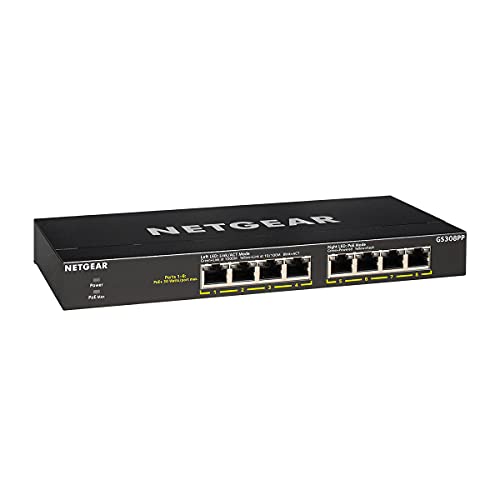
| Premium Power Budget | Total PoE Power Budget: 83W | Number of PoE Ports: 8 PoE+ ports | Maximum Power Per Port: 30W | VIEW LATEST PRICE | Read Our Analysis |
| REOLINK PoE Switch with 8 PoE Ports (RLA-PS1) |

| Best For NVR | Total PoE Power Budget: 120W | Number of PoE Ports: 8 PoE ports | Maximum Power Per Port: 30W | VIEW LATEST PRICE | Read Our Analysis |
| Goalake 8 Port Gigabit PoE Switch with Uplinks |

| Cloud Managed Pick | Total PoE Power Budget: 120W | Number of PoE Ports: 8 PoE ports | Maximum Power Per Port: 30W | VIEW LATEST PRICE | Read Our Analysis |
| TP-Link Omada 16 Port Gigabit PoE Switch (ES220GP) |

| Enterprise Solution | Total PoE Power Budget: 150W | Number of PoE Ports: 16 PoE+ ports | Maximum Power Per Port: 30W | VIEW LATEST PRICE | Read Our Analysis |
More Details on Our Top Picks
TP-Link TL-SG1005P 5 Port Gigabit PoE Switch
The TP-Link TL-SG1005P is a compact starter switch designed for small offices and home networks requiring Power over Ethernet. It features four PoE+ ports delivering up to 30W each with a 65W total budget, plus one standard Gigabit port. The fanless metal case operates quietly without maintenance. Setup requires plugging in the 48V power adapter and connecting devices to appropriate ports—use PoE ports for powered equipment like cameras or access points, and the standard port for computers needing maximum speed. This unmanaged switch includes QoS, IGMP snooping, and flow control for basic network optimization. A three-year warranty covers defects.
- Total PoE Power Budget:65W
- Number of PoE Ports:4 PoE+ ports
- Maximum Power Per Port:30W
- Management Type:Unmanaged
- Extended Range PoE Mode:Not specified
- Warranty Period:3 years
- Additional Feature:4 PoE+ ports configuration
- Additional Feature:Sturdy metal case shielded
- Additional Feature:Fanless quiet operation
TP-Link LS108GP 8 Port PoE Gigabit Switch
For surveillance camera deployments spanning large areas, TP-Link’s LS108GP delivers eight PoE+ ports with a 65W total power budget and Extend Mode capability that pushes PoE transmission to 820 feet. Each port supports up to 30W, accommodating power-hungry cameras and devices. The fanless design operates silently, making it suitable for noise-sensitive locations. Setup requires no configuration—simply connect devices and power it on. The durable metal casing supports both desktop and wall mounting. When devices drop offline, PoE Auto Recovery automatically reboots them, restoring connectivity without manual intervention. With 16 Gbps switching capacity, this switch handles multiple simultaneous data streams efficiently.
- Total PoE Power Budget:65W
- Number of PoE Ports:8 PoE+ ports
- Maximum Power Per Port:30W
- Management Type:Unmanaged (Plug and Play)
- Extended Range PoE Mode:Up to 820 ft
- Warranty Period:Not specified
- Additional Feature:PoE Auto Recovery feature
- Additional Feature:820 ft extend mode
- Additional Feature:Silent fanless design
NETGEAR 8 Port PoE Gigabit Smart Switch (GS308EP)
NETGEAR’s 8-port model uses easy smart managed essentials software to simplify network setup. You’ll get eight PoE+ ports with a 62W total budget, allowing you to power devices like IP cameras, VoIP phones, and wireless access points simultaneously. The switch features a 16 Gbps data transfer rate and supports both basic and advanced network management capabilities. Its compact desktop or wall-mount design fits various spaces, measuring 10.2 by 10.2 by 2.2 inches. The included 2V, 0.5A power adapter gets you started immediately. NETGEAR backs this switch with a 3-year limited hardware warranty, providing reliable protection for your investment.
- Total PoE Power Budget:62W
- Number of PoE Ports:8 PoE+ ports
- Maximum Power Per Port:30W
- Management Type:Easy Smart Managed Essentials
- Extended Range PoE Mode:Not specified
- Warranty Period:3 years
- Additional Feature:Easy Smart Managed software
- Additional Feature:Desktop wall-mount capable
- Additional Feature:Basic advanced management features
UGREEN 10-Port PoE Network Switch with Gigabit Uplink
UGREEN’s 10-port switch is most versatile for anyone deploying security cameras, access points, or IP phones across standard and extended distances. You’ll get 8 PoE+ ports delivering up to 30W each with a 60W total power budget. The switch automatically detects PoE devices, supplies power, and transmits data to non-PoE devices simultaneously. You can switch between three modes: Standard for basic networking, Port Isolation to prevent network storms, and Extend Mode for PoE coverage up to 820 feet. If power demand exceeds 60W, ports shut down in priority order to prevent overload. Short-circuited ports disconnect independently for protection.
- Total PoE Power Budget:60W
- Number of PoE Ports:8 PoE+ ports
- Maximum Power Per Port:30W
- Management Type:Unmanaged
- Extended Range PoE Mode:Up to 820 ft (Extend Mode)
- Warranty Period:Not specified
- Additional Feature:Intelligent Power Management shutdown
- Additional Feature:Three operation modes available
- Additional Feature:Port Isolation VLAN support
TP-Link TL-SG1428PE 24 Port Gigabit PoE+ Switch
The TP-Link TL-SG1428PE delivers professional-grade network infrastructure for organizations deploying multiple powered devices. You’ll access 24 PoE+ ports delivering up to 30W per port, with a combined 250W power budget for simultaneous device operation. The switch includes two SFP slots for high-speed uplink connections and two standard Gigabit ports. You manage the device through a web-based interface requiring no software installation. Configure VLANs to segment your network and improve security. Enable PoE Auto Recovery to automatically detect and reboot unresponsive devices. This Easy Smart Managed switch provides QoS and LAG support for optimized performance across your infrastructure.
- Total PoE Power Budget:250W
- Number of PoE Ports:24 PoE+ ports
- Maximum Power Per Port:30W
- Management Type:Easy Smart Managed
- Extended Range PoE Mode:Not specified
- Warranty Period:3 years
- Additional Feature:2 SFP slots included
- Additional Feature:24 PoE+ ports capacity
- Additional Feature:Web-based easy smart management
8 Port Gigabit PoE Switch with Uplink
Are you managing an IP camera system or NVR setup that demands reliable power and data transmission across multiple devices? This 8-port gigabit PoE switch delivers 120W total power budget—up to 30W per port—supporting your PoE cameras directly. The two gigabit uplink ports connect to your NVR or router. Use CCTV mode for extended transmission distances up to 820 feet, or activate VLAN mode to isolate ports while maintaining uplink communication. The fanless aluminum chassis operates silently at temperatures up to 55°C. Port protection reaches 4kV against lightning damage. Simply plug in your PoE devices, connect uplinks, and activate power—the switch handles everything automatically without configuration required.
- Total PoE Power Budget:120W
- Number of PoE Ports:8 PoE ports
- Maximum Power Per Port:30W
- Management Type:Unmanaged
- Extended Range PoE Mode:Up to 820 ft (CCTV Mode)
- Warranty Period:1 year
- Additional Feature:4 kV port protection
- Additional Feature:820 ft CCTV transmission
- Additional Feature:Built-in power supply included
NETGEAR 8-Port PoE+ Gigabit Ethernet Switch (GS308PP)
NETGEAR’s GS308PP delivers premium power budget with an 83W total PoE allocation across all eight ports. Each Gigabit Ethernet port supports up to 1000 Mbps data transfer, making it suitable for powering IP cameras, access points, and VoIP phones simultaneously. The unmanaged design requires zero configuration—simply connect your devices and the switch operates immediately. Its compact metal housing measures 9.3 by 4 inches, fitting easily on desktops or wall mounts. The included power adapter and installation guide enable quick deployment. Built-in FlexPoE technology optimizes power distribution dynamically. NETGEAR backs this switch with a three-year hardware warranty, ensuring long-term reliability for your network infrastructure.
- Total PoE Power Budget:83W
- Number of PoE Ports:8 PoE+ ports
- Maximum Power Per Port:30W
- Management Type:Unmanaged Essentials
- Extended Range PoE Mode:Not specified
- Warranty Period:3 years
- Additional Feature:FlexPoE integrated technology
- Additional Feature:Interchangeable external power adapter
- Additional Feature:Metal case construction
REOLINK PoE Switch with 8 PoE Ports (RLA-PS1)
If you’re setting up a surveillance system around an NVR, REOLINK’s RLA-PS1 delivers centralized power and networking in one compact unit. You get eight PoE ports for cameras and two Gigabit uplink ports for your network backbone. The switch automatically detects PoE-compatible devices and distributes up to 120W of power across connected equipment. Connect your NVR directly for security, or link cameras through the same LAN as your router for expanded features. Installation requires minimal effort—plug in the 120W adapter and connect devices. The metal casing supports wall mounting or desktop placement, making it adaptable to various installation environments.
- Total PoE Power Budget:120W
- Number of PoE Ports:8 PoE ports
- Maximum Power Per Port:30W
- Management Type:Plug and Play (Auto-detect)
- Extended Range PoE Mode:Not specified
- Warranty Period:Standard (30-day return guarantee)
- Additional Feature:Auto-detection prevents device damage
- Additional Feature:120W built-in power adapter
- Additional Feature:REOLINK NVR compatibility optimized
Goalake 8 Port Gigabit PoE Switch with Uplinks
The Goalake 8 Port Gigabit PoE Switch delivers a cloud-managed solution for small businesses and home security setups. This 10-port device includes eight PoE ports and two dedicated Gigabit uplinks, providing 120W total PoE budget with up to 30W per port. Each port automatically detects compatible devices and supplies power only when needed. The switch isolates network traffic using VLANs, separating guest Wi-Fi from main operations. Advanced features include QoS prioritization, port mirroring, and storm control. Setup requires minimal configuration through the user-friendly app or web interface. The metal housing includes industrial-grade power supply and lightning protection, ensuring reliable operation for cameras, access points, and printers.
- Total PoE Power Budget:120W
- Number of PoE Ports:8 PoE ports
- Maximum Power Per Port:30W
- Management Type:Cloud Managed
- Extended Range PoE Mode:Up to 250 meters (820 ft)
- Warranty Period:1 year
- Additional Feature:Cloud managed via app
- Additional Feature:250 meter ultra-long-range
- Additional Feature:Enhanced safety short-circuit protection
TP-Link Omada 16 Port Gigabit PoE Switch (ES220GP)
TP-Link’s Omada ES220GP delivers an enterprise solution for organizations that need reliable surveillance and small business networking without complexity. You’ll get 16 PoE+ ports delivering up to 30W each, with 150W total budget for simultaneous camera connections. Two Gigabit SFP slots enable fiber uplinks for extended reach. The fanless metal design runs silently in office environments while supporting rack mounting. You’ll manage everything through Omada’s cloud-based SDN platform via web or mobile app, enabling remote camera reboots and traffic prioritization. PoE extends to 250m, ideal for distributed surveillance setups. Layer 2 features include VLAN support and automatic loop prevention for network stability.
- Total PoE Power Budget:150W
- Number of PoE Ports:16 PoE+ ports
- Maximum Power Per Port:30W
- Management Type:Omada SDN Managed
- Extended Range PoE Mode:Up to 250 meters
- Warranty Period:5 years
- Additional Feature:Centralized Omada SDN management
- Additional Feature:250m surveillance distance capability
- Additional Feature:Rack-mountable metal enclosure design
Factors to Consider When Choosing PoE Gigabit Switches

When you select a PoE gigabit switch, you’ll need to evaluate your port count requirements based on how many devices you’re connecting, calculate your power budget allocation to ensure the switch can deliver sufficient wattage to all ports simultaneously, and assess the management capabilities you need such as VLAN support or remote monitoring. You should also determine your deployment distance range—standard PoE operates effectively up to 100 meters, while PoE+ extends this capability—and verify that the switch meets your protection and reliability standards through features like redundant power supplies, surge protection, and operating temperature ranges. These five factors work together to guide you toward a switch that matches your network’s current demands and accommodates future expansion.
Port Count Requirements
How many PoE devices do you need to connect? Start by counting your cameras, access points, and other powered devices. An 8-port switch handles 6–8 PoE devices in small setups, making it suitable for basic surveillance or office networks. For larger deployments, choose a 16- or 24-port model to accommodate multiple cameras and access points simultaneously. Remember that you’ll typically need one non-PoE port for uplink or management, so subtract that from your total port count. Next, verify the switch’s total PoE power budget matches your devices’ requirements. Small switches offer 60–95W, while larger models provide 150–250W. Match your port count to your device inventory plus future expansion plans. This prevents under-provisioning and ensures reliable operation across your network infrastructure.
Power Budget Allocation
Every PoE switch has a total power budget—the maximum wattage it can distribute across all PoE ports simultaneously—and you’ll need to match this budget to your devices’ combined power demands. Calculate your total power requirement by adding the wattage of every device you plan to connect. For example, if you’re powering five cameras at 15W each, you need at least 75W total. Common budgets range from 65W to 250W. Also consider individual port limits: most PoE+ ports supply up to 30W per device. This affects how many high-wattage devices you can run at once. Choose a switch with sufficient total budget and per-port capacity for your current setup plus future expansion, preventing bottlenecks and ensuring all devices receive adequate power.
Management Capabilities
Beyond ensuring your switch has enough power budget, you’ll want to contemplate how you’ll practically control and monitor that power distribution across your network. Managed switches give you centralized control through web-based interfaces or cloud ecosystems like Omada, letting you configure VLANs, QoS, and port isolation directly. Easy Smart models simplify this process with straightforward dashboards for monitoring and remote reboots. Consider switches with auto recovery and PoE watchdog features—these automatically reboot unresponsive devices, reducing downtime without manual intervention. Per-port PoE budgets let you allocate power strategically across devices. Layer 2 features like IGMP Snooping optimize video surveillance performance. Optional SFP uplinks support fiber connections for scalability. Choose management capabilities matching your network size and technical expertise to ensure reliable, efficient device control and monitoring.
Deployment Distance Range
What’s the farthest distance you can run PoE to your network devices? Standard Ethernet limits PoE transmission to 100 meters, but extended modes push this to 820 feet (250 meters) on compatible switches. You’ll want to verify the maximum supported PoE distance per port before purchasing, since limitations vary by model and mode.
For surveillance camera deployments, select switches advertising long-range PoE or CCTV modes specifically. These maintain power and data transmission over extended distances to IP cameras and NVRs. Check your switch’s uplink configuration too—additional Gigabit uplinks provide higher-bandwidth paths from extended PoE devices to your core network, ensuring reliable performance.
Document each port’s maximum distance capability to prevent power delivery failures during installation.
Protection And Reliability
Once you’ve mapped your deployment distances and confirmed port capabilities, you’ll need to evaluate the built-in protections that keep your PoE network running smoothly. Look for switches offering short-circuit protection, overcurrent/overvoltage safeguards, and 4 kV port protection against electrical faults. Check whether the model includes thunder protection for the power supply to maintain uptime during disturbances. Review the power budget—typically 60W to 250W total—to understand how many devices you can power simultaneously without triggering overload protection. Consider auto recovery capabilities that automatically reboot unresponsive PoE devices, restoring operation without manual intervention. These protection layers work together to prevent downtime and equipment damage, making them essential criteria when selecting your switch.
Physical Form Factor
The physical design of your PoE Gigabit switch determines where and how you’ll install it, so you’ll need to evaluate your space constraints and deployment environment before making a selection. Desktop units occupy compact spaces—typically a few inches per dimension—and support plug-and-play setup in offices or homes. Rack-mountable switches fit into data closets and equipment racks with larger footprints suited for organized installations. Consider your enclosure type: metal housings provide maximum durability for demanding environments, while plastic options offer lighter-weight placement flexibility. Fanless models operate silently, making them ideal for occupied spaces. Evaluate power delivery methods as well. Some switches include integrated power supplies within the chassis, whereas others use external adapters or detachable options, affecting your cable management and space requirements.
Warranty And Support
Beyond selecting the right physical design, you’ll want to examine warranty coverage and manufacturer support options, as these protections directly affect your long-term costs and downtime risk. Most PoE gigabit switches offer 3-year warranties as standard, though some extend to 5 years with advanced management features. Check whether your vendor provides free technical support during business hours—typically 6am–6pm PST weekdays—since this directly impacts resolution speed. Review replacement or return policies, which usually align with platform guidelines like 30-day windows. When filing warranty claims, gather your proof of purchase and verify the switch meets usage guidelines. Understanding these details upfront prevents costly surprises and ensures you’ve got reliable backup support when network issues arise.
Final Thoughts
You’ll choose the right PoE gigabit switch by matching your port needs, power budget, and management features. Start by counting how many devices you’re powering. Next, decide between fanless desktop models for quiet offices or managed switches for advanced control. Finally, verify warranty coverage and uplink options. TP-Link, NETGEAR, and UGREEN models deliver reliable performance across different budgets and deployments.

Meet Ry, “TechGuru,” a 36-year-old technology enthusiast with a deep passion for tech innovations. With extensive experience, he specializes in gaming hardware and software, and has expertise in gadgets, custom PCs, and audio.
Besides writing about tech and reviewing new products, he enjoys traveling, hiking, and photography. Committed to keeping up with the latest industry trends, he aims to guide readers in making informed tech decisions.