


When you’re selecting a robotic arm for your educational program, you’ll need to evaluate several key factors: the arm’s degrees of freedom (DOF), programming language compatibility, price point, and skill level requirements. You can choose from Arduino-based systems like the LewanSoul 6DOF, AI-powered options such as the Hiwonder SO-ARM101, or drag-and-teach models from Elephant Robotics. Each option offers distinct advantages depending on your specific learning goals—but which one truly fits your needs?
| LewanSoul 6DOF Robotic Arm Arduino STEM Educational Kit |
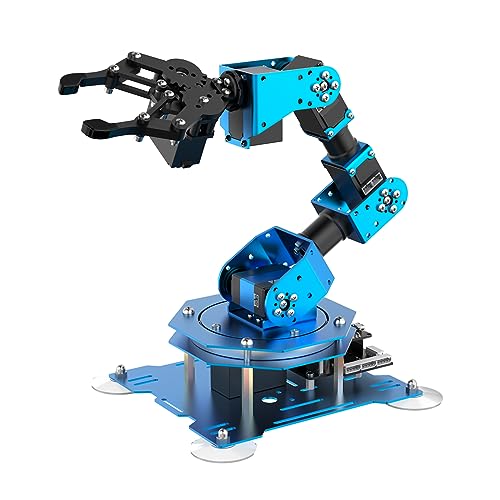
| Best For Beginners | Degrees of Freedom: 6-axis | Programming Language Support: Arduino coding | Control Methods: PC, app, wireless controller, mouse | VIEW LATEST PRICE | Read Our Analysis |
| AI Robotic Arm Kit Hiwonder SO-ARM101 6-Axis |

| Most Advanced | Degrees of Freedom: 6-axis | Programming Language Support: Open-source framework (LeRobot) | Control Methods: PC software, professional debugging board | VIEW LATEST PRICE | Read Our Analysis |
| ELEPHANT ROBOTICS myCobot 280 6 Axis Robotic Arm |

| Best Portable Option | Degrees of Freedom: 6-axis | Programming Language Support: Arduino, myBlockly, Python, ROS | Control Methods: myBlockly visual programming, Arduino | VIEW LATEST PRICE | Read Our Analysis |
| HIWONDER ROS2 Robot Car with 6DOF Robotic Arm AI |

| Best AI Integration | Degrees of Freedom: 6-axis | Programming Language Support: Python, ROS2 | Control Methods: ROS2, Python, AI voice interaction | VIEW LATEST PRICE | Read Our Analysis |
| Thames & Kosmos Bionic Robotic Arm STEM Kit |

| Best Non-Electric | Degrees of Freedom: Mechanical (non-motorized) | Programming Language Support: No programming required | Control Methods: Joystick mechanical control | VIEW LATEST PRICE | Read Our Analysis |
| LewanSoul MaxArm Robotic Arm Kit for Arduino Programming |

| Most Versatile | Degrees of Freedom: 6-axis | Programming Language Support: Python, Arduino | Control Methods: App, PC, wireless controller, mouse | VIEW LATEST PRICE | Read Our Analysis |
| Robot Arm STEM Building Kit for Kids |

| Best Budget Pick | Degrees of Freedom: 6-axis | Programming Language Support: No programming required | Control Methods: Wooden joystick assembly (no electronics) | VIEW LATEST PRICE | Read Our Analysis |
| Waveshare Robotic Arm Kit 5+1 DOF ESP32 |

| Best For Researchers | Degrees of Freedom: 5+1 DOF | Programming Language Support: ROS2, web application | Control Methods: Wireless/wired, web app, coordinate control | VIEW LATEST PRICE | Read Our Analysis |
| Robotic Arm Kit 6DOF Programming Robot with Servos |
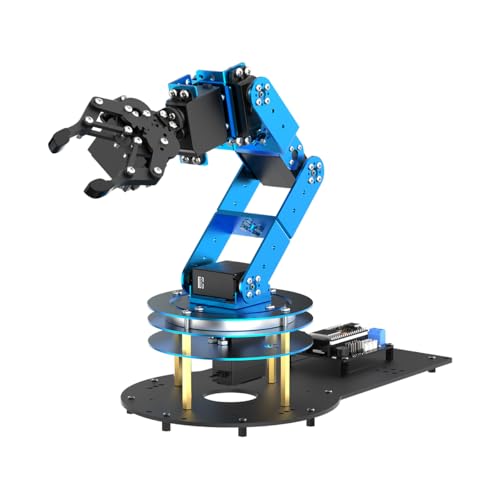
| Best Open-Source | Degrees of Freedom: 6-axis | Programming Language Support: Arduino, Python, open-source | Control Methods: App, PC software, wireless controller | VIEW LATEST PRICE | Read Our Analysis |
| ACEBOTT 5DOF Smart Robot Arm Car Kit Arduino |

| Best All-in-One | Degrees of Freedom: 5-axis | Programming Language Support: Arduino, Python, Blockly | Control Methods: Infrared remote, app, autonomous modes | VIEW LATEST PRICE | Read Our Analysis |
More Details on Our Top Picks
LewanSoul 6DOF Robotic Arm Arduino STEM Educational Kit
The LewanSoul 6DOF Robotic Arm works well for beginners because it arrives fully assembled and ready to use right out of the box. You’ll control it through multiple methods: a PC, smartphone app, mouse, or PS2 wireless controller. The arm features six high-precision servos with position feedback and can grasp objects weighing up to 500 grams. Its aluminum frame and industrial-grade bearings provide stability during tabletop operation. You can create custom actions and programs using graphical programming tools on your PC or app. The arm’s full metal construction supports repetitive use for coding practice and project demonstrations in STEM learning environments.
- Degrees of Freedom:6-axis
- Programming Language Support:Arduino coding
- Control Methods:PC, app, wireless controller, mouse
- Payload Capacity:500g
- Target Age Range:Educational STEM audience
- Assembly Required:Pre-assembled
- Additional Feature:500g grasping capability
- Additional Feature:Multiple control interfaces
- Additional Feature:Graphical programming support
AI Robotic Arm Kit Hiwonder SO-ARM101 6-Axis
Want your students to learn AI through hands-on robotics? The Hiwonder SO-ARM101 6-Axis kit combines imitation learning with practical engineering. You’ll get twelve high-torque servo motors, dual cameras for vision recognition, and the BusLinker V3.0 debugging board for real-time monitoring. Students can calibrate the arm using professional PC software, then test trajectories and servo responses. The kit’s compatibility with LeRobot’s open-source framework gives you access to pre-trained models and shared code templates. This setup lets students explore end-to-end learning by programming the arm to imitate demonstrated movements, building both robotics and AI competency simultaneously.
- Degrees of Freedom:6-axis
- Programming Language Support:Open-source framework (LeRobot)
- Control Methods:PC software, professional debugging board
- Payload Capacity:Heavy-duty payload (12 servos)
- Target Age Range:Researchers, developers, hobbyists
- Assembly Required:Pre-assembled (with 3D printed parts)
- Additional Feature:Dual-camera vision system
- Additional Feature:Embodied imitation learning
- Additional Feature:LeRobot open-source compatibility
ELEPHANT ROBOTICS myCobot 280 6 Axis Robotic Arm
Looking for a portable robotic arm you can move between classrooms or labs? The myCobot 280 weighs only 800 grams and handles a 250-gram payload with ±0.5 mm precision. Six servo motors deliver smooth, fast movements. You’ll use myBlockly visual programming or Python code to control it. The drag-and-teach feature lets you record up to 60 minutes of movement paths by hand, then replay them automatically. Dual built-in displays support fastLED effects for interactive demonstrations. Compatible with Arduino and ROS systems, it integrates easily with M5Stack embedded hardware. Note: this arm requires basic programming knowledge and isn’t suitable for young children. Read instructions thoroughly before operating.
- Degrees of Freedom:6-axis
- Programming Language Support:Arduino, myBlockly, Python, ROS
- Control Methods:myBlockly visual programming, Arduino
- Payload Capacity:250g
- Target Age Range:Basic programming knowledge, NOT for children
- Assembly Required:Pre-assembled
- Additional Feature:Drag-and-teach functionality
- Additional Feature:±0.5mm repeatability precision
- Additional Feature:Dual built-in displays
HIWONDER ROS2 Robot Car with 6DOF Robotic Arm AI
How do you build autonomous systems that think and act independently? The HIWONDER ROS2 Robot Car with 6DOF Robotic Arm AI combines a Raspberry Pi 5 platform with integrated perception tools: TOF lidar, 3D depth camera, and vision recognition. You’ll program in Python while developing SLAM mapping, path planning, and autonomous driving capabilities. The system includes YOLOv8 model training for recognizing road signs and traffic lights. You gain hands-on experience with multimodal AI models featuring ChatGPT integration for natural human-robot interaction. This platform supports embodied AI applications where your robot perceives environments, reasons about obstacles, and executes complex tasks using its 6DOF arm with DC geared encoder motors.
- Degrees of Freedom:6-axis
- Programming Language Support:Python, ROS2
- Control Methods:ROS2, Python, AI voice interaction
- Payload Capacity:Not specified
- Target Age Range:AI robot development, advanced users
- Assembly Required:Pre-assembled
- Additional Feature:SLAM mapping capability
- Additional Feature:YOLOv8 model training
- Additional Feature:ChatGPT core integration
Thames & Kosmos Bionic Robotic Arm STEM Kit
The Thames & Kosmos Bionic Robotic Arm STEM Kit operates without motors or electricity, making it an excellent non-electric option for students who want hands-on robotics experience. You’ll assemble nearly 300 pieces into a fully functional robotic arm controlled by a pair of joysticks. The joysticks pull and release nylon cables to move the arm with precision, while buttons control the claw, rotation, and other movements. The included manual provides step-by-step assembly guidance and explains real-world robotics, biomimicry, and mechanical engineering principles. Recommended for ages 10 and up with adult assistance or ages 14 and up for independent building. You can challenge yourself to grab and manipulate objects using the claw attachment.
- Degrees of Freedom:Mechanical (non-motorized)
- Programming Language Support:No programming required
- Control Methods:Joystick mechanical control
- Payload Capacity:Limited (mechanical only)
- Target Age Range:Ages 10+ (with help), 14+ (independent)
- Assembly Required:Assembly required (300 pieces, no motors)
- Additional Feature:No motors/electricity required
- Additional Feature:Nylon cable-driven control
- Additional Feature:300-piece assembly challenge
LewanSoul MaxArm Robotic Arm Kit for Arduino Programming
Want a robotic arm that’s most versatile for both beginners and intermediate learners? The LewanSoul MaxArm Kit delivers precisely that capability. You’ll program it using Python or Arduino, selecting from app-based, PC, wireless controller, or mouse control options. Its ESP32 core board enables WiFi and Bluetooth connectivity for wireless operation. The inverse kinematics link mechanism lets you maneuver the end effector along x, y, and z axes with trajectory planning accuracy. High-precision smart bus servos handle substantial payloads reliably. You can expand functionality by connecting various sensors through reserved ports, enabling AI-driven applications through code customization and multiple expansion interfaces.
- Degrees of Freedom:6-axis
- Programming Language Support:Python, Arduino
- Control Methods:App, PC, wireless controller, mouse
- Payload Capacity:Heavy payloads (high-precision servos)
- Target Age Range:STEM education, starter-level learners
- Assembly Required:Assembly required
- Additional Feature:Inverse kinematics algorithm
- Additional Feature:WiFi/Bluetooth wireless transmission
- Additional Feature:Sensor expansion ports
Robot Arm STEM Building Kit for Kids
Robot Arm STEM Building Kits for kids offer an affordable entry point into robotics and engineering education. You’ll assemble wooden pieces and electronic components without soldering, making the kit accessible for ages 8 and up. The kit includes motors, microcontroller boards, and wires; you’ll need to supply six AA batteries. Through assembly, you’ll learn how circuits control mechanical movement and understand basic physics principles. The challenging build promotes problem-solving and patience while developing engineering skills. You can complete this project independently or with family members, making it suitable for home learning, classrooms, or summer camps.
- Degrees of Freedom:6-axis
- Programming Language Support:No programming required
- Control Methods:Wooden joystick assembly (no electronics)
- Payload Capacity:Not specified
- Target Age Range:Ages 8-16+
- Assembly Required:Assembly required (wooden pieces)
- Additional Feature:Wooden puzzle assembly
- Additional Feature:Non-soldering design
- Additional Feature:6 AA battery operation
Waveshare Robotic Arm Kit 5+1 DOF ESP32
Waveshare’s RoArm-M3 series delivers a 5+1 DOF robotic arm that researchers find especially valuable for deep learning and imitation learning projects. The arm features direct-drive joints that improve accuracy and reliability while maintaining stable shoulder torque. You’ll control it via wireless or wired communication using a web application or coordinate-based mode. The ESP32 MCU powers the system, and ROS2 compatibility enables cross-platform integration. You can expand functionality with custom end-effectors and access extensive Wiki resources for setup guidance. Its 360° omnidirectional movement and 2-DOF wrist joint support diverse research applications.
- Degrees of Freedom:5+1 DOF
- Programming Language Support:ROS2, web application
- Control Methods:Wireless/wired, web app, coordinate control
- Payload Capacity:Not specified
- Target Age Range:ROS2 learners, researchers
- Assembly Required:Flexible installation required
- Additional Feature:360° omnidirectional movement
- Additional Feature:Direct-drive joint design
- Additional Feature:ROS2 compatible system
Robotic Arm Kit 6DOF Programming Robot with Servos
Looking for a foundation to learn robotics fundamentals? The 6DOF Programming Robot gives you six servo motors controlled by an ESP32 microcontroller compatible with Arduino. You’ll program movements using inverse kinematics for precise path planning. Start with the 200+ tutorials and sample experiments included with open-source code. Control the arm through an app, PC software, or wireless controller—no prior experience required. Expand capabilities by adding AI vision, voice modules, ultrasonic sensors, or acceleration sensors. You’ll tackle color recognition, target tracking, and face detection. Use circuit schematics and extensive programs to understand each component, then build complex tasks and complete projects that develop both technical skills and creative problem-solving abilities.
- Degrees of Freedom:6-axis
- Programming Language Support:Arduino, Python, open-source
- Control Methods:App, PC software, wireless controller
- Payload Capacity:Not specified
- Target Age Range:Students, engineers, robot enthusiasts
- Assembly Required:Assembly required
- Additional Feature:200+ tutorials included
- Additional Feature:Voice control capability
- Additional Feature:Face detection support
ACEBOTT 5DOF Smart Robot Arm Car Kit Arduino
The ACEBOTT kit combines robotics and programming into one complete package. You’ll build a 5DOF robotic arm mounted on a mobile base with Mecanum wheels, then control it using Arduino, Python, or Blockly. The arm features five metal gear servos enabling precise grasping and placement tasks. You can program autonomous navigation with obstacle avoidance or operate the arm remotely via infrared or mobile app. The ESP32 controller provides expansion capabilities for custom projects. Assembly requires following the included paper manual step-by-step. This kit suits teenagers twelve and older who want hands-on experience integrating mechanical design, sensor technology, and coding into functional robotics.
- Degrees of Freedom:5-axis
- Programming Language Support:Arduino, Python, Blockly
- Control Methods:Infrared remote, app, autonomous modes
- Payload Capacity:Not specified
- Target Age Range:Ages 12+, STEM beginners to teens/adults
- Assembly Required:Assembly required (from scratch)
- Additional Feature:Mecanum wheel mobility
- Additional Feature:Obstacle avoidance system
- Additional Feature:Follow-mode tracking feature
Factors to Consider When Choosing a Robotic Arm for Education

When selecting a robotic arm for education, you’ll want to evaluate several key factors that match your specific needs and learning goals. Start by assessing the learner’s age and skill level, then examine the programming language support (like Python or C++), control method options (touchscreen, remote, or coding), build complexity requirements, and sensor expansion capabilities that’ll let you add cameras, distance sensors, or pressure sensors as skills advance. Each of these considerations directly impacts whether the robotic arm’ll serve your educational purposes effectively, so you should compare them across different models before making your final choice.
Age And Skill Level
How do you know which robotic arm kit matches your learner’s abilities? Start by checking the manufacturer’s age recommendation against your learner’s cognitive and motor skills. For ages 8–16+, select kits offering guided, step-by-step instructions with minimal coding knowledge required. For learners 14+, consider kits featuring open-source software and programmable APIs supporting languages beyond block-based coding. Evaluate the construction approach—simpler designs work for beginners, while complex builds suit advanced hobbyists. Confirm the kit uses durable, child-safe materials appropriate to the learner’s level. Review whether learning materials include progressive challenges or tutorials that scale with growing skill, allowing continued development without replacement. This structured approach ensures you select a kit supporting both current abilities and future growth.
Programming Language Support
Once you’ve matched a robotic arm kit to your learner’s age and skill level, you’ll need to evaluate its programming language support—the tools that truly control the arm’s movements and functions. Check whether the arm supports Python and Arduino, the most common entry points for STEM learners. Look for block-based or graphical programming options like Blockly to help beginners transition into coding smoothly. Verify that the platform provides open-source code and tutorials in your chosen language to accelerate the learning process. Ensure the arm allows easy porting between Python, Arduino IDE, and other environments so projects aren’t locked into one system. Finally, confirm whether the control interface—whether it’s a PC app, microcontroller sketches, or cloud IDE—aligns with your preferred programming workflow and your learner’s experience level.
Control Method Options
What control method’ll work best for your learning environment? You can choose from several options depending on your needs. PC software provides comprehensive control for desktop setups. Smartphone apps offer portability for classroom demonstrations. Wireless controllers give students hands-on manipulation experience. Browser-based interfaces eliminate software installation requirements, making setup faster. Direct manual control allows beginners to understand basic mechanics before programming.
Consider your connectivity options next. USB connections work reliably for stationary setups. Bluetooth enables wireless pairing within limited range. Wi-Fi supports longer distances and multi-device access across your classroom.
Evaluate programming support alongside control methods. Block-based systems like Blockly suit beginners. Python and Arduino code serve advanced learners. Open-source frameworks such as LeRobot and ROS expand possibilities through community resources and templates, letting you customize control approaches based on skill levels.
Build Complexity Requirements
When you’re selecting a robotic arm for your classroom, you’ll need to match the build complexity to your students’ mechanical skills and prior experience. Pre-assembled kits work best for beginners since they require minimal setup and calibration. Modular kits demand more independence as students assemble and align components themselves. Consider the arm’s degrees of freedom—simpler models have fewer moving joints, while advanced arms use inverse kinematics for precise movements. Drag-and-teach features let students record and replay movements without programming. Check material choices too: wood construction simplifies assembly, while aluminum requires careful alignment. Verify that tutorials, sample projects, and open-source code are available before purchasing. These resources directly reduce your students’ learning curve and increase their success with assembly and programming tasks.
Sensor Expansion Capabilities
How do you plan to grow your robotic arm’s capabilities beyond its standard features? Check if your arm has open ports or dedicated expansion interfaces for adding modules like vision, ultrasonic, or infrared sensors. These connections let you attach third-party sensors without redesigning the hardware. Next, verify that your arm includes built-in feedback systems for position, voltage, and temperature monitoring. This feedback helps you calibrate new sensors accurately and operate safely. Finally, confirm compatibility with open-source frameworks and debugging tools. This compatibility makes it easier to integrate sensors, share data, and troubleshoot during lab projects. A robotic arm with strong sensor expansion capabilities supports diverse experiments in imitation learning and object recognition, directly expanding your educational opportunities.
Final Thoughts
You’ve reviewed ten robotic arm options with varying degrees of complexity and programming capabilities. Select one based on your skill level, budget, and learning goals. Beginners should start with drag-and-teach systems or visual programming interfaces. Advanced learners can tackle ROS2 platforms or Arduino-based kits requiring manual coding. Evaluate your school’s existing equipment and software compatibility before purchasing to ensure seamless integration into your curriculum.

Meet Ry, “TechGuru,” a 36-year-old technology enthusiast with a deep passion for tech innovations. With extensive experience, he specializes in gaming hardware and software, and has expertise in gadgets, custom PCs, and audio.
Besides writing about tech and reviewing new products, he enjoys traveling, hiking, and photography. Committed to keeping up with the latest industry trends, he aims to guide readers in making informed tech decisions.