


You’ll find that selecting the right small phone printer depends on matching your specific needs to key features: connectivity type (Wi-Fi or Bluetooth), print size (2×3″ or 4×6″), and photo quality technology (dye-sublimation or ZINK). Before committing to a purchase, you should evaluate paper costs, battery life, and whether you need water-resistant finishes for your photos. Each printer on this list offers distinct advantages, but understanding which factors matter most to you will determine your best choice.
| Liene M100 4×6 Photo Printer with Wi-Fi |

| Best Overall | Printing Technology: Thermal-dye sublimation | Print Size: 4×6 inches | Connectivity: Wi-Fi hotspot | VIEW LATEST PRICE | Read Our Analysis |
| KODAK Step Instant Smartphone Photo Printer Wireless |
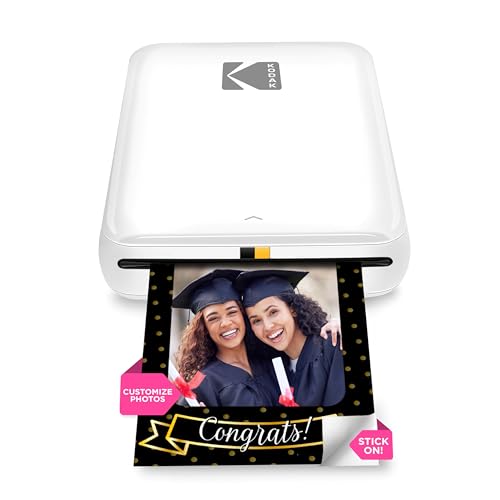
| Most Portable | Printing Technology: Zero Ink (ZINK) | Print Size: 2×3 inches | Connectivity: Bluetooth and NFC | VIEW LATEST PRICE | Read Our Analysis |
| Nelko Mini Photo Printer for iOS & Android (PP01) |

| Best High Resolution | Printing Technology: Inkjet | Print Size: 2×3 inches | Connectivity: Bluetooth | VIEW LATEST PRICE | Read Our Analysis |
| KODAK Dock Plus 4×6 Photo Printer for Smartphones |

| Best For Home | Printing Technology: 4PASS dye sublimation | Print Size: 4×6 inches | Connectivity: Bluetooth | VIEW LATEST PRICE | Read Our Analysis |
| KODAK Mini 2 Retro Portable Photo Printer |

| Retro Design Pick | Printing Technology: 4PASS dye sublimation | Print Size: 2×3 inches (credit card size) | Connectivity: Bluetooth | VIEW LATEST PRICE | Read Our Analysis |
| YOTON Portable Photo Printer with Wi-Fi Connection |

| Best Creative Features | Printing Technology: Dye-sublimation | Print Size: 4×6 inches | Connectivity: Wi-Fi and USB | VIEW LATEST PRICE | Read Our Analysis |
| HP Sprocket Portable Photo Printer (2nd Edition) |

| Most User-Friendly | Printing Technology: ZINK Zero Ink | Print Size: 2×3 inches | Connectivity: Bluetooth 5.0 | VIEW LATEST PRICE | Read Our Analysis |
| Cudinham Print Pods Mini Sticker Printer for Phone |

| Best For Notes | Printing Technology: Thermal inkless | Print Size: 2 inches wide (customizable length) | Connectivity: Bluetooth 5.0 | VIEW LATEST PRICE | Read Our Analysis |
| Cabaro Mini Thermal Printer with Bluetooth & 3 Paper Rolls |

| Best Budget Option | Printing Technology: Thermal inkless | Print Size: 2 inches wide (customizable) | Connectivity: Bluetooth 4.0 | VIEW LATEST PRICE | Read Our Analysis |
| Fujifilm Instax Mini Link 3 Smartphone Printer – Clay White |

| Premium Quality Choice | Printing Technology: Photographic film (instant) | Print Size: 2×3 inches | Connectivity: Bluetooth and USB Type-C | VIEW LATEST PRICE | Read Our Analysis |
More Details on Our Top Picks
Liene M100 4×6 Photo Printer with Wi-Fi
If you’re looking for a printer that handles smartphone photos without complications, the Liene M100 stands out as the top choice for most users. This compact 4×6 photo printer connects directly to your iPhone or Android device via Wi-Fi without requiring cables or external networks. The thermal-dye sublimation technology produces vibrant, durable photos with laminated surfaces that resist water and scratches. You’ll receive 100 sheets and three color cartridges initially, plus an extra box with 80 sheets and two additional cartridges. Download the Liene App to customize photos with filters, borders, and brightness adjustments before printing. You can also print ID and Visa photos directly from home using this straightforward setup.
- Printing Technology:Thermal-dye sublimation
- Print Size:4×6 inches
- Connectivity:Wi-Fi hotspot
- Device Compatibility:iPhone, Android, PC
- Print Speed:Not specified
- Portability:Compact, portable
- Additional Feature:Built-in Wi-Fi hotspot support
- Additional Feature:Water/scratch/fingerprint resistant
- Additional Feature:ID and Visa photo printing
KODAK Step Instant Smartphone Photo Printer Wireless
The KODAK Step’s palm-sized design makes it the most portable option for printing photos directly from your phone. Connect via Bluetooth or NFC to your iOS or Android device, then use the KODAK app to edit your photos with filters, stickers, and frames before printing. The printer uses Zero Ink technology, eliminating messy cartridges. Simply insert ZINK 2×3″ sticky-back paper and print full-color photos in under 60 seconds. Each charge produces 25 prints, and the peel-and-stick backing lets you attach photos instantly. The durable prints resist moisture and smudges, making them ideal for immediate sharing or decorating.
- Printing Technology:Zero Ink (ZINK)
- Print Size:2×3 inches
- Connectivity:Bluetooth and NFC
- Device Compatibility:iOS and Android
- Print Speed:Under 60 seconds
- Portability:Palm-sized, 0.07 kg
- Additional Feature:Zero Ink technology
- Additional Feature:Peel-and-stick photo backing
- Additional Feature:25 photos per charge
Nelko Mini Photo Printer for iOS & Android (PP01)
You’ll find that Nelko’s PP01 delivers high-resolution output at 600 DPI, capturing fine details and precise colors for anyone who wants instant photo prints from their smartphone. This portable printer weighs just 0.6 pounds and prints 2×3 photos on sticky-backed paper within 60 seconds. Download the Nelko app on iOS or Android to edit images, add frames, apply filters, and print directly. Each ink cartridge produces up to 80 full-color photos. The water-resistant, tear-resistant paper works for travel journals, scrapbooking, and party favors. Before use, fully charge the device and wipe the cartridge head vertically to prevent clogging. Insert paper with the first sheet facing down, then secure cartridges after powering on.
- Printing Technology:Inkjet
- Print Size:2×3 inches
- Connectivity:Bluetooth
- Device Compatibility:iOS and Android
- Print Speed:Under 60 seconds
- Portability:Pocket-sized, 0.6 pounds
- Additional Feature:600 DPI high-resolution prints
- Additional Feature:Up to 80 prints per cartridge
- Additional Feature:AI image editing features
KODAK Dock Plus 4×6 Photo Printer for Smartphones
Want prints from your phone without leaving home? The KODAK Dock Plus 4×6 photo printer delivers dye sublimation prints in approximately 55 seconds. Download the KODAK Photo Printer app, connect your smartphone via Bluetooth, and dock your device for charging while printing. The printer applies three color layers plus protective lamination, creating fingerprint and water-resistant photos. Set up requires powering on the device and pairing Bluetooth—no complex installation needed. Use this desktop printer for photo albums, framed pictures, or family events. The integrated docking station stabilizes your phone during the printing process, ensuring consistent connection quality and optimal results.
- Printing Technology:4PASS dye sublimation
- Print Size:4×6 inches
- Connectivity:Bluetooth
- Device Compatibility:iOS and Android
- Print Speed:Approximately 55 seconds
- Portability:Desktop docking station
- Additional Feature:Integrated docking station included
- Additional Feature:Protective lamination layer
- Additional Feature:Phone charging while docking
KODAK Mini 2 Retro Portable Photo Printer
Instant prints from your phone arrive in 55 seconds with this retro design pick, making it ideal for anyone who wants tangible photos at parties, trips, and events without carrying bulky equipment. The KODAK Mini 2 Retro uses 4PASS dye sublimation technology to produce fingerprint-, water-, and fade-resistant 2×3-inch prints. Setup takes seconds: power on the printer, enable Bluetooth on your iPhone or Android device, and connect. Use the KODAK Photo Printer App to edit and crop images before printing. The bundle includes 38 sheets of glossy photo paper and four cartridges. Print speed reaches one page per minute at 300 DPI resolution. Weighing just 200 grams, you’ll carry this printer anywhere without difficulty.
- Printing Technology:4PASS dye sublimation
- Print Size:2×3 inches (credit card size)
- Connectivity:Bluetooth
- Device Compatibility:iOS and Android
- Print Speed:Approximately 55 seconds
- Portability:Pocket-sized, 200 grams
- Additional Feature:Credit card-sized prints
- Additional Feature:38 sheets included bundle
- Additional Feature:4PASS dye sublimation technology
YOTON Portable Photo Printer with Wi-Fi Connection
The YOTON Photo Printer delivers creative features that work directly from your phone. You’ll print 4×6 inch glossy photos using dye-sublimation technology for vivid colors and durability. Connect via Wi-Fi to your iPhone, Android device, or laptop without needing internet. The compact printer weighs 1.8 pounds and fits easily in bags. You get 54 sheets of photo paper and one ink ribbon that prints 40-50 photos. Use the exclusive AR Video Printing feature to capture 15-second videos, then scan printed photos in the app to animate them. The 300 dpi resolution produces sharp images. Keep the printer sealed when unused and ensure the ink ribbon clicks into place with the yellow button before printing.
- Printing Technology:Dye-sublimation
- Print Size:4×6 inches
- Connectivity:Wi-Fi and USB
- Device Compatibility:iOS, Android, laptops
- Print Speed:Not specified
- Portability:Compact, 970g (1.8 pounds)
- Additional Feature:AR video printing capability
- Additional Feature:Built-in Wi-Fi connection
- Additional Feature:Prints up to 50 photos
HP Sprocket Portable Photo Printer (2nd Edition)
HP’s Sprocket (2nd Edition) works best for users who want the most user-friendly phone photo printer that fits in a pocket. Download the HP Sprocket app on your iOS or Android device, then connect via Bluetooth 5.0. Select photos from your camera roll or social media accounts. Customize prints by adding borders and stickers through the app. Press print to produce 2×3-inch sticky-backed photos using ZINK technology, which requires no ink cartridges. The printer includes ten starter sheets. Each print emerges smudge-proof and ready to stick anywhere. Use augmented reality features to preview your print queue before printing.
- Printing Technology:ZINK Zero Ink
- Print Size:2×3 inches
- Connectivity:Bluetooth 5.0
- Device Compatibility:Android 5+, iOS 10+
- Print Speed:Print on demand
- Portability:Pocket-sized, 6.1 ounces
- Additional Feature:Augmented reality photo viewing
- Additional Feature:Multi-device printing support
- Additional Feature:Social media printing integration
Cudinham Print Pods Mini Sticker Printer for Phone
Looking for a portable printer that handles study notes, work plans, and everyday printing? The Cudinham Print Pods Mini Sticker Printer uses thermal printing technology to produce black-and-white images on 2-inch paper. You download the Tiny Print app, connect via Bluetooth 5.0, and select your content. The app provides zoom, drag, OCR, templates, and editing tools. You load adhesive or standard thermal paper into the compartment, press print, and cut results to your desired shape. The 1200mAh battery supports extended use. Compatible with Android 4.0+ and iOS 9.0+, this printer works for photos, lists, labels, and stickers. Maintenance requires occasional alcohol wiping of the laser bar if print quality dims. Ten paper rolls come included.
- Printing Technology:Thermal inkless
- Print Size:2 inches wide (customizable length)
- Connectivity:Bluetooth 5.0
- Device Compatibility:iOS 9.0+, Android 4.0+
- Print Speed:Not specified
- Portability:Compact, lightweight mini
- Additional Feature:Thermal inkless printing technology
- Additional Feature:Customizable label sizes/shapes
- Additional Feature:10 paper rolls included
Cabaro Mini Thermal Printer with Bluetooth & 3 Paper Rolls
Want an affordable way to print photos and labels directly from your phone without ongoing ink costs? The Cabaro Mini Thermal Printer connects via Bluetooth 4.0 to Android and iOS devices. Download the Fun Print app, select your photo or text, apply fonts and filters, then tap print. The printer outputs monochrome images at 203 DPI on thermal paper rolls included with purchase. Cut printouts into custom label shapes using scissors. At 160 grams, it fits in your pocket. Charging via USB cable enables portability. No ink cartridges mean lower printing expenses. This option suits journaling, organizing notes, and creating decorative labels efficiently.
- Printing Technology:Thermal inkless
- Print Size:2 inches wide (customizable)
- Connectivity:Bluetooth 4.0
- Device Compatibility:iOS 8.0+, Android 4.0+
- Print Speed:Instant/one-click
- Portability:Cute small size, 160 grams
- Additional Feature:Thermal sticker paper included
- Additional Feature:One-click printing via app
- Additional Feature:Lifetime warranty coverage
Fujifilm Instax Mini Link 3 Smartphone Printer – Clay White
The Instax Mini Link 3 is a premium quality choice for anyone who wants instant prints directly from their phone. Connect your smartphone via Bluetooth, then use the Instax app to select and print photos. The printer produces glossy 2×3-inch prints at 1200 dpi resolution in about one minute per photo. Each print uses dedicated film cartridges that hold up to ten sheets. The device weighs just 0.1 pounds and measures 3.54 by 4.92 inches, making it highly portable. With a one-year manufacturer warranty and strong customer ratings, this printer delivers reliable performance for sharing physical copies of your digital memories instantly.
- Printing Technology:Photographic film (instant)
- Print Size:2×3 inches
- Connectivity:Bluetooth and USB Type-C
- Device Compatibility:Smartphone compatible
- Print Speed:1 page per minute
- Portability:Lightweight, 0.1 pounds
- Additional Feature:Glossy film media output
- Additional Feature:1200 x 1200 DPI resolution
- Additional Feature:USB Type-C connectivity
Factors to Consider When Choosing a Small Printer for Phone Pictures

When you’re selecting a small printer for phone pictures, you’ll need to evaluate five key factors that directly affect your printing experience: print quality and resolution, connectivity options available, paper size and format, printing speed performance, and battery life and portability. Start by checking the printer’s resolution specifications (measured in dots per inch) to ensure your photos print with sharp details, then confirm it connects to your phone via Bluetooth, Wi-Fi, or both depending on your needs. Next, verify the paper dimensions and types the printer supports, assess how quickly it produces prints, and determine whether the battery life and weight suit your lifestyle and how often you’ll use it on the go.
Print Quality And Resolution
Print quality and resolution matter most when you’re deciding which small printer fits your needs, because they directly determine how sharp and detailed your phone pictures look on paper. Higher DPI numbers deliver finer clarity—600 DPI printers like the Nelko PP01 produce sharper images than 300 DPI models on 2×3 or 4×6 formats. Dye-sublimation printers use thermal methods to create durable prints with laminated protection against water, fingerprints, and fading. Zink inkless systems print using color mosaics at roughly 313×400 DPI on sticky-back media. Note that some printers advertise 600–1200 DPI equivalents, but real output emphasizes color depth and tonal range over native resolution alone. Compare DPI specs and printing methods before purchasing.
Connectivity Options Available
Once you’ve confirmed that a printer delivers the image quality you need, you’ll want to evaluate how it connects to your phone—this determines how easily you can send photos for printing. Most small printers offer Bluetooth connectivity, which pairs directly with your device without requiring a network. Some models include Wi-Fi capabilities, allowing you to print through a built-in hotspot. NFC technology enables one-tap printing on compatible Android or iOS devices, streamlining the setup process. Certain printers feature USB connections for wired printing or charging. Check whether the printer includes a companion app that lets you monitor print status, edit images before printing, and manage settings. Verify that your phone’s operating system is compatible with the printer’s connectivity options before purchasing.
Paper Size And Format
What paper size works best for your printing needs? Start by identifying your primary use. If you want portable, sticky-back prints for immediate adhesion, choose 2×3 inch ZINK formats. These compact prints fit easily in pockets and attach directly to surfaces without tape or glue. For larger, more versatile photos, select 4×6 inch dye-sublimation papers instead. These prints require more docking space but offer better durability and lamination options. Next, check your printer’s maximum media specifications—they vary significantly across models. Finally, review sheet counts per cartridge or pack to determine how many photos you can print before reloading. Match your paper choice to your portability needs and intended use.
Printing Speed Performance
Most compact phone printers complete a single photo in roughly 55 to 60 seconds, though the exact time depends on your printer’s technology and model. Dye-sublimation systems (4PASS) typically deliver faster output with durable, laminated results. ZINK-based printers may vary slightly due to paper handling differences. Consider your workflow when evaluating speed. A docking station or direct wireless connection reduces setup time and connection overhead, improving practical performance. Remember that app-assisted editing and pre-print processing add to your total time from photo selection to finished print. Calculate your actual timeline by including these steps. If you frequently print multiple photos, faster per-image speeds compound into meaningful time savings. Match the printer’s speed to your printing frequency and usage patterns.
Battery Life And Portability
After you’ve identified a printer with adequate speed for your workflow, you’ll need to evaluate how long the device can operate away from a power outlet. Check the manufacturer’s specifications for battery capacity and stated print count per charge—this tells you how many photos you can produce before recharging. Look for models offering at least 50–100 prints per charge for reliable daily use. Next, verify the weight and dimensions. Portable printers typically range from 0.07 to 1.8 pounds; lighter models fit easily into bags or pockets. Finally, confirm wireless connectivity options like Bluetooth or Wi-Fi, which eliminate cable dependencies and enhance true portability. These factors combined determine whether you can actually print on-the-go without constant access to electricity.
Cost Per Print Efficiency
Because the total cost of ownership depends heavily on consumable expenses, you’ll want to calculate the per-print price before committing to a specific model. Start by checking the replacement paper pack cost and sheet count for each printer you’re considering. Divide the pack price by the number of sheets to determine your actual per-print expense. Dye-sublimation models typically cost more per print due to multiple color layers and laminates, while ZINK inkless systems claim lower costs since they eliminate ink cartridges. However, verify paper pricing carefully. Next, factor in print speed and capacity: faster printers with larger paper packs reduce downtime between sessions, improving your overall cost efficiency. Compare these figures across models to identify the best value for your printing volume.
App Features And Customization
What companion app features does your printer offer? Check that the app supports your phone’s operating system—either iOS or Android—and enables direct printing through Bluetooth or Wi‑Fi connections. Examine the editing tools available: filters, borders, text overlays, stickers, frames, and collage options let you enhance photos before printing. Look for real-time print status displays that show progress and alert you to errors immediately. Verify special formatting capabilities, including border adjustments, brightness and contrast controls, and AI-powered edits. Confirm you can export or save edited images for later printing. Consider whether the app offers augmented reality viewing, social media integration, and options to share printed images directly from the application. These features streamline your workflow and expand your creative possibilities.
Durability Of Final Prints
Print longevity depends primarily on the printing technology your small printer uses, and you’ll want to understand how each method protects your images from fading, water damage, and physical wear. Dye sublimation printers with thermal-dye or 4PASS technology offer laminated surfaces that resist water and fingerprints, extending color life significantly. ZINK technology embeds protective coatings into paper, making prints moisture- and tear-resistant, though quality varies by paper type. For maximum durability, choose adhesive-backed or laminated 2×3″ or 4×6″ prints, which provide superior abrasion resistance against handling scuffs. Multi-layer color processes combined with clear laminate substantially improve fade resistance against UV exposure. Verify whether your printer’s finish is glossy or matte, as this affects durability specifications listed in product descriptions.
Final Thoughts
You’ll want to pick a printer based on three main factors: how you’ll connect it (Wi-Fi or Bluetooth), what photo size fits your needs (2×3″ or 4×6″), and your budget for paper costs. Test the companion app on your phone before buying. Check battery life if you’re printing on-the-go. Compare water-resistant options for durability. Match the printer’s speed and connectivity to your actual usage patterns for best results.

Meet Ry, “TechGuru,” a 36-year-old technology enthusiast with a deep passion for tech innovations. With extensive experience, he specializes in gaming hardware and software, and has expertise in gadgets, custom PCs, and audio.
Besides writing about tech and reviewing new products, he enjoys traveling, hiking, and photography. Committed to keeping up with the latest industry trends, he aims to guide readers in making informed tech decisions.