


You’re selecting a sound board for your church’s weekly services, and you need equipment that handles multiple microphones, instruments, and audio playback reliably. The right mixer balances ease of use for volunteer operators with professional sound quality that won’t fail during Sunday services. You’ll want to evaluate channel counts, USB recording capabilities, phantom power for microphones, and built-in effects. Here’s what separates the boards that churches truly depend on from the rest.
| 8 Channel Professional Audio Mixer Console with USB |

| Best For Small Churches | Channel Count: 8 channels | XLR Mic Input: 8 XLR inputs (all channels) | Phantom Power: Not specified | VIEW LATEST PRICE | Read Our Analysis |
| Depusheng MX16 16 Channel Professional Audio Mixer Console |

| Best For Versatility | Channel Count: 16 channels | XLR Mic Input: 16 XLR inputs (all channels) | Phantom Power: 48V phantom power | VIEW LATEST PRICE | Read Our Analysis |
| GX12 Professional 12 Channel Digital DJ Mixer Console |

| Best For Live Streaming | Channel Count: 12 channels | XLR Mic Input: 12 XLR inputs (all channels) | Phantom Power: 48V phantom power | VIEW LATEST PRICE | Read Our Analysis |
| W IN-MIX DX16 Professional 16-Channel DJ Mixer |

| Most Feature-Rich | Channel Count: 16 channels | XLR Mic Input: 14 XLR/combo inputs + 2 stereo channels | Phantom Power: Independent 48V phantom power (every channel) | VIEW LATEST PRICE | Read Our Analysis |
| XTUGA 16 Channel Professional Audio Mixer (CT160) |

| Best Portable Solution | Channel Count: 6/8/12/16 channels (configurable) | XLR Mic Input: Balanced XLR inputs (multiple channels) | Phantom Power: +48V phantom power | VIEW LATEST PRICE | Read Our Analysis |
| Mackie ProFX22v3 22-Channel Professional Analog Mixer |

| Professional Grade | Channel Count: 22 channels | XLR Mic Input: 17 XLR mic preamps | Phantom Power: Not specified | VIEW LATEST PRICE | Read Our Analysis |
| FULUODE 8 Channel Audio Mixer DJ Console with Bluetooth |

| Best Budget Pick | Channel Count: 8 channels | XLR Mic Input: 8 XLR inputs (all channels) | Phantom Power: 48V phantom power | VIEW LATEST PRICE | Read Our Analysis |
| Phenyx Pro 8-Channel DJ Audio Mixer (PTL-800) |

| Best For Live Sound | Channel Count: 8 channels | XLR Mic Input: 6 XLR/LINE inputs + L/R TRS | Phantom Power: Individual +48V phantom power (per channel) | VIEW LATEST PRICE | Read Our Analysis |
| Rockville RPM45 1800w Powered Soundboard Mixer Console |
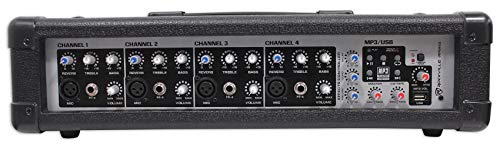
| Best Powered Option | Channel Count: 4 channels | XLR Mic Input: XLR inputs available | Phantom Power: +15V phantom power | VIEW LATEST PRICE | Read Our Analysis |
| Soundcraft Ui16 16 Input Digital Mixing Console Bundle |

| Best For Remote Control | Channel Count: 16 channels | XLR Mic Input: 12 XLR combo mic/line + 4 XLR mic inputs | Phantom Power: Professional-grade mic preamps (48V standard) | VIEW LATEST PRICE | Read Our Analysis |
More Details on Our Top Picks
8 Channel Professional Audio Mixer Console with USB
Why’d you choose an 8-channel mixer for your small church setup? This console gives you enough inputs for microphones, instruments, and audio playback without overwhelming complexity. You’ll connect your pastor’s mic, worship band instruments, and background music through XLR or quarter-inch plugs. The USB connection lets you record services directly to a flash drive for later distribution. Use the 3-band EQ controls to adjust each channel’s sound independently. The built-in reverb and delay effects enhance vocal clarity during live streaming or Zoom meetings. Monitor everything through the headphone jack before it reaches your speakers. This rugged, dust-resistant design handles weekly church use reliably.
- Channel Count:8 channels
- XLR Mic Input:8 XLR inputs (all channels)
- Phantom Power:Not specified
- Effects:Reverb and Delay
- USB Recording/Connectivity:USB Music Player with computer/flash drive recording
- Wireless Connectivity:Bluetooth wireless connection
- Additional Feature:Headphone jack monitoring (6.5mm)
- Additional Feature:Reverb and Delay effects
- Additional Feature:Sealed rotary dust-resistant controls
Depusheng MX16 16 Channel Professional Audio Mixer Console
Looking for a mixer that handles everything from Sunday services to special events? The Depusheng MX16 gives you 16 channels with XLR and 6.35mm inputs on each channel, letting you connect microphones, instruments, and audio sources simultaneously. You’ll use the rotary compressor to control dynamics easily and select from 256 reverberation effects to enhance vocals and instruments. The mixer connects to your computer via USB for recording sermons and services directly. XLR and RCA outputs send audio to your speakers and recording equipment. The 48V phantom power supports condenser microphones. This setup works for Sunday services, choir performances, conferences, and live broadcasts without requiring additional equipment purchases.
- Channel Count:16 channels
- XLR Mic Input:16 XLR inputs (all channels)
- Phantom Power:48V phantom power
- Effects:256 reverberation effects + DSP digital effects
- USB Recording/Connectivity:USB connection for computer recording
- Wireless Connectivity:Not specified
- Additional Feature:256 reverberation effects available
- Additional Feature:Rotary compressor easy control
- Additional Feature:RCA input/output connectivity
GX12 Professional 12 Channel Digital DJ Mixer Console
The GX12 Professional 12 Channel Digital DJ Mixer Console handles live streaming setups with its high-fidelity USB sound card that connects directly to your computer for lossless recording. You’ll manage 12 channels through XLR mic inputs, instrument connections, Bluetooth, and RCA multi-channel options. The 48V phantom power supports condenser microphones for clear audio capture. You can adjust independent EQ settings and monitor levels via LED displays. Its metal body resists interference and accidental drops during transport. Connect wireless via Bluetooth or wired RCA outputs to your church’s speaker system. This single device replaces multiple equipment pieces, reducing setup complexity for Sunday services, special events, and recordings.
- Channel Count:12 channels
- XLR Mic Input:12 XLR inputs (all channels)
- Phantom Power:48V phantom power
- Effects:Not explicitly detailed
- USB Recording/Connectivity:High-fidelity USB sound card for lossless recording
- Wireless Connectivity:Bluetooth for wireless pairing
- Additional Feature:48V phantom power condenser
- Additional Feature:Metal body drop-resistant design
- Additional Feature:LED level display indicators
W IN-MIX DX16 Professional 16-Channel DJ Mixer
You’ll find the most feature-rich mixer here if your church needs straightforward audio control without complexity. The W IN-MIX DX16 gives you 16 channels with dedicated gain control and 3-band EQ on each one. You get 99 DSP effects for audio processing, 48V phantom power on every channel for condenser microphones, and a 7-band master EQ. Connect up to 14 XLR inputs plus 2 stereo channels. Route audio to your main speakers, monitor wedges, or recording interface through separate outputs. The rugged metal chassis withstands weekly church use. USB recording lets you capture services for streaming or archiving. Bluetooth connectivity lets you pull backing tracks from your phone when needed.
- Channel Count:16 channels
- XLR Mic Input:14 XLR/combo inputs + 2 stereo channels
- Phantom Power:Independent 48V phantom power (every channel)
- Effects:99 DSP effects including reverb and delay
- USB Recording/Connectivity:USB recording to computer for live streaming and podcasting
- Wireless Connectivity:Bluetooth capability to stream backing tracks
- Additional Feature:99 DSP effects included
- Additional Feature:7-band master EQ
- Additional Feature:LED-lit mute buttons
XTUGA 16 Channel Professional Audio Mixer (CT160)
Need a mixer that travels with your church’s audio setup? The XTUGA CT160 delivers 16 channels in a compact 1.4-inch design. Connect your microphones, instruments, and devices through balanced XLR inputs with +48V phantom power for consistent sound. Use the built-in Bluetooth to stream audio wirelessly from phones or tablets. The USB interface lets you record services directly to your computer for archiving or editing. Gold-plated ports prevent interference, ensuring clean audio during worship services. Sealed rotary knobs resist dust in various environments. This mixer handles simultaneous inputs from multiple sources, making it practical for live performances, singing, or podcast recording.
- Channel Count:6/8/12/16 channels (configurable)
- XLR Mic Input:Balanced XLR inputs (multiple channels)
- Phantom Power:+48V phantom power
- Effects:Not explicitly detailed
- USB Recording/Connectivity:USB audio interface for recording, editing, exporting to computer
- Wireless Connectivity:Built-in Bluetooth for wireless audio streaming (multiple devices: iOS, Android, tablets)
- Additional Feature:1.4-inch ultra-slim thickness
- Additional Feature:Gold-plated XLR ports
- Additional Feature:MP3/U disk playback
Mackie ProFX22v3 22-Channel Professional Analog Mixer
For worship leaders managing multiple microphone inputs during services, Mackie’s ProFX22v3 delivers professional-grade mixing capabilities with 17 Onyx mic preamps that reach up to 60 dB gain and maintain ultra-low noise performance. You’ll record services at 24-bit/192 kHz quality for archival or streaming purposes. The mixer’s 2×4 USB I/O lets you create two separate computer mixes simultaneously, allowing you to monitor specific tracks while maintaining your main worship mix. Utilize the single-knob blend feature to transition between computer playback and direct mixer input when recording new vocal tracks over pre-recorded accompaniment. The GigFX effects engine provides 24 processing options including reverbs and delays, enhancing vocal clarity and instrumental balance throughout your sanctuary space.
- Channel Count:22 channels
- XLR Mic Input:17 XLR mic preamps
- Phantom Power:Not specified
- Effects:24 FX options including reverbs and delays (GigFX engine)
- USB Recording/Connectivity:2×4 USB I/O at 24-bit/192 kHz
- Wireless Connectivity:Not specified
- Additional Feature:24-bit/192 kHz recording
- Additional Feature:17 Onyx mic preamps
- Additional Feature:2×4 USB I/O custom mixes
FULUODE 8 Channel Audio Mixer DJ Console with Bluetooth
The FULUODE 8 Channel Audio Mixer CT-80S delivers compact, reliable mixing for churches operating under budget constraints. This ultra-thin mixer features eight channels with three segments each, accepting microphones, instruments, and MP3/USB inputs. Built-in Bluetooth 5.0 lets you stream audio wirelessly from devices. The 48V phantom power supports condenser microphones for choir and instrument amplification. A large LED display shows song names when connected via Bluetooth or MP3. Connect your speakers, monitors, and external effects units to the output connections. The mixer’s slim 1.57-inch design fits easily into tight spaces behind your sound booth or altar area. Standard 110V US power makes installation straightforward in existing church facilities.
- Channel Count:8 channels
- XLR Mic Input:8 XLR inputs (all channels)
- Phantom Power:48V phantom power
- Effects:Reverb + external effects compatibility
- USB Recording/Connectivity:MP3/USB input with built-in MP3 player/recorder
- Wireless Connectivity:Built-in Bluetooth 5.0 wireless connection
- Additional Feature:Bluetooth 5.0 wireless connection
- Additional Feature:1.57-inch ultra-thin design
- Additional Feature:Large LED display
Phenyx Pro 8-Channel DJ Audio Mixer (PTL-800)
Phenyx Pro’s PTL-800 delivers the routing flexibility you’ll need for live sound setups where multiple audio sources feed into independent outputs simultaneously. Connect your microphones via six XLR/LINE inputs, then direct vocal signals through the 3-band EQ for clarity. Route each channel to your main outputs, subwoofer output, or auxiliary sends depending on your needs. Use the dual stereo headphone outputs to monitor different mixes independently. The 16 DSP effects and +48V phantom power support condenser microphones for worship leaders and instruments. Send your main feed to powered speakers while routing low frequencies exclusively to a subwoofer through the dedicated SUB output, ensuring clean audio separation throughout your sanctuary.
- Channel Count:8 channels
- XLR Mic Input:6 XLR/LINE inputs + L/R TRS
- Phantom Power:Individual +48V phantom power (per channel)
- Effects:16 DSP effects
- USB Recording/Connectivity:USB-B PC recording/playback
- Wireless Connectivity:Bluetooth streaming
- Additional Feature:16 DSP effects included
- Additional Feature:Dual stereo headphone outputs
- Additional Feature:Subwoofer dedicated output routing
Rockville RPM45 1800w Powered Soundboard Mixer Console
Need a mixer that handles microphones, instruments, and playback all in one unit? The Rockville RPM45 delivers 225 watts RMS power per channel at 8 ohms, making it suitable for church and school spaces. You get four channels with +15V phantom power for condenser microphones. Connect your sound sources through USB input, 1/4-inch effect loops, and dual speaker outputs. The built-in effects processor lets you add reverb or delay without external gear. A fan cooling system keeps the unit stable during services. At 18 pounds and compact dimensions, you’ll transport and install it easily. This powered mixer consolidates your audio needs into one straightforward setup.
- Channel Count:4 channels
- XLR Mic Input:XLR inputs available
- Phantom Power:+15V phantom power
- Effects:Built-in effects
- USB Recording/Connectivity:USB input/output
- Wireless Connectivity:Not specified
- Additional Feature:1800w powered amplification built-in
- Additional Feature:Fan vent cooling system
- Additional Feature:225w RMS per channel
Soundcraft Ui16 16 Input Digital Mixing Console Bundle
How do you manage your church’s sound from anywhere in the building? The Ui16 lets you control your mix remotely using Wi-Fi and a compatible app on iOS, Android, Windows, or Mac. You can adjust 16 inputs—including 8 XLR combo mic/line channels, 4 XLR mics, and 2 instrument inputs—plus manage effects and levels from up to 10 devices simultaneously. The compact, 7.9-pound chassis fits floor setups in small venues and churches. You’ll access professional HARMAN signal processing, including parametric EQ, compressors, and three dedicated effects processors. Show and Snapshot recall features with channel safes enable consistent Sunday services. Password protection limits operator access, ensuring reliable operation across multiple services.
- Channel Count:16 channels
- XLR Mic Input:12 XLR combo mic/line + 4 XLR mic inputs
- Phantom Power:Professional-grade mic preamps (48V standard)
- Effects:3 dedicated effects processors (Reverb, Delay, Chorus) + 4-band parametric EQ
- USB Recording/Connectivity:USB 2-channel recording/playback (MP3, WAV, AIFF)
- Wireless Connectivity:Built-in Wi-Fi with app control (iOS, Android, Windows, Mac OS, Linux)
- Additional Feature:Wi-Fi remote app control
- Additional Feature:HARMAN signal processing integration
- Additional Feature:31-band graphic EQ output
Factors to Consider When Choosing a Sound Board for Church

When you’re selecting a sound board for your church, you’ll need to evaluate your channel count and scalability requirements based on how many microphones, instruments, and audio sources you’ll typically connect. You should also assess the audio quality and preamp specifications, connectivity options (like USB, Dante, or analog inputs), and whether the interface design matches your team’s technical skill level. Finally, consider how well the board integrates with your existing equipment and whether it can grow with your church’s needs over time.
Factors to Consider When Choosing Sound Board for Church
Selecting the right sound board requires you to evaluate several practical specifications that’ll directly impact your Sunday services. First, count your microphone needs and confirm the mixer has enough XLR inputs with phantom power for choir mics and speakers. Next, examine the EQ capabilities—you need per-channel EQ plus a master EQ to adjust for your sanctuary’s acoustics. Third, verify USB and recording outputs for sermon archives and live streaming. Fourth, inspect the physical build: look for sealed rotary controls and dust-resistant chassis since church environments experience heavy foot traffic. Finally, check monitoring features like PFL/AFL buttons, multiple output types for main and monitor feeds, and clear metering displays. These elements ensure smooth, professional sound during services.
Channel Count and Scalability
Why does your mixer’s channel count matter so much? You’ll need enough inputs to handle all your microphones, instruments, and line sources simultaneously. For medium to large churches, 16 to 24 channels typically balance your needs without consuming excessive space. This range accommodates multiple lecterns, choir microphones, and worship instruments during various service formats.
Consider scalability when selecting your mixer. Choose consoles that allow you to add inputs through expansion modules or stage box options without replacing the entire unit. This flexibility supports your church’s future growth.
Routing capabilities matter equally. Your mixer should connect channels to subgroups, buses, and main mixes, enabling you to manage hymns, spoken word, and choir performances effectively.
Finally, verify USB and DAW integration plus stage box compatibility. These features let you incorporate additional sources and remote recordings as your church expands.
Audio Quality and Preamps
The preamps in your mixer form the foundation of your audio chain, and they’ll directly affect how clearly your congregation hears sermons, choir performances, and worship music. Higher-quality preamps deliver cleaner gain with minimal noise, ensuring intelligible speech and crisp instrument pickup. Look for models offering sufficient headroom to handle dynamic vocal performances without clipping when choir members sing at varying distances from microphones. Select a mixer with 24-bit/192 kHz recording capability to preserve fine vocal and instrument details during post-production and archival. Onboard equalization, whether 3-band or 4-band, lets you shape vocal presence and reduce feedback without introducing artifacts. Confirm 48V phantom power availability for condenser microphones, which expands your mic options and captures sensitive, distant voices clearly.
Connectivity and Integration
How’ll you connect your microphones, instruments, playback devices, and recording equipment to your sound board? Check for multiple input types: XLR connectors for mics, 1/4″ jacks for instruments and line-level sources, and USB ports for direct computer integration. Verify your board includes robust USB audio interfaces—either 2-channel or multi-channel—for seamless recording or streaming. Confirm phantom power (48V) availability on accessible channels to support condenser microphones. Examine output options carefully: main outputs for your primary speakers, monitor outputs for stage wedges, AUX sends for auxiliary equipment, and subwoofer outputs for bass management. Built-in Bluetooth or USB playback capabilities eliminate extra hardware needs for pre-recorded hymns and sermon media. These connectivity features ensure your entire sanctuary setup integrates without signal loss or compatibility issues.
User-Friendly Interface Design
Once you’ve confirmed your board’s connectivity meets your sanctuary’s needs, you’ll want to examine how intuitively you can operate it during a live service. Look for clearly labeled knobs and controls arranged in logical signal flow so you can adjust levels quickly without confusion. Check that the board displays large, legible metering with peak indicators or LED level displays to prevent distortion. Verify each channel includes visible gain, EQ, and effects controls in one module, reducing setup time before services. Test the mute groups and solo/PFL monitoring features to isolate problems fast when issues arise. Finally, confirm the USB, Bluetooth, and app-based remote control navigation is straightforward so you can manage multiple audio sources seamlessly throughout your event.
Final Thoughts
You’ll want to pick a sound board that matches your church’s needs. Count your microphones and instruments to determine channel requirements. Check that your choice includes USB recording, phantom power for mics, and built-in effects. Test the interface with your volunteers to ensure they can operate it easily. Budget between $300–$2,000 depending on features. Start with a 12–16 channel console for most worship settings.

Meet Ry, “TechGuru,” a 36-year-old technology enthusiast with a deep passion for tech innovations. With extensive experience, he specializes in gaming hardware and software, and has expertise in gadgets, custom PCs, and audio.
Besides writing about tech and reviewing new products, he enjoys traveling, hiking, and photography. Committed to keeping up with the latest industry trends, he aims to guide readers in making informed tech decisions.