


Choose five switch films that balance fit, durability, and value. Start with DUROCK 0.15mm HTV+PC films for stable edge wear and reduced housing movement; they pair with DUROCK, Cherry MX, and similar switches. Add 0.5mm PORON dampening pads to quiet switches and improve feel on hot-swap or solder boards. Include RUNJRX 0.5mm Poron pads for easy PCB placement and broad layouts. Add HONKID stabilizer film pads to reduce stabilizer rattle, and 120Pcs PORON pads for per-switch coverage. If you want more options and steps, you’ll learn more.
| ZugGear DUROCK Switch Film for Cherry MX (120pcs) |

| Best Vibration Reduction | Type: Switch Film | Thickness: 0.15 mm | Material: HTV+PC film | VIEW LATEST PRICE | Read Our Analysis |
| DUROCK 0.5mm Poron Keyboard Switch Dampening Pads |

| Prime Dampening Pads | Type: Switch Pads | Thickness: 0.5 mm | Material: PORON foam | VIEW LATEST PRICE | Read Our Analysis |
| RUNJRX Keyboard Poron Switch Pads 0.5mm (120Pcs) |
| Easy-Install Poron Pads | Type: Switch Pads | Thickness: 0.5 mm | Material: Poron memory foam | VIEW LATEST PRICE | Read Our Analysis |
| HONKID Mechanical Keyboard PCB Stabilizer Satellite Switch Film Pad 20pcs |

| Stabilizer Enhancement | Type: Switch Film Pad | Thickness: 0.2 mm | Material: Teflon foam | VIEW LATEST PRICE | Read Our Analysis |
| 120PCS Black PORON Keyboard Switch Pads for Mechanical Keyboard |
| Solid Dampening Value | Type: Switch Pads | Thickness: 0.5 mm | Material: PORON memory foam | VIEW LATEST PRICE | Read Our Analysis |
More Details on Our Top Picks
ZugGear DUROCK Switch Film for Cherry MX (120pcs)
The ZugGear DUROCK Switch Film for Cherry MX (120pcs) is a practical choice when you want to reduce vibration and dust ingress in compatible switches. You install these films by removing the switch housing, placing the 0.15mm HTV+PC double-layer film inside, and reseating the housing. The blue base plate helps you remove and install without guessing. This pack includes 120 pieces, enough for multiple switches. It fits DUROCK, Cherry MX, and similar switches, reducing upper housing movement and potentially improving sound. Follow the step-by-step fitment, verify alignment, and test for wobble and dust resistance after installation.
- Type:Switch Film
- Thickness:0.15 mm
- Material:HTV+PC film
- Purpose:Reduce vibration
- Compatibility:Cherry MX/DUROCK-like
- Packaging / Quantity:120 pcs
- Additional Feature:Blue base plate for easy removal
- Additional Feature:0.15mm HTV+PC double-layer
- Additional Feature:Reduces upper housing shaking
DUROCK 0.5mm Poron Keyboard Switch Dampening Pads
If you’re aiming to improve keyboard acoustics and feel without modifying every switch, the DUROCK 0.5mm Poron Keyboard Switch Dampening Pads offer a straightforward dampening solution. These pads use 0.5mm PORON foam to buffer force between switches and the PCB. They are compatible with solder-type and hot-swap PCBs, and with per-switch RGB shine-through. Pre-cut with mild adhesive, they’re easy to apply: peel from backing, place on the PCB, and press firmly. They work with 3-Pin and 5-Pin switches and come as 120 pieces in black. Install to dampen sound and improve overall typing feel.
- Type:Switch Pads
- Thickness:0.5 mm
- Material:PORON foam
- Purpose:Dampening between switch and PCB
- Compatibility:Solder-type and hot-swap PCBs
- Packaging / Quantity:120 pcs
- Additional Feature:Pre-cut with mild adhesive backing
- Additional Feature:0.5mm PORON foam pads
- Additional Feature:Compatible with hot-swap PCBs
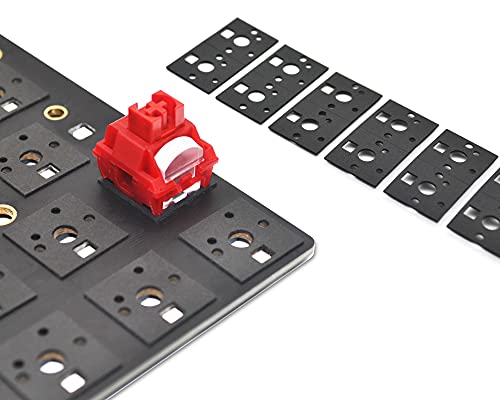
RUNJRX Keyboard Poron Switch Pads 0.5mm (120Pcs)
This RUNJRX 0.5mm Poron switch pads are a practical option for reducing vibrations and muted typing sounds on hot-swap boards. You place the pads directly on the PCB with tweezers, without disassembling the keyboard. The pads are 0.5mm thick Poron memory foam, with a film bottom and non-stick adhesive for tear resistance, and they’re reusable. They fit 61/64/87/100/104/108 hot-swap layouts. Package includes 120 pads and one tweezers tool. To use, peel and align each pad on the PCB gaps, recheck key spacing, and test typing. Warranty info is available via the provided link.
- Type:Switch Pads
- Thickness:0.5 mm
- Material:Poron memory foam
- Purpose:Dampening between switch and PCB
- Compatibility:61/64/87/100/104/108 hot-swap
- Packaging / Quantity:120 pcs (plus tweezers)
- Additional Feature:Reusable film layer backing
- Additional Feature:Fits 61/64/87/100/104/108 hot-swap
- Additional Feature:Includes tweezers
HONKID Mechanical Keyboard PCB Stabilizer Satellite Switch Film Pad 20pcs
HONKID’s PCB Stabilizer Satellite Switch Film Pad (20 pcs) provides a precise, low-friction layer between the stabilizer stem and the PCB to minimize rattle and vibration while typing. You install these pads by removing the 3M or transparent anti-sticking layer, then separate each rubber pad. The foam is made of Teflon and measures 0.2 mm thick, designed to prevent sticking to glue. They are suitable for PCB satellite switches and reduce typing vibration sounds. Use all 20 pieces per set, applying one pad per stabilizer location as you assemble or repair your board. This setup improves stability and reduces noise.
- Type:Switch Film Pad
- Thickness:0.2 mm
- Material:Teflon foam
- Purpose:Fill gap between stabilizer and stem
- Compatibility:PCB stabilizers (satellite switches)
- Packaging / Quantity:20 pcs
- Additional Feature:0.2 mm foam thickness
- Additional Feature:Teflon foam material
- Additional Feature:Easy peel-off non-sticky backing
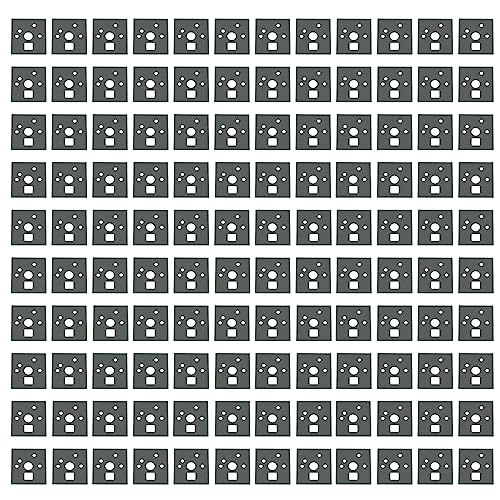
120PCS Black PORON Keyboard Switch Pads for Mechanical Keyboard
The PCS Black PORON Keyboard Switch Pads are a practical option for reducing switch noise and stabilizing keypresses in mechanical keyboards. You receive 120 pads made from PORON high-density memory foam, 0.5mm thick, in black. Use them to fill the gap between each switch and the PCB, reducing vibration and typing sound. Place pads directly on the PCB with tweezers; no keyboard removal is required. Compatible with Cherry MX, hot-swappable boards, and USB-connected setups. Each pad resists tearing and sticks after positioning. Maintain a neat layout, replace worn pads, and use the packaging guidance to store extras for future use.
- Type:Switch Pads
- Thickness:0.5 mm
- Material:PORON memory foam
- Purpose:Dampening between switch and PCB
- Compatibility:Cherry MX-compatible, hot-swappable
- Packaging / Quantity:120 pcs
- Additional Feature:Tear-resistant bottom film
- Additional Feature:No keyboard removal required
- Additional Feature:0.5mm PORON memory foam
Factors to Consider When Choosing Switch Films for Keyboards
Start by evaluating film thickness to match your preferred feel, noting that thinner films tend to preserve actuation sounds while thicker films can dampen them. Next, check the compatibility range for your switches and stems, and confirm you have the right footprint and mounting style before purchasing. Finally, assess noise reduction potential, dust and debris protection, and ease of installation, with clear steps for lining up the film, seating it properly, and testing keystrokes after installation.
Film Thickness Considerations
Thickness matters. You choose film thickness to control how much the switch moves and how it feels. Start with 0.15 mm to 0.20 mm as the baseline, balancing top housing stability with actuation feel. If you want lighter feedback, try the thinner end, about 0.15 mm, for less dampening and easier key travel. For more stabilization and smoother keystrokes, use thicker films toward 0.20 mm, but test for stiffness first. A 0.15 mm HTV+PC double-layer setup offers a lightweight, low-profile option that fits many switches with minimal effort. Be aware thicker films may require careful alignment during installation and can alter travel distance. Check compatibility with your switches and verify fit before full assembly.
Switch Compatibility Range
When choosing switch films, start by confirming which switch types you own and plan to use, since compatibility ranges vary by model. Identify common families such as Cherry MX, DUROCK, or similar switches, and check each film’s stated fit. Some films list compatibility with both standard Cherry MX and DUROCK, broadening usable range. Note that thickness and material matter: a 0.15 mm HTV+PC film may clear certain housings, while a 0.5 mm PORON pad can restrict fit in tighter sockets. Foams and dampening pads should match the switch footprint and PCB type, especially for hot-swap or soldered boards. Consider pre-cut dimensions, base plates, or adhesive backing, as these affect which switch families and stabilizers you can use.
Noise Reduction Potential
To assess noise reduction potential, start by matching film choices to your switch type and mounting setup. You begin by evaluating how films limit upper housing vibration, which lowers the high-pitched “twang” and overall clatter. Consider thinner films, like 0.15 mm, with a soft dual-layer HTV+PC structure, to dampen vibration without overly softening the keypress feel. Decide whether to place the film directly inside the switch to seal against dust and reduce mechanical resonance that contributes noise. If you use dampening pads, note that some films are designed to complement pads by addressing noise from both housing and stem-to-pcb vibration. Finally, verify compatibility with your switch family (e.g., Cherry MX, DUROCK) and ensure secure installation for consistent sound.
Dust and Debris Guard
Dust and Debris Guard: Start by ensuring the film covers the full outer edge of the switch housing to maximize particulate protection. You design your choice by evaluating coverage, fit, and sealing performance. Look for films with tight edges that sit flush against the housing, reducing gaps where dust can enter. Some films use dual-layer HTV+PC construction, which improves sealing against dust ingress, so consider those for higher protection. Installation matters: apply with full outer-edge contact and press evenly to avoid air pockets. Regular inspection is essential; check vents and seals for wear and replace films when protection diminishes. Track your switches over time and plan replacements to maintain a clean, protected internals environment.
Ease Of Installation
Ease of installation hinges on choosing films that fit your switches without extra work. Some films, like 0.15mm HTV+PC double-layer options, are designed for straightforward installation with blue base plates to aid removal and placement. Pre-cut or pre-adhesive choices simplify the process by eliminating trimming or aligning loose film during fitment. Clear instructions often note the film reduces vibration and dust ingress once seated, implying a one-time install with minimal ongoing adjustments. Compatibility claims, such as works with Cherry MX and DUROCK switches, help ensure the film fits without modifying switch housings, easing fitment. Packaging lists pieces (for example 120pcs) to gauge how many switches you can cover, affecting installation scope planning.
Durability And Longevity
Durability and longevity depend on choosing switch films with the right material, thickness, and construction to withstand repeated presses. You assess material type: HTV+PC films offer a soft double-layer structure that resists wear over many cycles. Check thickness: 0.15 mm in some DUROCK-compatible films balances cushioning with edge wear resistance. Evaluate construction: multi-layer designs improve tear resistance and backing compatibility, extending life under frequent use. Consider protective features: dust protection and vibration dampening help maintain consistent performance and reduce contamination and fatigue over time. Installation fit matters: precise cuts and secure backing minimize shifting, preserving alignment after extended use. Favor films with stable edge integrity and compatible blue base plates to support long-term durability.
Value For Size Pack
When evaluating value for size packs, start by checking how many switches you can cover with a single bundle. Larger packs may offer better per-unit value, with 120-piece quantities common across products for economical substitution across many switches. This size is practical for full-keyboard builds or multiple repairs, reducing frequent reorders. A 120-piece pack ensures you can replace or re-film several switches without buying more film each time. Note that smaller sets aren’t shown in the data, so you can’t confirm alternate pack sizes from these details. The 0.5mm PORON pads also come in 120-piece groups, aligning with the same batch size used for the switch films. Use this alignment to simplify procurement and inventory planning.
Final Thoughts
You should choose switch films based on your goals and install them in clear steps. If you want smooth, quiet typing, pick 0.5mm Poron pads and follow exact sizing, clean surfaces, and even pressure during installation. For firmer feel or stabilizer hiss reduction, use stabilizer-compatible films and verify compatibility with Cherry MX stems. Document each kit’s piece count and polarity, then test acoustics, then adjust if needed. Compare brands by thickness, material, and user reviews before finalizing your choice.

Meet Ry, “TechGuru,” a 36-year-old technology enthusiast with a deep passion for tech innovations. With extensive experience, he specializes in gaming hardware and software, and has expertise in gadgets, custom PCs, and audio.
Besides writing about tech and reviewing new products, he enjoys traveling, hiking, and photography. Committed to keeping up with the latest industry trends, he aims to guide readers in making informed tech decisions.