


If you want more desk space for your mouse, a tenkeyless keyboard removes the numeric pad without cutting performance. You’ll find options ranging from compact 65% layouts to full 87-key designs, each offering different switch types, connectivity, and durability features. Understanding what matters most—whether that’s wireless capability, hot-swappable switches, or RGB lighting—helps you narrow down your choices. Let’s explore what sets each option apart.
| Logitech G PRO Mechanical Gaming Keyboard RGB Backlit |
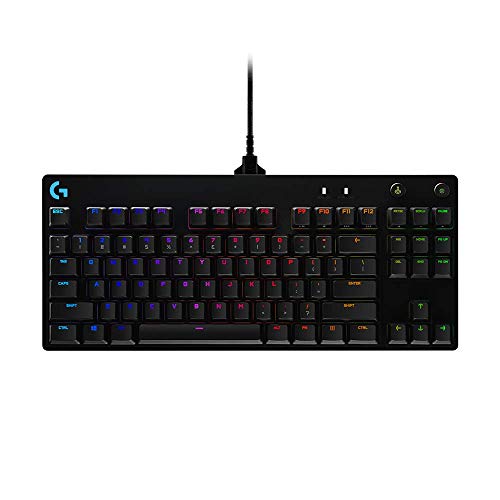
| Esports Champion | Switch Type: GX Blue Click (mechanical, tactile) | Connectivity: Wired (USB Micro, detachable) | Backlighting/RGB: LIGHTSYNC RGB (programmable, onboard memory) | VIEW LATEST PRICE | Read Our Analysis |
| SteelSeries Apex 3 TKL RGB Gaming Keyboard |

| Best Overall | Switch Type: Whisper Quiet (mechanical, tactile & silent) | Connectivity: Wired (USB) | Backlighting/RGB: PrismSync RGB (8-zone, reactive/interactive) | VIEW LATEST PRICE | Read Our Analysis |
| Cherry Stream Keyboard TKL Wired Quiet Keys |

| Quiet Professional | Switch Type: CHERRY SX Scissor (scissor, quiet) | Connectivity: Wired (USB) | Backlighting/RGB: Status LEDs only (CAPS LOCK, SCROLL) | VIEW LATEST PRICE | Read Our Analysis |
| Redragon K552 Mechanical Gaming Keyboard 87-Key Compact |

| Best Value | Switch Type: Red Linear (mechanical, smooth) | Connectivity: Wired (USB, plug-and-play) | Backlighting/RGB: Rainbow LED (6 dynamic modes, fixed colors) | VIEW LATEST PRICE | Read Our Analysis |
| GEODMAER 65% Gaming Keyboard Wired Backlit Mini |

| Ultra-Portable | Switch Type: Imitation Mechanical (membrane, quiet) | Connectivity: Wired (USB Type-C, detachable) | Backlighting/RGB: LED Backlit (2 modes: always bright, breathing) | VIEW LATEST PRICE | Read Our Analysis |
| Keychron K8 Tenkeyless Wireless Mechanical Keyboard |

| Mac-Focused Pick | Switch Type: Keychron G Pro Brown (mechanical, tactile) | Connectivity: Bluetooth 5.1 + Wired USB Type-C (wireless/wired dual) | Backlighting/RGB: White backlight (single-color, shine-through keycaps) | VIEW LATEST PRICE | Read Our Analysis |
| Corsair K70 CORE TKL RGB Mechanical Gaming Keyboard |

| Premium Performance | Switch Type: MLX Red v2 Linear (mechanical, pre-lubed) | Connectivity: Wired (USB-A/USB-C) | Backlighting/RGB: Per-key RGB (ultra-bright, customizable) | VIEW LATEST PRICE | Read Our Analysis |
| Microsoft Designer Compact Wireless Bluetooth Keyboard |
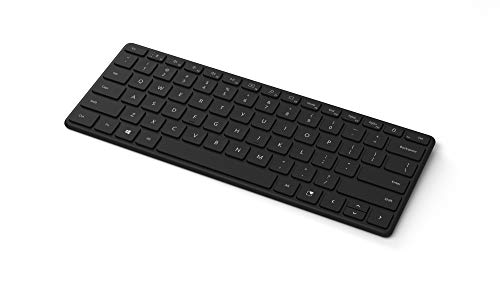
| Best Wireless | Switch Type: Not specified (membrane) | Connectivity: Bluetooth wireless | Backlighting/RGB: None (non-backlit) | VIEW LATEST PRICE | Read Our Analysis |
| Perixx PERIBOARD-335RD Ergonomic Mechanical Compact Keyboard |

| Best Ergonomics | Switch Type: Red Linear (mechanical, low-profile) | Connectivity: Wired (USB) | Backlighting/RGB: None (non-backlit) | VIEW LATEST PRICE | Read Our Analysis |
| Turtle Beach Vulcan TKL Mechanical Gaming Keyboard RGB |

| Tournament-Ready | Switch Type: TITAN Switch Linear (mechanical, smooth) | Connectivity: USB-C Wired + Bluetooth + 2.4GHz Wireless (triple-mode) | Backlighting/RGB: Per-key RGB (AIMO intelligent engine) | VIEW LATEST PRICE | Read Our Analysis |
| Redragon K707 PRO 80% RGB Gaming Keyboard |

| Most Customizable | Switch Type: Mint Mambo Linear (mechanical, lubed) | Connectivity: USB-C Wired + Bluetooth 3.0/5.0 + 2.4GHz Wireless (triple-mode) | Backlighting/RGB: Per-key RGB (south-facing LEDs, gradient keycaps) | VIEW LATEST PRICE | Read Our Analysis |
| MageGee 75% Mechanical Gaming Keyboard Red Switch |

| Budget Gaming | Switch Type: Red Mechanical (mechanical, linear) | Connectivity: Wired (USB, plug-and-play) | Backlighting/RGB: LED Blue Backlit (16 modes, customizable) | VIEW LATEST PRICE | Read Our Analysis |
| Macally Compact Wireless Keyboard 2.4G USB Portable |
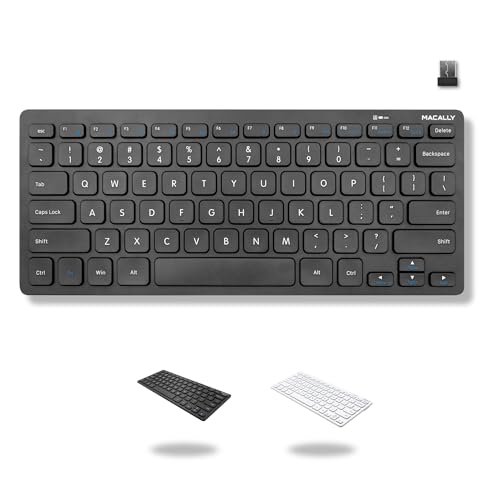
| Travel Essential | Switch Type: Not specified (membrane) | Connectivity: Wireless 2.4GHz USB dongle | Backlighting/RGB: None (non-backlit) | VIEW LATEST PRICE | Read Our Analysis |
| Evoluent Wired Compact Ergonomic Keyboard |

| Compact Comfort | Switch Type: Scissor-switch (scissor, low-profile) | Connectivity: Wired (USB) | Backlighting/RGB: None (non-backlit) | VIEW LATEST PRICE | Read Our Analysis |
| MSI Forge GK600 TKL Mechanical Gaming Keyboard |

| Modern Hybrid | Switch Type: Mechanical Linear (mechanical, hot-swappable) | Connectivity: USB Type-C Wired + Bluetooth + 2.4GHz Wireless (triple-mode) | Backlighting/RGB: RGB customizable (with display monitor) | VIEW LATEST PRICE | Read Our Analysis |
More Details on Our Top Picks
Logitech G PRO Mechanical Gaming Keyboard RGB Backlit
Why’d you choose a cramped full-size keyboard when esports champions demand a compact tenkeyless design? The Logitech G PRO delivers competition-grade performance in a space-saving layout. Its GX Blue Click switches provide audible, tactile feedback for precise keypress confirmation. You’ll program F-keys and macros through Logitech G HUB software, storing lighting patterns directly on the keyboard for tournament systems restricting software. The detachable 1.8m Micro USB cable enables quick setup and transport. Adjust the three-step angle, position rubber feet for stability, and you’re ready to claim extra desk real estate for mouse movement.
- Switch Type:GX Blue Click (mechanical, tactile)
- Connectivity:Wired (USB Micro, detachable)
- Backlighting/RGB:LIGHTSYNC RGB (programmable, onboard memory)
- Key Count/Layout:87 keys (tenkeyless, compact)
- Weight:Not specified
- Warranty:Not specified
- Additional Feature:Tournament onboard memory storage
- Additional Feature:F-key macro programming capability
- Additional Feature:Three-pronged detachable cable
SteelSeries Apex 3 TKL RGB Gaming Keyboard
The SteelSeries Apex 3 TKL RGB Gaming Keyboard delivers the tenkeyless design that competitive gamers and desk-space-conscious users need. You’ll get 87 keys with Whisper Quiet switches rated for over 20 million keypresses, ensuring durability through extended gaming sessions. The keyboard connects via USB cable to Windows, Mac, Xbox, and PlayStation devices. Its IP32 water and dust resistance protects against spills and debris. You can customize RGB lighting across eight zones using on-board controls and adjust audio with the clickable volume roller. The compact 14.3-inch length maximizes mouse space on your desk.
- Switch Type:Whisper Quiet (mechanical, tactile & silent)
- Connectivity:Wired (USB)
- Backlighting/RGB:PrismSync RGB (8-zone, reactive/interactive)
- Key Count/Layout:87 keys (tenkeyless, QWERTY)
- Weight:1.4 pounds
- Warranty:1-year manufacturer warranty
- Additional Feature:Multi-console compatibility (PS4/PS5/Xbox)
- Additional Feature:Clickable volume roller control
- Additional Feature:IP32 water/dust resistance
Cherry Stream Keyboard TKL Wired Quiet Keys
Consider the Cherry Stream if you’re a desk worker who needs more mouse space without sacrificing a quiet professional environment. The keyboard’s SX scissor switches deliver precise, whisper-quiet keystrokes ideal for shared offices. Its compact tenkeyless design positions your mouse closer, reducing arm strain during extended work sessions. The integrated metal plate stabilizes the keyboard, preventing movement during typing. Rubberized fold-out feet adjust the angle for comfortable positioning. Abrasion-resistant lettering ensures durability through years of daily use. Status LEDs indicate CAPS LOCK and SCROLL functionality. Six multimedia keys provide quick access to common functions without reaching your mouse.
- Switch Type:CHERRY SX Scissor (scissor, quiet)
- Connectivity:Wired (USB)
- Backlighting/RGB:Status LEDs only (CAPS LOCK, SCROLL)
- Key Count/Layout:Tenkeyless (scissor, space-saving)
- Weight:1.5 pounds
- Warranty:Product warranty available via link
- Additional Feature:Abrasion-resistant lettering durability
- Additional Feature:SX scissor switch technology
- Additional Feature:Rubberized fold-out feet
Redragon K552 Mechanical Gaming Keyboard 87-Key Compact
Gamers and professionals who need mouse space should consider this 87-key compact keyboard—it delivers solid mechanical performance without the premium price tag. The linear red switches provide smooth, quiet keystrokes ideal for gaming and typing. You’ll benefit from the metal frame construction and anti-slip feet, which maintain stability during intense sessions. The keyboard supports full N-key rollover and anti-ghosting, ensuring simultaneous key presses register correctly. Rainbow backlighting offers six dynamic modes adjustable via keyboard shortcuts. The braided USB cable connects without requiring drivers, and it’s compatible with Windows, macOS, and Linux. A 1-year warranty provides reliability assurance for long-term use.
- Switch Type:Red Linear (mechanical, smooth)
- Connectivity:Wired (USB, plug-and-play)
- Backlighting/RGB:Rainbow LED (6 dynamic modes, fixed colors)
- Key Count/Layout:87 keys (tenkeyless, anti-slip feet)
- Weight:Not specified
- Warranty:1-year warranty
- Additional Feature:Six dynamic lighting modes
- Additional Feature:Full N-key rollover anti-ghosting
- Additional Feature:Metal top plate construction
GEODMAER 65% Gaming Keyboard Wired Backlit Mini
Looking for a keyboard that doesn’t consume your desk? The GEODMAER 65% Gaming Keyboard delivers compact functionality without sacrificing features. This wired model eliminates the numpad while maintaining separate arrow keys, freeing significant mouse space. You’ll get 11 media buttons, adjustable LED backlighting with breathing modes, and durable mechanical-feel switches rated for 10+ million keystrokes. The detachable Type-C cable ensures stable connectivity with minimal input lag. Its ergonomic keycap design supports extended typing sessions. The 26-key anti-conflict layout prevents accidental inputs when you enable FN+Win lock. Customize brightness and breathing speed using FN combinations. This keyboard suits both gaming and office work while remaining portable enough for backpack transport.
- Switch Type:Imitation Mechanical (membrane, quiet)
- Connectivity:Wired (USB Type-C, detachable)
- Backlighting/RGB:LED Backlit (2 modes: always bright, breathing)
- Key Count/Layout:65% compact (no numpad, separate arrows)
- Weight:Not specified
- Warranty:Not specified
- Additional Feature:26-key anti-conflict layout
- Additional Feature:Two-color injection molding keycaps
- Additional Feature:10,000,000+ keystroke lifespan
Keychron K8 Tenkeyless Wireless Mechanical Keyboard
The Keychron K8’s 87-key tenkeyless design frees up desk space for your mouse—a mac-focused pick that pairs Bluetooth multidevice connectivity with wired USB Type-C reliability. You’ll switch between three devices seamlessly using Bluetooth 5.1, or plug in the USB-C cable for wired mode’s full NKRO performance. The tactile G Pro Brown switches require 55 grams of force and deliver 50 million keystrokes of durability. Adjust the two-level feet to your preferred typing angle, then customize your setup with included macOS and Windows keycaps. The 4000 mAh battery lasts 200 hours without backlighting, ensuring you’ll rarely need to charge during your workflow.
- Switch Type:Keychron G Pro Brown (mechanical, tactile)
- Connectivity:Bluetooth 5.1 + Wired USB Type-C (wireless/wired dual)
- Backlighting/RGB:White backlight (single-color, shine-through keycaps)
- Key Count/Layout:87 keys (tenkeyless, 80% navigation)
- Weight:Not specified
- Warranty:1-year limited warranty
- Additional Feature:Multidevice Bluetooth switching capability
- Additional Feature:4000 mAh battery included
- Additional Feature:50 million keystroke lifespan
Corsair K70 CORE TKL RGB Mechanical Gaming Keyboard
Competitive gamers and esports enthusiasts who need maximum desk real estate will find premium performance in Corsair’s tenkeyless design. The K70 CORE TKL RGB features pre-lubed MLX Red v2 linear switches delivering smooth, responsive keystrokes essential for fast-paced gaming. Two sound dampening foam layers reduce typing noise, while the compact 84-87 key layout frees up mouse space. Configure the rotary dial and programmable media button through iCUE software or use onboard profile storage for up to five custom settings. Ultra-bright per-key RGB backlighting lets you customize lighting across compatible devices via USB connectivity at 1000Hz polling for competitive advantage.
- Switch Type:MLX Red v2 Linear (mechanical, pre-lubed)
- Connectivity:Wired (USB-A/USB-C)
- Backlighting/RGB:Per-key RGB (ultra-bright, customizable)
- Key Count/Layout:84-87 keys (tenkeyless, QWERTY)
- Weight:1.64 pounds
- Warranty:2-year manufacturer warranty
- Additional Feature:Multi-function rotary dial control
- Additional Feature:Premium foam sound dampening layers
- Additional Feature:Five onboard profile storage
Microsoft Designer Compact Wireless Bluetooth Keyboard
Want a wireless keyboard that won’t crowd your desk? The Microsoft Designer Compact Wireless Bluetooth Keyboard delivers exactly that. Its compact design frees up significant mouse space on your workspace. You’ll appreciate the low-profile, sleek appearance that fits any setup. The keyboard connects to up to three devices via Bluetooth, letting you switch seamlessly between your PC or Mac without physical cables cluttering your desk. Optimized key spacing enables fast, fluid typing despite the reduced footprint. An expressive input key provides quick access to emojis and symbols. This keyboard prioritizes functionality while maintaining a minimal physical footprint for maximum desktop freedom.
- Switch Type:Not specified (membrane)
- Connectivity:Bluetooth wireless
- Backlighting/RGB:None (non-backlit)
- Key Count/Layout:Compact layout (specific key count not stated)
- Weight:Not specified
- Warranty:Not specified
- Additional Feature:Three-device seamless connectivity switching
- Additional Feature:Expressive emoji/symbol input key
- Additional Feature:Low-profile sleek appearance
Perixx PERIBOARD-335RD Ergonomic Mechanical Compact Keyboard
Seeking superior ergonomics without sacrificing desk real estate? The Perixx PERIBOARD-335RD delivers both through its compact ten-key-less design. You’ll get a split-key layout with 104 keys and low-profile red linear switches for responsive typing. The curved frame naturally positions your hands to reduce strain. Adjust the wrist rest to 0, -4, or -7 degrees to match your preference. You can reprogram keys and create macros using intuitive software. The keyboard connects via USB with a 5.9-foot cable and works on Windows and Mac systems. It arrives with a user manual and includes a 12-month limited warranty.
- Switch Type:Red Linear (mechanical, low-profile)
- Connectivity:Wired (USB)
- Backlighting/RGB:None (non-backlit)
- Key Count/Layout:104 keys (split-key TKL design)
- Weight:Not specified
- Warranty:12-month limited warranty
- Additional Feature:Integrated adjustable wrist rest
- Additional Feature:Split-key curved frame design
- Additional Feature:Three mechanical switch variants
Turtle Beach Vulcan TKL Mechanical Gaming Keyboard RGB
For PC gamers who need mouse space without sacrificing performance, the Turtle Beach Vulcan TKL delivers a tournament-ready platform in a compact tenkeyless design. The TITAN Switch Mechanical Linear switches provide smooth, rapid keystrokes with advanced anti-ghosting technology to prevent input errors during competitive play. You’ll configure onboard profiles to customize settings without external software, then adjust per-key RGB lighting through the AIMO intelligent lighting engine. The anodized aluminum top plate ensures durability through extended gaming sessions. Use the Easy-Shift[+] button duplicator to access secondary functions, and control audio with mixer-style media controls. The detachable USB-C cable lets you disconnect quickly for transport or cable management adjustments.
- Switch Type:TITAN Switch Linear (mechanical, smooth)
- Connectivity:USB-C Wired + Bluetooth + 2.4GHz Wireless (triple-mode)
- Backlighting/RGB:Per-key RGB (AIMO intelligent engine)
- Key Count/Layout:87 keys (tenkeyless)
- Weight:Not specified
- Warranty:1-year warranty
- Additional Feature:Easy-Shift button duplicator function
- Additional Feature:Mixer-style media controls
- Additional Feature:Anodized aluminum top plate
Redragon K707 PRO 80% RGB Gaming Keyboard
The Redragon K707 PRO offers the most customizable 80% layout for users who want maximum desk space without sacrificing control. You’ll access three connectivity options—USB-C wired, Bluetooth 3.0/5.0, and 2.4GHz wireless—letting you switch between devices seamlessly. The hot-swap socket accepts most 3 or 5-pin switches, so you can swap components without soldering. Install the included Mint Mambo switches for linear, lubricated typing, or customize your own selection. Use the Pro software to program macros and design RGB effects tailored to your workflow. The five-layer noise dampening system reduces typing sound significantly, keeping your workspace quieter during extended gaming or work sessions.
- Switch Type:Mint Mambo Linear (mechanical, lubed)
- Connectivity:USB-C Wired + Bluetooth 3.0/5.0 + 2.4GHz Wireless (triple-mode)
- Backlighting/RGB:Per-key RGB (south-facing LEDs, gradient keycaps)
- Key Count/Layout:87 keys (80% TKL)
- Weight:Not specified
- Warranty:1-year warranty
- Additional Feature:Five-layer noise dampening system
- Additional Feature:Hot-swap compatible socket design
- Additional Feature:Three connectivity modes available
MageGee 75% Mechanical Gaming Keyboard Red Switch
Budget gaming setups benefit most when you prioritize mouse space, and the MageGee 75% Mechanical Gaming Keyboard delivers this without sacrificing essential keys. Its 87-key tenkeyless layout retains arrow keys and F1-F12 functions while occupying less desk real estate than full-size models. The red mechanical switches provide linear, smooth actuation ideal for gaming. You’ll get plug-and-play setup with no driver installation required across Windows, macOS, and Linux systems. The aluminum panel, N-key rollover anti-ghosting technology, and 16 customizable backlight modes round out the practical features. At 890 grams with ergonomic kickstands, this keyboard positions itself as a straightforward choice for gamers maximizing mouse movement space.
- Switch Type:Red Mechanical (mechanical, linear)
- Connectivity:Wired (USB, plug-and-play)
- Backlighting/RGB:LED Blue Backlit (16 modes, customizable)
- Key Count/Layout:87 keys (tenkeyless, retains arrow keys)
- Weight:890 grams (1.96 pounds)
- Warranty:1-year warranty
- Additional Feature:Sixteen backlight effect modes
- Additional Feature:Two-step kickstand design
- Additional Feature:Double-color injection keycaps
Macally Compact Wireless Keyboard 2.4G USB Portable
Seeking a travel essential that won’t consume your desk real estate? The Macally Compact Wireless Keyboard delivers a 78-key layout without a number pad, freeing up mouse space on any surface. You’ll connect it via the included 2.4GHz USB-A dongle—just plug it in without needing drivers or software. The lightweight design makes it portable for laptops, desktops, Chromebooks, and tablets. You’ll conserve battery using the on/off switch when you’re not typing. One AAA battery powers the keyboard, keeping your setup minimal and travel-friendly for professionals and students seeking efficient workspace solutions.
- Switch Type:Not specified (membrane)
- Connectivity:Wireless 2.4GHz USB dongle
- Backlighting/RGB:None (non-backlit)
- Key Count/Layout:78 keys (no numpad, compact)
- Weight:Not specified
- Warranty:Not specified
- Additional Feature:Battery on/off switch included
- Additional Feature:Twelve convenient shortcut keys
- Additional Feature:Single AAA battery powered
Evoluent Wired Compact Ergonomic Keyboard
For users who need compact comfort without sacrificing typing functionality, Evoluent’s wired compact keyboard delivers an 84-key design that eliminates the numeric keypad entirely. This scissor-switch keyboard measures 12.5 by 6.5 inches, positioning your mouse closer and reducing arm strain during extended work sessions. The ultra-low profile keeps your wrists neutral. Twelve one-touch hotkeys let you execute commands without pressing the Fn key. Simply plug the USB cable into your laptop—no batteries needed. The ambidextrous layout works for both left and right-handed users. Compatible with Linux, macOS, and Windows, this black plastic keyboard weighs about 499 grams for easy portability.
- Switch Type:Scissor-switch (scissor, low-profile)
- Connectivity:Wired (USB)
- Backlighting/RGB:None (non-backlit)
- Key Count/Layout:84 keys (no numpad, compact)
- Weight:499 grams (1.1 pounds)
- Warranty:Warranty information available via product page
- Additional Feature:Twelve one-touch hotkeys included
- Additional Feature:Ultra-low profile scissor design
- Additional Feature:Mouse closer ergonomic positioning
MSI Forge GK600 TKL Mechanical Gaming Keyboard
The MSI Forge GK600 TKL is a modern hybrid keyboard that works best if you need more mouse space. Its tenkeyless design removes the number pad, giving you extra desk room on your right side. You’ll get triple connectivity options: 2.4 GHz wireless, Bluetooth, or USB Type-C wired. The hot-swappable mechanical switches let you replace individual switches without soldering. Its 4000 mAh battery powers wireless sessions, while the small display shows battery status and RGB settings. Dye-sublimated PBT keycaps resist wear and provide anti-slip grip. This setup balances gaming performance with practical desk organization for mouse movement.
- Switch Type:Mechanical Linear (mechanical, hot-swappable)
- Connectivity:USB Type-C Wired + Bluetooth + 2.4GHz Wireless (triple-mode)
- Backlighting/RGB:RGB customizable (with display monitor)
- Key Count/Layout:83 keys (tenkeyless)
- Weight:2.6 pounds
- Warranty:1-year manufacturer warranty
- Additional Feature:1.06-inch battery status display
- Additional Feature:Hot-swappable switch design
- Additional Feature:4000 mAh battery capacity
Factors to Consider When Choosing a Tenkeyless Keyboard for More Mouse Space

When you’re selecting a tenkeyless keyboard, you’ll want to evaluate how the compact layout frees up desk real estate on your right side, assess whether the form factor matches your desk dimensions and setup, and confirm that the reduced size doesn’t compromise your arm positioning or wrist alignment during extended use. Consider your mouse pad placement and the distance you need for comfortable mouse movement, then test whether the keyboard’s position allows your elbows to stay at a natural angle without reaching too far left or right. Finally, examine how the ergonomic positioning of a smaller keyboard affects your overall posture, since removing the numpad can let you center both your keyboard and mouse closer to your body’s midline.
Compact Layout Benefits
By removing the numeric keypad, tenkeyless keyboards shrink your keyboard’s width and free up valuable desk real estate for mouse movement. This compact design lets you position your mouse closer to your keyboard without reaching across empty space. You’ll notice improved wrist alignment and reduced arm strain during extended work sessions. The standard 87-key layout retains all essential keys you need daily—letters, numbers, and function keys—while eliminating unnecessary bulk. When you evaluate TKL options, measure your current desk space and compare it to your keyboard’s width. Check that the keyboard you select maintains full key rollover and programmable functions. This ensures you don’t sacrifice functionality for space savings.
Desk Space Optimization
How much horizontal space can you actually dedicate to your mouse pad and movement? Start by measuring your desk width, then subtract the width of your keyboard and monitor stand. A tenkeyless keyboard typically spans 14 inches, compared to 17+ inches for full-size models, immediately freeing 3+ inches of usable space. Next, choose a low-profile design to avoid vertical obstruction of your sightline and mouse area. Select a keyboard with a detachable cable to eliminate cable clutter and reclaim additional surface space. Finally, position your keyboard slightly left of center, angling it if needed, to maximize the right-side mouse zone. These steps create an uninterrupted, accessible area for your mouse pad and optimal cursor control during work or gaming sessions.
Mouse Movement Accessibility
Optimizing your desk layout for mouse space requires you to contemplate how your keyboard’s physical characteristics affect your hand positioning and movement speed. Evaluate keyboard width first—shorter widths reduce the distance your hand travels to reach the mouse, enabling quicker transitions. Next, assess key height and weight; low-profile, lightweight keyboards minimize physical barriers and desk clutter, freeing up surface area. Consider your keyboard’s configuration: wired models stay fixed, while detachable options let you reposition freely based on your gaming style. Finally, examine the keyboard’s footprint in the 84- to 87-key range, which directly expands available mouse movement space. These factors combine to determine whether your setup supports fast, unrestricted mouse maneuvers during gameplay.
Form Factor Considerations
What makes a tenkeyless keyboard the right choice for expanding your mouse space? Consider the depth and width first. A TKL keyboard measures roughly 13 inches wide, compared to a standard board at 18 inches. Next, evaluate the specific layout—80% designs offer additional width reduction, while 65% keyboards shrink both dimensions further. Check the keyboard’s weight; lighter models move easily during repositioning. Third, examine key spacing and your typing familiarity. Fewer keys mean tighter layouts that may require adjustment. Finally, verify that function layers preserve numpad access if you need calculations. Test whether multimedia controls align with your workflow. These considerations determine whether a tenkeyless design genuinely solves your desk space constraints.
Ergonomic Positioning Advantages
When you remove the numeric keypad from your setup, you’re not just gaining desk space—you’re creating the conditions for better arm and wrist alignment. Position your mouse closer to your body by placing it immediately adjacent to the keyboard’s right edge. This proximity reduces shoulder strain during extended typing sessions. A compact keyboard depth also lets you move your monitor forward, promoting neutral spine posture. You’ll naturally decrease forearm rotation when your mouse sits at your elbow’s height rather than extended outward. Arrange your keyboard and mouse on the same plane to maintain consistent wrist angles. These positioning adjustments directly lower repetitive strain injury risk during daily work.
Portability and Transport
Why does keyboard portability matter when you’re selecting a tenkeyless model for mouse space? You need a keyboard you can transport easily without sacrificing desk real estate. First, check the weight and dimensions of the model. Lightweight variants under two pounds pack into bags or backpacks without bulk. Second, verify the cable type. Detachable USB-C or Micro USB cables eliminate tangling and reduce what you carry. Third, examine the profile. Slim or low-profile designs occupy minimal space in travel cases. Fourth, assess whether fold-out feet are removable or collapsible, further reducing packed size. Finally, confirm the keyboard fits your typical workspace—whether a dorm, office, or coffee shop. These steps ensure you maintain maximum mouse space while keeping your setup mobile and practical.
Gaming Performance Impact
How does a tenkeyless layout actually affect your gaming performance? You’ll gain extended mouse movement space, which reduces arm repositioning during fast-paced games. To maximize this advantage, select keyboards with high polling rates (1000Hz) that match full-size responsiveness. Next, choose mechanical switches with low actuation force—linear or tactile options enable quicker keystrokes for rapid in-game actions. Then, verify the keyboard includes N-key rollover and sturdy stabilizers to prevent missed inputs during intense sessions. Finally, confirm the model has on-board memory for storing macros and RGB profiles without requiring software, ensuring consistent performance across different computers. These specifications directly influence your reaction time and input reliability during competitive gaming.
Switch Type Selection
Beyond polling rates and rollover capabilities, your switch choice directly shapes both typing comfort and gaming responsiveness in a tenkeyless layout. You’ll encounter three main switch types: linear switches provide smooth, quiet operation ideal for rapid keystrokes; tactile switches deliver a subtle bump at actuation, offering feedback without noise; clicky switches produce audible clicks, enhancing awareness of key presses. Consider your environment and playstyle when selecting. If you game competitively, linear switches minimize delay. For typing-heavy sessions, tactile or clicky options provide confirmation of registration. Hot-swappable tenkeyless keyboards let you test different switches before committing fully. Evaluate actuation force—lighter switches demand less pressure but risk accidental presses, while heavier switches require more effort. Match your choice to your grip strength and gaming demands for optimal performance.
Final Thoughts
You’ve reviewed eight tenkeyless keyboards offering distinct advantages. To make your choice, identify your priorities: gaming performance, portability, ergonomics, or budget. Match these needs to the models listed. Consider switch type, connectivity options, and durability features. Test keyboards when possible before purchasing. Your selection directly impacts your workspace efficiency and mouse comfort, so weigh each factor against your specific requirements carefully.

Meet Ry, “TechGuru,” a 36-year-old technology enthusiast with a deep passion for tech innovations. With extensive experience, he specializes in gaming hardware and software, and has expertise in gadgets, custom PCs, and audio.
Besides writing about tech and reviewing new products, he enjoys traveling, hiking, and photography. Committed to keeping up with the latest industry trends, he aims to guide readers in making informed tech decisions.