
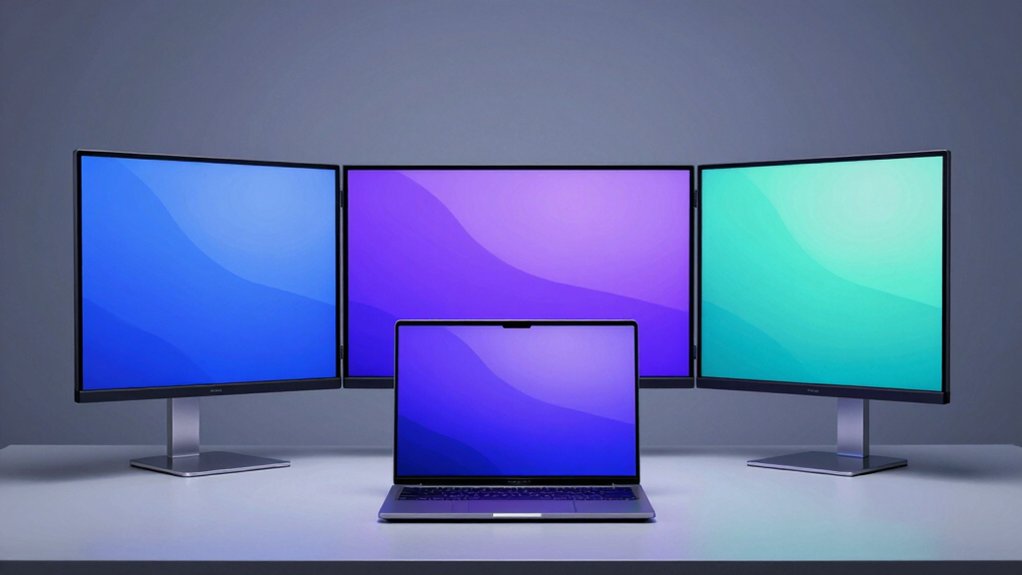

You’re looking to expand your laptop’s screen real estate without cluttering your workspace. Tri-fold monitor extenders offer a practical solution by connecting via USB-C or USB-A, giving you multiple display options in a compact form. These devices feature adjustable brightness controls and rotating stands that adapt to your setup. However, choosing the right model requires understanding key specifications—and that’s where the specifics matter most.
| QQH 15.6″ Triple Portable Monitor USB-C Extender |

| Premium Build Quality | Screen Size: 15.6″ dual displays | Resolution: 1920×1080 FHD IPS | Connection Type: Single USB-C or USB-A cable | VIEW LATEST PRICE | Read Our Analysis |
| ZUMWALT 14″ Triple Portable Laptop Monitor Extender |
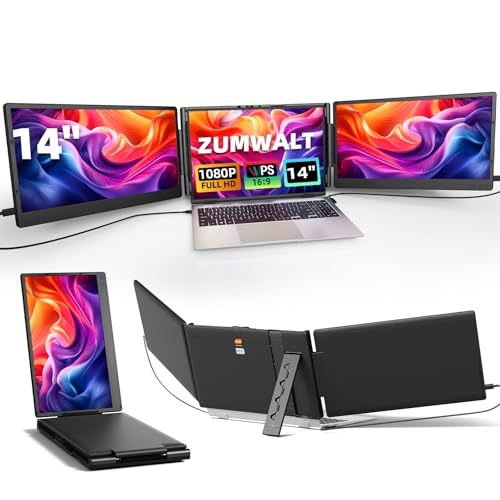
| Best Overall | Screen Size: 14″ triple display | Resolution: 1920×1080 FHD IPS | Connection Type: USB-C, HDMI, USB-A | VIEW LATEST PRICE | Read Our Analysis |
| QQH 15.6″ Triple Portable Monitor for Laptops |
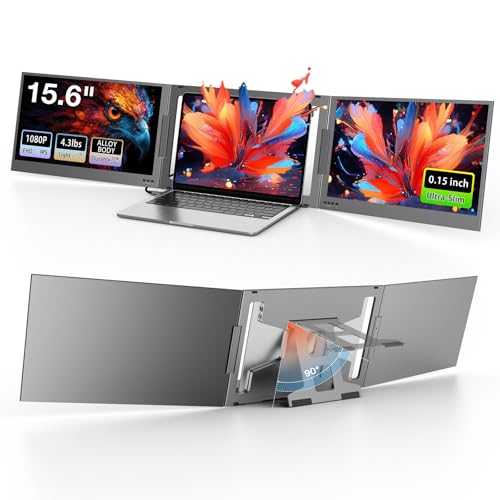
| Best Value | Screen Size: 15.6″ dual displays | Resolution: 1920×1080 FHD IPS | Connection Type: USB-C connection | VIEW LATEST PRICE | Read Our Analysis |
| Laptop Screen Extender 14″ FHD Portable Monitor |

| Budget-Friendly Pick | Screen Size: 14″ single display | Resolution: 1920×1080 FHD IPS | Connection Type: USB-C, HDMI | VIEW LATEST PRICE | Read Our Analysis |
| KEFEYA 15.6″ Portable Laptop Screen Extender Monitor |

| Most Versatile | Screen Size: 15.6″ triple display | Resolution: 1920×1080 FHD IPS | Connection Type: USB-C or USB-A, HDMI option | VIEW LATEST PRICE | Read Our Analysis |
More Details on Our Top Picks
QQH 15.6″ Triple Portable Monitor USB-C Extender
Want to expand your screen real estate without breaking your budget or cluttering your desk? The QQH 15.6″ Triple Portable Monitor USB-C Extender delivers dual 1080p displays in a slim aluminum design. You’ll install the required driver first, then connect via single USB-C or USB-A cable for plug-and-play operation. The freestanding setup positions behind your laptop without damage. Each screen features independent brightness and contrast controls with memory settings that save your preferences. The 360° rotation capability and 90° built-in stand adapt to your viewing angle. This extender works with Windows, macOS, ChromeOS, Android, and Linux systems, supporting laptops between 12 and 16 inches.
- Screen Size:15.6″ dual displays
- Resolution:1920×1080 FHD IPS
- Connection Type:Single USB-C or USB-A cable
- Driver Required:Yes, required before use
- Laptop Compatibility Range:12-16″
- Weight:7 lbs
- Additional Feature:360° rotation capability
- Additional Feature:Built-in memory saves settings
- Additional Feature:Aluminum alloy tri-screen design
ZUMWALT 14″ Triple Portable Laptop Monitor Extender
The ZUMWALT 14″ Triple Portable Laptop Monitor Extender serves remote workers, designers, programmers, and financial analysts who need to expand their workspace without upgrading their entire setup. This monitor features a 1920×1080 IPS display with a 178° viewing angle and 300 nits brightness. It connects via USB-C or HDMI cables included in the package. The ultra-slim design weighs 4.5 pounds and rotates 180°, making it suitable for presentations. However, it won’t work with MacBook M1/M2/M3 models or older MacBooks. Verify your laptop’s chip before purchasing. Setup requires no drivers—just plug in the cables and your system recognizes it automatically.
- Screen Size:14″ triple display
- Resolution:1920×1080 FHD IPS
- Connection Type:USB-C, HDMI, USB-A
- Driver Required:No, plug-and-play
- Laptop Compatibility Range:13-16.5″
- Weight:~4.5 lbs
- Additional Feature:Built-in speakers included
- Additional Feature:Magnetic dual-screen protector
- Additional Feature:180° rotatable stand
QQH 15.6″ Triple Portable Monitor for Laptops
If you’re managing multiple tasks across spreadsheets, documents, and communication apps simultaneously, the QQH 15.6″ Triple Portable Monitor delivers dual external screens that expand your workspace without requiring a permanent desk setup. The ultra-slim metal design weighs just 4.3 lbs, making it ideal for travel between locations. You’ll connect via USB-C with one cable, and the integrated stand provides stability at a 60° tilt without relying on your laptop for support. Each 15.6″ FHD IPS display offers 1920×1080 resolution with 300 nits brightness and 178° viewing angles. You can adjust brightness, contrast, and color temperature independently on each screen, and the memory function automatically restores your personalized settings when you reconnect. Compatible with Windows, macOS, Android, and ChromeOS systems, this solution fits 12-16″ laptops and requires a driver installation.
- Screen Size:15.6″ dual displays
- Resolution:1920×1080 FHD IPS
- Connection Type:USB-C connection
- Driver Required:Yes, required
- Laptop Compatibility Range:12-16″
- Weight:4.3 lbs
- Additional Feature:Integrated memory function per-device
- Additional Feature:Standalone metal stand stability
- Additional Feature:85% sRGB color gamut
Laptop Screen Extender 14″ FHD Portable Monitor
Need extra screen space without investing in a full desktop setup? This 14-inch FHD portable monitor expands your workspace through dual or triple display configurations. Connect it via USB-C or HDMI using the included cables—it works with Windows, macOS, and Linux systems. The ultra-thin 0.24-inch design fits easily into your bag for travel productivity. Note that M1/M2/M3 MacBooks and single Type-C Surface devices aren’t compatible. The IPS screen includes blue light filtering and anti-glare technology to reduce eye strain during extended work sessions. Built-in speakers handle audio without external equipment. You’ll receive two Type-C cables, an HDMI adapter, power supplies, and a protective case for complete portability.
- Screen Size:14″ single display
- Resolution:1920×1080 FHD IPS
- Connection Type:USB-C, HDMI
- Driver Required:No, plug-and-play
- Laptop Compatibility Range:Not specified
- Weight:Not specified
- Additional Feature:Blue light filtering technology
- Additional Feature:Built-in speakers included
- Additional Feature:Protective case included
KEFEYA 15.6″ Portable Laptop Screen Extender Monitor
Looking to transform your laptop into a multi-screen workstation without desk space constraints? KEFEYA’s 15.6″ portable monitor delivers 1920×1080 FHD resolution with 120% sRGB color accuracy on an IPS panel. Connect via USB-C, USB-A, or HDMI—no driver installation required. Rotate 235° for ideal viewing angles, then choose Mirror or Extension mode for dual or triple screen setups. The detachable design fits inside the included leather bag for immediate portability. Compatible with Windows, Mac, Linux, Chrome, Android, and gaming consoles, this extender boosts productivity up to 300% by eliminating constant screen switching. Simply unfold, connect, and start working across multiple displays instantly.
- Screen Size:15.6″ triple display
- Resolution:1920×1080 FHD IPS
- Connection Type:USB-C or USB-A, HDMI option
- Driver Required:No, plug-and-play
- Laptop Compatibility Range:13-17.3″
- Weight:Not specified
- Additional Feature:235° rotation capability
- Additional Feature:Detachable design for portability
- Additional Feature:120% sRGB color gamut
Factors to Consider When Choosing Tri-Fold Monitor Extenders for Laptops
When you’re selecting a tri-fold monitor extender for your laptop, you’ll need to evaluate five critical factors: display resolution and quality to ensure sharp visuals, laptop compatibility and port types to confirm your device can connect properly, driver requirements and setup procedures to understand installation complexity, portability and weight specifications for your mobile workflow, and stand design and stability to prevent wobbling during use. Each factor directly affects whether the extender will actually work with your specific laptop model and meet your productivity needs. Start by checking your laptop’s available ports, then match those against the extender’s connection options, and finally compare screen specifications and weight limits to your portability requirements.
Display Resolution and Quality
Clarity and visual comfort form the foundation of any productive multi-monitor setup, so understanding display specifications is essential before purchasing a tri-fold extender. Most tri-fold extenders feature 1920×1080 FHD IPS panels that deliver sharp text and images across dual screens. IPS technology ensures consistent brightness and accurate colors from 178° viewing angles, while typical 1200:1 contrast ratios maintain image depth. Check the color gamut—most models offer 80–85% sRGB coverage, which suits standard productivity but may limit design work requiring higher accuracy. Brightness levels around 300 nits provide adequate visibility in various lighting conditions. The 60 Hz refresh rate handles spreadsheets, documents, and video conferencing effectively, though it isn’t suitable for gaming. Verify these specifications match your specific work requirements before making your purchase decision.
Laptop Compatibility and Port Types
Which ports does your laptop actually have? You’ll need USB-C with full functionality, HDMI, or USB-A support to connect your tri-fold extender without purchasing extra adapters. Check your laptop’s specifications or physical ports before buying. Next, verify that your operating system—Windows, macOS, or Linux—works with your chosen extender model. Some extenders exclude Apple Silicon chips like M1, M2, M3, and M4, so confirm compatibility if you own a newer MacBook. Finally, determine whether your laptop supports multiple external displays simultaneously, as this affects whether you can run extended or mirror modes. Review the extender’s system requirements documentation to confirm driver installation needs and ensure plug-and-play capability.
Driver Requirements and Setup
Since some tri-fold monitor extenders require driver installation while others work plug-and-play, you’ll need to determine which type fits your situation before purchasing. Driver-dependent models save your display settings—brightness, contrast, and color temperature—to built-in memory, ensuring consistent preferences each time you connect. However, they may conflict with corporate IT policies on work computers. Check whether your laptop permits third-party driver installation and ask your IT department about restrictions. Plug-and-play extenders require no driver setup, making them ideal for restricted work environments. Consider your operating system compatibility too, since driver availability varies across Windows, macOS, Linux, ChromeOS, and Android. If you’re unsure about installation policies at work, test the extender on a personal device first to confirm functionality before workplace deployment.
Portability and Weight Specifications
Once you’ve confirmed driver compatibility and installation requirements, you’ll want to evaluate how the extender fits into your mobile workflow. Weight ranges from 4.3 to 7 pounds depending on the model and screen configuration you select. Check the slim profile thickness—typically 0.15 to 0.24 inches—to understand how compact the displays pack when traveling. Consider screen sizes offered: dual 15.6″ displays or a 14″ primary with two additional panels affect overall bulk and weight distribution differently. Review stand design features, including adjustable tilts from 0–60+ degrees and optional 180° rotation, which stabilize the monitors during transport and use. Verify whether your chosen package includes protective cases or pouches that reduce damage risk during commuting and on-the-go use.
Stand Design and Stability
A stable stand foundation is critical to your tri-fold monitor setup, and you’ll want to prioritize models that don’t depend on your laptop for structural support. Look for built-in metal stands or freestanding bases that anchor the displays independently. Check that the stand offers a tilt range of 60° or more, which enhances both stability and ergonomic viewing when working extended hours. Verify the unit accommodates your laptop size—typically 13″ to 16.5″—and keeps monitors properly aligned to prevent center-of-gravity shifts. Consider rotation capabilities of 180° or 360°, which allow flexible repositioning during presentations while maintaining balance. Finally, confirm the weight distribution supports your setup on uneven surfaces without wobbling, ensuring reliable performance in various work environments.
Brightness, Contrast, and Color Gamut
Display quality depends heavily on three interconnected specs: brightness, contrast, and color gamut. Brightness, measured in nits, determines visibility in bright environments—you’ll want at least 300 nits for adequate performance outdoors or near windows. Contrast ratio, such as 1200:1, shows how deep blacks appear against whites, directly affecting perceived image depth and clarity. Color gamut, expressed as a percentage of sRGB, indicates how many colors your monitor reproduces; 85% sRGB suits basic work, while 120% sRGB handles creative tasks better. When selecting a tri-fold extender, balance these specs against your work environment and power consumption tolerance, since higher brightness and wider gamuts increase heat output and energy use.
Final Thoughts
You’ve reviewed five top tri-fold monitor extenders designed to enhance your laptop productivity. When you’re ready to choose, prioritize your specific needs: screen size, connectivity type (USB-C or USB-A), brightness levels, and portability requirements. Check compatibility with your device’s operating system. Compare rotation options and stand stability for your workspace setup. Purchase the model that matches your budget and workflow demands.

Meet Ry, “TechGuru,” a 36-year-old technology enthusiast with a deep passion for tech innovations. With extensive experience, he specializes in gaming hardware and software, and has expertise in gadgets, custom PCs, and audio.
Besides writing about tech and reviewing new products, he enjoys traveling, hiking, and photography. Committed to keeping up with the latest industry trends, he aims to guide readers in making informed tech decisions.