


You’re vulnerable to unauthorized USB access every day—whether someone plugs in a device to steal data or charges their phone without permission. USB port blockers with keys stop these threats by physically locking ports until you remove them. You’ll find options ranging from basic plastic blockers to premium stainless steel versions, each offering different protection levels. But choosing the right blocker depends on several critical factors that determine whether you’re actually secure.
| Lindy USB Port Blocker – Pack of 4 Blue (40452) |

| Best Budget Pick | Port Type Compatibility: USB-A | Quantity Included: 4 blockers + 1 key | Primary Material: Plastic | VIEW LATEST PRICE | Read Our Analysis |
| USB-A Port Blockers 10 Pack with Removal Key |

| Best Overall | Port Type Compatibility: USB-A | Quantity Included: 10 blockers + 1 key | Primary Material: Heat-resistant PE | VIEW LATEST PRICE | Read Our Analysis |
| 10PCS USB-A Port Blockers with Key Dust Protection |
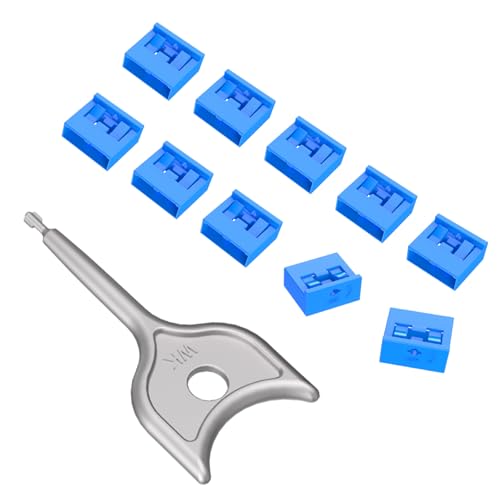
| Best For Travel | Port Type Compatibility: USB-A | Quantity Included: 10 blockers + 1 key | Primary Material: PC material | VIEW LATEST PRICE | Read Our Analysis |
| 20PCS USB-A Port Lock with Keys (Black) |

| Best Bulk Pack | Port Type Compatibility: USB-A | Quantity Included: 20 blockers + 1 key | Primary Material: Heat-resistant PE | VIEW LATEST PRICE | Read Our Analysis |
| MECCANIXITY 15 Port USB Blocker with Coded Key |

| Best For Networks | Port Type Compatibility: USB optical/network ports | Quantity Included: 15 blockers + 2 keys | Primary Material: PC material | VIEW LATEST PRICE | Read Our Analysis |
| USB-C Port Blockers with Key (5-Pack) |
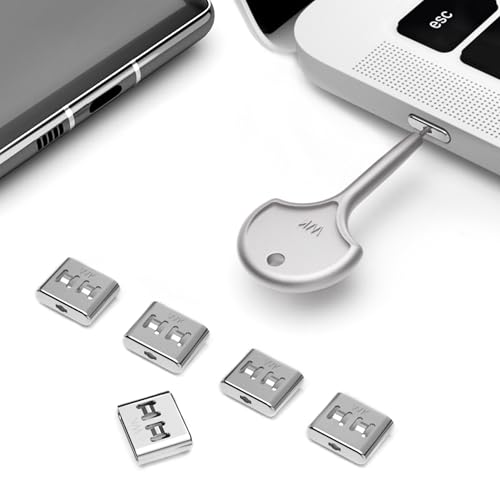
| Best USB-C Option | Port Type Compatibility: USB-C | Quantity Included: 5 blockers + 1 key | Primary Material: Stainless steel (SUS304) | VIEW LATEST PRICE | Read Our Analysis |
| Syba 4 Piece USB-C Type-C Port Blocker with Removal Tool SY-ACC20222 |

| Best USB-C Value | Port Type Compatibility: USB-C | Quantity Included: 4 blockers + 1 removal tool + 1 key | Primary Material: Copper | VIEW LATEST PRICE | Read Our Analysis |
| 7 PCS USB Port Blockers with Locks for PC |

| Most Versatile | Port Type Compatibility: USB-A | Quantity Included: 7 blockers + 1 key | Primary Material: Heat-resistant PC | VIEW LATEST PRICE | Read Our Analysis |
| 10-Pack Black USB Type-A Dust Plugs Port Protectors |

| Best Dust Protection | Port Type Compatibility: USB-A | Quantity Included: 10 dust plugs (no key) | Primary Material: Heat-resistant PE | VIEW LATEST PRICE | Read Our Analysis |
| 12-Pack USB-A Port Locks with Key for Laptops |

| Best For Offices | Port Type Compatibility: USB-A | Quantity Included: 12 blockers + 1 key | Primary Material: Plastic | VIEW LATEST PRICE | Read Our Analysis |
| Stainless Steel USB-C Port Lock with Key Protector |
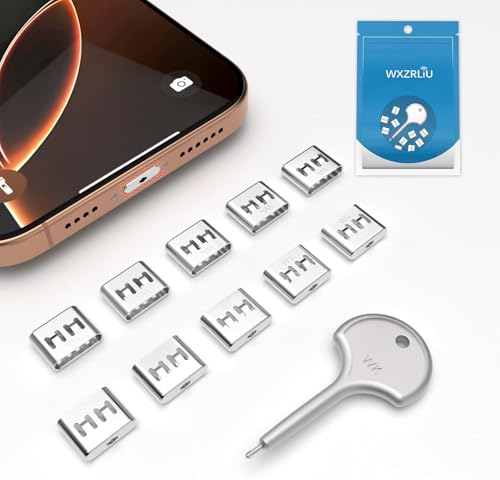
| Best Premium Build | Port Type Compatibility: USB-C | Quantity Included: Multiple units + 1 key | Primary Material: Stainless steel | VIEW LATEST PRICE | Read Our Analysis |
| PortaPow USB Power Blocker – Stops Charging Allows Data (Twin Pack) |

| Specialized Solution | Port Type Compatibility: USB-A | Quantity Included: 2 adapters (twin pack) | Primary Material: N/A (USB adapter) | VIEW LATEST PRICE | Read Our Analysis |
| Mini USB-B Port Lock Pack of 10 Blockers |

| Best Mini USB | Port Type Compatibility: Mini USB-B | Quantity Included: 10 blockers (key not included) | Primary Material: Plastic | VIEW LATEST PRICE | Read Our Analysis |
| 50Pcs USB Port Lock with 3 Keys & Dust Caps |
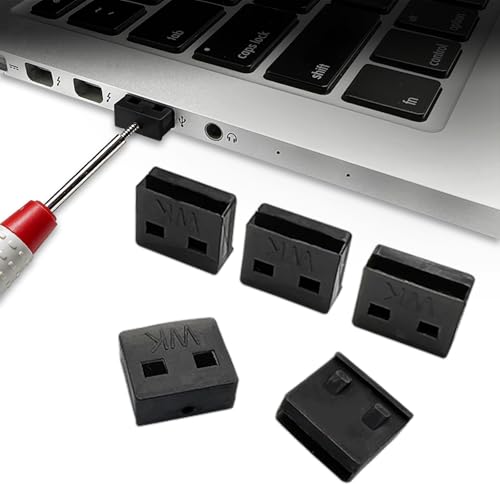
| Best Heavy-Duty Pack | Port Type Compatibility: USB-A | Quantity Included: 50 blockers + 3 keys | Primary Material: High-quality plastic/polypropylene | VIEW LATEST PRICE | Read Our Analysis |
More Details on Our Top Picks
Lindy USB Port Blocker – Pack of 4 Blue (40452)
For offices and schools managing multiple workstations, the Lindy USB Port Blocker offers an affordable way to secure data access. The pack includes four physical locks and one key that prevent unauthorized USB connections. Each lock matches only its corresponding colored key, so you’ll assign different colors to different users or departments. Installation takes seconds—simply insert the blocker into any USB port to prevent access. The blue variant comes in a four-pack, though ten-packs without keys are also available if you need additional blockers. This product includes a two-year warranty, providing reliable protection for sensitive data against unauthorized file transfers or device connections.
- Port Type Compatibility:USB-A
- Quantity Included:4 blockers + 1 key
- Primary Material:Plastic
- Dust & Moisture Protection:Yes
- Color Options:5 colors (pink, green, blue, orange, white)
- Warranty/Guarantee:2-year warranty
- Additional Feature:Color-coded lock-key matching
- Additional Feature:2-year warranty included
- Additional Feature:Available in 5 color variants
USB-A Port Blockers 10 Pack with Removal Key
Need straightforward protection for standard USB-A ports across multiple devices? This 10-pack offers you physical blockers made from durable, heat-resistant PE material designed for laptops, desktops, and docking stations. Insert a blocker into each USB-A port you want to secure, then use the included removal key to take them out when needed. The keyed design restricts unauthorized access and data transfer on unattended equipment. Deploy these blockers in offices, schools, computer labs, and shared spaces where multiple users access devices. Beyond security, the blockers protect your ports from dust and moisture accumulation over time. The reusable design supports repeated use across different devices and environments, making this pack suitable for IT administrators, educators, parents, and security-conscious home users managing multiple machines.
- Port Type Compatibility:USB-A
- Quantity Included:10 blockers + 1 key
- Primary Material:Heat-resistant PE
- Dust & Moisture Protection:Yes
- Color Options:Single color
- Warranty/Guarantee:Not specified
- Additional Feature:Dust and moisture protection
- Additional Feature:Reusable removable design
- Additional Feature:Heat-resistant PE material
10PCS USB-A Port Blockers with Key Dust Protection
Travelers who carry devices through airports, hotels, and public workspaces need reliable USB port security that doesn’t add bulk to your luggage. This 10-piece set provides comprehensive protection by blocking unauthorized data transfers and preventing malware installation on your devices. The metal key ensures you control access while the PC material resists high temperatures. The anti-slip design makes insertion and removal straightforward. Keep one blocker on each frequently-used device and store extras in your bag. The compact size fits easily in any pocket. Contact customer support if you need assistance with installation or have concerns about functionality.
- Port Type Compatibility:USB-A
- Quantity Included:10 blockers + 1 key
- Primary Material:PC material
- Dust & Moisture Protection:Yes
- Color Options:Single color
- Warranty/Guarantee:After-sale support offered
- Additional Feature:High-quality metal key
- Additional Feature:Anti-slip design for insertion
- Additional Feature:PC material heat resistance
20PCS USB-A Port Lock with Keys (Black)
The 20PCS USB-A Port Lock with Keys offers the superior bulk pack solution you’ll need when securing multiple devices across your organization. Each lock features oxidation- and heat-resistant PE material that withstands dust and moisture in demanding environments. You’ll receive twenty port blockers with one key per lock, allowing you to manage access across data centers, medical facilities, financial institutions, and government offices. Installation requires no tools—simply insert each lock into USB-A ports on computers, laptops, televisions, and routers. The removable design enables quick unlocking when authorized personnel need port access. This straightforward approach prevents unauthorized connections while protecting device longevity and data integrity simultaneously.
- Port Type Compatibility:USB-A
- Quantity Included:20 blockers + 1 key
- Primary Material:Heat-resistant PE
- Dust & Moisture Protection:Yes
- Color Options:Black
- Warranty/Guarantee:Not specified
- Additional Feature:20 protective covers included
- Additional Feature:Oxidation-resistant PE material
- Additional Feature:Industrial/government facility suitable
MECCANIXITY 15 Port USB Blocker with Coded Key
Are you protecting networks across multiple devices? The MECCANIXITY 15 Port USB Blocker offers practical security for optical ports on routers, switches, and computers. You get fifteen red blockers and two coded keys in each package. Installation takes seconds: align the blocker with your port and push until it clicks. To remove it, insert the coded key into the disassembly hole, rotate ninety degrees, then pull straight out. The elastic buckle design locks ports firmly while the small, portable blockers fit easily in your pocket. These blockers resist dust, moisture, water, and oxidation, protecting your ports from unauthorized access and foreign objects.
- Port Type Compatibility:USB optical/network ports
- Quantity Included:15 blockers + 2 keys
- Primary Material:PC material
- Dust & Moisture Protection:Yes (dustproof, moistureproof, waterproof)
- Color Options:Red
- Warranty/Guarantee:Not specified
- Additional Feature:Elastic buckle locking design
- Additional Feature:Waterproof and anti-oxidation
- Additional Feature:Coded key removal tool
USB-C Port Blockers with Key (5-Pack)
For anyone securing multiple devices across home and office environments, this 5-pack of USB-C port blockers delivers comprehensive protection with a single steel key. The SUS304 stainless steel construction with nickel plating resists corrosion and withstands daily wear. You’ll use the included steel key to lock and unlock each blocker without scratching your ports. The set fits all USB-C devices—MacBooks, Windows laptops, Chromebooks, tablets, and Thunderbolt 3/4 devices. You can secure your primary laptop, then deploy spares to your home office, second device, or shared reception computer. The tamper-resistant design prevents juice jacking and unauthorized data access from employees and visitors.
- Port Type Compatibility:USB-C
- Quantity Included:5 blockers + 1 key
- Primary Material:Stainless steel (SUS304)
- Dust & Moisture Protection:Not specified
- Color Options:Not specified
- Warranty/Guarantee:Not specified
- Additional Feature:SUS304 stainless steel construction
- Additional Feature:Stops juice jacking attacks
- Additional Feature:Nickel-plated corrosion resistance
Syba 4 Piece USB-C Type-C Port Blocker with Removal Tool SY-ACC20222
Syba’s 4-piece USB-C port blocker set delivers solid value for organizations protecting multiple workstations from unauthorized device connections. Each blocker physically prevents USB-C devices like pen drives and adapters from connecting to your ports. The set includes four blockers, a removal tool, and a locking key. The copper construction ensures durability for frequent use. To install, insert a blocker into each USB-C port you want to secure. Use the key to lock the blocker in place, preventing accidental removal. When you need port access, unlock with the key and use the removal tool to extract the blocker safely. This straightforward system protects four ports simultaneously, making it ideal for shared computer environments.
- Port Type Compatibility:USB-C
- Quantity Included:4 blockers + 1 removal tool + 1 key
- Primary Material:Copper
- Dust & Moisture Protection:Not specified
- Color Options:White
- Warranty/Guarantee:1-year warranty
- Additional Feature:Copper enclosure material
- Additional Feature:Pen-compatible device support
- Additional Feature:1-year manufacturer warranty
7 PCS USB Port Blockers with Locks for PC
Looking to secure multiple devices at once? This 7-piece set gives you one blocker for each USB-A port you need to protect. You’ll get seven color-coded locks—black, white, red, yellow, blue, and green—plus one metal key to manage them all. Insert a blocker into each USB-A port on your PC or laptop, then lock it with the key. The premium PC material resists heat and oxidation while blocking dust and moisture. Remove blockers only when you need USB access, then lock them back down. This system prevents unauthorized data transfers and keeps your devices physically secured against theft.
- Port Type Compatibility:USB-A
- Quantity Included:7 blockers + 1 key
- Primary Material:Heat-resistant PC
- Dust & Moisture Protection:Yes
- Color Options:7 mixed colors (multicolor pack)
- Warranty/Guarantee:Not specified
- Additional Feature:Mixed 7-color pack
- Additional Feature:High-strength break-resistant key
- Additional Feature:Color-coded port sorting
10-Pack Black USB Type-A Dust Plugs Port Protectors
You’ll want these dust plugs if your devices sit unused or collect debris in storage areas. This 10-pack provides affordable protection for USB-A ports across laptops, TVs, routers, and chargers. The heat-resistant PE material resists cracking while remaining lightweight. Raised edges create a secure fit that prevents loss but allows easy removal. Simply insert plugs into unused ports to block dust, dirt, sand, and moisture that compromise connections. The set’s quantity suits multiple devices or sharing among users. Replace any plugs if damaged. Contact WECONFiG’s support team with questions. The 180-day guarantee covers replacement if unsatisfied with protection quality.
- Port Type Compatibility:USB-A
- Quantity Included:10 dust plugs (no key)
- Primary Material:Heat-resistant PE
- Dust & Moisture Protection:Yes (dust plugs)
- Color Options:Black
- Warranty/Guarantee:180-day no-sweat promise
- Additional Feature:Raised edges for grip
- Additional Feature:180-day no-sweat promise
- Additional Feature:Heat-resistant PE material
12-Pack USB-A Port Locks with Key for Laptops
These removable port locks protect your office devices from unauthorized USB access. You’ll install them directly into standard USB-A ports on laptops and tablets without tools. The included key unlocks them when you need to use your ports again. You can choose from multiple colors to organize different devices or departments. These locks also block dust and moisture, extending your equipment’s lifespan. They fit snugly in ports without loosening or falling out during daily use. Install them easily by inserting each lock into a USB-A port, then secure with the key. Remove them just as simply when you need port access. Order multiple packs for comprehensive coverage across your workplace devices and systems.
- Port Type Compatibility:USB-A
- Quantity Included:12 blockers + 1 key
- Primary Material:Plastic
- Dust & Moisture Protection:Yes
- Color Options:Multiple colors available
- Warranty/Guarantee:Not specified
- Additional Feature:Color-coding organizational support
- Additional Feature:Tool-free installation/removal
- Additional Feature:Multiple color options available
Stainless Steel USB-C Port Lock with Key Protector
Business travelers who frequently use public charging stations need premium build protection that doesn’t compromise portability. This stainless steel USB-C port lock blocks data theft at airports, hotels, and coffee shops by physically preventing unauthorized access. The key-based design ensures only you can remove it, and the durable metal construction resists tampering better than plastic alternatives. Simply insert the lock into your device’s USB-C port when charging in public spaces. Its compact size fits easily in your laptop bag, making deployment quick whenever you need it. The manufacturer backs this protection with a satisfaction guarantee, refunding your purchase if you’re unsatisfied with the security it provides.
- Port Type Compatibility:USB-C
- Quantity Included:Multiple units + 1 key
- Primary Material:Stainless steel
- Dust & Moisture Protection:Not specified
- Color Options:Not specified
- Warranty/Guarantee:Customer satisfaction guarantee
- Additional Feature:Stainless steel durability
- Additional Feature:Portable travel guardian size
- Additional Feature:100% satisfaction money-back guarantee
PortaPow USB Power Blocker – Stops Charging Allows Data (Twin Pack)
Looking for a specialized solution that blocks power while keeping data flowing? The PortaPow USB Power Blocker offers a twin pack of USB-A adapters that disconnect the 5V power line while maintaining D+, D-, and ground connections. This design supports USB 2.0 data transfer exclusively. However, you’ll want to note that it isn’t compatible with smartphones, tablets, and numerous other devices. You’ll find it most useful for specialist applications like 3D printers and Raspberry Pi systems where power delivery causes problems. Before purchasing, review customer feedback to confirm compatibility with your specific equipment, as success varies considerably across different device types.
- Port Type Compatibility:USB-A
- Quantity Included:2 adapters (twin pack)
- Primary Material:N/A (USB adapter)
- Dust & Moisture Protection:No (power blocker only)
- Color Options:Not specified
- Warranty/Guarantee:Not specified
- Additional Feature:Allows USB 2.0 data
- Additional Feature:Stops power transmission capability
- Additional Feature:Specialist application use cases
Mini USB-B Port Lock Pack of 10 Blockers
Want to secure Mini USB-B ports across your organization? This pack of 10 blockers offers straightforward protection for multiple devices simultaneously. Installation requires no tools—you’ll simply insert each lock by hand into the Mini USB-B port. Note that the key isn’t included; you’ll need to purchase a Smart Keeper Lock Key Mini separately for removal. The key works across nine different Essential series products, so one key manages your entire port-locking system. This approach suits offices needing consistent security across many workstations or facilities managing shared equipment. The blockers prevent unauthorized data transfers and charging attempts at the hardware level, delivering reliable protection without complicated setup procedures.
- Port Type Compatibility:Mini USB-B
- Quantity Included:10 blockers (key not included)
- Primary Material:Plastic
- Dust & Moisture Protection:Not specified
- Color Options:Not specified
- Warranty/Guarantee:Not specified
- Additional Feature:All-purpose key compatibility
- Additional Feature:Hand-installable easy setup
- Additional Feature:Essential series integration
50Pcs USB Port Lock with 3 Keys & Dust Caps
Need to protect multiple devices from unauthorized USB access and environmental damage? This 50-piece set offers scalable security across your home or office. Each black polypropylene lock requires a specially designed key for removal, preventing accidental or intentional port access. The included dust caps block lint, moisture, and oxidation. You’ll receive three keys to manage multiple devices efficiently. The durable plastic construction withstands high temperatures, making it suitable for car USB ports and electronics in warm environments. When you no longer need the locks, simply remove them without damaging ports, allowing normal USB functionality to resume.
- Port Type Compatibility:USB-A
- Quantity Included:50 blockers + 3 keys
- Primary Material:High-quality plastic/polypropylene
- Dust & Moisture Protection:Yes
- Color Options:Black
- Warranty/Guarantee:Not specified
- Additional Feature:50 blockers with caps
- Additional Feature:High-temperature polypropylene material
- Additional Feature:Disassembles for USB reuse
Factors to Consider When Choosing USB Port Blockers With Key

When selecting USB port blockers with keys, you’ll need to evaluate five critical factors: port type compatibility (ensuring the blocker fits your USB-A, USB-C, or other ports), material durability (checking if the plastic or metal construction can withstand repeated use), pack size and quantity (determining how many devices you need to secure), key management system (deciding between master keys, individual keys, or combination locks), and security level requirements (assessing whether you need basic dust protection or advanced data-access prevention). Start by identifying which USB ports you’re protecting, then match blockers to those specifications while confirming the material quality matches your environment’s wear demands. Finally, count your protected devices, choose a key system that fits your management capacity, and select security features that match your actual security needs rather than purchasing unnecessary protection levels.
Port Type Compatibility
How do you know which USB port blocker will truly fit your device? First, identify your port type. Check your device for USB-A ports (rectangular, flat connectors) or USB-C ports (small, oval connectors). Next, match your blocker to that specific port type. USB-A blockers won’t fit USB-C ports and vice versa. If you own multiple devices with different port types, purchase separate blockers for each. Some manufacturers offer universal kits claiming cross-compatibility, but verify they actually support your exact port standard before buying. Finally, confirm color-coded lock systems align with your devices—if you have three USB-C ports, ensure your kit includes three matching blockers and keys. This prevents installation errors and guarantees proper security across all your ports.
Material and Durability
Once you’ve matched your blocker to the correct port type, you’ll want to examine what materials make up the blocker itself—this directly affects how long it’ll protect your ports. Choose stainless steel models, specifically SUS304 with nickel plating, for superior corrosion resistance and extended lifespan. If you prefer plastic options, select high-strength PC or PE materials that resist tampering and daily wear. Look for heat and oxidation resistance properties, which maintain integrity through environmental changes and repeated use. Verify the locking mechanism is sturdy with a dedicated key that won’t wear down quickly. Check for textured or anti-slip surfaces that facilitate insertion and removal without damaging your ports. These material specifications directly determine your blocker’s durability and protective effectiveness.
Pack Size and Quantity
What quantity of USB port blockers do you really need? Start by counting your accessible USB ports across all devices you want to protect. Single devices require 4-pack sets, while multiple devices need larger quantities. Small offices benefit from 10 to 15-unit packs covering several workstations. Larger environments like labs or reception areas need 20 to 50-unit packs for comprehensive coverage. Consider whether you’ll deploy blockers across one location or multiple sites; twin packs address multi-location needs efficiently. Check key distribution: single-key packs suit one user, while coded or multiple-key options work for shared environments requiring different access levels. Color-coded variants help you organize ports by device or purpose. Buy slightly more than your current count to account for future equipment additions and replacements.
Key Management System
Why you choose a key management system matters as much as the blockers themselves. A robust system assigns each port blocker a unique, color-coded key that only matches its corresponding lock, preventing unauthorized cross-access. When you deploy multiple blockers across your organization, multi-pack offerings let you scale efficiently—typically including several locks with one key per color. This approach maintains individual access control without managing dozens of separate keys. Look for sets that provide spare keys and clear instructions to avoid lockouts and preserve long-term integrity. Some advanced options include front- and back-removal tools or coded keys to reduce operator errors in high-traffic environments. If you use different port types like USB-A, USB-C, or mini USB-B, confirm that your chosen system maintains consistent keying across all devices.
Security Level Requirements
Beyond selecting the right key management system, you’ll need to assess your organization’s actual security threats to choose port blockers that match your protection needs. Start by identifying your risk level: high-security environments require tamper-resistant metal housings with coded keys, while standard offices may need basic keyed designs. Next, evaluate physical durability requirements. If your ports face harsh conditions or frequent access attempts, select blockers with stainless steel or high-strength materials. Then, consider your authorized personnel’s needs. Ensure the blocker allows quick removal through front or back access when legitimate users need port access. Finally, verify compatibility with your specific USB-A or USB-C port dimensions to guarantee effective locking. Match these factors directly to your threat level.
Environmental Protection Features
Environmental conditions can substantially degrade USB port blockers over time, so you’ll want to prioritize models with robust sealing and corrosion-resistant materials. Look for blockers constructed from stainless steel or heat-resistant polycarbonate that withstand high temperatures and frequent handling without degrading.
Check that your chosen blocker includes anti-oxidation finishes and protective caps or dust shields. These features prevent dust and moisture from entering ports when the blocker isn’t in use. Verify the design provides a secure fit that resists loosening from environmental vibrations or humidity-induced port swelling.
Confirm the blocker’s keying system maintains integrity under daily wear, including exposure to dust, moisture, and cleaning chemicals. This ensures your port protection remains reliable throughout extended use in demanding environments.
Final Thoughts
You’ve reviewed 14 USB port blockers offering various security levels. Choose based on your needs: select standard blockers for basic dust protection, multi-packs for multiple devices, stainless steel options for durability, or specialized variants like USB-C or Mini USB-B. Verify the blocker fits your ports, confirm you receive coded keys, and test removal before full deployment. Implement blockers consistently across all accessible ports for maximum data protection.

Meet Ry, “TechGuru,” a 36-year-old technology enthusiast with a deep passion for tech innovations. With extensive experience, he specializes in gaming hardware and software, and has expertise in gadgets, custom PCs, and audio.
Besides writing about tech and reviewing new products, he enjoys traveling, hiking, and photography. Committed to keeping up with the latest industry trends, he aims to guide readers in making informed tech decisions.