


When you’re moving large files between devices, you need an enclosure that matches your speed demands. USB4 NVMe enclosures deliver the fast data transfer you’re after, but choosing the right one requires understanding what separates a basic option from a high-performance solution. The seven enclosures ahead offer different advantages—from cooling systems to drive capacity support—and we’ll show you how to pick the one that fits your specific needs.
| UGREEN 40Gbps M.2 NVMe Enclosure with Heat Dissipation |
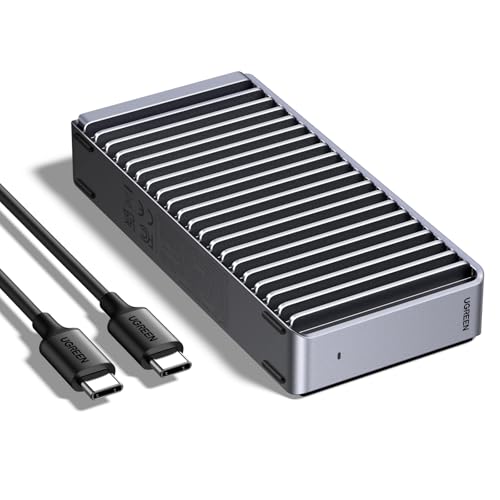
| Best Heat Dissipation | Max Transfer Speed: 3600 MB/s | NVMe Form Factor Support: 2230/2242/2260/2280 | Thermal Management: Double-sided fin heat dissipation (passive) | VIEW LATEST PRICE | Read Our Analysis |
| SABRENT USB4 NVMe SSD Enclosure (EC-U4TN) |

| Best For Professionals | Max Transfer Speed: 3900 MB/s (USB4) | NVMe Form Factor Support: 2230/2242/2260/2280 | Thermal Management: Active cooling fan | VIEW LATEST PRICE | Read Our Analysis |
| OWC Express 1M2 40Gb/s Portable NVMe SSD USB4 |

| Best Performance | Max Transfer Speed: 3836 MB/s | NVMe Form Factor Support: 2230/2242/2280 | Thermal Management: Patented heat-dissipating design (passive) | VIEW LATEST PRICE | Read Our Analysis |
| ASUS ProArt PA40SU SSD Enclosure USB4 40Gbps |

| Best Design | Max Transfer Speed: 40 Gbps (exact speed not specified) | NVMe Form Factor Support: 2230/2280 | Thermal Management: Four-level smart cooling system | VIEW LATEST PRICE | Read Our Analysis |
| ACASIS 40Gbps M.2 NVMe SSD Enclosure with Cooling Fan |

| Best Active Cooling | Max Transfer Speed: 2805 MB/s read | NVMe Form Factor Support: 2230/2242/2260/2280 | Thermal Management: Active cooling fan with switch | VIEW LATEST PRICE | Read Our Analysis |
| UGREEN 80Gbps M.2 NVMe SSD Enclosure Thunderbolt |
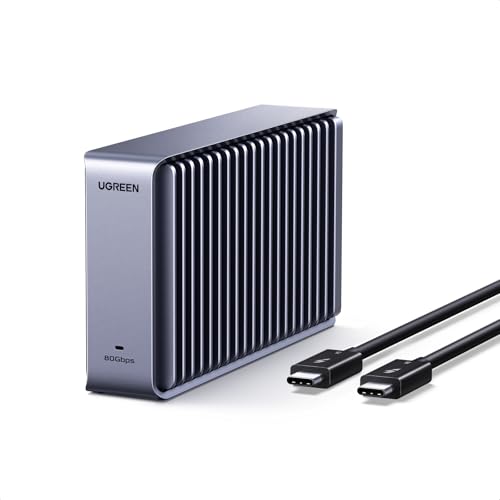
| Best Speed | Max Transfer Speed: 7000 MB/s | NVMe Form Factor Support: 2230/2242/2260/2280 | Thermal Management: 3D dual-sided aluminum fins (passive) | VIEW LATEST PRICE | Read Our Analysis |
| Satechi M.2 NVMe SSD USB4 Enclosure 40Gbps |

| Award-Winning Pick | Max Transfer Speed: 3840 MB/s | NVMe Form Factor Support: 2230/2242/2260/2280 | Thermal Management: Thermal pad included | VIEW LATEST PRICE | Read Our Analysis |
More Details on Our Top Picks
UGREEN 40Gbps M.2 NVMe Enclosure with Heat Dissipation
Looking for an enclosure that handles sustained high-speed transfers without thermal throttling? The UGREEN 40Gbps enclosure delivers speeds up to 3,600MB/s when paired with Thunderbolt 4 cables and devices. You’ll get broad compatibility across USB4, Thunderbolt 3/4, and USB 3.x standards. The dual-sided aluminum fin design dissipates heat several times more efficiently than standard enclosures, eliminating fan noise while protecting your drive’s lifespan. This compact case supports M.2 NVMe drives in 2230 to 2280 sizes up to 8TB and works with Windows, macOS, Linux, and Android. Check your SSD’s thickness before installation—thicker drives may require replacing the thermal pads with thinner alternatives for proper fitting.
- Max Transfer Speed:3600 MB/s
- NVMe Form Factor Support:2230/2242/2260/2280
- Thermal Management:Double-sided fin heat dissipation (passive)
- Maximum SSD Capacity:8TB
- Operating Systems Supported:Windows, macOS, Linux, Android
- Installation Method:No tools required (standard)
- Additional Feature:Double-sided fin heat dissipation
- Additional Feature:Supports drives up to 8TB
- Additional Feature:No fan noise operation
SABRENT USB4 NVMe SSD Enclosure (EC-U4TN)
Need portable storage that keeps pace with your workflow? The Sabrent USB4 NVMe SSD Enclosure delivers transfer speeds up to 3,900 MB/s via USB4 and 2,700 MB/s with Thunderbolt 3/4. Install any PCIe NVMe SSD—2230, 2242, 2260, or 2280—without tools. The enclosure works with Windows and macOS systems featuring USB4, Thunderbolt, or USB-C ports. An integrated active cooling fan maintains performance during large file transfers. No external power or drivers required—simply connect and use. This enclosure suits professionals needing fast, reliable portable storage for creative work, editing, or data transfer tasks.
- Max Transfer Speed:3900 MB/s (USB4)
- NVMe Form Factor Support:2230/2242/2260/2280
- Thermal Management:Active cooling fan
- Maximum SSD Capacity:Not specified
- Operating Systems Supported:Windows, macOS
- Installation Method:Tool-free installation
- Additional Feature:Integrated active cooling fan
- Additional Feature:Tool-free NVMe installation
- Additional Feature:No external power required
OWC Express 1M2 40Gb/s Portable NVMe SSD USB4
The OWC Express 1M2 delivers top-tier performance for professionals who need fast external storage. You’ll get real-world speeds up to 3836MB/s, which is over two times faster than competing Thunderbolt enclosures. The aluminum heat sink keeps your drive cool and reliable during extended use. You can install 2280, 2242, or 2230 M.2 NVMe drives inside. The enclosure works with USB4, Thunderbolt, and USB-C devices, giving you broad compatibility. It’s bus-powered and pocket-sized, so you can carry it anywhere. OWC includes a 40Gb/s USB-C cable and screwdriver. You’re covered by a two-year enclosure warranty or three-year solution warranty for complete peace of mind.
- Max Transfer Speed:3836 MB/s
- NVMe Form Factor Support:2230/2242/2280
- Thermal Management:Patented heat-dissipating design (passive)
- Maximum SSD Capacity:Not specified
- Operating Systems Supported:Not specified
- Installation Method:Screwdriver included
- Additional Feature:Patented heat-dissipating design
- Additional Feature:Includes 40Gb/s USB-C cable
- Additional Feature:2-3 year limited warranty
ASUS ProArt PA40SU SSD Enclosure USB4 40Gbps
ASUS ProArt PA40SU delivers ultraslim design paired with exceptional speed for professionals transferring large files regularly. You’ll install NVMe SSDs (2230/2280) using the tool-free, push-to-open mechanism without requiring additional equipment. The USB4 40 Gbps interface via USB-C provides high-speed performance across Windows 11 and macOS systems. Four-level smart cooling maintains low-noise operation during intensive data transfers. You can monitor real-time SSD activity through the ProArt SSD Dashboard, a custom monitoring interface included with your purchase. The one-year warranty covers hardware defects.
- Max Transfer Speed:40 Gbps (exact speed not specified)
- NVMe Form Factor Support:2230/2280
- Thermal Management:Four-level smart cooling system
- Maximum SSD Capacity:Not specified
- Operating Systems Supported:Windows 11, macOS
- Installation Method:Tool-free push-to-open
- Additional Feature:Four-level smart cooling system
- Additional Feature:Push-to-open quick mechanism
- Additional Feature:ProArt SSD Dashboard monitoring
ACASIS 40Gbps M.2 NVMe SSD Enclosure with Cooling Fan
If you’re managing demanding professional workflows, ACASIS delivers sustained high-speed performance through its active cooling system. The built-in fan with switch control prevents thermal throttling during intensive tasks like video editing and data backup. The aluminum enclosure and precision-engineered heat dissipation holes work together to maintain stability. You’ll access speeds up to 2805 MB/s read and 2734 MB/s write. The JHL7440 chip ensures Thunderbolt 4 and Thunderbolt 3 compatibility while supporting USB 3.2 backward compatibility. It accommodates M.2 drives in 2280, 2260, 2242, and 2230 sizes, including high-capacity options. The compact, pocket-sized design suits professionals requiring portable, high-performance external storage.
- Max Transfer Speed:2805 MB/s read
- NVMe Form Factor Support:2230/2242/2260/2280
- Thermal Management:Active cooling fan with switch
- Maximum SSD Capacity:4TB tested (990 Pro)
- Operating Systems Supported:M1/M2/M3 MacBook, iPad Pro, Windows, Linux
- Installation Method:No tools required (standard)
- Additional Feature:Built-in cooling fan switch
- Additional Feature:JHL7440 certified Intel chip
- Additional Feature:Prevents thermal throttling
UGREEN 80Gbps M.2 NVMe SSD Enclosure Thunderbolt
Looking for maximum speed without sacrificing portability? The UGREEN 80Gbps enclosure delivers up to 7000 MB/s using dual-chip design with Intel Thunderbolt and JMicron controllers. It accommodates M.2 sizes 2230, 2242, 2260, and 2280 up to 8TB. The 3D cooling system with aluminum fins increases heat dissipation by 91% and reduces surface temperatures by 10%. You’ll find it compatible with Windows, macOS, Linux, and Android. Note that SATA SSDs and pre-installed heatsinks won’t work. Some thicker SSDs require a thinner thermal pad replacement. This ultra-slim aluminum design makes it ideal for work, gaming, and media storage while remaining travel-friendly.
- Max Transfer Speed:7000 MB/s
- NVMe Form Factor Support:2230/2242/2260/2280
- Thermal Management:3D dual-sided aluminum fins (passive)
- Maximum SSD Capacity:8TB
- Operating Systems Supported:Windows, macOS, Linux, Android
- Installation Method:No tools required (standard)
- Additional Feature:Dual-chip Thunderbolt controller design
- Additional Feature:91% heat dissipation improvement
- Additional Feature:Up to 7000 MB/s speed
Satechi M.2 NVMe SSD USB4 Enclosure 40Gbps
The Satechi M.2 Enclosure (Model ST-EU4NPM) is an award-winning pick for users who need maximum speed with broad device compatibility. This aluminum enclosure supports NVMe SSDs up to 16TB and delivers speeds up to 3840MB/s via USB4 40Gbps connection. It works with Mac, Windows, Linux, and even iPhone through USB-C. The tool-free installation uses a silicone pin, and the included thermal pad manages heat effectively. Backward compatibility with USB3.2 and USB2.0 ensures you’ll connect to older devices without issues. At 189 grams, it’s portable. You get a 2-year warranty, USB-C cable, and no drivers required.
- Max Transfer Speed:3840 MB/s
- NVMe Form Factor Support:2230/2242/2260/2280
- Thermal Management:Thermal pad included
- Maximum SSD Capacity:16TB
- Operating Systems Supported:Mac, Windows, Linux, iPhone (via USB-C)
- Installation Method:Tool-free with silicone pin
- Additional Feature:Supports up to 16TB capacity
- Additional Feature:CES award-winning enclosure design
- Additional Feature:Includes thermal pad/silicone pin
Factors to Consider When Choosing a USB4 NVMe Enclosure

When selecting a USB4 NVMe enclosure, you should evaluate transfer speed performance to match your workflow needs, check the thermal management system to prevent drive overheating during sustained use, and verify drive compatibility requirements with your specific M.2 NVMe model. Next, examine the build quality materials—aluminum and steel options provide better durability than plastic—and consider portability and design features such as cable storage, weight, and form factor for your intended use. These five factors work together to determine whether an enclosure will deliver reliable, fast data transfers while protecting your investment.
Transfer Speed Performance
How much speed do you truly need from your USB4 NVMe enclosure? Real-world performance typically ranges from 3,800 to 3,900 MB/s with PCIe Gen4 x4 drives, approaching the theoretical 5,000 MB/s maximum. First, match your enclosure’s controller quality to your SSD’s capabilities—pairing a high-end drive with a budget controller wastes potential. Second, verify Thunderbolt 4 or USB4 compatibility on your device, as USB 3.0 connections cap speeds significantly lower. Third, confirm your enclosure supports your drive’s size: 2230, 2242, 2260, or 2280 M.2 formats. Fourth, check if active cooling or heat-dissipation design prevents thermal throttling during sustained transfers. Finally, review firmware updates and driver support, which directly impact stability and achievable speeds.
Thermal Management Systems
Why does your USB4 NVMe enclosure heat up during sustained transfers, and what can you do about it? High-speed PCIe SSDs generate significant heat during extended data movement, and inadequate cooling causes thermal throttling, which reduces your actual transfer speeds. You’ll want to examine the enclosure’s thermal design first. Check if it uses aluminum cages with fins or heat sinks to dissipate heat effectively. Consider models with active cooling systems—built-in fans maintain consistent performance during long transfers. Dual-sided or 3D-printed fin arrays increase surface area substantially, improving heat dissipation compared to standard designs. Additionally, verify that thermal pads between the SSD and enclosure are thin enough to maintain proper contact while ensuring effective heat transfer. These factors directly impact your sustained bandwidth performance.
Drive Compatibility Requirements
Before you buy a USB4 NVMe enclosure, you’ll need to verify that your drive meets the enclosure’s compatibility standards. Check that your drive is a PCIe NVMe M.2 drive, not a SATA M.2 SSD, since USB4 enclosures don’t support SATA models. Confirm your drive’s form factor—2280, 2260, 2242, or 2230—matches what the enclosure accepts. If your drive has a pre-installed heatsink, measure its thickness; thicker heatsinks may prevent the drive from fitting properly. Verify your drive’s capacity doesn’t exceed the enclosure’s maximum, typically 8TB. For peak speeds of 40 Gbps, ensure your drive is PCIe Gen4 x4 NVMe and your computer supports USB4 or Thunderbolt 3/4.
Build Quality Materials
When you’re evaluating a USB4 NVMe enclosure, the materials used in its construction directly affect durability, heat management, and long-term performance. Choose enclosures with full aluminum or high-grade aluminum alloy chassis, which maximize rigidity and conduct heat effectively away from your drive. Avoid plastic housings entirely, as they deform under sustained use and trap thermal energy. Look for double-sided or multi-fin heat sinks with 3D cooling designs to improve thermal performance during extended transfers. Verify that thermal pads are included, and check whether the model offers active cooling fans for load-intensive operations. Finally, confirm the enclosure accommodates your specific NVMe SSD dimensions, including thickness, since some drives require thermal pad replacements to fit properly.
Portability And Design
While build quality guarantees your enclosure can handle thermal stress and heavy use, the physical form factor determines whether you’ll truly want to carry it daily. Check the dimensions and weight specifications against your bag or pocket space. Palm-sized aluminum enclosures offer maximum portability for mobile workflows. Ultra-slim designs reduce bulk markedly, fitting easily into small bags or jacket pockets. Aluminum heat sinks and finned cooling maintain performance without adding weight. Evaluate tool-free installation options and included USB-C cables for quick setup when traveling. Measure your specific storage needs against the enclosure’s footprint. Consider whether you prioritize pocket portability or desktop stability. Match the enclosure’s weight and dimensions directly to your travel habits and work environment.
Warranty And Support Coverage
How well does your enclosure’s warranty really protect your investment? Check whether you’re getting enclosure-only coverage or a full-solution warranty that includes the SSD. Most manufacturers offer 1 to 3 years of protection against defects in materials and workmanship. Review what’s excluded—typically SSDs aren’t covered separately. Examine the warranty terms carefully: they should specify coverage for normal-use defects while excluding damage from misuse or physical damage. Look for documented replacement and repair processes so you know exactly what happens if problems arise. Verify whether accessories and software dashboards are included in warranty service. Compare warranty lengths across products you’re considering, since longer coverage often indicates manufacturer confidence in durability.
Final Thoughts
You’ve reviewed seven USB4 NVMe enclosures offering speeds up to 3,900 MB/s. Choose based on your needs: pick UGREEN or Sabrent for budget options, OWC for durability, or ASUS for advanced cooling. Verify your drive’s capacity (up to 16TB), confirm Thunderbolt 4/USB4 compatibility on your device, and select tool-free installation if you prefer quick setup. Match the enclosure’s speed rating to your Gen4 NVMe drive for optimal performance.

Meet Ry, “TechGuru,” a 36-year-old technology enthusiast with a deep passion for tech innovations. With extensive experience, he specializes in gaming hardware and software, and has expertise in gadgets, custom PCs, and audio.
Besides writing about tech and reviewing new products, he enjoys traveling, hiking, and photography. Committed to keeping up with the latest industry trends, he aims to guide readers in making informed tech decisions.