
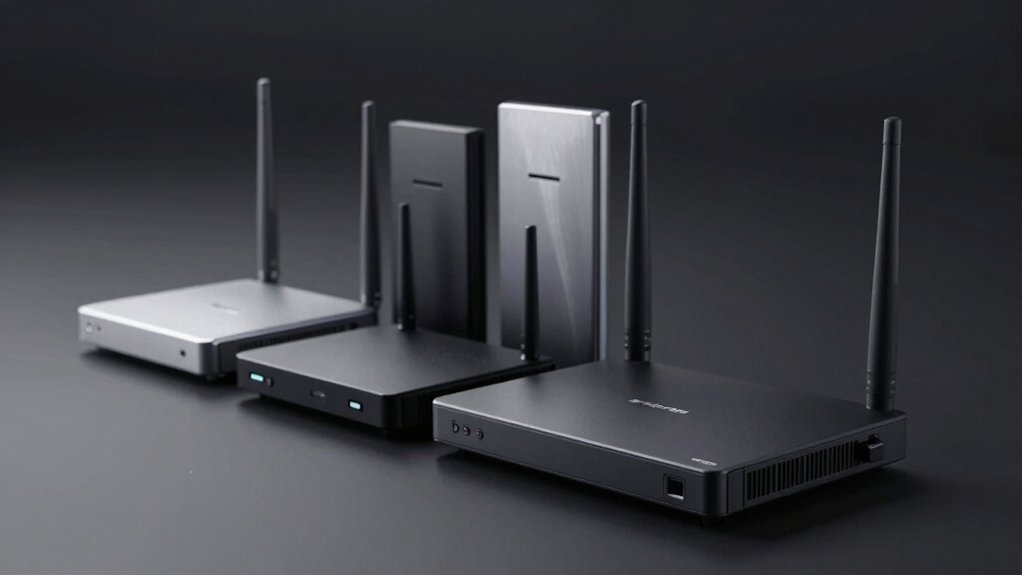

When you’re shopping for a Wi-Fi 6E router, you’ll want to compare tri-band and quad-band models that deliver speeds of AXE5400 or higher across multiple frequencies. Your choice depends on coverage needs, budget, and device compatibility. Understanding the key differences between standalone routers and mesh systems—plus knowing which features actually impact your real-world performance—will help you avoid overpaying for unnecessary specs. Here’s what you need to evaluate.
| TP-Link AXE5400 WiFi 6E Router (Archer AXE75) |

| Editor’s Choice | WiFi Standard & Bands: WiFi 6E tri-band (6 GHz, 5 GHz, 2.4 GHz) | Total Speed: 5400 Mbps | Coverage Area: Whole-home with OneMesh extender support | VIEW LATEST PRICE | Read Our Analysis |
| TP-Link Archer AX21 WiFi 6 Router |

| Budget-Friendly Pick | WiFi Standard & Bands: WiFi 6 dual-band (5 GHz, 2.4 GHz) | Total Speed: 1800 Mbps | Coverage Area: Extensive coverage with 4 high-gain antennas | VIEW LATEST PRICE | Read Our Analysis |
| TP-Link Deco XE70 Pro AXE4900 WiFi 6E Mesh Router |

| Best for Coverage | WiFi Standard & Bands: WiFi 6E tri-band (6 GHz, 5 GHz, 2.4 GHz) | Total Speed: 4900 Mbps | Coverage Area: Up to 2,900 sq ft | VIEW LATEST PRICE | Read Our Analysis |
| TP-Link Deco XE75 WiFi 6E Mesh System |

| Best Overall | WiFi Standard & Bands: WiFi 6E tri-band (6 GHz, 5 GHz, 2.4 GHz) | Total Speed: 5400 Mbps | Coverage Area: Up to 2,900 sq ft | VIEW LATEST PRICE | Read Our Analysis |
| Amazon eero Pro 6E Mesh WiFi Router (1-pack) |
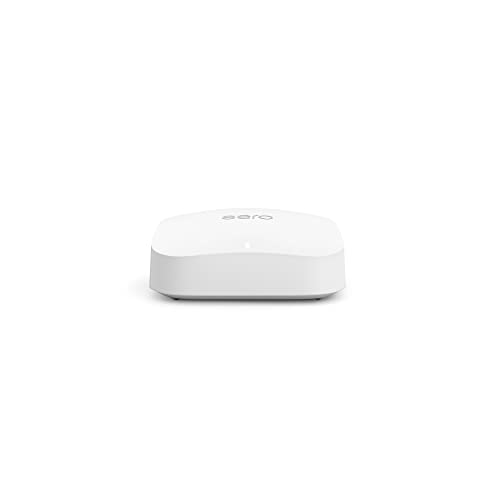
| Most Expandable | WiFi Standard & Bands: WiFi 6E tri-band (6 GHz, 5 GHz, 2.4 GHz) | Total Speed: 2300 Mbps (combined wired/wireless) | Coverage Area: Up to 2,000 sq ft | VIEW LATEST PRICE | Read Our Analysis |
| ASUS RT-BE58U WiFi 7 BE3600 AiMesh Router |

| WiFi 7 Upgrade | WiFi Standard & Bands: WiFi 7 dual-band (5 GHz, 2.4 GHz) | Total Speed: 3600 Mbps | Coverage Area: 2.0 ft approximate marketing footprint | VIEW LATEST PRICE | Read Our Analysis |
More Details on Our Top Picks
TP-Link AXE5400 WiFi 6E Router (Archer AXE75)
Are you gaming, streaming, or running multiple devices simultaneously and frustrated with your current router’s performance? The TP-Link Archer AXE75 delivers tri-band WiFi 6E speeds up to 5400 Mbps across three bands: 6 GHz at 2402 Mbps, 5 GHz at 2402 Mbps, and 2.4 GHz at 574 Mbps. The 6 GHz band reduces latency and congestion. Its quad-core CPU and OFDMA technology handle four times more simultaneous device transmissions. Setup works with most major ISPs like AT&T, Verizon, and Xfinity; you’ll need a modem for many providers. OneMesh compatibility expands coverage throughout your home using compatible extenders.
- WiFi Standard & Bands:WiFi 6E tri-band (6 GHz, 5 GHz, 2.4 GHz)
- Total Speed:5400 Mbps
- Coverage Area:Whole-home with OneMesh extender support
- Device Capacity:High simultaneous device transmissions via OFDMA
- Security Features:TP-Link HomeShield, VPN Server/Client, WPA3
- Ethernet Ports:Multiple Gigabit ports for wired connectivity
- Additional Feature:OneMesh compatible whole-home
- Additional Feature:Quad-Core CPU 1.7GHz
- Additional Feature:2-year warranty included
TP-Link Archer AX21 WiFi 6 Router
If you’re looking for a budget-friendly WiFi 6 router that doesn’t require a separate 6 GHz modem, the TP-Link Archer AX21 delivers solid dual-band performance at an accessible price point. This AX1800 router provides up to 1200 Mbps on 5 GHz and 574 Mbps on 2.4 GHz, supported by four high-gain antennas and OFDMA technology that enables simultaneous data transmission to multiple devices. Beamforming concentrates your signal toward distant devices for improved coverage. The router includes OpenVPN and PPTP VPN server options and carries TP-Link’s CISA Secure-by-Design pledge. It’s compatible with all major ISPs including Comcast, Charter, AT&T, and Verizon. Keep firmware updated through the Tether app for optimal performance, and contact support at 1-866-225-8139 if you need assistance.
- WiFi Standard & Bands:WiFi 6 dual-band (5 GHz, 2.4 GHz)
- Total Speed:1800 Mbps
- Coverage Area:Extensive coverage with 4 high-gain antennas
- Device Capacity:Multiple devices via OFDMA
- Security Features:CISA Secure-by-Design pledge, VPN Server, WPA3
- Ethernet Ports:Standard Gigabit ports
- Additional Feature:4 high-gain antennas
- Additional Feature:Beamforming signal concentration
- Additional Feature:CISA Secure-by-Design pledge
TP-Link Deco XE70 Pro AXE4900 WiFi 6E Mesh Router
The TP-Link Deco XE70 Pro AXE4900 delivers what you need if you’re managing a multi-device household across a larger space. This tri-band Wi-Fi 6E mesh system covers up to 2,900 square feet and supports 200 devices simultaneously. You’ll get 4.9 Gbps total speed across six streams, with the 6 GHz band eliminating network congestion. The 2.5 Gbps wired port handles high-bandwidth tasks efficiently. Setup takes minutes using the Deco app, which lets you manage your network remotely. AI-powered roaming ensures seamless device switching. Built-in HomeShield security protects against threats and provides parental controls. The system works with any ISP and supports both wireless and wired backhaul configurations.
- WiFi Standard & Bands:WiFi 6E tri-band (6 GHz, 5 GHz, 2.4 GHz)
- Total Speed:4900 Mbps
- Coverage Area:Up to 2,900 sq ft
- Device Capacity:Supports up to 200 devices
- Security Features:HomeShield suite, parental controls, IoT protection
- Ethernet Ports:1x 2.5 Gbps port + 2x 1 Gbps ports
- Additional Feature:AI-powered self-learning mesh
- Additional Feature:2.5 Gbps wired port
- Additional Feature:AI roaming seamless switching
TP-Link Deco XE75 WiFi 6E Mesh System
Looking for a mesh system that covers your entire home while delivering Wi-Fi 6E speeds? The TP-Link Deco XE75 offers tri-band coverage up to 2,900 square feet with combined speeds of 5,400 Mbps. You’ll get 2,402 Mbps on both the 6 GHz and 5 GHz bands, plus 574 Mbps on 2.4 GHz. Set it up using the Deco app, then configure your network preferences and guest access. The system includes three Ethernet ports for wired connections and works with most ISPs. Built-in HomeShield security provides device identification and parental controls at no extra cost. You’ll receive 24/7 support and a two-year warranty with your purchase.
- WiFi Standard & Bands:WiFi 6E tri-band (6 GHz, 5 GHz, 2.4 GHz)
- Total Speed:5400 Mbps
- Coverage Area:Up to 2,900 sq ft
- Device Capacity:High capacity for multi-device environments
- Security Features:HomeShield, parental controls, CISA Secure-by-Design pledge
- Ethernet Ports:1x 2.5 Gbps port + 2x 1 Gbps ports
- Additional Feature:AI-Driven Mesh technology
- Additional Feature:Voice control via Alexa
- Additional Feature:6GHz backhaul by default
Amazon eero Pro 6E Mesh WiFi Router (1-pack)
Amazon’s eero Pro 6E is built for households that need to support 100+ connected devices across up to 2,000 square feet—making it the ideal choice if you’re running multiple smart home systems, streaming services, and work-from-home setups simultaneously. You’ll get 2.3 Gbps total network speeds with a 2.5 Gigabit Ethernet port that handles gigabit+ internet plans directly. The Wi-Fi 6E technology accesses the 6 GHz band for lower latency, while TrueMesh technology reduces dead spots throughout your home. Setup takes minutes through the eero app, and you can expand the network by adding more eero devices. WPA3 encryption and automatic security updates protect your network automatically.
- WiFi Standard & Bands:WiFi 6E tri-band (6 GHz, 5 GHz, 2.4 GHz)
- Total Speed:2300 Mbps (combined wired/wireless)
- Coverage Area:Up to 2,000 sq ft
- Device Capacity:Connect 100+ devices
- Security Features:WPA3, WPA2, VPN passthrough, automatic security updates
- Ethernet Ports:1x 2.5 Gigabit port + 1x 1 Gigabit port
- Additional Feature:TrueMesh optimal routing technology
- Additional Feature:2.5 Gigabit Ethernet port
- Additional Feature:Zigbee/Thread smart home support
ASUS RT-BE58U WiFi 7 BE3600 AiMesh Router
ASUS RT-BE58U delivers WiFi 7 speeds up to 3600 Mbps, making it ideal if you’re managing multiple connected devices across your home or small office and need stable, high-speed performance without frequent disconnections. The router’s 2×2 dual-band configuration supports 160 MHz bandwidth and 4096-QAM modulation, delivering approximately 688 Mbps on 2.4 GHz and 2882 Mbps on 5 GHz. MLO technology ensures reliable connections across bands. You’ll access Smart Home Master features for setting up IoT networks, kid-safe zones, and VPN connectivity through a single app. AiProtection Pro security, powered by Trend Micro, provides firewall protection and safe browsing. The included 1 Gbps Ethernet ports support wired connections for consistent performance. You receive a three-year warranty with purchase.
- WiFi Standard & Bands:WiFi 7 dual-band (5 GHz, 2.4 GHz)
- Total Speed:3600 Mbps
- Coverage Area:2.0 ft approximate marketing footprint
- Device Capacity:Multiple device support via AiMesh
- Security Features:AiProtection Pro by Trend Micro, Safe Browsing, WPA3 support
- Ethernet Ports:Multiple 1 Gbps Ethernet ports
- Additional Feature:Multi-Link Operation (MLO) stability
- Additional Feature:USB 4G LTE/5G tethering
- Additional Feature:3-year warranty coverage
Factors to Consider When Choosing Wi-Fi 6E Routers
When choosing a Wi-Fi 6E router, you’ll need to evaluate your speed and bandwidth requirements based on how many devices you use simultaneously, then measure your coverage area to ensure the router’s range matches your home size. Next, check the security features like WPA3 encryption and built-in firewalls, verify that the router supports your internet service provider and connects with your existing devices, and confirm it has sufficient wired ports for devices that benefit from direct ethernet connections. These five factors work together to determine whether a specific router will actually meet your household’s needs rather than just offering impressive specs on paper.
Speed And Bandwidth Requirements
How much speed do you actually need from a Wi-Fi 6E router? Start by identifying your household’s primary activities. Streaming 4K video requires roughly 25 Mbps per device. Video conferencing needs 2.5–4 Mbps. Gaming demands low latency rather than high speed, typically 5–10 Mbps. Next, count your simultaneous connected devices. A home with five streaming devices simultaneously requires 125 Mbps minimum. Then evaluate your internet plan’s maximum speed. Your router can’t exceed what your ISP provides. Finally, consider future growth. If you’re adding smart devices yearly, opt for higher capacity. Wi-Fi 6E routers offering 5400 Mbps theoretical throughput handle heavy multi-device networks efficiently. Match your router’s capabilities to your actual needs, not just peak specifications.
Coverage Area And Home Size
Once you’ve determined your bandwidth needs, the next step is matching your router’s coverage to your home’s physical layout. Single routers typically cover 2,000–2,900 square feet, making them suitable for smaller homes or apartments. For larger or multi-story houses, mesh systems like the Deco XE75 or eero Pro 6E distribute coverage more evenly across rooms. Wi-Fi 6E routers using the 6 GHz band reduce congestion and extend reach further than older standards. Count your home’s square footage and note any problem areas—thick walls or distant rooms—where signal weakens. Choose wired backhaul options when possible to strengthen connections between mesh units. Tri-band models with multiple antennas penetrate walls better, delivering consistent speeds throughout your space.
Security And Privacy Features
Since protecting your network and connected devices matters as much as speed, you’ll want to prioritize routers with robust security built in from the start. Look for models that support WPA3-Personal and WPA3-Enterprise encryption standards to safeguard your data. Check whether the router includes a built-in security suite offering IoT protection, parental controls, and threat detection. Verify it provides automatic firmware updates to patch vulnerabilities promptly. Review whether it offers device identification features to track connected IoT devices and isolate them if needed. Confirm the router includes a firewall and can generate security reports showing network risk. Consider VPN passthrough or built-in VPN capabilities for secure remote access. These features work together to create multiple protection layers across your entire network.
Device Compatibility And ISP Support
Before you buy a Wi-Fi 6E router, you’ll need to verify it works with your internet service provider and your current internet plan. Check your router’s compatibility list against major ISPs like Comcast, AT&T, Verizon, and Spectrum. Many providers require a separate modem, so confirm whether your router works alongside ISP-supplied equipment. Test that the device establishes stable connections across all your home devices without conflicts. Review whether the router supports VPN options and secure remote access, as these features affect ISP network compatibility. Finally, check for regular firmware updates and manufacturer support to maintain compatibility as ISP technologies evolve. These steps ensure your router functions reliably with your specific setup.
Wired Connectivity And Ports
While ISP compatibility sets the foundation for your network, the physical ports on your router determine how you’ll connect devices and expand your coverage. Start by identifying your router’s WAN/LAN ports—look for at least one 2.5 Gbps port to match modern internet speeds. Next, count the Gigabit Ethernet ports available for backhaul connections between your main router and mesh nodes. Check for USB ports that enable 4G/5G tethering as a backup connection option. Verify your router supports both wired and wireless backhaul, allowing flexible network topology. Finally, ensure your port configuration aligns with your Wi-Fi 6E tri-band or quad-band capabilities to prevent performance bottlenecks. This combination delivers stable multi-device networks without speed limitations from physical connections.
Final Thoughts
You’ll want to pick a Wi-Fi 6E router that matches your needs. First, check your ISP’s compatibility with your chosen model. Next, decide between a single router or mesh system based on your home’s size. Then, compare speeds—AXE5400 or higher gives you better performance. Finally, verify the router supports firmware updates to maintain real-world speeds over time.

Meet Ry, “TechGuru,” a 36-year-old technology enthusiast with a deep passion for tech innovations. With extensive experience, he specializes in gaming hardware and software, and has expertise in gadgets, custom PCs, and audio.
Besides writing about tech and reviewing new products, he enjoys traveling, hiking, and photography. Committed to keeping up with the latest industry trends, he aims to guide readers in making informed tech decisions.